
使用 TFDConnection 的 pooled 连接池
从开始看到这个属性,就一直认为他可以提供一个连接池管理功能, 苦于文档资料太少, 甚至在帮助中对该属性的使用都没有任何介绍,如果你搜索百度,也会发现基本没资料。
最后终于在其官方网站看到了其完整相关的英文资料,虽然没有正面介绍该属性,但却是要启用该属性的详细方法:
Defining Connection (FireDAC)
A connection definition is a set of parameters that defines how to connect an application to a DBMS using a specific FireDAC driver. It is the equivalent of a BDE alias, ADO UDL (stored OLEDB connection string), or ODBC Data Source Name (DSN). For the list of supported database management systems and corresponding parameters, see FireDAC Database Connectivity.
FireDAC supports 3 connection definition kinds:
| Type | Description | Pros | Cons |
|---|---|---|---|
| Persistent | Has a unique name, is managed by the FDManager, and is stored in a connection definition file. | May be defined once and reused across many applications. May be pooled. | The parameters (server address, DB name, and so on) are publicly visible and may be changed incidentally.
FDManager has to be reactivated or the Delphi IDE has to be restarted to make a newly added definition visible at design time. |
| Private | Has a unique name, is managed by the FDManager, but is NOT stored in a connection definition file. | Connection definition parameters are not visible "outside" the application. May be pooled. | The application needs to create a private connection definition after each program restarts and cannot share it with the other programs.
Cannot be created at design time. |
| Temporary | Has no name, is not stored in a connection definition file, and is not managed by the FDManager. | The simplest way to create a connection definition is to fill in the TFDConnection.Params property.
Can be created at design time using the TFDConnection component editor. |
Similar to private. Also cannot be referenced by name and cannot be pooled. |
Connection Definition File
The persistent connection definitions are stored in an external file - the connection definition file. This file has the standard INI text file format. It can be edited by FDExplorer or FDAdministrator utilities at first, manually, or by code. By default the file is C:\Users\Public\Documents\Embarcadero\Studio\14.0\FireDAC\FDConnectionDefs.ini.
Note: If you add a new persistent connection definition using FDExplorer or FDAdministrator while the RAD Studio IDE is running, it is not visible to the FireDAC design time code. To refresh the persistent connection definitions list, you need to reactivate FDManager or restart the RAD Studio IDE.
Sample content of this file:
[Oracle_Demo]

DriverID=Ora

Database=ORA_920_APP

User_Name=ADDemo

Password=a

MetaDefSchema=ADDemo

;MonitorBy=Remote


[MSSQL_Demo]

DriverID=MSSQL

Server=127.0.0.1

Database=Northwind

User_Name=sa

Password=

MetaDefSchema=dbo

MetaDefCatalog=Northwind

MonitorBy=Remote
An application can specify a connection definition file name in the FDManager.ConnectionDefFileName property. FireDAC searches for a connection definition file in the following places:
- If ConnectionDefFileName is specified:
- search for a file name without a path, then look for it in an application EXE folder.
- otherwise just use a specified file name.
- If ConnectionDefFileName is not specified:
- Look for FDConnectionDefs.ini in an application EXE folder.
- If the file above is not found, look for a file specified in the registry key HKCU\Software\Embarcadero\FireDAC\ConnectionDefFile. By default it is
C:\Users\Public\Documents\Embarcadero\Studio\14.0\FireDAC\FDConnectionDefs.ini.
Note: At design time, FireDAC ignores the value of the FDManager.ConnectionDefFileName, and looks for a file in a RAD Studio Bin folder or as specified in the registry. If the file is not found, an exception is raised.
If FDManager.ConnectionDefFileAutoLoad is True, a connection definition file loads automatically. Otherwise, it must be loaded explicitly by calling the FDManager.LoadConnectionDefFile method before the first usage of the connection definitions. For example, before setting TFDConnection.Connected to True.
Creating a Persistent Connection Definition
A persistent connection definition can be created using FDExplorer or FDAdministrator. Here is how you can do that in code. Also see the demo FireDAC\Samples\Comp Layer\TFDConnection\ConnectionDefs.
The following code snippet creates a connection definition named "MSSQL_Connection", which has all parameters required to connect to the Microsoft SQL Server running locally, using the OS authentication (SSPI):
uses

  FireDAC.Comp.Client, FireDAC.Stan.Intf;

var

  oDef: IFDStanConnectionDef;

begin

  oDef := FDManager.ConnectionDefs.AddConnectionDef;

  oDef.Name := 'MSSQL_Connection';

  oDef.DriverID := 'MSSQL';

  oDef.Server := '127.0.0.1';

  oDef.Database := 'Northwind';

  oDef.OSAuthent := True;

  oDef.MarkPersistent;

  oDef.Apply;

  .....................

  FDConnection1.ConnectionDefName := 'MSSQL_Connection';

  FDConnection1.Connected := True;
FDManager is a global instance of the FireDAC connection manager. Its property FDManager.ConnectionDefs: IFDStanConnectionDefs is a collection of the persistent and private connection definitions. The AddConnectionDef method adds a new connection definition. The MarkPersistent method marks a connection definition as persistent. The Apply method saves a connection definition to a connection definition file. Without the MarkPersistent call, the connection definition is private.
Creating a Private Connection Definition
A private connection definition can be created only in code. The code is similar to the one above, but without the MarkPersistent call.
Also, you can use a technique similar to BDE:
var

  oParams: TStrings;

begin

  oParams := TStringList.Create;

  oParams.Add('Server=127.0.0.1');

  oParams.Add('Database=Northwind');

  oParams.Add('OSAuthent=Yes');

  FDManager.AddConnectionDef('MSSQL_Connection', 'MSSQL', oParams);

  .....................

  FDConnection1.ConnectionDefName := 'MSSQL_Connection';

  FDConnection1.Connected := True;
Creating a Temporary Connection Definition
A temporary connection definition can be created at design time using the FireDAC Connection Editor. In order to do this, double-click a TFDConnection to invoke the editor:
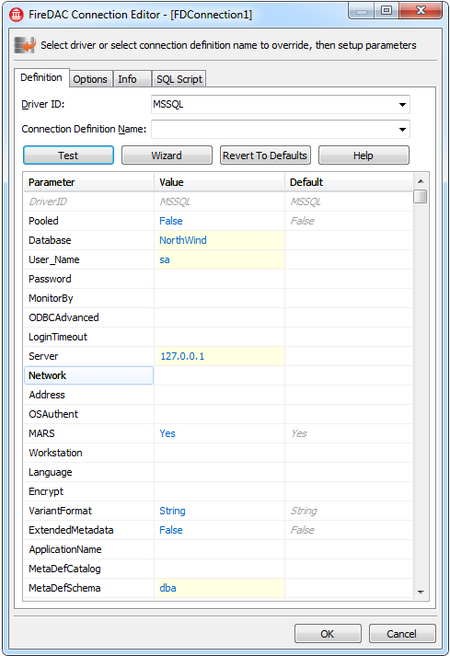
Or at run time in code by filling the TFDConnection.Params property. This is the simplest way to create a connection definition.
FDConnection1.DriverName := 'MSSQL';

FDConnection1.Params.Add('Server=127.0.0.1');

FDConnection1.Params.Add('Database=Northwind');

FDConnection1.Params.Add('User_name=sa');

FDConnection1.Connected := True;
Another option is to specify a connection string at run time by filling the TFDConnection.ConnectionString property. A connection string may be a convenient way to specify connection definition parameters for certain types of applications. For example:
FDConnection1.ConnectionString := 'DriverID=MSSQL;Server=127.0.0.1;Database=Northwind;User_name=sa';

FDConnection1.Connected := True;
Editing a Connection Definition
An application may need an ability to create and edit a connection definition at run time using standard FireDAC Connection Editor dialog. To edit a temporary connection definition stored in TFDConnection, use the code:
uses

  FireDAC.VCLUI.ConnEdit;

...

if TfrmFDGUIxFormsConnEdit.Execute(FDConnection1, '') then

  FDConnection1.Connected := True;
To edit a connection definition represented as a FireDAC connection string, use the code:
uses

  FireDAC.VCLUI.ConnEdit;

...

var

  sConnStr: String;

...

sConnStr := FDConnection1.ResultConnectionDef.BuildString();

if TfrmFDGUIxFormsConnEdit.Execute(sConnStr, '') then begin

  FDConnection1.ResultConnectionDef.ParseString(sConnStr);

  FDConnection1.Connected := True;

end;
使用 TFDConnection 的 pooled 连接池的更多相关文章
- Jar程序使用MyBatis集成阿里巴巴druid连接池
在写jar程序,而不是web程序的时候,使用mybatis作为持久层,可以集成POOLED连接池,而阿里的druid不能用,确实很郁闷.不过有办法. 首先准备好数据库配置文件 然后对Druid进行一个 ...
- Mybatis连接池及事务
一:Mybatis连接池 我们在学习WEB技术的时候肯定接触过许多连接池,比如C3P0.dbcp.druid,但是我们今天说的mybatis中也有连接池技术,可是它采用的是自己内部实现了一个连接池技术 ...
- FIREDAC FDConnection 连接池 连接串
一.FDConnection 连接池 http://docs.embarcadero.com/products/rad_studio/firedac/frames.html?frmname=topic ...
- 三句话搞定FireDAC连接池
form上拖入: FDManager1: TFDManager; FDConnection1: TFDConnection; //初始化连接池procedure TForm1.InitDBPool;b ...
- Delphi XE FireDac 连接池
在开发Datasnap三层中,使用FireDac 连接 MSSQL数据库. 实现过程如下: 1.在ServerMethods 单元中放入 FDManager.FDPhysMSSQLDriverLin ...
- Redis 连接池的问题
目录 Redis 连接池的问题 1 1. 前言 1 2.解决方法 1 前言 问题描述:Redis跑了一段时间之后,出现了以下异常. Redis Timeout ex ...
- 连接池和 "Timeout expired"异常
转自:博客园宁静.致远:http://www.cnblogs.com/zhangzhu/archive/2013/10/10/3361197.html 异常信息: MySql.Data.MySqlCl ...
- 连接池和 "Timeout expired"异常【转】
异常信息: MySql.Data.MySqlClient.MySqlException (0x80004005): error connecting: Timeout expired. The tim ...
- oracle database resident connection pooling(驻留连接池)
oracle在11g中引入了database resident connection pooling(DRCP).在此之前,我们可以使用dedicated 或者share 方式来链接数据库,dedic ...
随机推荐
- UIWebView相关设置
让UIWebView的背景透明: 1 2 self.webView.backgroundColor = [UIColor clearColor]; self.webView.opaque = NO 这 ...
- 通过iphone蓝牙与经过苹果MFI授权认证的硬件通讯,传输图片(转)
http://blog.csdn.net/hwj2012/article/details/7883711 相关: http://blog.csdn.net/xufeidll/article/detai ...
- css3画图之大白(●—●)
把大白送给你~ <!DOCTYPE html> <html> <head> <title>大白</title> <meta http- ...
- nginx端口被占用解决方案
killall -9 nginx或service nginx restart(重新启动)
- Android --Activity与Fragment通讯
参考博客:详解Fragment跟Activity之间的通信 Activity中方法 private OnSearchListener mSearchListener; /** *定义一个借口 **/ ...
- Swing 顶层容器
顶层容器值得是容纳其他容器的容器组件,包括JFrame类,JWindows类,JDialog类,JApplet等.Swing中的顶层容器类Swing提供三个顶层容器类:JFrame,JDialog和J ...
- SpringJUnit4ClassRunner拉起来的单元测试怎么装配Container实例
由于历史代码的原因,产品中部分spring装配的实例需要通过Container的实现类(自定义的)去获取.那么当在单元测试中怎么实例化这个Container实现呢? 实例化Container实现需要A ...
- linux:档案与档案系统的压缩、打包与备份
压缩比:压缩后与压缩的档案锁占用的磁碟空间大小,就称之为压缩比 压缩技术: a.将没有使用到的空间丢出去,以让档案资料占用的空间变小 b.将重复的资料统计记录(比如100个1,不是真正的用100个元位 ...
- SqlServer跨库查询
由于业务的拆分,数据库拆分为两种作用: 汇总数据库(Master,头节点数据库), 子节点数据库(Compute Node,计算子节点数据库) 这样,就设计到子节点访问头节点数据库中的某张汇总表,这种 ...
- compilation filed Unable to write to path xxxxxx 遇到这种情况的话
如果是xib文件的话 查看target —>Build Phases —> Copy Bundle Resources里面查看路径. 可能有重复路径导致编译不通过.