
iOS:城市级联列表的使用
1、介绍:
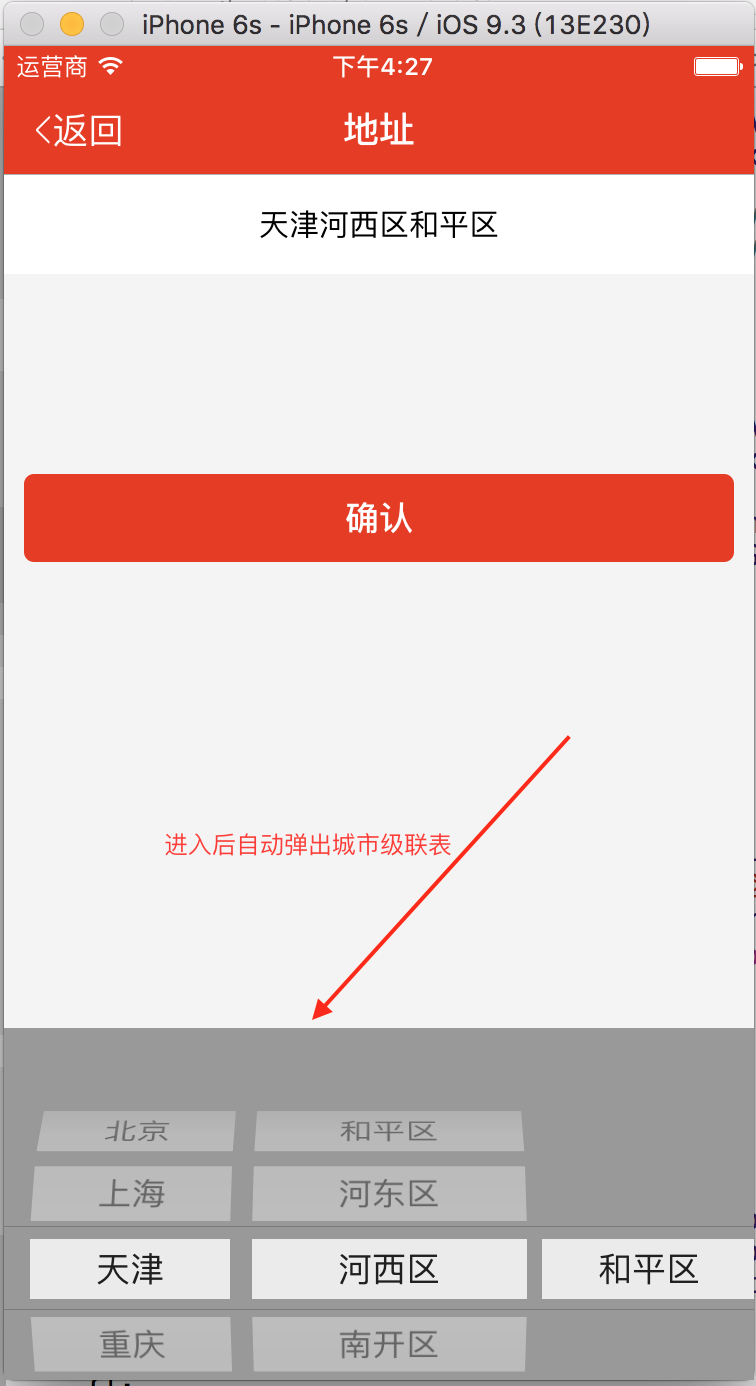
现在越来越多的项目都用到了地址,尤其是电商O2O的购物平台,我之前做的教育产品和电商产品都用到了,而实现地址的设置用到的技术就是城市级联列表,即普遍的做法就是自定义选择器控件UIPickerView,然后从本地整理的城市plist文件获取省份、城市、县镇三级级联。现在整理一下,分享给大家。
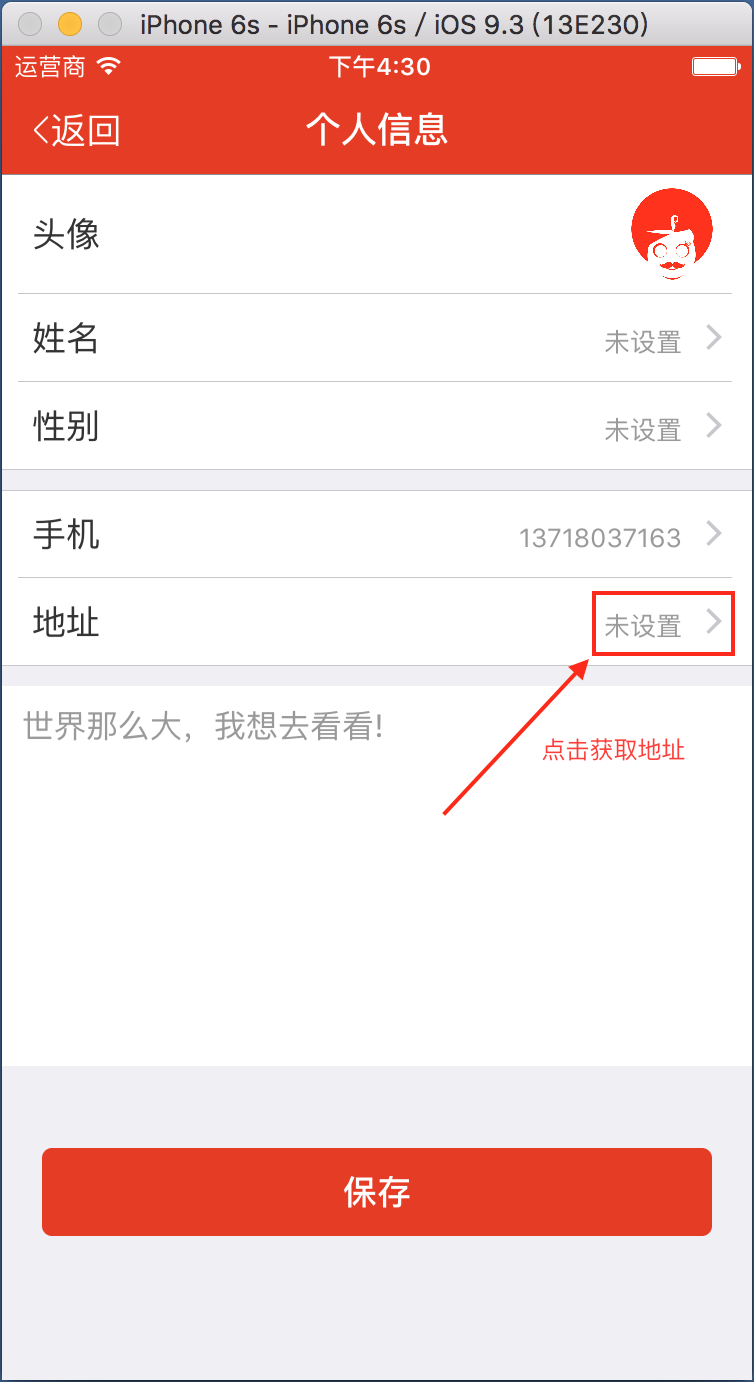
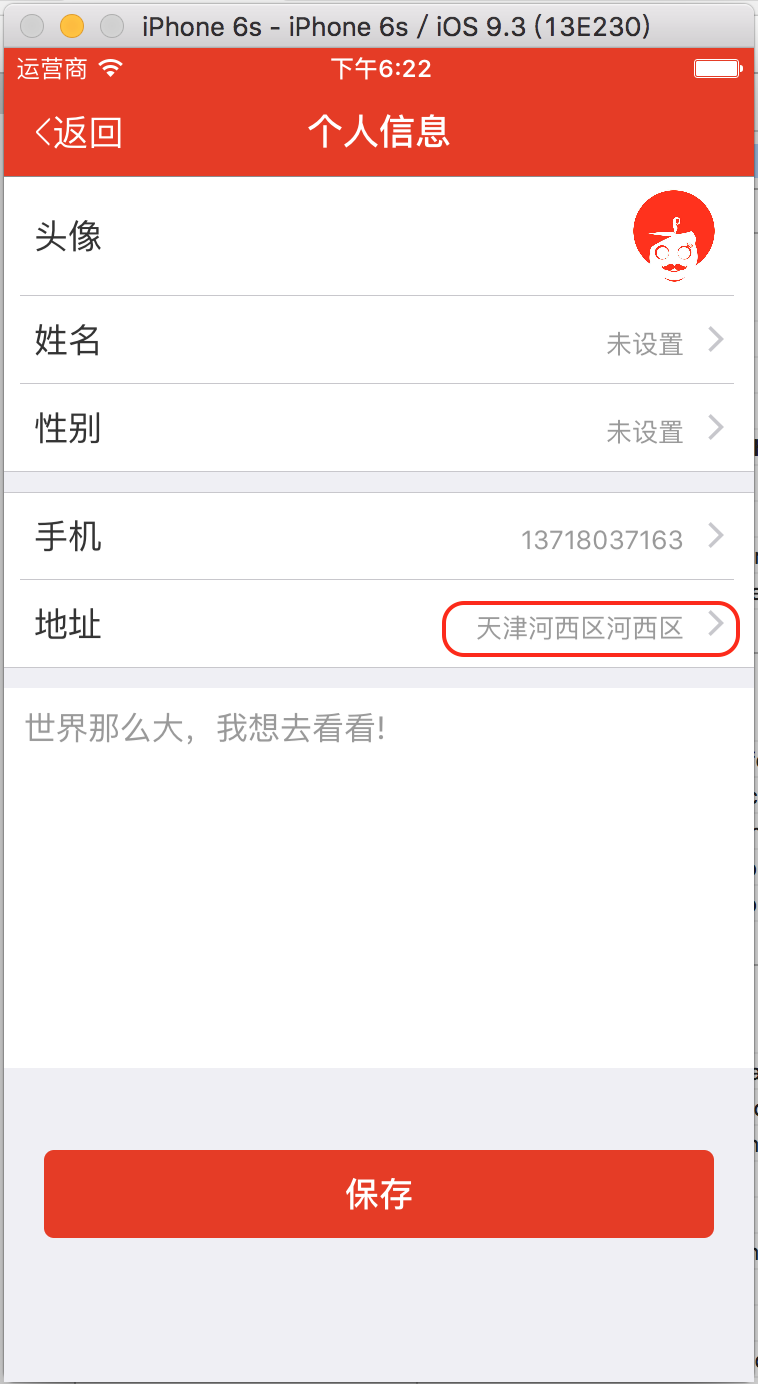
2、效果图如下:
3、用法:
(1)导入本地城市级联文件:provincecity.plist.zip
(2)导入DDMeZonePickerView.h头文件,在控制器通过[UIView Animation]的动画控制创建的DDMeZonePickerView视图对象的frame让其显示或隐藏即可,被选择的城市然后通过block进行回传。
4、废话不多说,实现代码如下:
DDMeZonePickerView.h
//  DDMeZonePickerView.h

//  BiaoJiePay

//

//  Created by 夏远全 on 16/11/19.

//  Copyright © 2016年 广州东德科技. All rights reserved.

//

#import <UIKit/UIKit.h>

/**

 *  声明block

 */

typedef void (^adressBlock)(NSString *adress);

@interface DDMeZonePickerView : UIView

/**

 *  定义block属性

 */

@property (copy,nonatomic)adressBlock adressBlock;

/**

 *  传递地址

 */

-(void)chooseAdressBlock:(adressBlock)adressBlock;

@end
DDMeZonePickerView.m
//

//  DDMeZonePickerView.m

//  BiaoJiePay

//

//  Created by 夏远全 on 16/11/19.

//  Copyright © 2016年 广州东德科技. All rights reserved.

//

#import "DDMeZonePickerView.h"

@interface DDMeZonePickerView ()<UIPickerViewDataSource,UIPickerViewDelegate>

/** picker选择器*/

@property (strong, nonatomic)UIPickerView *customPicker;

/**

 *  原始省份数组

 */

@property (strong, nonatomic)NSArray *provinceArray;

/**

 *  原始城市数组

 */

@property (strong, nonatomic)NSArray *cityArray;

/**

 *  原始区镇数组

 */

@property (strong, nonatomic)NSArray *townArray;

/**

 *  选择省份字典

 */

@property (strong, nonatomic)NSDictionary *selectedProvinceDic;

/**

 *  选择城市字典

 */

@property (strong, nonatomic)NSDictionary *selectedCityDic;

/**

 *  确认

 */

@property (strong,nonatomic)UIButton *sureButton;

/**

 *  取消

 */

@property (strong,nonatomic)UIButton *cancelButton;

@end

@implementation DDMeZonePickerView

/**

 *  懒加载

 */

-(UIPickerView *)customPicker{

    if (!_customPicker) {

        _customPicker = [[UIPickerView alloc]init];

        _customPicker.dataSource = self;

        _customPicker.delegate = self;

        _customPicker.backgroundColor = XYQColor(, , );

    }

    return _customPicker;

}

-(NSArray *)provinceArray{

    if (!_provinceArray) {

        _provinceArray = [NSArray array];

    }

    return _provinceArray;

}

-(NSArray *)cityArray{

    if (!_cityArray) {

        _cityArray = [NSArray array];

    }

    return _cityArray;

}

-(NSArray *)townArray{

    if (!_townArray) {

        _townArray = [NSArray array];

    }

    return _townArray;

}

-(NSDictionary *)selectedProvinceDic{

    if (!_selectedProvinceDic) {

        _selectedProvinceDic = [NSDictionary dictionary];

    }

    return _selectedProvinceDic;

}

-(NSDictionary *)selectedCityDic{

    if (!_selectedCityDic) {

        _selectedCityDic = [NSDictionary dictionary];

    }

    return _selectedCityDic;

}

/**

 *  初始化

 */

-(instancetype)initWithFrame:(CGRect)frame{

    self = [super initWithFrame:frame];

    if (self) {

        [self getPickerData];

        self.customPicker.frame = CGRectMake(, , SCREEN_WIDTH, frame.size.height);

        [self addSubview:self.customPicker];

    }

    return self;

}

/**

 *  从本地文件获取数据

 */

- (void)getPickerData{

    NSString *path = [[NSBundle mainBundle] pathForResource:@"provincecity" ofType:@"plist"];

    self.provinceArray = [NSArray arrayWithContentsOfFile:path]; //所有的省份

    self.selectedProvinceDic = self.provinceArray[];

    self.cityArray = [self.selectedProvinceDic objectForKey:@"city"];//所有的城市

    self.selectedCityDic = self.cityArray[];

    self.townArray = [self.selectedCityDic objectForKey:@"area"];//所有的区/县

}

#pragma mark UIPickerViewDataSource

//设置有多少列

-(NSInteger)numberOfComponentsInPickerView:(UIPickerView *)pickerView{

    return ;

}

//设置每列多少行

-(NSInteger)pickerView:(UIPickerView *)pickerView numberOfRowsInComponent:(NSInteger)component

{

    if (component == ) {

        return self.provinceArray.count;

    } else if (component == ) {

        return self.cityArray.count;

    } else {

        return self.townArray.count;

    }

}

#pragma mark - UIPickerViewDelegate

//自定义字体大小

- (UIView *)pickerView:(UIPickerView *)pickerView viewForRow:(NSInteger)row forComponent:(NSInteger)component reusingView:(UIView *)view

{

    UILabel *myView = nil;

    if (component == ) {

        myView = [[UILabel alloc] initWithFrame:CGRectMake(0.0, 0.0, , )] ;

        myView.text = [[self.provinceArray objectAtIndex:row] objectForKey:@"name"];

    }else if(component == ){

        myView = [[UILabel alloc] initWithFrame:CGRectMake(0.0, 0.0, (SCREEN_WIDTH-)/, )];

        myView.text = [[self.cityArray objectAtIndex:row] objectForKey:@"name"];

    }else{

        myView = [[UILabel alloc] initWithFrame:CGRectMake(0.0, 0.0, (SCREEN_WIDTH-)/-, )];

        myView.text = [[self.townArray objectAtIndex:row] objectForKey:@"name"];

    }

    myView.textAlignment = NSTextAlignmentCenter;

    myView.font = [UIFont systemFontOfSize:]; //用label来设置字体大小

    myView.backgroundColor = [UIColor whiteColor];

    return myView;

}

//设置宽度

- (CGFloat)pickerView:(UIPickerView *)pickerView widthForComponent:(NSInteger)component

{

    return SCREEN_WIDTH/;

}

//返回行高

- (CGFloat)pickerView:(UIPickerView *)pickerView rowHeightForComponent:(NSInteger)component

{

    return ;

}

//通过代理方法didSelectRows获取数据

- (void)pickerView:(UIPickerView *)pickerView didSelectRow:(NSInteger)row inComponent:(NSInteger)component {

    if (component == ) {

        //获取省份选中行

        self.selectedProvinceDic = self.provinceArray[row];

        self.cityArray = [self.selectedProvinceDic objectForKey:@"city"];//所有的城市

        self.selectedCityDic = self.cityArray[];

        self.townArray = [self.selectedCityDic objectForKey:@"area"];//所有的区/县

        [pickerView reloadComponent:];

        [pickerView reloadComponent:];

    }

    if (component == ) {

        //获取城市选中行

        NSInteger cityselectedRow = [pickerView selectedRowInComponent:];

        self.selectedCityDic = self.cityArray[cityselectedRow];

        self.townArray = [self.selectedCityDic objectForKey:@"area"];//所有的区/县

        [pickerView reloadComponent:];

    }

    //获取选中的省

    NSString *provice = [NSString stringWithFormat:@"%@",[[self.provinceArray objectAtIndex:[pickerView selectedRowInComponent:]] objectForKey:@"name"]];

    //获取选中的市

    NSString *city = [NSString stringWithFormat:@"%@",[[self.cityArray objectAtIndex:[pickerView selectedRowInComponent:]] objectForKey:@"name"]];

    //获取选中的县

    NSString *town = [NSString stringWithFormat:@"%@",[[self.townArray objectAtIndex:[pickerView selectedRowInComponent:]] objectForKey:@"name"]];

    //赋值

    NSString *adressText = [NSString stringWithFormat:@"%@%@%@",provice,city,town];

    self.adressBlock(adressText);

}

/**

 *  地址传值

 */

-(void)chooseAdressBlock:(void (^)(NSString *))adressBlock{

    if (adressBlock) {

        self.adressBlock = [adressBlock copy];

    }

}@end
在ViewController.h懒加载选择器调用block取值:
/**

 *  选择器

 */

-(DDMeZonePickerView *)zonePickerView{

    if (!_zonePickerView) {

        _zonePickerView = [[DDMeZonePickerView alloc]initWithFrame:CGRectMake(, SCREEN_HEIGHT, SCREEN_WIDTH, )];

        [_zonePickerView chooseAdressBlock:^(NSString *adress) {

            self.updateField.text = adress;

        }];

    }

    return _zonePickerView;

}
本人原创,欢迎大家分享,转载需注明出处
iOS:城市级联列表的使用的更多相关文章
- MVVM架构~knockoutjs系列之包括区域级联列表的增删改
返回目录 这个例子我做了几次,之前总是有BUG,目前测试后,确定没有BUG才发上来的,主要功能是实现“我的银行”模块的增删改的功能,这个里面包括了级联列表的区域选择,这部分是难点,在开发过程中,我们应 ...
- 天气预报API(一):全国城市代码列表(“旧编码”)
说明 2016-12-09 补充 (后来)偶然发现中国天气网已经有城市ID列表的网页... 还发现城市编码有两种,暂且称中国天气网这些编码为旧标准 "旧编码"的特征是 9个字符长度 ...
- iOS 6分享列表——UIActivityViewController详解
iOS 6分享列表——UIActivityViewController详解 2013-06-03 01:42:33 发表评论 在iOS 6之后提供了一个分享列表视图,它通过UIActivity ...
- 使用NPOI生成Excel级联列表
目录 1 概要 1 2 磨刀不误砍柴工——先学会Excel中的操作 2 3 利用NPOI生成导入模板 7 3.1 设置workbook&sheet ...
- iOS TableView多级列表
代码地址如下:http://www.demodashi.com/demo/15006.html 效果预览 ### 一.需求 TableView多级列表:分级展开或合并,逐级获取并展示其子级数据,可以设 ...
- iOS系统声音列表
iOS系统声音列表 效果 说明 1. 点击cell就能发出声音 2. 只需要给出声音编号,就可以,非常简单易用 源码 https://github.com/YouXianMing/iOS-Utilit ...
- 气象城市ID列表
气象城市ID列表 数据来源: http://cj.weather.com.cn/support/Detail.aspx?id=51837fba1b35fe0f8411b6df 记录了2574个地区,2 ...
- 获取IOS应用安装列表
原文转载至 http://blog.csdn.net/justinjing0612/article/details/8887747 转自鸟哥博客:http://blog.cnrainbird.com/ ...
- GeneXus笔记本—城市级联下拉
最近在交流GeneXus的时候 总是会遇到有城市级联下拉的问题 这里就简单做几种方式 供大家参考参考 第一种就是直接绑定关联信息然后在后者的条件模块设定条件即可 具体如下: 首先我们所需要的表为pro ...
随机推荐
- 绕过杀毒软件抓取windows密码
使用procdump,由于是微软的东西,带微软签名杀软不会报毒. procdump -accepteula -ma lsass.exe lsass.dmp copy出 lsass.dmp到本机. mi ...
- 使用AuthDBMType指令支持多种类似DBM的数据库
Unix线程 在支持POSIX线程的Unix系统上,现在Apache能在混合的多进程.多线程模式下运行,使很多(但非全部)配置的可伸缩性得到了改善. 新的编译系统 重写了编译系统,现在是基于autoc ...
- Java类型相互转换byte[]类型,blob类型
在我们的程序开发当中,经常会用到java.sql.Blob.byte[].InputStream之间的相互转换,但在JDK的API当中,又没有直接给我们提供可用的API,下面的程序片段主要就是实现它们 ...
- Solr学习笔记之3、Solr dataimport - 从SQLServer导入数据建立索引
Solr学习笔记之3.Solr导入SQLServer数据建立索引 一.下载MSSQLServer的JDBC驱动 下载:Microsoft JDBC Driver 4.0 for SQL Server ...
- ThinkPHP 学习笔记 ( 五 ) 数据验证
根据官网的教程 ( http://www.thinkphp.cn/info/171.html ),数据验证的使用静态定义方式 ( 以 regex 为例 ) 无法验证数据: 而采用动态验证则正常: 控制 ...
- centos7 安装及配置
第一步 下载centoshttps://www.centos.org/download/CentOS-7.0-1406-x86_64-DVD.iso:这个镜像(DVD image)包括了那些可以用安装 ...
- Mac OS X 中安装JDK 7
通过Mac系统的更新安装Java的版本均为JDK 6的版本,如果想要在Mac上安装JDK 7,就需要到Oracle的网站上去下载相应的安装包. 下面为详细教程: 最新版本为JDK8,目前需求JDK7够 ...
- 解决ORA-00054资源正忙的问题
有时候在drop表或者其他对象的时候,会遇到ORA-00054:资源正忙,要求指定NOWAIT(中文字符集)或者ORA-00054: resource busy and acquire with NO ...
- 七 mybatis的延迟加载
1 延迟加载 1.1 什么是延迟加载 resultMap可以实现高级映射(使用association.collection实现一对一及一对多映射),association.coll ...
- 五 mybatis的SqlMapConfig.xml详解
SqlMapConfig.xml <?xml version="1.0" encoding="UTF-8" ?> <!DOCTYPE conf ...