
eclipse luna 安装 Hadoop 1.2.1 eclipse-plugin
博主最近学习Hadoop 1.2.1,从多个搜索引擎的搜索结果当中汇合得出本文Hadoop 1.2.1 Eclipse-plugin安装过程介绍,如果你是从网上下载hadoop-eclipse-plugin-1.2.1.jar放进eclipse的plugins目录后发现并未被成功加载时,可以尝试本文内的编译安装方法。
一、软件环境准备
JDK版本:jdk-6u45-windows-x64.exe
Hadoop版本:hadoop-1.2.1.tar.gz
IDE版本:eclipse-java-luna-SR1a-win32-x86_64.zip
ANT版本:apache-ant-1.9.4-bin.zip
操作系统:Windows 8.1 64bit
二、安装前期准备
JDK:安装过程忽略,请自行网上搜索安装资料。
Hadoop:将hadoop-1.2.1.tar.gz解压到D:\
eclipse:将eclipse-java-luna-SR1a-win32-x86_64.zip解压到D:\Program Files\
ANT:将apache-ant-1.9.4-bin.zip解压到D:\Program Files\
- 配置ANT环境变量 -
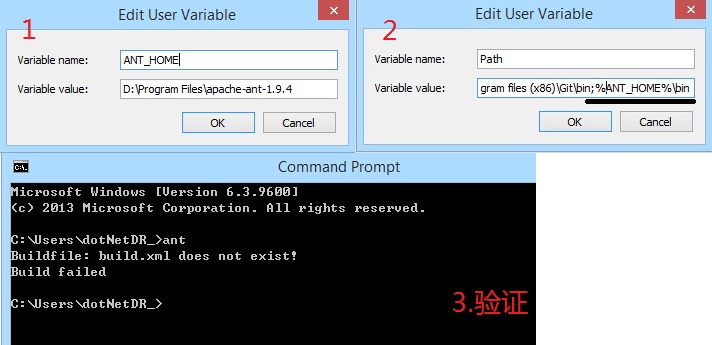
目前我是将环境变量配置到用户环境变量当中,当然你可以根据需要配置为系统环境变量。ant需要配置一个ANT_HOME和在Path中添加%ANT_HOME%\bin
1.ANT_HOME = D:\Program Files\apache-ant-1.9.4
2.Path 末尾添加 ;%ANT_HOME%\bin
3.打开命令行窗口输入ant按回车,如出现Buildfile等文字代表环境变量已设置正确,ant已可用
ant设置过程如下图示:
软件最终目录情况如下图示:

三、编译hadoop-eclipse-plugin-1.2.1
1.用文本编辑器打开D:\hadoop-1.2.1\src\contrib\eclipse-plugin\build.properties设置eclipse.home及version
#   Licensed under the Apache License, Version 2.0 (the "License");

#   you may not use this file except in compliance with the License.

#   You may obtain a copy of the License at

#

#       http://www.apache.org/licenses/LICENSE-2.0

#

#   Unless required by applicable law or agreed to in writing, software

#   distributed under the License is distributed on an "AS IS" BASIS,

#   WITHOUT WARRANTIES OR CONDITIONS OF ANY KIND, either express or implied.

#   See the License for the specific language governing permissions and

#   limitations under the License.

output.. = bin/

bin.includes = META-INF/,\

               plugin.xml,\

               resources/,\

               classes/,\

               classes/,\

               lib/

eclipse.home=D:\\Program Files\\eclipse

version=1.2.1
2.修改D:\hadoop-1.2.1\src\contrib\eclipse-plugin\build.xml
<?xml version="1.0" encoding="UTF-8" standalone="no"?>

<!--

   Licensed to the Apache Software Foundation (ASF) under one or more

   contributor license agreements.  See the NOTICE file distributed with

   this work for additional information regarding copyright ownership.

   The ASF licenses this file to You under the Apache License, Version 2.0

   (the "License"); you may not use this file except in compliance with

   the License.  You may obtain a copy of the License at

       http://www.apache.org/licenses/LICENSE-2.0

   Unless required by applicable law or agreed to in writing, software

   distributed under the License is distributed on an "AS IS" BASIS,

   WITHOUT WARRANTIES OR CONDITIONS OF ANY KIND, either express or implied.

   See the License for the specific language governing permissions and

   limitations under the License.

-->

<project default="jar" name="eclipse-plugin">

  <import file="../build-contrib.xml"/>

  <path id="eclipse-sdk-jars">

    <fileset dir="${eclipse.home}/plugins/">

      <include name="org.eclipse.ui*.jar"/>

      <include name="org.eclipse.jdt*.jar"/>

      <include name="org.eclipse.core*.jar"/>

      <include name="org.eclipse.equinox*.jar"/>

      <include name="org.eclipse.debug*.jar"/>

      <include name="org.eclipse.osgi*.jar"/>

      <include name="org.eclipse.swt*.jar"/>

      <include name="org.eclipse.jface*.jar"/>

      <include name="org.eclipse.team.cvs.ssh2*.jar"/>

      <include name="com.jcraft.jsch*.jar"/>

    </fileset>

      <fileset dir="D:/hadoop-1.2.1">

          <include name="hadoop*.jar"/>

      </fileset>

  </path>

  <!-- Override classpath to include Eclipse SDK jars -->

  <path id="classpath">

    <pathelement location="${build.classes}"/>

    <pathelement location="${hadoop.root}/build/classes"/>

    <path refid="eclipse-sdk-jars"/>

  </path>

  <!-- Skip building if eclipse.home is unset. -->

  <target name="check-contrib" unless="eclipse.home">

    <property name="skip.contrib" value="yes"/>

    <echo message="eclipse.home unset: skipping eclipse plugin"/>

  </target>

 <target name="compile" depends="init, ivy-retrieve-common" unless="skip.contrib">

    <echo message="contrib: ${name}"/>

    <javac

     encoding="${build.encoding}"

     srcdir="${src.dir}"

     includes="**/*.java"

     destdir="${build.classes}"

     debug="${javac.debug}"

     deprecation="${javac.deprecation}">

     <classpath refid="classpath"/>

    </javac>

  </target>

  <!-- Override jar target to specify manifest -->

  <target name="jar" depends="compile" unless="skip.contrib">

    <mkdir dir="${build.dir}/lib"/>

    <!--copy file="${hadoop.root}/build/hadoop-core-${version}.jar" tofile="${build.dir}/lib/hadoop-core.jar" verbose="true"/>

    <copy file="${hadoop.root}/build/ivy/lib/Hadoop/common/commons-cli-${commons-cli.version}.jar"  todir="${build.dir}/lib" verbose="true"/-->

    <copy file="D:/hadoop-1.2.1/hadoop-core-${version}.jar" tofile="${build.dir}/lib/hadoop-core.jar" verbose="true"/>

    <copy file="D:/hadoop-1.2.1/lib/commons-cli-${commons-cli.version}.jar"  todir="${build.dir}/lib" verbose="true"/>

    <copy file="D:/hadoop-1.2.1/lib/commons-configuration-1.6.jar"  todir="${build.dir}/lib" verbose="true"/>

    <copy file="D:/hadoop-1.2.1/lib/commons-httpclient-3.0.1.jar"  todir="${build.dir}/lib" verbose="true"/>

    <copy file="D:/hadoop-1.2.1/lib/commons-lang-2.4.jar"  todir="${build.dir}/lib" verbose="true"/>

    <copy file="D:/hadoop-1.2.1/lib/jackson-core-asl-1.8.8.jar"  todir="${build.dir}/lib" verbose="true"/>

    <copy file="D:/hadoop-1.2.1/lib/jackson-mapper-asl-1.8.8.jar"  todir="${build.dir}/lib" verbose="true"/>

    <jar

      jarfile="${build.dir}/hadoop-${name}-${version}.jar"

      manifest="${root}/META-INF/MANIFEST.MF">

      <fileset dir="${build.dir}" includes="classes/ lib/"/>

      <fileset dir="${root}" includes="resources/ plugin.xml"/>

    </jar>

  </target>

</project>
3.修改D:\hadoop-1.2.1\src\contrib\eclipse-plugin\META-INF\MANIFEST.MF
Manifest-Version: 1.0

Bundle-ManifestVersion: 2

Bundle-Name: MapReduce Tools for Eclipse

Bundle-SymbolicName: org.apache.hadoop.eclipse;singleton:=true

Bundle-Version: 0.18

Bundle-Activator: org.apache.hadoop.eclipse.Activator

Bundle-Localization: plugin

Require-Bundle: org.eclipse.ui,

 org.eclipse.core.runtime,

 org.eclipse.jdt.launching,

 org.eclipse.debug.core,

 org.eclipse.jdt,

 org.eclipse.jdt.core,

 org.eclipse.core.resources,

 org.eclipse.ui.ide,

 org.eclipse.jdt.ui,

 org.eclipse.debug.ui,

 org.eclipse.jdt.debug.ui,

 org.eclipse.core.expressions,

 org.eclipse.ui.cheatsheets,

 org.eclipse.ui.console,

 org.eclipse.ui.navigator,

 org.eclipse.core.filesystem,

 org.apache.commons.logging

Eclipse-LazyStart: true

Bundle-ClassPath: classes/,lib/hadoop-core.jar,lib/commons-cli-1.2.jar

 ,lib/commons-configuration-1.6.jar,lib/commons-httpclient-3.0.1.jar,l

 ib/commons-lang-2.4.jar,lib/jackson-core-asl-1.8.8.jar,lib/jackson-ma

 pper-asl-1.8.8.jar

Bundle-Vendor: Apache Hadoop
4.利用ant编译hadoop-eclipse-plugin-1.2.1.jar
打开cmd.exe,用cd命令定位到D:\hadoop-1.2.1\src\contrib\eclipse-plugin后执行ant回车
>cd /d D:\hadoop-1.2.1\src\contrib\eclipse-plugin

>ant >>d:\eclipse-plugin-build.log
完成后打开d:\eclipse-plugin-build.log在文件结尾看到BUILD SUCCESSFUL字样则代表jar包编译完成。这里需要注意的是设置build.properties中的eclipse.home为你eclipse的存放目录位置。

四、安装hadoop-eclipse-plugin-1.2.1.jar
安装过程就稍微简单多了,将本机上D:\hadoop-1.2.1\build\contrib\eclipse-plugin\hadoop-eclipse-plugin-1.2.1.jar拷贝至D:\Program Files\eclipse\plugins\目录后启动Eclipse即可。

最终效果如下图示:

参考:
3.Build hadoop-eclipse-plugin-1.2.1.jar
本文到此结束,谢谢。
eclipse luna 安装 Hadoop 1.2.1 eclipse-plugin的更多相关文章
- Eclipse Luna安装Hibernate Tools 4.2.3不显示,设置Eclipse运行的JDK
Eclipse Luna安装Hibernate Tools 4.2.3不显示,设置Eclipse运行的JDK,有需要的朋友可以参考下. eclipse-jee-luna-SR2中安装Hibernate ...
- Eclipse luna安装SVN
Eclipse luna安装SVN 1.Subversive Plug in 的安装 打开Eclipse ,Help--->Install New Soft ----> 输入 “Luna ...
- Hadoop第6周练习—在Eclipse中安装Hadoop插件及测试(Linux操作系统)
1 运行环境说明 1.1 硬软件环境 1.2 机器网络环境 2 :安装Eclipse并测试 2.1 内容 2.2 实现过程 2.2.1 2.2.2 ...
- eclipse Luna 安装SVN插件
Help--->Install New Soft ----> 输入 “Luna - http://download.eclipse.org/releases/luna” 这里显示都是 lu ...
- Eclipse luna安装 Ivy
在线安装地址:http://www.apache.org/dist/ant/ivyde/updatesite
- hadoop 1.2.1 eclipse 插件编译
hadoop-1.2.1 eclipse插件编译 在ubuntu上进行hadoop相关的开发,需要在eclipse上安装hadoop开发插件.最新释放出的hadoop包含源码的包,以had ...
- Eclipse JEE 安装JBPM 4.4 GPD
回顾往昔,发现自己好久没写博客了,想想以前自己是多么热衷于写博客分享,虽然分享的都是比较基础的东西,但每每看到访问量不断增加的时候内心还是爽爽的. 时间过的真的很快,离开学校和团队已经一个月了.来到了 ...
- (转载)eclipse插件安装的四种方法
eclipse插件安装的四种方法 Eclipse插件的安装方法 1.在eclipse的主目录(ECLIPSE_HOME, 比如在我的机器上安装的目录是:D:\eclipse)有一个plugins的目录 ...
- Eclipse的安装及汉化图解
Eclipse的安装及汉化图解 Eclipse的安装 有了JDK,你可以编译Java源码,运行Java程序,但是还没有代码编辑器,没有版本管理工具,也不能方便的管理工程文件,不能与团队协作.安装Ecl ...
随机推荐
- SQL Server 2008 删除数据库帐号失败问题
SQL Server 2008 中单独为一个项目建立了一个账号zdhsa,结果发现无法删除. 问题:删除zdhsa失败. 解决:首先从"安全性"-"架构"中删除 ...
- C#下取得Exif中照片拍摄日期
/// <summary> /// 获取Exif中的照片拍摄日期 /// </summary> /// <param name="fileName"& ...
- win7下安装ubuntu13.04
http://teliute.org/linux/Ubsetup/jichu1/jichu1.html xp下安装 http://flysqrlboy.blog.51cto.com/5027074/8 ...
- Nodejs npm安装socket.io报错解决办法
安装socket.io时,报错,提示需要安装Microsoft visual studio 2005 或 Net framework 2.0 sdk,没有找到vcbuild.exe,解决办法是安装 . ...
- Scala 深入浅出实战经典 第79讲:单例深入讲解及单例背后的链式表达式
王家林亲授<DT大数据梦工厂>大数据实战视频 Scala 深入浅出实战经典(1-87讲)完整视频.PPT.代码下载:百度云盘:http://pan.baidu.com/s/1c0noOt6 ...
- Codeforces Round #384 (Div. 2)D - Chloe and pleasant prizes 树形dp
D - Chloe and pleasant prizes 链接 http://codeforces.com/contest/743/problem/D 题面 Generous sponsors of ...
- js获取gridview模板列中textbox行列的值
下面一个例子:在gridview中第一列输入数值,第二列输入数值,点击第三列的时候进行计算 求和,如果不符合标记为红色字体. 如图: 代码 : <html xmlns="http:// ...
- sqlserver row_number 类似 mysql中 limit 用法
select * from ( select row_number() over(ORDER BY inspecdate desc,inspectime DESC,itemorder asc ) as ...
- Lists in Prolog
Symbols in Prolog: atom variable number list (how to assembly and take them apart) Lists are very ...
- 第 3 章 MySQL 存储引擎简介
第 3 章 MySQL 存储引擎简介 前言 3.1 MySQL 存储引擎概述 MyISAM 存储引擎是 MySQL 默认的存储引擎,也是目前 MySQL 使用最为广泛的存储引擎之一.他的前身就是我们在 ...