
python复杂网络分析库NetworkX
NetworkX是一个用Python语言开发的图论与复杂网络建模工具,内置了常用的图与复杂网络分析算法,可以方便的进行复杂网络数据分析、仿真建模等工作。networkx支持创建简单无向图、有向图和多重图(multigraph);内置许多标准的图论算法,节点可为任意数据;支持任意的边值维度,功能丰富,简单易用。
引入模块
import networkx as nx

print nx
无向图
例1:
#!-*- coding:utf8-*-

import networkx as nx

import matplotlib.pyplot as plt

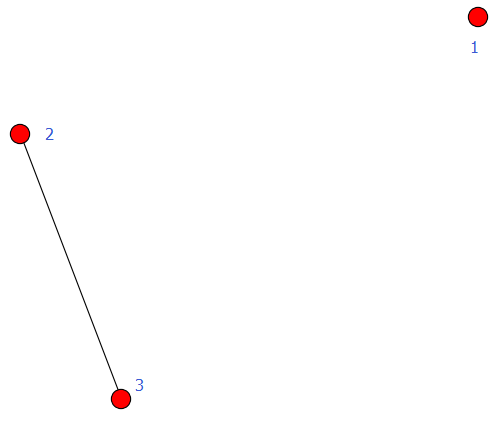
G = nx.Graph()                 #建立一个空的无向图G

G.add_node(1)                  #添加一个节点1

G.add_edge(2,3)                #添加一条边2-3(隐含着添加了两个节点2、3)

G.add_edge(3,2)                #对于无向图,边3-2与边2-3被认为是一条边

print "nodes:", G.nodes()      #输出全部的节点: [1, 2, 3]

print "edges:", G.edges()      #输出全部的边:[(2, 3)]

print "number of edges:", G.number_of_edges()   #输出边的数量:1

nx.draw(G)

plt.savefig("wuxiangtu.png")

plt.show()
输出
nodes: [1, 2, 3]

edges: [(2, 3)]

number of edges: 1
例2:
#-*- coding:utf8-*-

import networkx as nx

import matplotlib.pyplot as plt

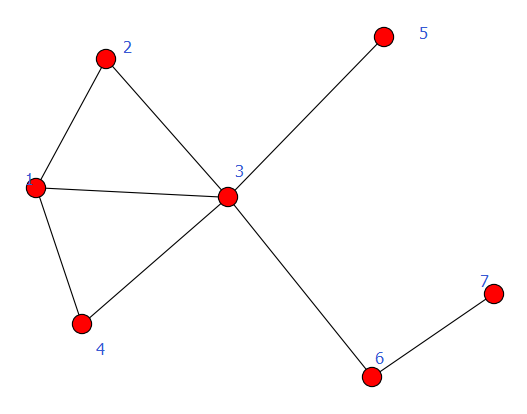
G = nx.DiGraph()

G.add_node(1)

G.add_node(2)                  #加点

G.add_nodes_from([3,4,5,6])    #加点集合

G.add_cycle([1,2,3,4])         #加环

G.add_edge(1,3)

G.add_edges_from([(3,5),(3,6),(6,7)])  #加边集合

nx.draw(G)

plt.savefig("youxiangtu.png")

plt.show()
有向图
例1:
#!-*- coding:utf8-*-

import networkx as nx

import matplotlib.pyplot as plt

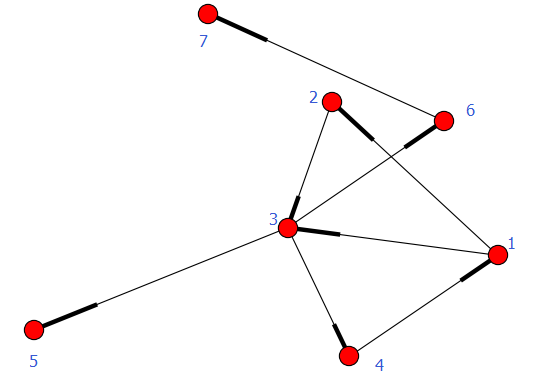
G = nx.DiGraph()

G.add_node(1)

G.add_node(2)

G.add_nodes_from([3,4,5,6])

G.add_cycle([1,2,3,4])

G.add_edge(1,3)

G.add_edges_from([(3,5),(3,6),(6,7)])

nx.draw(G)

plt.savefig("youxiangtu.png")

plt.show()
注:有向图和无向图可以互相转换,使用函数:
- Graph.to_undirected()
- Graph.to_directed()
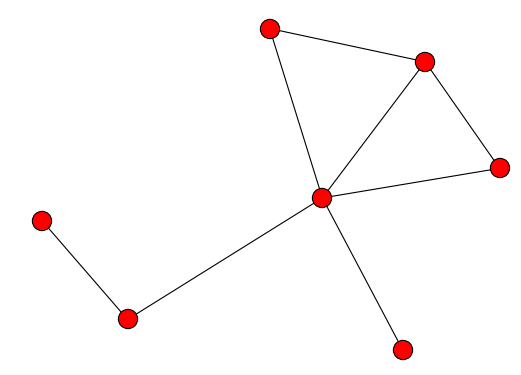
例2,例子中把有向图转化为无向图:
#!-*- coding:utf8-*-

import networkx as nx

import matplotlib.pyplot as plt

G = nx.DiGraph()

G.add_node(1)

G.add_node(2)

G.add_nodes_from([3,4,5,6])

G.add_cycle([1,2,3,4])

G.add_edge(1,3)

G.add_edges_from([(3,5),(3,6),(6,7)])

G = G.to_undirected()

nx.draw(G)

plt.savefig("wuxiangtu.png")

plt.show()
注意区分以下2例
例3-1
#-*- coding:utf8-*-

import networkx as nx

import matplotlib.pyplot as plt

G = nx.DiGraph()

road_nodes = {'a': 1, 'b': 2, 'c': 3}

#road_nodes = {'a':{1:1}, 'b':{2:2}, 'c':{3:3}}

road_edges = [('a', 'b'), ('b', 'c')]

G.add_nodes_from(road_nodes.iteritems())

G.add_edges_from(road_edges)

nx.draw(G)

plt.savefig("youxiangtu.png")

plt.show()
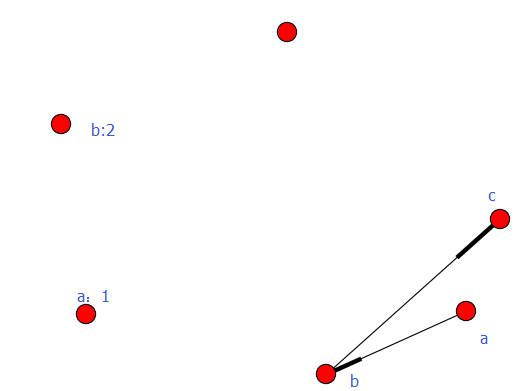
例3-2
#-*- coding:utf8-*-

import networkx as nx

import matplotlib.pyplot as plt

G = nx.DiGraph()

#road_nodes = {'a': 1, 'b': 2, 'c': 3}

road_nodes = {'a':{1:1}, 'b':{2:2}, 'c':{3:3}}

road_edges = [('a', 'b'), ('b', 'c')]

G.add_nodes_from(road_nodes.iteritems())

G.add_edges_from(road_edges)

nx.draw(G)

plt.savefig("youxiangtu.png")

plt.show()

加权图
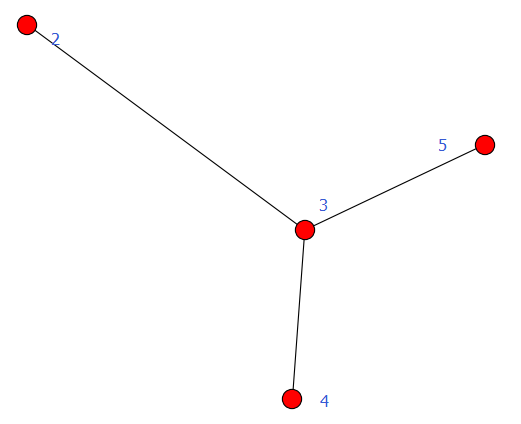
有向图和无向图都可以给边赋予权重,用到的方法是add_weighted_edges_from,它接受1个或多个三元组[u,v,w]作为参数,其中u是起点,v是终点,w是权重。
例1:
#!-*- coding:utf8-*-

import networkx as nx

import matplotlib.pyplot as plt

G = nx.Graph()                                        #建立一个空的无向图G

G.add_edge(2,3)                                     #添加一条边2-3(隐含着添加了两个节点2、3)

G.add_weighted_edges_from([(3, 4, 3.5),(3, 5, 7.0)])                                     #对于无向图,边3-2与边2-3被认为是一条边

print G.get_edge_data(2, 3)

print G.get_edge_data(3, 4)

print G.get_edge_data(3, 5)

nx.draw(G)

plt.savefig("wuxiangtu.png")

plt.show()
输出
{}

{'weight': 3.5}

{'weight': 7.0}
经典图论算法计算
计算1:求无向图的任意两点间的最短路径
# -*- coding: cp936 -*-

import networkx as nx

import matplotlib.pyplot as plt

#计算1:求无向图的任意两点间的最短路径

G = nx.Graph()

G.add_edges_from([(1,2),(1,3),(1,4),(1,5),(4,5),(4,6),(5,6)])

path = nx.all_pairs_shortest_path(G)

print path[1]
计算2:找图中两个点的最短路径
import networkx as nx

G=nx.Graph()

G.add_nodes_from([1,2,3,4])

G.add_edge(1,2)

G.add_edge(3,4)

try:

    n=nx.shortest_path_length(G,1,4)

    print n

except nx.NetworkXNoPath:

    print 'No path'
强连通、弱连通
- 强连通:有向图中任意两点v1、v2间存在v1到v2的路径(path)及v2到v1的路径。
- 弱联通:将有向图的所有的有向边替换为无向边,所得到的图称为原图的基图。如果一个有向图的基图是连通图,则有向图是弱连通图。
距离
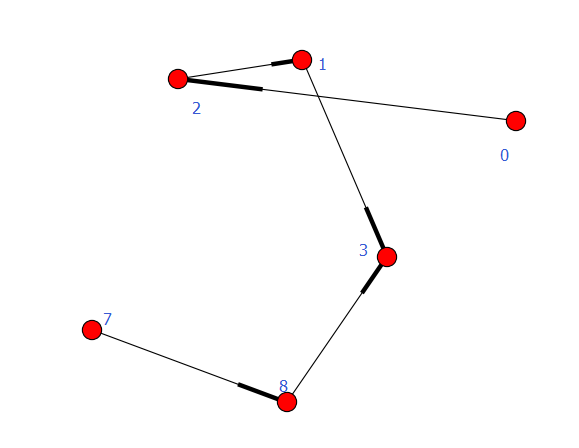
例1:弱连通
#-*- coding:utf8-*-

import networkx as nx

import matplotlib.pyplot as plt

#G = nx.path_graph(4, create_using=nx.Graph())

#0 1 2 3

G = nx.path_graph(4, create_using=nx.DiGraph())    #默认生成节点0 1 2 3,生成有向变0->1,1->2,2->3

G.add_path([7, 8, 3])  #生成有向边:7->8->3

for c in nx.weakly_connected_components(G):

    print c

print [len(c) for c in sorted(nx.weakly_connected_components(G), key=len, reverse=True)]

nx.draw(G)

plt.savefig("youxiangtu.png")

plt.show()
执行结果
set([0, 1, 2, 3, 7, 8])

[6]
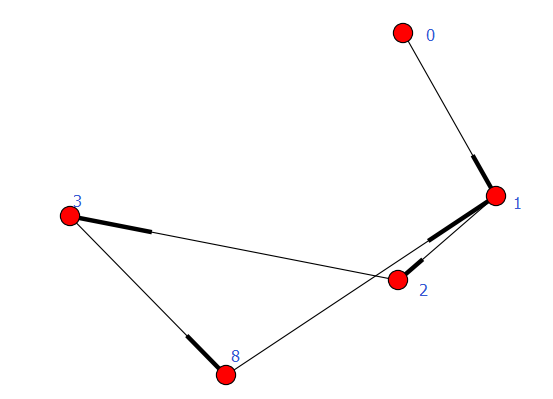
例2:强连通
#-*- coding:utf8-*-

import networkx as nx

import matplotlib.pyplot as plt

#G = nx.path_graph(4, create_using=nx.Graph())

#0 1 2 3

G = nx.path_graph(4, create_using=nx.DiGraph())

G.add_path([3, 8, 1])

#for c in nx.strongly_connected_components(G):

#    print c

#

#print [len(c) for c in sorted(nx.strongly_connected_components(G), key=len, reverse=True)]

con = nx.strongly_connected_components(G)

print con

print type(con)

print list(con)

nx.draw(G)

plt.savefig("youxiangtu.png")

plt.show()
执行结果
<generator object strongly_connected_components at 0x0000000008AA1D80>

<type 'generator'>

[set([8, 1, 2, 3]), set([0])]
子图
#-*- coding:utf8-*-

import networkx as nx

import matplotlib.pyplot as plt

G = nx.DiGraph()

G.add_path([5, 6, 7, 8])

sub_graph = G.subgraph([5, 6, 8])

#sub_graph = G.subgraph((5, 6, 8))  #ok  一样

nx.draw(sub_graph)

plt.savefig("youxiangtu.png")

plt.show()

条件过滤
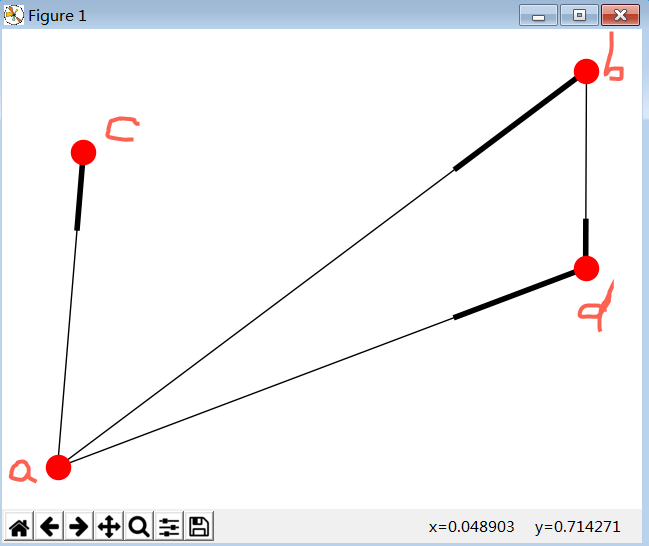
#原图
#-*- coding:utf8-*-

import networkx as nx

import matplotlib.pyplot as plt

G = nx.DiGraph()

road_nodes = {'a':{'id':1}, 'b':{'id':1}, 'c':{'id':3}, 'd':{'id':4}}

road_edges = [('a', 'b'), ('a', 'c'), ('a', 'd'), ('b', 'd')]

G.add_nodes_from(road_nodes)

G.add_edges_from(road_edges)

nx.draw(G)

plt.savefig("youxiangtu.png")

plt.show()
图
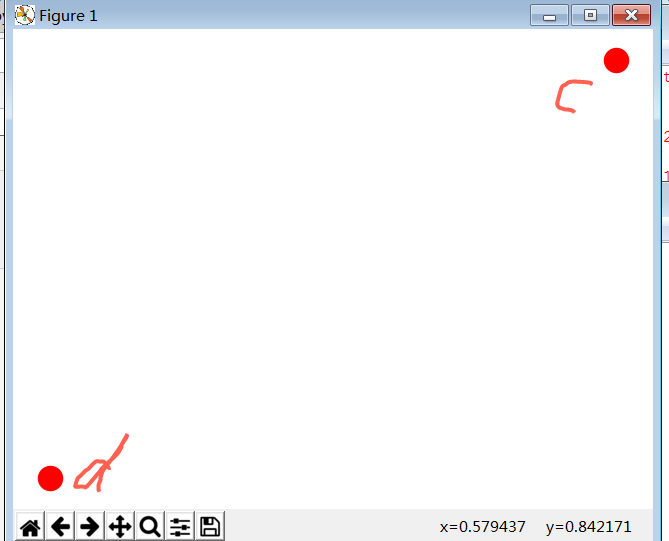
#过滤函数
#-*- coding:utf8-*-

import networkx as nx

import matplotlib.pyplot as plt

G = nx.DiGraph()

def flt_func_draw():

    flt_func = lambda d: d['id'] != 1

    return flt_func

road_nodes = {'a':{'id':1}, 'b':{'id':1}, 'c':{'id':3}, 'd':{'id':4}}

road_edges = [('a', 'b'), ('a', 'c'), ('a', 'd'), ('b', 'd')]

G.add_nodes_from(road_nodes.iteritems())

G.add_edges_from(road_edges)

flt_func = flt_func_draw()

part_G = G.subgraph(n for n, d in G.nodes_iter(data=True) if flt_func(d))

nx.draw(part_G)

plt.savefig("youxiangtu.png")

plt.show()
图
pred,succ
#-*- coding:utf8-*-

import networkx as nx

import matplotlib.pyplot as plt

G = nx.DiGraph()

road_nodes = {'a':{'id':}, 'b':{'id':}, 'c':{'id':}}

road_edges = [('a', 'b'), ('a', 'c'), ('c', 'd')]

G.add_nodes_from(road_nodes.iteritems())

G.add_edges_from(road_edges)

print G.nodes()

print G.edges()

print "a's pred ", G.pred['a']

print "b's pred ", G.pred['b']

print "c's pred ", G.pred['c']

print "d's pred ", G.pred['d']

print "a's succ ", G.succ['a']

print "b's succ ", G.succ['b']

print "c's succ ", G.succ['c']

print "d's succ ", G.succ['d']

nx.draw(G)

plt.savefig("wuxiangtu.png")

plt.draw()
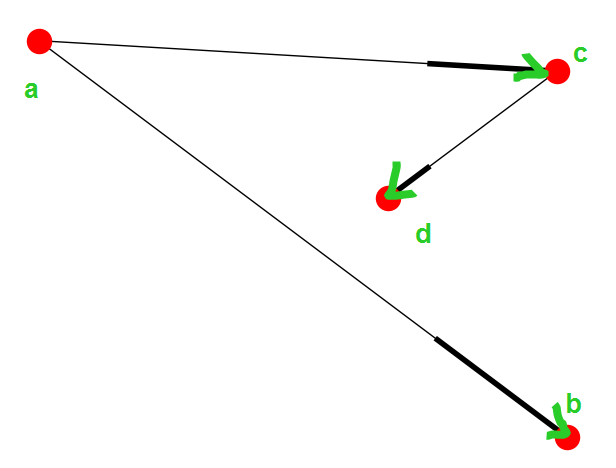
结果
['a', 'c', 'b', 'd']

[('a', 'c'), ('a', 'b'), ('c', 'd')]

a's pred  {}

b's pred  {'a': {}}

c's pred  {'a': {}}

d's pred  {'c': {}}

a's succ  {'c': {}, 'b': {}}

b's succ  {}

c's succ  {'d': {}}

d's succ  {}
python复杂网络分析库NetworkX的更多相关文章
- python复杂网络库networkx:基础
http://blog.csdn.net/pipisorry/article/details/49839251 其它复杂网络绘图库 [SNAP for python] [ArcGIS,Python,网 ...
- python复杂网络库networkx:算法
http://blog.csdn.net/pipisorry/article/details/54020333 Networks算法Algorithms 最短路径Shortest Paths shor ...
- python复杂网络库networkx:绘图draw
http://blog.csdn.net/pipisorry/article/details/54291831 networkx使用matplotlib绘制函数 draw(G[, pos, ax, h ...
- python 各种开源库
测试开发 来源:https://www.jianshu.com/p/ea6f7fb69501 Web UI测试自动化 splinter - web UI测试工具,基于selnium封装. 链接 sel ...
- Python常用的库简单介绍一下
Python常用的库简单介绍一下fuzzywuzzy ,字符串模糊匹配. esmre ,正则表达式的加速器. colorama 主要用来给文本添加各种颜色,并且非常简单易用. Prettytable ...
- Python的常用库
读者您好.今天我将介绍20个属于我常用工具的Python库,我相信你看完之后也会觉得离不开它们.他们是: Requests.Kenneth Reitz写的最富盛名的http库.每个Python程序员都 ...
- Python底层socket库
Python底层socket库将Unix关于网络通信的系统调用对象化处理,是底层函数的高级封装,socket()函数返回一个套接字,它的方法实现了各种套接字系统调用.read与write与Python ...
- 【C++实现python字符串函数库】strip、lstrip、rstrip方法
[C++实现python字符串函数库]strip.lstrip.rstrip方法 这三个方法用于删除字符串首尾处指定的字符,默认删除空白符(包括'\n', '\r', '\t', ' '). s.st ...
- 【C++实现python字符串函数库】二:字符串匹配函数startswith与endswith
[C++实现python字符串函数库]字符串匹配函数startswith与endswith 这两个函数用于匹配字符串的开头或末尾,判断是否包含另一个字符串,它们返回bool值.startswith() ...
随机推荐
- ITIL图示
- discuz怎么根据连接知道调用的是什么模板页面
其实不怎么难,基本都可以看出discuz是怎么样调用模板页面的 这个是论坛的帖子的列表页,看到url就可以看出是forum目录下的forumdisplay这个模板,forumdisplay.html这 ...
- Linux常用命令(持续更新中)
cd 目录名 :进入某个目录 ls :列出当前目录的内容 locate 文件名/目录名:寻找文件.目录 find 目录名1 -name 文件名/目录名2 :在目录1中寻找目录2 whereis 文件 ...
- Android系统目录结构
Android系统编译后生成三个映像文件,都是用cpio打包,gzip压缩的. ramdisk.img 文件系统,包含/system, /data, /bin等目录.kernel启动时负责初始 ...
- Oracle Merge Into 用法详解
原文:http://blog.csdn.net/EdgenHuang/article/details/3587912 Oracle9i引入了MERGE命令,你能够在一个SQL语句中对一个表同时执行in ...
- General Questions:Front-end Developer Interview Questions
What did you learn yesterday/this week? Learning Angular. What excites or interests you about coding ...
- checkbox 全選、取消全選、反選
在寫一個全選.取消全選.反選的功能時. 未來元素[type='checkbox'],在使用了jquery-1.11.1.min.js版本的jquery時: 功能版本1: 存在的問題,當使用了attr時 ...
- PHP文件操作 之读取一个文件(以二进制只读的方式打开)
最近应用了文件的读取,顺便复习一下! //读取一个文件 $f = fopen($filename,'rb'); $f: 表示返回的一个资源句柄 $filename:要打开的文件路径 rb:参数,表示只 ...
- CSS之display:block与display:inline-block
1.<span style="display:block; border:red solid 1px; width:100px"></span> 行级元素是 ...
- Ubuntu+Redis主从配置
软件环境: OS:ubuntu-12.04-desktop-amd64 Redis:redis-2.8.13.tar.gz TCL:tcl8.6.2-src.tar.gz VMware:vmware ...