
jQuery EasyUI DataGrid Checkbox 数据设定与取值
纯粹做个记录,以免日后忘记该怎么设定。
这一篇将会说明两种使用 jQuery EasyUI DataGrid 的 Checkbox 设定方式,以及在既有数据下将 checked 为 true 的该笔数据列的 Checkbox 设定为 Checked,另外就是两种 Checkbox 设定方式下如何取得有勾选的数据。
有关 jQuery EasyUI DataGrid 的相关资料,可以前往官网查看,
jQuery EasyUI 官网
jQuery EasyUI Documentation
DataGrid Demo
CheckBox select on DataGrid
使用的范例 JSON 数据:
01.{02."total": 4,03."rows": [04.{05."productid": "FI-SW-01",06."productname": "Koi",07."unitcost": 10.00,08."status": "P",09."listprice": 36.50,10."attr1": "Large",11."itemid": "EST-1",12."checked": true13.},14.{15."productid": "K9-DL-01",16."productname": "Dalmation",17."unitcost": 12.00,18."status": "P",19."listprice": 18.50,20."attr1": "Spotted Adult Female",21."itemid": "EST-10",22."checked": true23.},24.{25."productid": "RP-SN-01",26."productname": "Rattlesnake",27."unitcost": 12.00,28."status": "P",29."listprice": 38.50,30."attr1": "Venomless",31."itemid": "EST-11",32."checked": true33.},34.{35."productid": "RP-SN-01",36."productname": "Rattlesnake",37."unitcost": 12.00,38."status": "P",39."listprice": 26.50,40."attr1": "Rattleless",41."itemid": "EST-12",42."checked": false43.}44.]45.}设定方式一:使用预设的设定方式
网页的 HTML 原始码内容
01.<body>02.<h2>Custom CheckBox on DataGrid</h2>03. 04.<input type="button" id="ButonGetCheck" value="Get Checked" />05.<br/><br/>06. 07.<table id="dg"></table>08. 09.</body>我是习惯把 DataGrid 的相关设定放在 Javascript 程序中,因为这会比直接在 HTML 的 Table Tag 使用属性设定的方式还具有弹性,
Javascript 程序中的 DataGrid 设定
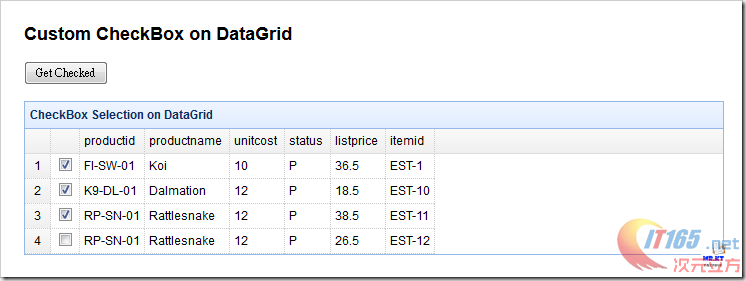
01.$('#dg').datagrid({02.title: 'CheckBox Selection on DataGrid',03.url: 'datagrid_data3.json',04.width: '700',05.rownumbers: true,06.columns:[[07.{ field:'ck',checkbox:true },08.{ field: 'productid', title: 'productid' },09.{ field: 'productname', title: 'productname' },10.{ field: 'unitcost', title: 'unitcost' },11.{ field: 'status', title: 'status' },12.{ field: 'listprice', title: 'listprice' },13.{ field: 'itemid', title: 'itemid' }14.]],15.singleSelect: false,16.selectOnCheck: true,17.checkOnSelect: true18.});设定完成后的页面如下:
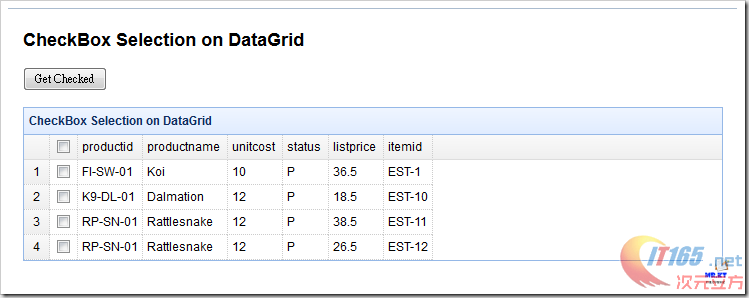
但是我们的 JSON 数据里有个字段是「checked」,这个字段的数据 true / false 就是用来设定 Checkbox 是否勾选,而设定的动作必须要在 DataGrid 加载数据完成后再去执行,这边会使用到 jQuery 的 each 去逐一检查每个数据列的的数据内容,假如 checked 为 true,那就使用「checkRow」这个 Method 将该数据列的 Checkbox 设为勾选的状态,

修改后的 DataGrid 设定程序如下:
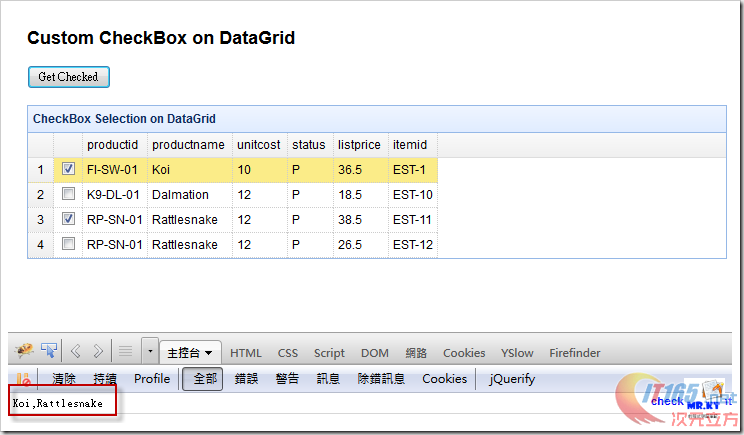
01.$('#dg').datagrid({02.title: 'CheckBox Selection on DataGrid',03.url: 'datagrid_data3.json',04.width: '700',05.rownumbers: true,06.columns:[[07.{ field:'ck',checkbox:true },08.{ field: 'productid', title: 'productid' },09.{ field: 'productname', title: 'productname' },10.{ field: 'unitcost', title: 'unitcost' },11.{ field: 'status', title: 'status' },12.{ field: 'listprice', title: 'listprice' },13.{ field: 'itemid', title: 'itemid' }14.]],15.singleSelect: false,16.selectOnCheck: true,17.checkOnSelect: true,18.onLoadSuccess:function(data){ 19.if(data){20.$.each(data.rows, function(index, item){21.if(item.checked){22.$('#dg').datagrid('checkRow', index);23.}24.});25.}26.} 27.});重新执行页面后就可以看到 checked 为 true 的数据列 Checkbox 都为勾选,

再来就是要取得勾选的数据值,这边也是使用 DataGrid 所提供的 Method「getChecked」 www.it165.net

程序如下:
1.$('#ButonGetCheck').click(function(){2.var checkedItems = $('#dg').datagrid('getChecked');3.var names = [];4.$.each(checkedItems, function(index, item){5.names.push(item.productname);6.}); 7.console.log(names.join(","));8.});最后的执行结果:
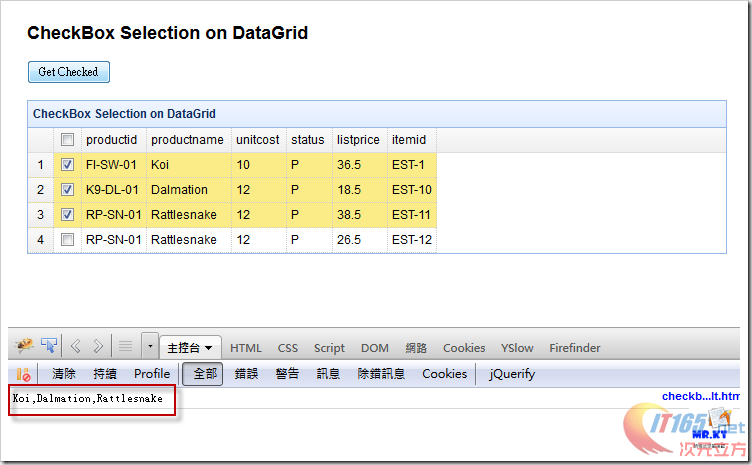
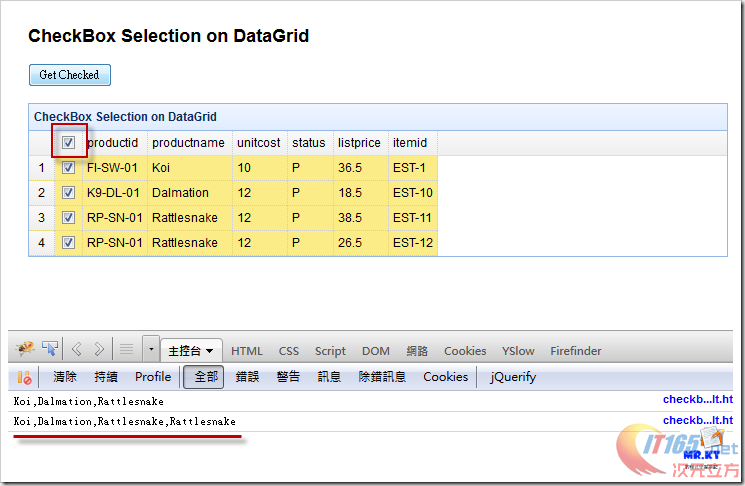
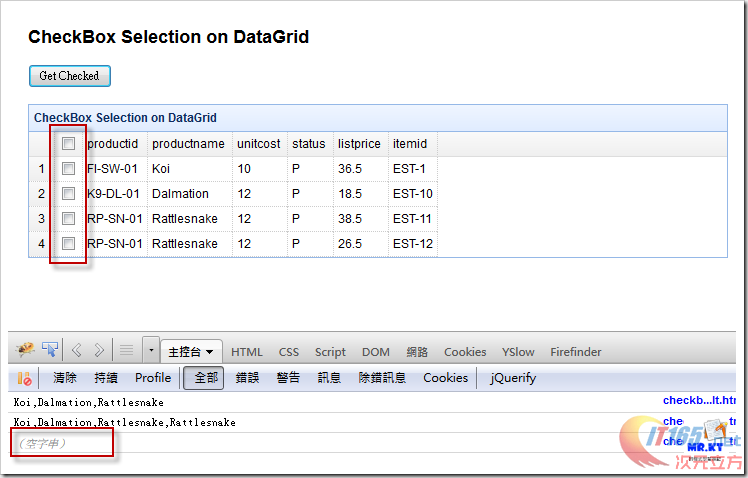
方式一的完整 Javascript 程序:
01.$('#dg').datagrid({02.title: 'CheckBox Selection on DataGrid',03.url: 'datagrid_data3.json',04.width: '700',05.rownumbers: true,06.columns:[[07.{ field:'ck',checkbox:true },08.{ field: 'productid', title: 'productid' },09.{ field: 'productname', title: 'productname' },10.{ field: 'unitcost', title: 'unitcost' },11.{ field: 'status', title: 'status' },12.{ field: 'listprice', title: 'listprice' },13.{ field: 'itemid', title: 'itemid' }14.]],15.singleSelect: false,16.selectOnCheck: true,17.checkOnSelect: true,18.onLoadSuccess:function(data){ 19.if(data){20.$.each(data.rows, function(index, item){21.if(item.checked){22.$('#dg').datagrid('checkRow', index);23.}24.});25.}26.} 27.});28. 29.$('#ButonGetCheck').click(function(){30.var checkedItems = $('#dg').datagrid('getChecked');31.var names = [];32.$.each(checkedItems, function(index, item){33.names.push(item.productname);34.}); 35.console.log(names.join(","));36.});设定方式二:不使用预设的设定方式与 Method
这个设定的方式应该是在 jQuery EasyUI 1.3 之前所使用的,因为早期的版本并没有足够的设定方式与 Method 让使用者可以去增加 Checkbox 的项目,这边所使用的 JSON 数据以及 HTML 原始码都跟设定方式一的内容是一样的,不一样的地方在于 Javascript 程序的部份,
先看 DataGrid 的设定
01.$('#dg').datagrid({02.title: 'CheckBox Selection on DataGrid',03.url: 'datagrid_data3.json',04.width: '700',05.rownumbers: true,06.columns:[[07.{field:'checked',formatter:function(value,row,index){08.if(row.checked){09.return '<input type="checkbox" name="DataGridCheckbox" checked="checked">';10.}11.else{12.return '<input type="checkbox" name="DataGridCheckbox">';13.}14.}},15.{ field: 'productid', title: 'productid' },16.{ field: 'productname', title: 'productname' },17.{ field: 'unitcost', title: 'unitcost' },18.{ field: 'status', title: 'status' },19.{ field: 'listprice', title: 'listprice' },20.{ field: 'itemid', title: 'itemid' }21.]],22.singleSelect: true23.});这边的 Checkbox 设定则是使用 formatter 的方式,类似 ASP.NET GridView 的 ItemTemplate 设定方式,判断每个数据列的 checked 字段数据是否为 true,如 checked 为 true 则回传一个有勾选的 Checkbox,不过这样的设定方式就不会在 DataGrid 的字段名称列出现可让使用者全选的 Checkbox,如需要的话就必须再用其它的方式来做设定,不过这边就不介绍,
接着就是取得有勾选的数据值,因为这里是使用自己加入 checkbox tag 的方式,所以就无法使用 DataGrid 所提供的 getChecked 方法,而是必须要另外写程序来处理,可以使用 extend 的方式去扩充 DataGrid 的方法,
程序如下:
01.$.extend($.fn.datagrid.methods, {02.getChecked: function (jq) {03.var rr = [];04.var rows = jq.datagrid('getRows');05.jq.datagrid('getPanel').find('div.datagrid-cell input:checked').each(function () {06.var index = $(this).parents('tr:first').attr('datagrid-row-index');07.rr.push(rows[index]);08.});09.return rr;10.}11.});这么一来在取得 DataGrid 的 Checkbox 有勾选的数据值就可以沿用方式一的程序,
1.$('#ButonGetCheck').click(function(){2.var checkedItems = $('#dg').datagrid('getChecked');3.var names = [];4.$.each(checkedItems, function(index, item){5.names.push(item.productname);6.}); 7.console.log(names.join(","));8.});执行结果:

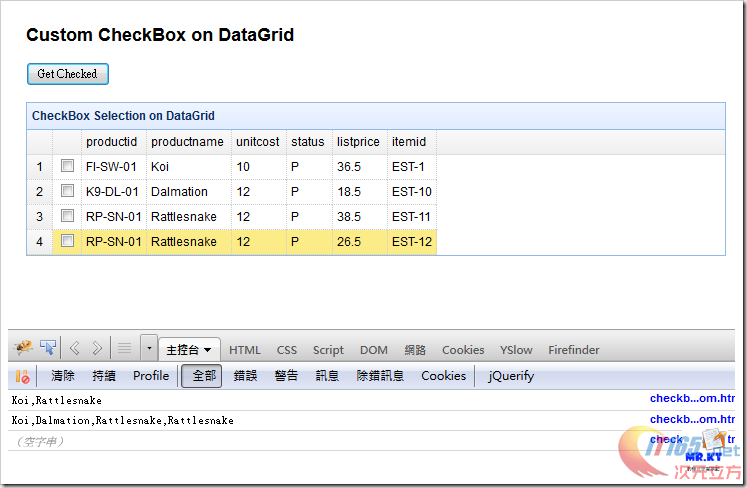
完整 Javascript 程序如下:
01.$(function(){02.$('#dg').datagrid({03.title: 'CheckBox Selection on DataGrid',04.url: 'datagrid_data3.json',05.width: '700',06.rownumbers: true,07.columns:[[08.{field:'checked',formatter:function(value,row,index){09.if(row.checked){10.return '<input type="checkbox" name="DataGridCheckbox" checked="checked">';11.}12.else{13.return '<input type="checkbox" name="DataGridCheckbox">';14.}15.}},16.{ field: 'productid', title: 'productid' },17.{ field: 'productname', title: 'productname' },18.{ field: 'unitcost', title: 'unitcost' },19.{ field: 'status', title: 'status' },20.{ field: 'listprice', title: 'listprice' },21.{ field: 'itemid', title: 'itemid' }22.]],23.singleSelect: true24.});25. 26.$('#ButonGetCheck').click(function(){27.var checkedItems = $('#dg').datagrid('getChecked');28.var names = [];29.$.each(checkedItems, function(index, item){30.names.push(item.productname);31.}); 32.console.log(names.join(","));33.});34.});35. 36.$.extend($.fn.datagrid.methods, {37.getChecked: function (jq) {38.var rr = [];39.var rows = jq.datagrid('getRows');40.jq.datagrid('getPanel').find('div.datagrid-cell input:checked').each(function () {41.var index = $(this).parents('tr:first').attr('datagrid-row-index');42.rr.push(rows[index]);43.});44.return rr;45.}46.});jQuery EasyUI DataGrid Checkbox 数据设定与取值的更多相关文章
- EasyUI datagrid checkbox数据设定与取值(转自http://blog.csdn.net/baronyang/article/dnetails/9323463,感谢分享,谢谢)
这一篇将会说明两种使用 jQuery EasyUI DataGrid 的 Checkbox 设定方式,以及在既有数据下将 checked 为 true 的该笔数据列的 Checkbox 设定为 Che ...
- Jquery EasyUI datagrid后台数据表格生成及分页详解
由于项目原因,网站后台需要对用户信息进行各种操作,有时还需要进行批量操作,所以首先需要将用户信息展示出来,查了不少资料.发现Jquery EasyUI确实是一个不错的选择,功能强大,文档也比较全面,而 ...
- ThinkPHP+jQuery EasyUI Datagrid查询数据的简单处理
ThinkPHP和jQuery EasyUI这两个都是不错的框架,现在要把它两个整合到一块,做个简单的Ajax调用查询. 在ThinkPHP模板中引入EasyUI的相关文件,然后设置按钮3的调用: & ...
- jQuery easyui datagrid 的数据加载
其实easyuidatagrid加载数据只有两种方式:一种是ajax加载目标url返回的json数据:另一种是加载js对象,也就是使用loadDate方法,这种方法用于加载本地js数据(非ur ...
- jquery easyui datagrid实现数据改动
1.单击选中待改动行 watermark/2/text/aHR0cDovL2Jsb2cuY3Nkbi5uZXQv/font/5a6L5L2T/fontsize/400/fill/I0JBQkFCMA= ...
- [转载]再次谈谈easyui datagrid 的数据加载
这篇文章只谈jQuery easyui datagrid 的数据加载,因为这也是大家谈论最多的内容.其实easyui datagrid加载数据只有两种方式:一种是ajax加载目标url返回的json数 ...
- jquery easyui datagrid 无滚动条,datagrid 没垂直滚动条
jquery easyui datagrid 无滚动条,datagrid 没垂直滚动条 ============================== 蕃薯耀 2018年2月6日 http://www. ...
- 谈谈easyui datagrid 的数据加载(转)
这篇文章只谈jQuery easyui datagrid 的数据加载,因为这也是大家谈论最多的内容.其实easyui datagrid加载数据只有两种方式:一种是ajax加载目标url返回的json数 ...
- 再次谈谈easyui datagrid 的数据加载
from:http://www.easyui.info/archives/204.html 这篇文章只谈jQuery easyui datagrid 的数据加载,因为这也是大家谈论最多的内容.其实ea ...
随机推荐
- Android涉及到的设计模式
转载地址:http://blog.csdn.net/dengshengjin2234/article/details/8502097 1.适配器模式:ListView或GridView的Adapter ...
- Ubuntu使用tcpdump工具
Ubuntu默认是安装好了tcpdump工具的,如果没有安装的话使用sudo apt-get install tcpdump即可安装. (如果遇到tcpdump: no suitable devi ...
- vs c++中读取数据流并存储
ifstream in("test.txt"); vector<string> vs; string s; while(!in.eof()) { in>>s ...
- Android Bander设计与实现 - 设计篇
转自:http://blog.csdn.net/universus/article/details/6211589#t7 Binder Android IPC Linux 内核 驱动 摘要 Binde ...
- etc目录名字的意思---挖Linux中的古老缩略语
Unix已经有35年历史了.许多人认为它开始于中世纪,这个中世纪是相对于计算机技术的产生和发展来说的.在过去的时间里,Unix和它的子分支Linux收集有许多的历史和一些完全古老的语言.在这篇技巧文章 ...
- jquery easy ui 1.3.4 布局layout(4)
4.1.easyui布局-layout 在easyui里面只有一种布局方式,layout(东.南.西.北.中)的布局方式,创建layout布局的方式如下: <div id="cc&qu ...
- CRT注册工具使用说明
激活步骤如下: 1)准备工作:安装好SecureCRT软件,下载并得到该注册机. 2)保持SecureCRT软件关闭(运行的话会提示你正在运行的,关闭就好). 3)将注册机拷贝到你的CRT ...
- volley 应用 GET POST请求 图片异步加载
package com.example.volleydemo; import java.util.HashMap; import java.util.Map; import org.json.JSON ...
- C# 读取本地图片 转存到其他盘符
UpFileContent upfile = new UpFileContent(); upfile.StationImageName = "123.png"; FileStrea ...
- 滚屏加载--jQuery+PHP实现浏览更多内容
滚屏加载技术,就是使用Javascript监视滚动条的位置,每次当滚动条到达浏览器窗口底部时,触发一个Ajax请求后台PHP程序,返回相应的数据,并将返回的数据追加到页面底部,从而实现了动态加载,其实 ...