
SwipeRefreshLayout下拉刷新
1.SwipeRefreshLayout是Google在support v4 19.1版本的library更新的一个下拉刷新组件,实现刷新效果更方便。
弊端:只有下拉
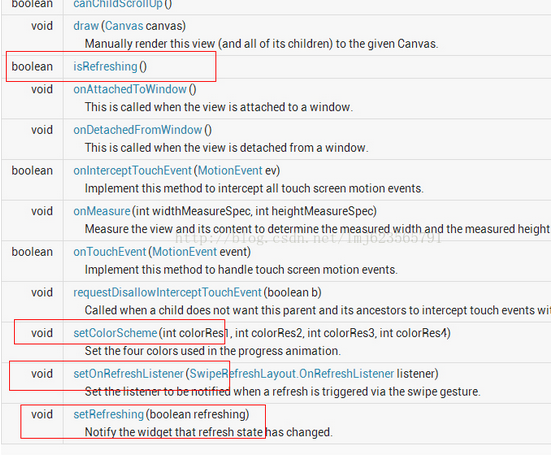
//设置刷新控件圈圈的颜色
swipe_refresh_layout.setColorSchemeResources(android.R.color.holo_blue_light, android.R.color.holo_orange_light, android.R.color.holo_red_light, android.R.color.holo_green_light);
//设置刷新控件背景色
swipe_refresh_layout.setProgressBackgroundColorSchemeColor(getResources().getColor(android.R.color.white));
//设置滑动距离
swipe_refresh_layout.setDistanceToTriggerSync(100);
//设置大小模式
swipe_refresh_layout.setSize(SwipeRefreshLayout.DEFAULT);
//设置下拉刷新控件状态隐藏
swipe_refresh_layout.setRefreshing(false);
2.在xml文件中引用android.support.v4.widget.SwipeRefreshLayout控件,在里面可以放置任何一个控件,例如ListView,gridview等。
<RelativeLayout xmlns:android="http://schemas.android.com/apk/res/android"
    android:layout_width="match_parent"
    android:layout_height="match_parent" >

    <android.support.v4.widget.SwipeRefreshLayout
        android:id="@+id/id_swipe_ly"
        android:layout_width="match_parent"
        android:layout_height="match_parent" >

        <ListView
            android:id="@+id/id_listview"
            android:layout_width="match_parent"
            android:layout_height="match_parent" >
        </ListView>
    </android.support.v4.widget.SwipeRefreshLayout>

</RelativeLayout>
3.Java代码
public class MainActivity extends Activity implements SwipeRefreshLayout.OnRefreshListener {

	private SwipeRefreshLayout swipeLayout;
	private ListView listView;
	private ListViewAdapter adapter;
	private List<ItemInfo> infoList;

	@Override
	protected void onCreate(Bundle savedInstanceState) {
		super.onCreate(savedInstanceState);
		setContentView(R.layout.activity_main);

		swipeLayout = (SwipeRefreshLayout) this.findViewById(R.id.swipe_refresh);
		swipeLayout.setOnRefreshListener(this);

		// 顶部刷新的样式
		swipeLayout.setColorScheme(android.R.color.holo_red_light, android.R.color.holo_green_light,
				android.R.color.holo_blue_bright, android.R.color.holo_orange_light);

		infoList = new ArrayList<ItemInfo>();
		ItemInfo info = new ItemInfo();
		info.setName("coin");
		infoList.add(info);
		listView = (ListView) this.findViewById(R.id.listview);
		adapter = new ListViewAdapter(this, infoList);
		listView.setAdapter(adapter);
	}

	public void onRefresh() {
		new Handler().postDelayed(new Runnable() {
			public void run() {
				swipeLayout.setRefreshing(false);
				ItemInfo info = new ItemInfo();
				info.setName("coin-refresh");
				infoList.add(info);
				adapter.notifyDataSetChanged();
			}
		}, 500);
	}
}
SwipeRefreshLayout下拉刷新的更多相关文章
- google推出的SwipeRefreshLayout下拉刷新用法
使用如下: 1.先下载android-support-v4.jar最新版本,之前的版本是没有SwipeRefreshLayout下拉刷新控件的,如果已经更新,此步骤可省略. 2.在xml文件中引用an ...
- 【转】google推出的SwipeRefreshLayout下拉刷新用法
SwipeRefreshLayout是Google在support v4 19.1版本的library更新的一个下拉刷新组件,实现刷新效果更方便. 使用如下: 1.先下载android-support ...
- Android之SwipeRefreshLayout下拉刷新组件
SwipeRefreshLayout概述 SwipeRefrshLayout是Google官方更新的一个Widget,可以实现下拉刷新的效果.该控件集成自ViewGroup在support-v4兼容包 ...
- Android零基础入门第72节:SwipeRefreshLayout下拉刷新
在实际开发中,经常都会遇到下拉刷新.上拉加载更多的情形,这一期就一起来学习Android系统的SwipeRefreshLayout下拉刷新组件. 一.SwipeRefreshLayout简介 Swip ...
- Android SwipeRefreshLayout 下拉刷新——Hi_博客 Android App 开发笔记
以前写下拉刷新 感觉好费劲,要判断ListView是否滚到顶部,还要加载头布局,还要控制 头布局的状态,等等一大堆.感觉麻烦死了.今天学习了SwipeRefreshLayout 的用法,来分享一下,有 ...
- SwipeRefreshLayout下拉刷新简单用例
自己的下拉刷新组件 下拉刷新并自动添加数据 MainActivity package com.shaoxin.myswiperefreshlayout; import android.graphics ...
- Android --SwipeRefreshLayout 下拉刷新
1.Layout <android.support.v4.widget.SwipeRefreshLayout android:id="@+id/id_swipe_ly" an ...
- 谷歌官方SwipeRefreshLayout下拉刷新的用法。
<Android SwipeRefreshLayout:谷歌官方SDK包中的下拉刷新> 下拉刷新在如今移动开发中应用如此广泛和普遍,以至于谷歌干脆在SDK中给予支持.在android-su ...
- [Android实例] Android 6.0RecyclerView SwipeRefreshLayout 下拉刷新 上拉加载
这是Android 6.0的 SwipeRefreshLayout 实现下拉刷新和RecyclerView的上拉加载更多,以及添加分割线等 Android <ignore_js_op> r ...
随机推荐
- Schema Workbench 开发mdx和模式文件
一.前言 安装了saiku之后,每次修改schema文件,非常耗时,每次都要经历若干步骤:修改xml.上传.重启才能生效,并且非常不利于学习和理解MDX和模式文件,踌躇之际,发现了这个工具,十分小巧方 ...
- Eclipse中用Logcat调试程序
调试程序的一种方法是用Logcat程序,在Eclipse中windows->show view->other->android->logcat可打开. 然后程序加入androi ...
- CSS知识点-- Padding
The CSS padding properties define the space between the element border and the element content. Padd ...
- Til the Cows Come Home(最短路)
Til the Cows Come Home Time Limit:1000MS Memory Limit:65536KB 64bit IO Format:%I64d & %I ...
- matlab processing for video
[filename,pathname,fileindex]=uigetfile('*.avi','请选择一个Avi文件'); video_info=aviinfo([pathname filename ...
- overflow:hidden的另一层含义
overflow:hidden这个CSS样式是大家常用到的CSS样式,但是大多数人对这个样式的理解仅仅局限于隐藏溢出,而对于清除浮动这个含义不是 很了解.一提到清除浮动,我们就会想到另外一个CSS样式 ...
- 队列的图文解析 和 对应3种语言的实现(C/C++/Java)
概要 本章和介绍"栈"时的流程一样,先对队列进行介绍,然后分别给出队列的C.C++和Java三种语言的实现.内容包括:1. 队列的介绍2. 队列的C实现3. 队列的C++实现4. ...
- 如何自学Android--转
原文地址:http://blog.csdn.net/lavor_zl/article/details/51217319 1. Java知识储备 本知识点不做重点讲解: 对于有基础的同学推荐看<J ...
- 使用WinDbg调试SQL Server——入门
这篇文章我想探究下SQL Server里完全不同的领域:如果使用WinDbg(来自针对Windows的调试工具)调试SQL Server.在我们进入枯涩细节之前,我想详细解释下为什么选择这样晦涩的话题 ...
- JS魔法堂:获取当前脚本文件的绝对路径
一.前言 当写模块加载器时,获取当前脚本文件的绝对路径作为基础路径是必不可少的一步,下面我们一起来探讨一下这个问题吧! 二.各大浏览器的实现方式 [a]. Chrome和FF 超简单的一句足矣! va ...