
基于Spring MVC + Spring + MyBatis的【学生信息管理系统】
资源下载:https://download.csdn.net/download/weixin_44893902/45603211
练习点设计: 模糊查询、删除、新增
一、语言和环境
- 实现语言:JAVA语言。
- 环境要求:MyEclipse/Eclipse + Tomcat + MySql。
- 使用技术:
Jsp+Servlet+JavaBean或SpringMVC+Spring+Mybatis。
二、实现功能
随着数字化信息的发展,现需要制作学生信息管理系统,主要功能如下:
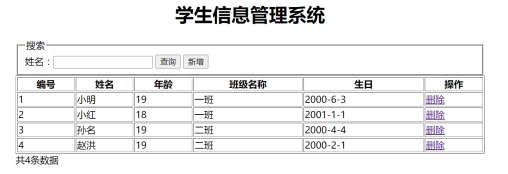
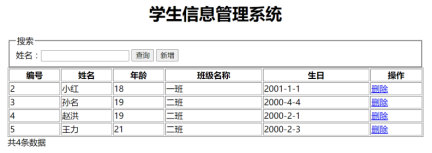
1.首页默认显示所有学生信息,如图1所示。
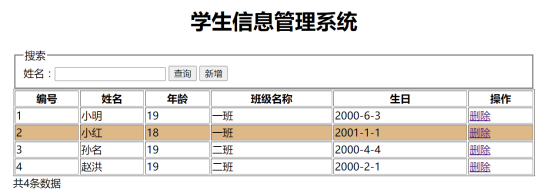
2.鼠标悬停某行数据时,以线性过渡动画显示光棒效果,如图2所示。
3.用户输入学生名称,点击查询,则完成模糊查询,显示查询结果,如图3所示。

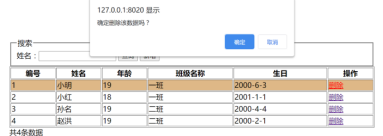
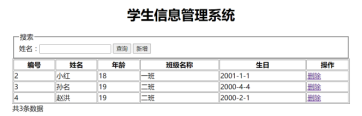
4.用户点击删除,则弹出提示框,用户点击确定后,删除选中数据并显示最新数据,如图4和图5所示。
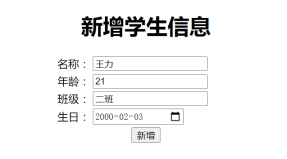
5.用户点击“新增”按钮,则打开新增页面,填写完相关信息后点击新增按钮,增加学生信息数据到数据库,且页面跳转到列表页面展示最新数据,如图6和图7所示。
三、 数据库设计
1.创建数据库(stu_db)。
2.创建数据表(student),结构如下。
| 字段名 | 说明 | 字段类型 | 长度 | 备注 |
|---|---|---|---|---|
| id | 编号 | int | 主键,自增 | |
| name | 学生姓名 | varchar | 50 | 不能为空 |
| age | 年龄 | int | 不能为空 | |
| classes | 班级名称 | varchar | 50 | 不能为空 |
| birth | 出生日期 | date | 不能为空 |
四、推荐实现步骤
1.SSM版本的实现步骤如下:
(1)创建数据库和数据表,添加测试数据(至少添加4条测试数据)。
(2)创建Web工程并创建各个包,导入工程所需的jar文件。
(3)添加相关SSM框架支持。
(4)配置项目所需要的各种配置文件(mybatis配置文件、spring配置文件、springMVC配置文件)。
(5)创建实体类。
(6)创建MyBatis操作数据库所需的Mapper接口及其Xml映射数据库操作语句文件。
(7)创建业务逻辑相应的接口及其实现类,实现相应的业务,并在类中加入对DAO/Mapper的引用和注入。
(8)创建Controller控制器类,在Controller中添加对业务逻辑类的引用和注入,并配置springMVC配置文件。
(9)创建相关的操作页面,并使用CSS对页面进行美化。
(10)实现页面的各项操作功能,并在相关地方进行验证,操作要人性化。
(11)调试运行成功后导出相关的数据库文件并提交。
五、实现代码
1、MySQL数据库
stu_db.sql

2、项目Java代码
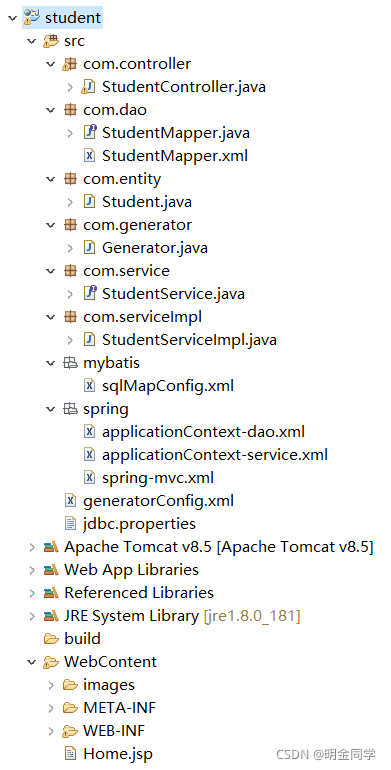
目录结构
student
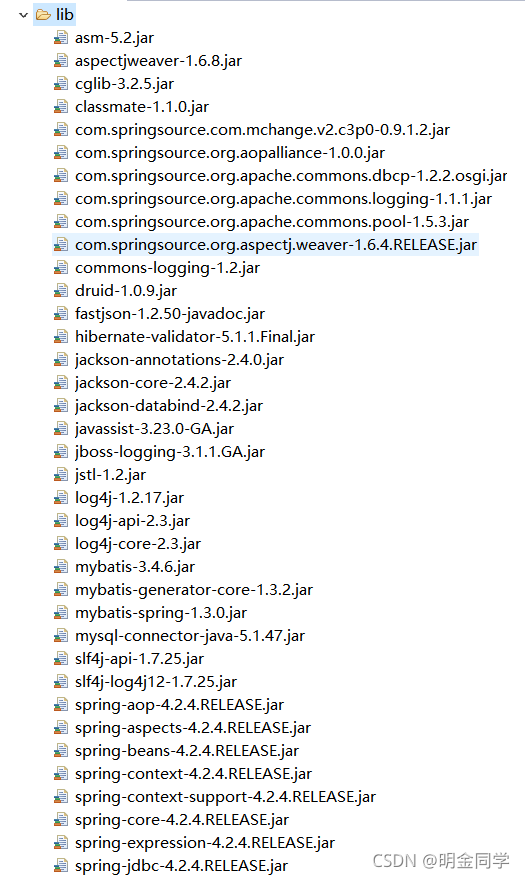
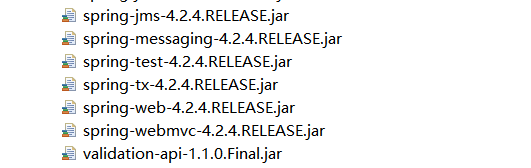
JAR包:
src
com.controller
StudentController.java
package com.controller;

import java.util.List;

import javax.annotation.Resource;

import org.apache.ibatis.annotations.Param;

import org.springframework.stereotype.Controller;

import org.springframework.ui.Model;

import org.springframework.web.bind.annotation.RequestMapping;

import org.springframework.web.servlet.ModelAndView;

import com.dao.StudentMapper;

import com.entity.Student;

import com.service.StudentService;

@Controller

public class StudentController {

	@Resource

	StudentService service;

	@RequestMapping("/selectStudent")

	public ModelAndView selectStudent(String keyword) {

		List<Student> studentList=service.selectAll(keyword);

		if (keyword==null||keyword.trim().equals("")) {

			keyword="";

		}

		System.out.println("123456");

		ModelAndView modelAndView = new ModelAndView();

		modelAndView.addObject("studentList", studentList);

		modelAndView.setViewName("student");

		return modelAndView;

	}

	@RequestMapping("/delStudent")

	public String delStudent(int id) {

		int del=service.delStudent(id);

		return "redirect:/selectStudent.do";

	}

	@RequestMapping("/jumpInsert")

	public String jumpInsert() {

		return "addStudent";

	}

	@RequestMapping("/insertStudent")

	public String insertStudent(Student student) {

		int add=service.insertStudent(student);

		return "redirect:/selectStudent.do";

	}

}
com.dao
StudentMapper.java
package com.dao;

import com.entity.Student;

import java.util.List;

public interface StudentMapper {

    int deleteByPrimaryKey(Integer id);

    int insert(Student record);

    Student selectByPrimaryKey(Integer id);

    List<Student> selectAll();

    int updateByPrimaryKey(Student record);

	List<Student> likeSelect(String keyword);

}
StudentMapper.xml
<?xml version="1.0" encoding="UTF-8" ?>

<!DOCTYPE mapper PUBLIC "-//mybatis.org//DTD Mapper 3.0//EN" "http://mybatis.org/dtd/mybatis-3-mapper.dtd" >

<mapper namespace="com.dao.StudentMapper" >

  <resultMap id="BaseResultMap" type="com.entity.Student" >

    <id column="id" property="id" jdbcType="INTEGER" />

    <result column="name" property="name" jdbcType="VARCHAR" />

    <result column="age" property="age" jdbcType="INTEGER" />

    <result column="classes" property="classes" jdbcType="VARCHAR" />

    <result column="birth" property="birth" jdbcType="VARCHAR" />

  </resultMap>

  <delete id="deleteByPrimaryKey" parameterType="java.lang.Integer" >

    delete from student

    where id = #{id,jdbcType=INTEGER}

  </delete>

  <insert id="insert" parameterType="com.entity.Student" >

    insert into student (id, name, age,

      classes, birth)

    values (#{id,jdbcType=INTEGER}, #{name,jdbcType=VARCHAR}, #{age,jdbcType=INTEGER},

      #{classes,jdbcType=VARCHAR}, #{birth,jdbcType=VARCHAR})

  </insert>

  <update id="updateByPrimaryKey" parameterType="com.entity.Student" >

    update student

    set name = #{name,jdbcType=VARCHAR},

      age = #{age,jdbcType=INTEGER},

      classes = #{classes,jdbcType=VARCHAR},

      birth = #{birth,jdbcType=VARCHAR}

    where id = #{id,jdbcType=INTEGER}

  </update>

  <select id="selectByPrimaryKey" resultMap="BaseResultMap" parameterType="java.lang.Integer" >

    select id, name, age, classes, birth

    from student

    where id = #{id,jdbcType=INTEGER}

  </select>

  <select id="selectAll" resultMap="BaseResultMap" >

    select id, name, age, classes, birth

    from student

  </select>

  <select id="likeSelect" resultMap="BaseResultMap" >

    select id, name, age, classes, birth

    from student where `name` LIKE "%"#{name}"%"

  </select>

</mapper>
com.entity
Student.java
package com.entity;

public class Student {

    private Integer id;

    private String name;

    private Integer age;

    private String classes;

    private String birth;

    public Integer getId() {

        return id;

    }

    public void setId(Integer id) {

        this.id = id;

    }

    public String getName() {

        return name;

    }

    public void setName(String name) {

        this.name = name == null ? null : name.trim();

    }

    public Integer getAge() {

        return age;

    }

    public void setAge(Integer age) {

        this.age = age;

    }

    public String getClasses() {

        return classes;

    }

    public void setClasses(String classes) {

        this.classes = classes == null ? null : classes.trim();

    }

    public String getBirth() {

        return birth;

    }

    public void setBirth(String birth) {

        this.birth = birth == null ? null : birth.trim();

    }

}
com.generator
Generator.java
package com.generator;

import java.io.IOException;

import java.io.InputStream;

import java.sql.SQLException;

import java.util.ArrayList;

import java.util.List;

import org.mybatis.generator.api.MyBatisGenerator;

import org.mybatis.generator.config.Configuration;

import org.mybatis.generator.config.xml.ConfigurationParser;

import org.mybatis.generator.exception.InvalidConfigurationException;

import org.mybatis.generator.exception.XMLParserException;

import org.mybatis.generator.internal.DefaultShellCallback;

public class Generator {

	/*

	 * targetRuntime="MyBatis3Simple", 不生成Example

	 */

	public void generateMyBatis() {

		//MBG执行过程中的警告信息

		List<String> warnings = new ArrayList<String>();

		//当生成的代码重复时,覆盖原代码

		boolean overwrite = true ;

		//String generatorFile = "/generator/generatorConfig.xml";

		String generatorFile = "/generatorConfig.xml";

		//读取MBG配置文件

		InputStream is = Generator.class.getResourceAsStream(generatorFile);

		ConfigurationParser cp = new ConfigurationParser(warnings);

		Configuration config;

		try {

			config = cp.parseConfiguration(is);

			DefaultShellCallback callback = new DefaultShellCallback(overwrite);

			//创建MBG

			MyBatisGenerator myBatisGenerator = new MyBatisGenerator(config, callback, warnings);

			//执行生成代码

			myBatisGenerator.generate(null);

		} catch (IOException e) {

			e.printStackTrace();

		} catch (XMLParserException e) {

			e.printStackTrace();

		} catch (InvalidConfigurationException e) {

			e.printStackTrace();

		} catch (SQLException e) {

			e.printStackTrace();

		} catch (InterruptedException e) {

			e.printStackTrace();

		}

		for (String warning : warnings) {

			System.out.println(warning);

		}

	}

	public static void main(String[] args) {

		Generator generator = new Generator();

		generator.generateMyBatis();

	}

}
com.service
StudentService.java
package com.service;

import java.util.List;

import com.entity.Student;

public interface StudentService {

	//查询

	List<Student> selectAll(String keyword);

	//删除

	int delStudent(int id);

	//添加

	int insertStudent(Student student);

}
com.service.imp
StudentServiceImpl.java
package com.serviceImpl;

import java.util.List;

import javax.annotation.Resource;

import org.springframework.stereotype.Service;

import com.dao.StudentMapper;

import com.entity.Student;

import com.service.StudentService;

@Service

public class StudentServiceImpl implements StudentService {

	@Resource

	StudentMapper mapper;

	@Override

	// 查询

	public List<Student> selectAll(String keyword) {

		if (keyword == null || keyword.trim().equals("")) {

			List<Student> selectAll = mapper.selectAll();

			return selectAll;

		} else {

			List<Student> likeSelect = mapper.likeSelect(keyword);

			return likeSelect;

		}

	}

	// 删除

	@Override

	public int delStudent(int id) {

		int del = mapper.deleteByPrimaryKey(id);

		return del;

	}

	// 添加

	@Override

	public int insertStudent(Student student) {

		int insert = mapper.insert(student);

		return insert;

	}

}
mybatis
sqlMapConfig.xml
<?xml version="1.0" encoding="UTF-8"?>

<!DOCTYPE configuration PUBLIC "-//mybatis.org//DTD Config 3.0//EN"

	"http://mybatis.org/dtd/mybatis-3-config.dtd">

<configuration>

	<!-- 别名 -->

	<typeAliases>

		<package name="com.entity" />

	</typeAliases>

</configuration>
spring
applicationContext-dao.xml
<?xml version="1.0" encoding="UTF-8"?>

<beans xmlns:xsi="http://www.w3.org/2001/XMLSchema-instance"

	xmlns="http://www.springframework.org/schema/beans"

	xmlns:p="http://www.springframework.org/schema/p"

	xmlns:context="http://www.springframework.org/schema/context"

	xmlns:aop="http://www.springframework.org/schema/aop"

	xmlns:tx="http://www.springframework.org/schema/tx"

	xsi:schemaLocation="http://www.springframework.org/schema/beans

	http://www.springframework.org/schema/beans/spring-beans-4.2.xsd

	http://www.springframework.org/schema/context

	http://www.springframework.org/schema/context/spring-context-4.2.xsd

	http://www.springframework.org/schema/aop

	http://www.springframework.org/schema/aop/spring-aop-4.2.xsd

	http://www.springframework.org/schema/tx

	http://www.springframework.org/schema/tx/spring-tx.xsd

	http://www.springframework.org/schema/mvc

		http://www.springframework.org/schema/mvc/spring-mvc-4.2.xsd ">

	<!-- 指定spring容器读取db.properties文件 -->

	<context:property-placeholder location="classpath:jdbc.properties"></context:property-placeholder>

	<!-- 将连接池注册到bean容器中 -->

	<bean id="dataSource" class="com.alibaba.druid.pool.DruidDataSource">

		<property name="driverClassName" value="${jdbc.driver}"></property>

		<property name="Url" value="${jdbc.url}"></property>

		<property name="username" value="${jdbc.username}"></property>

		<property name="password" value="${jdbc.password}"></property>

	</bean>

	<!-- 配置SqlSessionFactory -->

	<bean class="org.mybatis.spring.SqlSessionFactoryBean">

		<!-- 设置MyBatis核心配置文件 -->

		<property name="configLocation" value="classpath:mybatis/sqlMapConfig.xml" />

		<!-- 设置数据源 -->

		<property name="dataSource" ref="dataSource" />

	</bean>

	<!-- 配置Mapper扫描 -->

	<bean class="org.mybatis.spring.mapper.MapperScannerConfigurer">

		<!-- 设置Mapper扫描包 -->

		<property name="basePackage"  value="com.dao" />

	</bean>

	<!-- 配置事务管理器 -->

		<bean id="transactionManager" class="org.springframework.jdbc.datasource.DataSourceTransactionManager">

			<property name="dataSource" ref="dataSource"></property>

		</bean>

		<!-- 开启注解方式管理AOP事务 -->

		<tx:annotation-driven transaction-manager="transactionManager" />

</beans>
applicationContext-service.xml
<?xml version="1.0" encoding="UTF-8"?>

<beans  xmlns:xsi="http://www.w3.org/2001/XMLSchema-instance"

		xmlns="http://www.springframework.org/schema/beans"

		xmlns:context="http://www.springframework.org/schema/context"

		xmlns:aop="http://www.springframework.org/schema/aop"

		xmlns:tx="http://www.springframework.org/schema/tx"

		xmlns:mvc="http://www.springframework.org/schema/mvc"

		xsi:schemaLocation="http://www.springframework.org/schema/beans

		http://www.springframework.org/schema/beans/spring-beans-4.2.xsd

		http://www.springframework.org/schema/context

		http://www.springframework.org/schema/context/spring-context-4.2.xsd

		http://www.springframework.org/schema/aop

		http://www.springframework.org/schema/aop/spring-aop-4.2.xsd

		http://www.springframework.org/schema/tx

		http://www.springframework.org/schema/tx/spring-tx-4.2.xsd

		http://www.springframework.org/schema/mvc

		http://www.springframework.org/schema/mvc/spring-mvc-4.2.xsd ">

		<!-- 配置Service扫描 -->

		<context:component-scan base-package="com" />

</beans>
spring-mvc.xml
<?xml version="1.0" encoding="UTF-8"?>

<beans  xmlns:xsi="http://www.w3.org/2001/XMLSchema-instance"

		xmlns="http://www.springframework.org/schema/beans"

		xmlns:context="http://www.springframework.org/schema/context"

		xmlns:aop="http://www.springframework.org/schema/aop"

		xmlns:tx="http://www.springframework.org/schema/tx"

		xmlns:mvc="http://www.springframework.org/schema/mvc"

		xsi:schemaLocation="http://www.springframework.org/schema/beans

		http://www.springframework.org/schema/beans/spring-beans-4.2.xsd

		http://www.springframework.org/schema/context

		http://www.springframework.org/schema/context/spring-context-4.2.xsd

		http://www.springframework.org/schema/aop

		http://www.springframework.org/schema/aop/spring-aop-4.2.xsd

		http://www.springframework.org/schema/tx

		http://www.springframework.org/schema/tx/spring-tx-4.2.xsd

		http://www.springframework.org/schema/mvc

		http://www.springframework.org/schema/mvc/spring-mvc-4.2.xsd ">

		<!-- 配置Controller扫描 -->

		<context:component-scan base-package="com.controller" />

		<!-- 配置注解驱动 -->

		<mvc:annotation-driven />

		<!-- 配置视图解析器 -->

		<bean class="org.springframework.web.servlet.view.InternalResourceViewResolver">

			<!-- 前缀 -->

			<property name="prefix" value="/WEB-INF/jsp/" />

			<!-- 后缀 -->

			<property name="suffix" value=".jsp" />

		</bean>

</beans>
generatorConfig.xml
<?xml version="1.0" encoding="UTF-8"?>

<!DOCTYPE generatorConfiguration

  PUBLIC "-//mybatis.org//DTD MyBatis Generator Configuration 1.0//EN"

  "http://mybatis.org/dtd/mybatis-generator-config_1_0.dtd">

<!-- 配置生成器 -->

<generatorConfiguration>

	<context id="MySQLContext" targetRuntime="MyBatis3Simple"

		defaultModelType="flat">

		<!-- 配置前置分隔符和后置分隔符 -->

		<property name="beginningDelimiter" value="`" />

		<property name="endingDelimiter" value="`" />

		<!-- 配置注释信息 -->

		<commentGenerator>

			<!-- 不生成注释 -->

			<property name="suppressAllComments" value="true" />

			<property name="suppressDate" value="true" />

			<property name="addRemarkComments" value="true" />

		</commentGenerator>

		<!-- 数据库连接配置 -->

		<jdbcConnection driverClass="com.mysql.jdbc.Driver"

			connectionURL="jdbc:mysql://localhost:3306/stu_db" userId="root"

			password="root">

		</jdbcConnection>

		<!-- targetPackage:生成实体类存放的包名, targetProject:指定目标项目路径,可以使用相对路径或绝对路径 -->

		<javaModelGenerator targetPackage="com.entity"

			targetProject="src">

			<property name="trimStrings" value="true" />

		</javaModelGenerator>

		<!-- 配置SQL映射器Mapper.xml文件的属性 -->

		<sqlMapGenerator targetPackage="com.dao"

			targetProject="src" />

		<!-- type="XMLMAPPER":所有的方法都在XML中,接口调用依赖XML文件 -->

		<javaClientGenerator targetPackage="com.dao" type="XMLMAPPER"

			targetProject="src" />

		<!-- 生成所有表的映射 -->

		<table tableName="%"></table>

	</context>

</generatorConfiguration>
jdbc.properties
jdbc.url=jdbc:mysql://localhost:3306/stu_db?useUnicode=true&characterEncoding=UTF-8&useSSL=false

jdbc.username=root

jdbc.password=123456

jdbc.driver=com.mysql.jdbc.Driver
WebContent
web.xml
<?xml version="1.0" encoding="UTF-8"?>

<web-app xmlns:xsi="http://www.w3.org/2001/XMLSchema-instance" xmlns="http://xmlns.jcp.org/xml/ns/javaee" xsi:schemaLocation="http://xmlns.jcp.org/xml/ns/javaee http://xmlns.jcp.org/xml/ns/javaee/web-app_3_1.xsd" id="WebApp_ID" version="3.1">

  <display-name>library.two</display-name>

  <welcome-file-list>

    <welcome-file>index.html</welcome-file>

    <welcome-file>index.htm</welcome-file>

    <welcome-file>index.jsp</welcome-file>

    <welcome-file>default.html</welcome-file>

    <welcome-file>default.htm</welcome-file>

    <welcome-file>default.jsp</welcome-file>

  </welcome-file-list>

  <!--spring容器  -->

  <context-param>

  	<param-name>contextConfigLocation</param-name>

  	<param-value>classpath:spring/applicationContext-*.xml</param-value>

  </context-param>

  <!-- 监听器,加载spring配置 -->

  <listener>

  	<listener-class>org.springframework.web.context.ContextLoaderListener</listener-class>

  </listener>

  <!-- 前端控制器 -->

	<servlet>

		<servlet-name>springmvc</servlet-name>

		<servlet-class>org.springframework.web.servlet.DispatcherServlet</servlet-class>

		<init-param>

			<param-name>contextConfigLocation</param-name>

			<param-value>classpath:spring/spring-mvc.xml</param-value>

		</init-param>

		<load-on-startup>1</load-on-startup>

	</servlet>

	<servlet-mapping>

		<servlet-name>springmvc</servlet-name>

		<url-pattern>*.do</url-pattern>

	</servlet-mapping>

	<!-- 设置post请求的字符编码过滤器 -->

  <filter>

        <filter-name>CharacterEncodingFilter</filter-name>

        <filter-class>org.springframework.web.filter.CharacterEncodingFilter</filter-class>

        <init-param>

            <param-name>encoding</param-name>

            <param-value>UTF-8</param-value>

        </init-param>

    </filter>

    <filter-mapping>

        <filter-name>CharacterEncodingFilter</filter-name>

        <url-pattern>/*</url-pattern>

    </filter-mapping>

</web-app>
JSP
Home.jsp
<%@ page language="java" contentType="text/html; charset=utf-8"

	pageEncoding="utf-8"%>

<!DOCTYPE html>

<%

	String path = request.getContextPath();

	String basePath = request.getScheme()+"://"+request.getServerName()+":"

		+request.getServerPort()+path;

%>

<html>

<head>

<meta charset="utf-8">

<title>学生信息管理系统</title>

</head>

<body>

	<script type="text/javascript">

	window.location.href="<%=basePath%>/selectStudent.do";

</script>

</body>

</html>
addStudent.jsp
<?xml version="1.0" encoding="UTF-8" ?>
<%@ page language="java" contentType="text/html; charset=UTF-8"
pageEncoding="UTF-8"%>
<%@taglib uri="http://java.sun.com/jsp/jstl/core" prefix="c"%>
<!DOCTYPE html PUBLIC "-//W3C//DTD XHTML 1.0 Transitional//EN" "http://www.w3.org/TR/xhtml1/DTD/xhtml1-transitional.dtd">
<html xmlns="http://www.w3.org/1999/xhtml">
<head>
<meta http-equiv="Content-Type" content="text/html; charset=UTF-8" />
<title></title>
</head>
<body>
<div class="addMoot">
<form action="insertStudent.do" method="post">
<input type="hidden" name="id" value="${studentList.id}" />
<p class="add_title">录入新同学</p>
<table border="0" cellspacing="0" cellpadding="0">
<tr>
<td>学生姓名:</td>
<td><input type="text" name="name" value="${student.name}"></td>
</tr>
<tr>
<td>年龄:</td>
<td><input type="text" name="age" value="${student.age}"></td>
</tr>
<tr>
<td>班级名称:</td>
<td><input type="text" name="classes"
value="${student.classes}"></td>
</tr>
<tr>
<td>生日:</td>
<td><input type="date" name="birth" value="${student.birth}"></td>
</tr>
<tr>
<td class="btn" colspan="2"><input class="button"
type="submit" value="新增" /> <input class="reset"
type="button" onclick="history.go(-1);" value="取消" /></td>
</tr>
</table>
</form>
</div>
</body>
</html>
student.jsp
<%@ page language="java" contentType="text/html; charset=utf-8"
pageEncoding="utf-8"%>
<!DOCTYPE html>
<html>
<%@taglib uri="http://java.sun.com/jsp/jstl/core" prefix="c"%>
<head>
<meta charset="utf-8">
<title>学生信息管理系统</title>
</head>
<style type="text/css">
tr:hover {
background: orange;
}
</style>
<body>
<form action="">
<fieldset style="height: 60px">
<legend> 搜索</legend>
姓名:<input type="text" placeholder="请输入姓名搜索" name="keyword"
style="height: 25px;" />
<button type="submit">查询</button>
<button>
<a href="jumpInsert.do">新增</a>
</button>
</fieldset>
</form>
<table border="1px">
<tr>
<th>编号</th>
<th>学生姓名</th>
<th>年龄</th>
<th>班级名称</th>
<th>生日</th>
<th>操作</th>
</tr>
<c:forEach var="student" items="${studentList }" varStatus="item">
<tr>
<td>${student.id}</td>
<td>${student.name}</td>
<td>${student.age}</td>
<td>${student.classes}</td>
<td>${student.birth}</td>
<td><a onclick="del(${student.id})">删除</a></td>
</tr>
</c:forEach>
</table>
<div>
<span>共${studentList.size()}条数据</span>
</div>
<script type="text/javascript">
function del(id){
if(confirm("确认要删除吗?")){
return window.location.href="delStudent.do?id="+id;
}else {
return false;
}
}
</script>
</body>
</html>
基于Spring MVC + Spring + MyBatis的【学生信息管理系统】的更多相关文章
- 基于Spring MVC + Spring + MyBatis的【医院就诊挂号系统】
资源下载:https://download.csdn.net/download/weixin_44893902/21727306 一.语言和环境 1.实现语言: JAVA语言. 2.环境要求: MyE ...
- Spring、Spring MVC、MyBatis
Spring.Spring MVC.MyBatis整合文件配置详解 使用SSM框架做了几个小项目了,感觉还不错是时候总结一下了.先总结一下SSM整合的文件配置.其实具体的用法最好还是看官方文档. Sp ...
- IDEA下创建Maven项目,并整合使用Spring、Spring MVC、Mybatis框架
项目创建 本项目使用的是IDEA 2016创建. 首先电脑安装Maven,接着打开IDEA新建一个project,选择Maven,选择图中所选项,下一步. 填写好GroupId和ArtifactId, ...
- SSM 即所谓的 Spring MVC + Spring + MyBatis 整合开发。
SSM 即所谓的 Spring MVC + Spring + MyBatis 整合开发.是目前企业开发比较流行的架构.代替了之前的SSH(Struts + Spring + Hibernate) 计划 ...
- 转载 Spring、Spring MVC、MyBatis整合文件配置详解
Spring.Spring MVC.MyBatis整合文件配置详解 使用SSM框架做了几个小项目了,感觉还不错是时候总结一下了.先总结一下SSM整合的文件配置.其实具体的用法最好还是看官方文档. ...
- Spring MVC+Spring+Mybatis+MySQL(IDEA)入门框架搭建
目录 Spring MVC+Spring+Mybatis+MySQL(IDEA)入门框架搭建 0.项目准备 1.数据持久层Mybatis+MySQL 1.1 MySQL数据准备 1.2 Mybatis ...
- ssm(spring,spring mvc,mybatis)框架
ssm框架各个技术的职责 spring :spring是一个IOC DI AOP的 容器类框架 spring mvc:spring mvc 是一个mvc框架 mybatis:是一个orm的持久层框架 ...
- spring MVC、mybatis配置读写分离
spring MVC.mybatis配置读写分离 1.环境: 3台数据库机器,一个master,二台slave,分别为slave1,slave2 2.要实现的目标: ①使数据写入到master ②读数 ...
- spring mvc与mybatis收集到博客
mybaits-spring 官方教程 http://mybatis.github.io/spring/zh/ SpringMVC 基础教程 框架分析 http://blog.csdn.net/swi ...
随机推荐
- spring boot集成mybatis框架
概述 中文官网:http://www.mybatis.cn 参考教程:https://www.w3cschool.cn/mybatis MyBatis Plus:http://mp.baomidou. ...
- js将数字转为千分位/清除千分位
/** * 千分位格式化数字 * * @param s * 传入需要转换的数字 * @returns {String} */ function formatNumber(s) { if (!isNaN ...
- 【编程思想】【设计模式】【结构模式Structural】桥梁模式/桥接模式bridge
Python版 https://github.com/faif/python-patterns/blob/master/structural/bridge.py #!/usr/bin/env pyth ...
- shell脚本采集系统cpu、内存、磁盘、网络信息
有不少朋友不知道如何用shell脚本采集linux系统相关信息,包括cpu.内存.磁盘.网络等信息,这里脚本小编做下讲解,大家一起来看看吧. 一.cpu信息采集 1),采集cpu使用率采集算法:通过/ ...
- Jenkins远程发布制品
目录 一.简介 二.实现 一.简介 WEB服务很少会与Jenkins服务器在同一台机器,所以需要将构建好的制品包,发放到远程服务器进行部署. 二.实现 插件名:Publish over SSH 作用: ...
- Jenkins 报错合集
目录 一.启动项目显示,没有接受许可之前不能够自动安装 二.明明配置了jdk但还是说找不到 三.jenkins-RestAPI调用出现Error 403 No valid crumb was incl ...
- Linux 01 计算机硬件之冯诺依曼体系
1. 计算机硬件软件体系 1.1 冯诺依曼体系结构 (1) 计算机处理的数据和指令用二进制表示 (2) 按顺序执行指令 (3) 计算机硬件:运算器.控制器.储存器.输入设备和输出设备. 1.2 计算机 ...
- Linux centos 安装Docker
安装docker需要centos7 内核3.1以上 基本上centos7以上的都支持, 然后先更新到最新 sudo yum update 然后直接安装 sudo yum install docker ...
- Google Earth Engine 中的位运算
Google Earth Engine中的位运算 按位运算是编程中一个难点,同时也是在我们后续处理影像数据,尤其要使用影像自带的波段比如QA波段经常会用到的一个东西.通过按位运算我们可以筛选出我们想要 ...
- LuoguP3932 浮游大陆的68号岛 题解
Content 在一个无限长的数轴上有 \(n\) 个点.第 \(i\) 个点上面有 \(a_i\) 件物品,且第 \(i\) 个点到第 \(i+1\) 个点的距离为 \(b_i\). 定义从第 \( ...