
基于Android平台的图书管理系统的制作(4)
讲解完学生、职员、书籍这些基础层之后,我们可以来了解一些应用层的活动。
新书上架、借阅排行、黑名单、图书馆介绍、图书馆新闻。
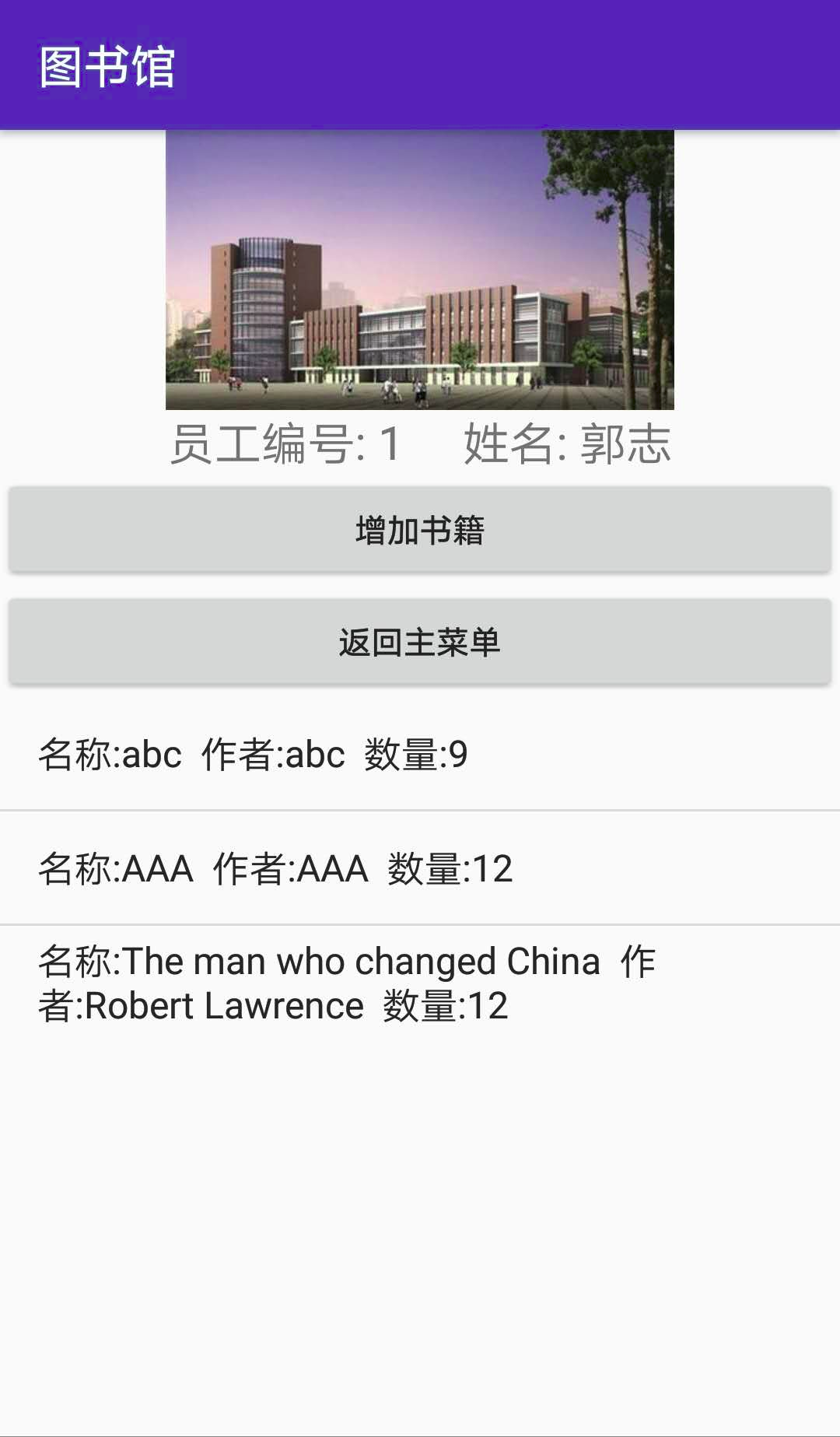
新书上架是查询数据库里的Book表,将最近注册的五本书的基本信息(若图书馆所有书籍少于5,则所有)通过listview展示出来。
源代码贴出:
 1 package com.example.administrator.library1;

 2

 3 import android.content.Intent;

 4 import android.support.v7.app.AppCompatActivity;

 5 import android.os.Bundle;

 6 import android.widget.ArrayAdapter;

 7 import android.widget.ListView;

 8

 9 import org.litepal.LitePal;

10

11 import java.util.ArrayList;

12 import java.util.List;

13

14 public class New_Books extends AppCompatActivity {

15

16     ListView listView;

17     List<Book> bookList=new ArrayList<>();

18     List<String> books=new ArrayList<>();

19     @Override

20     protected void onCreate(Bundle savedInstanceState) {

21         super.onCreate(savedInstanceState);

22         setContentView(R.layout.activity_new__books);

23

24         listView=findViewById(R.id.books_new_list_id);

25         bookList= LitePal.findAll(Book.class);

26         if(bookList.size()>8)

27         {

28             for(int i=0;i<8;++i)

29             {

30                 books.add("书名:"+bookList.get(bookList.size()-i-1).getName()+"    "+"作者:"+bookList.get(bookList.size()-i-1).getWriter());

31             }

32         }

33         else

34         {

35             for(int i=bookList.size()-1;i>=0;--i)

36             {

37                 books.add("书名:"+bookList.get(i).getName()+"    "+"作者:"+bookList.get(i).getWriter());

38             }

39         }

40         ArrayAdapter adapter=new ArrayAdapter<String>(New_Books.this,android.R.layout.simple_list_item_1,books);

41         listView.setAdapter(adapter);

42     }

43

44     @Override

45     protected void onPause() {

46         Intent intent=new Intent(New_Books.this,MainActivity.class);

47         startActivity(intent);

48         super.onPause();

49     }

50 }
NewBooks
 1 <?xml version="1.0" encoding="utf-8"?>

 2 <LinearLayout xmlns:android="http://schemas.android.com/apk/res/android"

 3     xmlns:app="http://schemas.android.com/apk/res-auto"

 4     xmlns:tools="http://schemas.android.com/tools"

 5     android:orientation="vertical"

 6     android:layout_width="match_parent"

 7     android:layout_height="match_parent"

 8     tools:context=".New_Books">

 9     <TextView

10         android:layout_width="match_parent"

11         android:layout_height="wrap_content"

12         android:textSize="30sp"

13         android:textColor="#091"

14         android:gravity="center"

15         android:text="新书上架"/>

16     <ListView

17         android:id="@+id/books_new_list_id"

18         android:layout_width="match_parent"

19         android:layout_height="match_parent">

20     </ListView>

21

22 </LinearLayout>
Newbooks_xml
接着是借阅排行榜。
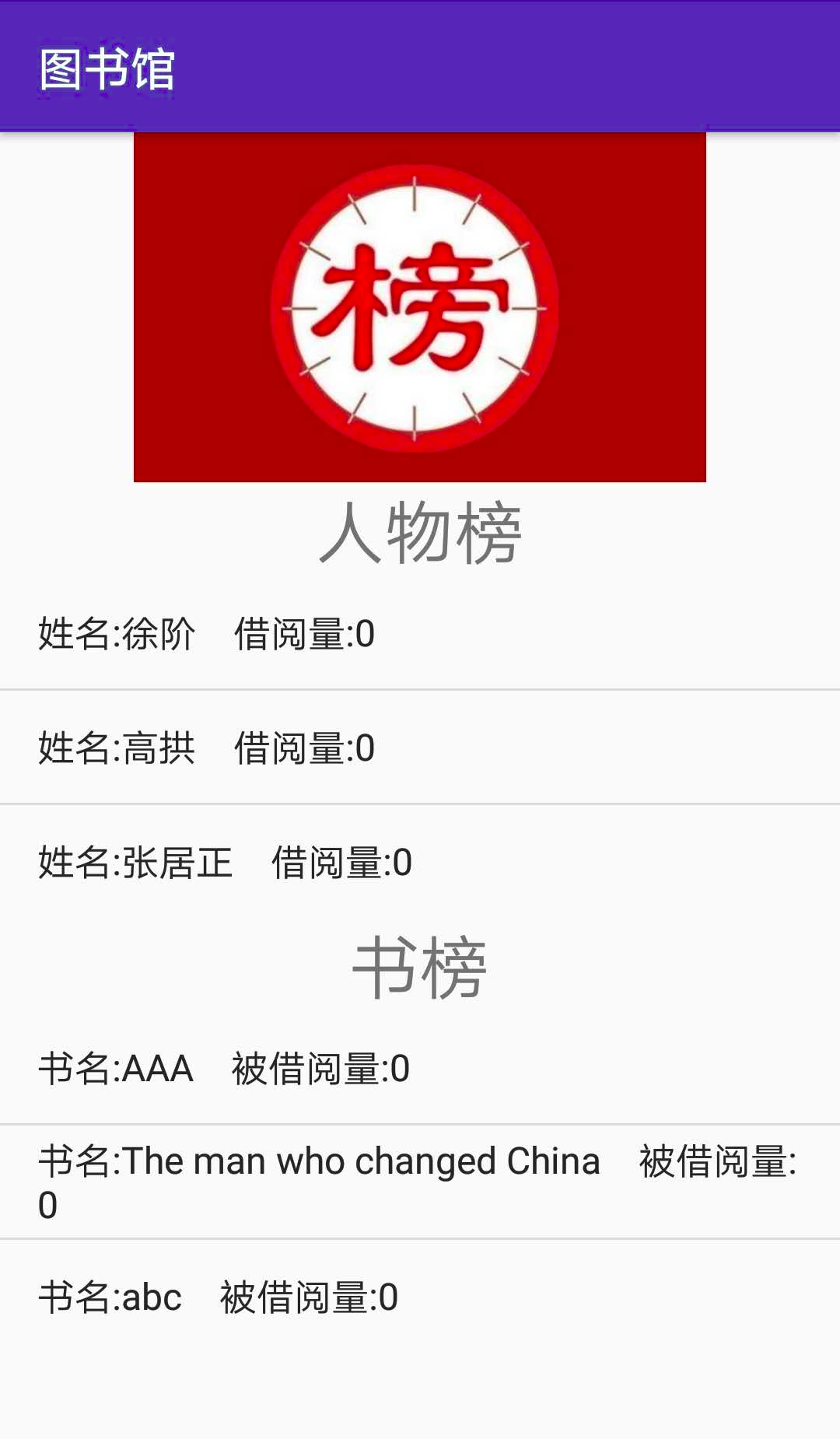
搜索出借阅数量最多的五个学生,被借阅量最多的五本书,通过listview展示出来。
代码如下:
 1 <?xml version="1.0" encoding="utf-8"?>

 2 <LinearLayout xmlns:android="http://schemas.android.com/apk/res/android"

 3     xmlns:app="http://schemas.android.com/apk/res-auto"

 4     xmlns:tools="http://schemas.android.com/tools"

 5     android:orientation="vertical"

 6     android:layout_width="match_parent"

 7     android:layout_height="match_parent"

 8     tools:context=".Ranking">

 9

10     <ImageView

11         android:layout_width="wrap_content"

12         android:layout_height="150dp"

13         android:layout_gravity="center"

14         android:src="@drawable/ranking" />

15

16     <TextView

17         android:layout_width="match_parent"

18         android:layout_height="wrap_content"

19         android:gravity="center"

20         android:textSize="30sp"

21         android:text="人物榜" />

22

23     <ListView

24         android:id="@+id/rank_list1_id"

25         android:layout_width="match_parent"

26         android:layout_height="wrap_content"></ListView>

27     <TextView

28         android:layout_width="match_parent"

29         android:layout_height="wrap_content"

30         android:gravity="center"

31         android:textSize="30sp"

32         android:text="书榜"/>

33     <ListView

34         android:id="@+id/rank_list2_id"

35         android:layout_width="match_parent"

36         android:layout_height="wrap_content"></ListView>

37

38 </LinearLayout>
Ranking_xml
  1 package com.example.administrator.library1;

  2

  3 import android.content.Intent;

  4 import android.support.v7.app.AppCompatActivity;

  5 import android.os.Bundle;

  6 import android.widget.ArrayAdapter;

  7 import android.widget.ListView;

  8

  9 import org.litepal.LitePal;

 10

 11 import java.util.ArrayList;

 12 import java.util.List;

 13

 14 public class Ranking extends AppCompatActivity {

 15

 16     ListView listView1,listView2;

 17     List<Student> students=new ArrayList<>();

 18     List<Book> books=new ArrayList<>();

 19     List<String> stu=new ArrayList<>();

 20     List<String> bo=new ArrayList<>();

 21     @Override

 22     protected void onCreate(Bundle savedInstanceState) {

 23         super.onCreate(savedInstanceState);

 24         setContentView(R.layout.activity_ranking);

 25

 26         listView1=findViewById(R.id.rank_list1_id);

 27         listView2=findViewById(R.id.rank_list2_id);

 28

 29         students= LitePal.findAll(Student.class);

 30         books=LitePal.findAll(Book.class);

 31

 32         if(students.size()>5)

 33         {

 34             for(int i=0;i<5;++i)

 35             {

 36                 for(int j=students.size()-1;j>0;--j)

 37                 {

 38                     if(students.get(j).getBookAmount()>students.get(j-1).getBookAmount())

 39                     {

 40                         Student student_temp;

 41                         student_temp=students.get(j);

 42                         students.set(j,students.get(j-1));

 43                         students.set(j-1,student_temp);

 44                     }

 45                 }

 46             }

 47             for(int i=0;i<5;++i)

 48             {

 49                 stu.add("学生:"+students.get(i).getName()+"    "+"借阅量:"+String.valueOf(students.get(i).getBookAmount()));

 50             }

 51         }

 52         else

 53         {

 54             for(int i=0;i<students.size()-1;++i)

 55             {

 56                 for(int j=i+1;j<students.size();++j)

 57                 {

 58                     if(students.get(i).getBookAmount()<students.get(j).getBookAmount())

 59                     {

 60                         Student student_temp;

 61                         student_temp=students.get(i);

 62                         students.set(i,students.get(j));

 63                         students.set(j,student_temp);

 64                     }

 65                 }

 66             }

 67             for(int i=0;i<students.size();++i)

 68             {

 69                 stu.add("姓名:"+students.get(i).getName()+"    "+"借阅量:"+String.valueOf(students.get(i).getBookAmount()));

 70             }

 71         }

 72         ArrayAdapter<String> adapter1=new ArrayAdapter<String>(Ranking.this,android.R.layout.simple_list_item_1,stu);

 73         listView1.setAdapter(adapter1);

 74

 75         if(books.size()>5)

 76         {

 77             for(int i=0;i<5;++i)

 78             {

 79                 for(int j=books.size()-1;j>0;--j)

 80                 {

 81                     if(books.get(j).getAmount()-books.get(j).getIn_shelf()>books.get(j-1).getAmount()-books.get(j-1).getIn_shelf())

 82                     {

 83                         Book book_temp;

 84                         book_temp=books.get(j);

 85                         books.set(j,books.get(j-1));

 86                         books.set(j-1,book_temp);

 87                     }

 88                 }

 89             }

 90             for(int i=0;i<5;++i)

 91             {

 92                 bo.add("书名:"+books.get(i).getName()+"    "+"被借阅量:"+String.valueOf(books.get(i).getAmount()-books.get(i).getIn_shelf()));

 93             }

 94         }

 95         else

 96         {

 97             for(int i=0;i<books.size()-1;++i)

 98             {

 99                 for(int j=i+1;j<books.size();++j)

100                 {

101                     if(books.get(i).getAmount()-books.get(i).getIn_shelf()<books.get(j).getAmount()-books.get(i).getIn_shelf())

102                     {

103                         Book book_temp;

104                         book_temp=books.get(i);

105                         books.set(i,books.get(j));

106                         books.set(j,book_temp);

107                     }

108                 }

109             }

110             for(int i=0;i<books.size();++i)

111             {

112                 bo.add("书名:"+books.get(i).getName()+"    "+"被借阅量:"+String.valueOf(books.get(i).getAmount()-books.get(i).getIn_shelf()));

113             }

114         }

115         ArrayAdapter<String> adapter2=new ArrayAdapter<String>(Ranking.this,android.R.layout.simple_list_item_1,bo);

116         listView2.setAdapter(adapter2);

117     }

118

119     @Override

120     protected void onPause() {

121         Intent intent=new Intent(Ranking.this,MainActivity.class);

122         startActivity(intent);

123         super.onPause();

124     }

125 }
Ranking_List
效果图:
关于图书馆介绍,图书馆新闻这两个的实现比较简单,可以在Github上查看。
至此 我的第一个系统性的Android应用程序讲解完毕,中间有一些不足之处,希望之后我能够将它们进行修正。
基于Android平台的图书管理系统的制作(4)的更多相关文章
- 基于Android平台的图书管理系统的制作(1)
在学习了郭神的第一行代码前半段之后,想通过一次实践来完成对已学知识的巩固.于是码下了这个图书管理系统客户端. IDE Android studio,语言 JAVA.XML: 在刚开始设计的时候对于这个 ...
- 基于Android平台的图书管理系统的制作(2)
上一篇讲解了制作图书管理系统的初衷与要求,和app首页的代码. 下面来介绍图书管理系统的服务对象:学生 学生类的设计: 个人信息:账号.密码.姓名.学号.邮箱.年龄. 借阅信息:借阅总数(不超过十本) ...
- 基于Android平台的图书管理系统的制作(3)
前两篇介绍了主页面和Student,这一篇来讲Book类和工作人员. Book是图书管理系统的核心,查书,借书,还书,增加书都与Book类息息相关.Book类的设计很简单:包含信息:名称.作者.页数. ...
- 基于Android平台的会议室管理系统具体设计说明书
会议室管理系统具体设计说明书 第一部分 引言 1.编写目的 本说明对会议室管理系统项目的各模块.页面.脚本分别进行了实现层面上的要求和说明. 软件开发小组的产品实现成员应该阅读和參考本说明进行代码的 ...
- 基于android平台的斗地主AI
本软件是基于android平台的斗地主AI,我们在源代码的基础之上,旨在改进AI的算法,使玩家具有更丰富的体验感,让NPC可以更为智能. (一)玩法解析: (1)发牌和叫牌:一副扑克54张,先为每个人 ...
- 基于Android 平台简易即时通讯的研究与设计[转]
摘要:论文简单介绍Android 平台的特性,主要阐述了基于Android 平台简易即时通讯(IM)的作用和功能以及实现方法.(复杂的通讯如引入视频音频等可以考虑AnyChat SDK~)关键词:An ...
- 基于Android平台的简易人脸检测库
代码地址如下:http://www.demodashi.com/demo/12135.html ViseFace 简易人脸检测库,不依赖三方库,可快速接入人脸检测功能. 项目依赖:compile 'c ...
- 基于ANDROID平台,U3D对蓝牙手柄键值的获取
对于ANDROID平台,物理蓝牙手柄已被封装,上层应用不可见,也就是说对于上层应用,不区分蓝牙手柄还是其它手柄: 完成蓝牙手柄和ANDROID手机的蓝牙连接后,即可以UNITY3D中获取其键值: 在U ...
- 结对编程--基于android平台的黄金点游戏
游戏内容: 阿超的课都是下午两点钟,这时班上不少的同学都昏昏欲睡,为了让大家兴奋起来,阿超让同学玩一个叫“黄金点”的游戏: N个同学(N通常大于10),每人写一个0~100之间的有理数 (不包括0或1 ...
随机推荐
- jQuery数组($.grep,$.each,$.inArray,$.map)处理函数详解
1.jQuery.grep( array, function(elementOfArray, indexInArray) [, invert ] ) 描述: 查找满足过滤函数的数组元素.原始数组不受影 ...
- .NET 在信创常用软件适配清单之中?
2020年8月份写了一篇文章<.NET Core也是国产化信息系统开发的重要选项>, 这又过去了大半年了,在信创领域发生了很大的变化,今天写这篇文章主要是想从信创常用软件适配清单 看一看. ...
- JVM垃圾回收器总结
常见七种垃圾回收器以及使用的垃圾回收算法总结:
- 容器进阶:OCI与容器运行时
Blog:博客园 个人 什么是容器运行时(Container Runtime) Kubernetes节点的底层由一个叫做容器运行时的软件进行支撑,它负责比如启停容器 这样的事情.最广为人知的容器运行时 ...
- MySQL8.0大表秒加字段,是真的吗?
前言: 很早就听说 MySQL8.0 支持快速加列,可以实现大表秒级加字段.笔者自己本地也有8.0环境,但一直未进行测试.本篇文章我们就一起来看下 MySQL8.0 快速加列到底要如何操作. 1.了解 ...
- ASP.NET Core文件压缩最佳实践
前言 在微软官方文档中,未明确指出文件压缩功能的使用误区. 本文将对 ASP.NET Core 文件响应压缩的常见使用误区做出说明. 误区1:未使用 Brotil 压缩 几乎不需要任何额外的代价,Br ...
- 小米华为vivooppo手机记录隐私证据查询
1.在拨号界面输入:*#*#4636#*#* 2.在输入代码之后 手机会自动跳转到下面这个页面 就可以查看她到底拿着手机在干嘛 2 输入下面代码可以检测小米手机的各种信息 *#*#64663#*#*
- linux下获取占用CPU资源最多的10个进程,可以使用如下命令组合:
linux下获取占用CPU资源最多的10个进程,可以使用如下命令组合: ps aux|head -1;ps aux|grep -v PID|sort -rn -k +3|head linux下获取占用 ...
- Linux下Shell实现服务器IP监测
实验室有一个服务器放在机房,装的是Ubuntu Server,IP为自动分配,因此一旦IP有变化就无法远程操作,必须去机房记录新的IP.学了几天Shell之后想,是不是可以定时检测其IP的变化,一旦有 ...
- crontab简单使用手册
Linux定时任务(1)- crontab 枫林风雨关注 0.1682018.12.14 12:29:47字数 946阅读 921 执行定时任务 crontab 执行循环任务 at 执行一次性任务 c ...