
【C++】map容器的用法
检测map容器是否为空:
 1 #include <iostream>

 2 #include<map>

 3 #include<string>

 4 using namespace std;

 5 int main()

 6 {

 7     //检测容器是否为空

 8     map<string, string>mapText;

 9     if (mapText.empty())

10     {

11         cout << "mapText为空" << endl;

12     }

13     else

14     {

15         cout << "mapText不为空" << endl;

16     }

17

18     //向容器中添加元素

19     mapText["小A"] = "A"; //赋值

20     mapText["小B"] = "B"; //赋值

21     mapText["小C"] = "C"; //赋值

22

23     if (mapText.empty())

24     {

25         cout << "mapText为空" << endl;

26     }

27     else

28     {

29         cout << "mapText不为空" << endl;

30     }

31

32     system("pause");

33     return 0;

34 }
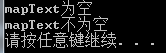
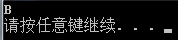
重复赋值,值被替换:
 1 #include <iostream>

 2 #include<map>

 3 #include<string>

 4 using namespace std;

 5 int main()

 6 {

 7     map<string, string>mapText;

 8     mapText["小A"] = "A"; //赋值

 9     mapText["小A"] = "B"; //重复赋值

10     cout << mapText["小A"] << endl;

11

12     system("pause");

13     return 0;

14 }
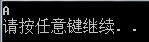
判断键是否存在,如果不存在再赋值:
 1 #include <iostream>

 2 #include<map>

 3 #include<string>

 4 using namespace std;

 5 int main()

 6 {

 7     map<string, string>mapText;

 8     mapText["小A"] = "A";     //赋值

 9      //先检测键是否存在,如果存在则不赋值

10     if (mapText.count("小A") == 0)  //count==0不存在 count==1存在

11     {

12         mapText["小A"] = "B"; //重复赋值

13     }

14     cout << mapText["小A"] << endl;

15

16     system("pause");

17     return 0;

18 }
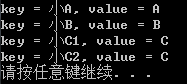
map循环遍历:
map.begin()指向map的第一个元素
map.end()指向map的最后一个元素之后的地址
 1 #include <iostream>

 2 #include<map>

 3 #include<string>

 4 using namespace std;

 5 int main()

 6 {

 7     map<string, string>mapText;

 8     mapText["小A"] = "A";     //赋值

 9     mapText["小B"] = "B";     //赋值

10     mapText["小C1"] = "C";     //赋值

11     mapText["小C2"] = "C";     //赋值

12     for (map<string, string>::iterator itor = mapText.begin(); itor != mapText.end(); ++itor)

13     {

14         cout << "key = " << itor->first << ", value = " << itor->second << endl;

15

16     }

17     system("pause");

18     return 0;

19 }
map 通过“键”删除键值对:
 1 #include <iostream>

 2 #include<map>

 3 #include<string>

 4 using namespace std;

 5 int main()

 6 {

 7     map<string, string>mapText;

 8     mapText["小A"] = "A";     //赋值

 9     mapText["小B"] = "B";     //赋值

10     mapText["小C1"] = "C";     //赋值

11     mapText["小C2"] = "C";     //赋值

12     cout << "删除前:" << endl;

13     for (map<string, string>::iterator itor = mapText.begin(); itor != mapText.end(); ++itor)

14     {

15         cout << "key = " << itor->first << ", value = " << itor->second << endl;

16

17     }

18     //删除小B

19     mapText.erase("小B");

20     cout << "删除后:" << endl;

21     for (map<string, string>::iterator itor = mapText.begin(); itor != mapText.end(); ++itor)

22     {

23         cout << "key = " << itor->first << ", value = " << itor->second << endl;

24

25     }

26     mapText.erase("小B"); //小B不存在,erase也不会报错

27     system("pause");

28     return 0;

29 }
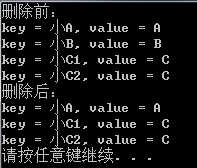
map 通过“值”删除键值对,先写一个错误用法,这里要注意:
 1 #include <iostream>

 2 #include<map>

 3 #include<string>

 4 using namespace std;

 5 int main()

 6 {

 7     map<string, string>mapText;

 8     mapText["小A"] = "A";     //赋值

 9     mapText["小B"] = "B";     //赋值

10     mapText["小C1"] = "C";     //赋值

11     mapText["小C2"] = "C";     //赋值

12     cout << "删除前:" << endl;

13     for (map<string, string>::iterator itor = mapText.begin(); itor != mapText.end(); ++itor)

14     {

15         cout << "key = " << itor->first << ", value = " << itor->second << endl;

16

17     }

18     //删除值为C的元素

19     //错误用法:

20     for (map<string, string>::iterator itor = mapText.begin(); itor != mapText.end(); ++itor)

21     {

22         if ((itor->second) == "C")

23         {

24             mapText.erase(itor);

25         }

26     }

27

28     cout << "删除后:" << endl;

29     for (map<string, string>::iterator itor = mapText.begin(); itor != mapText.end(); ++itor)

30     {

31         cout << "key = " << itor->first << ", value = " << itor->second << endl;

32

33     }

34     system("pause");

35     return 0;

36 }
错误原因:itor指针在元素被删除后失效了,回到for语句中与mapText.end()进行比较出现错误。
map 通过“值”删除键值对,正确的用法:
 1 #include <iostream>

 2 #include<map>

 3 #include<string>

 4 using namespace std;

 5 int main()

 6 {

 7     map<string, string>mapText;

 8     mapText["小A"] = "A";     //赋值

 9     mapText["小B"] = "B";     //赋值

10     mapText["小C1"] = "C";     //赋值

11     mapText["小C2"] = "C";     //赋值

12     cout << "删除前:" << endl;

13     for (map<string, string>::iterator itor = mapText.begin(); itor != mapText.end(); ++itor)

14     {

15         cout << "key = " << itor->first << ", value = " << itor->second << endl;

16

17     }

18     //删除值为C的元素

19     //正确用法:

20     for (map<string, string>::iterator itor = mapText.begin(); itor != mapText.end(); /*++itor*/)

21     {

22         if ((itor->second) == "C")

23         {

24             itor = mapText.erase(itor);

25         }

26         else

27         {

28             ++itor;

29         }

30     }

31

32

33     cout << "删除后:" << endl;

34     for (map<string, string>::iterator itor = mapText.begin(); itor != mapText.end(); ++itor)

35     {

36         cout << "key = " << itor->first << ", value = " << itor->second << endl;

37

38     }

39     system("pause");

40     return 0;

41 }
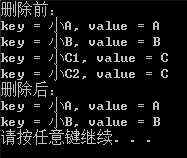
删除map的第一个元素
mapText.erase(mapText.begin());
【C++】map容器的用法的更多相关文章
- 蓝桥杯 算法提高 9-3摩尔斯电码 _c++ Map容器用法
//****|*|*-**|*-**|--- #include <iostream> #include <map> #include <vector> #inclu ...
- 详解C++ STL map 容器
详解C++ STL map 容器 本篇随笔简单讲解一下\(C++STL\)中的\(map\)容器的使用方法和使用技巧. map容器的概念 \(map\)的英语释义是"地图",但\( ...
- map的详细用法
map是STL的一个关联容器,它提供一对一(其中第一个可以称为关键字,每个关键字只能在map中出现一次,第二个可能称为该关键字的值)的数据处理能力,由于这个特性,它完成有可能在我们处理一对一数据的时 ...
- stl之map容器的原理及应用
容器的数据结构同样是采用红黑树进行管理,插入的元素健位不允许重复,所使用的节点元素的比较函数,只对元素的健值进行比较,元素的各项数据可通过健值检索出来.map容器是一种关联容器,实现了SortedAs ...
- STL——map/unordered_map基础用法
map /multimap map是STL里重要容器之一. 它的特性总结来讲就是:所有元素都会根据元素的键值key自动排序(也可根据自定义的仿函数进行自定义排序),其中的每个元素都是<key, ...
- map的详细用法 (转
map的详细用法: map是STL的一个关联容器,它提供一对一(其中第一个可以称为关键字,每个关键字只能在map中出现一次,第二个可能称为该关键字的值)的数据处理能 力,由于这个特性,它完成有可能在我 ...
- C++ STL 中 map 容器
C++ STL 中 map 容器 Map是STL的一个关联容器,它提供一对一(其中第一个可以称为关键字,每个关键字只能在map中出现一次,第二个可能称为该关键字的值)的数据 处理能力,由于这个特性,它 ...
- map的常见用法
map的常见用法 map 是什么? map是一组键值对的组合,通俗理解类似一种特殊的数组,a[key]=val,只不过数组元素的下标是任意一种类型,而且数组的元素的值也是任意一种类型.有点类似pyth ...
- map 容器的使用
C++中map容器提供一个键值对容器,map与multimap差别仅仅在于multiple允许一个键对应多个值. 一.map的说明 1 头文件 #include <map> ...
随机推荐
- 【python】Leetcode每日一题-存在重复元素3
[python]Leetcode每日一题-存在重复元素3 [题目描述] 给你一个整数数组 nums 和两个整数 k 和 t .请你判断是否存在 两个不同下标 i 和 j,使得 abs(nums[i] ...
- 对spring创建对象时为何要使用接口
对spring创建对象时为何要使用接口,而使用接口的实现类会报错 接上一篇问题的解答:Spring AOP获取不了增强类(额外方法)和无法通过getBean()获取对象 此问题发生在动态代理时,比如对 ...
- Docker 中运行 ElasticSearch 和 Kibana
ElasticSearch 是一个基于Lucene的搜索服务器.它提供了一个分布式多用户能力的全文搜索引擎,基于RESTful web接口:Kibana 是一个开源的分析和可视化平台,可以搜索,查看. ...
- [Python] execl读写
相关库 读:xlrd 写:xlwt 案例 要求: 将图1中的数据导以图2的形式写入另一个文件中 第一列索引关系:{1:K1-B1,2:K1-B2} ...(18列) 思路: 按行读取数据,根据索引关系 ...
- python从hello world开始(3)
"""# !usr/bin/env python# -*- coding:utf-8 _*-""""""@Au ...
- C++知识点案例 笔记-5
1.关系运算符重载 2.类型转换函数重载 3.转换构造函数 4.函数模板 5.显式实例化 6.类模板外定义模板函数 1.关系运算符重载 ==关系运算符重载== //直接(按分数)比较两个对象 #inc ...
- shell应用之简单计算器
1 #!/bin/bash 2 while : 3 do 4 read -p "请输入计算规则:" JS 5 if [ -z $JS ];then 6 exit 7 else 8 ...
- MyBatis 高级查询之一对多查询(十)
高级查询之一对多查询 查询条件:根据游戏名称,查询游戏账号信息 我们在之前创建的映射器接口 GameMapper.java 中添加接口方法,如下: /** * 根据游戏名查询游戏账号 * @param ...
- 服务器RAID配置
一.RAID介绍RAID是Redundent Array of Inexpensive Disks的缩写,直译为"廉价冗余磁盘阵列",也简称为"磁盘阵列".后来 ...
- STM32自己的封装库
以前一直使用STM32的标准库,需要一步步地将代码加进去,将编译选项设置好,然后再编译整个工程. 这个编译过程是一个相当慢的过程!完全编译大约需要一支烟的时间.每次建立工程都这么编译,是一个相当浪费时 ...