
swagger菜单分级
效果
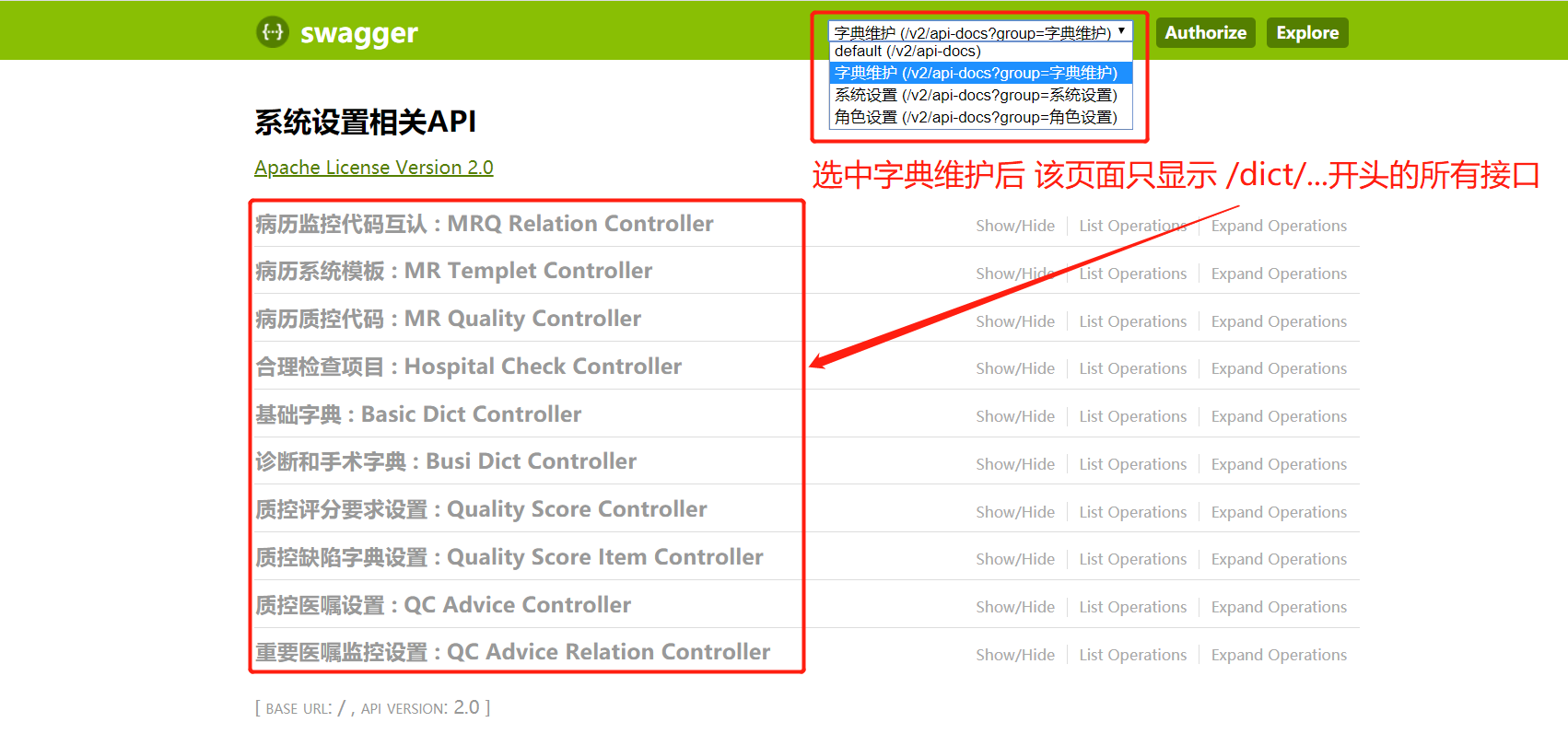
实现
SwaggerAutoConfiguration里新增配置:
package com.fxkj.common.config;

import com.google.common.base.Predicates;

import com.google.common.collect.Lists;

import org.springframework.beans.factory.annotation.Autowired;

import org.springframework.boot.autoconfigure.condition.ConditionalOnProperty;

import org.springframework.boot.context.properties.EnableConfigurationProperties;

import org.springframework.context.annotation.Bean;

import org.springframework.context.annotation.Configuration;

import org.springframework.context.annotation.Profile;

import springfox.documentation.builders.ApiInfoBuilder;

import springfox.documentation.builders.PathSelectors;

import springfox.documentation.builders.RequestHandlerSelectors;

import springfox.documentation.service.*;

import springfox.documentation.spi.DocumentationType;

import springfox.documentation.spi.service.contexts.SecurityContext;

import springfox.documentation.spring.web.plugins.Docket;

import springfox.documentation.swagger2.annotations.EnableSwagger2;

import javax.annotation.Resource;

import java.util.ArrayList;

import java.util.List;

/**

 * @author Jackson

 */

@Profile({"default", "dev", "test"})

@Configuration

@EnableConfigurationProperties({SwaggerProperties.class})

@ConditionalOnProperty(prefix = "swagger",value = "enable")

@EnableSwagger2

public class SwaggerAutoConfiguration {

    @Resource

    private SecurityConfig securityConfig;

    @Bean

    public Docket swaggerSpringMvcPlugin(@Autowired SwaggerProperties swaggerConfigProps) {

        return new Docket(DocumentationType.SWAGGER_2)

                .enable(swaggerConfigProps.isEnable())

                .useDefaultResponseMessages(false)

                .apiInfo(apiInfo(swaggerConfigProps))

                .securitySchemes(getSecuritySchemes())

                .securityContexts(getSecurityContexts())

                .select()

                .paths(Predicates.not(PathSelectors.regex("/error.*")))

                .build();

    }

    private ApiInfo apiInfo(SwaggerProperties properties) {

        return new ApiInfoBuilder()

                .title(properties.getTitle())

                .version(properties.getVersion())

                .description(properties.getDescription())

                .contact(new Contact(properties.getContactName(),

                        properties.getContactUrl(),

                        properties.getContactEmail()))

                .license("Apache License Version 2.0")

                .licenseUrl("https://github.com/springfox/springfox/blob/master/LICENSE")

                .version("2.0")

                .build();

    }

    @Bean

    public Docket api_system(@Autowired SwaggerProperties swaggerConfigProps) {

        return new Docket(DocumentationType.SWAGGER_2)

                .apiInfo(apiInfoSystem(swaggerConfigProps))

                .securitySchemes(getSecuritySchemes())

                .securityContexts(getSecurityContexts())

                .select()

                .apis(RequestHandlerSelectors.any())

                .paths(PathSelectors.ant("/system/**"))

                .build()

                .groupName("系统设置")

                .pathMapping("/");

    }

    @Bean

    public Docket api_role(@Autowired SwaggerProperties swaggerConfigProps) {

        return new Docket(DocumentationType.SWAGGER_2)

                .apiInfo(apiInfoSystem(swaggerConfigProps))

                .securitySchemes(getSecuritySchemes())

                .securityContexts(getSecurityContexts())

                .select()

                .apis(RequestHandlerSelectors.any())

                .paths(PathSelectors.ant("/roles/**"))

                .build()

                .groupName("角色设置")

                .pathMapping("/");

    }

    @Bean

    public Docket api_dict(@Autowired SwaggerProperties swaggerConfigProps) {

        return new Docket(DocumentationType.SWAGGER_2)

                .apiInfo(apiInfoSystem(swaggerConfigProps))

                .securitySchemes(getSecuritySchemes())

                .securityContexts(getSecurityContexts())

                .select()

                .apis(RequestHandlerSelectors.any())

                .paths(PathSelectors.ant("/dict/**"))

                .build()

                .groupName("字典维护")

                .pathMapping("/");

    }

    private ApiInfo apiInfoSystem(SwaggerProperties properties) {

        return new ApiInfoBuilder()

                .title("系统设置相关API")

                .version(properties.getVersion())

                .description(properties.getDescription())

                .contact(new Contact(properties.getContactName(),

                        properties.getContactUrl(),

                        properties.getContactEmail()))

                .license("Apache License Version 2.0")

                .licenseUrl("https://github.com/springfox/springfox/blob/master/LICENSE")

                .version("2.0")

                .build();

    }

    private ArrayList<ApiKey> getSecuritySchemes() {

        return Lists.newArrayList(

                new ApiKey("token", "token", "header")

        );

    }

    private List<SecurityContext> getSecurityContexts() {

        AuthorizationScope[] scopes = {

                new AuthorizationScope("global", "accessEverything")

        };

        List<SecurityReference> securityReferences = Lists.newArrayList(

                new SecurityReference("token", scopes)

        );

        return Lists.newArrayList(SecurityContext.builder()

                .securityReferences(securityReferences)

                .forPaths(Predicates.not(Predicates.in(securityConfig.getIgnoreUrls())))

                .build());

    }

}
swagger菜单分级的更多相关文章
- python学习入门第一天总结
虽然之前自己也看过许多关于python的视频,但一直没有动力与勇气,所以未能坚持且也没有学得这么深刻,这次希望通过python自动化培训,能够彻底改变自己,通过第一天的python学习,自己学到了许多 ...
- 我的第一个python web开发框架(34)——后台管理系统权限设计
框架底层和接口终于改造完成了,小白再次找到老菜. 小白:老大,上次你对后台权限系统简单的讲了一下,我一点头绪都没有,现在有空完整的说一说吗? 老菜:说到权限系统,要讲明白真不容易,权限系统并不是越复杂 ...
- Django框架----权限管理(设计分析以及具体细节)
说起权限我们大家都知道,不一样的角色会有不一样的权限.比如就像学生管理系统一样,管理员,老师,学生之间的权限都是不一样的,那么展示的页面也是不一样的.所以,我们现在来看看具体操作. 目标:生成一个独立 ...
- 基于角色权限管理:rbac设计分析以及具体细节
权限管理---设计分析以及具体细节 说起权限我们大家都知道,不一样的角色会有不一样的权限. 比如就像学生管理系统一样,管理员,老师,学生之间的权限都是不一样的,那么展示的页面也是不一样的. 所以,我们 ...
- jQuery知识点小结
博主之前学习一段时间后做了点Demo,借此机会发出来分享,其实学jQuery只要简单看看文档即可,但有些细枝末节的东西文档会默认使用者是了解的,所以还是得系统学习系统训练:Talk is cheap, ...
- 基于react实现无限分级菜单
在开发CMS(内容管理系统)系统时,一般都会用到一个侧边栏或者顶部的二级或者三级菜单,当点击或者鼠标悬浮时,菜单能够随之展开或收起. 本文纯粹为了练习一下react,因此我会在react环境下实现这么 ...
- JS及Dom示例 | 分级菜单折叠
<!DOCTYPE html> <html lang="en"> <head> <meta charset="UTF-8&quo ...
- jQuery示例 | 分级菜单
<!DOCTYPE html> Title .header{ background-color: black; color: wheat; } .content{ min-height: ...
- 无限分级和tree结构数据增删改【提供Demo下载】
无限分级 很多时候我们不确定等级关系的层级,这个时候就需要用到无限分级了. 说到无限分级,又要扯到递归调用了.(据说频繁递归是很耗性能的),在此我们需要先设计好表机构,用来存储无限分级的数据.当然,以 ...
随机推荐
- 网站图片无缝兼容 WebP/AVIF
前言 WebP 格式发布已有十余年,但不少站点至今仍未使用,只为兼顾极少数低版本浏览器.至于去年发布的 AVIF 格式,使用的站点就更少了. 然而图片往往是流量大户,与其费尽心机优化脚本体积,可能还不 ...
- 简单DOS命令
1.nslookup命令 nslookup命令是用来解析域名的,举个例子:我们只知道百度的域名是www.baidu.com 想要知道它的ip的话就要使用nslookup命令了nslookup www. ...
- CTF-Streamgame2-writeup
Streamgame2 题目信息: 附件: streamgame2.py from flag import flag assert flag.startswith("flag{") ...
- WORD2010
WORD2010表格,利用公式计算第一行,将光标定位到第二行相应位置,点F4即可进行相应的运算,第三行,相应位置,再点F4,继续计算
- C语言:判断整除
if (aa%10==0)来判断 不能用if (aa/10==int(aa/10)) 判断
- 基于SSM酒店管理系统mysql版本(前后台)
介绍:spring,springmvc,mybatis,mysql,eclipse 截图: 数据库表:CREATE TABLE `account` ( `id` int(11) NOT NULL AU ...
- 【LeetCode】930. 和相同的二元子数组
930. 和相同的二元子数组 知识点:数组:前缀和: 题目描述 给你一个二元数组 nums ,和一个整数 goal ,请你统计并返回有多少个和为 goal 的 非空 子数组. 子数组 是数组的一段连续 ...
- 手机端web网页布局经验总结(持续更新中)
1. 首先,在网页代码的头部,加入一行viewport元标签,我们一般是不让用户手动的去改变页面的大小的. <meta name="viewport" content=&qu ...
- 第一篇 -- 下载并安装IDEA
此篇讲的是安装IDEA企业版,社区版是免费的,就不多说了. 参考链接:https://www.exception.site/essay/how-to-free-use-intellij-idea-20 ...
- 第二十一篇 -- QTimer实现秒表功能
效果图: 程序一开始就开始计时,当完成了相关功能(在线程中完成)之后,就触发停止信号,停止定时器. time.py #!/usr/bin/env python # _*_ coding: UTF-8 ...