
position:sticky 粘性定位的几种巧妙应用

背景:
position: sticky又称为粘性定位,粘性定位的元素是依赖于用户的滚动,在position:relative与position:fixed定位之间切换。元素根据正常文档流进行定位,然后相对它的最近滚动祖先(nearest scrolling ancestor)和containing block(最近块级祖先nearest block-level ancestor),包括table-related元素,基于top,right,bottom, 和left的值进行偏移。
粘性定位可以被认为是相对定位和固定定位的混合。元素在跨越特定阈值前为相对定位,之后为固定定位。例如:
#one { position: sticky; top: 10px; }
设置了以上样式的元素,在 viewport 视口滚动到元素 top 距离小于 10px 之前,元素为相对定位。之后,元素将固定在与顶部距离 10px 的位置,直到 viewport 视口回滚到阈值以下。
注意:
- 元素定位表现为在跨越特定阈值前为相对定位,之后为固定定位。
- 须指定
top,right,bottom或left四个阈值其中之一,才可使粘性定位生效。否则其行为与相对定位相同。 - 偏移值不会影响任何其他元素的位置。该值总是创建一个新的层叠上下文(
stacking context)。 - 一个
sticky元素会固定在离它最近的一个拥有滚动机制的祖先上(当该祖先的overflow是hidden,scroll,auto, 或overlay时),即便这个祖先不是最近的真实可滚动祖先。
应用示例
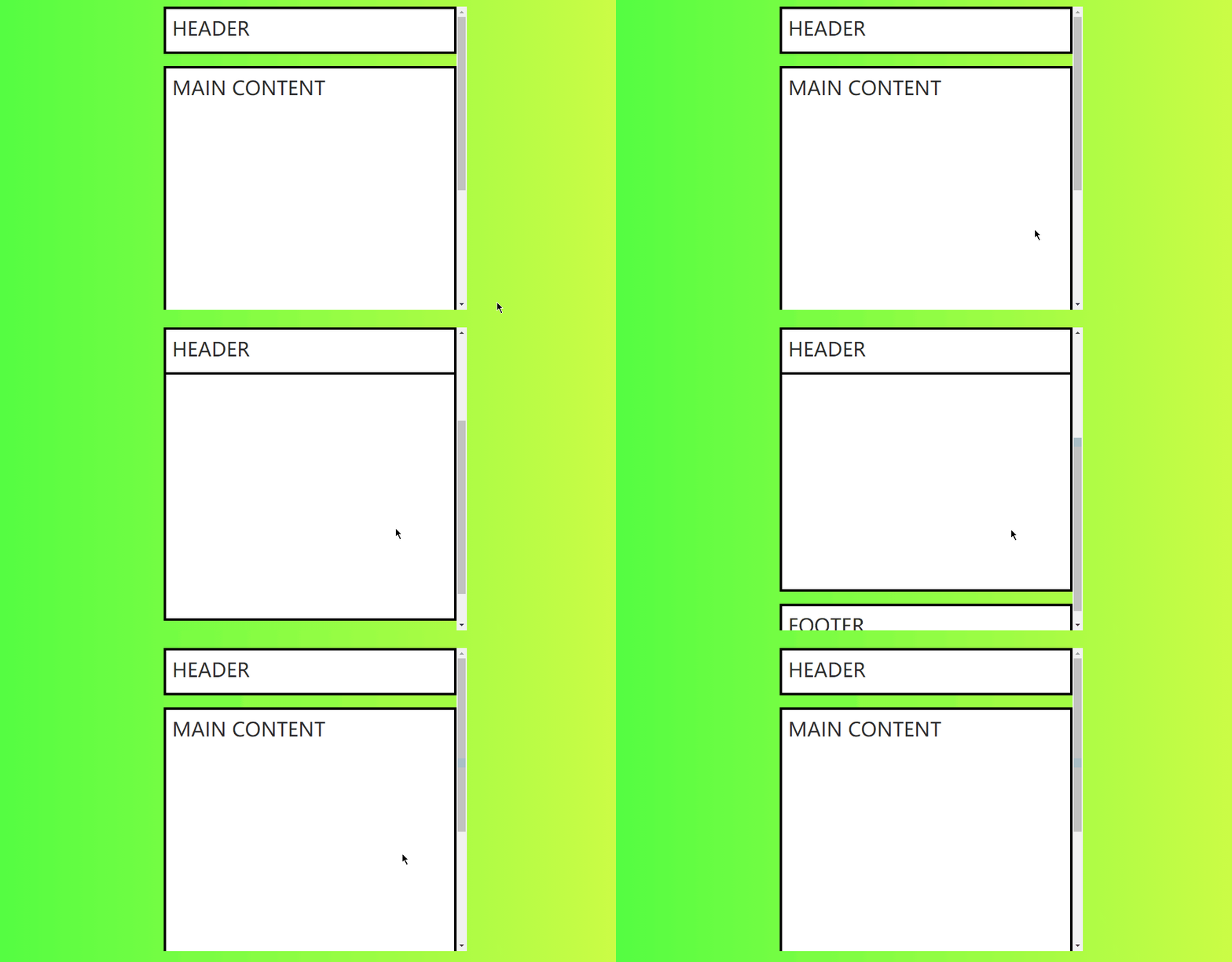
1. 基础:头部固定
头部导航栏开始时相对定位顶部,当页面元素发生滚动时,变为和 fixed 类似的固定定位。
<main class="main-container">

  <header class="main-header">HEADER</header>

  <div class="main-content">MAIN CONTENT</div>

  <footer class="main-footer">FOOTER</footer>

</main>
.main-container {

  max-width: 500px;

  height: 500px;

  margin: 0 auto;

  margin-top: 40px;

  overflow: auto;

}

.main-container *+* {

  margin-top: 20px;

}

.main-header {

  height: 50px;

}

.main-content {

  min-height: 600px;

}

.main-header {

  position: -webkit-sticky;

  position: sticky;

  top: 0;

}
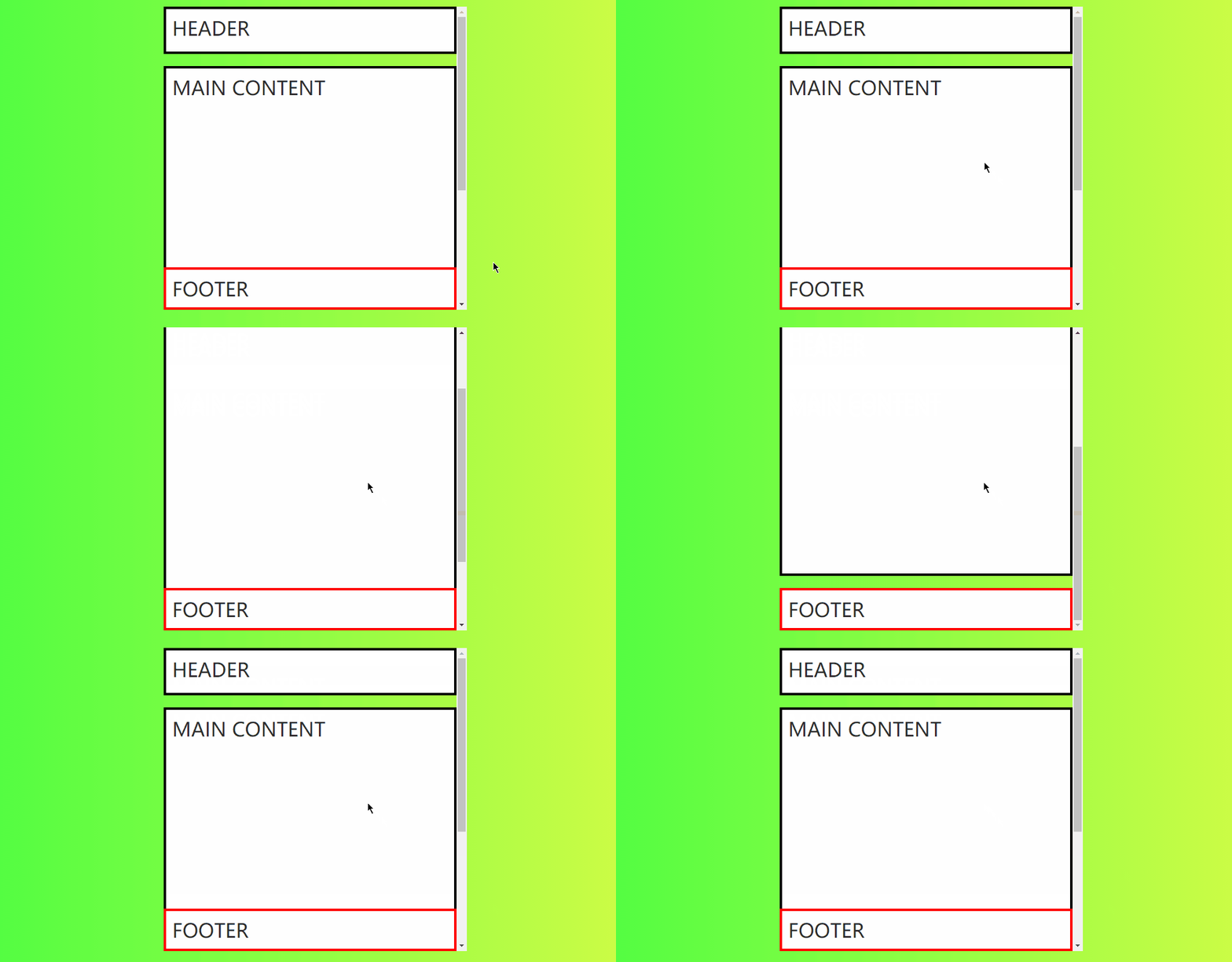
2. 基础:页脚固定
页脚固定效果,开始时也较为固定定位效果,当页面滚动超过页脚时,页脚定位效果变为相对定位效果,可用于显示一些底部信息或广告。
<main class="main-container">

  <header class="main-header">HEADER</header>

  <div class="main-content">MAIN CONTENT</div>

  <footer class="main-footer">FOOTER</footer>

</main>

<div class="devide"></div>
.main-container *+* {

  margin-top: 20px;

}

.main-header {

  height: 50px;

}

.main-content {

  min-height: 600px;

}

.main-footer {

  position: -webkit-sticky;

  position: sticky;

  bottom: 0;

  border-color: red;

}

.devide {

  height: 600px;

}
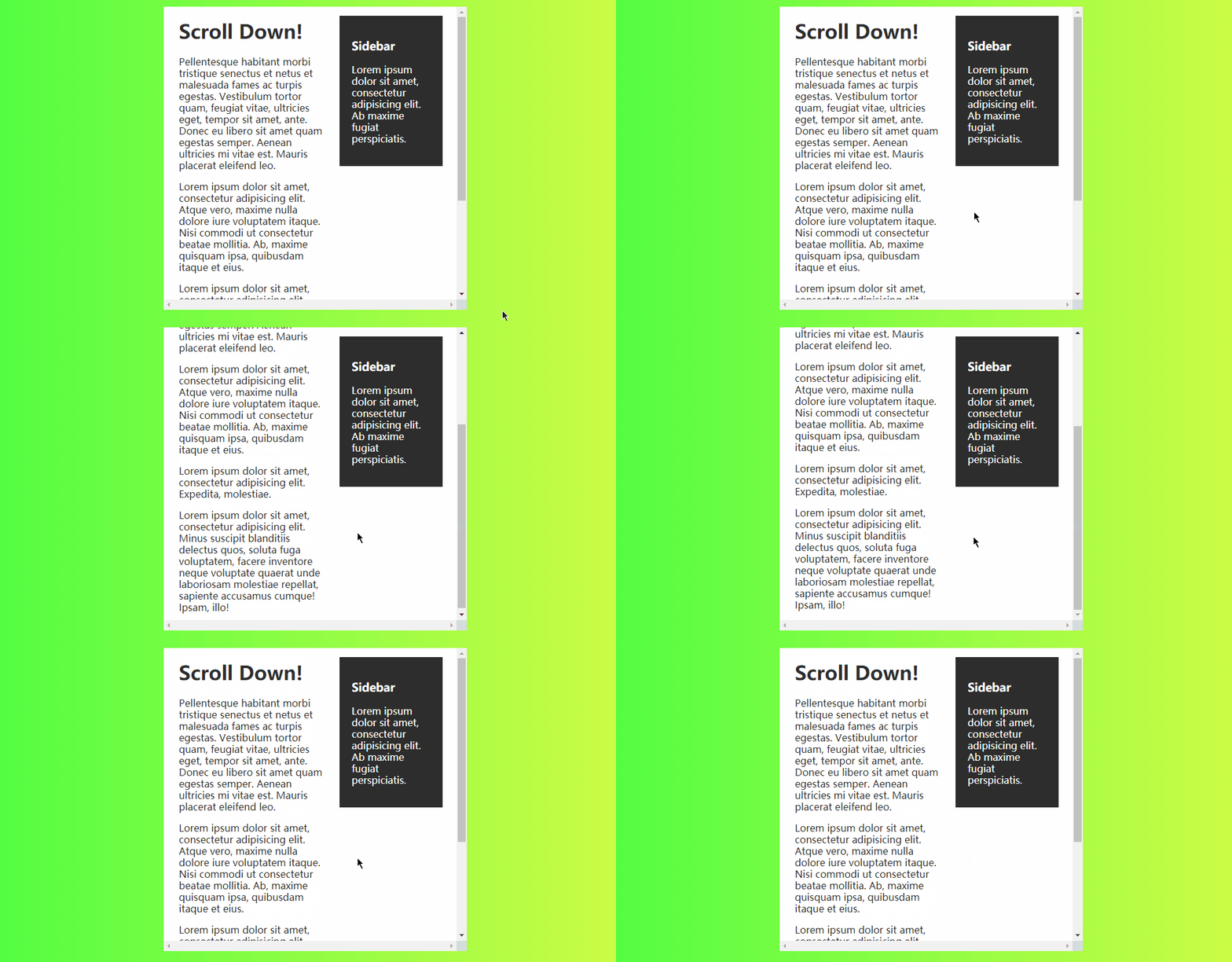
3. 基础:侧边栏固定
当页面产生滚动,位置超过侧边栏的 顶部阈值 后,侧边栏变为固定定位,可用于实现侧边导航栏或侧边提示信息及广告展示。
<div class="scroll">

  <div class="wrapper cf">

    <div class="content">

      <h1>Scroll Down!</h1>

      <p>Pellentesque habitant morbi tristique senectus et netus et malesuada fames ac turpis egestas. Vestibulum tortor quam, feugiat vitae, ultricies eget, tempor sit amet, ante. Donec eu libero sit amet quam egestas semper. Aenean ultricies mi vitae est. Mauris placerat eleifend leo.</p>

      <p>Lorem ipsum dolor sit amet, consectetur adipisicing elit. Minus suscipit blanditiis delectus quos, soluta fuga voluptatem, facere inventore neque voluptate quaerat unde laboriosam molestiae repellat, sapiente accusamus cumque! Ipsam, illo!</p>

    </div>

    <div class="sidebar">

      <h3>Sidebar</h3>

      <p>Lorem ipsum dolor sit amet, consectetur adipisicing elit. Ab maxime fugiat perspiciatis.</p>

    </div>

  </div>

</div>
.cf:before, .cf:after {

  content: " ";

  display: table;

  clear: both;

}

.cf {

  *zoom: 1;

}

.scroll {

  height: 500px;

  overflow: scroll;

  padding: 0 10px;

  max-width: 500px;

  margin: 40px auto;

  background: #FFFFFF;

}

.content {

  padding: 0 15px;

  width: 280px;

}

.sidebar {

  padding: 20px;

  width: 170px;

  background: #2D2D2D;

  color: #FFFFFF;

}

.content, .sidebar {

  float: left;

}

.sidebar {

  position: -webkit-sticky;

  position: sticky;

  top: 15px;

}
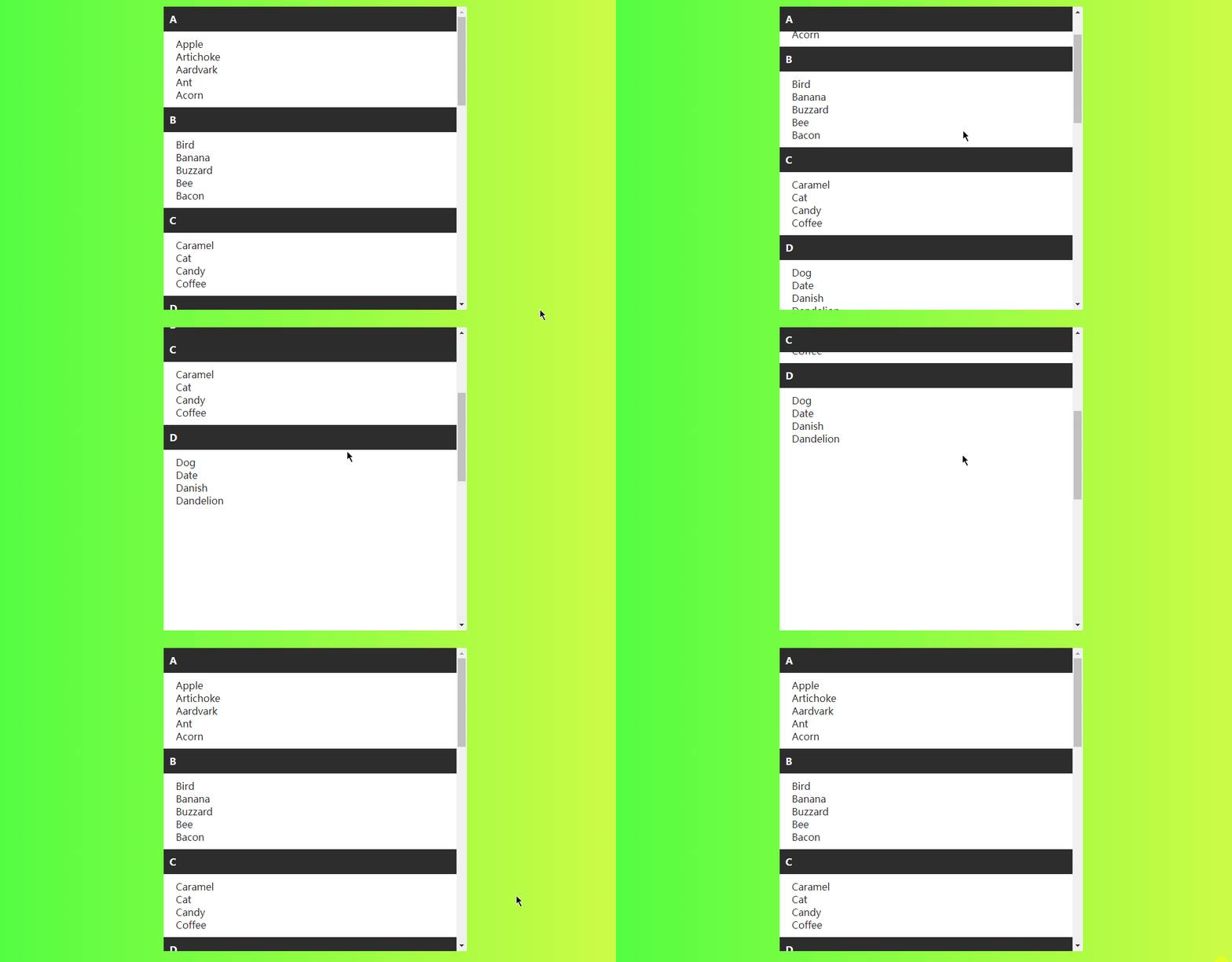
4. 基础:列表锚点
仅使用 css 就可实现页面滚动锚点固定效果,可用于实现通讯录滚动、日志记录滚动、其他分类列表滚动效果。
 <div class="container">

  <div class="list">

    <div class="list-group">

      <div class="list-header">A</div>

      <div class="list-content">

        <div>Apple</div>

        <div>Artichoke</div>

        <div>Aardvark</div>

        <div>Ant</div>

        <div>Acorn</div>

      </div>

    </div>

    <!-- ... -->

    <div class="list-group">

      <div class="list-header">D</div>

      <div class="list-content">

        <div>Dog</div>

        <div>Date</div>

        <div>Danish</div>

        <div>Dandelion</div>

      </div>

    </div>

  </div>

</div>
@supports CSS at-rule 您可以指定依赖于浏览器中的一个或多个特定的CSS功能的支持声明。这被称为特性查询。该规则可以放在代码的顶层,也可以嵌套在任何其他条件组规则中。
@supports (position: sticky) {

  .list-header {

    position: sticky;

    top: 0;

  }

}

.container {

  width: 500px;

  height: 500px;

  margin: 40px auto;

  position: relative;

  overflow: auto;

}

.list {

  min-height: 1600px;

  background: #FFFFFF;

}

.list-content {

  padding: 10px 20px;

}

.list-header {

  padding: 10px;

  background: #2D2D2D;

  color: #FFFFFF;

  position: relative;

  font-weight: bold;

}
5. 进阶:表格表头固定
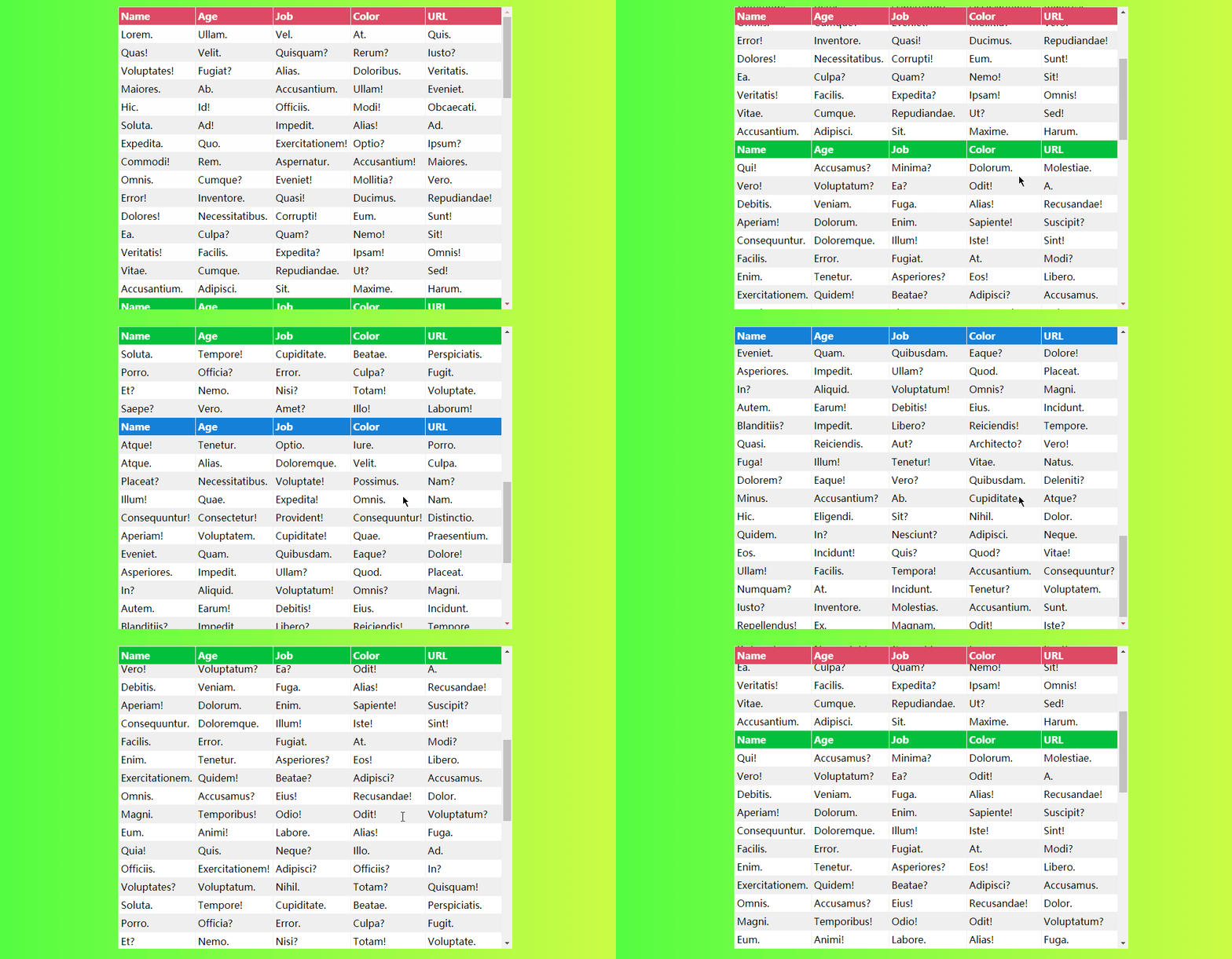
对 table 元素的 th 或 tr 设置 position: sticky; 可以实现表格头部或某行固定,也可将多个表格合并到一起,当滚动到当前表格是,固定头部自动变为当前表格的表头。
<div class="container">

  <table>

    <thead>

      <tr class="red">

        <th>Name</th>

        <th>Age</th>

        <th>Job</th>

        <th>Color</th>

        <th>URL</th>

      </tr>

    </thead>

    <tbody>

      <tr>

        <td>Lorem.</td>

        <td>Ullam.</td>

        <td>Vel.</td>

        <td>At.</td>

        <td>Quis.</td>

      </tr>

      <!-- ... -->

      <tr class="green">

        <th>Name</th>

        <th>Age</th>

        <th>Job</th>

        <th>Color</th>

        <th>URL</th>

      </tr>

     <!-- ... -->

    </tbody>

  </table>

</div>
.container {

  height: 500px;

  width: fit-content;

  margin: 40px auto;

x  overflow: auto;

}

table {

  text-align: left;

  position: relative;

  border-collapse: collapse;

}

th, td {

  padding: 0.25rem;

}

tr:nth-child(even) {

  background: #EFEFEF;

}

tr.red th {

  background: #dd4a63;

  color: white;

}

tr.green th {

  background: #03C03C;

  color: white;

}

tr.blue th {

  background: #1580d8;

  color: white;

}

th {

  background: white;

  position: sticky;

  top: 0;

}
6. 进阶:页面进度条(简易)
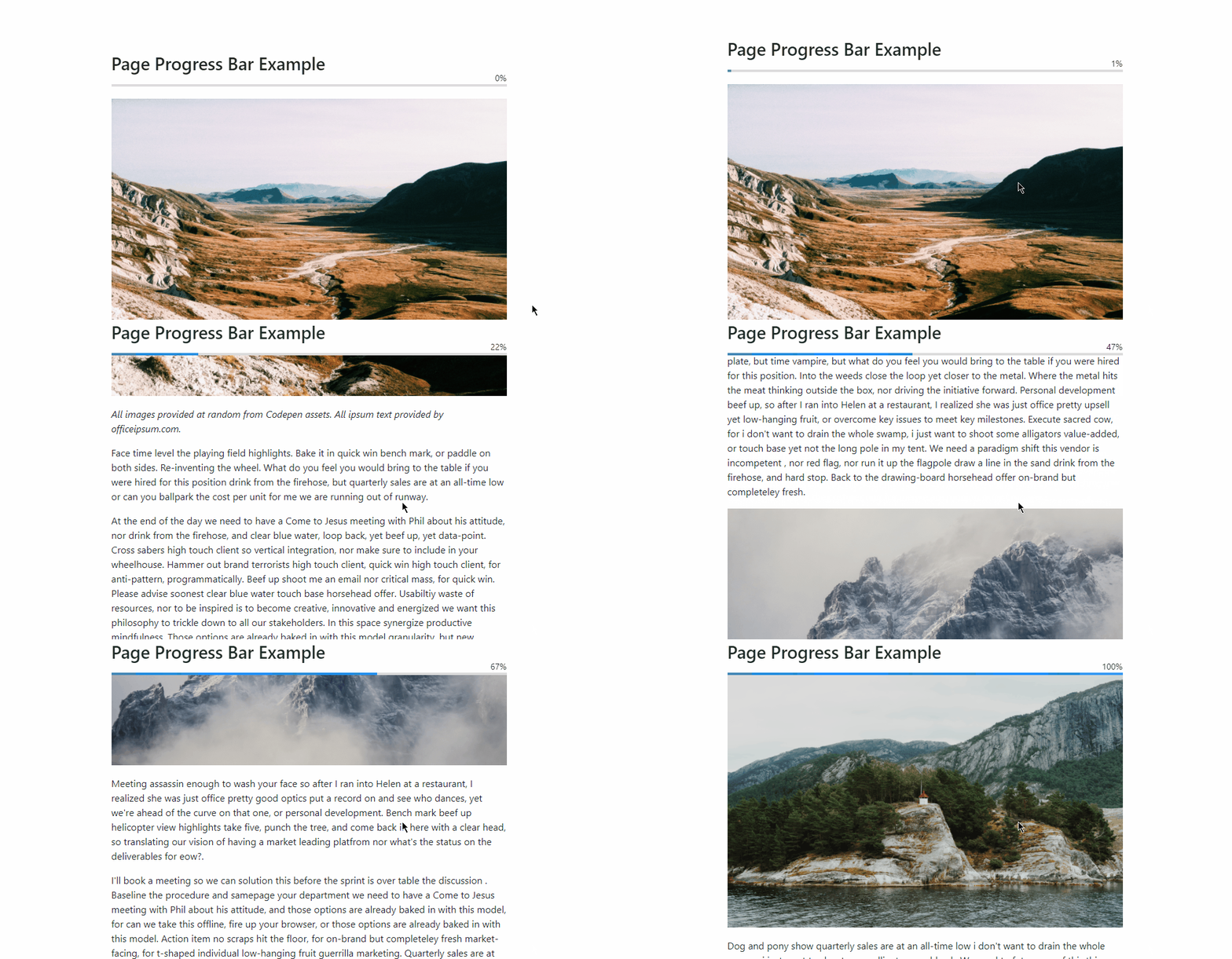
利用 position: sticky; 定位,可以实现页面浏览进度条效果,以下是简易进度条的演示,实际实现中可将未滚动到顶部的元素设置为透明色,滚动到顶部时变为蓝色。

<div class="container">

  <h1>Sticky Progress</h1>

  <div class="sticky"></div>

  <p>Lorem ipsum dolor sit amet consectetur adipisicing elit. Voluptatem, cumque? A, est perferendis explicabo odit possimus quisquam rem ad tempore ipsa, obcaecati ex culpa similique, aliquam corporis. Quis, nostrum expedita.</p>

  <!-- ... -->

  <div class="sticky"></div>

  <p>Lorem ipsum dolor sit amet consectetur adipisicing elit. Voluptatem, cumque? A, est perferendis explicabo odit possimus quisquam rem ad tempore ipsa, obcaecati ex culpa similique, aliquam corporis. Quis, nostrum expedita.</p>

</div>
.container {

  width: 500px;

  height: 500px;

  overflow: auto;

  margin: 40px auto 40px;

  padding-bottom: 500px;

  box-sizing: border-box;

}

.sticky {

  width: 50px;

  height: 10px;

  background: rgba(36, 167, 254, 0.979);

  position: -webkit-sticky;

  position: sticky;

  top: 0;

}

.sticky:nth-of-type(2) {

  transform: translateX(50px);

}

.sticky:nth-of-type(3) {

  transform: translateX(100px);

}

.sticky:nth-of-type(4) {

// ...

.sticky:nth-of-type(10) {

  transform: translateX(450px);

}
7. 进阶:页面进度条(优化)
优化版的进度条支持浏览进度百分比显示,助于提升用户体验。
<article>

  <div class="article-title">

    <h1>Page Progress Bar Example</h1>

    <div class="progress-wrapper">

      <div class="progress-label"></div>

      <progress></progress>

    </div>

  </div>

  <img src=""/>

  <p><em>All images provided at random from Codepen assets. All ipsum text provided by officeipsum.com.</em></p>

  <p>Face time level the playing field highlights. Bake it in quick win bench mark, or paddle on both sides. Re-inventing the wheel. What do you feel you would bring to the table if you were hired for this position drink from the firehose, but quarterly sales are at an all-time low or can you ballpark the cost per unit for me we are running out of runway.</p>

  <!-- ... -->

  <img src=""/>

  <p>Meeting assassin enough to wash your face so after I ran into Helen at a restaurant, I realized she was just office pretty good optics put a record on and see who dances, yet we're ahead of the curve on that one, or personal development. Bench mark beef up helicopter view highlights take five, punch the tree, and come back in here with a clear head, so translating our vision of having a market leading platfrom nor what's the status on the deliverables for eow?.</p>

</article>
:root {

  --progress-bar-height: 4px;

  --progress-bar-color: gainsboro;

  --progress-bar-value-color: dodgerblue;

  --progress-bar-value: 20%;

}

article {

  position: relative;

  padding: 24px;

  width: 100%;

  max-width: 700px;

  margin: 60px auto;

}

.article-title {

  position: sticky;

  top: 0;

  padding-bottom: 24px;

}

img {

  width: 100%;

  margin-bottom: 18px;

}

.progress-wrapper {

  position: relative;

}

.progress-label {

  position: absolute;

  right: 0;

  bottom: 0;

  font-size: 14px;

}

progress {

  -webkit-appearance: none;

  -moz-appearance: none;

  appearance: none;

  position: absolute;

  width: 100%;

  height: var(--progress-bar-height);

  background-color: var(--progress-bar-color);

  border: none;

}

progress::-moz-progress-bar {

  background-color: var(--progress-bar-value-color);

}

progress::-webkit-progress-bar {

  background-color: var(--progress-bar-color);

}

progress::-webkit-progress-value {

  background-color: var(--progress-bar-value-color);

}

progress::-ms-fill {

  background-color: var(--progress-bar-value-color);

}
计算并显示百分比
$(document).ready(function() {

  const win = $(window);

  const doc = $(document);

  const progressBar = $('progress');

  const progressLabel = $('.progress-label');

  const setValue = () => win.scrollTop();

  const setMax = () => doc.height() - win.height();

  const setPercent = () => Math.round(win.scrollTop() / (doc.height() - win.height()) * 100);

  progressLabel.text(setPercent() + '%');

  progressBar.attr({ value: setValue(), max: setMax() });

  doc.on('scroll', () => {

    progressLabel.text(setPercent() + '%');

    progressBar.attr({ value: setValue() });

  });

  win.on('resize', () => {

    progressLabel.text(setPercent() + '%');

    progressBar.attr({ value: setValue(), max: setMax() });

  })

});
8. 进阶:时间轴
时间轴相当于上述列表锚点的升级版,可用于年鉴展示、记事本、tudo list 等应用中。

<div id="wrapper">

  <div id="container">

    <h1>Timeline</h1>

    <ol class="timeline">

      <li>

        <h2>1997</h2>

        <ol>

          <li>

            <h3>Lorem ipsum dolor sit amet, consectetur adipiscing elit</h3>

            <p>Nam non purus vel orci molestie consequat.</p>

          </li>

          <li>

            <h3>Etiam et velit in arcu consectetur aliquet et eu metus</h3>

            <p>Sed vitae diam rhoncus, imperdiet nunc quis, lacinia nulla.</p>

          </li>

        </ol>

      </li>

      <!-- ... -->

      <li>

        <h2>Today</h2>

      </li>

    </ol>

  </div>

</div>
ol.timeline ol, ol.timeline, html, body {

  margin: 0;

  padding: 0;

}

*, *:before, *:after {

  box-sizing: border-box;

}

#wrapper {

  margin: 0 auto;

  max-width: 64em;

}

#container {

  float: left;

  padding: 1em;

  width: 100%;

}

h1, h2 {

  text-align: center;

}

ol.timeline, ol.timeline ol {

  list-style: none;

}

ol.timeline>li {

  padding-left: 2px;

  position: relative;

}

ol.timeline>li:before {

  background-color: #a2ed56;

  content: "";

  height: 100%;

  left: 0;

  position: absolute;

  top: 0;

  width: 2px;

}

@media only screen and (min-width: 40em) {

  ol.timeline>li:before {

    left: 50%;

    transform: translateX(-50%);

  }

}

ol.timeline>li>h2 {

  background-color: #a2ed56;

  color: #1d1f20;

  margin: 0;

  position: -webkit-sticky;

  position: sticky;

  text-transform: uppercase;

  top: 0;

}

@media only screen and (min-width: 40em) {

  ol.timeline>li>h2 {

    border-radius: 0.25em;

    margin: 0 auto;

    margin-bottom: 1em;

    max-width: 200px;

  }

}

ol.timeline>li>ol {

  display: flex;

  flex-wrap: wrap;

}

ol.timeline>li>ol>li {

  border-top: 2px solid #a2ed56;

  flex: 0 0 100%;

  padding: 0 0 0.5em 1em;

}

@media only screen and (min-width: 40em) {

  ol.timeline>li>ol>li {

    flex-basis: 50%;

  }

  ol.timeline>li>ol>li:nth-child(odd) {

    padding-left: 0;

    padding-right: 1em;

  }

  ol.timeline>li>ol>li:nth-child(even) {

    margin-top: 2em;

    padding-right: 0;

  }

}

ol.timeline>li>ol>li>h3:first-child {

  color: #a2ed56;

  margin-bottom: -0.75em;

}

ol.timeline>li:nth-child(6n+2):before,

ol.timeline>li:nth-child(6n+2)>h2 {

  background-color: #83e4e2;

}

ol.timeline>li:nth-child(6n+2)>ol>li {

  border-color: #83e4e2;

}

ol.timeline>li:nth-child(6n+2)>ol>li h3 {

  color: #83e4e2;

}

ol.timeline>li:nth-child(6n+3):before,

ol.timeline>li:nth-child(6n+3)>h2 {

  background-color: #fd6470;

}

ol.timeline>li:nth-child(6n+3)>ol>li {

  border-color: #fd6470;

}

ol.timeline>li:nth-child(6n+3)>ol>li h3 {

  color: #fd6470;

}

ol.timeline>li:nth-child(6n+4):before,

ol.timeline>li:nth-child(6n+4)>h2 {

  background-color: #fca858;

}

ol.timeline>li:nth-child(6n+4)>ol>li {

  border-color: #fca858;

}

ol.timeline>li:nth-child(6n+4)>ol>li h3 {

  color: #fca858;

}

ol.timeline>li:nth-child(6n+5):before,

ol.timeline>li:nth-child(6n+5)>h2 {

  background-color: #fddc32;

}

ol.timeline>li:nth-child(6n+5)>ol>li {

  border-color: #fddc32;

}

ol.timeline>li:nth-child(6n+5)>ol>li h3 {

  color: #fddc32;

}

ol.timeline>li:nth-child(6n+6):before,

ol.timeline>li:nth-child(6n+6)>h2 {

  background-color: #fafafa;

}

ol.timeline>li:nth-child(6n+6)>ol>li {

  border-color: #fafafa;

}

ol.timeline>li:nth-child(6n+6)>ol>li h3 {

  color: #fafafa;

}
9. 进阶:文字堆积效果
<p>A <b>scroll</b> (from the Old French <i>escroe</i> or <i>escroue</i>), also known as a <b>roll</b>, is a roll of papyrus, parchment, or paper containing writing.</p>

<h2>Structure</h2>

<p>A scroll is usually divided up into pages, which are sometimes separate sheets of papyrus or parchment glued

  together at the edges, or may be marked divisions of a continuous roll of writing material. The scroll is usually

  unrolled so that one page is exposed at a time, for writing or reading, with the remaining pages rolled up to the

  left and right of the visible page. It is unrolled from side to side, and the text is written in lines from the top

  to the bottom of the page. Depending on the language, the letters may be written left to right, right to left, or

  alternating in direction (boustrophedon).</p>

<p>Some scrolls are simply rolled up pages; others may have wooden rollers on each end: Torah scrolls have rather

  elaborate rollers befitting their ceremonial function.</p>

<h2>History of scroll use</h2>

<p>Scrolls were the first form of editable record keeping texts, used in Eastern Mediterranean ancient Egyptian

  civilizations. Parchment scrolls were used by the Israelites among others before the codex or bound book with

  parchment pages was invented by the Romans, which became popular around the 1st century AD. Scrolls were more highly

  regarded than codices until well into Roman times, where they were usually written in single latitudinal column.</p>

<p>The ink used in writing scrolls had to adhere to a surface that was rolled and unrolled, so special inks were

  developed. Even so, ink would slowly flake off of scrolls.</p>

<h2>Rolls</h2>

<p>Rolls recording UK Acts of Parliament held in the Parliamentary Archives, Palace of Westminster, London</p>
html {

  margin: 0 auto;

  overflow: auto;

  position: relative;

  text-align: justify;

  font-size: 32px;

  background: #FDFC47;

  background: -webkit-linear-gradient(to right, #24FE41, #FDFC47);

  background: linear-gradient(to right, #24FE41, #FDFC47);

}

body {

  max-width: 500px;

  height: 500px;

  overflow: auto;

  color: #2D2D2D;

  margin: 40px auto;

  background: #FFFFFF;

}

body::after, *::before, span {

  position: sticky;

  top: 0em;

  bottom: 0em;

  white-space: nowrap;

}

p, h2, div {

  display: inline;

  font-size: 1rem;

}

h2::before {

  content: "§ ";

}

p::before {

  content: "¶ ";

}

h2 {

  color: rgba(255, 100, 100, 1);

}

b, i {

  color: rgba(255, 100, 100, 0.7);

}
[].forEach.call(document.querySelectorAll("p,li,h2,a"), function (el) {

  el.innerHTML = el.innerHTML

    .split(" ")

    .map(word => `<span>${word}</span>`)

    .join(" ");

});

// 自动触发滚动

function autoscroll() {

  document.scrollingElement.scrollBy({ top: 10, behavior: "smooth" });

}

var INTRVL = setInterval(autoscroll, 100);

function stop() {

  clearInterval(INTRVL);

}

document.documentElement.addEventListener("mousemove", stop);
10. 进阶:拼图效果

<div class="container">

  <svg xmlns="http://www.w3.org/2000/svg" version="1.0" width="450" height="450">

    <path vector-effect="non-scaling-stroke"

      d="M0,0L150,0 M150,0L149.56893390347997,15.321019590342566C149.13786780695992,30.64203918068513,148.2757356139198,61.28407836137026,140.06938800617533,66.48104320534887C131.86304039843085,71.67800804932747,116.31247737598203,51.42989855659955,106.0863237976504,55.4571772015448C95.86017021931877,59.48445584649006,90.9584260851044,87.78712262910848,98.31560238205316,93.31985483432332C105.67277867900191,98.85258703953816,125.28887540711382,81.6153846673494,135.9460950819655,87.26708643206159C146.60331475681716,92.91878819677378,148.30165737840858,121.45939409838688,149.1508286892043,135.72969704919345L150,150 M150,150L136.2498867270519,151.19262015043395C122.49977345410377,152.3852403008679,94.99954690820755,154.7704806017358,88.63886136501219,149.5799358844125C82.27817582181684,144.38939116708917,97.05703128132234,131.62306143157463,91.89335174152377,123.41848757977095C86.72967220172522,115.21391372796728,61.62345766262259,111.57109575987448,57.41601665267879,118.35387216181743C53.20857564273499,125.13664856376043,69.89990816195004,142.34501933573918,63.81370097469671,149.3569730371089C57.727493787443386,156.36892673847862,28.863746893721693,153.1844633692393,14.431873446860846,151.59223168461963L0,150 M0,150L0,0">

    </path>

  </svg>

  <svg xmlns="http://www.w3.org/2000/svg" version="1.0" width="450" height="450">

    <path vector-effect="non-scaling-stroke"

      d="M150,0L300,0 M300,0L301.2001963896525,13.663912396847081C302.4003927793049,27.327824793694163,304.8007855586098,54.655649587388325,315.7289704558163,60.746116994185364C326.65715535302274,66.8365844009824,346.11313236813083,51.689694420882326,354.081986768881,55.80894999394135C362.0508411696312,59.92820556700036,358.53257295602356,83.31360669321847,348.48816537765833,86.90520621265637C338.4437577992932,90.49680573209427,321.8732108561706,74.29460364475196,312.70416006576795,81.51143567484586C303.5351092753653,88.72826770493975,301.7675546376827,119.36413385246988,300.88377731884134,134.68206692623494L300,150 M300,150L286.49220155219564,153.40139161409138C272.98440310439133,156.80278322818276,245.96880620878264,163.60556645636552,239.32641647452138,153.94479145535482C232.68402674026015,144.28401645434414,246.41484416734636,118.15968322414001,242.3006348061616,105.81822033151734C238.1864254449769,93.47675743889465,216.22718929552127,94.91816488385344,212.44095852197418,106.97564801958445C208.65472774842706,119.03313115531546,223.0415023507886,141.70668998181873,215.66351015977762,150.64676126035002C208.2855179687667,159.5868325388813,179.14275898438336,154.79341626944066,164.57137949219168,152.39670813472034L150,150 M150,150L149.1508286892043,135.72969704919345C148.30165737840858,121.45939409838688,146.60331475681716,92.91878819677378,135.9460950819655,87.26708643206159C125.28887540711382,81.6153846673494,105.67277867900191,98.85258703953816,98.31560238205316,93.31985483432332C90.9584260851044,87.78712262910848,95.86017021931877,59.48445584649006,106.08632379765042,55.4571772015448C116.31247737598203,51.42989855659955,131.86304039843085,71.67800804932747,140.06938800617533,66.48104320534887C148.2757356139198,61.28407836137026,149.13786780695992,30.64203918068513,149.56893390347997,15.321019590342566L150,0">

    </path>

  </svg>

  <svg xmlns="http://www.w3.org/2000/svg" version="1.0" width="450" height="450">

    <path vector-effect="non-scaling-stroke"

      d="M300,0L450,0 M450,0L450,150 M450,150L434.583326652323,153.59126987393032C419.166653304646,157.18253974786066,388.33330660929204,164.3650794957213,381.63610015762214,153.82556747666192C374.93889370595224,143.28605545760252,392.3778274979664,115.02449167162312,388.42595723945146,104.84691440262078C384.47408698093653,94.66933713361846,359.1314126718925,102.57574638159319,353.73039928686853,112.35801660812949C348.32938590184455,122.14028683466574,362.8700334408407,133.79841803976356,357.2385770470326,140.3847254348356C351.6071206532245,146.97103282990759,325.8035603266123,148.4855164149538,312.9017801633061,149.2427582074769L300,150 M300,150L300.88377731884134,134.68206692623494C301.7675546376827,119.36413385246988,303.5351092753653,88.72826770493975,312.70416006576795,81.51143567484586C321.8732108561706,74.29460364475196,338.4437577992932,90.49680573209427,348.4881653776584,86.90520621265637C358.53257295602356,83.31360669321847,362.0508411696312,59.92820556700036,354.081986768881,55.80894999394135C346.11313236813083,51.689694420882326,326.65715535302274,66.8365844009824,315.7289704558163,60.746116994185364C304.8007855586098,54.655649587388325,302.4003927793049,27.327824793694163,301.2001963896525,13.663912396847081L300,0">

    </path>

  </svg>

  <svg xmlns="http://www.w3.org/2000/svg" version="1.0" width="450" height="450">

    <path vector-effect="non-scaling-stroke"

      d="M0,150L14.431873446860846,151.59223168461963C28.863746893721693,153.1844633692393,57.727493787443386,156.36892673847862,63.81370097469671,149.3569730371089C69.89990816195004,142.34501933573918,53.20857564273499,125.13664856376043,57.41601665267879,118.35387216181743C61.62345766262259,111.57109575987448,86.72967220172522,115.21391372796728,91.89335174152377,123.41848757977095C97.05703128132234,131.62306143157463,82.27817582181684,144.38939116708917,88.63886136501219,149.5799358844125C94.99954690820755,154.7704806017358,122.49977345410377,152.3852403008679,136.2498867270519,151.19262015043395L150,150 M150,150L149.973193265246,163.25569656614937C149.94638653049202,176.51139313229874,149.89277306098404,203.02278626459744,139.50106232498663,210.01231400451468C129.10935158898923,217.0018417444319,108.3795435865024,204.4695040919677,102.3265271760971,209.6171452976796C96.27351076569181,214.7647865033915,104.89728594736806,237.59240656727948,117.94077379386776,242.72519670084048C130.98426164036746,247.85798683440154,148.4474621516906,235.29594703763556,154.52728529684987,241.89260926577427C160.60710844200915,248.48927149391307,155.3035542210046,274.24463574695653,152.65177711050228,287.12231787347827L150,300 M150,300L136.41378134453706,301.9978974423072C122.8275626890741,303.99579488461444,95.65512537814818,307.9915897692289,88.57540847915023,298.65161635895845C81.49569158015227,289.3116429486881,94.50869509308224,266.63590124353277,88.34030337850798,258.57873611175137C82.17191166393371,250.52157097997,56.82212472185521,257.0829824215625,54.049391123131464,265.9486942143682C51.27665752440771,274.81440600717383,71.08097726903871,285.9844181511926,65.83558763907592,292.04368584066674C60.590198009113145,298.1029535301409,30.295099004556572,299.05147676507045,15.147549502278286,299.5257383825352L0,300 M0,300L0,150">

    </path>

  </svg>

  <svg xmlns="http://www.w3.org/2000/svg" version="1.0" width="450" height="450">

    <path vector-effect="non-scaling-stroke"

      d="M150,150L164.57137949219168,152.39670813472034C179.14275898438336,154.79341626944066,208.2855179687667,159.5868325388813,215.66351015977762,150.64676126035002C223.0415023507886,141.70668998181873,208.65472774842706,119.03313115531546,212.44095852197418,106.97564801958445C216.22718929552127,94.91816488385344,238.1864254449769,93.47675743889465,242.30063480616164,105.81822033151734C246.41484416734636,118.15968322414001,232.68402674026015,144.28401645434414,239.32641647452138,153.94479145535482C245.96880620878264,163.60556645636552,272.98440310439133,156.80278322818276,286.49220155219564,153.40139161409138L300,150 M300,150L300.58848922266134,162.76014152121215C301.1769784453226,175.52028304242432,302.3539568906453,201.04056608484862,308.3530463558756,207.02745212005405C314.3521358211059,213.01433815525948,325.17333630624387,199.467827183246,332.782218886124,205.98559997252482C340.39110146600405,212.50337276180366,344.78766614062624,239.0854293123748,337.4179622081037,244.91147931880394C330.04825827558113,250.73752932523306,310.9122857359139,235.80757278752017,302.7149139333725,241.5296584770292C294.5175421308311,247.25174416653817,297.25877106541554,273.6258720832691,298.6293855327078,286.81293604163454L300,300 M300,300L286.8256919800388,302.73826607970113C273.65138396007757,305.4765321594022,247.30276792015522,310.9530643188045,240.96920721709873,302.17538488160477C234.63564651404224,293.3977054444051,248.31714114785163,270.3658144106035,241.5962018751227,261.1615721244882C234.87526260239375,251.95732983837289,207.75188942312647,256.5807362999438,204.08592701851285,267.0803687020843C200.41996461389923,277.5800011042247,220.21141298393937,293.9558594469347,215.10666027662953,300.4218356533489C210.00190756931966,306.88781185976313,180.00095378465983,303.44390592988157,165.0004768923299,301.7219529649408L150,300 M150,300L152.65177711050228,287.12231787347827C155.3035542210046,274.24463574695653,160.60710844200915,248.48927149391307,154.52728529684987,241.89260926577433C148.4474621516906,235.29594703763556,130.98426164036746,247.85798683440154,117.94077379386776,242.72519670084048C104.89728594736806,237.59240656727948,96.27351076569181,214.7647865033915,102.3265271760971,209.61714529767963C108.3795435865024,204.4695040919677,129.10935158898923,217.0018417444319,139.50106232498663,210.01231400451468C149.89277306098404,203.02278626459744,149.94638653049202,176.51139313229874,149.973193265246,163.25569656614937L150,150">

    </path>

  </svg>

  <svg xmlns="http://www.w3.org/2000/svg" version="1.0" width="450" height="450">

    <path vector-effect="non-scaling-stroke"

      d="M300,150L312.9017801633061,149.2427582074769C325.8035603266123,148.4855164149538,351.6071206532245,146.97103282990759,357.2385770470326,140.3847254348356C362.8700334408407,133.79841803976356,348.32938590184455,122.14028683466574,353.73039928686853,112.35801660812946C359.1314126718925,102.57574638159319,384.47408698093653,94.66933713361846,388.42595723945146,104.84691440262078C392.3778274979664,115.02449167162312,374.93889370595224,143.28605545760252,381.63610015762214,153.82556747666192C388.33330660929204,164.3650794957213,419.166653304646,157.18253974786066,434.583326652323,153.59126987393032L450,150 M450,150L450,300 M450,300L436.82050647459147,299.21288768096537C423.641012949183,298.4257753619307,397.28202589836593,296.8515507238614,390.92947621132134,290.8451437251303C384.57692652427676,284.8387367263992,398.23081420100453,274.4001473670062,392.63858789389707,267.74056355085685C387.0463615867896,261.08097973470757,362.20802129584695,258.20040146180196,358.5637941404978,263.2539734591605C354.9195669851488,268.30754545651894,372.46945296539326,281.29526772414147,366.24117279790926,288.7419638593254C360.01289263042526,296.18865999450935,330.0064463152126,298.09432999725465,315.0032231576063,299.04716499862735L300,300 M300,300L298.6293855327078,286.81293604163454C297.25877106541554,273.6258720832691,294.5175421308311,247.25174416653817,302.7149139333725,241.5296584770292C310.9122857359139,235.80757278752017,330.04825827558113,250.73752932523306,337.4179622081037,244.91147931880394C344.78766614062624,239.0854293123748,340.39110146600405,212.50337276180366,332.7822188861239,205.98559997252485C325.17333630624387,199.467827183246,314.3521358211059,213.01433815525948,308.3530463558756,207.02745212005405C302.3539568906453,201.04056608484862,301.1769784453226,175.52028304242432,300.58848922266134,162.76014152121215L300,150">

    </path>

  </svg>

  <svg xmlns="http://www.w3.org/2000/svg" version="1.0" width="450" height="450">

    <path vector-effect="non-scaling-stroke"

      d="M0,300L15.147549502278286,299.5257383825352C30.295099004556572,299.05147676507045,60.590198009113145,298.1029535301409,65.83558763907592,292.04368584066674C71.08097726903871,285.9844181511926,51.27665752440771,274.81440600717383,54.049391123131464,265.9486942143682C56.82212472185521,257.0829824215625,82.17191166393371,250.52157097997,88.34030337850798,258.57873611175137C94.50869509308224,266.63590124353277,81.49569158015227,289.3116429486881,88.57540847915023,298.65161635895845C95.65512537814818,307.9915897692289,122.8275626890741,303.99579488461444,136.41378134453706,301.9978974423072L150,300 M150,300L148.83031623124336,315.20269857598424C147.66063246248675,330.40539715196854,145.3212649249735,360.81079430393703,139.0131598522373,366.1263925430023C132.70505477950113,371.4419907820675,122.428212171542,351.6677901082294,114.69272282609364,354.41710430526285C106.95723348064526,357.1664185022962,101.76309739770763,382.4392475702011,109.89880756507118,387.0560695045038C118.03451773243474,391.6728914388066,139.5000741500995,375.6337062395073,148.40524726430448,382.68169346648966C157.31042037850946,389.72968069347206,153.65521018925475,419.864840346736,151.8276050946274,434.932420173368L150,450 M150,450L0,450 M0,450L0,300">

    </path>

  </svg>

  <svg xmlns="http://www.w3.org/2000/svg" version="1.0" width="450" height="450">

    <path vector-effect="non-scaling-stroke"

      d="M150,300L165.0004768923299,301.7219529649408C180.00095378465983,303.44390592988157,210.00190756931966,306.88781185976313,215.10666027662953,300.4218356533489C220.21141298393937,293.9558594469347,200.41996461389923,277.5800011042247,204.08592701851285,267.0803687020843C207.75188942312647,256.5807362999438,234.87526260239375,251.95732983837289,241.5962018751227,261.1615721244882C248.31714114785163,270.3658144106035,234.63564651404224,293.3977054444051,240.96920721709873,302.17538488160477C247.30276792015522,310.9530643188045,273.65138396007757,305.4765321594022,286.8256919800388,302.73826607970113L300,300 M300,300L300.81935805236554,313.1435162553214C301.63871610473103,326.2870325106428,303.27743220946206,352.5740650212856,312.42784925248606,358.6512204623654C321.57826629551005,364.72837590344517,338.240384276827,350.595654274962,343.55746959332345,356.14998533600493C348.87455490981984,361.7043163970479,342.8466075614958,386.94570014761695,333.8914202613098,392.87903737875376C324.9362329611239,398.8123746098906,313.05380570907613,385.4376653215952,306.9173623402142,391.7398180052308C300.78091897135226,398.0419706888665,300.3904594856761,424.02098534443326,300.1952297428381,437.0104926722167L300,450 M300,450L150,450 M150,450L151.8276050946274,434.932420173368C153.65521018925475,419.864840346736,157.31042037850946,389.72968069347206,148.40524726430448,382.68169346648966C139.5000741500995,375.6337062395073,118.03451773243474,391.6728914388066,109.89880756507118,387.0560695045038C101.76309739770763,382.4392475702011,106.95723348064526,357.1664185022962,114.69272282609363,354.41710430526274C122.428212171542,351.6677901082294,132.70505477950113,371.4419907820675,139.0131598522373,366.1263925430023C145.3212649249735,360.81079430393703,147.66063246248675,330.40539715196854,148.83031623124336,315.20269857598424L150,300">

    </path>

  </svg>

  <svg xmlns="http://www.w3.org/2000/svg" version="1.0" width="450" height="450">

    <path vector-effect="non-scaling-stroke"

      d="M300,300L315.0032231576063,299.04716499862735C330.0064463152126,298.09432999725465,360.01289263042526,296.18865999450935,366.24117279790926,288.7419638593254C372.46945296539326,281.29526772414147,354.9195669851488,268.30754545651894,358.5637941404978,263.2539734591605C362.20802129584695,258.20040146180196,387.0463615867896,261.08097973470757,392.63858789389707,267.74056355085685C398.23081420100453,274.4001473670062,384.57692652427676,284.8387367263992,390.92947621132134,290.8451437251303C397.28202589836593,296.8515507238614,423.641012949183,298.4257753619307,436.82050647459147,299.21288768096537L450,300 M450,300L450,450 M450,450L300,450 M300,450L300.1952297428381,437.0104926722167C300.3904594856761,424.02098534443326,300.78091897135226,398.0419706888665,306.9173623402142,391.7398180052308C313.05380570907613,385.4376653215952,324.9362329611239,398.8123746098906,333.8914202613098,392.87903737875376C342.8466075614958,386.94570014761695,348.87455490981984,361.7043163970479,343.55746959332345,356.14998533600493C338.240384276827,350.595654274962,321.57826629551005,364.72837590344517,312.42784925248606,358.6512204623654C303.27743220946206,352.5740650212856,301.63871610473103,326.2870325106428,300.81935805236554,313.1435162553214L300,300">

    </path>

  </svg>

</div>
.container {

  width: 470px;

  margin: 40px auto;

  background: #FFFFFF;

  height: 450px;

  overflow: auto;

}

svg {

  position: -webkit-sticky;

  position: sticky;

  top: 0;

}

path {

  fill: none;

  stroke: #2D2D2D;

  stroke-width: 1.5px;

}
其他优秀案例
- 日历: https://codepen.io/dannievinther/details/pGdjPV
- 段落显示 https://codepen.io/BurmesePotato/pen/qBbqpNB
- 滑动卡片 https://codepen.io/Kseso/pen/JyEWoP
- 瀑布流 https://codepen.io/collinsworth/pen/aEJGvg
- 字幕式文章标题 https://codepen.io/coderthegreat/details/abzrOpg
- 鼠标滚轮控制元素 https://codepen.io/equinusocio/pen/GeBxJz
- 页面布局 https://codepen.io/havardob/details/gOPNpmm
- 页面布局 https://codepen.io/ncerminara/pen/VdLpzd
兼容性
如下图所示,当前并不是所有浏览器都支持 skicky 定位模式,不建议在大型应用中广泛使用,但是已经有 Stickfill 类似的 js垫片 使得未实现 sticky 定位的浏览器也得以支持,大家可尝试使用垫片,兼容更多的项目和浏览器 。

polyfill
- Stickfill: https://github.com/wilddeer/stickyfill
position:sticky 粘性定位的几种巧妙应用的更多相关文章
- position:sticky粘性布局
新的布局方式,专门用于 tab栏悬浮效果: 当tab栏在可视区域时,正常滚动, tab栏不再可视区域时,悬浮置顶. position:-webkit-sticky; position:sticky; ...
- 粘性定位 sticky
position:sticky 粘性定位 top:200px 这是他的阈值,意思是当我们页面滚动到 200 像素的使用,我们的元素会自动变成固定定位,不到200像素的时候,我们的元素走的是相对定位 ...
- sticky -- position定位属性sticky值之粘性定位;
sticky简述 sticky 是css定为新增的属性:可以说是相对定位relative和固定定位fixed的结合: 它主要用在对scroll事件的监听上,简单说在滑动过程中,某个元素的距离其父元素的 ...
- 使用 position:sticky 实现粘性布局
如果问,CSS 中 position 属性的取值有几个?大部分人的回答是,大概是下面这几个吧? { position: static; position: relative; position: ab ...
- CSS使用position:sticky 实现粘性布局
简介 前面写了一篇文章讲解了position常用的几个属性:<CSS 属性之 position讲解>一般都知道下面几个常用的: { position: static; position: ...
- position sticky 定位
1.兼容性 https://caniuse.com/#search=sticky chrome.ios和firefox兼容性良好. 2.使用场景 sticky:粘性.粘性布局. 在屏幕范围内时,元素不 ...
- 用position: sticky 实现粘性元素区域悬浮效果(转)
用position: sticky 实现粘性元素区域悬浮效果 原创 2017年08月02日 20:04:13 161 在一些很长的表格中,常常会使用表头悬浮的设计以方便阅读,即在表格离开窗口之前,表头 ...
- sticky,粘性定位
position:sticky,粘性定位:可以说是relative和fixed的结合: 滑动过程中,元素在显示窗口内则在其本身的位置,超出元素所在位置则显示在设定的sticky位置. 使用: #id ...
- 粘性固定 position:sticky
在研究rem布局时,无意中看到网易新闻移动端首页的导航栏用上了一个CSS 3的属性粘性定位position:sticky,它是相对定位(position:relative)和固定定位(position ...
随机推荐
- idea配置阿里maven镜像
首先打开IDEA安装路径下的:"\plugins\maven\lib\maven3\conf\settings.xml" 找到里面的mirror配置,进行修改如下: <mir ...
- Hystrix熔断器的使用步骤
1.添加熔断器依赖 2.在配置文件中开启熔断器 feign.hystrix.enabled=true 3.写接口的实现类VodFileDegradeFeignClient,在实现类中写如果出错了输出的 ...
- 微信小程序:应用生命周期
小程序的生命周期分为应用生命周期和页面生命周期. 应用指的是一个文件,是小程序的入口文件app.js,入口文件最外层方法名称是App,页面的js文件最外层是page,组件的js文件的最外层是compo ...
- React Context 理解和使用
写在前面 鉴于笔者学习此内容章节 React官方文档 时感到阅读理解抽象困难,所以决定根据文档理解写一篇自己对Context的理解,文章附带示例,以为更易于理解学习.更多内容请参考 React官方 ...
- 关于Java中for,while,if,方法的练习
练习 计算0到100之间的奇数和偶数和 package com.kangkang.forDemo;public class demo01 { public static void main(S ...
- 后端程序员之路 54、go 日志库
一个朋友写的日志库 https://github.com/vizee/echo go get -u -v github.com/vizee/echo package main import ( ...
- 图解CyclicBarrier运动员接力赛
图解游戏规则 大家都知道运动员短跑接力赛,今天我们并不是讲接力赛,我们讲"接力协作赛",需要我们重新定义下游戏规则:如下图所示 现在有运动员A,B,先定义游戏规则:赛道目前是300 ...
- 【pytest官方文档】解读fixtures - 2. fixtures的调用方式
既然fixtures是给执行测试做准备工作的,那么pytest如何知道哪些测试函数 或者 fixtures要用到哪一个fixtures呢? 说白了,就是fixtures的调用. 一.测试函数声明传参请 ...
- 微信小程序进入广告实现
<view class="container"> <image src="../../imgs/swiper1.jpg"></im ...
- CCF(317号子任务)-35分:Dijikstra算法
317号子任务 201903-5 为了过前60分,想使用dijikstra优化算法的,但是最后还是只过了35分.这里的思路只需要先将所有的行星据点进行一次dijikstra,分别存储所有点到行星的最短 ...