
Linux_部署日志服务器
一、部署日志服务
1、查看自己的系统是否安装(一般默认安装)
[root@localhost ~]# rpm -qa | grep rsyslog

rsyslog-8.37.0-13.el8.x86_64
如果没安装,使用yum安装:
[root@localhost ~]# yum list rsyslog

Updating Subscription Management repositories.

Unable to read consumer identity

This system is not registered to Red Hat Subscription Management. You can use subscription-manager to register.

appstream                                                                                                                                  3.1 MB/s | 3.2 kB     00:00

baseos                                                                                                                                     2.7 MB/s | 2.8 kB     00:00

Installed Packages

rsyslog.x86_64

[root@localhost ~]# yum install -y rsyslog

...........
2、编辑/etc/rsyslog.conf配置文件:
- 编辑配置文件(/etc/rsyslog.conf) , 将下列内容前面的注释去掉,然后重启rsyslog服务即可:
- #module(load="imudp")
- #input(type="imudp" port="514")
- #module(load="imtcp")
- #input(type="imtcp" port="514")
[root@localhost ~]# vim /etc/rsyslog.conf

...........

# Provides UDP syslog reception

# for parameters see http://www.rsyslog.com/doc/imudp.html

module(load="imudp") # needs to be done just once

input(type="imudp" port="514")

# Provides TCP syslog reception

# for parameters see http://www.rsyslog.com/doc/imtcp.html

module(load="imtcp") # needs to be done just once

input(type="imtcp" port="514")

............
3、重启rsyslog服务
[root@localhost ~]# systemctl restart rsyslog

[root@localhost ~]# netstat -tunlp | grep rsyslog

tcp        0      0 0.0.0.0:514             0.0.0.0:*               LISTEN      1814/rsyslogd

tcp6       0      0 :::514                  :::*                    LISTEN      1814/rsyslogd

udp        0      0 0.0.0.0:514             0.0.0.0:*                           1814/rsyslogd

udp6       0      0 :::514                  :::*                                1814/rsyslogd

 //查看rsyslog状态

[root@localhost ~]# systemctl status rsyslog

● rsyslog.service - System Logging Service

   Loaded: loaded (/usr/lib/systemd/system/rsyslog.service; enabled; vendor preset: enabled)

   Active: active (running) since Sun 2020-08-23 00:57:37 CST; 31s ago

     Docs: man:rsyslogd(8)

           http://www.rsyslog.com/doc/

 Main PID: 1814 (rsyslogd)

    Tasks: 9 (limit: 11340)

   Memory: 3.7M

   CGroup: /system.slice/rsyslog.service

           └─1814 /usr/sbin/rsyslogd -n

Aug 23 00:57:37 localhost.localdomain systemd[1]: Stopped System Logging Service.

Aug 23 00:57:37 localhost.localdomain systemd[1]: Starting System Logging Service...

Aug 23 00:57:37 localhost.localdomain rsyslogd[1814]: environment variable TZ is not set, auto correcting this to TZ=/etc/localtime  [v8.37.0-13.el8 try http://www.rsyslo>

Aug 23 00:57:37 localhost.localdomain rsyslogd[1814]:  [origin software="rsyslogd" swVersion="8.37.0-13.el8" x-pid="1814" x-info="http://www.rsyslog.com"] start

Aug 23 00:57:37 localhost.localdomain systemd[1]: Started System Logging Service.
4、测试
- 首先进入/var/log/secure下监控日志状态
[root@localhost ~]# tail -f /var/log/secure

[root@localhost ~]# tail -f /var/log/secure

Aug 22 21:36:16 localhost sshd[1051]: Server listening on :: port 22.

Aug 22 21:36:16 localhost polkitd[1019]: Loading rules from directory /etc/polkit-1/rules.d

Aug 22 21:36:16 localhost polkitd[1019]: Loading rules from directory /usr/share/polkit-1/rules.d

Aug 22 21:36:16 localhost polkitd[1019]: Finished loading, compiling and executing 2 rules

Aug 22 21:36:16 localhost polkitd[1019]: Acquired the name org.freedesktop.PolicyKit1 on the system bus

Aug 22 21:36:37 localhost sshd[1519]: Accepted password for root from 192.168.121.1 port 2335 ssh2

Aug 22 21:36:37 localhost systemd[1522]: pam_unix(systemd-user:session): session opened for user root by (uid=0)

Aug 22 21:36:38 localhost sshd[1519]: pam_unix(sshd:session): session opened for user root by (uid=0)

Aug 23 01:01:41 localhost sshd[1843]: Accepted password for root from 192.168.121.1 port 11157 ssh2

Aug 23 01:01:41 localhost sshd[1843]: pam_unix(sshd:session): session opened for user root by (uid=0)

 //持续监控
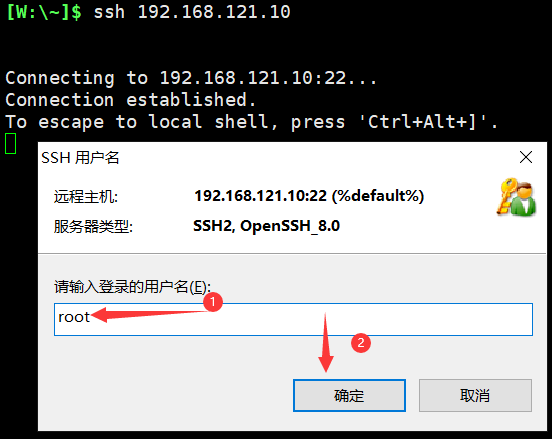
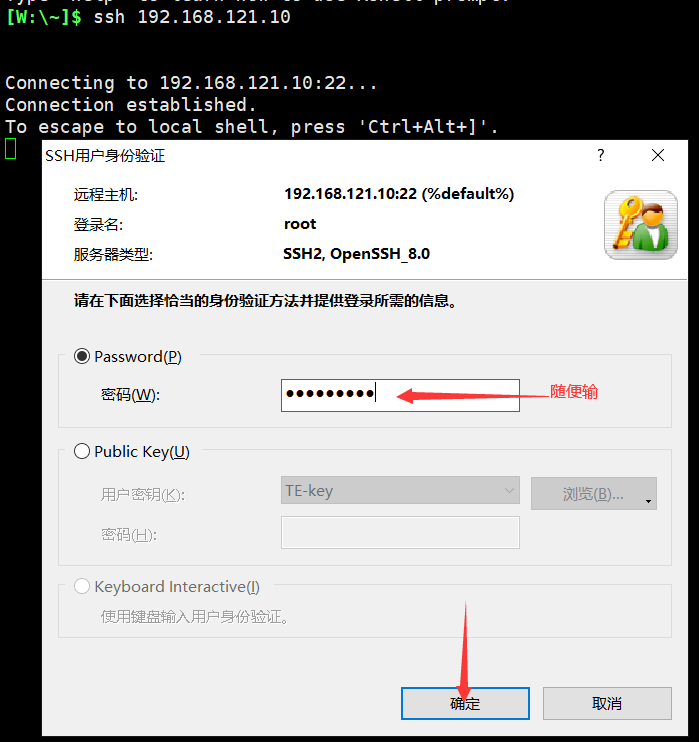
- 使用远程登陆,故意输入错误的密码,看该文件是否接受到错误的日志消息
- 查看/var/log/secre文件是否收到错误的日志信息
[root@localhost ~]# tail -f /var/log/secure

Aug 22 21:36:16 localhost polkitd[1019]: Loading rules from directory /usr/share/polkit-1/rules.d

Aug 22 21:36:16 localhost polkitd[1019]: Finished loading, compiling and executing 2 rules

Aug 22 21:36:16 localhost polkitd[1019]: Acquired the name org.freedesktop.PolicyKit1 on the system bus

Aug 22 21:36:37 localhost sshd[1519]: Accepted password for root from 192.168.121.1 port 2335 ssh2

Aug 22 21:36:37 localhost systemd[1522]: pam_unix(systemd-user:session): session opened for user root by (uid=0)

Aug 22 21:36:38 localhost sshd[1519]: pam_unix(sshd:session): session opened for user root by (uid=0)

Aug 23 01:01:41 localhost sshd[1843]: Accepted password for root from 192.168.121.1 port 11157 ssh2

Aug 23 01:01:41 localhost sshd[1843]: pam_unix(sshd:session): session opened for user root by (uid=0)

Aug 23 01:05:56 localhost sshd[1877]: error: Received disconnect from 192.168.121.1 port 11264:0:  [preauth]

Aug 23 01:05:56 localhost sshd[1877]: Disconnected from 192.168.121.1 port 11264 [preauth]

Aug 23 01:10:17 localhost sshd[1883]: pam_unix(sshd:auth): authentication failure; logname= uid=0 euid=0 tty=ssh ruser= rhost=192.168.121.1  user=root

Aug 23 01:10:18 localhost sshd[1883]: Failed password for root from 192.168.121.1 port 11388 ssh2

Aug 23 01:10:21 localhost sshd[1883]: error: Received disconnect from 192.168.121.1 port 11388:0:  [preauth]

Aug 23 01:10:21 localhost sshd[1883]: Disconnected from authenticating user root 192.168.121.1 port 11388 [preauth]

 //后面四行是刚刚收到的错误日志信息
Linux_部署日志服务器的更多相关文章
- CentOS 6.7下利用Rsyslog+LogAnalyzer+MySQL部署日志服务器
一.简介 LogAnalyzer 是一款syslog日志和其他网络事件数据的Web前端.它提供了对日志的简单浏览.搜索.基本分析和一些图表报告的功能.数据可以从数据库或一般的syslog文本文件中获取 ...
- CentOS 6.5下利用Rsyslog+LogAnalyzer+MySQL部署日志服务器
一.简介 LogAnalyzer 是一款syslog日志和其他网络事件数据的Web前端.它提供了对日志的简单浏览.搜索.基本分析和一些图表报告的功能.数据可以从数据库或一般的syslog文本文件中获取 ...
- CentOS 6.5下部署日志服务器 Rsyslog+LogAnalyzer+MySQL
简介 LogAnalyzer 是一款syslog日志和其他网络事件数据的Web前端.它提供了对日志的简单浏览.搜索.基本分析和一些图表报告的功能.数据可以从数据库或一般的syslog文本文件中获取,所 ...
- Linux下使用rsyslog部署日志服务器 && 记录history并发送到rsyslog服务器
一.syslog服务简介 rsyslog 是一个 syslogd 的多线程增强版.rsyslog负责写入日志, logrotate负责备份和删除旧日志, 以及更新日志文件 logger命令 将自定义的 ...
- rsyslog+mysql+loganalyzer搭建日志服务器<个人笔记>
大概思路如下: 使用Linux自带的rsyslog服务来做底层,然后再使用mysql与rsyslog的模板来存储文件,并且以web来进行显示出来.<模板的存储以日期的树形结构来存储,并且以服务器 ...
- CentOS7.3下部署Rsyslog+LogAnalyzer+MySQL中央日志服务器
一.简介 1.LogAnalyzer 是一款syslog日志和其他网络事件数据的Web前端.它提供了对日志的简单浏览.搜索.基本分析和一些图表报告的功能.数据可以从数据库或一般的syslog文本文件中 ...
- 利用Syslog Watcher在windows下部署syslog日志服务器
1.概述 syslog协议是各种网络设备.服务器支持的网络日志记录标准.Syslog消息提供有关网络事件和错误的信息.系统管理员使用Syslog进行网络管理和安全审核. 通过专用的syslog服务器和 ...
- 部署openssh服务器
1.安装服务器端软件包 先查看是否已经安装openSSH服务器软件包 # rpm -qa|grep openssh openssh-askpass-.3p1-.el6_6..x86_64 openss ...
- centos7+rsyslog+loganalyzer+mysql 搭建rsyslog日志服务器
一.简介 在centos7系统中,默认的日志系统是rsyslog,它是一类unix系统上使用的开源工具,用于在ip网络中转发日志信息,rsyslog采用模块化设计,是syslog的替代品. 1.rsy ...
随机推荐
- 【面试技巧】老生常谈之 n 种使用 CSS 实现三角形的技巧
在一些面经中,经常能看到有关 CSS 的题目都会有一道如何使用 CSS 绘制三角形,而常见的回答通常也只有使用 border 进行绘制一种方法. 而 CSS 发展到今天,其实有很多有意思的仅仅使用 C ...
- MySQL常见的七种锁详细介绍()
原地址: https://blog.csdn.net/Saintyyu/article/details/91269087
- Python基础(二十一):面向对象“类”第四课——魔法方法
先划一下重点: 6个魔法方法: 动态操作属性的4个函数: 魔法方法 魔法方法的简单介绍 魔法方法的命名规则:方法名(前后各有2个下划线). 通常情况下,不会主动去调用魔法方法,而是在满足一定的条件下, ...
- 201871010109-胡欢欢-实验一-软件工程的准备(初识github及《现代软件工程-构建之法》)
项目 内容 课程班级博客链接 2021年春软件工程课程班(2018级计算机科学与技术) 这个作业要求链接链接 实验一软件工程准备 我的课程学习目标 了解github的基本使用,学习markdown编辑 ...
- python基础(补充):lambda匿名函数,用了的,都说好!
lambda函数又叫做"匿名函数".当你完成一件小工作时,直接使用该函数可以让你的工作得心应手. lambda函数介绍 在Python中,定义函数使用的是def关键字,但是通过la ...
- [C++]变量声明与定义的规则
声明与定义分离 Tips:变量能且仅能被定义一次,但是可以被多次声明. 为了支持分离式编译,C++将定义和声明区分开.其中声明规定了变量的类型和名字,定义除此功能外还会申请存储空间并可能为变量赋一个初 ...
- JDBC_15_悲观锁和乐观锁
悲观锁和乐观锁 并发控制 当程序中可能出现并发操作的情况时,就需要保证在并发操作的情况下数据的准确性,以此确保当前用户和其他用户一起操作时,所得到的结果和某个用户单独操作时的结果是一样的.这种手段就叫 ...
- 🍎
江湖中有一本练了就能天下无敌的葵花宝典,大家都想得到它.如果有一天葵花宝典被公开了,人人都有机会练,到底是好事还是坏事呢? 这会成为一个灾难. 因为一个人拥有时,练不练是一个人的事.大家都拥有,练不练 ...
- 【synchronized锁】通过synchronized锁 反编译查看字节码指令分析synchronized关键字修饰方法与代码块的区别
前提: 首先要铺垫几个前置的知识: Java中的锁如sychronize锁是对象锁,Java对象头中具有标识位,当对象锁升级为重量级锁时,重量级锁的标识位会指向监视器monitor, 而每个Java对 ...
- POJ1018贪心(多路归并的想法)
题意: 有n个服务器,每个服务器都要安装网线(必须也只能安装一个),然后每个服务器都有mi种选择网线的方式,每种方式两个参数,一个是速度b,另一个是价钱p,然后让你找到一个最大的比值 min ...