
Qt 进度条
一、前言
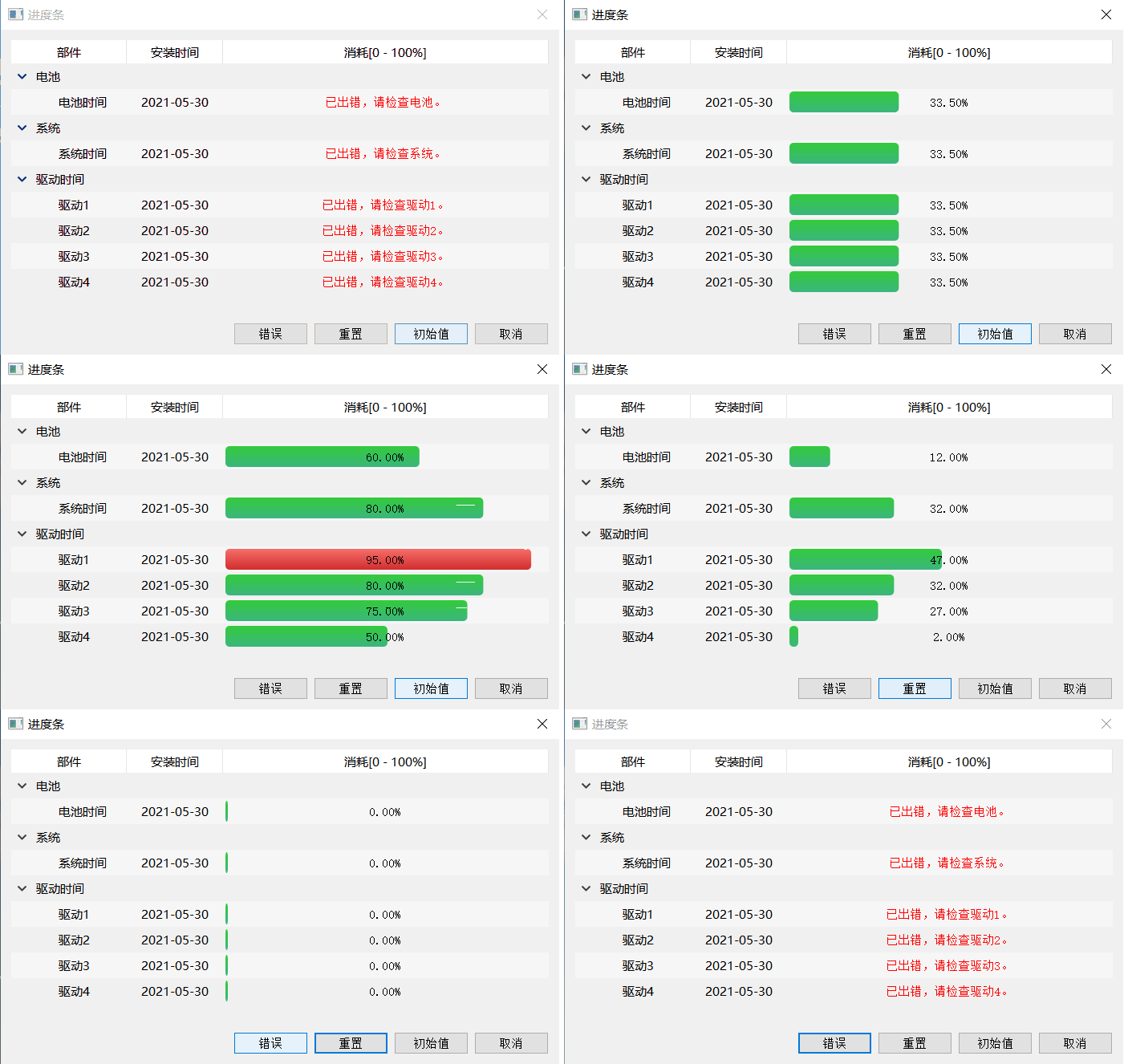
有时我们需要在表格(QTableWidget)、树状栏(QTreeWidget)中直观显示任务进度或消耗百分比,达到报表显示的形式,可通过重写QLabel的方式实现。
1、进度条控件功能
1)可设置值动态变化
2)可设置警戒值
3)可设置正常颜色和报警颜色
4)可设置边框渐变颜色
5)可设置变化时每次移动的步长
6)可设置错误时显示错误描述
7)可设置显示值保留小数的位数
8)可设置边框圆角角度/背景进度圆角角度/头部圆角角度
2、实现效果
二、实现过程
1、运行环境Qt5.5 VS2013
2、继承QLabel重写ProgressLabel控件


  1 /***********************************************************************

  2 作者:liangtianmanyue(QQ:1660941209) 2021-05-30

  3 功能:进度控件

  4 1、可设置值动态变化

  5 2、可设置警戒值

  6 3、可设置正常颜色和报警颜色

  7 4、可设置边框渐变颜色

  8 5、可设置变化时每次移动的步长

  9 6、可设置错误时显示错误描述

 10 6、可设置显示值保留小数的位数

 11 8、可设置边框圆角角度/背景进度圆角角度/头部圆角角度

 12 ************************************************************************/

 13

 14 #ifndef PROGRESS_LABEL_H

 15 #define PROGRESS_LABEL_H

 16

 17 #include <QLabel>

 18 #include <QWidget>

 19

 20 #ifdef Plugin

 21 #if (QT_VERSION < QT_VERSION_CHECK(5,7,0))

 22 #include <QtDesigner/QDesignerExportWidget>

 23 #else

 24 #include <QtUiPlugin/QDesignerExportWidget>

 25 #endif

 26

 27 class QDESIGNER_WIDGET_EXPORT ProgressLabel : public QLabel

 28 #else

 29 class ProgressLabel : public QLabel

 30 #endif

 31 {

 32     Q_OBJECT

 33     Q_PROPERTY(double minValue READ getMinValue WRITE setMinValue)

 34     Q_PROPERTY(double maxValue READ getMaxValue WRITE setMaxValue)

 35     Q_PROPERTY(double value READ getValue WRITE setValue)

 36     Q_PROPERTY(double alarmValue READ getAlarmValue WRITE setAlarmValue)

 37

 38     Q_PROPERTY(double step READ getStep WRITE setStep)

 39     Q_PROPERTY(int decimals READ getDecimals WRITE setDecimals)

 40     Q_PROPERTY(int borderRadius READ getBorderRadius WRITE setBorderRadius)

 41     Q_PROPERTY(int bgRadius READ getBgRadius WRITE setBgRadius)

 42     Q_PROPERTY(int headRadius READ getHeadRadius WRITE setHeadRadius)

 43

 44     Q_PROPERTY(QColor borderColorStart READ getBorderColorStart WRITE setBorderColorStart)

 45     Q_PROPERTY(QColor borderColorEnd READ getBorderColorEnd WRITE setBorderColorEnd)

 46

 47     Q_PROPERTY(QColor alarmColorStart READ getAlarmColorStart WRITE setAlarmColorStart)

 48     Q_PROPERTY(QColor alarmColorEnd READ getAlarmColorEnd WRITE setAlarmColorEnd)

 49

 50     Q_PROPERTY(QColor normalColorStart READ getNormalColorStart WRITE setNormalColorStart)

 51     Q_PROPERTY(QColor normalColorEnd READ getNormalColorEnd WRITE setNormalColorEnd)

 52

 53 public:

 54     explicit ProgressLabel(QWidget *parent = 0);

 55     ~ProgressLabel();

 56

 57 protected:

 58     void paintEvent(QPaintEvent *);

 59     void drawBg(QPainter *painter);

 60

 61 private slots:

 62     void updateValue();

 63

 64 public:

 65     double getMinValue()            const;

 66     double getMaxValue()            const;

 67     double getValue()               const;

 68     double getAlarmValue()          const;

 69

 70     double getStep()                const;

 71     int getBorderRadius()           const;

 72     int getBgRadius()               const;

 73     int getHeadRadius()             const;

 74

 75     QColor getBorderColorStart()    const;

 76     QColor getBorderColorEnd()      const;

 77

 78     QColor getAlarmColorStart()     const;

 79     QColor getAlarmColorEnd()       const;

 80

 81     QColor getNormalColorStart()    const;

 82     QColor getNormalColorEnd()      const;

 83

 84     QSize sizeHint()                const;

 85     QSize minimumSizeHint()         const;

 86

 87 public Q_SLOTS:

 88     //设置范围值

 89     void setRange(double minValue, double maxValue);

 90     void setRange(int minValue, int maxValue);

 91

 92     //设置最大最小值

 93     void setMinValue(double minValue);

 94     void setMaxValue(double maxValue);

 95

 96     //设置显示值

 97     void setValue(double value);

 98     void setValue(int value);

 99

100     //设置警戒值

101     void setAlarmValue(double alarmValue);

102     void setAlarmValue(int alarmValue);

103

104     //设置步长

105     void setStep(double step);

106     void setStep(int step);

107

108     //小数点位数

109     int getDecimals();

110     void setDecimals(int decimals);

111

112     //设置边框圆角角度

113     void setBorderRadius(int borderRadius);

114     //设置背景圆角角度

115     void setBgRadius(int bgRadius);

116     //设置头部圆角角度

117     void setHeadRadius(int headRadius);

118

119     //设置边框渐变颜色

120     void setBorderColorStart(const QColor &borderColorStart);

121     void setBorderColorEnd(const QColor &borderColorEnd);

122

123     //设置报警时的渐变颜色

124     void setAlarmColorStart(const QColor &alarmColorStart);

125     void setAlarmColorEnd(const QColor &alarmColorEnd);

126

127     //设置电正常时的渐变颜色

128     void setNormalColorStart(const QColor &normalColorStart);

129     void setNormalColorEnd(const QColor &normalColorEnd);

130

131     //正常、异常显示

132     void setNormalState();

133     void setErrorText(const QString &text);

134

135 Q_SIGNALS:

136     void valueChanged(double value);

137

138 private:

139     bool m_IsError;                 //是否出错

140     QString m_ErrorText;            //错误描述

141

142     double minValue;                //最小值

143     double maxValue;                //最大值

144     double value;                   //目标电量

145     double alarmValue;              //电池电量警戒值

146     int decimals;                   //显示小数点后位数

147     double step;                    //每次移动的步长

148     int borderRadius;               //边框圆角角度

149     int bgRadius;                   //背景进度圆角角度

150     int headRadius;                 //头部圆角角度

151

152     QColor borderColorStart;        //边框渐变开始颜色

153     QColor borderColorEnd;          //边框渐变结束颜色

154

155     QColor alarmColorStart;         //电池低电量时的渐变开始颜色

156     QColor alarmColorEnd;           //电池低电量时的渐变结束颜色

157

158     QColor normalColorStart;        //电池正常电量时的渐变开始颜色

159     QColor normalColorEnd;          //电池正常电量时的渐变结束颜色

160

161     bool isForward;                 //是否往前移

162     double currentValue;            //当前电量

163     QRectF batteryRect;             //电池主体区域

164     QTimer *timer;                  //绘制定时器

165 };

166

167 #endif // PROGRESS_LABEL_H
ProgressLabel定义
3、重写paintEvent事件,根据是否有出错,绘制出错信息或值
 1 void ProgressLabel::paintEvent(QPaintEvent *)

 2 {

 3     //绘制准备工作,启用反锯齿

 4     QPainter painter(this);

 5     painter.setRenderHints(QPainter::Antialiasing | QPainter::TextAntialiasing);

 6

 7     //获取边框区域

 8     QPointF topLeft(2, 2);

 9     QPointF bottomRight(width() - 4, height() - 2);

10     batteryRect = QRectF(topLeft, bottomRight);

11     //绘制背景

12     drawBg(&painter);

13 }

14

15 void ProgressLabel::drawBg(QPainter *painter)

16 {

17     if(!m_IsError)

18     {

19         painter->save();

20         QLinearGradient batteryGradient(QPointF(0, 0), QPointF(0, height()));

21         if (currentValue >= alarmValue)

22         {

23             batteryGradient.setColorAt(0.0, alarmColorStart);

24             batteryGradient.setColorAt(1.0, alarmColorEnd);

25         }

26         else

27         {

28             batteryGradient.setColorAt(0.0, normalColorStart);

29             batteryGradient.setColorAt(1.0, normalColorEnd);

30         }

31

32         double min = qMin(width(), height());

33         int margin =  min / 20;

34         double unit = (batteryRect.width() - (margin * 2)) / 100;

35         double width = currentValue * unit;

36         QPointF topLeft(batteryRect.topLeft().x() + margin, batteryRect.topLeft().y() + margin);

37         QPointF bottomRight(width + margin + 5, batteryRect.bottomRight().y() - margin);

38         QRectF rect(topLeft, bottomRight);

39

40         painter->setPen(Qt::NoPen);

41         painter->setBrush(batteryGradient);

42         painter->drawRoundedRect(rect, bgRadius, bgRadius);

43         painter->restore();

44     }

45

46     //写进度

47     painter->save();

48     QPen pen(Qt::SolidLine);

49     pen.setWidth(1);

50     if(m_IsError)

51         pen.setColor(Qt::red);

52     else

53         pen.setColor(Qt::black);

54     painter->setPen(pen);

55     painter->setBrush(Qt::NoBrush);

56     if(m_IsError)

57         painter->drawText(batteryRect, Qt::AlignCenter, m_ErrorText);

58     else

59         painter->drawText(batteryRect, Qt::AlignCenter, QString("%1%").arg(currentValue, 0, 'f', decimals));

60     painter->restore();

61 }
控件绘制
4、刷新值时采用定时器定时刷新方式,达到动态效果
1 timer = new QTimer(this);

2 timer->setInterval(10);

3 connect(timer, SIGNAL(timeout()), this, SLOT(updateValue()));
创建定时器
 1 void ProgressLabel::updateValue()

 2 {

 3     if (isForward)

 4     {

 5         currentValue -= step;

 6

 7         if (currentValue <= value)

 8         {

 9             timer->stop();

10             currentValue = value;//保持真实性

11         }

12     }

13     else

14     {

15         currentValue += step;

16

17         if (currentValue >= value)

18         {

19             timer->stop();

20             currentValue = value;//保持真实性

21         }

22     }

23

24     this->update();

25 }
按step值刷新
5、外部设置值的时候,清除错误标志,并启动定时器
 1 void ProgressLabel::setValue(double value)

 2 {

 3     m_IsError = false;

 4     //值和当前值一致则无需处理

 5     if (value == this->value)

 6         return;

 7

 8     //值小于最小值则取最小值,大于最大值则取最大值

 9     if (value < minValue)

10         value = minValue;

11     else if (value > maxValue)

12         value = maxValue;

13

14     if (value > currentValue)

15         isForward = false;

16     else if (value < currentValue)

17         isForward = true;

18     else

19         return;

20

21     this->value = value;

22     this->update();

23     emit valueChanged(value);

24     timer->start();

25 }
设置值
Qt 进度条的更多相关文章
- QT 进度条 QProgressDialog
//默认构造函数 参数依次为,对话框正文,取消按钮名称,进度条范围,及所属 QProgressDialog *progressDlg=new QProgressDialog( QStringLiter ...
- QT进度条QProgressBar的练习(定制QProgressBar,单独成为一个控件)
progressbar.h #ifndef PROGRESSBAR_H #define PROGRESSBAR_H #include <QProgressBar> class QStrin ...
- QT进度条QProgressBar的练习
progressbar.h #ifndef PROGRESSBAR_H #define PROGRESSBAR_H #include <QProgressBar> class QStrin ...
- 25.QT进度条
#ifndef MAINWINDOW_H #define MAINWINDOW_H #include <QMainWindow> 5 #include <QProgressBar&g ...
- 【Qt开发】Qt控件之进度条
QT 进度条操作实例是本文要介绍的内容,在QT中可以用QProgressBar或着QProgressDialog来实现进度条. QProgressBar的使用 首先在designer中拖一个按钮和 ...
- 【PyQt5-Qt Designer】制作炫酷的启动界面+进度条
QProgressBar 进度条+QSplashScreen 启动界面 知识点: 1.进度条 #将进度条的最大值.最小值设置为相同时,产生跑马灯效果 self.progressBar.setMinim ...
- Qt之QRoundProgressBar(圆形进度条)
简述 QRoundProgressBar类能够实现一个圆形进度条,继承自QWidget,并且有和QProgressBar类似的API接口. 简述 详细说明 风格 颜色 字体 共有函数 共有槽函数 详细 ...
- Qt之模型/视图(自定义进度条)
简述 在之前的章节中分享过关于QHeaderView表头排序.添加复选框等内容,相信大家模型/视图.自定义风格有了一定的了解,下面我们来分享一个更常用的内容-自定义进度条. 实现方式: 从QAbstr ...
- QT中进度条的使用
在QT中可以用QProgressBar或着QProgressDialog来实现进度条. QProgressBar的使用 首先在designer中拖一个按钮和进度条部件,按下面初始化 //补充:下面两句 ...
随机推荐
- 大学四年,总结一套适合小白的Java自学路线和方法
前言篇 大家好,我是bigsai 好久不见,甚是想念,文章同时收录在回车课堂(文底阅读原文可达). 无论你是大学生还是在职人员,想学Java时,都会面临两个选择,自学或者报班.报班通常太费钱,时间又不 ...
- Spring Cloud Alibaba(2)---RestTemplate微服务项目
RestTemplate微服务项目 前言 因为要运用 Spring Cloud Alibaba 开源组件到分布式项目中,所以这里先搭建一个不通过 Spring Cloud只通过 RestTemplat ...
- Innodb中的快照读和当前读
一.前言 上篇文章记录了对MVCC的相关理解,其中有提到快照读.其实在MVCC并发控制中,读操作可以分为两类:快照读(snapshot read)和当前读(current read) 二.什么是快 ...
- 1. Robot Framework入门
RF定义: 通用型的 自动测试框架, 绝大部分的软件的的自动化系统都可以采用它. 特点: 测试数据文件(Test Data)对应一个个的测试用例.测试数据文件里面使用的功能小模块叫关键字,由测试库(T ...
- 【MySQL】若sql语句中order by指定了多个字段,则怎么排序?
举个例子吧:order by id desc,time desc先是按 id 降序排列 (优先)如果 id 字段 有些是一样的话 再按time 降序排列 (前提是满足id降序排列) order b ...
- UC-Android逆向工程师 面试题1的分析
1.简介 这个题目是一位吾爱破解的坛友在面试UC的Android逆向工程事时,遇到的题目.此题不难,与阿里移动去年移动安全比赛的题目差不多,题目的验证方式也是查表对比,并且这个表的数据是放在文件中的. ...
- C++扫雷小游戏(基于CMD命令行)
这个小游戏是笔者在大一C语言课程设计的时候写的,基于命令行,为了显得漂亮一些,特别加上了彩色特效~~~ 注意:Win10系统须将命令行调为旧版命令行,否则有可能会显示乱码! 代码示例: #includ ...
- 网站指纹识别工具Whatweb的使用
目录 whatweb 一些常见的Whatweb的扫描 常规扫描 批量扫描 详细回显扫描 扫描强度等级控制 快速本地扫描(扫描内网的主机) 将扫描结果导出至文件内 whatweb whatweb 是ka ...
- 【pytest系列】- mark标记功能详细介绍
如果想从头学起pytest,可以去看看这个系列的文章! https://www.cnblogs.com/miki-peng/category/1960108.html mark标记 在实际工作中, ...
- 【Mybtais】Mybatis 插件 Plugin开发(一)动态代理步步解析
需求: 对原有系统中的方法进行'拦截',在方法执行的前后添加新的处理逻辑. 分析: 不是办法的办法就是,对原有的每个方法进行修改,添加上新的逻辑:如果需要拦截的方法比较少,选择此方法到是会节省成本.但 ...