
K8s 开始
Kubernetes 是用于自动部署,扩展和管理容器化应用程序的开源系统。本文将介绍如何快速开始 K8s 的使用。
了解 K8s
搭建 K8s
本地开发测试,需要搭建一个 K8s 轻量服务。实际部署时,可以用云厂商的 K8s 服务。
本文以 k3d 为例,于 macOS 搭建 K8s 服务。于 Ubuntu 则推荐 MicroK8s。其他可替代方案有:
k3d
k3s 是 Rancher 推出的 K8s 轻量版。而 k3d 即 k3s in docker,以 docker 容器管理 k3s 集群。
以下搭建过程,是于 macOS 的笔记,供参考。其他平台,请依照官方文档进行。
# 安装 kubectl: 命令行工具

brew install kubectl

# 安装 kubecm: 配置管理工具

brew install kubecm

# 安装 k3d

brew install k3d

❯ k3d version

k3d version v4.4.8

k3s version latest (default)
创建集群(1主2从):
❯ k3d cluster create mycluster --api-port 6550 --servers 1 --agents 2 --port 8080:80@loadbalancer --wait

INFO[0000] Prep: Network

INFO[0000] Created network 'k3d-mycluster' (23dc5761582b1a4b74d9aa64d8dca2256b5bc510c4580b3228123c26e93f456e)

INFO[0000] Created volume 'k3d-mycluster-images'

INFO[0001] Creating node 'k3d-mycluster-server-0'

INFO[0001] Creating node 'k3d-mycluster-agent-0'

INFO[0001] Creating node 'k3d-mycluster-agent-1'

INFO[0001] Creating LoadBalancer 'k3d-mycluster-serverlb'

INFO[0001] Starting cluster 'mycluster'

INFO[0001] Starting servers...

INFO[0001] Starting Node 'k3d-mycluster-server-0'

INFO[0009] Starting agents...

INFO[0009] Starting Node 'k3d-mycluster-agent-0'

INFO[0022] Starting Node 'k3d-mycluster-agent-1'

INFO[0030] Starting helpers...

INFO[0030] Starting Node 'k3d-mycluster-serverlb'

INFO[0031] (Optional) Trying to get IP of the docker host and inject it into the cluster as 'host.k3d.internal' for easy access

INFO[0036] Successfully added host record to /etc/hosts in 4/4 nodes and to the CoreDNS ConfigMap

INFO[0036] Cluster 'mycluster' created successfully!

INFO[0036] --kubeconfig-update-default=false --> sets --kubeconfig-switch-context=false

INFO[0036] You can now use it like this:

kubectl config use-context k3d-mycluster

kubectl cluster-info
查看集群信息:
❯ kubectl cluster-info

Kubernetes control plane is running at https://0.0.0.0:6550

CoreDNS is running at https://0.0.0.0:6550/api/v1/namespaces/kube-system/services/kube-dns:dns/proxy

Metrics-server is running at https://0.0.0.0:6550/api/v1/namespaces/kube-system/services/https:metrics-server:/proxy
查看资源信息:
# 查看 Nodes

❯ kubectl get nodes

NAME                     STATUS   ROLES                  AGE     VERSION

k3d-mycluster-agent-0    Ready    <none>                 2m12s   v1.20.10+k3s1

k3d-mycluster-server-0   Ready    control-plane,master   2m23s   v1.20.10+k3s1

k3d-mycluster-agent-1    Ready    <none>                 2m4s    v1.20.10+k3s1

# 查看 Pods

❯ kubectl get pods --all-namespaces

NAMESPACE     NAME                                      READY   STATUS      RESTARTS   AGE

kube-system   coredns-6488c6fcc6-5n7d9                  1/1     Running     0          2m12s

kube-system   metrics-server-86cbb8457f-dr7lh           1/1     Running     0          2m12s

kube-system   local-path-provisioner-5ff76fc89d-zbxf4   1/1     Running     0          2m12s

kube-system   helm-install-traefik-bfm4c                0/1     Completed   0          2m12s

kube-system   svclb-traefik-zx98g                       2/2     Running     0          68s

kube-system   svclb-traefik-7bx2r                       2/2     Running     0          68s

kube-system   svclb-traefik-cmdrm                       2/2     Running     0          68s

kube-system   traefik-6f9cbd9bd4-2mxhk                  1/1     Running     0          69s
测试 Nginx:
# 创建 Nginx Deployment

kubectl create deployment nginx --image=nginx

# 创建 ClusterIP Service,暴露 Nginx 端口

kubectl create service clusterip nginx --tcp=80:80

# 创建 Ingress Object

#  k3s 以 traefik 为默认 ingress controller

cat <<EOF | kubectl apply -f -

apiVersion: networking.k8s.io/v1

kind: Ingress

metadata:

  name: nginx

  annotations:

    ingress.kubernetes.io/ssl-redirect: "false"

spec:

  rules:

  - http:

      paths:

      - path: /

        pathType: Prefix

        backend:

          service:

            name: nginx

            port:

              number: 80

EOF

# 访问 Nginx Service

#  kubectl get pods 确认 nginx STATUS=Running

open http://127.0.0.1:8080
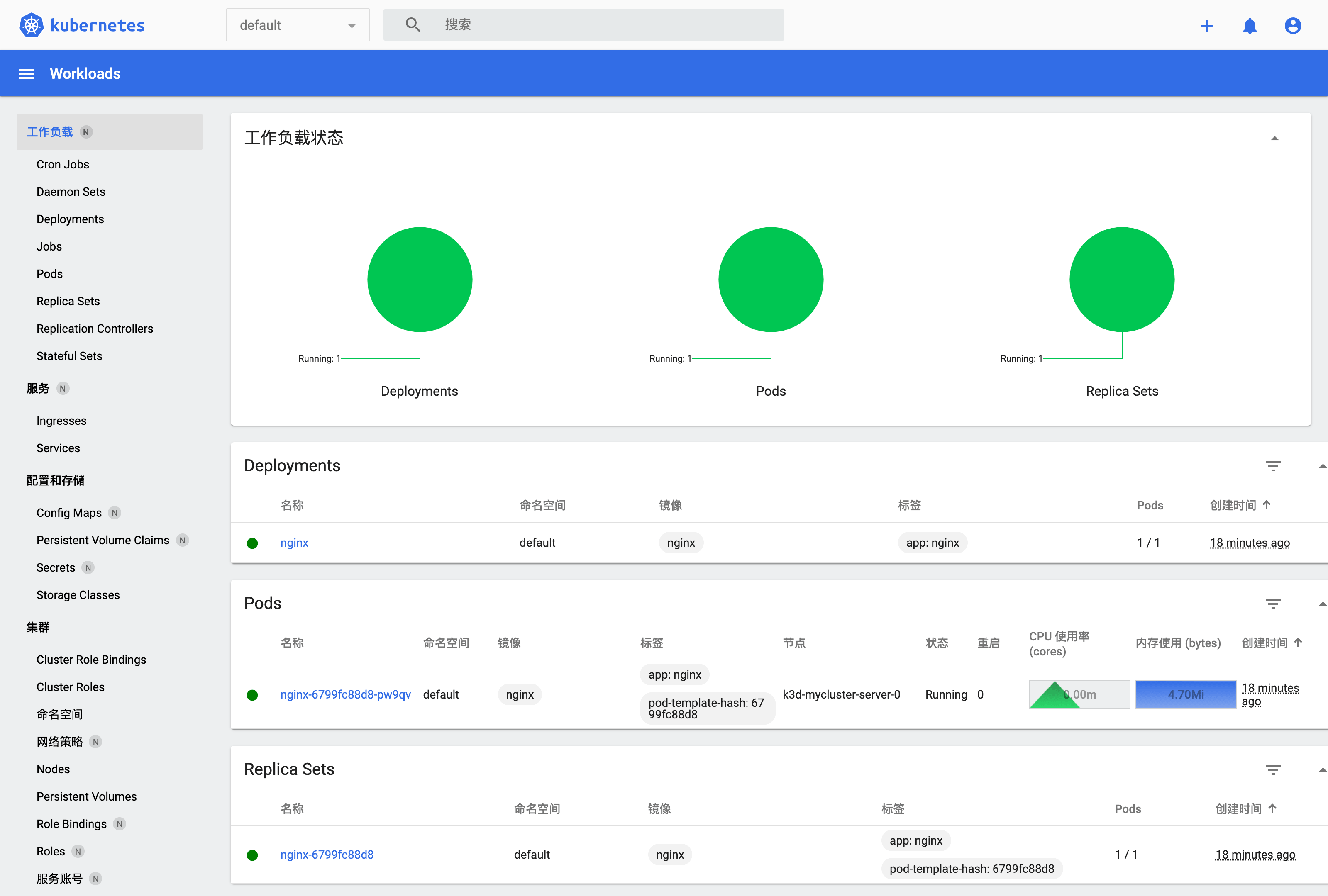
测试 Dashboard:
# 创建 Dashboard

GITHUB_URL=https://github.com/kubernetes/dashboard/releases

VERSION_KUBE_DASHBOARD=$(curl -w '%{url_effective}' -I -L -s -S ${GITHUB_URL}/latest -o /dev/null | sed -e 's|.*/||')

kubectl create -f https://raw.githubusercontent.com/kubernetes/dashboard/${VERSION_KUBE_DASHBOARD}/aio/deploy/recommended.yaml

# 配置 RBAC

#  admin user

cat <<EOF > dashboard.admin-user.yml

apiVersion: v1

kind: ServiceAccount

metadata:

  name: admin-user

  namespace: kubernetes-dashboard

EOF

#  admin user role

cat <<EOF > dashboard.admin-user-role.yml

apiVersion: rbac.authorization.k8s.io/v1

kind: ClusterRoleBinding

metadata:

  name: admin-user

roleRef:

  apiGroup: rbac.authorization.k8s.io

  kind: ClusterRole

  name: cluster-admin

subjects:

- kind: ServiceAccount

  name: admin-user

  namespace: kubernetes-dashboard

EOF

# 配置部署

kubectl create -f dashboard.admin-user.yml -f dashboard.admin-user-role.yml

# 获取 Bearer Token

kubectl -n kubernetes-dashboard describe secret admin-user-token | grep ^token

# 访问代理

kubectl proxy

# 访问 Dashboard

#  输入 Token 登录

open http://127.0.0.1:8001/api/v1/namespaces/kubernetes-dashboard/services/https:kubernetes-dashboard:/proxy/
删除集群:
k3d cluster delete mycluster
切换集群:
kubecm s
参考:
MicroK8s
MicroK8s 是 Ubuntu 官方生态提供的 K8s 轻量版,适合用于开发工作站、IoT、Edge、CI/CD。
以下搭建过程,是于 Ubuntu 18/20 的笔记,供参考。其他平台,请依照官方文档进行。
# 检查 hostname

#  要求不含大写字母和下划线,不然依照后文修改

hostname

# 安装 microk8s

sudo apt install snapd -y

snap info microk8s

sudo snap install microk8s --classic --channel=1.21/stable

# 添加用户组

sudo usermod -a -G microk8s $USER

sudo chown -f -R $USER ~/.kube

newgrp microk8s

id $USER

## 一些确保拉到镜像的方法

# 配置代理(如果有)

#  MicroK8s / Installing behind a proxy

#   https://microk8s.io/docs/install-proxy

#  Issue: Pull images from others than k8s.gcr.io

#   https://github.com/ubuntu/microk8s/issues/472

sudo vi /var/snap/microk8s/current/args/containerd-env

  HTTPS_PROXY=http://127.0.0.1:7890

  NO_PROXY=10.1.0.0/16,10.152.183.0/24

# 添加镜像(docker.io)

#  镜像加速器

#   https://yeasy.gitbook.io/docker_practice/install/mirror

#  还可改 args/ 里不同模板的 sandbox_image

sudo vi /var/snap/microk8s/current/args/containerd-template.toml

  [plugins."io.containerd.grpc.v1.cri"]

    [plugins."io.containerd.grpc.v1.cri".registry]

      [plugins."io.containerd.grpc.v1.cri".registry.mirrors]

        [plugins."io.containerd.grpc.v1.cri".registry.mirrors."docker.io"]

          endpoint = ["https://x.mirror.aliyuncs.com", "https://registry-1.docker.io", ]

        [plugins."io.containerd.grpc.v1.cri".registry.mirrors."localhost:32000"]

          endpoint = ["http://localhost:32000"]

# 手动导入,见后文启用插件那

# 重启服务

microk8s stop

microk8s start
检查状态:
$ microk8s status

microk8s is running

high-availability: no

  datastore master nodes: 127.0.0.1:19001

  datastore standby nodes: none

addons:

  enabled:

    ha-cluster           # Configure high availability on the current node

  disabled:

    ambassador           # Ambassador API Gateway and Ingress

    cilium               # SDN, fast with full network policy

    dashboard            # The Kubernetes dashboard

    dns                  # CoreDNS

    fluentd              # Elasticsearch-Fluentd-Kibana logging and monitoring

    gpu                  # Automatic enablement of Nvidia CUDA

    helm                 # Helm 2 - the package manager for Kubernetes

    helm3                # Helm 3 - Kubernetes package manager

    host-access          # Allow Pods connecting to Host services smoothly

    ingress              # Ingress controller for external access

    istio                # Core Istio service mesh services

    jaeger               # Kubernetes Jaeger operator with its simple config

    keda                 # Kubernetes-based Event Driven Autoscaling

    knative              # The Knative framework on Kubernetes.

    kubeflow             # Kubeflow for easy ML deployments

    linkerd              # Linkerd is a service mesh for Kubernetes and other frameworks

    metallb              # Loadbalancer for your Kubernetes cluster

    metrics-server       # K8s Metrics Server for API access to service metrics

    multus               # Multus CNI enables attaching multiple network interfaces to pods

    openebs              # OpenEBS is the open-source storage solution for Kubernetes

    openfaas             # openfaas serverless framework

    portainer            # Portainer UI for your Kubernetes cluster

    prometheus           # Prometheus operator for monitoring and logging

    rbac                 # Role-Based Access Control for authorisation

    registry             # Private image registry exposed on localhost:32000

    storage              # Storage class; allocates storage from host directory

    traefik              # traefik Ingress controller for external access
如果 status 不正确时,可以如下排查错误:
microk8s inspect

grep -r error /var/snap/microk8s/2346/inspection-report
如果要修改 hostname:
# 改名称

sudo hostnamectl set-hostname ubuntu-vm

# 改 host

sudo vi /etc/hosts

# 云主机的话,还要改下配置

sudo vi /etc/cloud/cloud.cfg

  preserve_hostname: true

  # 如果只修改 preserve_hostname 不生效,那就直接注释掉 set/update_hostname

  cloud_init_modules:

  #  - set_hostname

  #  - update_hostname

# 重启,验证生效

sudo reboot
接着,启用些基础插件:
microk8s enable dns dashboard

# 查看 Pods ,确认 running

microk8s kubectl get pods --all-namespaces

# 不然,详情里看下错误原因

microk8s kubectl describe pod --all-namespaces
直到全部正常 running:
$ kubectl get pods --all-namespaces

NAMESPACE     NAME                                         READY   STATUS    RESTARTS   AGE

kube-system   kubernetes-dashboard-85fd7f45cb-snqrv        1/1     Running   1          15h

kube-system   dashboard-metrics-scraper-78d7698477-tmb7k   1/1     Running   1          15h

kube-system   metrics-server-8bbfb4bdb-wlf8g               1/1     Running   1          15h

kube-system   calico-node-p97kh                            1/1     Running   1          6m18s

kube-system   coredns-7f9c69c78c-255fg                     1/1     Running   1          15h

kube-system   calico-kube-controllers-f7868dd95-st9p7      1/1     Running   1          16h
如果拉取镜像失败,可以 microk8s ctr image pull <mirror>。或者,docker pull 后导入 containerd:
docker pull registry.cn-hangzhou.aliyuncs.com/google_containers/pause:3.1

docker tag registry.cn-hangzhou.aliyuncs.com/google_containers/pause:3.1 k8s.gcr.io/pause:3.1

docker save k8s.gcr.io/pause:3.1 > pause:3.1.tar

microk8s ctr image import pause:3.1.tar

docker pull calico/cni:v3.13.2

docker save calico/cni:v3.13.2 > cni:v3.13.2.tar

microk8s ctr image import cni:v3.13.2.tar

docker pull calico/node:v3.13.2

docker save calico/node:v3.13.2 > node:v3.13.2.tar

microk8s ctr image import node:v3.13.2.tar
如果 calico-node CrashLoopBackOff,可能网络配置问题:
# 查具体日志

microk8s kubectl logs -f -n kube-system calico-node-l5wl2 -c calico-node

# 如果有 Unable to auto-detect an IPv4 address,那么 ip a 找出哪个网口有 IP 。修改:

sudo vi /var/snap/microk8s/current/args/cni-network/cni.yaml

  - name: IP_AUTODETECTION_METHOD

  value: "interface=wlo.*"

# 重启服务

microk8s stop; microk8s start

## 参考

# Issue: Microk8s 1.19 not working on Ubuntu 20.04.1

#  https://github.com/ubuntu/microk8s/issues/1554

# Issue: CrashLoopBackOff for calico-node pods

#  https://github.com/projectcalico/calico/issues/3094

# Changing the pods CIDR in a MicroK8s cluster

#  https://microk8s.io/docs/change-cidr

# MicroK8s IPv6 DualStack HOW-TO

#  https://discuss.kubernetes.io/t/microk8s-ipv6-dualstack-how-to/14507
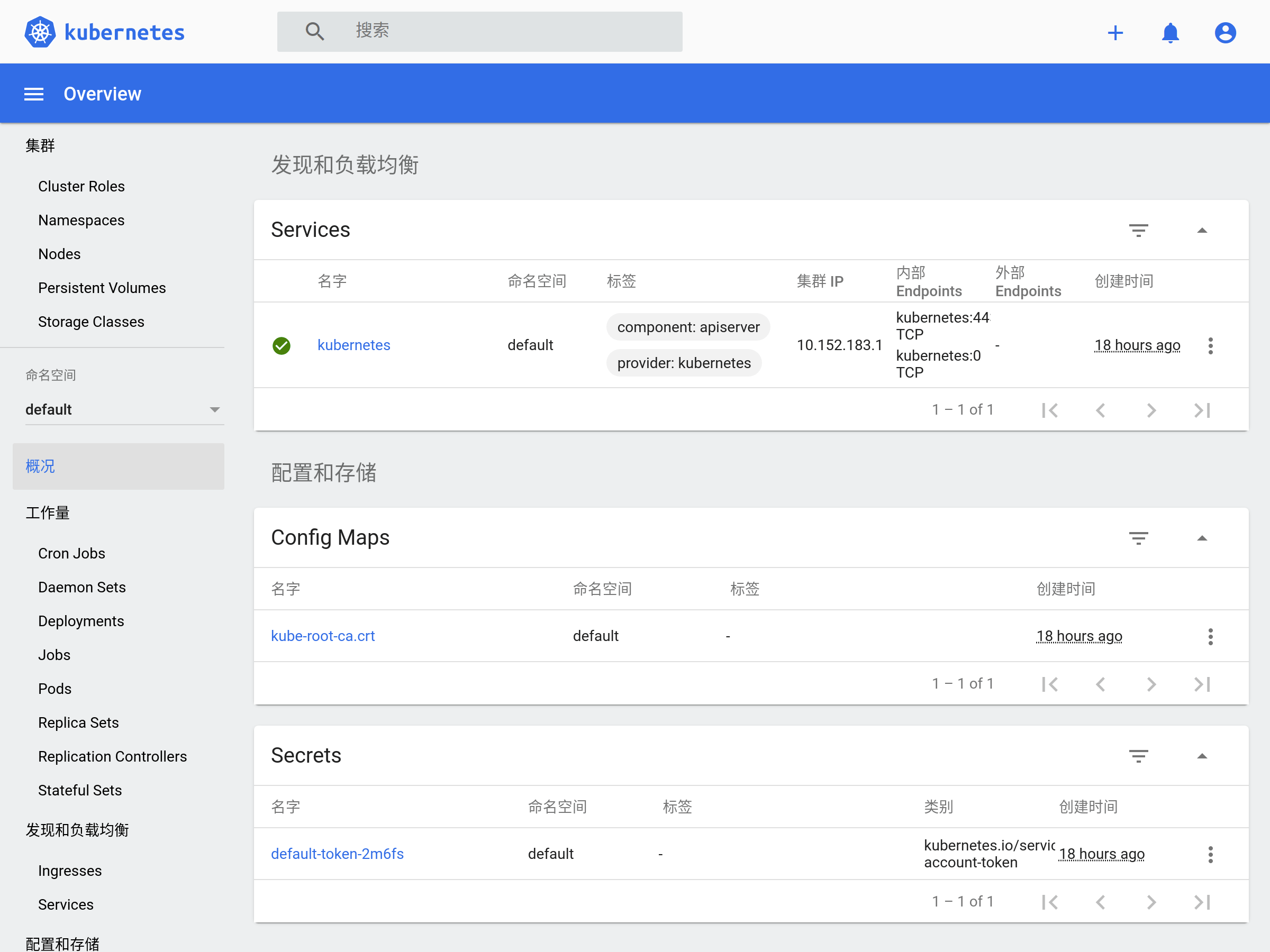
然后,可以打开 Dashboard 看看:
# 获取 Token (未启用 RBAC 时)

token=$(microk8s kubectl -n kube-system get secret | grep default-token | cut -d " " -f1)

microk8s kubectl -n kube-system describe secret $token

# 转发端口

microk8s kubectl port-forward -n kube-system service/kubernetes-dashboard 10443:443

# 打开网页,输入 Token 登录

xdg-open https://127.0.0.1:10443

# 更多说明 https://microk8s.io/docs/addon-dashboard

# Issue: Your connection is not private

#  https://github.com/kubernetes/dashboard/issues/3804
更多操作,请阅读官方文档。本文之后仍以 k3d 为例。
准备 K8s 应用
Go 应用
http_server.go:
package main

import (

	"fmt"

	"log"

	"net/http"

)

func handler(w http.ResponseWriter, r *http.Request) {

	fmt.Fprintf(w, "Hi there, I love %s!", r.URL.Path[1:])

}

func main() {

	http.HandleFunc("/", handler)

	fmt.Println("HTTP Server running ...")

	log.Fatal(http.ListenAndServe(":3000", nil))

}
构建镜像
http_server.dockerfile:
FROM golang:1.17-alpine AS builder

WORKDIR /app

ADD ./http_server.go /app

RUN cd /app && go build http_server.go

FROM alpine:3.14

WORKDIR /app

COPY --from=builder /app/http_server /app/

EXPOSE 3000

ENTRYPOINT ./http_server
# 编译镜像

docker build -t http_server:1.0 -f http_server.dockerfile .

# 运行应用

docker run --rm -p 3000:3000 http_server:1.0

# 测试应用

❯ curl http://127.0.0.1:3000/go

Hi there, I love go!
部署 K8s 应用
了解概念
之后,参照官方教程,我们将使用 Deployment 运行 Go 应用(无状态)。
导入镜像
首先,我们手动导入镜像进集群:
docker save http_server:1.0 > http_server:1.0.tar

k3d image import http_server:1.0.tar -c mycluster
如果有自己的私有仓库,参见 k3d / Registries 进行配置。
创建 Deployment
# 配置 Deployment (2个副本)

cat <<EOF > go-http-deployment.yaml

apiVersion: apps/v1

kind: Deployment

metadata:

  name: go-http

  labels:

    app: go-http

spec:

  replicas: 2

  selector:

    matchLabels:

      app: go-http

  template:

    metadata:

      labels:

        app: go-http

    spec:

      containers:

      - name: go-http

        image: http_server:1.0

        ports:

        - containerPort: 3000

EOF

# 应用 Deployment

#  --record: 记录命令

kubectl apply -f go-http-deployment.yaml --record
查看 Deployment:
# 查看 Deployment

❯ kubectl get deploy

NAME      READY   UP-TO-DATE   AVAILABLE   AGE

nginx     1/1     1            1           2d

go-http   2/2     2            2           22s

# 查看 Deployment 信息

kubectl describe deploy go-http

# 查看 Deployment 创建的 ReplicaSet (2个)

kubectl get rs

# 查看 Deployment 创建的 Pods (2个)

kubectl get po -l app=go-http -o wide --show-labels

# 查看某一 Pod 信息

kubectl describe po go-http-5848d49c7c-wzmxh
创建 Service
# 创建 Service,名为 go-http

#  将请求代理到 app=go-http, tcp=3000 的 Pod 上

kubectl expose deployment go-http --name=go-http

# 或

cat <<EOF | kubectl create -f -

apiVersion: v1

kind: Service

metadata:

  name: go-http

  labels:

    app: go-http

spec:

  selector:

    app: go-http

  ports:

    - protocol: TCP

      port: 3000

      targetPort: 3000

EOF

# 查看 Service

kubectl get svc

# 查看 Service 信息

kubectl describe svc go-http

# 查看 Endpoints 对比看看

#  kubectl get ep go-http

#  kubectl get po -l app=go-http -o wide

# 删除 Service (如果)

kubectl delete svc go-http
访问 Service (DNS):
❯ kubectl run curl --image=radial/busyboxplus:curl -i --tty

If you don't see a command prompt, try pressing enter.

[ root@curl:/ ]$ nslookup go-http

Server:    10.43.0.10

Address 1: 10.43.0.10 kube-dns.kube-system.svc.cluster.local

Name:      go-http

Address 1: 10.43.102.17 go-http.default.svc.cluster.local

[ root@curl:/ ]$ curl http://go-http:3000/go

Hi there, I love go!
暴露 Service (Ingress):
# 创建 Ingress Object

cat <<EOF | kubectl apply -f -

apiVersion: networking.k8s.io/v1

kind: Ingress

metadata:

  name: go-http

  annotations:

    ingress.kubernetes.io/ssl-redirect: "false"

spec:

  rules:

  - http:

      paths:

      - path: /go

        pathType: Prefix

        backend:

          service:

            name: go-http

            port:

              number: 3000

EOF

# 查看 Ingress

kubectl get ingress

# 查看 Ingress 信息

kubectl describe ingress go-http

# 删除 Ingress (如果)

kubectl delete ingress go-http
访问 Service (Ingress):
❯ open http://127.0.0.1:8080/go

# 或,

❯ curl http://127.0.0.1:8080/go

Hi there, I love go!

# Nginx 是在 http://127.0.0.1:8080
更新
仅当 Deployment Pod 模板发生改变时,例如模板的标签或容器镜像被更新,才会触发 Deployment 上线。其他更新(如对 Deployment 执行扩缩容的操作)不会触发上线动作。
所以,我们准备 http_server:2.0 镜像导入集群,然后更新:
❯ kubectl set image deployment/go-http go-http=http_server:2.0 --record

deployment.apps/go-http image updated
之后,可以查看上线状态:
# 查看上线状态

❯ kubectl rollout status deployment/go-http

deployment "go-http" successfully rolled out

# 查看 ReplicaSet 状态:新的扩容,旧的缩容,完成更新

❯ kubectl get rs

NAME                 DESIRED   CURRENT   READY   AGE

go-http-586694b4f6   2         2         2       10s

go-http-5848d49c7c   0         0         0       6d
测试服务:
❯ curl http://127.0.0.1:8080/go

Hi there v2, I love go!
回滚
查看 Deployment 修订历史:
❯ kubectl rollout history deployment.v1.apps/go-http

deployment.apps/go-http

REVISION  CHANGE-CAUSE

1         kubectl apply --filename=go-http-deployment.yaml --record=true

2         kubectl set image deployment/go-http go-http=http_server:2.0 --record=true

# 查看修订信息

kubectl rollout history deployment.v1.apps/go-http --revision=2
回滚到之前的修订版本:
# 回滚到上一版

kubectl rollout undo deployment.v1.apps/go-http

# 回滚到指定版本

kubectl rollout undo deployment.v1.apps/go-http --to-revision=1
缩放
# 缩放 Deployment 的 ReplicaSet 数

kubectl scale deployment.v1.apps/go-http --replicas=10

# 如果集群启用了 Pod 的水平自动缩放,可以根据现有 Pods 的 CPU 利用率选择上下限

# Horizontal Pod Autoscaler Walkthrough

#  https://kubernetes.io/docs/tasks/run-application/horizontal-pod-autoscale-walkthrough/

kubectl autoscale deployment.v1.apps/nginx-deployment --min=10 --max=15 --cpu-percent=80
暂停、恢复
# 暂停 Deployment

kubectl rollout pause deployment.v1.apps/go-http

# 恢复 Deployment

kubectl rollout resume deployment.v1.apps/go-http
期间可以更新 Deployment ,但不会触发上线。
删除
kubectl delete deployment go-http
金丝雀部署
灰度部署,用多标签区分多个部署,新旧版可同时运行。部署新版时,用少量流量验证,没问题再全量更新。
Helm 发布
Helm 是 K8s 的包管理工具,包格式称为 charts。现在来发布我们的 Go 服务吧。
安装 Helm
# macOS

brew install helm

# Ubuntu

sudo snap install helm --classic
执行 helm 了解命令。
创建 Chart
helm create go-http
查看内容:
❯ tree go-http -aF --dirsfirst

go-http

├── charts/     # 包依赖的 charts,称 subcharts

├── templates/  # 包的 K8s 文件模板,用的 Go 模板

│   ├── tests/

│   │   └── test-connection.yaml

│   ├── NOTES.txt       # 包的帮助文本

│   ├── _helpers.tpl    # 模板可重用的片段,模板里 include 引用

│   ├── deployment.yaml

│   ├── hpa.yaml

│   ├── ingress.yaml

│   ├── service.yaml

│   └── serviceaccount.yaml

├── .helmignore # 打包忽略说明

├── Chart.yaml  # 包的描述文件

└── values.yaml # 变量默认值,可安装时覆盖,模板里 .Values 引用
修改内容:
- 修改
Chart.yaml里的描述 - 修改
values.yaml里的变量- 修改
image为发布的 Go 服务 - 修改
ingress为true,及一些配置 - 删除
serviceAccountautoscaling,templates/里也搜索删除相关内容
- 修改
- 修改
templates/里的模板- 删除
tests/,剩余deployment.yamlservice.yamlingress.yaml有用
- 删除
结果可见 start-k8s/helm/go-http。
检查错误:
❯ helm lint --strict go-http

==> Linting go-http

[INFO] Chart.yaml: icon is recommended

1 chart(s) linted, 0 chart(s) failed
渲染模板:
# --set 覆盖默认配置,或者用 -f 选择自定的 values.yaml

helm template go-http-helm ./go-http \

--set replicaCount=2 \

--set "ingress.hosts[0].paths[0].path=/helm" \

--set "ingress.hosts[0].paths[0].pathType=Prefix"
安装 Chart:
helm install go-http-helm ./go-http \

--set replicaCount=2 \

--set "ingress.hosts[0].paths[0].path=/helm" \

--set "ingress.hosts[0].paths[0].pathType=Prefix"

# 或,打包后安装

helm package go-http

helm install go-http-helm go-http-1.0.0.tgz \

--set replicaCount=2 \

--set "ingress.hosts[0].paths[0].path=/helm" \

--set "ingress.hosts[0].paths[0].pathType=Prefix"

# 查看安装列表

helm list
测试服务:
❯ kubectl get deploy go-http-helm

NAME           READY   UP-TO-DATE   AVAILABLE   AGE

go-http-helm   2/2     2            2           2m42s

❯ curl http://127.0.0.1:8080/helm

Hi there, I love helm!
卸载 Chart:
helm uninstall go-http-helm
发布 Chart
官方仓库 ArtifactHub 上有很多分享的 Helm charts 。可见 velkoz1108/helm-chart 把我们的 Go 服务发布到 Hub 上。
最后
开始 K8s 吧!本文样例在 ikuokuo/start-k8s。
GoCoding 个人实践的经验分享,可关注公众号!
K8s 开始的更多相关文章
- 【Kubernetes】K8S网络方案--最近在看的
K8S网络-最近在看的 Create a Minikube cluster - Kubernetes Kubernetes Documentation - Kubernetes Kubernetes ...
- 【Kubernetes】K8S 网络隔离 方案
参考资料: K8S-网络隔离参考 OpenContrail is an open source network virtualization platform for the cloud. – Kub ...
- k8s入门系列之guestbook快速部署
k8s集群以及一些扩展插件已经安装完毕,本篇文章介绍一下如何在k8s集群上快速部署guestbook应用. •实验环境为集群:master(1)+node(4),详细内容参考<k8s入门系列之集 ...
- k8s volume
只有nfs和rbd的,本人翻译确实很渣 在容器中磁盘文件寿命是短暂的,当在容器中运行一些重要程序时,这会产生一些问题. 首先,当一个容器崩溃后,kubelet将重新启动该容器, ...
- k8s pv
这个文档描述当前在k8s中PersistentVolumes的使用. 我们建议和volume一起进行了解 Introduction 管理存储和管理计算是截然不同的问题. 持久存储子系统对用 ...
- k8s DNS 服务发现的一个坑
按照官当文档,以及大家的实践进行k8s dns 服务发现搭建还是比较简单的,但是会有一个因为系统默认dns 配置造成的一个问题 1. linux 默认dns 配置在 /etc/resolv.conf ...
- k8s dns 服务安装配置说明
1. 提前条件 安装k8s 集群 2. dns 安装配置 安装方式: 使用controller service controller 脚本: 基于官方改动 apiVersion: v1 kin ...
- 第四十四章 微服务CICD(6)- gitlab + jenkins + docker + k8s
总体流程: 在开发机开发代码后提交到gitlab 之后通过webhook插件触发jenkins进行构建,jenkins将代码打成docker镜像,push到docker-registry 之后将在k8 ...
- k8s入门系列之扩展组件(二)kube-ui安装篇
kube-ui是k8s提供的web管理界面,可以展示节点的内存.CPU.磁盘.Pod.RC.SVC等信息. 1.编辑kube-dashboard-rc.yml定义文件[root@master kube ...
- k8s入门系列之扩展组件(一)DNS安装篇
DNS (domain name system),提供域名解析服务,解决了难于记忆的IP地址问题,以更人性可读可记忆可标识的方式映射对应IP地址. Cluster DNS扩展插件用于支持k8s集群系统 ...
随机推荐
- small-spring 代码贡献者3个月,敢说精通Spring了,分享我的总结!
作者:小傅哥 博客:https://bugstack.cn 沉淀.分享.成长,让自己和他人都能有所收获! 一.为什么手写Spring 这个与我们码农朝夕相处的 Spring,就像睡在你身边的媳妇,你知 ...
- 『Java』数组
在学习数组之前先学习java.util.Arrays类中的一个静态方法Arrays.toString(). 该方法可以将传入的数组格式化为一个字符串,便于我们查看数组内容,例如: import jav ...
- git submodule 操作
git submodule foreach git status 举一反三,对所有子库的操作,都可以使用 git submodule foreach 做前缀 foreach,可以记忆为for each ...
- Linux引导过程和服务过程
目录 一.Linux操作系统引导过程 1.1.开机自检 1.2.MBR引导 1.3.GRUB菜单 1.4.加载Linux内核 1.5.init进程初始化 二.系统初始化进程 2.1.init进程 2. ...
- 【网络编程】TCPIP_3_地址族与数据序列
目录 前言 3. 地址族与数据序列 3.1 分配给套接字的 IP 地址与端口号 3.2 参数 IP 地址 3.2.1 IPV4 地址的结构体 3.2.2 地址族(Address Family) 3.2 ...
- DVWA-全等级XSS(反射型、存储型)
DVWA简介 DVWA(Damn Vulnerable Web Application)是一个用来进行安全脆弱性鉴定的PHP/MySQL Web应用,旨在为安全专业人员测试自己的专业技能和工具提供合法 ...
- Spring-Boot的动态代理AOP原理
前言 Spring AOP使用了动态代理技术,动态代理在业界比较流行的实现方式有,CGLIB,Javassist,ASM等等. Spring动态代理实现方式 Spring采用了JDK和CGLIB两种方 ...
- 关于yii2学习笔记:gii的使用
yii2中的gii无疑是非常强大的代码生成工具,以下是我学习使用gii的一些技巧,跟大家分享一下. 以User为例,在数据库中,创建user表. /*Navicat MySQL Data Transf ...
- bootStrap模态框与select2合用时input不能获取焦点、模态框内部滑动,select选中跳转
bootStrap模态框与select2合用时input不能获取焦点 在bootstrap的模态框里使用select2插件,会导致select2里的input输入框没有办法获得焦点,没有办法输入. 把 ...
- js之DOM入门(慕课网学习笔记)
DOM简介 获得元素 document.getElementById('') 1.通过id获得元素内容 document.getElementsByTagName('') 2.通过标签获得元素内容 d ...