
vue使用GraphVis开发无限拓展的关系图谱
1、去GraphVis官网下载对应的js,新版和旧版的js有所不同,看自己需求引入旧版还是新版(GraphVis官方网址:http://www.graphvis.cn/)
- visgraph.min.js (基本配置js)
- visgraph-layout.min.js(配置布局js)
2、在需要的vue文件引入js文件
import VisGraph from '@/assets/js/GraphVis/old/visgraph.min.js' // 自己对应的js文件位置

import LayoutFactory from '@/assets/js/GraphVis/old/visgraph-layout.min.js' // 自己对应的js文件位置
export default { components: { VisGraph, LayoutFactory } }
3、加载画布和配置
配置(自己根据需求修改配置):
config: {

  // 节点配置

          node: {

            label: { // 标签配置

              show: true, // 是否显示

              color: '250,250,250', // 字体颜色

              font: 'normal 14px Microsoft YaHei', // 字体大小及类型

              textPosition: 'Middle_Center', // 字体位置

              wrapText: true // 节点包裹文字(该属性为true时只对于字体位置为Middle_Center时有效)

            },

            shape: 'circle', // 节点形状 circle,rect,square,ellipse,triangle,star,polygon,text

            // width: 60, // 节点宽度(只对于shape为rect时有效)

            // height: 60, // 节点高度(只对于shape为rect时有效)

            color: '62,160,250', // 节点颜色

            borderColor: '62,160,250', // 节点边框颜色

            borderWidth: 0, // 节点边框宽度

            borderRadius: 0, // 节点圆角

            lineDash: [0], // 节点边框线条类型 [0] 表示实线 [5,8] 表示虚线 borderWidth > 0有效

            alpha: 1, // 节点透明度

            size: 60, // 节点大小

            selected: { // 节点选中后样式

              borderColor: '136,198,255', // 选中时边框颜色

              borderAlpha: 1, // 选中时的边框透明

              borderWidth: 3, // 选中是的边框宽度

              showShadow: true, // 是否展示阴影

              shadowColor: '136,198,255' // 选中是的阴影颜色

            }

          },

          // 线条配置

          link: {

            label: { // 标签配置

              show: true, // 是否显示

              color: '100,100,200', // 标签颜色

              font: 'normal 10px Arial' // 标签文字大小及类型

            },

            lineType: 'direct', // 线条类型direct,curver,vlink,hlink,bezier,vbezier,hbezier

            colorType: 'defined', // 连线颜色类型 source:继承source颜色,target:继承target颜色 both:用双边颜色,defined:自定义

            color: '200,200,200', // 线条颜色

            alpha: 1, // 连线透明度

            lineWidth: 1, // 连线宽度

            lineDash: [0], // 虚线间隔样式如:[5,8]

            showArrow: true, // 显示箭头

            selected: { // 选中时的样式设置

              color: '20,250,50', // 选中时的颜色

              alpha: 1, // 选中时的透明度

              lineWidth: 4, // 选中线条宽度

              showShadow: true, // 显示阴影

              shadowColor: '50,250,50' // 阴影颜色

            }

          },

          highLightNeiber: true, // 相邻节点高度标志

          wheelZoom: 0.8 // 滚轮缩放开关,不使用时不设置[0,1]

}
加载画布:
this.visgraph = new VisGraph(

        document.getElementById(this.canvasId),

        this.canvasConfig

      )

this.visgraph.clearAll()

this.visgraph.drawData(this.graphData)
4、拓展功能:
无限拓展子节点,双击节点触发(ondblClick):
this.visgraph.restoreHightLight() // 取消高亮

const allNodes = this.visgraph.getVisibleData()

this.currentNode.push(node.id)

allNodes.nodes.forEach(item => {

    if (this.currentNode.indexOf(item.id) === (-1)) {

         this.visgraph.deleteNode(item)

    }

})

const findNodeNum = Math.round(Math.random() * 50)

const increamData = this.buildIncreamData(node, findNodeNum)

this.visgraph.activeAddNodeLinks(increamData.nodes, increamData.links)

this.visgraph.translateToCenter()
完整代码(relation.vue):
<!--
* @Author: CarlYang
* @Date: 2021-07-23 15:31:51
* @LastEditTime: 2021-07-30 09:46:05
* @LastEditors: Please set LastEditors
* @Description: 关系图谱
* @FilePath: \vue-g6\src\views\GraphVis\company.vue
-->
<template>
<div id="container">
<!-- ============================================= 画布视图 ============================================= -->
<div
id="graph-panel"
ref="graphpanel"
@contextmenu="globalClickedDispatch"
></div> <!-- ============================================= 左侧工具栏 ============================================= -->
<div class="left-toolbar">
<ul>
<li @click="setZoomOut" title="放大">
<i class="iconfont icon-zoomin"></i>
</li>
<li @click="setZoomIn" title="缩小">
<i class="iconfont icon-zoomout"></i>
</li>
<li @click="saveImage" title="保存图片">
<i class="iconfont icon-baocun-"></i>
</li>
<li @click="exportJson" title="导出JSON">
<i class="iconfont icon-json"></i>
</li>
<li @click="showOverView" title="缩略图">
<i class="iconfont icon-suolvetu" style="font-size: 14px"></i>
</li>
<li @click="clockwiseRotate" title="顺时针旋转">
<i class="iconfont icon-shunshizhenfangxiangclockwise4" style="font-size: 14px"></i>
</li>
<li @click="counterclockwiseRotate" title="逆时针旋转">
<i class="iconfont icon-nishizhencounterclockwise3" style="font-size: 14px"></i>
</li>
<li @click="setMouseModel('normal')" title="正常模式">
<i class="iconfont icon-pointer-up"></i>
</li>
<li @click="setMouseModel('drag')" title="拖拽模式">
<i class="iconfont icon-line-dragmovetuozhuai-01"></i>
</li>
<li @click="setMouseModel('select')" title="框选模式">
<i class="iconfont icon-kuangxuan1"></i>
</li>
<li @click="fullScreen" title="全屏显示">
<i class="iconfont icon-quanping" style="font-size: 20px"></i>
</li>
</ul>
</div> <!-- ============================================= 右键菜单 ============================================= -->
<div id="nodeMenuDialog" class="nodeMenuDialog">
<ul>
<li @click="clickNodeInfo">节点信息</li>
<li @click="settingNode">配置节点</li>
<li @click="selectRelation">选中关联</li>
<li @click="deleteNode">删除节点</li>
<li @click="contractNode">收起节点</li>
<li @click="expandedNode">展开节点</li>
</ul>
</div> <!-- ============================================= 节点信息弹框 ============================================= -->
<el-drawer
title="节点信息"
:visible.sync="nodeInfoDrawer"
direction="rtl"
:modal="false"
size="20%"
>
<div class="nodeInfo">
<el-form class="nodeInfoForm" ref="nodeInfoForm" :model="nodeInfoForm" label-width="80px">
<el-form-item label="节点名称">
<el-input v-model="nodeInfoForm.label"></el-input>
</el-form-item>
<el-form-item label="节点ID">
<el-input v-model="nodeInfoForm.id"></el-input>
</el-form-item>
</el-form>
<el-tabs v-model="nodeInfoActiveName" :stretch="true" class="nodeInfoTabs">
<el-tab-pane label="关联关系" name="first">
<div class="nodeInfoRelation">
<el-collapse v-model="nodeInfoRelationActive">
<el-collapse-item title="目标节点" name="1">
<template slot="title">
<el-badge :value="nodeInfoSourceList.length">目标节点</el-badge>
</template>
<table
border="0"
cellspacing="0"
cellpadding="0"
class="nodeInfo-table"
v-if="nodeInfoSourceList.length > 0"
>
<thead>
<tr>
<th>实体对象</th>
<th>关系类型</th>
</tr>
</thead>
<tbody>
<tr v-for="(item, index) in nodeInfoSourceList" :key="index">
<td
:style="{ color: item.color }"
style="cursor: pointer;"
@click="moveCenterThisNode(item.id)"
>{{ item.label }}</td>
<td>{{ item.relationType }}</td>
</tr>
</tbody>
</table>
<p v-else>无数据</p>
</el-collapse-item>
<el-collapse-item title="来源节点" name="2">
<template slot="title">
<el-badge :value="nodeInfoTargetList.length">来源节点</el-badge>
</template>
<table
border="0"
cellspacing="0"
cellpadding="0"
class="nodeInfo-table"
v-if="nodeInfoTargetList.length > 0"
>
<thead>
<tr>
<th>实体对象</th>
<th>关系类型</th>
</tr>
</thead>
<tbody>
<tr v-for="(item, index) in nodeInfoTargetList" :key="index">
<td
:style="{ color: item.color }"
style="cursor: pointer;"
@click="moveCenterThisNode(item.id)"
>{{ item.label }}</td>
<td>{{ item.relationType }}</td>
</tr>
</tbody>
</table>
<p v-else>无数据</p>
</el-collapse-item>
</el-collapse>
</div>
</el-tab-pane>
<el-tab-pane label="属性" name="second">
<div class="nodeInfoAttribute">
<el-table :data="nodeInfoAttributeList" border style="width: 100%">
<el-table-column prop="name" label="属性名"></el-table-column>
<el-table-column prop="value" label="属性值"></el-table-column>
</el-table>
</div>
</el-tab-pane>
</el-tabs>
</div>
</el-drawer> <!-- ============================================= 节点配置 ============================================= -->
<el-drawer
title="节点配置"
:visible.sync="nodeConfigDrawer"
direction="rtl"
:modal="false"
size="20%"
>
<div class="nodeConfig">
<el-form ref="form" :model="nodeConfigForm" label-width="80px" label-position="left">
<el-form-item label="名称">
<el-input v-model="nodeConfigForm.label" placeholder="请输入节点名称"></el-input>
</el-form-item>
<el-form-item label="类型">
<el-select v-model="nodeConfigForm.shape" placeholder="请选择节点类型">
<el-option
v-for="(item, index) in nodeTypeList"
:key="'node' + index"
:label="item.label"
:value="item.value"
></el-option>
</el-select>
</el-form-item>
<el-form-item label="颜色">
<div class="form-color">
<el-input
v-model="nodeConfigForm.fillColor"
class="form-input"
placeholder="请选择颜色"
readonly
></el-input>
<el-color-picker
v-model="nodeConfigForm.hexColor"
class="form-color-select"
@change="colorChange(nodeConfigForm.hexColor, 'fillColor')"
></el-color-picker>
</div>
</el-form-item>
<el-form-item label="大小">
<el-input v-model="nodeConfigForm.size" placeholder="请输入节点大小" type="number"></el-input>
</el-form-item>
<el-form-item label="边框宽度">
<el-input v-model="nodeConfigForm.borderWidth" placeholder="请输入边框宽度" type="number"></el-input>
</el-form-item>
<el-form-item label="边框虚线">
<el-select v-model="nodeConfigForm.borderDash" placeholder="请选择边框虚线">
<el-option label="否" :value="false"></el-option>
<el-option label="是" :value="true"></el-option>
</el-select>
</el-form-item>
<el-form-item label="边框颜色">
<div class="form-color">
<el-input
v-model="nodeConfigForm.borderColor"
class="form-input"
placeholder="请选择边框颜色"
readonly
></el-input>
<el-color-picker
v-model="nodeConfigForm.borderHexColor"
class="form-color-select"
@change="colorChange(nodeConfigForm.borderHexColor, 'borderColor')"
></el-color-picker>
</div>
</el-form-item>
<el-form-item label="字体位置">
<el-select v-model="nodeConfigForm.textPosition" placeholder="请选择字体位置">
<el-option
v-for="(item, index) in textPositionList"
:key="index"
:label="item.label"
:value="item.value"
></el-option>
</el-select>
</el-form-item>
<el-form-item label="字体样式">
<el-input v-model="nodeConfigForm.font" placeholder="请输入字体样式"></el-input>
</el-form-item>
<el-form-item label="字体颜色">
<div class="form-color">
<el-input
v-model="nodeConfigForm.fontColor"
class="form-input"
placeholder="请选择字体颜色"
readonly
></el-input>
<el-color-picker
v-model="nodeConfigForm.fontHexColor"
class="form-color-select"
@change="colorChange(nodeConfigForm.fontHexColor, 'fontColor')"
></el-color-picker>
</div>
</el-form-item>
<el-form-item label="字体背景">
<div class="form-color">
<el-input
v-model="nodeConfigForm.fontBgColor"
class="form-input"
placeholder="请选择字体背景"
readonly
></el-input>
<el-color-picker
v-model="nodeConfigForm.fontBgHexColor"
class="form-color-select"
@change="colorChange(nodeConfigForm.fontBgHexColor, 'fontBgColor')"
></el-color-picker>
</div>
</el-form-item>
<el-form-item label="字体偏移">
<el-input
v-model="nodeConfigForm.textOffset"
placeholder="请输入字体偏移"
type="number"
max="100"
min="-100"
></el-input>
</el-form-item>
</el-form>
<div class="save-setting">
<el-button type="primary" @click="saveSetting">保存配置</el-button>
</div>
</div>
</el-drawer>
</div>
</template>
<script>
import VisGraph from '@/assets/js/GraphVis/old/visgraph.min.js'
import LayoutFactory from '@/assets/js/GraphVis/old/visgraph-layout.min.js'
import screenfull from 'screenfull'
import {
company
} from '@/assets/js/company.js'
export default {
name: 'DesignGraph',
components: {
VisGraph,
LayoutFactory
},
data() {
return {
// 画布实例
visgraph: null,
// 中心节点
centerNode: null,
// 已选中节点
currentNode: [],
// 选中节点信息
checkedNodeInfo: {},
// 图谱配置
config: {
node: {
label: {
show: true,
color: '250,250,250',
font: 'normal 14px Microsoft YaHei',
textPosition: 'Middle_Center',
borderWidth: 0,
wrapText: true
},
shape: 'circle',
width: 60,
height: 60,
color: '62,160,250',
borderColor: '62,160,250',
borderWidth: 0,
borderRadius: 0,
lineDash: [0],
alpha: 1,
selected: {
borderColor: '136,198,255',
borderAlpha: 1,
borderWidth: 3,
showShadow: true,
shadowColor: '136,198,255'
},
onClick: (event, node) => {
// this.visgraph.highLightNeiberNodes(node, 1) // 高亮
},
ondblClick: (event, node) => {
this.visgraph.restoreHightLight() // 取消高亮
const allNodes = this.visgraph.getVisibleData()
this.currentNode.push(node.id)
allNodes.nodes.forEach(item => {
if (this.currentNode.indexOf(item.id) === (-1)) {
this.visgraph.deleteNode(item)
}
})
const findNodeNum = Math.round(Math.random() * 50)
const increamData = this.buildIncreamData(node, findNodeNum)
this.visgraph.activeAddNodeLinks(increamData.nodes, increamData.links)
this.visgraph.translateToCenter()
},
onMouseOver: (event, node) => { },
onMouseOut: (event, node) => { }
},
link: {
label: {
show: true,
color: '100,100,200',
font: 'normal 10px Arial'
},
lineType: 'direct',
colorType: 'defined',
color: '200,200,200',
alpha: 1,
lineWidth: 1,
lineDash: [0],
showArrow: true,
selected: {
color: '20,250,50',
alpha: 1,
lineWidth: 4,
showShadow: true,
shadowColor: '50,250,50'
}
},
highLightNeiber: true,
wheelZoom: 0.8,
noElementClick: (event, _graphvis) => {
// 点击画布其他位置,弹框隐藏
this.nodeMenuDialogClose()
}
},
// 节点信息弹框
nodeInfoDrawer: false,
// 节点信息表单
nodeInfoForm: {
label: '',
id: ''
},
// 节点信息弹框tab选项名称
nodeInfoActiveName: 'first',
// 关联关系
nodeInfoRelationActive: ['1', '2'],
// 目标节点列表
nodeInfoTargetList: [],
// 来源节点列表
nodeInfoSourceList: [],
// 节点属性列表
nodeInfoAttributeList: [],
// 节点配置弹框
nodeConfigDrawer: false,
// 节点配置表单
nodeConfigForm: {
label: '',
shape: '',
fillColor: '',
hexColor: '',
size: '',
borderWidth: '',
borderDash: '',
borderColor: '',
borderHexColor: '',
textPosition: '',
font: '',
fontColor: '',
fontHexColor: '',
fontBgColor: '',
fontBgHexColor: '',
textOffset: ''
},
// 节点类型列表
nodeTypeList: [
{ value: 'circle', label: '圆形' },
{ value: 'rect', label: '矩形' },
{ value: 'ellipse', label: '椭圆形' },
{ value: 'star', label: '五角形' },
{ value: 'triangle', label: '三角形' },
{ value: 'polygon', label: '六边形' }
],
// 字体位置列表
textPositionList: [
{ value: 'Middle_Center', label: '居中' },
{ value: 'Bottom_Center', label: '底部' },
{ value: 'top_Center', label: '顶部' },
{ value: 'Middle_Left', label: '左方' },
{ value: 'Middle_right', label: '右方' },
]
}
},
mounted() {
this.handleData(company)
window.onresize = () => {
if (this.visgraph) {
this.visgraph.moveCenter()
}
}
},
methods: {
/**
* 处理数据
* @date 2021-07-23
* @param {Object} data
*/
handleData(data) {
const obj = {
nodes: [],
links: []
}
const nodes = data.nodes
nodes.forEach(item => {
if (item.label === '总公司') {
const nodeObj = {
id: item.id,
label: item.label,
properties: item,
color: '38,186,191',
selectedBorderColor: '131,218,228',
shadowColor: '131,218,228'
}
nodeObj.size = 80
nodeObj.x = 250
nodeObj.y = 250
this.centerNode = nodeObj
this.currentNode.push(item.id)
} else {
const nodeObj = {
id: item.id,
label: item.label,
properties: item,
size: 60
}
switch (item.type) {
case 1:
nodeObj.color = '242,105,97'
nodeObj.selectedBorderColor = '249,179,157'
nodeObj.shadowColor = '249,179,157'
break
}
obj.nodes.push(nodeObj)
}
})
const links = data.edges
links.forEach(item => {
const linkObj = {
id: item.id,
target: item.to,
source: item.from,
label: item.label,
properties: item
// strokeColor: this.getRandomColor()
}
switch (item.type) {
case 11:
linkObj.color = '40,194,199'
linkObj.selectedColor = '40,194,199'
linkObj.shadowColor = '40,194,199'
break
case 12:
linkObj.color = '250,108,100'
linkObj.selectedColor = '250,108,100'
linkObj.shadowColor = '250,108,100'
break
case 13:
linkObj.color = '0,132,255'
linkObj.selectedColor = '0,132,255'
linkObj.shadowColor = '0,132,255'
break
case 15:
linkObj.color = '250,108,100'
linkObj.selectedColor = '250,108,100'
linkObj.shadowColor = '250,108,100'
break
}
obj.links.push(linkObj)
})
this.buildData(obj)
},
/**
* 搭建实例
* @date 2021-07-23
* @param {Object} gxData
*/
buildData(gxData) {
this.visgraph = new VisGraph(document.getElementById('graph-panel'), this.config)
const nodeCount = gxData.nodes.length
const xyArr = this.getXY(this.centerNode, nodeCount, nodeCount * 20)
gxData.nodes.forEach((n, i) => {
n.x = xyArr[i].x
n.y = xyArr[i].y
n.size = 60
})
gxData.nodes.push(this.centerNode)
this.visgraph.drawData(gxData)
this.visgraph.setZoom()
},
/**
* 遍布选中节点周围的点坐标
* @date 2021-07-23
* @param {中心节点} centerNode
* @param {节点数量} nodeCount
* @param {距离中心点距离} raduis
* @returns {Array}
*/
getXY(centerNode, nodeCount, raduis) {
const aop = 360.0 / nodeCount
const arr = []
for (let i = 0; i < nodeCount; i++) {
let r1 = raduis
if (nodeCount > 10) {
r1 = (i % 2 === 0 ? raduis + 35 : raduis - 35)
}
const ao = i * aop
const o1 = {}
o1.x = centerNode.x + r1 * Math.cos(ao * Math.PI / 180)
o1.y = centerNode.y + r1 * Math.sin(ao * Math.PI / 180)
arr[i] = o1
}
return arr
},
/**
* 随机产生节点
* @date 2021-07-23
* @param {当前选中节点} centerNode
* @param {节点数量} nodeNum
* @returns {Object}
*/
buildIncreamData(centerNode, nodeNum) {
const gxData = {
nodes: [],
links: []
}
const count = nodeNum
const nodeIdPrefix = 'node_' + Math.round(Math.random() * 1000) + '_'
for (let i = 0; i < count; i++) {
gxData.nodes.push({
id: nodeIdPrefix + i,
label: '子节点+' + i,
size: 60
// color: this.getRandomColor()
})
gxData.links.push({
source: centerNode.id,
target: nodeIdPrefix + i,
label: '关系' + i
})
}
return gxData
},
/**
* 画布右键事件
* @date 2021-07-26
* @param {Object} event
*/
globalClickedDispatch(event) {
if (event.button === 2) {
if (this.visgraph.currentNode) {
this.nodeMenuDialogOpen(event, this.visgraph.currentNode)
}
}
},
/**
* 右键节点菜单显示
* @date 2021-07-26
* @param {Object} event
* @param {Object} node
*/
nodeMenuDialogOpen(event, node) {
let nodeMenuDialog = document.getElementById("nodeMenuDialog");
nodeMenuDialog.style.left = event.clientX + "px";
nodeMenuDialog.style.top = (event.clientY - 76) + "px";
nodeMenuDialog.style.display = "block";
this.checkedNodeInfo = node;
event.stopPropagation();
},
/**
* 关闭节点菜单
* @date 2021-07-26
*/
nodeMenuDialogClose() {
let nodeMenuDialog = document.getElementById("nodeMenuDialog");
nodeMenuDialog.style.display = "none";
},
/**
* 点击节点信息
* @date 2021-07-26
*/
clickNodeInfo() {
this.nodeInfoDrawer = true
// 赋值表单
this.nodeInfoForm = this.checkedNodeInfo
// 关联节点
// 出节点
const k = this.checkedNodeInfo
const g = (k.outLinks || []).map((link) => {
return {
id: link.target.id,
label: link.target.label,
type: link.target.type,
color: 'rgb(' + link.target.fillColor + ')',
relationType: link.type || link.label || '--'
}
})
// 入节点
const h = (k.inLinks || []).map((link) => {
return {
id: link.source.id,
label: link.source.label,
type: link.source.type,
color: 'rgb(' + link.source.fillColor + ')',
relationType: link.type || link.label || '--'
}
})
this.nodeInfoTargetList = h
this.nodeInfoSourceList = g
// 属性赋值
const list = []
const nameList = ['id', 'label', 'type', 'cluster', 'fillColor', 'shape', 'size', 'font', 'fontColor', 'x', 'y']
nameList.forEach(item => {
const obj = {
name: item,
value: this.checkedNodeInfo[item]
}
list.push(obj)
})
this.nodeInfoAttributeList = list
this.nodeMenuDialogClose()
},
/**
* 选中关联操作
* @date 2021-07-26
*/
selectRelation() {
this.visgraph.rightMenuOprate('selRelate')
},
/**
* 删除指定节点
* @date 2021-07-26
* @returns {any}
*/
deleteNode() {
this.visgraph.deleteNode(this.visgraph.currentNode)
this.nodeMenuDialogClose()
},
/**
* 收起指定节点
* @date 2021-07-26
* @returns {any}
*/
contractNode() {
if (this.visgraph.currentNode.outLinks.length > 0) {
this.visgraph.contract(this.visgraph.currentNode)
this.nodeMenuDialogClose()
} else {
this.$message.warning('当前节点无子节点,无法收起')
}
},
/**
* 展开指定节点
* @date 2021-07-26
* @returns {any}
*/
expandedNode() {
if (this.visgraph.currentNode.outLinks.length > 0) {
this.visgraph.expanded(this.visgraph.currentNode)
this.nodeMenuDialogClose()
} else {
this.$message.warning('当前节点无子节点,无法展开')
}
},
/**
* 以指定节点为中心移动
* @date 2021-07-26
* @param {String} id
*/
moveCenterThisNode(id) {
const node = this.visgraph.findNodeById(id)
this.visgraph.moveNodeToCenter(node)
},
/**
* 节点配置
* @date 2021-07-30
* @returns {any}
*/
settingNode () {
this.nodeMenuDialogClose()
const {
id,
label,
shape,
fillColor,
size,
borderWidth,
lineDash,
borderColor,
textPosition,
font,
fontColor,
labelBackGround,
textOffsetX
} = this.visgraph.currentNode
this.nodeConfigForm.id = id
this.nodeConfigForm.label = label
this.nodeConfigForm.shape = shape
this.nodeConfigForm.fillColor = 'rgb(' + fillColor + ')'
this.nodeConfigForm.hexColor = this.rgbToHex('rgb(' + fillColor + ')')
this.nodeConfigForm.size = size
this.nodeConfigForm.borderWidth = borderWidth
this.nodeConfigForm.borderDash = lineDash.length === 2
this.nodeConfigForm.borderColor = 'rgb(' + borderColor + ')'
this.nodeConfigForm.borderHexColor = this.rgbToHex('rgb(' + borderColor + ')')
this.nodeConfigForm.textPosition = textPosition
this.nodeConfigForm.font = font
this.nodeConfigForm.fontColor = 'rgb(' + fontColor + ')'
this.nodeConfigForm.fontHexColor = this.rgbToHex('rgb(' + fontColor + ')')
this.nodeConfigForm.fontBgColor = labelBackGround ? 'rgb(' + labelBackGround + ')' : ''
this.nodeConfigForm.fontBgHexColor = labelBackGround ? this.rgbToHex('rgb(' + labelBackGround + ')') : ''
this.nodeConfigForm.textOffset = textOffsetX
this.nodeConfigDrawer = true
},
/**
* 保存节点配置
* @date 2021-07-30
* @returns {any}
*/
saveSetting () {
const {
id,
label,
shape,
fillColor,
hexColor,
size,
borderWidth,
borderDash,
borderColor,
borderHexColor,
textPosition,
font,
fontColor,
fontHexColor,
fontBgColor,
fontBgHexColor,
textOffset
} = this.nodeConfigForm
const b = this.visgraph.findNodeByAttr('id', id)
if (b) {
b.label = label
b.size = size
b.shape = shape
b.fillColor = this.getColorRgb(fillColor)
b.textPosition = textPosition
b.fontColor = this.getColorRgb(fontColor)
b.labelBackGround = this.getColorRgb(fontBgColor)
b.font = font;
b.textOffsetY = Number(textOffset) || 2
b.borderWidth = Number(borderWidth) || 2
b.borderColor = this.getColorRgb(borderColor)
b.lineDash = (borderDash ? [8, 5] : [0])
this.visgraph.refresh()
this.$message({
message: '修改配置成功!',
type: 'success',
duration: 2000
})
this.nodeConfigDrawer = false
} else {
this.$message({
message: '无法找到选中节点!',
type: 'error',
duration: 2000
})
}
},
/**
* 随机获取颜色
* @date 2021-07-20
* @returns {String} 样式
*/
getRandomColor() {
const r = Math.floor(Math.random() * 256)
const g = Math.floor(Math.random() * 256)
const b = Math.floor(Math.random() * 256)
return 'rgb(' + r + ',' + g + ',' + b + ')'
},
/**
* 颜色选择框变化赋值
* @date 2021-07-26
* @param {String} val
* @param {String} kay
*/
colorChange(val, key) {
this.nodeConfigForm[key] = this.hexToRgba(val)
},
/**
* 16进制色值转rgb
* @date 2021-07-26
* @param {String} hex
* @returns {String}
*/
hexToRgba(hex) {
return "rgb(" + parseInt("0x" + hex.slice(1, 3)) + "," + parseInt("0x" + hex.slice(3, 5)) + "," + parseInt("0x" + hex.slice(5, 7)) + ")"
},
/**
* rgb色值转16进制
* @date 2021-07-26
* @param {String} color
* @returns {String}
*/
rgbToHex(color) {
const rgb = color.split(',');
const r = parseInt(rgb[0].split('(')[1]);
const g = parseInt(rgb[1]);
const b = parseInt(rgb[2].split(')')[0]);
const hex = "#" + ((1 << 24) + (r << 16) + (g << 8) + b).toString(16).slice(1);
return hex;
},
/**
* 去掉rgb
* @date 2021-07-30
* @param {String} a
* @returns {String}
*/
getColorRgb (a) {
if (a && a.length > 0) {
a = a.replace('rgb(', '').replace(')', '')
} else {
a = null
}
return a
},
/**
* 保存图片
* @date 2021-07-23
*/
saveImage() {
this.visgraph.saveImage()
},
/**
* 导出json
* @date 2021-07-30
*/
exportJson () {
this.visgraph.exportJsonFile()
},
/**
* 打开缩略图
* @date 2021-07-23
*/
showOverView() {
console.log(this.showOverViewFlag)
this.showOverViewFlag = !this.showOverViewFlag
this.visgraph.showOverView(this.showOverView)
},
/**
* 缩小操作
* @date 2021-07-23
*/
setZoomIn() {
this.visgraph.setZoom('zoomIn')
},
/**
* 放大操作
* @date 2021-07-23
*/
setZoomOut() {
this.visgraph.setZoom('zoomOut')
},
/**
* 顺时针旋转
* @date 2021-07-23
*/
clockwiseRotate() {
this.visgraph.rotateGraph(-10)
},
/**
* 逆时针旋转
* @date 2021-07-23
*/
counterclockwiseRotate() {
this.visgraph.rotateGraph(10)
},
/**
* 设置鼠标模式
* @date 2021-07-23
* @param {String} type drag:拖动模式 select:框选模式 normal:正常模式
*/
setMouseModel(type) {
this.visgraph.setMouseModel(type)
},
/**
* 全屏显示
* @date 2021-07-23
*/
fullScreen() {
screenfull.request(this.$refs.graphpanel)
}
}
}
</script> <style lang="scss" scoped>
#container {
width: 100%;
position: relative;
#graph-panel {
width:100%;
height:100%;
background:#9dadc1;
position: absolute;
z-index: 1;
}
/* 测试菜单栏 */
.left-toolbar {
position: absolute;
top: 0;
left: 0;
z-index: 1000;
width: 45px;
height: 100%;
background-color: #fafafa;
border-right: 1px solid #e5e2e2;
ul {
li {
text-align: center;
height: 35px;
color: #066fba;
line-height: 35px;
cursor: pointer;
padding: 0;
i {
font-size: 18px;
}
&:hover {
background-color: #6ea36d;
color: #fff;
}
}
}
} /* 右键弹框样式 */
.nodeMenuDialog {
display: none;
position: absolute;
min-width: 100px;
padding: 2px 3px;
margin: 0;
border: 1px solid #e3e6eb;
background: #f9f9f9;
color: #333;
z-index: 100;
border-radius: 5px;
box-shadow: 1px 1px 4px rgba(0, 0, 0, 0.2);
transform: translate(0, 15px) scale(0.95);
transition: transform 0.1s ease-out, opacity 0.1s ease-out;
overflow: hidden;
cursor: pointer;
li {
display: block;
position: relative;
margin: 0;
padding: 0 10px;
border-radius: 5px;
white-space: nowrap;
line-height: 30px;
text-align: center;
&:hover {
background-color: #c3e5fd;
}
}
} /* 节点信息弹框 */
.nodeInfo {
.nodeInfoForm {
padding: 20px 20px 0 20px;
border: solid 1px #dcdfe6;
border-left: none;
border-right: none;
margin: 20px 0;
}
.nodeInfoRelation {
padding: 0 20px;
.nodeInfo-table {
width: 100%;
overflow-y: scroll;
th {
width: 50%;
border: 1px solid #ebeef5;
padding: 9px 0 9px 9px;
text-align: left;
&:first-child {
border-right: none;
}
}
td {
width: 50%;
border: 1px solid #ebeef5;
border-top: none;
padding: 9px 0 9px 9px;
&:first-child {
border-right: none;
}
}
}
/deep/ .el-badge__content.is-fixed {
top: 24px;
right: -7px;
}
p {
text-align: center;
padding: 20px 0;
}
} .nodeInfoAttribute {
padding: 0 20px;
}
} /* 节点配置弹框 */
.nodeConfig {
padding: 20px 20px 0 20px;
border: solid 1px #dcdfe6;
border-left: none;
border-right: none;
margin: 20px 0;
.form-color {
display: flex;
justify-content: space-between;
.form-input {
width: calc(100% - 50px);
}
}
.save-setting {
width: 100%;
margin-bottom: 20px;
.el-button {
width: 100%;
}
}
}
}
</style>
注:引入两个js的文件eslint会报错,可以把这个文件忽略,不使用eslint的可以忽略。同时该项目还基于element-ui开发,引入screenfull全屏插件,还有阿里图标库图标,自己按需引入。
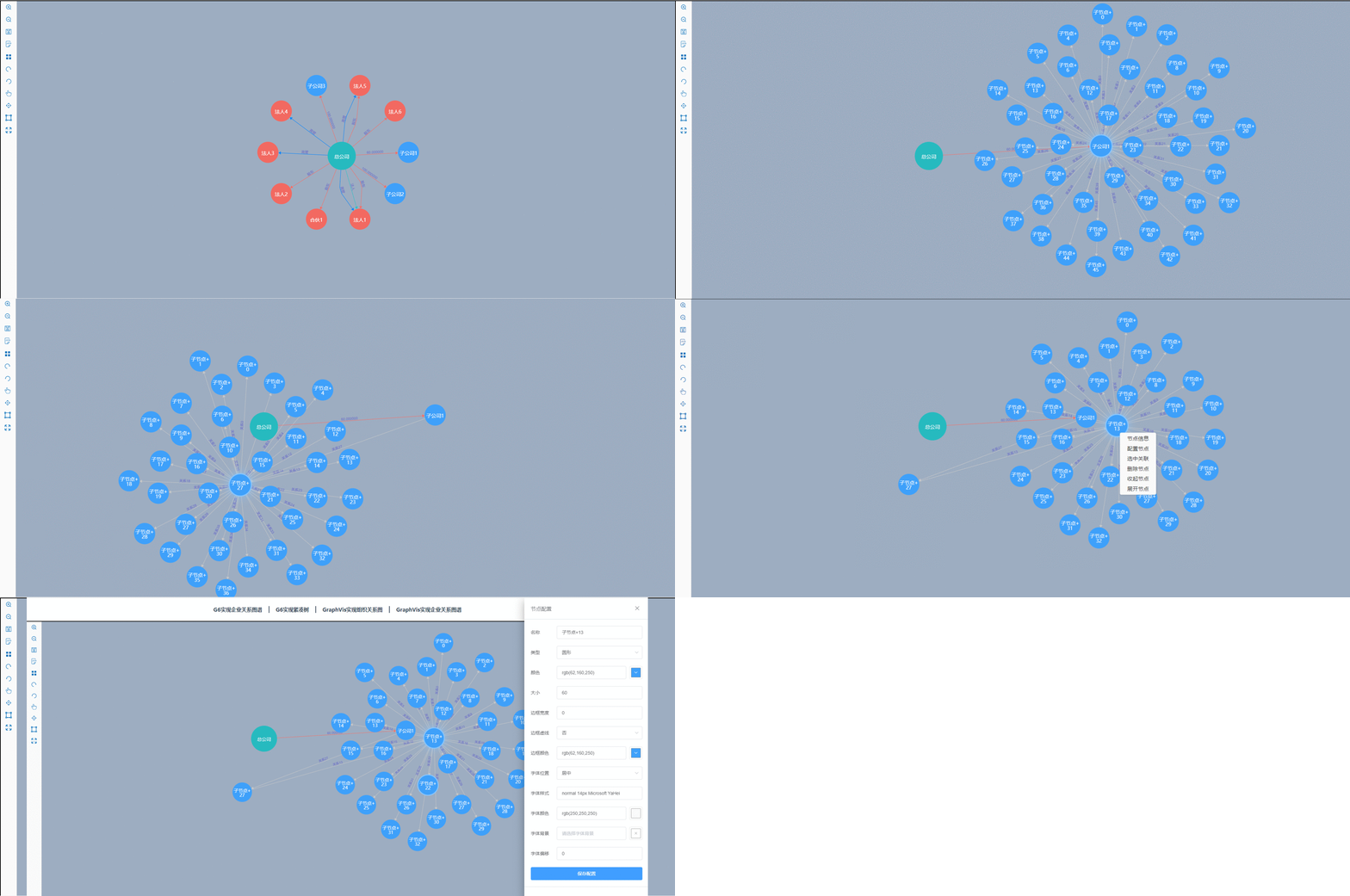
Demo演示:
vue使用GraphVis开发无限拓展的关系图谱的更多相关文章
- 二、vue组件化开发(轻松入门vue)
轻松入门vue系列 Vue组件化开发 五.组件化开发 1. 组件注册 组件命名规范 组件注册注意事项 全局组件注册 局部组件注册 2. Vue调试工具下载 3. 组件间数据交互 父组件向子组件传值 p ...
- windows环境下搭建vue+webpack的开发环境
前段时间一直在断断续续的看vue的官方文档,后来就慢慢的学习搭建vue的开发环境,已经有将近两周了,每到最后一步的时候就会报错,搞的我好郁闷,搁置了好几天,今天又接着搞vue的开发环境,终于成功了.我 ...
- vue-calendar 基于 vue 2.0 开发的轻量,高性能日历组件
vue-calendar-component 基于 vue 2.0 开发的轻量,高性能日历组件 占用内存小,性能好,样式好看,可扩展性强 原生 js 开发,没引入第三方库 Why Github 上很多 ...
- 第二节——vue多页面开发
我们平常用vue开发的时候总觉得vue好像就是专门为了单页面应用而诞生的,其实不是.因为vue在工程化开发的时候很依赖webpack,而webpack是将所有的资源整合到一块,弄成一个单页面. 但是v ...
- vue使用tradingview开发K线图相关问题
vue使用tradingview开发K线图相关问题 1.TradingView中文开发文档https://b.aitrade.ga/books/tradingview/CHANGE-LOG.html2 ...
- vue去掉严格开发,即去掉vue-cli安装时的eslint
vue去掉严格开发,即去掉vue-cli安装时的eslint : 1.vue-cli书写规范(主要是js规范) a.逗号.冒号后面要加空格 b.不能使用双引号,一律使用单引号 webpack的语法检查 ...
- vue前端+java后端 vue + vuex + koa2开发环境搭建及示例开发
vue + vuex + koa2开发环境搭建及示例开发 https://segmentfault.com/a/1190000012918518 vue前端+java后端 https://blog.c ...
- vue组件从开发到发布
组件化是前端开发非常重要的一部分,从业务中解耦出来,可以提高项目的代码复用率.更重要的是我们还可以打包发布,俗话说集体的力量是伟大的,正因为有许许多多的开源贡献者,才有了现在的世界. 不想造轮子的工程 ...
- 分享Node.js + Koa2 + MySQL + Vue.js 实战开发一套完整个人博客项目网站
这是个什么的项目? 使用 Node.js + Koa2 + MySQL + Vue.js 实战开发一套完整个人博客项目网站. 博客线上地址:www.boblog.com Github地址:https: ...
随机推荐
- Unreal如何进行材质优化?
Hello,大家好,今天给大家带来实用的材质优化,我是木偶心没.优化在每个游戏项目里面都会涉及到,是一种为了达成相同目标,寻求并采用消耗更少资源的办法.一般会在CPU,GPU,网络和内存方便进行优化. ...
- linux安装配置交叉编译器arm-linux-gnueabi-gcc
要使我们在x86架构下运行的程序迁移至ARM架构的开发板中运行时,需要通过交叉编译器将x86下编写的程序进行编译后,开发版才能运行. 在安装之前我们需要了解,什么是交叉编译器. 一.下载交叉编译器 这 ...
- R的基本使用
一.R的安装 1.进入R的官网,https://cran.r-project.org/ 2.下载对应的版 Downloaad R for Windows > base > Download ...
- ClickHouse学习系列之七【系统命令介绍】
背景 前面介绍了ClickHouse相关的系列文章,该系列文章包括了安装.权限管理.副本分片.配置说明等.这次介绍一些ClickHouse相关的系统命令,如重载配置文件.关闭服务和进程.停止和启动后 ...
- 与KubernetesAPI服务器交互
在介绍过的Downward API提供了一种简单的方式,将pod和容器的元数据传递给在它们内部运行的进程.但这种方式其实仅仅可以暴露一个pod自身的元数据,而且只可以暴露部分元数据.某些情况下,应用需 ...
- python之循环与判断
1,for 循环,语法 举例: for i in range(1, 5, 2): # 0,1,2,3,4 print(i) for a in range(5):# --(0,5,1) 0,1,2,3, ...
- 1、mysql基础入门(2)
1.4.常用非关系型数据库产品介绍: 1.Memcached(key-value)数据库:
- 23、mysql高可用实践
23.1.mysql高可用业务需求: 23.2.mysql高可用架构图(单主热备模式): 23.6.部署drbd.heartbeat.mysql的主从同步: 1.部署heartbeat:参考" ...
- Mweb发布blog到各博客平台
Mweb发布blog到各博客平台 主流博客平台 博客平台 博客园 CSDN 51CTO 博客类型 MetaWeblog API MetaWeblog API MetaWeblog API 博客网址 h ...
- 如何用Redis统计独立用户访问量
拼多多有数亿的用户,那么对于某个网页,怎么使用Redis来统计一个网站的用户访问数呢? 使用Hash 哈希是Redis的一种基础数据结构,Redis底层维护的是一个开散列,会把不同的key映射到哈希表 ...