
Nginx 自定义404、500、502 页面
利用nginx的反向代理来实现 服务器404 和500 等状态码的自定义页面
1.nginx配置文件 nginx.conf 配置开启代理错误拦截 和配置页面 下划线部分
http {

        ......

    proxy_intercept_errors on;

    fastcgi_intercept_errors on;

    server {

         ......

    error_page  404   /notfind.html;

    error_page   500 /error.html;

    error_page   502 503 504 /error502.html;

    }

}
2.编写自定义页面,将页面放置在nginx路径下的html 文件夹下 页面中用到的图片什么的都放置与此文件夹下

3.重启nginx 配置生效 OK
404页面代码
<!DOCTYPE html PUBLIC "-//W3C//DTD XHTML 1.0 Transitional//EN" "http://www.w3.org/TR/xhtml1/DTD/xhtml1-transitional.dtd">

<html xmlns="http://www.w3.org/1999/xhtml">

<head>

<meta charset="UTF-8" http-equiv="Content-Type" content="text/html; charset=utf-8" />

<link rel="icon" type="image/x-icon" href="http://zhaixt.info/icon.ico" />

<title>404-对不起!您访问的页面不存在</title>

<style type="text/css">

.head404{ width:580px; height:234px; margin:50px auto 0 auto; background:url(http://zhaixt.info/head404.png) no-repeat; }

.txtbg404{ width:499px; height:169px; margin:10px auto 0 auto; background:url(http://zhaixt.info/txtbg404.png) no-repeat;}

.txtbg404 .txtbox{ width:390px; position:relative; top:30px; left:60px;color:#eee; font-size:13px;}

.txtbg404 .txtbox p {margin:5px 0; line-height:18px;}

.txtbg404 .txtbox .paddingbox { padding-top:15px;}

.txtbg404 .txtbox p a { color:#eee; text-decoration:none;}

.txtbg404 .txtbox p a:hover { color:#FC9D1D; text-decoration:underline;}

</style>

</head>

<body bgcolor="#494949">

       <div class="head404"></div>

       <div class="txtbg404">

  <div class="txtbox">

      <p>对不起,您请求的页面不存在、或已被删除、或暂时不可用</p>

      <p class="paddingbox">请点击以下链接继续浏览网页</p>

      <p>》<a style="cursor:pointer" onclick="history.back()">返回上一页面</a></p>

      <p>》<a href="http://zhaixt.info/screenShot/index"> 文字识别 </a></p>

      <p>》<a href="http://zhaixt.info/excelchange/index"> 图表转换 </a></p>

    </div>

  </div>

</body>

</html>
500页面代码
<!DOCTYPE html PUBLIC "-//W3C//DTD XHTML 1.0 Transitional//EN" "http://www.w3.org/TR/xhtml1/DTD/xhtml1-transitional.dtd">

<html xmlns="http://www.w3.org/1999/xhtml">

<head>

  <title>We're sorry, but something went wrong (500)</title>

  <meta charset="UTF-8" http-equiv="Content-Type" content="text/html; charset=utf-8" />

  <link rel="icon" type="image/x-icon" href="http://zhaixt.info/icon.ico" />

  <style type="text/css">

    .head500{ width:580px; height:234px; margin:50px auto 0 auto; background:url(http://zhaixt.info/head500.png) no-repeat; }

    .txtbg500{ width:499px; height:169px; margin:10px auto 0 auto; background:url(http://zhaixt.info/txtbg404.png) no-repeat;}

    .txtbg500 .txtbox{ width:390px; position:relative; top:30px; left:60px;color:#eee; font-size:13px;}

    .txtbg500 .txtbox p {margin:5px 0; line-height:18px;}

    .txtbg500 .txtbox .paddingbox { padding-top:15px;}

    .txtbg500 .txtbox p a { color:#eee; text-decoration:none;}

    .txtbg500 .txtbox p a:hover { color:#FC9D1D; text-decoration:underline;}

</style>

</head>

<body bgcolor="#494949">

       <div class="head500"></div>

       <div class="txtbg500">

  <div class="txtbox">

      <p class="paddingbox">请点击以下链接继续浏览网页</p>

      <p>》<a style="cursor:pointer" onclick="history.back()">返回上一页面</a></p>

      <p>》<a href="http://zhaixt.info/screenShot/index"> 文字识别 </a></p>

      <p>》<a href="http://zhaixt.info/excelchange/index"> 图表转换 </a></p>

    </div>

  </div>

</body>

</html>
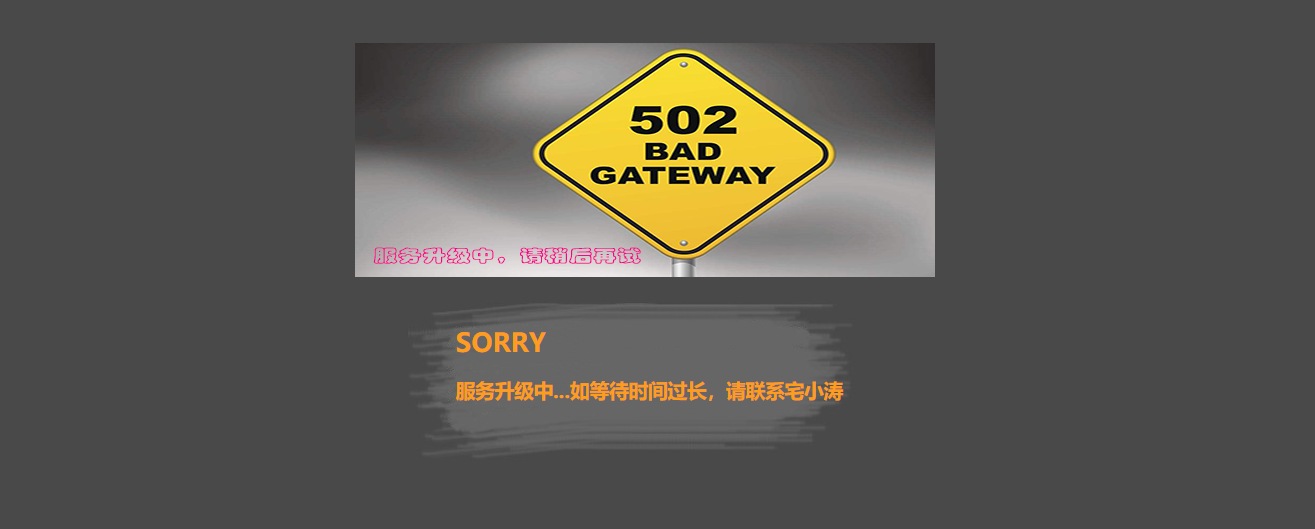
502页面代码
<!DOCTYPE html PUBLIC "-//W3C//DTD XHTML 1.0 Transitional//EN" "http://www.w3.org/TR/xhtml1/DTD/xhtml1-transitional.dtd">

<html xmlns="http://www.w3.org/1999/xhtml">

<head>

  <title>We're sorry, but something went wrong (502)</title>

  <meta charset="UTF-8" http-equiv="Content-Type" content="text/html; charset=utf-8" />

  <link rel="icon" type="image/x-icon" href="http://zhaixt.info/icon.ico" />

  <style type="text/css">

    .head500{ width:580px; height:234px; margin:50px auto 0 auto; background:url(http://zhaixt.info/502.png) no-repeat; }

    .txtbg500{ width:499px; height:169px; margin:10px auto 0 auto; background:url(http://zhaixt.info/txtbg404.png) no-repeat;}

    .txtbg500 .txtbox{ width:390px; position:relative; top:30px; left:60px;color:#eee; font-size:13px;}

    .txtbg500 .txtbox p {margin:5px 0; line-height:18px;}

    .txtbg500 .txtbox .paddingbox { padding-top:15px;}

    .txtbg500 .txtbox h1,h2{ color:#FC9D1D;}

</style>

</head>

<body bgcolor="#494949">

       <div class="head500"></div>

       <div class="txtbg500">

  <div class="txtbox">

    <h1> SORRY </h1>

    <h2>服务升级中...如等待时间过长,请联系宅小涛</h2>

    </div>

  </div>

</body>

</html>
欢迎大家参考 !


Nginx 自定义404、500、502 页面的更多相关文章
- nginx自定义404、403页面
1.在nginx的http模块加入: fastcgi_intercept_errors on; 2.在server模块加入 location / { root /data; index index.h ...
- apache 网页301重定向、自定义400/403/404/500错误页面
首先简单介绍一下,.htaccess文件是Apache服务器中的一个配置文件(Nginx服务器没有),它负责相关目录下的网页配置.通过对.htaccess文件进行设置,可以帮我们实现:网页301重定向 ...
- Nginx 自定义404、500错误页面跳转
自定义Nginx错误界面跳转 1.开启Nginx.conf配置文件下的自定义接口参数. http { fastcgi_intercept_errors on; } 2.在Server区域添加自定义的错 ...
- Nginx自定义404页面并返回404状态码
Nginx定义404页面并返回404状态码, WebServer是nginx,直接告诉我应该他们配置了nginx的404错误页面,虽然请求不存在的资源可以成功返回404页面,但返回状态码确是200. ...
- .net core 自定义404 500页面
常用处理方式 自己定制网站的404.500页面的方式有很多,比如修改nginx配置文件,指定请求返回码对应的页面, .netframework项目中修改webconfig文件,指定customerro ...
- Nginx自定义404页面
指定一个错误页面: error_page 404 /404.html; location = /404.html { root /usr/share/nginx/html; } 指定一个url地址: ...
- asp.net mvc输出自定义404等错误页面,非302跳转。
朋友问到一个问题,如何输出自定义错误页面,不使用302跳转.当前页面地址不能改变. 还要执行一些代码等,生成一些错误信息,方便用户提交反馈. 500错误,mvc框架已经有现成解决方法: filters ...
- asp.net mvc输出自定义404等错误页面,非302跳转
朋友问到一个问题,如何输出自定义错误页面,不使用302跳转.当前页面地址不能改变. 还要执行一些代码等,生成一些错误信息,方便用户提交反馈. 500错误,mvc框架已经有现成解决方法: filte ...
- http协议的状态码——400,401,403,404,500,502,503,301,302等常见网页错误代码
http协议的状态码 1xx(临时响应) 表示临时响应并需要请求者继续执行操作的状态码. 100(继续) 请求者应当继续提出请求.服务器返回此代码表示已收到请求的第一部分,正在等待其余部分. 101( ...
随机推荐
- luogu P5293 [HNOI2019]白兔之舞
传送门 关于这题答案,因为在所有行,往后跳到任意一行的\(w_{i,j}\)都是一样的,所以可以算出跳\(x\)步的答案然后乘上\(\binom{l}{x}\),也就是枚举跳到了哪些行 如果记跳x步的 ...
- mui-选项卡+scroll滚动
详细操作见代码: <!doctype html> <html> <head> <meta charset="UTF-8"> < ...
- pygame学习点滴
pygame分为四块 引用/ 初始化/ 事件处理/ 窗口刷新 普通版壁球游戏 """ 引用部分 """ import pygame, sys ...
- 设计模式七: 策略(Strategy)
简介 策略属于行为型模式的一种,策略模式允许对象的行为或算法在运行时改变,使用不同的算法达成相同的结果或目的. 实现层面上,定义一个抽象的算法接口, 然后根据具体算法的不同定义不同的类去实现该接口, ...
- sed 使用行号与关键字匹配限定行范围
1.打印匹配数字4 到最后一行 [111 sed]$ cat input [111 sed]$ sed -n '/4/,$p' input
- 【原创】大叔经验分享(18)hive2.0以后通过beeline执行sql没有进度信息
一 问题 在hive1.2中使用hive或者beeline执行sql都有进度信息,但是升级到hive2.0以后,只有hive执行sql还有进度信息,beeline执行sql完全silence,在等待结 ...
- Python- redis缓存 可达到瞬间并发量10W+
redis是什么? mysql是一个软件,帮助开发者对一台机器的硬盘进行操作. redis是一个软件,帮助开发者对一台机器的内存进行操作. redis缓存 可达到瞬间并发量10W+ 高并发架构系列:R ...
- 初识C语言(一)
C语言的结构体 一个C程序就是由多个头文件和函数组成 #include<stdio.h> /* 包含头文件*/ int main() { printf('"hello world ...
- URL.createObjectURL() 实现本地上传图片 并预览功能
URL.createObjectURL() 静态方法会创建一个 DOMString,其中包含一个表示参数中给出的对象的URL.这个 URL 的生命周期和创建它的窗口中的 document 绑定.这个新 ...
- Nginx Linux详细安装部署教程
一.Nginx简介 Nginx是一个web服务器也可以用来做负载均衡及反向代理使用,目前使用最多的就是负载均衡,具体简介我就不介绍了百度一下有很多,下面直接进入安装步骤 二.Nginx安装 1.下载N ...