
Chromium(Chrome) frame structure detail
1. Chromium VS Chrome
Chromium is an open-source Web browser project started by Google, to provide the source code for the proprietary Google Chrome browser. The two browsers share the majority of code and features, though there are some minor differences in features and logos, and they have different licensing.
So we can peek how Chrome working via learning Chromium.
2. Architectural overview
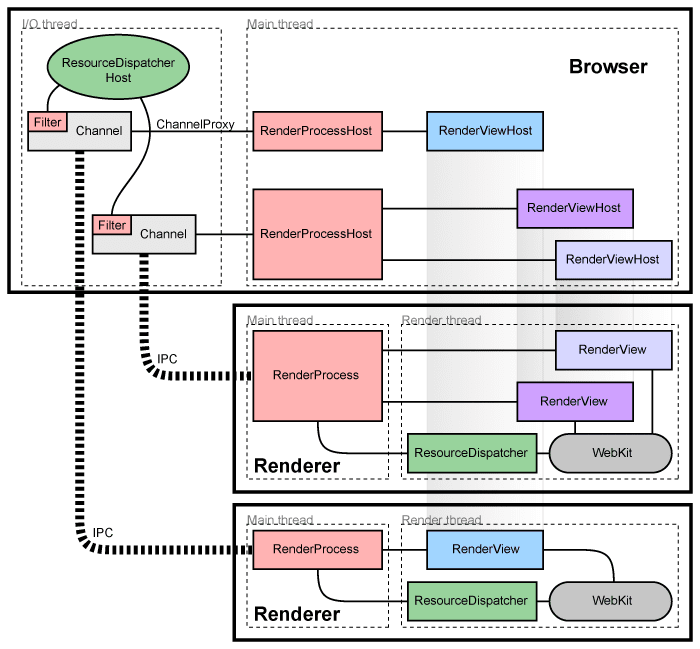
- All network communication is handled by the main browser process
- Separate browser tabs have separate processes
- each new window or tab opens in a new process
- Restrict access from each rendering engine process to others and to the rest of the system
- Browser: main process that runs the UI and manages tab and plugin processes
- Renderers: tab-specific processes, use Blink open-source layout engine
3. How Chromium Loading Resource

3.1 Three layers
- Lowest: Blink engine -> renders pages
- Middle: Renderer process -> each contains one Blink instance
- Highest: Browser process -> managing all the renderers & controls all network accesses
3.2 Blink
Responsible for fetching data, performing the actual data get, then send dispatch request to render
3.3 Renderer
Forward the request to the browser via IPC
3.4 Browser
Receive the IPC requests from each renderer, forwards these requests to the global ResourceDispatcherHost,send the notification back to the renderer
3.5 Cookie
Not share cookies with other browsers, cookie manager lives in the browser process which handles all network requests because cookies need to be the same across all tabs.
4. How Chromium Displays Web Pages
4.1 Conceptual application layers
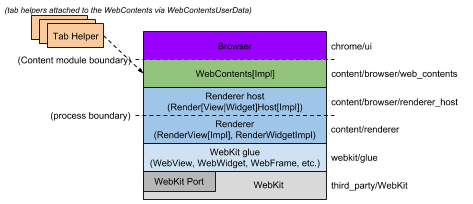
- WebKit
Rendering engine, actually, for Chrome, it should be replaced with Blink + V8
- Glue : "WebKit embedding layer", converts WebKit types to Chromium types
- Renderer / Render host: This is Chromium's "multi-process embedding layer."
- WebContents: A reusable component that is the main class of the Content module.
- Browser: Represents the browser window, it contains multiple WebContentses.
- Tab Helpers: Individual objects that can be attached to a WebContents.
4.2 Render process
The render thread is where the main objects such as the RenderView and all WebKit code run.

- RenderView(inherits from RenderWidget)
Represents a web page, contents of a tab or popup Window , handles all navigation-related commands to and from the browser process, painting and input event handling
- RenderWidget
A Window on the screen that receives input events and paint into
4.3 Browser process

- All IPC communication with the render processes is done on the I/O thread of the browser.
- Handles all network communication which keeps it from interfering with the user interface
- RenderViewHost & RenderWidgetHost
Responsibility of displaying a web page in a rectangular view
refers:
https://en.wikipedia.org/wiki/Chromium
http://www.chromium.org/developers/design-documents
Chromium(Chrome) frame structure detail的更多相关文章
- IE 加速插件之 Google Chrome Frame
前言 IE 8 及以下版本的速度较慢. 特别是前端的js 和 css 内容较多时尤为突出. 就笔者的开发经验来说GWT, Ext JS, raphael , draw2d 等开发的系统在IE下使用是相 ...
- 【转】使用Chrome Frame,彻底解决浏览器兼容问题
本文转自http://www.ryanbay.com/?p=269,感谢该作者的总结 X-UA-Compatible是自从IE8新加的一个设置,对于IE8以下的浏览器是不识别的. 通过在meta中设置 ...
- IE内嵌google chrome frame解决浏览器兼容问题
IE内嵌google chrome frame解决浏览器兼容问题 http://www.cnblogs.com/xwdreamer/archive/2013/12/17/3477776.html 参 ...
- Google Chrome Frame 自定义渲染方式,调用ActiveX
通过meta段的设置可以控制浏览器的渲染行为,但在一些特殊情况下,meta段的设置无效,我们需要额外的操作以达到目的. 模式1:页面A(IE)iFrame引用页面B(Chrome Frame) 问题描 ...
- 告别IE给我们的web开发带来的困扰(使用chrome frame v8引擎)
茶爸爸个人微信:benyzhous,公众号:cha-baba欢迎骚扰 由于客户所有机器必须使用IE6浏览器,导致我们在开发项目过程中遇到非常多的样式与性能问题,在偶然的一次使用360软件管家搜索chr ...
- 【转】IE内嵌google chrome frame解决浏览器兼容问题
参考文献: http://www.pseudowired.com/2012/12/04/tomcat-http-header-manipulation/(html中自动添加使用chrome的heade ...
- Chromium网页Frame Tree创建过程分析
Chromium在加载一个网页之前,需要在Browser进程创建一个Frame Tree.Browser进程为网页创建了Frame Tree之后,再请求Render进程加载其内容.Frame ...
- Chromium(Chrome) Sandbox Details
What Sandbox Do? Sandbox leverages the OS-provided security to allow code execution that cannot make ...
- Ubuntu 16.04下安装64位谷歌Chromium(Chrome)浏览器
在命令行下输入: sudo add-apt-repository ppa:a-v-shkop/chromium sudo apt-get update sudo apt-get install chr ...
随机推荐
- UML 类图口诀
UML类图口诀: (10G:实线继承)空三角实线指向被继承, (虚实:虚线实现)空三角虚线指向被实现, (恐惧:空棱形聚合)空棱形实线(棱形)指向聚合整体.部分作为成员变量. (十足:实棱形组合)实棱 ...
- html 使表格随着内容自动适应宽度
所谓难而不会,会儿不难.这个问题让我纠结了很长时间,一句css解决了,仅仅靠一个属性 td { white-space: nowrap; } from:http://blog.csdn.net/liu ...
- oracle数据库查询和更新
package sqltest; import java.sql.*; import parameter.BaseCanShu; public class PublicDbOracle { stati ...
- 201771010141 周强《面向对象设计 java》第十五周实验总结
理论部分 ◼ JAR文件◼ 应用程序首选项存储◼ Java Web Start JAR文件: 1.Java程序的打包:程序编译完成后,程序员将.class文件压缩打包为.jar文件后,GUI界面程序就 ...
- React相关:npm,ES6,
1.NPM: 参考:npm使用入门 npm 学习笔记整理 2.ES6参考:ES6 let命令:ES6新增了let命令,用来声明变量.它的用法类似于var,但是所声明的变量,只在let命令所在的代码块 ...
- 抛开visual studio,纯手工创建asp.net mvc遇到的问题
脱离Visual Studio,只用文本编辑器..NET Framework.IIS Express创建ASP.NET MVC应用时,需要精简~/View目录下web.config文件内容,之前创建的 ...
- 【linux】State : Uninterruptible, pid: 3936
运行centos7中yum命令时提示: Existing lock /var/run/yum.pid: another copy is running as pid 3936.Another app ...
- 在SQL Server 2008上安装ArcSDE 10.1并实现远程连接
先安装SQL Server 2008 R2 X64(SP2),创建数据库实例,安装客户端. 再安装ArcSDE 10.1,ArcGIS Desktop 10.1,一切顺利. 由于Desktop是32位 ...
- 每天一本电子书 - JavaScript for Kids: A Playful Introduction to Programming
JavaScript for Kids: A Playful Introduction to Programming 作者: Nick Morgan 出版社: No Starch Press 副标题 ...
- [LeetCode&Python] Problem 27. Remove Element
Given an array nums and a value val, remove all instances of that value in-placeand return the new l ...