
Saltstack_使用指南06_远程执行-指定目标
1. 主机规划

Targeting Minions文档
https://docs.saltstack.com/en/latest/contents.html
另请参见:自动化运维神器之saltstack (三)节点组及复合匹配器
注意事项
修改了master或者minion的配置文件,那么必须重启对应的服务。
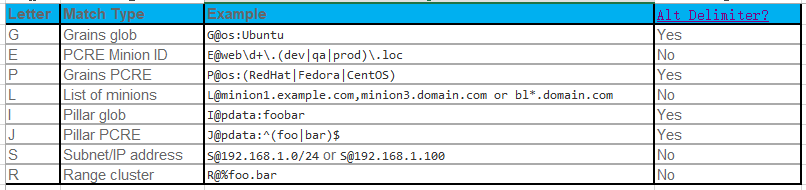
2. 目标指定方式
|
Letter |
Match Type |
Example |
|
|
G |
Grains glob |
G@os:Ubuntu |
Yes |
|
E |
PCRE Minion ID |
E@web\d+\.(dev|qa|prod)\.loc |
No |
|
P |
Grains PCRE |
P@os:(RedHat|Fedora|CentOS) |
Yes |
|
L |
List of minions |
L@minion1.example.com,minion3.domain.com or bl*.domain.com |
No |
|
I |
Pillar glob |
I@pdata:foobar |
Yes |
|
J |
Pillar PCRE |
J@pdata:^(foo|bar)$ |
Yes |
|
S |
Subnet/IP address |
S@192.168.1.0/24 or S@192.168.1.100 |
No |
|
R |
Range cluster |
R@%foo.bar |
No |
Matchers can be joined using boolean and, or, and not operators. 【复合匹配的时候】
2.1. 当前有哪些minion
 [root@salt100 ~]# salt '*' test.ping

 salt02:

     True

 salt100:

     True

 salt03:

     True

 salt01:

     True
3. 通过minion id匹配
3.1. 通配符匹配
在 top file 中也仍然适用。【推荐使用】
 # Match all minions:

 salt '*' test.ping

 # Match all minions in the example.net domain or any of the example domains:

 salt '*.example.net' test.ping

 salt '*.example.*' test.ping

 # Match all the 「webN」 minions in the example.net domain (web1.example.net, web2.example.net … webN.example.net):

 salt 'web?.example.net' test.ping

 # Match the 「web1」 through 「web5」 minions:

 salt 'web[1-5]' test.ping

 # Match the 「web1」 and 「web3」 minions:

 salt 'web[1,3]' test.ping

 # Match the 「web-x」, 「web-y」, and 「web-z」 minions:

 salt 'web-[x-z]' test.ping
3.2. 正则表达式(-E)
使用较少,因为正则写错的几率会大些。
正则规则参见:
https://blog.csdn.net/woshizhangliang999/article/details/46859161
 # Match both 「web1-prod」 and 「web1-devel」 minions:

 salt -E 'web1-(prod|devel)' test.ping
3.2.1. 在 top file 中的使用
 base:

   'web1-(prod|devel)':

   - match: pcre  # 使用正则匹配

   - webserver
3.3. 列表匹配(-L)
salt -L 'web1,web2,web3' test.ping
4. 使用grains指定(-G)
 # For example, the following matches all CentOS minions:

 salt -G 'os:CentOS' test.ping

 # Match all minions with -bit CPUs, and return number of CPU cores for each matching minion:

 salt -G 'cpuarch:x86_64' grains.item num_cpus
4.1. 嵌套匹配【细粒度匹配】
 [root@salt100 ~]# salt -G 'ip_interfaces:eth0' test.ping

 salt01:

     True

 salt02:

     True

 salt03:

     True

 salt100:

     True

 [root@salt100 ~]# salt -G 'ip_interfaces:eth0:*11*' test.ping

 salt01:

     True
5. 使用pillar指定(-I)
像grains匹配一样,也支持嵌套匹配。
 # 具体匹配

 salt -I 'somekey:specialvalue' test.ping
5.1. 嵌套匹配【细粒度匹配】
 [root@salt100 ~]# salt -I 'level1:level2:my_user:*zhang*' test.ping

 salt03:

     True

 salt02:

     True
6. 子网/IP 地址匹配(-S)
 # Minions can easily be matched based on IP address, or by subnet

 salt -S 172.16.1.11 test.ping     # 具体地址

 salt -S 172.16.1.0/ test.ping   # 网段

 salt -S fe80::20c:29ff:fe95:1b7a test.ping  # IPv  具体配置

 salt -S :db8::/ test.ping             # IPv  网段配置
6.1. 用于复合匹配
 # Ipcidr matching can also be used in compound matches

 salt -C 'S@10.0.0.0/24 and G@os:Debian' test.ping
6.2. 用于pillar和状态的top file匹配
 '172.16.0.0/12':

    - match: ipcidr  # 匹配方式

    - internal
7. 复合匹配(-C)
Matchers can be joined using boolean and, or, and not operators. 【复合匹配的时候】
 # the following string matches all 「Debian minions」 with a hostname that begins with 「webserv」, as well as any minions that have a hostname which matches the regular expression 「web-dc1-srv.* 」:

 salt -C 'webserv* and G@os:Debian or E@web-dc1-srv.*' test.ping

 # Excluding a minion based on its ID is also possible:

 salt -C 'not web-dc1-srv' test.ping

 # Versions prior to 2015.8. a leading 「not」 was not supported in compound matches. Instead, something like the following was required:

 salt -C '* and not G@kernel:Darwin' test.ping

 # Excluding a minion based on its ID was also possible:

 salt -C '* and not web-dc1-srv' test.ping
7.1. 在 top file 中的使用
 base:

   'webserv* and G@os:Debian or E@web-dc1-srv.*':

     - match: compound  # 复合匹配

     - webserver
7.2. 优先匹配
 # 可以使用括号实现优先匹配

 # 一定要注意括号和目标之间需要「空格」。不遵守此规则可能导致错误的目标!

 salt -C '( ms-1 or G@id:ms-3 ) and G@id:ms-3' test.ping
7.3. 替换分隔符
 # 默认为 「:」 改为其他字符分割

 salt -C 'J|@foo|bar|^foo:bar$ or J!@gitrepo!https://github.com:example/project.git' test.ping
案例1
 [root@salt100 ~]# salt -C 'G@os:redhat03' test.ping

 salt01:

     True

 [root@salt100 ~]#

 [root@salt100 ~]# salt -C 'G|@os|redhat03' test.ping  # 将分隔符从「:」 改为「|」

 salt01:

     True

 [root@salt100 ~]# salt -C 'G!@os!redhat03' test.ping  #将分隔符从「:」 改为「!」

 salt01:

     True

 [root@salt100 ~]# salt -C 'G!@os!redhat03 or salt02' test.ping

 salt02:

     True

 salt01:

     True
案例2
 [root@salt-master- ~]# salt '*' pillar.item getos

 10.0.0.112:

     ----------

     getos:

         ----------

         apache:

             httpd

         git:

             git

 172.16.1.111:

     ----------

     getos:

         ----------

         apache:

             apache2:kkk

         git:

             git-core

 salt-master-:

     ----------

     getos:

         ----------

         apache:

             httpd

         git:

             git

 [root@salt-master- ~]# salt -I 'getos:apache:apache2:kkk' test.ping

 172.16.1.111:

     True

 [root@salt-master- ~]# salt -C 'I@getos:apache:apache2:kkk' test.ping    # 因为有 apache2:kkk ,所以在某些情况下会出现错误

 172.16.1.111:

     True

 [root@salt-master- ~]#

 [root@salt-master- ~]# salt -C 'I#@getos#apache#apache2:kkk' test.ping   # 表示使用 # 作为分隔符,而不是 :

 172.16.1.111:

     True
8. 节点组(-N)
备注:
 、当向主配置文件添加或修改节点组时,必须重新启动master,以便完全识别这些更改。

 、在不重启的情况下,可以使用命令行中 -N 作为目标的有限功能。
8.1. /etc/salt/master 配置
 # The nodegroups master config file parameter is used to define nodegroups. Here's an example nodegroup configuration within 「/etc/salt/master」:

 nodegroups:

   group1: 'L@foo.domain.com,bar.domain.com,baz.domain.com or bl*.domain.com'

   group2: 'G@os:Debian and foo.domain.com'

   group3: 'G@os:Debian and N@group1'

   group4:

     - 'G@foo:bar'

     - 'or'

     - 'G@foo:baz'

 # As of the 2017.7. release of Salt, group names can also be prepended with a dash【破折号】. This brings the usage in line with many other areas of Salt. For example:

 # 组节点也可以使用 如下方式。  组名前面到破折号「-」

 nodegroups:

   - group1: 'L@foo.domain.com,bar.domain.com,baz.domain.com or bl*.domain.com'

 注意:

 Nodegroups可以参考group3中看到的其他Nodegroups,确保没有循环引用。循环引用将被检测到,并导致部分扩展产生日志错误消息。

 注意:

     「N@」 不能在命令行和top file中使用,只能在master config 中使用
8.2. 命令行匹配
salt -N group1 test.ping
8.3. 在 top file 中的使用
 base:

   group1:

     - match: nodegroup  # 使用节点组匹配

     - webserver
8.4. 根据列表的minion IDs定义为节点组
 # 常规的定义方式

 nodegroups:

   group1: L@host1,host2,host3

 # YAML 定义方式

 nodegroups:

   group1:

     - host1

     - host2

     - host3
9. 批量大小(-b)
 # The 「-b」 (or 「--batch-size」) option allows commands to be executed on only a specified number of minions at a time.

 # 同一时间执行多少 minion,支持百分比和数字。

 salt '*' -b  test.ping  # 同一时间执行  台,完毕后执行另外  台,依次执行下去

 salt '*' -b % test.ping  # 同一时间执行 % 的minion 端,完毕后执行另外 %【实际是最后的 %】。

 salt -G 'os:RedHat' --batch-size % apache.signal restart  #

 # --batch-wait minion返回后,等待多少秒在发送命令给新的minion

 salt '*' -b % --batch-wait  test.ping   # 第一批minion反馈后,等待  秒后,在发送命令给下一批的minion。

Saltstack_使用指南06_远程执行-指定目标的更多相关文章
- Saltstack_使用指南07_远程执行-执行模块
1. 主机规划 远程执行教程文档 https://docs.saltstack.com/en/latest/topics/tutorials/modules.html 所有模块文档 https://d ...
- Saltstack_使用指南02_远程执行-验证
1. 主机规划 2. Master与哪些minion通信 2.1. Master与哪些minion正常通信 [root@salt100 ~]# salt '*' test.ping salt100: ...
- Saltstack_使用指南08_远程执行-返回程序
1. 主机规划 salt 版本 [root@salt100 ~]# salt --version salt (Oxygen) [root@salt100 ~]# salt-minion --versi ...
- Saltstack_使用指南09_远程执行-编写执行模块
1. 主机规划 salt 版本 [root@salt100 ~]# salt --version salt (Oxygen) [root@salt100 ~]# salt-minion --versi ...
- expect脚本同步文件 expect脚本指定host和要同步的文件 构建文件分发系统 批量远程执行命令
自动同步文件 #!/usr/bin/expect set " spawn rsync -av root@.txt /tmp/ expect { "yes/no" { se ...
- expect脚本同步文件、expect脚本指定host和要同步的文件、构建文件分发系统、批量远程执行命令
7月20日任务 20.31 expect脚本同步文件20.32 expect脚本指定host和要同步的文件20.33 构建文件分发系统20.34 批量远程执行命令扩展:shell多线程 http:// ...
- 使用CreateRemoteThread把代码远程注入指定exe执行
由于本人也是新手,如果有朋友不懂windows api相关知识,我相信查阅书籍或者百度会比我说有帮助的多,下面就我所做简单复述一下过程,欢迎指正缺点. 效果图示如下: 做的这个例子首先是创建了一个MF ...
- 【DB2】报错:-30090 25000 指定的操作对远程执行失败
场景描述: 数据库:DB_1,DB_2 现在在DB_1中建立NICKNAME为CST_INFO_NICK,并且该别名指向数据库DB_2的CST_INFO表,在DB_1中建立存储过程,该存储过程需要 ...
- 03 深入远程执行:target目标、模块modules、返回returns
0.学习目的 http://docs.saltstack.cn/topics/execution/index.html 官方文档 0.1 命令解释 [root@host---- ~]# salt ' ...
随机推荐
- Spring boot 之自动生成API文档swagger2
目前解决API的方案一般有两种 1.编写文档接口.2.利用一些现成的api系统.3.如我一般想搞点特色的就自己写个api系统:http://api.zhaobaolin.vip/ ,这个还支持多用户. ...
- 【c#】RabbitMQ学习文档(四)Routing(路由)
(使用Net客户端) 在上一个教程中,我们构建了一个简单的日志系统,我们能够向许多消息接受者广播发送日志消息. 在本教程中,我们将为其添加一项功能 ,这个功能是我们将只订阅消息的一个子集成为可能. 例 ...
- Go语言系列文章
这个系列写的不是很好,未来重构. Go基础系列 Go基础 Go基础 1.Go简介 2.Go数据结构struct 3.构建Go程序 4.import导包和初始化阶段 5.array 6.Slice详解 ...
- CAN总线学习记录之二:系统结构与帧结构
CAN总线系统结构 CAN 控制器 接收控制单元中微处理器发出的数据,处理数据并传给 CAN 收发器 CAN 收发器 将数据传到总线 or 从总线接收数据给 CAN 控制器 CAN 数据传递终端 避 ...
- [CSS] css的background及多背景设置
问题 首先是一个 div 块里需要一张背景,带文本和图案的那种,但是身为容器的 div 是能够随数据的改变而变化长度的,所以一张静态图片不免的会有拉伸和挤扁的状态,尤其是有图案和文本的情况下最为明显 ...
- webpack4.0各个击破(10)—— Integration篇
webpack作为前端最火的构建工具,是前端自动化工具链最重要的部分,使用门槛较高.本系列是笔者自己的学习记录,比较基础,希望通过问题 + 解决方式的模式,以前端构建中遇到的具体需求为出发点,学习we ...
- Qt的内存管理机制
当我们在使用Qt时不可避免得需要接触到内存的分配和使用,即使是在使用Python,Golang这种带有自动垃圾回收器(GC)的语言时我们仍然需要对Qt的内存管理机制有所了解,以更加清楚的认识Qt对象的 ...
- 第27章 联合网关 - Identity Server 4 中文文档(v1.0.0)
通用架构是所谓的联合网关.在此方法中,IdentityServer充当一个或多个外部身份提供商的网关. 该架构具有以下优点: 您的应用程序只需要了解一个令牌服务(网关),并且屏蔽了有关连接到外部提供程 ...
- 第8章 概述 - Identity Server 4 中文文档(v1.0.0)
快速入门提供了各种常见IdentityServer方案的分步说明.他们从基础到复杂 - 建议您按顺序完成它们. 将IdentityServer添加到ASP.NET Core应用程序 配置Identit ...
- UED视觉交互设计与流程介绍
UED视觉交互设计与流程介绍 ------------------------------------------------------------------ 今天先到这儿,希望对您技术领导力, ...