
opencv学习之路(35)、SURF特征点提取与匹配(三)
一、简介
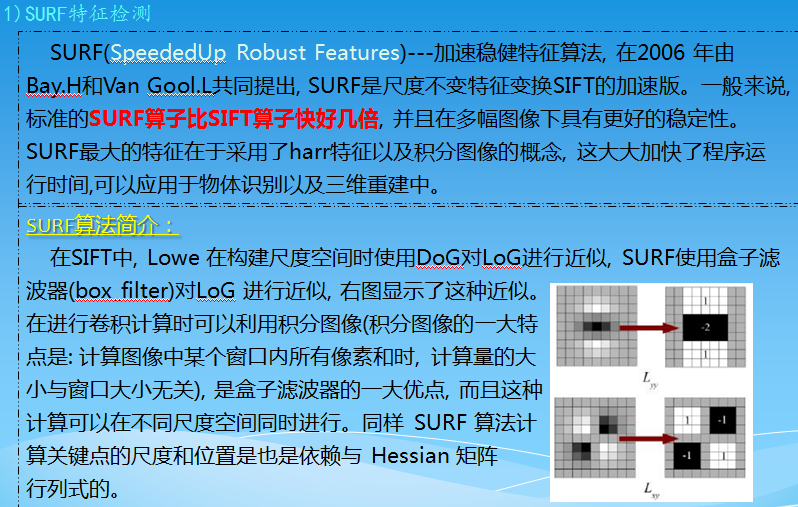
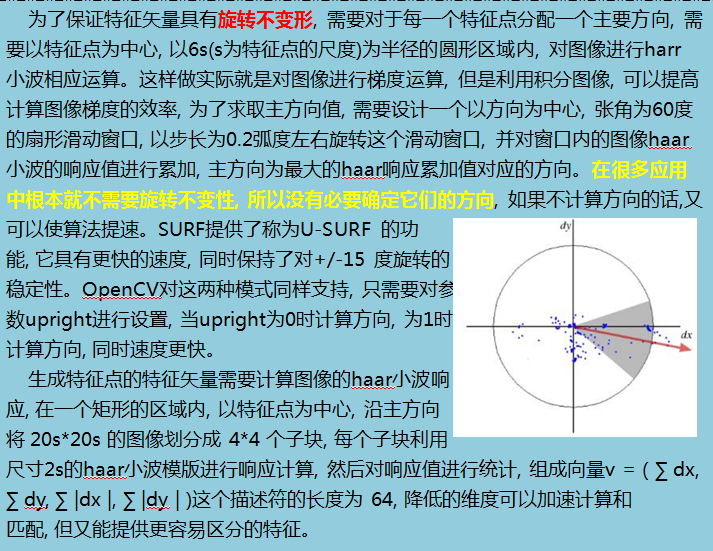
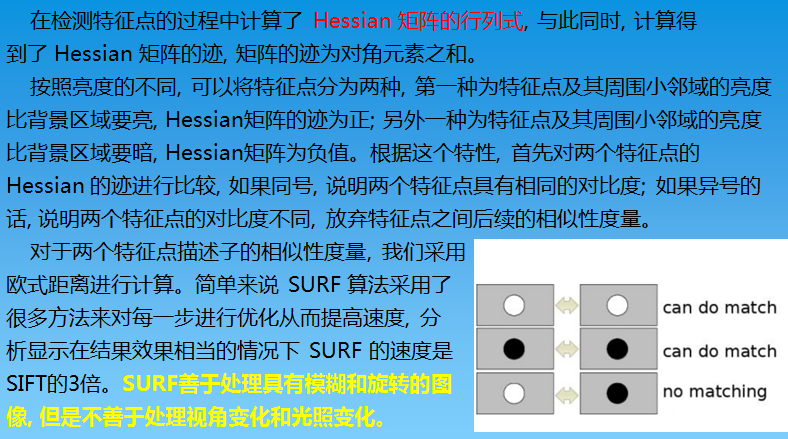
二、opencv中的SURF算法接口
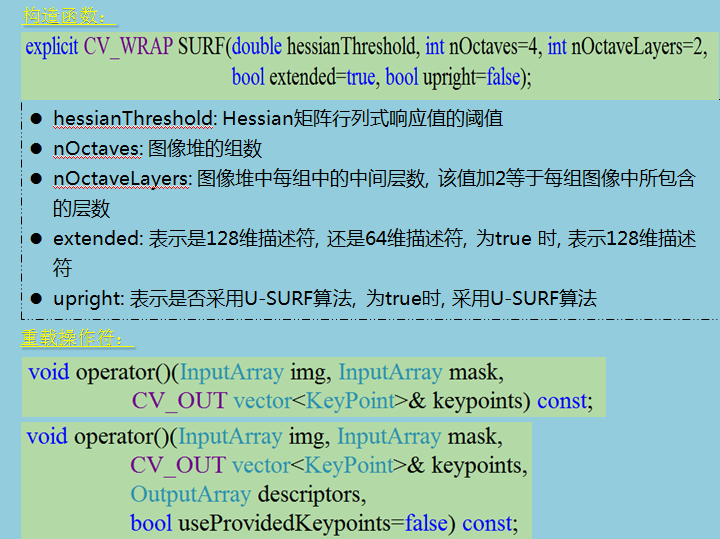
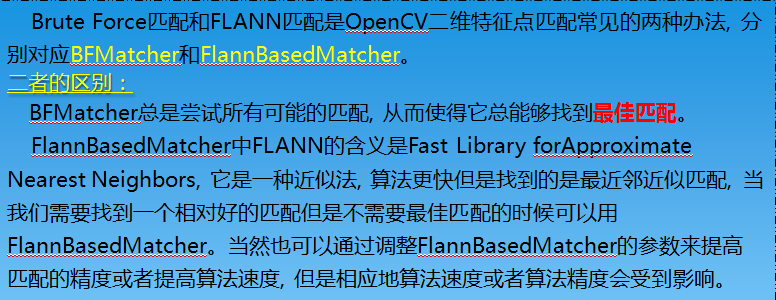
三、特征点匹配方法
四、代码
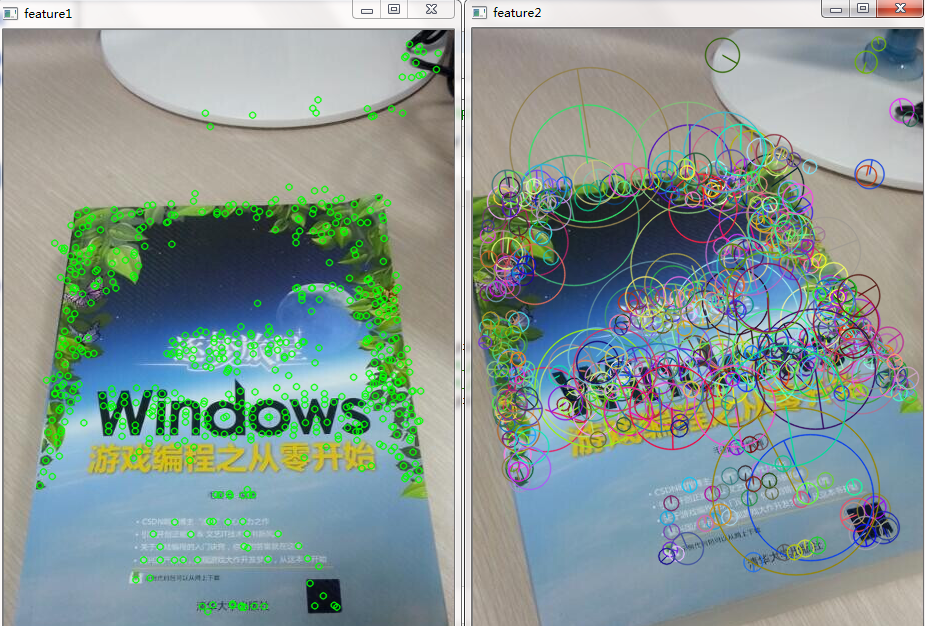
1.特征点提取
#include "opencv2/opencv.hpp"

#include <opencv2/nonfree/nonfree.hpp>

#include <vector>

#include<iostream>

using namespace std;

using namespace cv;

void main()

{

    Mat srcImg1 = imread("E://1.jpg");

    Mat srcImg2 = imread("E://2.jpg");

    //定义SURF特征检测类对象

    SurfFeatureDetector surfDetector();//SIFT有默认值,SURF没有默认值,需要赋初值 hessianThreshold

    //定义KeyPoint变量

    vector<KeyPoint>keyPoints1;

    vector<KeyPoint>keyPoints2;

    //特征点检测

    surfDetector.detect(srcImg1, keyPoints1);

    surfDetector.detect(srcImg2, keyPoints2);

    //绘制特征点(关键点)

    Mat feature_pic1, feature_pic2;

    drawKeypoints(srcImg1, keyPoints1, feature_pic1, Scalar(,,));

    //drawKeypoints(srcImg2, keyPoints2, feature_pic2, Scalar::all(-1));

    //drawKeypoints(srcImg1, keyPoints1, feature_pic1, Scalar::all(-1), DrawMatchesFlags::DRAW_RICH_KEYPOINTS);

    drawKeypoints(srcImg2, keyPoints2, feature_pic2, Scalar::all(-), DrawMatchesFlags::DRAW_RICH_KEYPOINTS);

    //显示原图

    imshow("src1", srcImg1);

    imshow("src2", srcImg2);

    //显示结果

    imshow("feature1", feature_pic1);

    imshow("feature2", feature_pic2);

    waitKey();

}
2.暴力匹配(尽量避免使用“nth_element前多少个”筛选)
#include "opencv2/opencv.hpp"

#include <opencv2/nonfree/nonfree.hpp>

#include <opencv2/legacy/legacy.hpp>

#include <vector>

#include<iostream>

using namespace std;

using namespace cv;

void main()

{

    Mat srcImg1 = imread("E://11.jpg");

    Mat srcImg2 = imread("E://22.jpg");

    //定义SURF特征检测类对象

    SurfFeatureDetector surfDetector();  //HessianThreshold

    //定义KeyPoint变量

    vector<KeyPoint>keyPoints1;

    vector<KeyPoint>keyPoints2;

    //特征点检测

    surfDetector.detect(srcImg1, keyPoints1);

    surfDetector.detect(srcImg2, keyPoints2);

    //绘制特征点(关键点)

    Mat feature_pic1, feature_pic2;

    drawKeypoints(srcImg1, keyPoints1, feature_pic1, Scalar::all(-));

    drawKeypoints(srcImg2, keyPoints2, feature_pic2, Scalar::all(-));

    //显示原图

    imshow("src1", srcImg1);

    imshow("src2", srcImg2);

    //显示结果

    imshow("feature1", feature_pic1);

    imshow("feature2", feature_pic2);

    //计算特征点描述符 / 特征向量提取

    SurfDescriptorExtractor descriptor;

    Mat description1;

    descriptor.compute(srcImg1, keyPoints1, description1);

    Mat description2;

    descriptor.compute(srcImg2, keyPoints2, description2);

    cout<<description1.cols<<endl;

    cout<<description1.rows<<endl;

    //进行BFMatch暴力匹配

    BruteForceMatcher<L2<float>>matcher;    //实例化暴力匹配器

    vector<DMatch>matches;  //定义匹配结果变量

    matcher.match(description1, description2, matches);  //实现描述符之间的匹配

     //计算向量距离的最大值与最小值

    double max_dist=, min_dist=;

    for(int i=; i<description1.rows; i++)

    {

        if(matches.at(i).distance > max_dist)

            max_dist = matches[i].distance;

        if(matches.at(i).distance < min_dist)

            min_dist = matches[i].distance;

    }

    cout<<"min_distance="<<min_dist<<endl;

    cout<<"max_distance="<<max_dist<<endl;

    //匹配结果筛选

    vector<DMatch>good_matches;

    for(int i=; i<matches.size(); i++)

    {

        if(matches[i].distance < *min_dist)

            good_matches.push_back(matches[i]);

    }

    Mat result;

    //drawMatches(srcImg1, keyPoints1, srcImg2, keyPoints2, matches, result, Scalar::all(-1), Scalar::all(-1));

    drawMatches(srcImg1, keyPoints1, srcImg2, keyPoints2, good_matches, result,  Scalar(, , ), Scalar::all(-));

    imshow("Match_Result", result);

    waitKey();

}
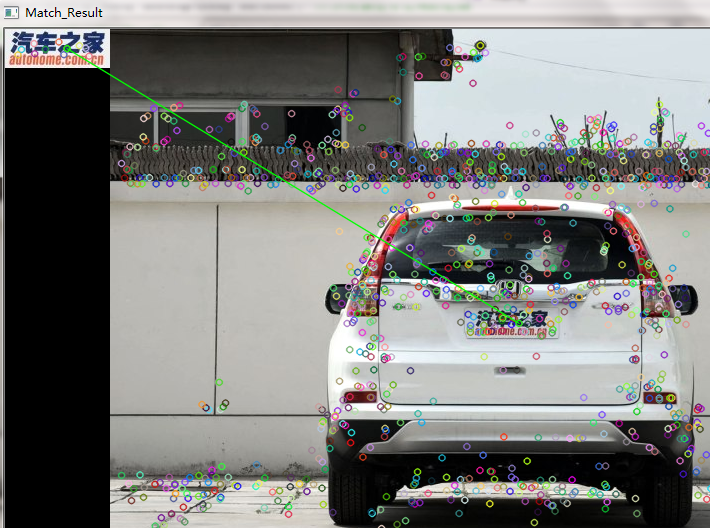
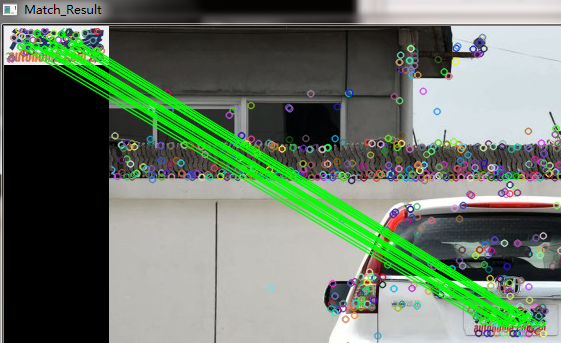
因为surf检测到的角点比较少,所以不适合做小目标匹配。
同样代码,使用sift作对比
3.FlannBasedMatcher匹配
   //BruteForceMatcher<L2<float>>matcher;    //实例化暴力匹配器

    FlannBasedMatcher matcher;  //实例化FLANN匹配器

    vector<DMatch>matches;  //定义匹配结果变量

    matcher.match(description1, description2, matches);  //实现描述符之间的匹配
其余代码相同
opencv学习之路(35)、SURF特征点提取与匹配(三)的更多相关文章
- OpenCV成长之路(9):特征点检测与图像匹配
特征点又称兴趣点.关键点,它是在图像中突出且具有代表意义的一些点,通过这些点我们可以用来识别图像.进行图像配准.进行3D重建等.本文主要介绍OpenCV中几种定位与表示关键点的函数. 一.Harris ...
- Opencv学习之路—Opencv下基于HOG特征的KNN算法分类训练
在计算机视觉研究当中,HOG算法和LBP算法算是基础算法,但是却十分重要.后期很多图像特征提取的算法都是基于HOG和LBP,所以了解和掌握HOG,是学习计算机视觉的前提和基础. HOG算法的原理很多资 ...
- opencv学习之路(34)、SIFT特征匹配(二)
一.特征匹配简介 二.暴力匹配 1.nth_element筛选 #include "opencv2/opencv.hpp" #include <opencv2/nonfree ...
- opencv学习之路(33)、SIFT特征点提取(一)
一.简介 二.OpenCV中的SIFT算法接口 #include "opencv2/opencv.hpp" #include <opencv2/nonfree/nonfree ...
- opencv学习之路(19)、直方图
一.概述 二.一维灰度直方图 #include "opencv2/opencv.hpp" #include<iostream> using namespace cv; ...
- opencv学习之路(41)、人脸识别
一.人脸检测并采集个人图像 //take_photo.cpp #include<opencv2/opencv.hpp> using namespace cv; using namespac ...
- opencv学习之路(40)、人脸识别算法——EigenFace、FisherFace、LBPH
一.人脸识别算法之特征脸方法(Eigenface) 1.原理介绍及数据收集 特征脸方法主要是基于PCA降维实现. 详细介绍和主要思想可以参考 http://blog.csdn.net/u0100066 ...
- opencv学习之路(20)、直方图应用
一.直方图均衡化--equalizeHist() #include "opencv2/opencv.hpp" using namespace cv; void main() { 6 ...
- opencv学习之路(18)、霍夫变换
一.简介 在图像处理和计算机视觉领域中,如何从当前的图像中提取所需要的特征信息是图像识别的关键所在.在许多应用场合中需要快速准确地检测出直线或者圆.其中一种非常有效的解决问题的方法是霍夫(Hough) ...
随机推荐
- 软件分享--EditPlus
有些人分享的报毒,不好用,所以在这分享个好用的.百度网盘地址: 链接: https://pan.baidu.com/s/15s7I6p0K_36KPtzRDbHfrw 密码:kl5w
- 使用 Canal 实现数据异构
小结: 1. https://mp.weixin.qq.com/s/z-5aoGVuk7JzIGrJJWgeJw 使用 Canal 实现数据异构 原创: 杜亦舒 性能与架构 3月4日
- JAVA RPC (四) 之thrift序列化普通对象
先简单写一个thrift文件 本地通过thrift编译之后会生成一个java源文件.------编译口令 :thrift -gen java mytestrequest.thrift 编译后的源代码如 ...
- Caused by: java.lang.ClassNotFoundException: org.springframework.integration.handler.support.HandlerMethodArgumentResolversHolder
<dependency> <groupId>org.springframework.cloud</groupId> <artifactId>spring ...
- python多进程multiprocessing模块中Queue的妙用
最近的部门RPA项目中,小爬为了提升爬虫性能,使用了Python中的多进程(multiprocessing)技术,里面需要用到进程锁Lock,用到进程池Pool,同时利用map方法一次构造多个proc ...
- js获取 gif 的帧数
使用 javascript 获取 GIF 图的帧数,如果帧数过大,则不让传到服务器 这里是使用一个插件: github地址为: https://github.com/buzzfeed/libgif-j ...
- python 批量ping脚本不能用os.system
os.system(cmd)通过执行命令会得到返回值. ping通的情况下返回值为0. ping不通的情况: 1.请求超时,返回值1 2.无法访问目标主机,返回值为 0,和ping通返回值相同 所 ...
- 手动创建Oracle实例
手工建库步骤 Step 1: Specify an Instance Identifier (SID)(指定一个实例的标识符SID)Step 2: Ensure That the Required E ...
- java操作对比两个字符串,将差异数据提取出来
记录瞬间 在实际的工作中,需要解决生成两次字符串结果进行对比的问题,将存在差异的字符串直接给出来. 当然,前提是需要将对比的两次结果,进行前期处理 比如: a_str = "@com/ene ...
- ubuntu16.04+ROS安装kinectV1
1.安装驱动 安装ROS软件包以下2种方式,任选一种即可,当然全部安装也没有问题 1)使用openni_launch sudo apt-get install ros-kinetic-openni-c ...