
417 事件、监听、jQuery、轮播手动
am:通用事件
a链接事件阻止默认行为 return false
HTML元素大都包含了自己的默认行为,例如:超链接、提交按钮等。我们可以通过在绑定事件中加上return false来阻止它的默认行为。
通用性的事件监听方法
1.绑定HTML元素属性
<input type="button" value="clickMe" onClick="check(this)">
2 绑定dom对象属性
document.getElementById("btn1").onClick=test;//test函数名
两种添加事件方式
1.function show(){
alert("你点击了我");
2.document.getElementById("mytest1").onclick=show; //+()是调用,不+是参数
function show(){
alert("你点击了我");
}
//页面加载完成后调用
window.onload=function(){
/*第二种添加事件方式*/
document.getElementById("mytest1").onclick=show;
}
标准DOM事件监听方法
[object].addEventListener(“事件类型”,”处理函数”,”冒泡事件或捕获事件”);
var bt1=document.getElementById("mytest1");

   bt1.removeEventListener("click",show,false);
[object].removeEventListener(“事件类型”,”处理函数”,”冒泡事件或捕获事件”);
var bt1=document.getElementById("mytest1");
bt1.addEventListener("click",show,false);
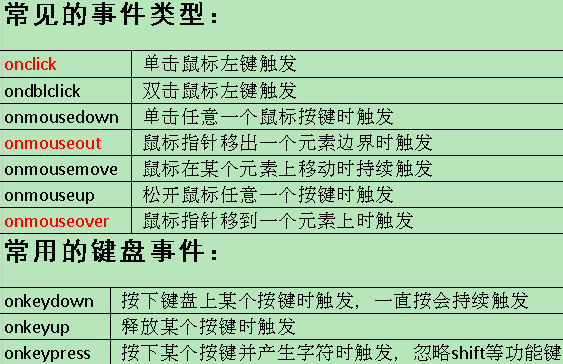
注意:上图是通用事件 标准事件就是 去掉 “on”
onMouseOver放到函数里会自动弹窗
onMouseOver="show()"
<!doctype html>

<html>

<head>

<meta charset="utf-8">

<title>通用性的事件监听方法</title>

<script type="text/javascript">

	function show(){

		alert("你点击了我");

	}

	//页面加载完成后调用

	window.onload=function(){

		/*第二种添加事件方式*/

		document.getElementById("mytest1").onclick=show; //这里的show不需要加(),加了等于调用

	}

</script>

</head>

<body>

<a href="https://www.baidu.com/" onClick="return false">点击我</a>

<input type="button" value="测试1" id="mytest1" >

<button type="button" id="test2" onClick="show()"><b>测试2</b></button>

</body>

</html>
<!doctype html>

<html>

<head>

<meta charset="utf-8">

<title>标准DOM中的事件监听方法</title>

<script type="text/javascript">

    function show(){

        alert("你点击我了");

    }

    //取消bt1按钮的点击事件

    function concel(){

        //[object].removeEventListener(“事件类型”,”处理函数”,false);

        var bt1=document.getElementById("mytest1");

        bt1.removeEventListener("click",show,false);

    }

    window.onload=function(){

    //[object].addEventListener(“事件类型”,”处理函数”,false);

    var bt1=document.getElementById("mytest1");

    bt1.addEventListener("click",show,false);

    //获取测试2按钮

    var bt2=document.getElementById("mytest2");

    bt2.addEventListener("click",concel,false);

    }

</script>

</head>

<body>

<input type="button" value="测试1" id="mytest1">

<button type="button" id="mytest2"><b>测试2</b></button>

</body>

</html>
<!doctype html>

<html>

<head>

<meta charset="utf-8">

<title>鼠标移动到div 和修改input后弹窗</title>

<script type="text/javascript">

    function show(){

        /*var str=document.getElementById("a").value;

        alert(str);*/

        alert("aaa");

    }

</script>

</head>

<body>

<form action="#" onSubmit="show()">
<!-- onSelect 当鼠标选中 -->

    <input type="text" value="aa" onSelect="show()">
<!-- onChange当改变内容,失去焦点 -->

    <input type="text" value="bb" onChange="show()">
<!-- onFocus 当点击时 重复点击 -->

    <input type="text" value="cc" onFocus="show()">
<!-- onBlur 输入内容 失去焦点时 -->

    <input type="text" value="dd" onBlur="show()" id="a">

    <input type="submit" value="提交">

</form>

<div style="width: 200px;height: 200px;background: red" onMouseOver="show()"></div>

</body>

</html>
<title>鼠标变小手</title>

<style>

    #d1{

        height:200px;

        width: 200px;

        background: red;

    }

    #d1:hover{

        /*鼠标变小手*/

        cursor:pointer;

    }

</style>

</head>

<body>

    <div id="d1"></div>

</body>
<head>

<meta charset="utf-8">

<title>用JS通过名字找属性</title>

<script type="text/javascript">

    window.onload=function(){

        //通过id属性找元素(得到一个元素对象)

        var doc=document.getElementById("p");

        //通过class属性找元素(得到一个数组)

        var arr=document.getElementsByClassName("p1");

        alert(arr[1].innerHTML);

        //通过元素名称找元素(得到一个数组)

        var arr2=document.getElementsByTagName("p");

    }

</script>

</head>

<body>

    <p class="p1">a</p>

    <p class="p1">b</p>

    <p class="p1">c</p>

    <p class="p">d</p>

</body>
JQ获取元素属性
<body>

    <input type="text" value="aaa" id="in" aaa="bbb">
</body>

<script type="text/javascript">

    //1.获取元素属性值:元素对象.属性名

/*    var v=document.getElementById("in").value;

    alert(v);*/

    //2.获取元素属性值:元素对象.getAttribute("属性名");

    /*var inp=document.getElementById("in");

    var v=inp.getAttribute("aaa");
//其中aaa="bbb"是自定义命名 必须用getA ttribute 才会认
alert(v);*/ //给元素属性赋值 var inp=document.getElementById("in"); inp.getAttribute("value","cccc"); </script> </html>
jQuery使用方法
<!doctype html>

<html>

<head>

<meta charset="utf-8">

<title>无标题文档</title>

<!--引入jQuery的js文件-->

<script type="text/javascript" src="js/jquery-3.4.0.min.js"></script>

</head>

<body>

<p id="p1">a</p>

<p class="p2" align="center">b</p>

<p class="p2">c</p>

<p class="p2">d</p>

<div>

    <p>e</p>

    <p>f</p>

</div>

<input type="text" value="aaaaaaaa">

</body>

<script type="text/javascript">

    /*id选择器*/

    /*var p1=$("#p1");

    alert(p1.html());*/

    /*class选择器*/

    /*var arr=$(".p2");

    alert(arr.length);*/

    /*元素选择器*/

    /*var arr=$("p");

    alert(arr.length);*/

    /*父子关系选择器*/

    /*var arr=$("div p");

    alert(arr.length);*/

    /*属性选择器*/

    /*var obj=$("[align='center']");

    alert(obj.html());*/

    /*如果得到的是数组,则用jqDom.eq(下标)*/

    /*alert($(".p2").eq(0).html());*/

    //获取js对象   js->jquery   $(jsDom)

    /*var p1=document.getElementById("p1");

    alert($(p1).html());*/

    //获取jQuery对象 jquery->js   $('div')[0]    $('div').get(0)

    /*alert($(".p2").get(1).innerHTML);*/

    //给非表单元素赋值

    /*$("#p1").html("你好");*/

    //获取表单的value值

    /*alert($("input").val());*/

    //给表单元素赋值

    $("input").val("bbbbbbbb");

</script>

</html>
<!doctype html>

<html>

<head>

<meta charset="utf-8">

<title>做轮播图</title>

<script type="text/javascript">

    var arr=null;

    var tp=null;

    var index=0;

    //当页面加载完成以后执行

    window.onload=function(){

        //定义一个数组装有图片地址

        arr=["img/1.jpg","img/2.jpg","img/3.jpg","img/4.jpg"];

        //获取img元素

        tp=document.getElementById("tp");

        start();

    }

    function change(obj){

        //获取用户点的是哪个按钮

        index=obj.value;

        alert(index);

        tp.src=arr[index];

    }

    //下一张

    function next(){

        //如果当前图片是最后一张

        if(index==arr.length-1){

            index=0;

        }else{

            index=index+1;

        }

        tp.src=arr[index];

    }

    //上一张

    function up(){

        //如果当前图片是最后一张

        if(index==0){

            index=arr.length-1;

        }else{

            index=index-1;

        }

        tp.src=arr[index];

    }

    //开始轮播

    function start(){

        var timer=setInterval("next()",5000);

    }

</script>

</head>

<body>

<img src="img/1.jpg" id="tp">

<input type="button" value="上一页" onClick="up()">

<input type="button" value="0" onClick="change(this)">

<input type="button" value="1" onClick="change(this)">

<input type="button" value="2" onClick="change(this)">

<input type="button" value="3" onClick="change(this)">

<input type="button" value="下一页" onClick="next()">

</body>

</html>
jQuery
   /*id选择器*/

    /*var p1=$("#p1");

    alert(p1.html());*/

    /*class选择器*/

    /*var arr=$(".p2");

    alert(arr.length);*/

    /*元素选择器*/

    /*var arr=$("p");

    alert(arr.length);*/

    /*父子关系选择器*/

    /*var arr=$("div p");

    alert(arr.length);*/

    /*属性选择器*/

    /*var obj=$("[align='center']");

    alert(obj.html());*/

    /*如果得到的是数组,则用jqDom.eq(下标)*/

    /*alert($(".p2").eq(0).html());*/

    //获取js对象   js->jquery   $(jsDom)

    /*var p1=document.getElementById("p1");

    alert($(p1).html());*/

    //获取jQuery对象 jquery->js   $('div')[0]    $('div').get(0)

    /*alert($(".p2").get(1).innerHTML);*/

    //给非表单元素赋值

    /*$("#p1").html("你好");*/

    //获取表单的value值

    /*alert($("input").val());*/

    //给表单元素赋值

    $("input").val("bbbbbbbb");
    js 和 jquery主要的区别 在 dom

    想用jquery  必须先引入(顺序问题)

        先css 在js:      先框架css再自己css 先jquery 在框架 在自己

    找元素:

        js:

            document.getElement[s]By...      id  tagname  name  classname

        jquery:

            $(选择器)       $(选择器).eq(下标)

        js找到的是js对象  jquery找到的是jquery对象

        相互转  js->jquery   $(jsDom)

               jquery->js   $('div')[0]    $('div').get(0)

        两个对象  jsDom      jqDom

    操作内容:

        jsDom.innerHtml = 赋值

        jsDmo.value

        jqDom.html()    jqDom.html('赋值')

        jqDom.val()

    操作样式

        jsDom.style.color = 赋值   //只能操作行内样式

        jqDmo.css('color');     jqDmo.css('color','red');

        jqDom.removecss('color')

        jqDmo.css({

            'color' : 'red',

            'width' : '100px'

            ...

        });

    操作属性

        jsDom.getAttribute('class');

        jsDom.setAttribute('class','add');

        jsDom.removeAttribute('class');

        jqDom.attr('class');

        jqDom.attr('class','add');

        jqDom.attr({

            'data' : 'add',

            'id' : 'add',

            ...

        });

        jQDom.removeAttr('class')

        jqDom.addclass('del')

    操作事件

        jsDom.onClick = function(){

            this

        }

        jqDom.click(function(){

            $(this)

        });
417 事件、监听、jQuery、轮播手动的更多相关文章
- Javascript事件模型系列(三)jQuery中的事件监听方式及异同点
作为全球最知名的js框架之一,jQuery的火热程度堪称无与伦比,简单易学的API再加丰富的插件,几乎是每个前端程序员的必修课.从读<锋利的jQuery>开始,到现在使用jQuery有一年 ...
- 从jQuery的缓存到事件监听
不知道大家有没有发现,用jQuery选择器"选择"之后的DOM上会添加jQuery*********属性. <DIV id=d1 jQuery1294122065250=&q ...
- jquery mobile 对手势触控提供了如下几个事件监听:
jquery mobile 对手势触控提供了如下几个事件监听: 复制代码代码如下: tap 当用户点屏幕时触发taphold 当用户点屏幕且保持触摸超过1秒时触发swipe 当页面被垂直或者水平拖动 ...
- jQuery中的事件监听方式及异同点
jQuery中的事件监听方式及异同点 作为全球最知名的js框架之一,jQuery的火热程度堪称无与伦比,简单易学的API再加丰富的插件,几乎是每个前端程序员的必修课.从读<锋利的jQuery&g ...
- jQuery中的事件监听小记
一,一个事件监听的简便写法 最近发现一个jQuery中事件监听的简洁写法,感觉方便好多.同时也深感自己基础薄弱,好多东西竟然都模棱两可.因此,记录的同时,也对jQuery事件监听做个小的总结 原文链接 ...
- Jquery系列:checkbox 获取值、选中、设置值、事件监听等操作
<div id="divId" class="divTable"> <div class="tableBody"> ...
- jQuery EasyUI/TopJUI输入框事件监听
jQuery EasyUI/TopJUI输入框事件监听 代码如下: <div data-toggle="topjui-panel" title="" da ...
- jQuery中四种事件监听的区别
原文链接:点我 我们知道jquery提供了四种事件监听方式,分别是bind.live.delegate.on,下面就分别对这四种事件监听方式分析. 已知有4个列表元素: 列表元素1 列表元素2 列表元 ...
- jquery 事件监听方法
一.事件监听方法 mouseover() 鼠标移入事件方法 mouseout() 鼠标移出事件方法 mouseenter() 鼠标移入事件方法 mouseleave() 鼠标移出事件方法 ...
随机推荐
- [题解]SP703 SERVICE - Mobile Service_Done
设计状态F[i][j][k]代表完成任务i后,有一个员工在地点P[i],其他两人分别在j和k两地.所需要的最小代价. 转移的方式: 分别考虑派遣i,j,k三人前往下一个需求地点,并更新状态. #inc ...
- js实现分段上传文件
使用js实现分段上传文件,本文使用了FileReader对象,可参考:https://developer.mozilla.org/zh-CN/docs/Web/API/FileReader 1)获取文 ...
- Git操作记录
记录一些用过的操作 增加远程推送分支 git remote add orgin http://xxxxx.git 直接新建本地分支,将远程分支提取出来. git checkout -t origin/ ...
- 工具(5): 极简开发文档编写(How-to)
缘起 一个合格的可维护项目,必须要有足够的文档,因此一个项目开发到一定阶段后需要适当的编写文档.项目的类型多种多样,有许多项目属于内部项目,例如一个内部的开发引擎,或者一个本身就是面向开发者的项目. ...
- 证明与计算(2): 离散对数问题(Discrete logarithm Problem, DLP)
离散对数问题,英文是Discrete logarithm Problem,有时候简写为Discrete log,该问题是十几个开放数学问题(Open Problems in Mathematics, ...
- OO第二单元总结——多线程电梯
第五次作业分析 1.设计策略 调度器采用单例模式,内部设请求队列,对请求队列的一切操作(查.增.删)都在调度器内完成,且都要求串行,从而确保线程安全.接收器和电梯是两个线程:接收器接受请求调用调度器来 ...
- redis的三种集群方式
redis有三种集群方式:主从复制,哨兵模式和集群. 1.主从复制 主从复制原理: 从服务器连接主服务器,发送SYNC命令: 主服务器接收到SYNC命名后,开始执行BGSAVE命令生成RDB文件并使用 ...
- Commons-DbUtils
<dependency> <groupId>commons-dbutils</groupId> <artifactId>commons-dbutils& ...
- python3使用ctypes在windows中访问C和C++动态链接库函数示例
python3使用ctypes在windows中访问C和C++动态链接库函数示例 这是我们的第一个示例,我们尽量简单,不传参,不返回,不访问其他的动态链接库 一 测试环境介绍和准备 测试环境: 操作系 ...
- CTFcracktools——非常实用的CTF解密工具
做bugku的crypto题时偶然发现了这个,吐血推荐!! 十分全面好用 整合了常见的解码.进制转换等CTF常用的工具: 下载地址: https://github.com/0Linchen/CTFCr ...