
UiAutomator2.0 - Toast信息的验证
问题:
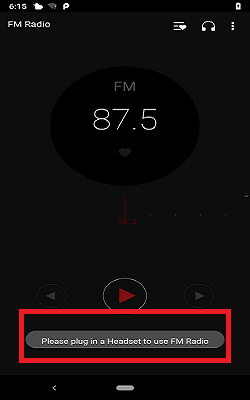
在做UI自动化测试时,偶尔会碰到 Toast 这种提示信息(如图),通过Uiautomatorviewer 无法获该类控件的信息。所以无法验证,该条case不能实现。然后就没然后了...
思考:
在《UiAutomator2.0 - 与AccessibilityService的关联》实验后,发现Toast提示信息所属事件为 AccessibilityEvent.TYPE_NOTIFICATION_STATE_CHANGED,依据《UiAutomator2.0 - 控件实现点击操作原理》中的分析,那也可以模仿源码监听该事件啊!美滋滋~~
实现:
准备着手实现时,发现其他类的相关方法并没公开,只有UiAutomation这个类公开了setOnAccessibilityEventListener方法(通过该方法进行监听Toast)。突破口找到了,那么就从这个方法开始实现。
1、创建一个 VerifyToast类,代码如下:
package com.testtoast;

import android.app.Notification;

import android.app.UiAutomation;

import android.os.Parcelable;

import android.support.test.InstrumentationRegistry;

import android.util.Log;

import android.view.accessibility.AccessibilityEvent;

/**

 * @author zzw

 * Toast Validation Helper

 */

public class VerifyToast {

    private static final String TAG = TestCase_FM.class.getSimpleName();

    private static VerifyToast verifyToast = new VerifyToast();

    private boolean isPass;

    private VerifyToast(){}

    public static VerifyToast getVerifyToast(){

        return verifyToast;

    }

    public boolean getIsPass(){

        return isPass;

    }

    public VerifyToast setIsPass(boolean isPass){

        this.isPass = isPass;

        return this;

    }

    /**

     * Listen for toast prompts

     * @param pck The package name of toast

     * @param msg Toast info

     */

    public void monitoringToast(final String pck, final String msg){

        UiAutomation uiAutomation = InstrumentationRegistry.getInstrumentation().getUiAutomation();

        uiAutomation.setOnAccessibilityEventListener(new UiAutomation.OnAccessibilityEventListener() {

            @Override

            public void onAccessibilityEvent(AccessibilityEvent event) {

                if(event.getEventType() == AccessibilityEvent.TYPE_NOTIFICATION_STATE_CHANGED){

                    Log.d(TAG, "onAccessibilityEvent:"+

                         String.format("--pck: %s   --msg: %s",getPackage(event),getMessage(event)));

                    isPass = pck.equals(getPackage(event)) && msg.equals(getMessage(event));

                    Log.d(TAG, "onAccessibilityEvent: isPass = "+ isPass);

                }

            }

        });

    }

    // 获取监听的包名

    private String getPackage(AccessibilityEvent event){

        return (String) event.getPackageName();

    }

    // 获取 Toast 信息

    private String getMessage(AccessibilityEvent event){

        String message = null;

        Parcelable parcelable = event.getParcelableData();

        if (!(parcelable instanceof Notification)) {

            message = (String) event.getText().get(0);

        }

        return message;

    }

}
2、测试用例中的调用
package com.testtoast;

import android.support.test.InstrumentationRegistry;

import android.support.test.runner.AndroidJUnit4;

import android.support.test.uiautomator.UiDevice;

import android.support.test.uiautomator.UiObject;

import android.support.test.uiautomator.UiSelector;

import android.util.Log;

import com.zzw.commonutils.UiApps;

import com.zzw.tools.ScreenCap;

import org.junit.BeforeClass;

import org.junit.FixMethodOrder;

import org.junit.Test;

import org.junit.runner.RunWith;

import org.junit.runners.MethodSorters;

import static junit.framework.Assert.assertTrue;

/**

 * @author zzw

 * Test for Toast

 */

@RunWith(AndroidJUnit4.class)

@FixMethodOrder(MethodSorters.NAME_ASCENDING)

public class TestCase_FM {

    private static final String TAG = TestCase_FM.class.getSimpleName();

    private UiDevice device= UiDevice.getInstance(InstrumentationRegistry.getInstrumentation());

    private String catchFail = "Catch_Pic";

    @BeforeClass

    public static void before(){

        Log.d(TAG, "before: -----------------------------start-------------");

    }

    @Test

    public void testCase_GetToast() throws Throwable {

        VerifyToast verifyToast = VerifyToast.getVerifyToast();

        String pck = "com.caf.fmradio";

        String msg = "Please plug in a Headset to use FM Radio";

        device.pressHome();

        UiObject app= device.findObject(new UiSelector().text("FM Radio"));

        Log.d(TAG, "testCase_GetToast: result ==  "+verifyToast.getIsPass());

        verifyToast.setIsPass(false).monitoringToast(pck,msg);

        try{

            new UiApps().toOpenApp(app); //自己封装打开app的方法

            assertTrue("Toast prompt error", verifyToast.getIsPass());

        }catch (Throwable e){

            e.printStackTrace();

            // 自己封装的截图方法

            ScreenCap.takeScreenshotToPicturesDirPath(catchFail);

            throw e;

        }

        Log.d(TAG, "testCase_GetToast: result ==  "+verifyToast.getIsPass());

    }

}
注:在 adb shell uiautomator --help 中有这么一句
events: prints out accessibility events until terminated
那么在控制台也直观的查看当前的Accessibility事件了,结果如图:

UiAutomator2.0 - Toast信息的验证的更多相关文章
- 微软企业库5.0 学习之路——第五步、介绍EntLib.Validation模块信息、验证器的实现层级及内置的各种验证器的使用方法——下篇
一.独立验证器 我上篇中我将AndCompositeValidator和OrCompositeValidator归为独立验证器,这2个验证器主要是为了第一类验证服务,可以进行多种验证组合在一起进行复杂 ...
- 『与善仁』Appium基础 — 29、获取toast信息
目录 1.toast介绍 2.toast定位 3.示例 4.封装toast判断 1.toast介绍 Android中的toast是一种简易的消息提示框,toast提示框不能被用户点击,会根据所设置的显 ...
- app自动化toast信息获取
移动端测试比较常遇到toast类型的提示信息,那么对于这类信息我们要怎么获取呢,让我细细道来: 首先,获取toast信息要注意以下几点: 必须是Uiautomator2框架,设备配置参数中设置 &qu ...
- UiAutomator2.0升级填坑记
UiAutomator2.0升级填坑记 SkySeraph May. 28th 2017 Email:skyseraph00@163.com 更多精彩请直接访问SkySeraph个人站点:www.sk ...
- UiAutomator2.0 - 与AccessibilityService的关联
目录 一.Android中的 Accessibility 二.UiAutomator2.0 与 AccessibilityService 三.验证与 AccessibilityService的关联 A ...
- UiAutomator2.0 - 控件实现点击操作原理
目录 一.UiObject 二.UiObject2 穿梭各大技术博客网站,每天都能看到一些的新的技术.突然感觉UiAutomator 2.0相对于现在来说已经是个很久远的东西了ε=(´ο`*))).写 ...
- Uiautomator1.0与Uiautomator2.0测试项目搭建与运行原理
Uiautomator是Android原生测试框架,可以用于白盒接口测试也可以用于UI自动化测试,Uiautomator分1.0版本与2.0版本,它们都是基于UiAutomation的测试框架,都是通 ...
- UiAutomator1.0 与 UiAutomator2.0
在使用2.0之前,对android自动化框架也做过一些了解<Android 自动化测试框架>.使用UiAutomator2.0也有一段时间,这里将1.0与2.0进行一个对比总结. Ui ...
- Toast信息框
Toast组件的功能和对话框有些相似,可是使用上更简单,使用Toast组件的目的仅仅有一个,就是在屏幕上弹出一个消息窗体告知用户某个信息,并且这个窗体没有不论什么button,经过几秒钟后就会消失.假 ...
随机推荐
- git总结三、关于分支下——团队合作中最重要的合并分支
合并分支是团队合作开发中常见的操作,这里涉及到两个命令:git merge 和 git rebase 下面来好好说一下git merge和git rebase都是怎样工作的 一. 1.新建一个空目录并 ...
- 买房安全无忧 l 龙光集团与光大银行二手房资金监管战略合作!
二手房买卖中,担心购房过程中房款交易的安全以致买方不敢先付款.卖方不敢先过户的现象比比皆是.近日,龙光集团与光大银行形成战略合作伙伴,联合推出“二手房交易资金监管”业务,彻底改变了二手房交易的付款模式 ...
- request+response+jsp+el+jstl
response: 1.设置响应行的状态码: response.setStatus(int sc); 2.设置response缓冲区的编码:response.setCharacterEncoding( ...
- AtCoder瞎做第二弹
ARC 067 F - Yakiniku Restaurants 题意 \(n\) 家饭店,\(m\) 张餐票,第 \(i\) 家和第 \(i+1\) 家饭店之间的距离是 \(A_i\) ,在第 \( ...
- mysql学习基础知识3
1.视图 简化sql语句的编写,限制可以查看的数据 一张虚拟的表,不占任何内存,查视图时都是临时从所查的表中拿数据 特点: 对于视图的增删改查 都会同步到原始表 对原始表的修改,会同步到视图内可查看的 ...
- HEOI2019游记
Day-x 菜死了. Day-1 上午准备出发了,外面的**鸟一直在叫. 咕咕咕(大雾 随后和高一的一块去火车站出发. 火车上先是和\(wjh\)聊闲天,然后开始讨论题. 然后\(wjh\)就随手出题 ...
- Java Socket、计算机网络
一个服务器对应一个客户端 http://blog.51cto.com/wangdy/1588379 https://www.cnblogs.com/rocomp/p/4790340.html pack ...
- Apache 解析.htaccess
解决.htaccess不解析 输入a2enmod rewrite 修改/etc/apache.conf 此处改为ALL
- C语言博客作业06——结构体&文件
C语言博客作业06--结构体&文件 1.本章学习总结 1.1思维导图 1.2.本章学习体会 在本周的学习中,我们学习了关于结构体和文件的内容.结构体的本身并不难,但以结构体为基础的链表还是让我 ...
- .NET框架 - NETFramework + API + EF(DBFirst) + MYSQL
.NET框架 - NETFramework + MVC+ EF(DBFirst) + MYSQL 1. 安装3个MYSQL插件 ①mysql-for-visualstudio-1.2.8 vs的 ...