
python第七十九天--第十四周作业
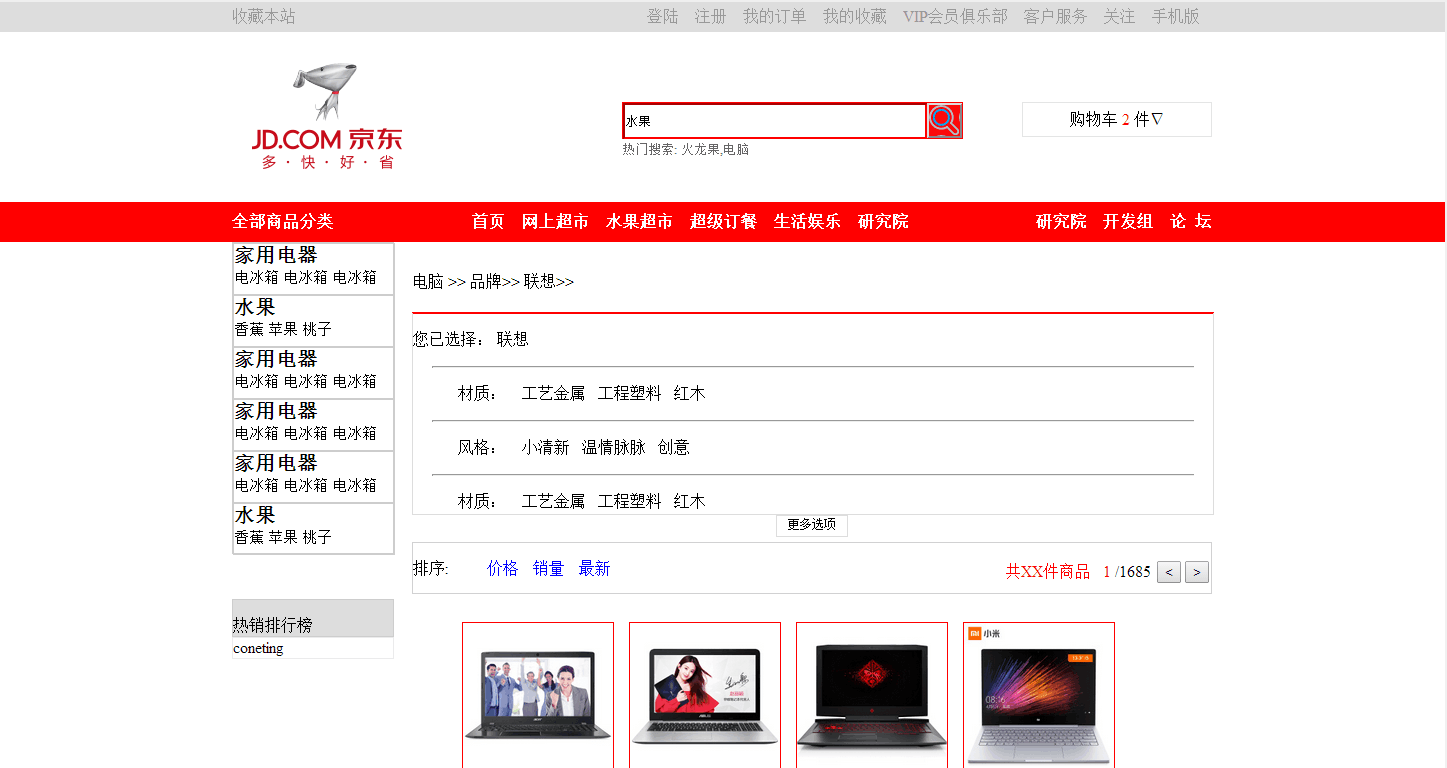

<!DOCTYPE html>
<html lang="en"> <head>
<meta charset="UTF-8">
<title>仿京东</title>
<style>
/*外框*/ .div_mingr {
height: 30px;
margin: 0 auto;
width: 980px;
}
/*左边*/ .div_left,
.div_cent_l,
.menu_cent_1 {
float: left;
}
/*中间*/ .div_cent_l {
width: 190px;
height: 100%;
background-color: #0dfsd;
} .div_cent_r {
height: 100%;
background-color: aqua;
}
/*右边*/ .div_right,
.div_cent_r,
.menu_cent_r,
.menu_cent_2 {
float: right;
}
/* 用来清楚浮动*/ .div_float {
clear: both;
}
/*<!--顶部 -->*/ .div_top_1 {
line-height: 30px;
} #div_0_1 a,
#div_0_2 a {
color: #999999;
line-height: 30px;
}
/*logo*/ .div_logo,
.div_logo_0 {
height: 170px;
}
/*标志 logo*/ .a_logo {
overflow: hidden;
display: block;
height: 170px;
/*width: 190px;*/
background-image: url(img/logo.v2.png);
} /*搜索 外框*/ .form {
margin: 0, 70px, 0, 0;
left: 320px;
top: 25px;
width: 339px;
height: 35px;
border: 1px solid;
border-color: red;
} /*搜索框*/
.input_s {
margin: 0 auto;
float: left;
line-height: 30px;
width: 280px;
border-color: red;
border-right:white ;
} .upload-bg{
margin: 0 auto;
float: left;
width: 20px;
height: 20px;
background: url(img/sprite-photo-search.png) no-repeat;
cursor: pointer;
margin-top: 10px;
}
/*<!--搜索提示-->*/
.ls a {
font: "微软雅黑";
font-size: small;
color: #666666;
} /*搜索按钮*/
.button {
margin: 0 auto;
width: 35px;
height: 35px;
background: url(img/magnifier1211.png);
} /*菜单*/
.div_meun {
background-color: red;
height: 40px;
} .menu_cent_1 {
width: 160px;
text-aling: ceter;
} /*a 标签 */
.a_red {
color: white;
line-height: 40px;
font-weight: bolder;
text-align: center;
} #go {
margin-top: 70px;
width: 188px;
height: 33px;
background-color: #fff;
text-align: center;
line-height: 33px;
overflow: hidden;
position: relative;
z-index: 1;
float: left;
border: 1px solid #e3e4e5;
} .menu_cent_2 {
margin-left: 80px;
} #meun_1 {
margin: 0 auto;
width: 160px;
text-align: center;
}
/*中间内容
.cent_meun{
width: 980px;
}*/ .left_big_meun {
float: left;
height: 310px;
width: 160px;
border: 1px solid;
border-color: #CCCCCC;
} .span_menu {
width: 160px;
height: 50px;
border: 1px solid;
border-color: #CCCCCC;
} .a_red_z {
margin: 0 auto;
font-size: 20px;
font-weight: bolder;
} .a_red_let {
font-size: 15px;
}
/*菜单左边下方*/ .cent_l_d {
clear: both;
margin-top: 30px;
width: 160px;
height: 36px;
border: 1px solid;
border-color: #CCCCCC;
background: #DDDDDD;
}
/*右边内容*/
/*右边内容上方*/ .div_cen_r_u {
/*background-color: grey;*/
width: 800px;
height: 300px;
} .div_cen_r_u_1 {
margin: auto;
} #div_r_u {
margin-top: 20px;
border: 1px solid #DDDDDD;
border-top: 2px solid red;
width: 100%;
height: 200px;
} .p_m {
padding-left: 45px;
} hr {
width: 95%;
} .td_1 {
color: #005EA7;
font-weight: bolder;
}
/*右边内容下方*/ .div_cen_r_d {
background-color: ;
width: 800px;
height: 300px;
} .cen_r_d_1 {
margin: 0 auto;
padding: 0;
border: 1px solid #D0D0D0;
height: 50px;
} .r_d_2 {
float: left;
line-height: 20px;
margin: 0 auto;
} .r_d_3 {
margin: 0 auto;
float: right;
line-height: 20px;
} .a_33 {
margin-left: 10px;
color: blue;
}
/*<!-- 右边内容下方 产品图片-->*/ .product { width: 100%;
height: 750px;
} .rp{
width: 100%;
float: left;
}
.rp1{ border: 1px solid red;
text-align: center;
float: left;
margin:5px 5px 5px 10px;
/*padding: 10px;*/
} .rp1 img{
width: 150px;
height: 150px;
}
.rp1 input[type="text"]{
width: 25px;
}
/*去除a 标签的下划线*/
ul{
list-style-type: none;/*除去ul标签前缀*/
} a {
text-decoration: none;
color: black;
}
</style> </head> <body style="margin: 0 auto">
<!--顶部 -->
<div class="div_top" id="div_0" style="background-color: #DDDDDD;">
<!--顶部 -->
<div class="div_mingr">
<div class="div_top_1 div_left" id="div_0_1">
<a>收藏本站</a>
</div>
<div class="div_top_1 div_right" id="div_0_2">
<a href="" methods="">登陆</a>
<a href="">注册</a>
<a href="">我的订单</a>
<a href="">我的收藏</a>
<a href="">VIP会员俱乐部</a>
<a href="">客户服务</a>
<a href="">关注</a>
<a href="">手机版</a>
</div>
</div>
<div class="div_float"></div>
</div> <!--logo-->
<div class="div_logo " id="div_1">
<div class="div_mingr div_logo_0">
<div class="div_mingr div_logo_0">
<div class="div_left div_logo_1">
<!-- logo 中间-->
<div class="div_cent_l">
<!-- logo图片框-->
<a href="#" class="a_logo"></a>
</div>
<div style="float: right; height: 170px; width: 300px; margin-left:200px ;">
<div style="height: 70px;"></div>
<div class="form">
<!--搜索框 -->
<form action="#">
<input type="text" name="" id="" value="水果" class="input_s" />
<span class="upload-bg"></span>
<button class="button"></button>
</form> </div>
<div class="ls">
<a href="">热门搜索:</a>
<a href="">火龙果,电脑</a>
</div>
</div> <!---->
</div>
<div class="div_right">
<div id="go">
<a href="#" name="">购物车 </a>
<a href="" style="color:red">2</a>
<a href="">件∇ </a>
</div>
<!--<input type="button" value="" />-->
</div>
</div>
<div class="div_float"></div>
</div>
<div class="div_float"></div>
</div> <!--菜单 -->
<div class="div_meun " id="div_1"> <!-- 菜单左边-->
<div class="div_mingr div_meun_0" id="">
<!-- 左边 1-->
<div class="div_meun_1 div_left">
<div class="menu_cent_1">
<a href="#" class="a_red" id="meun_1">全部商品分类</a>
</div>
<div class="menu_cent_2">
<a href="" class="a_red">首页</a>
<a href="" class="a_red">网上超市</a>
<a href="" class="a_red">水果超市</a>
<a href="" class="a_red">超级订餐</a>
<a href="" class="a_red">生活娱乐</a>
<a href="" class="a_red">研究院</a>
</div>
<div style="clear: both;"></div> </div>
<!--右边-->
<div class="div_right"> <a href="" class="a_red">研究院</a>
<a href="" class="a_red">开发组</a>
<a href="" class="a_red">论 坛</a> </div>
</div>
<div class="div_float"></div>
</div> <!--中间部分-->
<div class="cent_mingr">
<div class="mingr cent_meun div_mingr">
<div class="div_left">
<!--左边菜单-->
<div class="left_big_meun">
<div class="span_menu">
<!--左边菜单 分类-->
<a href="#" class="a_red_z">家用电器</a> <br />
<a href="" class="a_red_let">电冰箱</a>
<a href="" class="a_red_let">电冰箱</a>
<a href="" class="a_red_let">电冰箱</a>
</div>
<div class="span_menu">
<!--左边菜单 分类-->
<a href="#" class="a_red_z">水果</a> <br />
<a href="" class="a_red_let">香蕉</a>
<a href="" class="a_red_let">苹果</a>
<a href="" class="a_red_let">桃子</a>
</div>
<div class="span_menu">
<!--左边菜单 分类-->
<a href="#" class="a_red_z">家用电器</a> <br />
<a href="" class="a_red_let">电冰箱</a>
<a href="" class="a_red_let">电冰箱</a>
<a href="" class="a_red_let">电冰箱</a> </div>
<div class="span_menu">
<!--左边菜单 分类-->
<a href="#" class="a_red_z">家用电器</a> <br />
<a href="" class="a_red_let">电冰箱</a>
<a href="" class="a_red_let">电冰箱</a>
<a href="" class="a_red_let">电冰箱</a>
</div>
<div class="span_menu">
<!--左边菜单 分类-->
<a href="#" class="a_red_z">家用电器</a> <br />
<a href="" class="a_red_let">电冰箱</a>
<a href="" class="a_red_let">电冰箱</a>
<a href="" class="a_red_let">电冰箱</a>
</div>
<div class="span_menu">
<!--左边菜单 分类-->
<a href="#" class="a_red_z">水果</a> <br />
<a href="" class="a_red_let">香蕉</a>
<a href="" class="a_red_let">苹果</a>
<a href="" class="a_red_let">桃子</a>
</div>
</div>
<div style="width: 160px ; height: 15px; clear: both"> </div>
<div class="cent_l_d">
<!-- 左边下方-->
<p>热销排行榜</p>
</div>
<div style="border: 1px solid ;border-color:#ECECEC ;">
<a href="">coneting</a>
</div> </div> <div class="div_right">
<!--右边内容-->
<div class="div_cen_r_u">
<!-- 右边内容上方-->
<div style="height: 30px;"></div>
<div class="div_cen_r_u_1">
<a href="#">电脑</a> >>
<a href="">品牌</a>>>
<a href="#">联想</a>>>
</div>
<div id="div_r_u">
<p>您已选择: 联想 </p>
<hr/>
<p class="p_m">
<tr>
<a href="">
<td class="td_1">材质:</td>
</a>
<a href="">
<td> 工艺金属</td>
</a>
<a href="">
<td> 工程塑料</td>
</a>
<a href="">
<td> 红木</td>
</a>
</tr>
</p>
<hr />
<p class="p_m">
<tr>
<a href="">
<td class="td_1">风格:</td>
</a>
<a href="">
<td> 小清新</td>
</a>
<a href="">
<td> 温情脉脉</td>
</a>
<a href="">
<td> 创意</td>
</a>
</tr>
</p>
<hr />
<p class="p_m">
<tr>
<a href="">
<td class="td_1">材质:</td>
</a>
<a href="">
<td> 工艺金属</td>
</a>
<a href="">
<td> 工程塑料</td>
</a>
<a href="">
<td> 红木</td>
</a>
</tr>
</p> </div>
<div>
<div style="width:70px;height: 20px; border: 1px solid #DDDDDD; margin: 0 auto; font-size:12px ; text-align: center;">
<a href="">更多选项</a>
</div>
</div> </div> <!-- 右边内容下方-->
<div class="div_cen_r_d">
<!-- 右边内容下方-->
<div class="cen_r_d_1">
<div class="r_d_2">
<p><span id="" style="margin-right: 25px;">排序:</span>
<a href="" class="a_33">价格</a>
<a href="" class="a_33">销量</a>
<a href="" class="a_33">最新</a>
</p>
</div>
<div class="r_d_3">
<p>
<a href="" style="color:red">共XX件商品 1</a>
<a href="">/1685</a> <input type="button" name="" id="" value="<" /><input type="button" name="" id="" value=">" /></p>
</div>
</div>
<!--<div class="div_float"></div>-->
<!-- 右边内容下方 产品图片-->
<div class="product">
<!--<div class="lp">-->
<ul class="rp"><!--小视窗--> <li class="rp1"><a class="a1" href="#"><img src="img/11.jpg"><p>¥5999.00<br>Apple MacBook Air <br>13.3英寸笔记本电脑</p></a>
<input type="button" name="" id="" value="-" />
<input type="text" value="1"/>
<input type="button" name="" id="" value="+" />
</li>
<li class="rp1"><a class="a1" href="#"><img src="img/12.jpg"><p>¥6480.00<br>拯救者R720<br>联想电脑旗舰店</p></a>
<input type="button" name="" id="" value="-" />
<input type="text" value="1"/>
<input type="button" name="" id="" value="+" /> </li>
<li class="rp1"><a class="a1" href="#"><img src="img/13.jpg"><p>¥5999.00<br>惠普(HP)暗影精灵II代Pro 暗影红<br>15.6英寸游戏笔记本</p></a>
<input type="button" name="" id="" value="-" />
<input type="text" value="1"/>
<input type="button" name="" id="" value="+" />
</li>
<li class="rp1"><a class="a1" href="#"><img src="img/14.jpg"><p>¥3599.00<br>小米(MI) Air 12.5英寸<br>金属超轻薄笔记本电脑</p></a>
<input type="button" name="" id="" value="-" />
<input type="text" value="1"/>
<input type="button" name="" id="" value="+" />
</li> </ul>
<ul class="rp">
<li class="rp1"><a class="a1" href="#"><img src="img/15.jpg"><p>¥4199.00<br>宏碁(acer)小e E5<br>15.6英寸便携笔记本电脑</p></a>
<input type="button" name="" id="" value="-" />
<input type="text" value="1"/>
<input type="button" name="" id="" value="+" />
</li>
<li class="rp1"><a class="a1" href="#"><img src="img/13.jpg"><p>¥5999.00<br>拯救者R720<br>联想电脑旗舰店</p></a>
<input type="button" name="" id="" value="-" />
<input type="text" value="1"/>
<input type="button" name="" id="" value="+" />
</li>
<li class="rp1"><a class="a1" href="#"><img src="img/12.jpg"><p>¥5999.00<br>拯救者R720<br>联想电脑旗舰店</p></a>
<input type="button" name="" id="" value="-" />
<input type="text" value="1"/>
<input type="button" name="" id="" value="+" />
</li>
<li class="rp1"><a class="a1" href="#"><img src="img/11.jpg"><p>¥5999.00<br>拯救者R720<br>联想电脑旗舰店</p></a>
<input type="button" name="" id="" value="-" />
<input type="text" value="1"/>
<input type="button" name="" id="" value="+" />
</li>
</ul> <!--</div>--> </div>
</div> </div> </div>
<div class="div_float"></div> </div>
</body> </html>
python第七十九天--第十四周作业的更多相关文章
- python第一百六十九天,第十九周作业
FIRSTCRM 学员管理开发需求: 1.分讲师\学员\课程顾问角色, 2.学员可以属于多个班级,学员成绩按课程分别统计 3.每个班级至少包含一个或多个讲师 4.一个学员要有状态转化的过程 ,比如未报 ...
- 孤荷凌寒自学python第七十九天开始写Python的第一个爬虫9并使用pydocx模块将结果写入word文档
孤荷凌寒自学python第七十九天开始写Python的第一个爬虫9 (完整学习过程屏幕记录视频地址在文末) 今天在上一天的基础上继续完成对我的第一个代码程序的书写. 到今天终于完成了对docx模块针对 ...
- 孤荷凌寒自学python第七十六天开始写Python的第一个爬虫6
孤荷凌寒自学python第七十六天开始写Python的第一个爬虫6 (完整学习过程屏幕记录视频地址在文末) 今天在上一天的基础上继续完成对我的第一个代码程序的书写. 不过由于对python-docx模 ...
- 孤荷凌寒自学python第七十五天开始写Python的第一个爬虫5
孤荷凌寒自学python第七十五天开始写Python的第一个爬虫5 (完整学习过程屏幕记录视频地址在文末) 今天在上一天的基础上继续完成对我的第一个代码程序的书写. 直接上代码.详细过程见文末屏幕录像 ...
- 孤荷凌寒自学python第七十四天开始写Python的第一个爬虫4
孤荷凌寒自学python第七十四天开始写Python的第一个爬虫4 (完整学习过程屏幕记录视频地址在文末) 今天在上一天的基础上继续完成对我的第一个代码程序的书写. 直接上代码.详细过程见文末屏幕录像 ...
- 孤荷凌寒自学python第七十天学习并实践beautifulsoup对象用法3
孤荷凌寒自学python第七十天学习并实践beautifulsoup对象用法3 (完整学习过程屏幕记录视频地址在文末) 今天继续学习beautifulsoup对象的属性与方法等内容. 一.今天进一步了 ...
- 孤荷凌寒自学python第六十九天学习并实践beautifulsoup对象用法2
孤荷凌寒自学python第六十九天学习并实践beautifulsoup对象用法2 (完整学习过程屏幕记录视频地址在文末) 今天继续学习beautifulsoup对象的属性与方法等内容. 一.今天进一步 ...
- 孤荷凌寒自学python第五十九天尝试使用python来读访问远端MongoDb数据服务
孤荷凌寒自学python第五十九天尝试使用python来读访问远端MongoDb数据服务 (完整学习过程屏幕记录视频地址在文末) 今天是学习mongoDB数据库的第五天.今天的感觉是,mongoDB数 ...
- 孤荷凌寒自学python第四十九天继续研究跨不同类型数据库的通用数据表操作函数
孤荷凌寒自学python第四十九天继续研究跨不同类型数据库的通用数据表操作函数 (完整学习过程屏幕记录视频地址在文末,手写笔记在文末) 今天继续建构自感觉用起来顺手些的自定义模块和类的代码. 不同类型 ...
随机推荐
- 1. Spring 框架简介及官方压缩包目录
一.Spring 框架简介及官方压缩包目录介绍 1.主要发明者:Rod Johnson 2.轮子理论推崇者: 2.1 轮子理论:不用重复发明轮子. 2.2 IT 行业:直接使用写好的代 ...
- Windows下memcache的配置和使用(python)
1.memcache的安装和配置: 下载memcache for windows: http://up.2cto.com/2012/0522/20120522094758371.rar 解压到指定目 ...
- SpringBoot集成Redis
1.引入 spring-boot-starter-redis <dependency> <groupId>redis.clients</groupId> <a ...
- MongoDB-Oplog详解
MongoDB Oplog 详解 Oplog 概念 Oplog 是用于存储 MongoDB 数据库所有数据的操作记录的(实际只记录增删改和一些系统命令操作,查是不会记录的),有点类似于 mysql 的 ...
- 记录前台页面一些jQuery笔记
不知不觉工作两个月了,在这两个月,我成长很快学的很多,刚开始的时候,很多问题不懂,很多技术不会,当然作为实习阶段,很多不会的问题我都会去请教别人,在这里得感谢那些帮助我的人,但是经常去问别人问题,首先 ...
- 为springboot项目添加springboot-admin监控
我们知道spring-boot-actuator暴露了大量统计和监控信息的端点,spring-boot-admin 就是为此提供的监控项目. 先来看看大概会提供什么样的功能 从图中可以看出,主要内容都 ...
- leetcode — 3sum
import java.util.*; /** * Source : https://oj.leetcode.com/problems/3sum/ * * Created by lverpeng on ...
- mysql更新表中日期字段时间
DATE_ADD和DATE_SUB函数可以用INTERVAL关键字标识的时间间隔进行加减操作,类似于PHP中的strtotime函数. 1.更新表中有效期valid_time字段值都增加一天 UPDA ...
- a 标签提交表单
document.getElementById('ECS_FORMBUY').submit();
- 跨站请求伪造CSRF(Cross-site request forgery)
CSRF(Cross-site request forgery)跨站请求伪造,也被称为“One Click Attack”或者Session Riding,通常缩写为CSRF或者XSRF,是一种对网站 ...