
AspNet Core2 浏览器缓存使用
Core2中使用Microsoft.AspNetCore.Mvc下的ResponseCacheAttribute特性来控制Http Get请求的缓存
原理是设置http请求 响应头的Cache-control来告诉浏览器如何进行客户端缓存
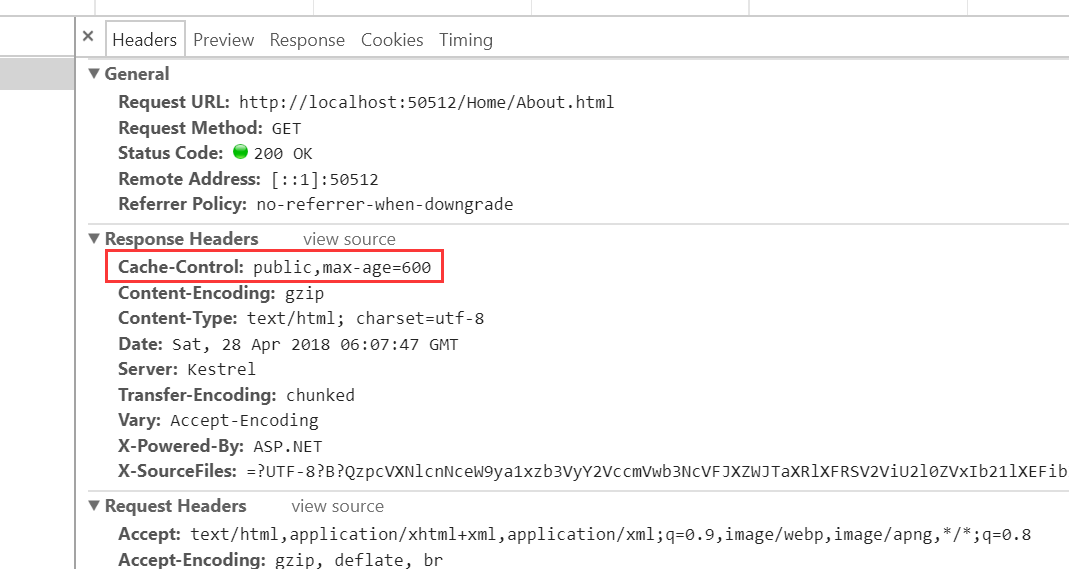
1、在Startup的ConfigureServices方法里面设置一个CacheProfiles,Duration属性定义浏览器缓存的秒数,CacheProfiles一个通用的缓存配置项
 services.AddMvc(option =>

            {

                /*客户端缓存*/

                option.CacheProfiles.Add("default", new Microsoft.AspNetCore.Mvc.CacheProfile

                {

                    Duration =  /*10分钟*/

                });

            });
2、在需要缓存的Action上面添加ResponseCacheAttribute特性,CacheProfileName 的值使用服务配置的名称,该Action将使用配置项进行缓存
[ResponseCache(CacheProfileName = "default")]
也可以在Action 上赋予 Duration 值,指定浏览器缓存的时间
查看ResponseCacheAttribute中的代码
    public unsafe IFilterMetadata CreateInstance(IServiceProvider serviceProvider)

        {

            //IL_0000: Unknown result type (might be due to invalid IL)

            //IL_0008: Unknown result type (might be due to invalid IL)

            //IL_000e: Unknown result type (might be due to invalid IL)

            //IL_0025: Unknown result type (might be due to invalid IL)

            //IL_0032: Expected Ref, but got Unknown

            //IL_0046: Unknown result type (might be due to invalid IL)

            if (serviceProvider == (IServiceProvider))

            {

                throw new ArgumentNullException("serviceProvider");

            }

            IOptions<MvcOptions> requiredService = serviceProvider.GetRequiredService<IOptions<MvcOptions>>();

            CacheProfile cacheProfile = null;

            if (this.CacheProfileName != null)

            {

                ((IDictionary)(?)requiredService.Value.CacheProfiles).TryGetValue((!)this.CacheProfileName, ref *(!*)(&cacheProfile));

                if (cacheProfile == null)

                {

                    throw new InvalidOperationException(Resources.FormatCacheProfileNotFound(this.CacheProfileName));

                }

            }

            this._duration = (this._duration ?? ((cacheProfile != null) ? cacheProfile.Duration : null));

            this._noStore = (this._noStore ?? ((cacheProfile != null) ? cacheProfile.NoStore : null));

            this._location = (this._location ?? ((cacheProfile != null) ? cacheProfile.Location : null));

            this.VaryByHeader = (this.VaryByHeader ?? ((cacheProfile != null) ? cacheProfile.VaryByHeader : null));

            this.VaryByQueryKeys = (this.VaryByQueryKeys ?? ((cacheProfile != null) ? cacheProfile.VaryByQueryKeys : null));

            return new ResponseCacheFilter(new CacheProfile

            {

                Duration = this._duration,

                Location = this._location,

                NoStore = this._noStore,

                VaryByHeader = this.VaryByHeader,

                VaryByQueryKeys = this.VaryByQueryKeys

            });

        }
可以得知Action上设置-----优先级高于--CacheProfiles里面的配置
缓存最终通过ResponseCacheFilter过滤器来实现,ResponseCacheFilter 的代码:
using Microsoft.AspNetCore.Http;

using Microsoft.AspNetCore.Mvc.Core;

using Microsoft.AspNetCore.Mvc.Filters;

using Microsoft.AspNetCore.ResponseCaching;

using System;

using System.Collections;

using System.Collections.Generic;

using System.Globalization;

using System.Linq;

namespace Microsoft.AspNetCore.Mvc.Internal

{

    /// <summary>

    /// An <see cref="T:Microsoft.AspNetCore.Mvc.Filters.IActionFilter" /> which sets the appropriate headers related to response caching.

    /// </summary>

    public class ResponseCacheFilter : IResponseCacheFilter, IActionFilter, IFilterMetadata

    {

        private readonly CacheProfile _cacheProfile;

        private int? _cacheDuration;

        private ResponseCacheLocation? _cacheLocation;

        private bool? _cacheNoStore;

        private string _cacheVaryByHeader;

        private string[] _cacheVaryByQueryKeys;

        /// <summary>

        /// Gets or sets the duration in seconds for which the response is cached.

        /// This is a required parameter.

        /// This sets "max-age" in "Cache-control" header.

        /// </summary>

        public int Duration

        {

            get

            {

                return (this._cacheDuration ?? this._cacheProfile.Duration) ?? ;

            }

            set

            {

                this._cacheDuration = value;

            }

        }

        /// <summary>

        /// Gets or sets the location where the data from a particular URL must be cached.

        /// </summary>

        public ResponseCacheLocation Location

        {

            get

            {

                return (this._cacheLocation ?? this._cacheProfile.Location) ?? ResponseCacheLocation.Any;

            }

            set

            {

                this._cacheLocation = value;

            }

        }

        /// <summary>

        /// Gets or sets the value which determines whether the data should be stored or not.

        /// When set to <see langword="true" />, it sets "Cache-control" header to "no-store".

        /// Ignores the "Location" parameter for values other than "None".

        /// Ignores the "duration" parameter.

        /// </summary>

        public bool NoStore

        {

            get

            {

                return (this._cacheNoStore ?? this._cacheProfile.NoStore) ?? false;

            }

            set

            {

                this._cacheNoStore = value;

            }

        }

        /// <summary>

        /// Gets or sets the value for the Vary response header.

        /// </summary>

        public string VaryByHeader

        {

            get

            {

                return this._cacheVaryByHeader ?? this._cacheProfile.VaryByHeader;

            }

            set

            {

                this._cacheVaryByHeader = value;

            }

        }

        /// <summary>

        /// Gets or sets the query keys to vary by.

        /// </summary>

        /// <remarks>

        /// <see cref="P:Microsoft.AspNetCore.Mvc.Internal.ResponseCacheFilter.VaryByQueryKeys" /> requires the response cache middleware.

        /// </remarks>

        public string[] VaryByQueryKeys

        {

            get

            {

                return this._cacheVaryByQueryKeys ?? this._cacheProfile.VaryByQueryKeys;

            }

            set

            {

                this._cacheVaryByQueryKeys = value;

            }

        }

        /// <summary>

        /// Creates a new instance of <see cref="T:Microsoft.AspNetCore.Mvc.Internal.ResponseCacheFilter" />

        /// </summary>

        /// <param name="cacheProfile">The profile which contains the settings for

        /// <see cref="T:Microsoft.AspNetCore.Mvc.Internal.ResponseCacheFilter" />.</param>

        public ResponseCacheFilter(CacheProfile cacheProfile)

        {

            this._cacheProfile = cacheProfile;

        }

        /// <inheritdoc />

        public void OnActionExecuting(ActionExecutingContext context)

        {

            //IL_0008: Unknown result type (might be due to invalid IL)

            //IL_0051: Unknown result type (might be due to invalid IL)

            //IL_00d4: Unknown result type (might be due to invalid IL)

            //IL_0185: Unknown result type (might be due to invalid IL)

            if (context == null)

            {

                throw new ArgumentNullException("context");

            }

            if (!this.IsOverridden(context))

            {

                if (!this.NoStore && !this._cacheProfile.Duration.get_HasValue() && !this._cacheDuration.get_HasValue())

                {

                    throw new InvalidOperationException(Resources.FormatResponseCache_SpecifyDuration("NoStore", "Duration"));

                }

                IHeaderDictionary headers = context.HttpContext.Response.Headers;

                ((IDictionary)(?)headers).Remove((!)"Vary");

                ((IDictionary)(?)headers).Remove((!)"Cache-Control");

                ((IDictionary)(?)headers).Remove((!)"Pragma");

                if (!string.IsNullOrEmpty(this.VaryByHeader))

                {

                    headers["Vary"] = this.VaryByHeader;

                }

                if (this.VaryByQueryKeys != null)

                {

                    IResponseCachingFeature responseCachingFeature = context.HttpContext.Features.Get<IResponseCachingFeature>();

                    if (responseCachingFeature == null)

                    {

                        throw new InvalidOperationException(Resources.FormatVaryByQueryKeys_Requires_ResponseCachingMiddleware("VaryByQueryKeys"));

                    }

                    responseCachingFeature.VaryByQueryKeys = this.VaryByQueryKeys;

                }

                if (this.NoStore)

                {

                    headers["Cache-Control"] = "no-store";

                    if (this.Location == ResponseCacheLocation.None)

                    {

                        headers.AppendCommaSeparatedValues("Cache-Control", "no-cache");

                        headers["Pragma"] = "no-cache";

                    }

                }

                else

                {

                    string text = null;

                    switch (this.Location)

                    {

                    case ResponseCacheLocation.Any:

                        text = "public";

                        break;

                    case ResponseCacheLocation.Client:

                        text = "private";

                        break;

                    case ResponseCacheLocation.None:

                        text = "no-cache";

                        headers["Pragma"] = "no-cache";

                        break;

                    }

                    text = string.Format((IFormatProvider)CultureInfo.get_InvariantCulture(), "{0}{1}max-age={2}", (object)text, (object)((text != null) ? "," : null), (object)this.Duration);

                    if (text != null)

                    {

                        headers["Cache-Control"] = text;

                    }

                }

            }

        }

        /// <inheritdoc />

        public void OnActionExecuted(ActionExecutedContext context)

        {

        }

        internal bool IsOverridden(ActionExecutingContext context)

        {

            //IL_0008: Unknown result type (might be due to invalid IL)

            if (context == null)

            {

                throw new ArgumentNullException("context");

            }

            return Enumerable.Last<IResponseCacheFilter>(Enumerable.OfType<IResponseCacheFilter>((IEnumerable)context.Filters)) != this;

        }

    }

}
AspNet Core2 浏览器缓存使用的更多相关文章
- ASP.NET Boilerplate 学习 AspNet Core2 浏览器缓存使用 c#基础,单线程,跨线程访问和线程带参数 wpf 禁用启用webbroswer右键菜单 EF Core 2.0使用MsSql/MySql实现DB First和Code First ASP.NET Core部署到Windows IIS QRCode.js:使用 JavaScript 生成
ASP.NET Boilerplate 学习 1.在http://www.aspnetboilerplate.com/Templates 网站下载ABP模版 2.解压后打开解决方案,解决方案目录: ...
- aspnet core2中使用csp内容安全策略
aspnet core2中使用csp内容安全策略 问题:aspnet core2如何使用csp防止xss的攻击 方法: public void ConfigureServices( IServiceC ...
- web性能优化:详说浏览器缓存
TOC 背景 浏览器的总流程图 一步一步说缓存 朴素的静态服务器 设置缓存超时时间 html5 Application Cache Last-Modified/If-Modified-Since Et ...
- 理解web缓存 浏览器缓存
为了: 控制缓存 遇到的现象: 1.开发的时候,浏览器会缓存你的文件,使得你的改动是无效的! 开发过程中:我们是不希望有缓存的. 但正是发布以后,我们是希望页面能够在浏览器缓存,这样用户的体验就会提高 ...
- nginx,控浏览器缓存,前端优化方案
1,困惑 做web项目,对于开发者来说,一个最头痛的问题就是浏览器缓存,有缓存,js更改了,html更改了,发布服务器以后用户往往无法通过浏览器访问到最新的类容,需要用户主动去刷新页面, 因为一直做企 ...
- 关于引用JS和CSS刷新浏览器缓存问题
有时候我们会碰到上线的新版本都要刷新一次缓存的问题.那是因为改了JS的内容,但是JSP引用的地方后面的字符串未发生改变导致浏览器读取浏览器缓存而不会重新加载新的JS内容,以下提供两种解决方式: 1.每 ...
- 浏览器缓存相关的Http头介绍:Expires,Cache-Control,Last-Modified,ETag
转自:http://www.path8.net/tn/archives/2745 缓存对于web开发有重要作用,尤其是大负荷web系统开发中. 缓存分很多种:服务器缓存,第三方缓存,浏览器缓存等.其中 ...
- Nginx使用Expires增加浏览器缓存加速
Max-age是指我们的web中的文件被用户访问(请求)后的存活时间,是个相对的值,相对Request_time(请求时间). Expires它比max-age要麻烦点,Expires指定的时间分&q ...
- 浏览器缓存详解:expires,cache-control,last-modified,etag详细说明
最近在对CDN进行优化,对浏览器缓存深入研究了一下,记录一下,方便后来者 画了一个草图: 每个状态的详细说明如下: 1.Last-Modified 在浏览器第一次请求某一个URL时,服务器端的返回状态 ...
随机推荐
- Difference Between Session.run and Tensor.eval
[Question]: TensorFlow has two ways to evaluate part of graph: Session.run on a list of variables an ...
- 正则表达式matcher.group用法
group是针对括号()来说的,group(0)就是指的整个串,group(1) 指的是第一个括号里的东西,group(2)指的第二个括号里的东西. 上代码: @Test public void te ...
- OpenGL10-骨骼动画原理篇(1)
视频教程请关注 http://edu.csdn.net/lecturer/lecturer_detail?lecturer_id=440 本例程展示如何建立骨骼动画,有些人叫蒙皮动画 定义如下: 当前 ...
- jsp 假分页的实现
原本做毕设做了一堆表格需要读出数据.为了以后的数据可能会很多做准备,这里实现一个以基于jsp页面实现的假分页. 假分页:实际上数据库一次过把所有数据读出来,通过对输出展示的控制来实现对数据分页的假象. ...
- Hadoop项目实战-用户行为分析之应用概述(一)
1.概述 本课程的视频教程地址:<Hadoop 回顾> 好的,下面就开始本篇教程的内容分享,本篇教程我为大家介绍我们要做一个什么样的Hadoop项目,并且对Hadoop项目的基本特点和其中 ...
- Docker两种方式进入后台运行的容器
1.在启动容器的时候,有时候我们加了参数-d,这时容器自动进入后台运行.如果我们要进入容器,该怎么办?通常使用docker attach命令和nsenter工具. 2.docker attach是Do ...
- 通过反射实现IOC功能
这段时间园子里有不少介绍IOC组件的文章,由于自己也一直在学习IOC的各种组件,及IOC的思想,常见的IOC组件很多:AutoFac.Ninject.Utity包括.NET自带的MEF等.由于今天周六 ...
- Java线程中的join使用实例
JDK中解释为 Waits for this thread to die. 等待本线程结束后,下一个线程才可以运行. 实例要求: 现在有T1.T2.T3三个线程,你怎样保证T2在T1执行完后执行,T3 ...
- linux下将指定目录加入环境变量的方法
每个用户目录下都有一个对应的.bash_profile比如root用户对应/root/.bash_profile,普通用户cqh对应/home/cqh/.bash_profile,以root用户为例v ...
- Rails项目防止时序攻击
时序攻击属于侧信道攻击/旁路攻击(Side Channel Attack),侧信道攻击是指利用信道外的信息,比如加解密的速度/加解密时芯片引脚的电压/密文传输的流量和途径等进行攻击的方式,一个词形容就 ...