
ubuntu代理设置
很多时候,服务器都没有连接外部互联网的条件,需要利用代理服务器才能够访问外网资源进行软件包的升级:
ubuntu修改apt-get的代理可以使用代理进行安装包的升级:
ubuntu@ubuntu:~$ cat /etc/apt/apt.conf

Acquire::http::Proxy http://Username:Password@proxy.foo.bar.edu.au:8080;
网易163 ubuntu14.04镜像资源,将下面的内容覆盖/etc/apt/source.list文件
deb http://mirrors.163.com/ubuntu/ trusty main restricted universe multiverse

deb http://mirrors.163.com/ubuntu/ trusty-security main restricted universe multiverse

deb http://mirrors.163.com/ubuntu/ trusty-updates main restricted universe multiverse

deb http://mirrors.163.com/ubuntu/ trusty-proposed main restricted universe multiverse

deb http://mirrors.163.com/ubuntu/ trusty-backports main restricted universe multiverse

deb-src http://mirrors.163.com/ubuntu/ trusty main restricted universe multiverse

deb-src http://mirrors.163.com/ubuntu/ trusty-security main restricted universe multiverse

deb-src http://mirrors.163.com/ubuntu/ trusty-updates main restricted universe multiverse

deb-src http://mirrors.163.com/ubuntu/ trusty-proposed main restricted universe multiverse

deb-src http://mirrors.163.com/ubuntu/ trusty-backports main restricted universe multiverse

deb http://us.archive.ubuntu.com/ubuntu precise main universe
阿里云ubuntu16.04 镜像资源:
# deb cdrom:[Ubuntu 16.04 LTS _Xenial Xerus_ - Release amd64 (20160420.1)]/ xenial main restricted

deb-src http://archive.ubuntu.com/ubuntu xenial main restricted #Added by software-properties

deb http://mirrors.aliyun.com/ubuntu/ xenial main restricted

deb-src http://mirrors.aliyun.com/ubuntu/ xenial main restricted multiverse universe #Added by software-properties

deb http://mirrors.aliyun.com/ubuntu/ xenial-updates main restricted

deb-src http://mirrors.aliyun.com/ubuntu/ xenial-updates main restricted multiverse universe #Added by software-properties

deb http://mirrors.aliyun.com/ubuntu/ xenial universe

deb http://mirrors.aliyun.com/ubuntu/ xenial-updates universe

deb http://mirrors.aliyun.com/ubuntu/ xenial multiverse

deb http://mirrors.aliyun.com/ubuntu/ xenial-updates multiverse

deb http://mirrors.aliyun.com/ubuntu/ xenial-backports main restricted universe multiverse

deb-src http://mirrors.aliyun.com/ubuntu/ xenial-backports main restricted universe multiverse #Added by software-properties

deb http://archive.canonical.com/ubuntu xenial partner

deb-src http://archive.canonical.com/ubuntu xenial partner

deb http://mirrors.aliyun.com/ubuntu/ xenial-security main restricted

deb-src http://mirrors.aliyun.com/ubuntu/ xenial-security main restricted multiverse universe #Added by software-properties

deb http://mirrors.aliyun.com/ubuntu/ xenial-security universe

deb http://mirrors.aliyun.com/ubuntu/ xenial-security multiverse
对于其他下载类型的任务,可以使用如下命令:
export http_proxy="http://172.11.11.11:1233"

export https_proxy="http://172.11.11.11:1233"

export ftp_proxy=http://172.11.11.11.1233
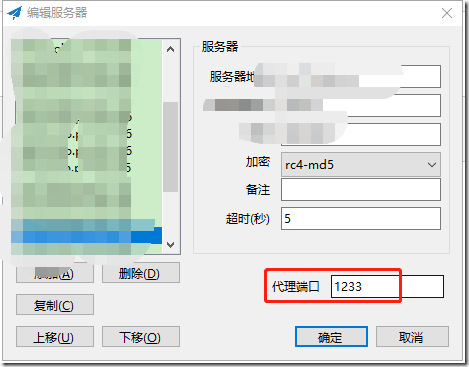
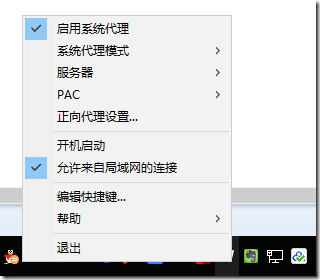
其中的ip和端口号是通过shadowsocks进行管理的 :
ubuntu代理设置的更多相关文章
- ubuntu 代理设置
在学习工作中使用vagrant作为开发环境已经有很长一段时间了,使用ubuntu 作为开发系统 在使用中发现,即使修改了apt的source.list源文件,在面对一些开发中需要的软件工具的时候,不可 ...
- ubuntu and centos各种上网代理设置
1.Ubuntu 一. apt-get 代理设置 由于公司通过代理上网,firefox的代理设置很容易就搞定了,但是通过apt-get安装软件还是不行,于是,查阅了很多资料,最多的方法就是网上流传的三 ...
- Ubuntu 的 apt-get 代理设置(zhuan)
url: http://qixinglu.com/post/ubuntu_apt-get_proxy_setup.html 升级到 Ubuntu10.04 后,发现 apt-get 的代理设置有改变了 ...
- ubuntu 常用设置
●1 问题:使用virt-manager创建虚拟机时,Virtual network 'default':NAT(Inactive) 解决方法:1,查看网络状态sudo virsh net-list ...
- 服务器上的 IPProxy代理设置
1.window 平台 CCProxy 安装包 传送门: http://www.xue51.com/soft/2794.html 该页面详细的说明了ccproxy怎么安装.怎么破jie.... 下面老 ...
- ubuntu下设置数据库字符集
就linux环境下出现的数据库乱码的问题,以ubuntu为例进行的总结 ubuntu环境设置的字符集utf8,windows默认字符集是GBK,Ubuntu的默认字符集为utf-8,这使 得在用tel ...
- JMeter学习-024-JMeter 命令行(非GUI)模式详解(二)-执行代理设置
闲话少述,接 上文 继续... 5.设置代理 jmeter -n -t JMeter分布式测试示例.jmx -H 20.9.215.90 -P 9999 -l report\01-result.csv ...
- android sdk manager 代理设置(送给牛逼的)
解决android sdk更新慢的问题(公司竟然把sdk更新给墙了). 第一步:如下图 第二部:进入代理设置页面,进行设置.如下图
- sdk更新代理设置
sdk更新代理设置 http://www.cnblogs.com/zhoujg/p/4560998.html
随机推荐
- Java常用的九种排序方法及代码实现
package com.algorithm.Demo; import java.util.ArrayList; import java.util.Arrays; import java.util.Li ...
- Jenkins环境搭建(3)-配置自动发送邮件
紧接上一篇博文继续来完善Jenkins自动构建环境的搭建,今天来分享下配置邮件,构建任务后,自动发送邮件到指定邮箱 配置邮件分为两部分,第一部分是在系统管理中的系统设置中配置,第二部分是在任务中配置 ...
- ASP.NET Core 新建线程中使用依赖注入的问题
问题来自博问的一个提问 .net core 多线程数据保存的时候DbContext被释放 . TCPService 通过构造函数注入了 ContentService , ContentService ...
- VMware5.5-vCenter的安装准备及安装
vSphere 最近公司来了新同事,为了帮助他尽快熟悉VM-vsphere,一块复习了下,并把实验总结为文档. 声明:本例是以王隆杰老师的vsphere5.5教程为基础和线索进行的,由于时间匆忙,可能 ...
- AGC 030D.Inversion Sum(DP 期望)
题目链接 \(Description\) 给定长为\(n\)的序列\(A_i\)和\(q\)次操作\((x,y)\).对于每次操作\((x,y)\),可以选择交换\(A_x,A_y\)两个数,也可以选 ...
- BZOJ.5461.[PKUWC2018]Minimax(DP 线段树合并)
BZOJ LOJ 令\(f[i][j]\)表示以\(i\)为根的子树,权值\(j\)作为根节点的概率. 设\(i\)的两棵子树分别为\(x,y\),记\(p_a\)表示\(f[x][a]\),\(p_ ...
- 潭州课堂25班:Ph201805201 django 项目 第二十四课 文章主页 多级评论数据库设计 ,后台代码完成 (课堂笔记)
加载新闻评论功能 1.分析 业务处理流程: 判断前端传的新闻id是否为空,是否为整数.是否不存在 请求方法:GET url定义:'/news/<int:news_id>' 请求参数:url ...
- [BZOJ3683]Falsita
[BZOJ3683]Falsita 题目大意: 一个\(n(n\le3\times10^5)\)个结点的树,每个结点有一个权值\(w_i\),\(m(m\le3\times10^5)\)次操作,操作包 ...
- MySQL(九)
封装 观察前面的文件发现,除了sql语句及参数不同,其它语句都是一样的 创建MysqlHelper.py文件,定义类 #encoding=utf8 import MySQLdb class Mysql ...
- 观光公交 [NOIP 2011] [思维推导]
Description 风景迷人的小城Y 市,拥有n 个美丽的景点.由于慕名而来的游客越来越多,Y 市特意安排了一辆观光公交车,为游客提供更便捷的交通服务.观光公交车在第0 分钟出现在1号景点,随后依 ...