
ubuntu代理设置
很多时候,服务器都没有连接外部互联网的条件,需要利用代理服务器才能够访问外网资源进行软件包的升级:
ubuntu修改apt-get的代理可以使用代理进行安装包的升级:
ubuntu@ubuntu:~$ cat /etc/apt/apt.conf

Acquire::http::Proxy http://Username:Password@proxy.foo.bar.edu.au:8080;
网易163 ubuntu14.04镜像资源,将下面的内容覆盖/etc/apt/source.list文件
deb http://mirrors.163.com/ubuntu/ trusty main restricted universe multiverse

deb http://mirrors.163.com/ubuntu/ trusty-security main restricted universe multiverse

deb http://mirrors.163.com/ubuntu/ trusty-updates main restricted universe multiverse

deb http://mirrors.163.com/ubuntu/ trusty-proposed main restricted universe multiverse

deb http://mirrors.163.com/ubuntu/ trusty-backports main restricted universe multiverse

deb-src http://mirrors.163.com/ubuntu/ trusty main restricted universe multiverse

deb-src http://mirrors.163.com/ubuntu/ trusty-security main restricted universe multiverse

deb-src http://mirrors.163.com/ubuntu/ trusty-updates main restricted universe multiverse

deb-src http://mirrors.163.com/ubuntu/ trusty-proposed main restricted universe multiverse

deb-src http://mirrors.163.com/ubuntu/ trusty-backports main restricted universe multiverse

deb http://us.archive.ubuntu.com/ubuntu precise main universe
阿里云ubuntu16.04 镜像资源:
# deb cdrom:[Ubuntu 16.04 LTS _Xenial Xerus_ - Release amd64 (20160420.1)]/ xenial main restricted

deb-src http://archive.ubuntu.com/ubuntu xenial main restricted #Added by software-properties

deb http://mirrors.aliyun.com/ubuntu/ xenial main restricted

deb-src http://mirrors.aliyun.com/ubuntu/ xenial main restricted multiverse universe #Added by software-properties

deb http://mirrors.aliyun.com/ubuntu/ xenial-updates main restricted

deb-src http://mirrors.aliyun.com/ubuntu/ xenial-updates main restricted multiverse universe #Added by software-properties

deb http://mirrors.aliyun.com/ubuntu/ xenial universe

deb http://mirrors.aliyun.com/ubuntu/ xenial-updates universe

deb http://mirrors.aliyun.com/ubuntu/ xenial multiverse

deb http://mirrors.aliyun.com/ubuntu/ xenial-updates multiverse

deb http://mirrors.aliyun.com/ubuntu/ xenial-backports main restricted universe multiverse

deb-src http://mirrors.aliyun.com/ubuntu/ xenial-backports main restricted universe multiverse #Added by software-properties

deb http://archive.canonical.com/ubuntu xenial partner

deb-src http://archive.canonical.com/ubuntu xenial partner

deb http://mirrors.aliyun.com/ubuntu/ xenial-security main restricted

deb-src http://mirrors.aliyun.com/ubuntu/ xenial-security main restricted multiverse universe #Added by software-properties

deb http://mirrors.aliyun.com/ubuntu/ xenial-security universe

deb http://mirrors.aliyun.com/ubuntu/ xenial-security multiverse
对于其他下载类型的任务,可以使用如下命令:
export http_proxy="http://172.11.11.11:1233"

export https_proxy="http://172.11.11.11:1233"

export ftp_proxy=http://172.11.11.11.1233
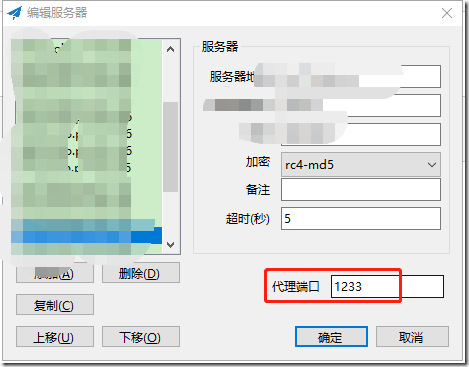
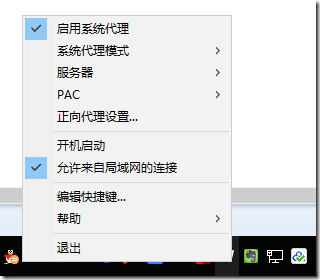
其中的ip和端口号是通过shadowsocks进行管理的 :
ubuntu代理设置的更多相关文章
- ubuntu 代理设置
在学习工作中使用vagrant作为开发环境已经有很长一段时间了,使用ubuntu 作为开发系统 在使用中发现,即使修改了apt的source.list源文件,在面对一些开发中需要的软件工具的时候,不可 ...
- ubuntu and centos各种上网代理设置
1.Ubuntu 一. apt-get 代理设置 由于公司通过代理上网,firefox的代理设置很容易就搞定了,但是通过apt-get安装软件还是不行,于是,查阅了很多资料,最多的方法就是网上流传的三 ...
- Ubuntu 的 apt-get 代理设置(zhuan)
url: http://qixinglu.com/post/ubuntu_apt-get_proxy_setup.html 升级到 Ubuntu10.04 后,发现 apt-get 的代理设置有改变了 ...
- ubuntu 常用设置
●1 问题:使用virt-manager创建虚拟机时,Virtual network 'default':NAT(Inactive) 解决方法:1,查看网络状态sudo virsh net-list ...
- 服务器上的 IPProxy代理设置
1.window 平台 CCProxy 安装包 传送门: http://www.xue51.com/soft/2794.html 该页面详细的说明了ccproxy怎么安装.怎么破jie.... 下面老 ...
- ubuntu下设置数据库字符集
就linux环境下出现的数据库乱码的问题,以ubuntu为例进行的总结 ubuntu环境设置的字符集utf8,windows默认字符集是GBK,Ubuntu的默认字符集为utf-8,这使 得在用tel ...
- JMeter学习-024-JMeter 命令行(非GUI)模式详解(二)-执行代理设置
闲话少述,接 上文 继续... 5.设置代理 jmeter -n -t JMeter分布式测试示例.jmx -H 20.9.215.90 -P 9999 -l report\01-result.csv ...
- android sdk manager 代理设置(送给牛逼的)
解决android sdk更新慢的问题(公司竟然把sdk更新给墙了). 第一步:如下图 第二部:进入代理设置页面,进行设置.如下图
- sdk更新代理设置
sdk更新代理设置 http://www.cnblogs.com/zhoujg/p/4560998.html
随机推荐
- 2019-1-9 c#时间格式
DateTime now=DateTime.Now; //获取拼接形式的,精确到毫秒 now.ToString("yyyyMMddHHmmssfff"); //获取时间戳 自公元0 ...
- SQL的多种JOIN
- BZOJ.1132.[POI2008]Tro(极角排序)
BZOJ 洛谷 考虑暴力,每次枚举三个点,答案就是\(\frac12\sum_{k<j<i}(i-k)\times(j-k)\). 注意到叉积有分配率,所以固定\(k\),枚举\(i,j\ ...
- JAVA实现Word(doc)文件读写
1.pom.xml依赖 <dependencies> <dependency> <groupId>org.apache.poi</groupId> &l ...
- java发送邮件高级篇
package com.xiets.javamaildemo; import java.util.Date; import java.util.Properties; import javax.act ...
- [POJ3197]Stall Reservations (贪心)
题意 (来自洛谷) 约翰的N(l<N< 50000)头奶牛实在是太难伺候了,她们甚至有自己独特的产奶时段.当 然对于某一头奶牛,她每天的产奶时段是固定的,为时间段A到B包括时间段A和时间段 ...
- array中key所对应的value
获取数组中的键对应的值 class Test{ public function index(){ $info = array( 'name' => 'daicr', 'age' => 24 ...
- Cocos Creator_发布到微信小游戏平台
观看官方教程,地址 传送门: http://docs.cocos.com/creator/manual/zh/publish/publish-wechatgame.html CocosCreator接 ...
- python对象转化为json串、json串转化为python串
1.1. JSON简介: JavaScript Object Notation(JavaScript对象表示法) JSON是存储和交换文本信息的语法.类似XML JSON比XML更小.更快.更易解析 ...
- Java面试题集锦
1. String.StringBuffer和StringBuilder的区别. (1) String:存储数值不可改变的字符串 (2) StringBuffer:可变字符序列.线程安全.效率低 ...