
Ubuntu下安装open-falcon-v0.2.1
在Ubuntu下安装open-falcon和Centos下安装的方法有点区别,因为Ubuntu使用的包管理器是apt-get,而Centos下使用的是Yum,建议不要再Ubuntu下使用yum
建议自己下载源码打包二进制包来安装,因为官方给出的二进制包应该是再centos下打包的,再Ubuntu下运行可能会出现问题
1.安装Go,首先去官网下载,需要fq
https://golang.org
顺便安装Goland,注册服务器 http://idea.youbbs.org
2.在/etc/profile中添加,后source /etc/profile
#Go

export GOROOT=/home/lintong/software/go

export PATH=$PATH:$GOROOT/bin:$GOPATH/bin

export GOPATH=/home/lintong/software/gopath
验证是否安装成功
go version

go version go1.10.2 linux/amd64
接下来参考
3.安装redis和mysql
sudo apt-get install redis-server

sudo apt-get install mysql-server
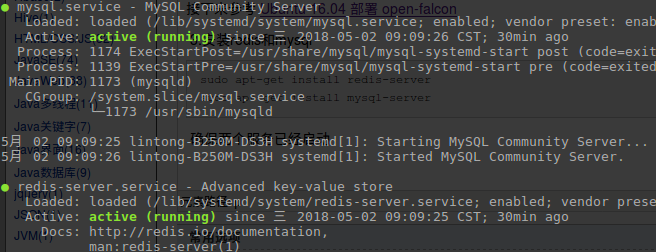
确保两个服务已经启动
systemctl status mysql redis-server
4.下载open-falcon源码,地址
https://github.com/open-falcon/falcon-plus
初始化MySQL表结构
mkdir -p $GOPATH/src/github.com/open-falcon

cd $GOPATH/src/github.com/open-falcon/falcon-plus/scripts/mysql/db_schema/

mysql -h 127.0.0.1 -u root -p < 1_uic-db-schema.sql

mysql -h 127.0.0.1 -u root -p < 2_portal-db-schema.sql

mysql -h 127.0.0.1 -u root -p < 3_dashboard-db-schema.sql

mysql -h 127.0.0.1 -u root -p < 4_graph-db-schema.sql

mysql -h 127.0.0.1 -u root -p < 5_alarms-db-schema.sql
5. 编译二进制包
cd $GOPATH/src/github.com/open-falcon/falcon-plus/

# make all modules

make all

# make specified module

make agent

# pack all modules

make pack
打包成功,在目录下多了文件open-falcon-v0.2.1.tar.gz
lintong@lintong-B250M-DS3H:~/software/go/src/github.com/open-falcon/falcon-plus$ make all

go build -o bin/agent/falcon-agent ./modules/agent

go build -o bin/aggregator/falcon-aggregator ./modules/aggregator

go build -o bin/graph/falcon-graph ./modules/graph

go build -o bin/hbs/falcon-hbs ./modules/hbs

go build -o bin/judge/falcon-judge ./modules/judge

go build -o bin/nodata/falcon-nodata ./modules/nodata

go build -o bin/transfer/falcon-transfer ./modules/transfer

go build -o bin/gateway/falcon-gateway ./modules/gateway

go build -o bin/api/falcon-api ./modules/api

go build -o bin/alarm/falcon-alarm ./modules/alarm

go build -ldflags "-X main.GitCommit=`git rev-parse --short HEAD` -X main.Version=0.2.1" -o open-falcon

lintong@lintong-B250M-DS3H:~/software/go/src/github.com/open-falcon/falcon-plus$ make agent

go build -o bin/agent/falcon-agent ./modules/agent

lintong@lintong-B250M-DS3H:~/software/go/src/github.com/open-falcon/falcon-plus$ make pack

go build -ldflags "-X main.GitCommit=`git rev-parse --short HEAD` -X main.Version=0.2.1" -o open-falcon

tar -C out -zcf open-falcon-v0.2.1.tar.gz .
6.解压到安装目录
mkdir ~/software/open-falcon-v0.2.1

tar -zxvf open-falcon-v0.2.1.tar.gz -C ~/software/open-falcon-v0.2.1/
7.安装open-falcon的前端框架dashboard
cd ~/software/open-falcon-v0.2.1

git clone https://github.com/open-falcon/dashboard.git
8.修改数据库密码,因为open-falcon需要操作数据库,这一步是官方教程中没有提到的
如果没有进行修改的话,在open-falcon-v0.2.1目录下使用./open-falcon start命令进行启动之后,使用./open-falcon check检查组件的状态,有些使用mysql的组件的状态是down
下面列出了使用mysql的组件,总共有6个:aggregator,graph、hbs、nodata、api、alarm模块
需要对这些组件的配置文件进行修改:
vim ~/software/open-falcon-v0.2.1/aggregator/config/cfg.json
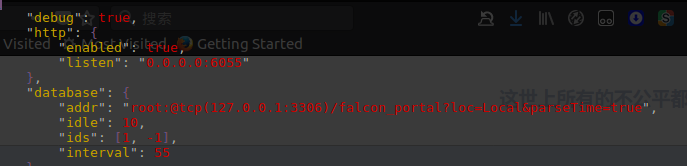
修改成

其他配置文件的修改方式类似
vim graph/config/cfg.json

vim hbs/config/cfg.json

vim nodata/config/cfg.json

vim api/config/cfg.json # 5处全部修改

vim alarm/config/cfg.json

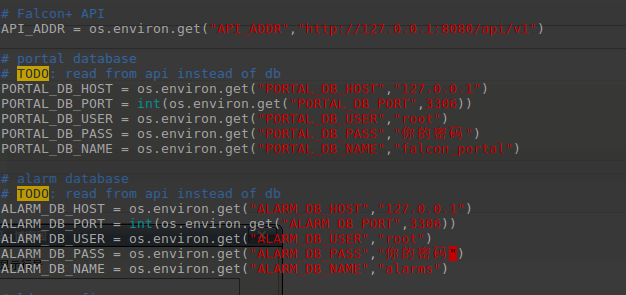
接下来需要在前端组件中,配置数据库密码
cd ~/software/open-falcon-v0.2.1/dashboard/rrd

vim config.py
9.安装Python的依赖,在Ubuntu下不要使用Yum
sudo apt-get install python-pip python-virtualenv

sudo apt-get install python-dev

sudo apt-get install ldap-utils

sudo apt-get install libmysqld-dev
10.安装virtualenv的运行环境,在服务器上是不建议直接pip安装的,因为Python包的冲突可能会影响到别人的服务
~/software/open-falcon-v0.2.1/dashboard

virtualenv ./env

./env/bin/pip install -r pip_requirements.txt -i https://pypi.douban.com/simple
如果出现 Failed building wheel for python-ldap 的问题
请参考 Installing python-ldap in Ubuntu
sudo apt-get install python-dev

sudo apt-get install libldap2-dev

sudo apt-get install libsasl2-dev

# 然后再

./env/bin/pip install python-ldap
请确保每个Python包都安装到位,成功如下
./env/bin/pip install -r pip_requirements.txt -i https://pypi.douban.com/simple

Looking in indexes: https://pypi.douban.com/simple

Requirement already satisfied: Flask==0.10.1 in ./env/lib/python2.7/site-packages (from -r pip_requirements.txt (line 1)) (0.10.1)

Requirement already satisfied: Flask-Babel==0.9 in ./env/lib/python2.7/site-packages (from -r pip_requirements.txt (line 2)) (0.9)

Requirement already satisfied: Jinja2==2.7.2 in ./env/lib/python2.7/site-packages (from -r pip_requirements.txt (line 3)) (2.7.2)

Requirement already satisfied: Werkzeug==0.9.4 in ./env/lib/python2.7/site-packages (from -r pip_requirements.txt (line 4)) (0.9.4)

Requirement already satisfied: gunicorn==19.1.1 in ./env/lib/python2.7/site-packages (from -r pip_requirements.txt (line 5)) (19.1.1)

Requirement already satisfied: python-dateutil==2.2 in ./env/lib/python2.7/site-packages (from -r pip_requirements.txt (line 6)) (2.2)

Requirement already satisfied: requests==2.3.0 in ./env/lib/python2.7/site-packages (from -r pip_requirements.txt (line 7)) (2.3.0)

Requirement already satisfied: mysql-python in ./env/lib/python2.7/site-packages (from -r pip_requirements.txt (line 8)) (1.2.5)

Requirement already satisfied: python-ldap in ./env/lib/python2.7/site-packages (from -r pip_requirements.txt (line 9)) (3.0.0)

Requirement already satisfied: itsdangerous>=0.21 in ./env/lib/python2.7/site-packages (from Flask==0.10.1->-r pip_requirements.txt (line 1)) (0.24)

Requirement already satisfied: speaklater>=1.2 in ./env/lib/python2.7/site-packages (from Flask-Babel==0.9->-r pip_requirements.txt (line 2)) (1.3)

Requirement already satisfied: Babel>=1.0 in ./env/lib/python2.7/site-packages (from Flask-Babel==0.9->-r pip_requirements.txt (line 2)) (2.5.3)

Requirement already satisfied: markupsafe in ./env/lib/python2.7/site-packages (from Jinja2==2.7.2->-r pip_requirements.txt (line 3)) (1.0)

Requirement already satisfied: six in ./env/lib/python2.7/site-packages (from python-dateutil==2.2->-r pip_requirements.txt (line 6)) (1.11.0)

Requirement already satisfied: pyasn1-modules>=0.1.5 in ./env/lib/python2.7/site-packages (from python-ldap->-r pip_requirements.txt (line 9)) (0.2.1)

Requirement already satisfied: pyasn1>=0.3.7 in ./env/lib/python2.7/site-packages (from python-ldap->-r pip_requirements.txt (line 9)) (0.4.2)

Requirement already satisfied: pytz>=0a in ./env/lib/python2.7/site-packages (from Babel>=1.0->Flask-Babel==0.9->-r pip_requirements.txt (line 2)) (2018.4)
11.启动open-falcon的后端,注意check的时候,每个组件需要都是up状态,down状态说明出了问题
cd ~/software/open-falcon-v0.2.1

./open-falcon start

[falcon-graph] 16736

[falcon-hbs] 16749

[falcon-judge] 16763

[falcon-transfer] 16774

[falcon-nodata] 16786

[falcon-aggregator] 16797

[falcon-agent] 16809

[falcon-gateway] 16819

[falcon-api] 16829

[falcon-alarm] 16844

./open-falcon check

        falcon-graph         UP           16736

          falcon-hbs         UP           16749

        falcon-judge         UP           16763

     falcon-transfer         UP           16774

       falcon-nodata         UP           16786

   falcon-aggregator         UP           16797

        falcon-agent         UP           16809

      falcon-gateway         UP           16819

          falcon-api         UP           16829

        falcon-alarm         UP           16844
以开发者模式启动前端组件
./env/bin/python wsgi.py
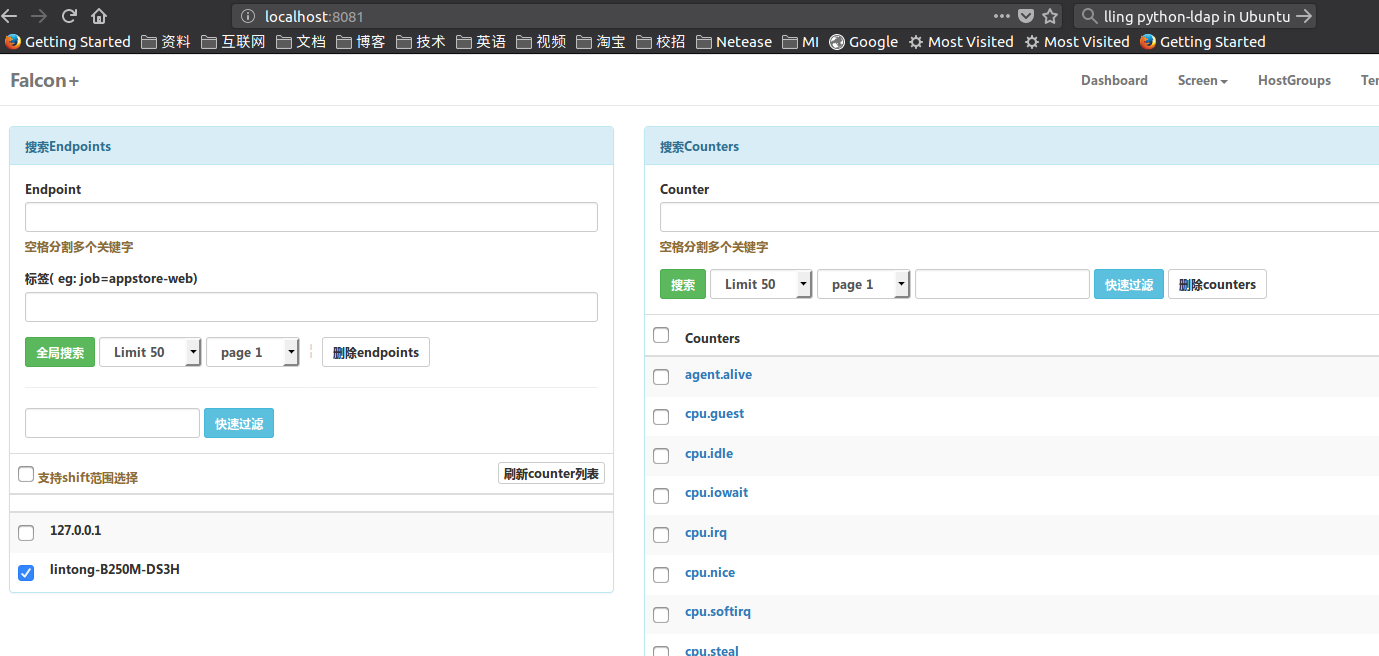
12.访问 127.0.0.1:8081,注册一个自己的账号和密码,然后登录,成功
Ubuntu下安装open-falcon-v0.2.1的更多相关文章
- ubuntu下安装nodejs
前言 继前几天在wins环境下使用cygwin模拟器安装nodejs出现了一些问题后,今天我决定在ubuntu下安装nodejs,安装过程非常顺利,没有报错,看来还是linux环境给力啊,由于刚接触l ...
- ubuntu下安装git,sublime,nodejs
用的是VMware10.0版本的虚拟机,很早之前下载的今天就直接用了,安装挺简单记得需要一个序列号.在这里:http://mirrors.163.com/ubuntu-releases/15.04/u ...
- 在Ubuntu下安装ovs-dpdk
在Ubuntu下安装ovs-dpdk 参考资料:https://software.intel.com/zh-cn/articles/using-open-vswitch-with-dpdk-on-ub ...
- Ubuntu 下安装QT
Ubuntu 下安装QT 本文使用的环境 QT Library: qt-everywhere-opensource-src-4.7.4.tar.gz QT Creator: qt-creator-li ...
- Ubuntu下安装JDK以及相关配置
1.查看系统位数,输入以下命令即可 getconf LONG_BIT 2.下载对应的JDK文件,我这里下载的是jdk-8u60-linux-64.tar.gz 3.创建目录作为JDK的安装目录,这里选 ...
- Ubuntu下安装mod_python报错(GIT错误)
Ubuntu下安装mod_python3.4.1版本报出如下错误: writing byte-compilation script '/tmp/tmpE91VXZ.py' /usr/bin/pytho ...
- TODO:Ubuntu下安装Node
TODO:Ubuntu下安装Node Node.js 是一个基于 Chrome V8 引擎的 JavaScript 运行环境.Node.js 使用了一个事件驱动.非阻塞式 I/O 的模型,使其轻量又高 ...
- Ubuntu杂记——Ubuntu下安装VMware
转战Ubuntu,不知道能坚持多久,但是自己还是要努力把转战过程中的学习到的给记录下来.这次就来记录一下,Ubuntu下如何安装VMware. 就我所知,Linux下有VirtualBox和VMwar ...
- 来杯Caffe——在ubuntu下安装Caffe框架并测试
Caffe是一种深度学习框架...blablabla...... Caffe要在ubuntu下安装 1. 安装依赖 sudo apt-get install libatlas-base-dev sud ...
- Ubuntu 下安装 Mysql
这里讲用Ubuntu下安装MySql ubuntu上安装mysql非常简单只需要几条命令就可以完成. 1. sudo apt-get install mysql-server 2. apt-get ...
随机推荐
- 考前停课集训 Day2 非
因为太长了 所以一天一天分开发 Day2 昨天晚上没开黑车 没脱衣服就睡了 可能是我难受了…… 新的一天. 早上好. 我没去晨跑,早上先和团长集合了,没看见rkbudlo来 于是就先吃饭了 去机房的时 ...
- 回文检测 [USACO Training Section 1.3]
题目描述 据说如果你给无限只母牛和无限台巨型便携式电脑(有非常大的键盘),那么母牛们会制造出世上最棒的回文.你的工作就是去寻找这些牛制造的奇观(最棒的回文). 在寻找回文时不用理睬那些标点符号.空格( ...
- C# Web API Modify Post Data Size Limit
在Web.config中增加下面两个配置后,重启IIS即可. 1.修改http请求数据大小限制 <system.web> <httpRuntime maxRequestLength ...
- Java 避免创建不必要的对象
最好能重用对象而不是在每次需要的时候就创建一个相同功能的新对象.如果对象是不可变的,它就始终可以被重用. String s = new String("stringette"); ...
- 如何修改CCS 7.2 代码和注释的颜色以及折叠代码
默认的字体总是让人感觉很难受,作为一个热爱生活的人,工作的时候也得尽力创造一个舒适的环境----程序猿们,对自己好一点. 首先废话一下--------------------------------- ...
- 使用iscroll,无法正常滑动的原因
iscroll的dom元素的结构是固定的,swiper是容器,scroll是需要滚动的容器,list是滚动的内容 <div class="swiper"> <di ...
- nested exception is java.lang.ClassNotFoundException
当出现nested exception is java.lang.ClassNotFoundException这个异常的时候,首先排查类是否存在.如果存在,是maven项目的话,clean.insta ...
- bootstrap-实现loading效果
可以使用bootstrap的模态框(modal.js),使用它我们可以做出loading效果. html <!-- loading --> <div class="moda ...
- 图解Windows下 GIT GUI 使用教程
https://jingyan.baidu.com/article/19020a0a7ae6af529c284248.html 本篇经验将和大家介绍Windows下 GIT GUI 使用教程,希望对大 ...
- 转发:entos7修改文件夹权限和用户名用户组
Linux系统下经常遇到文件或者文件夹的权限问题,或者是因为文件夹所属的用户问题而没有访问的权限.根据我自己遇到的情况,对这类问题做一个小结.在命令行使用命令“ll”或者“ls -a”,可以查看文件或 ...