
六、编写第一个应用【外部nodejs调用】
一、
参考地址:https://hyperledger-fabric.readthedocs.io/en/latest/write_first_app.html
根据前几节的配置
1、下载代码
git clone https://github.com/hyperledger/fabric-samples.git

cd fabric-samples/fabcar
2、在fabcar下会有如下文件
chaincode invoke.js network package.json query.js startFabric.sh
新版本的示例,chaincode在根目录下
3、开启网络配置[注意docker版本17.06,在1.12.6版本没有-e命令]
./startFabric.sh
4、查询一个账本

安装node
yum install gcc-c++
npm install
查询[注意配置query.js中的ip地址]
node query.js
展示如下数据

Create a client and set the wallet location

Set wallet path, and associate user  PeerAdmin  with application

Check user is enrolled, and set a query URL in the network

Make query

Assigning transaction_id:  f2f45cb045d6290d199e1b2d4eb3b60b1e9cafeff8d09e2b7683dd8578492be7

returned from query

Query result count =  1

Response is  [{"Key":"CAR0", "Record":{"colour":"blue","make":"Toyota","model":"Prius","owner":"Tomoko"}},{"Key":"CAR1", "Record":{"colour":"red","make":"Ford","model":"Mustang","owner":"Brad"}},{"Key":"CAR2", "Record":{"colour":"green","make":"Hyundai","model":"Tucson","owner":"Jin Soo"}},{"Key":"CAR3", "Record":{"colour":"yellow","make":"Volkswagen","model":"Passat","owner":"Max"}},{"Key":"CAR4", "Record":{"colour":"black","make":"Tesla","model":"S","owner":"Adriana"}},{"Key":"CAR5", "Record":{"colour":"purple","make":"Peugeot","model":"205","owner":"Michel"}},{"Key":"CAR6", "Record":{"colour":"white","make":"Chery","model":"S22L","owner":"Aarav"}},{"Key":"CAR7", "Record":{"colour":"violet","make":"Fiat","model":"Punto","owner":"Pari"}},{"Key":"CAR8", "Record":{"colour":"indigo","make":"Tata","model":"Nano","owner":"Valeria"}},{"Key":"CAR9", "Record":{"colour":"brown","make":"Holden","model":"Barina","owner":"Shotaro"}}]
5、分析query.js
1》初始化参数,包含了用户ID,信道,链码,网络连接入口
var options = {

    wallet_path: path.join(__dirname, './creds'),

    user_id: 'PeerAdmin',

    channel_id: 'mychannel',

    chaincode_id: 'fabcar',

    network_url: 'grpc://localhost:7051',

};
2》查询代码
    var transaction_id = client.newTransactionID();

    // queryCar - requires 1 argument, ex: args: ['CAR4'],

    // queryAllCars - requires no arguments , ex: args: [''],

    const request = {

        chaincodeId: options.chaincode_id,

        txId: transaction_id,

        fcn: 'queryAllCars',

        args: ['']

    };

    return channel.queryByChaincode(request);
这里设置了链码ID,交易ID,以及调用的链码的方法fcn,方法参数args等
3》链码:/chaincode/fabcar/目录下fabcar.go
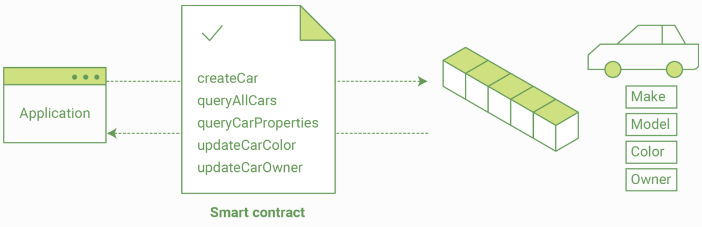
此文件匹配上文的链码ID,包含了如下方法:initLedger, queryCar,queryAllCars, createCar and changeCarOwner
func (s *SmartContract) queryAllCars(APIstub shim.ChaincodeStubInterface) sc.Response {

    startKey := "CAR0"

    endKey := "CAR999"

    resultsIterator, err := APIstub.GetStateByRange(startKey, endKey)
此处就是查询范围内的数据。
查看所有方法
6、测试
cp query.js query1.js
vim query1.js
修改内部访问链码方法
    const request = {

        chaincodeId: options.chaincode_id,

        txId: transaction_id,

        fcn: 'queryCar',

        args: ['CAR4']

    };
执行:node query1.js
Create a client and set the wallet location

Set wallet path, and associate user  PeerAdmin  with application

Check user is enrolled, and set a query URL in the network

Make query

Assigning transaction_id:  ca88dc3b60f4df009a709f2f5ee5ad3b54f43d03a7e0b931042e2797f70c795d

returned from query

Query result count =  1

Response is  {"colour":"black","make":"Tesla","model":"S","owner":"Adriana"}
7、更新账本数据
使用fabcar目录下的invoke.js
修改,中的 fcn,以及args等参数
var request = {

    targets: targets,

    chaincodeId: options.chaincode_id,

    fcn: '',

    args: [''],

    chainId: options.channel_id,

    txId: tx_id
如下
var request = {

    targets: targets,

    chaincodeId: options.chaincode_id,

    fcn: 'createCar',

    args: ['CAR10', 'Chevy', 'Volt', 'Red', 'Nick'],

    chainId: options.channel_id,

    txId: tx_id
执行命令
node invoke.js
成功后会有
The transaction has been committed on peer localhost:7053
执行
cp query1.js query2.js

vim query2.js
将query2.js中查询条件参数,变为CAR10即可
Response is {"colour":"Red","make":"Chevy","model":"Volt","owner":"Nick"}
ok,可以继续调试其他方法。
六、编写第一个应用【外部nodejs调用】的更多相关文章
- 006-基于hyperledger fabric1.4( 官方文档)编写第一个应用【外部nodejs调用】
一.概述 官方原文地址 Writing Your First Application如果对fabric网络的基本运行机制不熟悉的话,请看这里. 注意:本教程是对fabric应用以及如何使用智能合约的简 ...
- nodejs调用delphi编写的dll
公司的业务需要,nodejs要读取文件版本号. 同事要求我用delphi编写dll,以供nodejs调用,结果通过json返回. delphi代码如下: function GetFileInfo(AP ...
- C#基础知识-编写第一个程序(二)
通过上一篇数据类型已经介绍了C#中最基本的15种预定义数据类型,了解每一种类型代表的数据以及每种类型的取值范围,这是很重要也是最基本.下面我们通过实例来了解每个类型如何去使用.编写C#程序时我们需要用 ...
- 内核第三讲,进入ring0,以及编写第一个内核驱动程序.
内核第三讲,进入ring0,以及编写第一个内核驱动程序. PS: 请下配置双机调试,下方有可能用到.如果不配置,则你可以不用调试, 博客连接: http://www.cnblogs.com/iBina ...
- 深入了解以太坊虚拟机第4部分——ABI编码外部方法调用的方式
在本系列的上一篇文章中我们看到了Solidity是如何在EVM存储器中表示复杂数据结构的.但是如果无法交互,数据就是没有意义的.智能合约就是数据和外界的中间体. 在这篇文章中我们将会看到Solidit ...
- 用nodejs调用webservice
用nodejs调用webservice,是用soap包实现的. 步骤如下: 第一步:安装soap包 npm install soap 第二部:调用webservice var soap = requ ...
- Xamarin iOS编写第一个应用程序创建工程
Xamarin iOS编写第一个应用程序创建工程 在Xcode以及Xamarin安装好后,就可以在Xamarin Studio中编写程序了.本节将主要讲解在Xamarin Studio中如何进行工程的 ...
- 简单上手nodejs调用c++(c++和js的混合编程)
因为项目的原因,最近经常使用node.js搭RESTful接口. 性能还是很不错啦,感觉比Spring Boot之类的要快.而且在不错的性能之外,只要程序结构组织好,别让太多的回调把程序结构搞乱,整体 ...
- django之创建第3个项目:编写第一个模板文件
1.django结构 2.在站点blog下创建templates文件夹,专门用于存放模板文件 3.在templates文件夹下创建index.html文件 #index.html <!DOCTY ...
随机推荐
- 华容道 [NOIP 2013]
Describltion 小 B 最近迷上了华容道,可是他总是要花很长的时间才能完成一次.于是,他想到用编程来完成华容道:给定一种局面, 华容道是否根本就无法完成,如果能完成, 最少需要多少时间. 小 ...
- 我要当皇帝等微信小游戏的wbs
猜字:1.视图交互: 1)主界面:展示每一道题目跟答案 1) 题目展示区域, 成员布局 2) 选项展示 3) 其他 2)下一道题弹框 3)答案弹框 4)结果弹框 5)关卡弹框 2.数据处理, 1) 读 ...
- 3ds max学习笔记(一)--选择物体
选择所有物体:编辑-->全选(快捷:ctrl+a),在其他空白地方点击则取消选择(或编辑-->选择不选)反选:选择一部分物体 --编辑--反选/ ctrl+i 快速反选加选物体:选择一部分 ...
- pygame-KidsCanCode系列jumpy-part6-主角挂掉重新开始
游戏的虚拟世界中,最让人happy的一个因素就是主角挂了,而且重来,只要restart就行了,不象现实中人的生命只有1次.回顾上节的效果,如果方块向下落时,挡板没接住,整个游戏就跪了: 如果我们希望方 ...
- iOS:给标签栏控制器的UITabbarItem添加点击动效
一.介绍 现在很多app,附带很炫的点击效果,让用户享受到非常棒的体验,例如动画.渐变.音效等. 当然,市面上大多数app的标签栏点击还是挺中规中矩的,只是切换图片而已.然而,这个是可以优化的,附带点 ...
- one-stage object detectors(1)
2019/04/08 强烈推荐:深入理解one-stage目标检测算法 yolo系列 one-stage object detectors(YOLO and SSD) 在不专一的模型中,每个检测器应该 ...
- 《Python数据分析与挖掘实战》读书笔记
大致扫了一遍,具体的代码基本都没看了,毕竟我还不懂python,并且在手机端的排版,这些代码没法看. 有收获,至少了解到以下几点: 一. Python的语法挺有意思的 有一些类似于JavaSc ...
- Apache shiro如何实现一个账户同一时刻只有一个人登录
继承AuthorizingRealm类,重写方法doGetAuthenticationInfo /** * 认证(登录时调用) */ @Override protected Authenticatio ...
- Win7 32位下cocos2dx android开发调试环境
1.使用环境 win7 32位 + vs2010 2.软件准备(下方绿色文字带链接) cocos2dx-v2.2.2 jdk7 android sdk android ndk adt bundle a ...
- eureka服务注册发现流程和核心参数
参数1:eureka.instance.lease-renewal-interval-in-seconds 参数2:eureka.instance.lease-expiration-duration- ...