
粉红色界面的vscode,程序媛的必备利器
vscode都是黑漆漆的界面,对于一个喜欢花花草草的程序媛来说,长时间对着这样的界面,简直是一种折磨啊
有的时候,也会不自觉的想要看看一些粉色的东西,毕竟有着单纯的少女心
今天看到了一篇博客,作者是自己设计了一个灰色的界面,我以此为启发,将我的编辑器界面改成粉红色的啦
效果如下
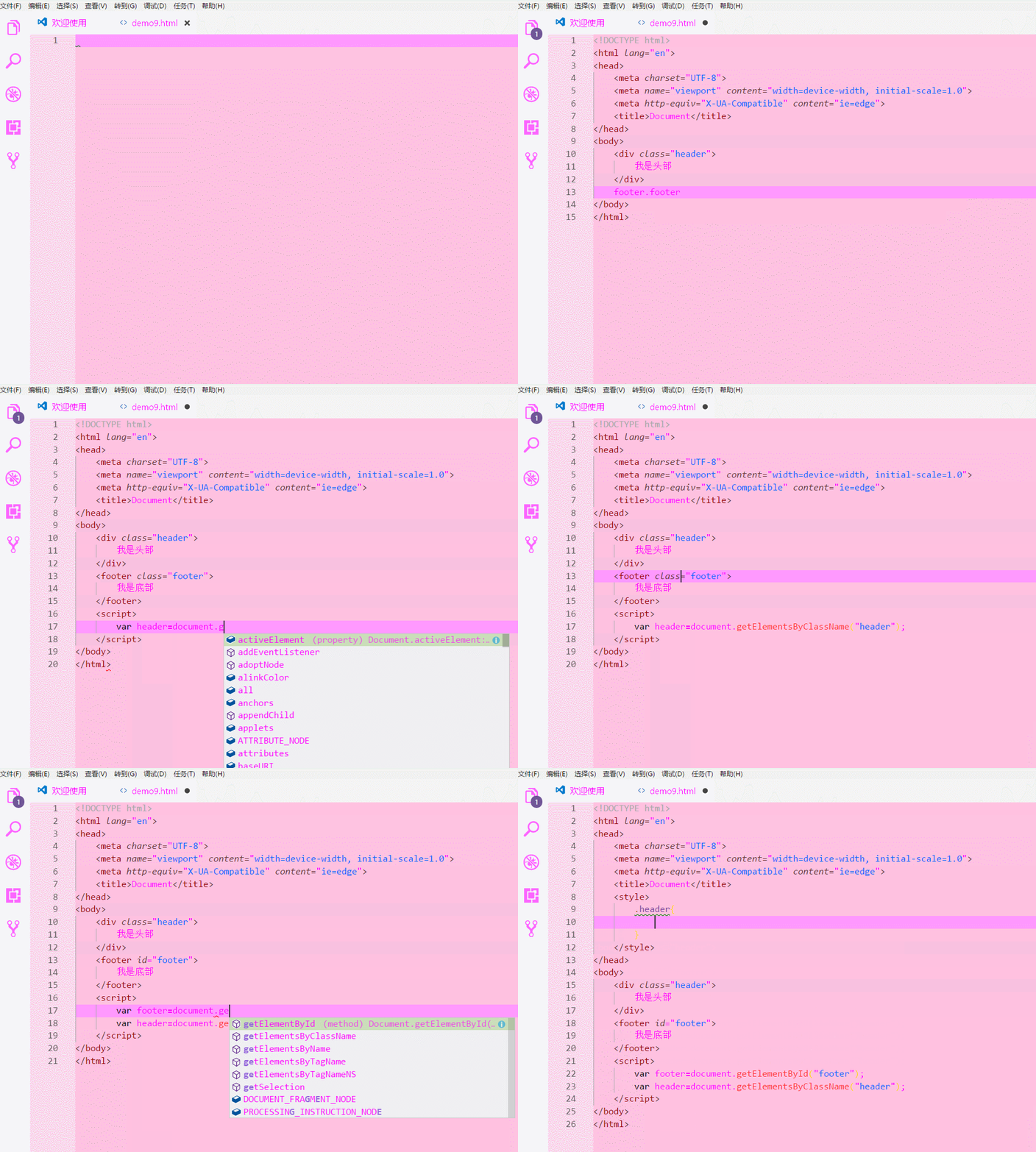
我自己感觉这样的界面挺好看的
怎么进行这样的设置呢?
第一步,进入我们安装vscode的文件夹中
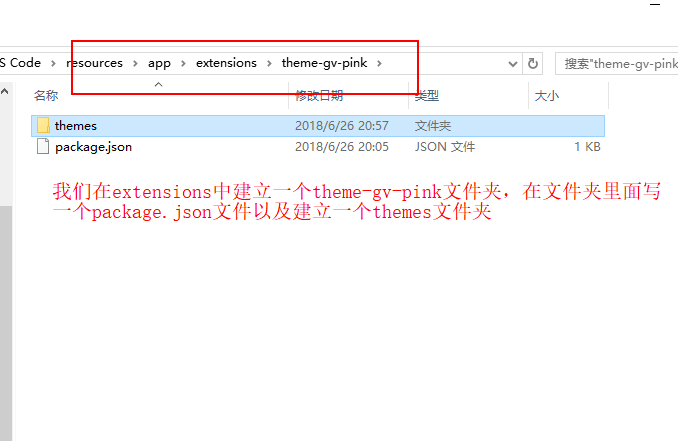
第二步,看看我的json文件中写了什么
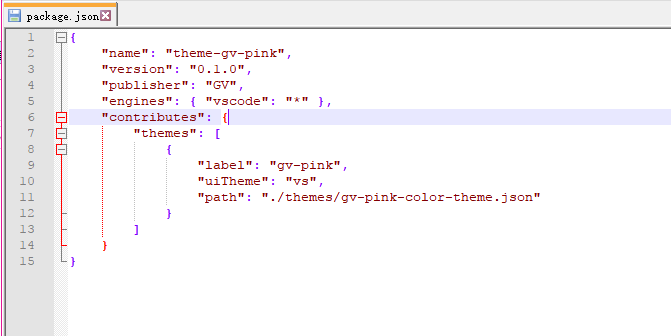
第三步,跟着我的图片走
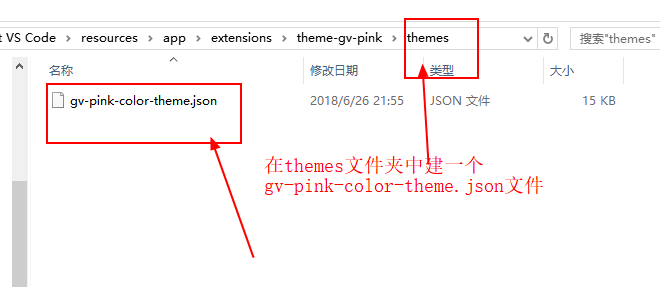
第四步,看看我的这个json文件写的什么,直接复制粘贴我的就好,就可以跟我一样的界面啦
{
"name": "gv-pink",
"colors": {
"activityBar.background": "#F8F8FF",
"activityBar.foreground": "#FF00FF",
"editor.background": "#FFC1E0",
"editor.foreground": "#FF00FF",
"editor.findMatchBackground": "#ffff00",
"editor.findMatchHighlightBackground": "#ffff00",
"editor.lineHighlightBackground": "#ff99ff",
"editor.selectionBackground": "#b0b0b0",
"editor.selectionHighlightBackground": "#dfdfdf",
"editor.rangeHighlightBackground": "#b0b0b0",
"editorBracketMatch.background": "#b0b0b0",
"editorCursor.foreground": "#333333",
"editorGutter.background": "#FFD9EC",
"editorLineNumber.foreground": "#5B5B5B",
"sideBar.background": "#FFE5FE",
"sideBar.foreground": "#FF00FF",
"sideBarSectionHeader.background": "#F8F8FF",
"statusBar.background": "#444444",
"statusBar.noFolderBackground": "#444444",
"statusBar.debuggingBackground": "#444444",
"tab.activeBackground": "#ffffff",
"tab.activeForeground": "#FF00FF",
"tab.inactiveBackground": "#F8F8FF",
"tab.inactiveForeground": "#FF00FF",
// Other colors.
"activityBarBadge.background": "#705697",
"button.background": "#705697",
"dropdown.background": "#F5F5F5",
"editorGroup.dropBackground": "#C9D0D988",
"editorWhitespace.foreground": "#AAAAAA",
"focusBorder": "#A6B39B",
"inputOption.activeBorder": "#adafb7",
"inputValidation.infoBorder": "#4ec1e5",
"inputValidation.infoBackground": "#f2fcff",
"inputValidation.warningBackground": "#fffee2",
"inputValidation.warningBorder": "#ffe055",
"inputValidation.errorBackground": "#ffeaea",
"inputValidation.errorBorder": "#f1897f",
"list.activeSelectionForeground": "#6c6c6c",
"list.focusBackground": "#CADEB9",
"list.activeSelectionBackground": "#c4d9b1",
"list.inactiveSelectionBackground": "#d3dbcd",
"list.highlightForeground": "#9769dc",
"notification.background": "#442e66",
"panel.background": "#F5F5F5",
"peekViewEditor.matchHighlightBackground": "#C2DFE3",
"peekViewTitle.background": "#F2F8FC",
"peekViewEditor.background": "#F2F8FC",
"peekViewResult.background": "#F2F8FC",
"peekView.border": "#705697",
"peekViewResult.matchHighlightBackground": "#93C6D6",
"pickerGroup.foreground": "#A6B39B",
"pickerGroup.border": "#749351"
},
"tokenColors": [
{
"settings": {
"background": "#ffffff",
"foreground": "#FF359A"
}
},
{
"name": "Character",
"scope": [
"constant",
"constant.character"
],
"settings": {
"foreground": "#000CCC"
}
},
{
"name": "Class",
"scope": [
"entity.name.type",
"entity.other.inherited-class",
"support.class"
],
"settings": {
"foreground": "#330033"
}
},
{
"name": "Comment",
"scope": [
"comment",
"punctuation.definition.comment"
],
"settings": {
"fontStyle": "italic",
"foreground": "#0066ff"
}
},
{
"name": "Function",
"scope": [
"entity.name.function",
"support.function"
],
"settings": {
"foreground": "#FF3333"
}
},
{
"name": "Keyword",
"scope": [
"keyword",
"storage"
],
"settings": {
"fontStyle": "bold",
"foreground": "#FFFF00"
}
},
{
"name": "Number",
"scope": [
"constant.numeric"
],
"settings": {
"foreground": "#66FFFF"
}
},
{
"name": "Operator",
"scope": "keyword.operator",
"settings": {
"foreground": "#FF00FF"
}
},
{
"name": "Parameter",
"scope": "variable.parameter",
"settings": {
"fontStyle": "underline"
}
},
{
"name": "Punctuation",
"scope": "punctuation",
"settings": {
"foreground": "#FF00FF"
}
},
{
"name": "String",
"scope": "string",
"settings": {
"foreground": "#0066FF"
}
},
{
"name": "Type",
"scope": [
"storage.type",
"support.type"
],
"settings": {
"fontStyle": "",
"foreground": "#000000"
}
},
{
"name": "Variable",
"scope": [
"support.variable",
"variable"
],
"settings": {
"foreground": "#FF00FF"
}
},
// Other token colors.
{
"name": "Comments: Preprocessor",
"scope": "comment.block.preprocessor",
"settings": {
"fontStyle": "",
"foreground": "#AAAAAA"
}
},
{
"name": "Comments: Documentation",
"scope": [
"comment.documentation",
"comment.block.documentation"
],
"settings": {
"foreground": "#448C27"
}
},
{
"name": "Invalid - Deprecated",
"scope": "invalid.deprecated",
"settings": {
"background": "#96000014"
}
},
{
"name": "Invalid - Illegal",
"scope": "invalid.illegal",
"settings": {
"background": "#96000014",
"foreground": "#660000"
}
},
{
"name": "Language Constants",
"scope": [
"constant.language",
"support.constant",
"variable.language"
],
"settings": {
"foreground": "#AB6526"
}
},
{
"name": "Exceptions",
"scope": "entity.name.exception",
"settings": {
"foreground": "#660000"
}
},
{
"name": "Sections",
"scope": "entity.name.section",
"settings": {
"fontStyle": "bold"
}
},
{
"name": "Strings: Escape Sequences",
"scope": "constant.character.escape",
"settings": {
"foreground": "#777777"
}
},
{
"name": "Strings: Regular Expressions",
"scope": "string.regexp",
"settings": {
"foreground": "#4B83CD"
}
},
{
"name": "Strings: Symbols",
"scope": "constant.other.symbol",
"settings": {
"foreground": "#AB6526"
}
},
{
"name": "Embedded Source",
"scope": [
"string source",
"text source"
],
"settings": {
"background": "#EAEBE6"
}
},
{
"name": "HTML: Doctype Declaration",
"scope": [
"meta.tag.sgml.doctype",
"meta.tag.sgml.doctype string",
"meta.tag.sgml.doctype entity.name.tag",
"meta.tag.sgml punctuation.definition.tag.html"
],
"settings": {
"foreground": "#AAAAAA"
}
},
{
"name": "HTML: Tags",
"scope": [
"meta.tag",
"punctuation.definition.tag.html",
"punctuation.definition.tag.begin.html",
"punctuation.definition.tag.end.html"
],
"settings": {
"foreground": "#663333"
}
},
{
"name": "HTML: Tag Names",
"scope": "entity.name.tag",
"settings": {
"foreground": "#990000"
}
},
{
"name": "HTML: Attribute Names",
"scope": [
"meta.tag entity.other.attribute-name",
"entity.other.attribute-name.html"
],
"settings": {
"fontStyle": "italic",
"foreground": "#663333"
}
},
{
"name": "HTML: Entities",
"scope": [
"constant.character.entity",
"punctuation.definition.entity"
],
"settings": {
"foreground": "#AB6526"
}
},
{
"name": "CSS: Selectors",
"scope": [
"meta.selector",
"meta.selector entity",
"meta.selector entity punctuation",
"entity.name.tag.css"
],
"settings": {
"foreground": "#7A3E9D"
}
},
{
"name": "CSS: Property Names",
"scope": [
"meta.property-name",
"support.type.property-name"
],
"settings": {
"foreground": "#AB6526"
}
},
{
"name": "CSS: Property Values",
"scope": [
"meta.property-value",
"meta.property-value constant.other",
"support.constant.property-value"
],
"settings": {
"foreground": "#448C27"
}
},
{
"name": "CSS: Important Keyword",
"scope": "keyword.other.important",
"settings": {
"fontStyle": "bold"
}
},
{
"name": "Markup: Changed",
"scope": "markup.changed",
"settings": {
"background": "#FFFFDD",
"foreground": "#FF00FF"
}
},
{
"name": "Markup: Deletion",
"scope": "markup.deleted",
"settings": {
"background": "#FFDDDD",
"foreground": "#FF00FF"
}
},
{
"name": "Markup: Emphasis",
"scope": "markup.italic",
"settings": {
"fontStyle": "italic"
}
},
{
"name": "Markup: Error",
"scope": "markup.error",
"settings": {
"background": "#96000014",
"foreground": "#660000"
}
},
{
"name": "Markup: Insertion",
"scope": "markup.inserted",
"settings": {
"background": "#DDFFDD",
"foreground": "#FF00FF"
}
},
{
"name": "Markup: Link",
"scope": "meta.link",
"settings": {
"foreground": "#4B83CD"
}
},
{
"name": "Markup: Output",
"scope": [
"markup.output",
"markup.raw"
],
"settings": {
"foreground": "#777777"
}
},
{
"name": "Markup: Prompt",
"scope": "markup.prompt",
"settings": {
"foreground": "#777777"
}
},
{
"name": "Markup: Heading",
"scope": "markup.heading",
"settings": {
"foreground": "#AA3731"
}
},
{
"name": "Markup: Strong",
"scope": "markup.bold",
"settings": {
"fontStyle": "bold"
}
},
{
"name": "Markup: Traceback",
"scope": "markup.traceback",
"settings": {
"foreground": "#660000"
}
},
{
"name": "Markup: Underline",
"scope": "markup.underline",
"settings": {
"fontStyle": "underline"
}
},
{
"name": "Markup Quote",
"scope": "markup.quote",
"settings": {
"foreground": "#7A3E9D"
}
},
{
"name": "Markup Lists",
"scope": "markup.list",
"settings": {
"foreground": "#4B83CD"
}
},
{
"name": "Markup Styling",
"scope": [
"markup.bold",
"markup.italic"
],
"settings": {
"foreground": "#448C27"
}
},
{
"name": "Markup Inline",
"scope": "markup.inline.raw",
"settings": {
"fontStyle": "",
"foreground": "#AB6526"
}
},
{
"name": "Extra: Diff Range",
"scope": [
"meta.diff.range",
"meta.diff.index",
"meta.separator"
],
"settings": {
"background": "#DDDDFF",
"foreground": "#434343"
}
},
{
"name": "Extra: Diff From",
"scope": "meta.diff.header.from-file",
"settings": {
"background": "#FFDDDD",
"foreground": "#434343"
}
},
{
"name": "Extra: Diff To",
"scope": "meta.diff.header.to-file",
"settings": {
"background": "#DDFFDD",
"foreground": "#434343"
}
}
]
}
最后感谢https://www.cnblogs.com/garvenc/p/vscode_customize_color_theme.html这篇博客的主人,没有他慷慨的分享他的技术
我的编辑器也不能改变颜色。
粉红色界面的vscode,程序媛的必备利器的更多相关文章
- 2017年"程序媛和工程狮"绝对不能忽视的编程语言、框架和工具
2017年"程序媛和工程狮"绝对不能忽视的编程语言.框架和工具 在过去的一年里,软件开发行业继续大踏步地向前迈进.回顾 2016 年,我们看到了更多新兴的流行语言.框架和工具, ...
- 程序媛也话Android 之 自定义控件(垂直方向滑动条)
Android里已经有足够多的控件供开发者使用,但有时候我们还是会想要一些不一样的东西,比如一些UI特效,比如一些3D动画,今天就讲讲比较basic的东西:自定义控件. 1.效果图 如果项目里需要一个 ...
- 通过Web Api 和 Angular.js 构建单页面的web 程序
通过Web Api 和 Angular.js 构建单页面的web 程序 在传统的web 应用程序中,浏览器端通过向服务器端发送请求,然后服务器端根据这个请求发送HTML到浏览器,这个响应将会影响整个的 ...
- 新年Flag,零基础程序媛编程学习计划(持续更新ing)~~
新的一年立下了转行做程序媛的Flag,我是文科妹子,专业是做市场传销…哦不,是市场营销,算是零基础转行,目标是半年内完成自学进入公司工作,目前打算从事的方向短期目标以入行为主,以前端(可以发挥自身审美 ...
- 10款Mac上程序员装机必备的开发工具推荐和下载
10款Mac上程序员装机必备的开发工具推荐和下载 使用Mac的用户主要有两大类:设计师和程序员,为各位程序员童鞋推荐10个Mac上非常棒的开发工具和辅助工具,分享软件专题[10款Mac上程序员装机必备 ...
- MFC如何在有界面的应用程序中开启控制台窗口
在有界面的应用程序中开启控制台窗口有时候非常有用,尤其是在调试多线程应用程序中,由于通过断点的方式调试程序时会导致线程挂起从而导致各种难于预料的结果.这时候就可以通过开启控制台窗口往窗口输出信息来查看 ...
- 关于Apache显示port 80 in use 无法解决的情况,这个世界对程序媛太不友好了
学到Ajax时下载了Apache,百度的安装教程,配置文件参数分别是: 1. httpd.conf里的80改为8000或者其他的,共三处(用记事本打开,按ctrl+F找方便) 2. httpd-ssl ...
- 副业收入是我做程序媛的3倍,工作外的B面人生
到“程序员”,多数人脑海里首先想到的大约是:为人木讷.薪水超高.工作枯燥…… 然而,当离开工作岗位,撕去层层标签,脱下“程序员”这身外套,有的人生动又有趣,马上展现出了完全不同的A/B面人生! 不论是 ...
- 程序媛数据报告:近三年增长至70%,平均月薪1.54W,女性程序媛并不是特殊物种
随机推荐
- JS进阶系列之执行上下文
function test(){ console.log(a);//undefined; var a = 1; } test(); 也许你会遇到过上面这样的面试题,你只知道它考的是变量提升,但是具体的 ...
- Linux内核及分析 第三周 Linux内核的启动过程
实验过程: 打开shell终端,执行以下命令: cd LinuxKernel/ qemu -kernel linux-3.18.6/arch/x86/boot/bzImage-initrd rootf ...
- 跟踪分析Linux内核的启动过程--实验报告 分析 及知识重点
跟踪分析Linux内核的启动过程 攥写人:杨光 学号:20135233 ( *原创作品转载请注明出处*) ( 学习课程:<Linux内核分析>MOOC课程http://mooc.stud ...
- [转帖]Nginx的超时keeplive_timeout配置详解
Nginx的超时keeplive_timeout配置详解 https://blog.csdn.net/weixin_42350212/article/details/81123932 Nginx ...
- ORA-01654 : 表空间不足
参考: Oracle表空间不足ORA-01654 查看表空间和表的使用率 ORA-01654 索引 无法通过 表空间扩展 Oracle 查看表空间的大小及使用情况sql语句 一.基础查询 1.查看表空 ...
- Node buffer模块缓冲区
//1:字节 byte//1024b = 1kb [千字节]//1024kb = 1mb [兆字节]//1024mb = 1gb [吉字节]//1024gb = 1tb [梯]//1024tb = 1 ...
- Hbase Shell 数据操作说明
启动.关闭hbase./bin/start-hbase.sh./bin/stop-hbase.sh 查询HBase版本.它的语法如下:hbase(main):010:0> version 建表c ...
- Bootstrap媒体对象
前面的话 在Web页面或者说移动页面制作中,常常看到图文混排效果,图片居左(或居右),内容居右(或居左)排列.常常把这样的效果称为媒体对象.可以说它是一种抽象的样式,可以用来构建不同类型的组件.本文将 ...
- 洛谷P2698 [USACO12MAR]花盆Flowerpot
P2698 [USACO12MAR]花盆Flowerpot 题目描述 Farmer John has been having trouble making his plants grow, and n ...
- python 模块之-os
python os模块 import os os.getcwd() # python脚本所在工作目录的路径 os.chdir(r'/tmp') # 切换目录到tmp os. ...