
使用 Portainer UI 管理 Docker 主机

Docker 使用命令行的方式来管理有时候并没有那么直观,可以使用 Portainer 的 UI 来管理 Docker 主机和 Docker Swarm 集群。
安装 Portainer
环境:centos 7.x
安装 Dokcer
curl -fsSL https://get.docker.com | bash -s docker --mirror Aliyun
或
sudo yum remove docker docker-client docker-client-latest docker-common docker-latest docker-latest-logrotate docker-logrotate docker-selinux docker-engine-selinux docker-engine

sudo yum install -y yum-utils device-mapper-persistent-data lvm2

#yum-config-manager --add-repo https://download.docker.com/linux/centos/docker-ce.repo

yum-config-manager --add-repo http://mirrors.aliyun.com/docker-ce/linux/centos/docker-ce.repo

sudo yum install docker-ce

sudo systemctl enable docker && systemctl start docker

sudo docker run hello-world

sudo systemctl status docker
Docker CE 镜像源站:https://yq.aliyun.com/articles/110806?spm=a2c4e.11153940.blogcont7695.8.519b1987xdykTn
镜像加速器
sudo mkdir -p /etc/docker

sudo tee /etc/docker/daemon.json <<-'EOF'

{

  "registry-mirrors": ["https://qyu8.mirror.aliyuncs.com"]

}

EOF

sudo systemctl daemon-reload

sudo systemctl restart docker
拉取镜像
docker pull portainer/portainer

docker images

docker run -d -p 9000:9000 -v /var/run/docker.sock:/var/run/docker.sock portainer/portainer
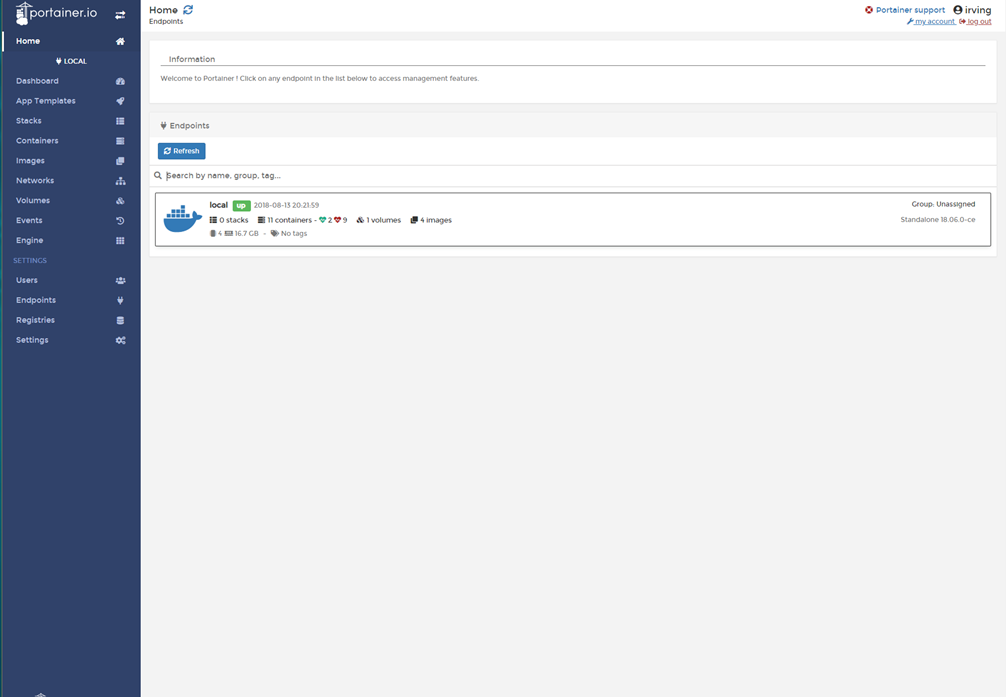
在浏览器中通过 9000 端口即可,常用的可以对 Images、Networks ,Volumes 管理。
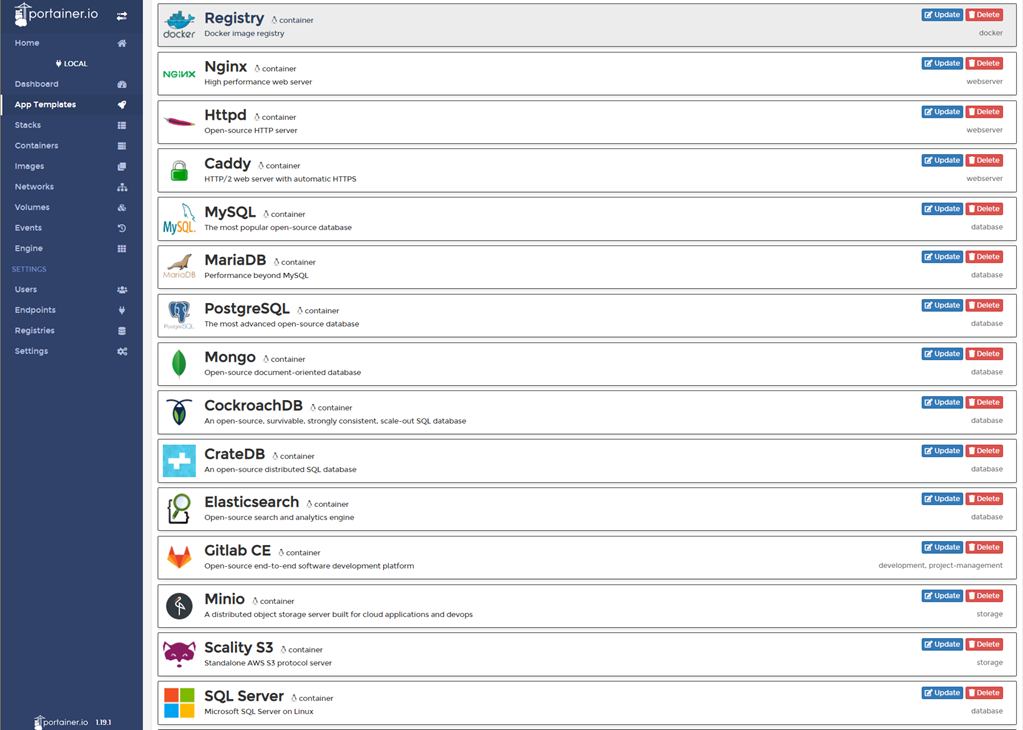
Application templates 中可以 pull 常用的 image,也可以自定义镜像相关的 Network ,Volume , Port 配置 。
REFER:
https://github.com/veggiemonk/awesome-docker
http://portainer.readthedocs.io/en/stable/deployment.html
https://media-glass.es/portainer-the-ui-for-docker-d067f6335f23
http://dockone.io/article/103https://github.com/goharbor/harbor
https://blog.csdn.net/weixin_41465338/article/details/80146218
使用 Portainer UI 管理 Docker 主机的更多相关文章
- 通过 UI 管理 docker
Docker 正在被用在越来越多的场景中,对于不太习惯命令行工具的朋友来说,docker cli 用起来可能会比较吃力.本文笔者将介绍一个功能强大的 docker web 客户端:portainer( ...
- Docker系列四: 使用UI管理docker容器
一.什么是Portainer? Portainer是Docker的图形化管理工具,提供状态显示面板.应用模板快速部署.容器镜像网络数据卷的基本操作(包括上传下载镜像,创建容器等操作).事件日志显示.容 ...
- portainer,用于管理docker swarm,好像也不错哟
shipyard的模式,好像在docker 1.12之后,没有啥用武之地了,也没有更新. 接下来,集群管理和调度,最有知名度的就是rancher了. 在rancher之前,我们试一下portainer ...
- 用 Portainer 远程管理 docker
参考的官网地址为:https://portainer.readthedocs.io/en/stable/deployment.html 先更新Centos docker 镜像加速地址: curl -s ...
- 使用UI管理docker
比较全面的对比 wangzi19870227 比较推荐的有两种(http://dockone.io/article/225): Shipyard 和 dockerui https://docs.doc ...
- Ubuntu下部署Portainer管理docker
在上一篇文章中,我们部署了Shipyard来管理docker集群,总体比较简单,而且Shipyard界面风格很简约,还是比较喜欢的,但是正如提出的node节点无法显示bug,以及该项目早已停止维护,让 ...
- Docker系列七: 使用Humpback管理工具管理容器(一款UI管理工具)
Humpback 可以帮助企业快速搭建轻量级的 Docker 容器云管理平台,若将你的 Docker 主机接入到 Humpback 平台中,就能够为你带来更快捷稳定的容器操作体验. 功能特点 Web操 ...
- 通过Portainer统一管理不同服务器的Docker
通过Portainer统一管理不同服务器的Docker 一.可视化管理工具Portainer的安装 二.跨服务器管理Docker 2.1开启2375监听端口 2.2Portainer配置远程管理 一. ...
- 使用Portainer管理Docker
Portainer Portainer安装非常简单,只需不到一分钟.Portainer完全支持Docker 1.10及更高版本. Mac 快速安装运行: 命令行输入: docker pull port ...
随机推荐
- [leetcode]27. Remove Element删除元素
Given an array nums and a value val, remove all instances of that value in-place and return the new ...
- ES6 Number
1. 新增Number.EPSILON(误差检查函数)
- sublime text3 使用问题积累
1.安装完后,注册码:注意!要把下列内容完全拷贝过去,包含"-------BEGIN LICENSE------和------END LICENSE--------" ----- ...
- centOS7搭建nexus私服
1.保证JDK,MAVEN已安装,firewalld服务安装 PS:yum install firewalld 2.官网下载:https://www.sonatype.com/download-oss ...
- scrollIntoView()窗口滚动
1.某DIV窗口滚动到顶部: document.getElementById("某DIV的ID").scrollIntoView(true); 2.某DIV窗口滚动到底部: doc ...
- RQNOJ 1 明明的随机数
查重和排序,这里我用的set进行存储数据,利用了set的唯一性和自动性,方便了很多 #include <iostream> using namespace std; #include &l ...
- 学习:java集合
java是一种可以撰写跨平台应用软件的面向对象的程序设计语言,是由Sun Microsystems公司于1995年5月推出的Java程序设计语言和Java平台(即JavaEE, JavaME, Jav ...
- ActiveMQ_3Java实现
Java实现 添加相应的jar包 <dependency> <groupId>org.apache.activemq</groupId> <artifactI ...
- s1 Linux 硬件基础
s1 Linux硬件基础 服务器特点 1.稳定 2.方便拆卸-模块化 运维职责:运行和维护服务器 1.数据不能丢---大片不能没 2.保证网站7*24小时运行--一直要运行 3.用户体验要好----打 ...
- Anton 上课题
Anton 上课题 Anton likes to play chess. Also he likes to do programming. No wonder that he decided to a ...