
django开发(二)
1.django数据库操作---model的使用以及django自带的数据api
django中已经做了ORM,表就是一个类class,表中的一个项就是一个对象object,很好用
1.1django自动把每次你对数据库的操作(更改)看成了对model的改变,然后你生成迁移文件,执行迁移更改,使你专注与django而不是sql
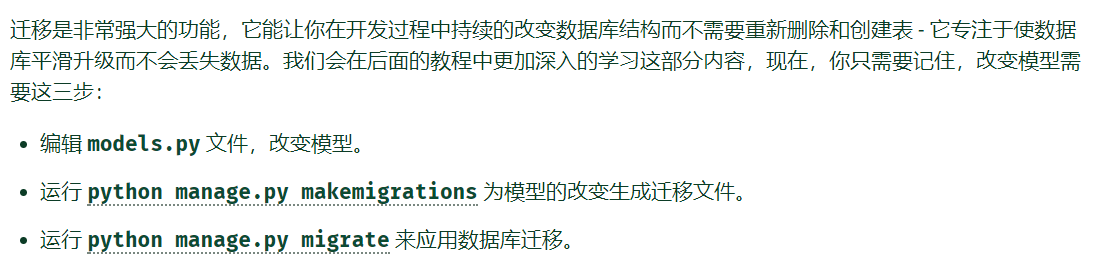
上面第一步和第二部之间还要加上一步激活模型,即把model.py所在的app模块注册到settings.py中的installed_app中,体现了可插拔的应用哲学
1.2常用命令
 python manage.py makemigrations app_name

 创建迁移文件

 python manage.py sqlmigrate app_name 0001

 0001是是生成的迁移文件名称,可能需要修改

 查看生成的迁移文件,也就是查看准备执行什么sql语句

 python manage.py migrate

 执行迁移
1.3数据库的shell操作(非常好用)
django的shell进行了ORM很好用,而且数据库中的每一个数据项在django中不仅是一个数据项,他还被映射成一个独立的对象,他还能被加入类方法
ORM-object relation mapping
 python manage.py shell

 启动django的shell,自带的shell工具,可以很容易的对数据库进行crud操作,外键检索等等,非常好用,其进行了ORM

 python manage.py dbshell

 启动对应对应数据库的shell
 >>> from polls.models import Choice, Question

 # Make sure our __str__() addition worked.

 >>> Question.objects.all()

 <QuerySet [<Question: What's up?>]>

 # Django provides a rich database lookup API that's entirely driven by

 # keyword arguments.

 >>> Question.objects.filter(id=1)

 <QuerySet [<Question: What's up?>]>

 >>> Question.objects.filter(question_text__startswith='What')

 <QuerySet [<Question: What's up?>]>

 # Get the question that was published this year.

 >>> from django.utils import timezone

 >>> current_year = timezone.now().year

 >>> Question.objects.get(pub_date__year=current_year)

 <Question: What's up?>

 # Request an ID that doesn't exist, this will raise an exception.

 >>> Question.objects.get(id=2)

 Traceback (most recent call last):

     ...

 DoesNotExist: Question matching query does not exist.

 # Lookup by a primary key is the most common case, so Django provides a

 # shortcut for primary-key exact lookups.

 # The following is identical to Question.objects.get(id=1).

 >>> Question.objects.get(pk=1)

 <Question: What's up?>

 # Make sure our custom method worked.

 >>> q = Question.objects.get(pk=1)

 >>> q.was_published_recently()

 True

 # Give the Question a couple of Choices. The create call constructs a new

 # Choice object, does the INSERT statement, adds the choice to the set

 # of available choices and returns the new Choice object. Django creates

 # a set to hold the "other side" of a ForeignKey relation

 # (e.g. a question's choice) which can be accessed via the API.

 >>> q = Question.objects.get(pk=1)

 # Display any choices from the related object set -- none so far.

 >>> q.choice_set.all()

 <QuerySet []>

 # Create three choices.

 >>> q.choice_set.create(choice_text='Not much', votes=0)

 <Choice: Not much>

 >>> q.choice_set.create(choice_text='The sky', votes=0)

 <Choice: The sky>

 >>> c = q.choice_set.create(choice_text='Just hacking again', votes=0)

 # Choice objects have API access to their related Question objects.

 >>> c.question

 <Question: What's up?>

 # And vice versa: Question objects get access to Choice objects.

 >>> q.choice_set.all()

 <QuerySet [<Choice: Not much>, <Choice: The sky>, <Choice: Just hacking again>]>

 >>> q.choice_set.count()

 3

 # The API automatically follows relationships as far as you need.

 # Use double underscores to separate relationships.

 # This works as many levels deep as you want; there's no limit.

 # Find all Choices for any question whose pub_date is in this year

 # (reusing the 'current_year' variable we created above).

 >>> Choice.objects.filter(question__pub_date__year=current_year)

 <QuerySet [<Choice: Not much>, <Choice: The sky>, <Choice: Just hacking again>]>

 # Let's delete one of the choices. Use delete() for that.

 >>> c = q.choice_set.filter(choice_text__startswith='Just hacking')

 >>> c.delete()
1.3常用的ORM之后的函数(在django中的shell运行)
class.objects.get()/filter(xxx__startwith='')/all()
q.choice_set.all()查找外键是q的所有对象
q.choice_set.count()对上一个计数
q.delete()
更多用法见文档
https://docs.djangoproject.com/zh-hans/2.1/ref/models/relations/
https://docs.djangoproject.com/zh-hans/2.1/topics/db/queries/#field-lookups-intro
https://docs.djangoproject.com/zh-hans/2.1/topics/db/queries/
2.django的后台管理页面功能
即在web页面中动态添加、修改、查看数据库中对象和数据,真的很方便很好用
2.1相关的一些命令
 python manage.py createsuperuser

 创建管理员账号
3
4 http://127.0.0.1:8000/admin/
5 访问管理界面
2.2但是一定要注意,如果想管理某个app应用模块的model(也就是其中的数据表以及其映射的对象和类),一定要把本模块的model中的class注册到本app模块中的admin.py中
 from django.contrib import admin

 from .models import Question

 admin.site.register(Question)

 在本模块的admin.py中添加代码,将需要管理的数据库表注册到admin后台管理中去
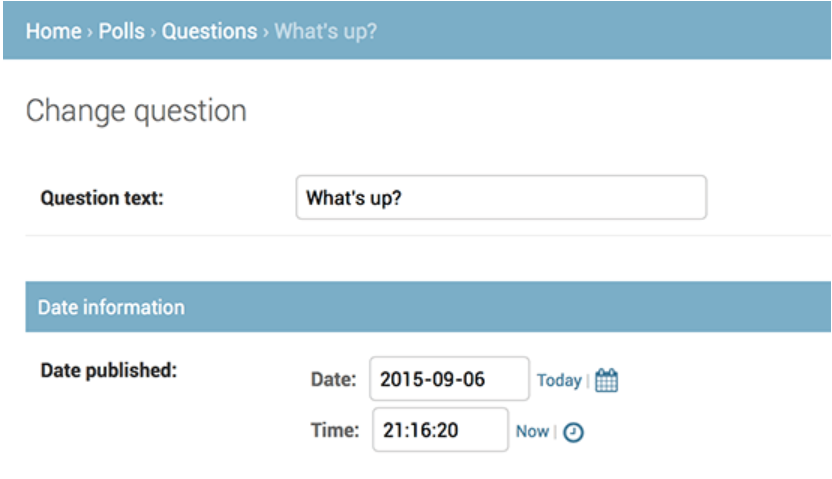
2.3调整admin后台管理的显示顺序跟风格
 from django.contrib import admin

 from .models import Question

 class QuestionAdmin(admin.ModelAdmin):

     fieldsets = [

         (None,               {'fields': ['question_text']}),

         ('Date information', {'fields': ['pub_date']}),

     ]

 admin.site.register(Question, QuestionAdmin)
3.django中的测试
3.1django中的单元测试,在app模块中的test.py中写代码,注意方法名要以test开头,运行测试脚本时候的命令
python manage.py test app_name
3.2如果在提交代码的时候自动化的进行测试,那也就是所谓的持续集成----continuous integration
4.静态文件的查找
4.1静态文件目录一般为app_name/static/appname/[type]/xxx.xxx,然后使用 django.contrib.staticfiles 即可让django自动的去查找对应的静态文件,方便管理,但是要在app模块中
4.2django让app有自己的模板有自己的静态文件,再次体现了django的app为单一的模块的思想。但是如果想让django自己去找,那要先把模块注入进来
5.进阶版后台管理界面
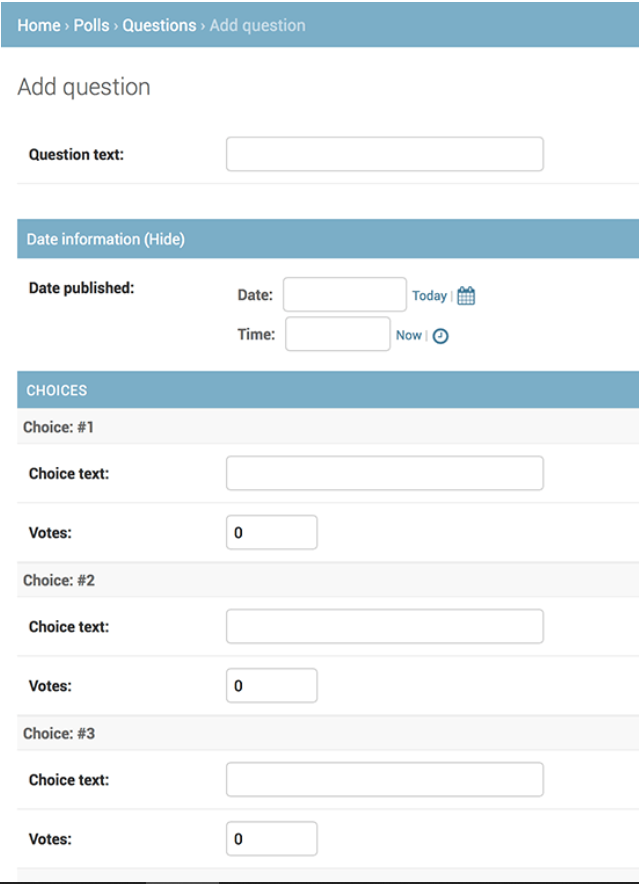
5.1可以设置显示数据表class的字段顺序,显示外键、分组显示、还可以自定义admin界面风格等等,这些都是在对应的admin.py中写代码
https://docs.djangoproject.com/zh-hans/2.1/intro/tutorial07/
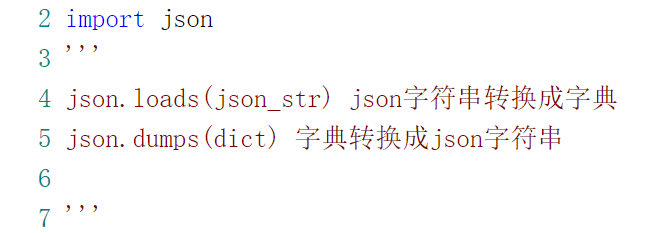
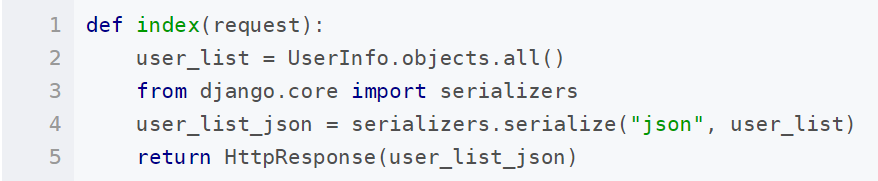
json、dict、对象之间的互相转化
django开发(二)的更多相关文章
- Django开发笔记二
Django开发笔记一 Django开发笔记二 Django开发笔记三 Django开发笔记四 Django开发笔记五 Django开发笔记六 1.xadmin添加主题.修改标题页脚和收起左侧菜单 # ...
- Linux——Django 开发环境部署(二)python版本控制器pyenv
python版本控制器pyenv 之前的 那篇是说明了django环境的site package完全独立出来了,但是使用的python解释器还是系统的,为了继续独立出来,甚至是达到ruby的rvm的自 ...
- Django开发目录
Django开发[第一章]:Django基础和基本使用 Django开发[第二章]:Django URLConf 进阶 Django开发[第三章]:Django View 进阶 Django开发[第四 ...
- Pycharm搭建Django开发环境
Pycharm搭建Django开发环境 作者:尹正杰 版权声明:原创作品,谢绝转载!否则将追究法律责任. 我们大家都知道Django是python都一个web框架,因此大家需要自行安装python环境 ...
- Django开发笔记六
Django开发笔记一 Django开发笔记二 Django开发笔记三 Django开发笔记四 Django开发笔记五 Django开发笔记六 1.登录功能完善 登录成功应该是重定向到首页,而不是转发 ...
- Django开发笔记五
Django开发笔记一 Django开发笔记二 Django开发笔记三 Django开发笔记四 Django开发笔记五 Django开发笔记六 1.页面继承 定义base.html: <!DOC ...
- Django开发笔记四
Django开发笔记一 Django开发笔记二 Django开发笔记三 Django开发笔记四 Django开发笔记五 Django开发笔记六 1.邮箱激活 users app下,models.py: ...
- Django开发笔记三
Django开发笔记一 Django开发笔记二 Django开发笔记三 Django开发笔记四 Django开发笔记五 Django开发笔记六 1.基于类的方式重写登录:views.py: from ...
- Django开发笔记一
Django开发笔记一 Django开发笔记二 Django开发笔记三 Django开发笔记四 Django开发笔记五 Django开发笔记六 1.运行 python manage.py runser ...
随机推荐
- linux shell的here document用法(cat << EOF)
什么是Here Document?Here Document 是在Linux Shell 中的一种特殊的重定向方式,它的基本的形式如下cmd << delimiter Here Docu ...
- iOS企业版打包 发布在线安装包 plist
本文转载至 http://blog.csdn.net/u011452278/article/details/49511385 原文转载:http://blog.csdn.net/pang040328/ ...
- 关于HOOK KiPageFault需要用到自旋锁研究
KeAcquireSpinLockRaiseToDpc 可以使用这个函数 来开启自旋锁
- Android学习:简易图片浏览
这个例子学习混合使用XML布局和代码来控制UI,习惯上把变化小.行为固定的组件放在XML布局文件中管理,而那些变化较多.行为控制复杂的组件则交给Java代码来管理. 先在布局文件中定义一个线性布局容器 ...
- Oracle RAC环境下ASM磁盘组扩容
生产环境注意调整以下参数: ++++++++++++++++++++++++++++++++++++++++++++++++++++++++++++++++++++++++++++++++++++++ ...
- 查看java内存情况命令
转自:http://boendev.iteye.com/blog/882479 jinfo:可以输出并修改运行时的java 进程的opts. jps:与unix上的ps类似,用来显示本地的java进程 ...
- 解决vscode更新后Ext Js插件无法使用问题
解决方案来至于https://www.sencha.com/forum/showthread.php?471410-Bug-in-VS-Code-Plugin-since-VS-Code-Update ...
- An error occurred. Sorry, the page you are looking for is currently unavailable. Please try again later.
刚装完 PHP.Nginx,准备跑下 phpMyAdmin 程序,结果报以下错误: An error occurred. Sorry, the page you are looking for is ...
- HTTPS 通讯流程
原文地址 https://blog.csdn.net/wangweilica6/article/details/50171457 一.简介 前一篇文章,我总结了下,如何部署https服务,开通ssl通 ...
- [WCF] Restful 自定义宿主
IPersonRetriever: /* * 由SharpDevelop创建. * 用户: Administrator * 日期: 2017/6/2 * 时间: 22:13 * * 要改变这种模板请点 ...