
django开发(二)
1.django数据库操作---model的使用以及django自带的数据api
django中已经做了ORM,表就是一个类class,表中的一个项就是一个对象object,很好用
1.1django自动把每次你对数据库的操作(更改)看成了对model的改变,然后你生成迁移文件,执行迁移更改,使你专注与django而不是sql
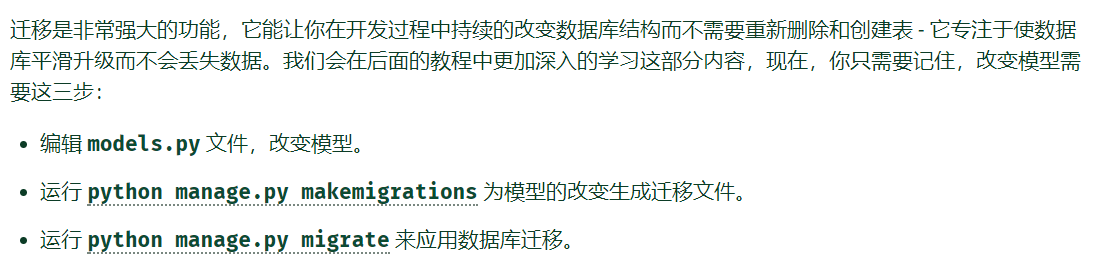
上面第一步和第二部之间还要加上一步激活模型,即把model.py所在的app模块注册到settings.py中的installed_app中,体现了可插拔的应用哲学
1.2常用命令
 python manage.py makemigrations app_name

 创建迁移文件

 python manage.py sqlmigrate app_name 0001

 0001是是生成的迁移文件名称,可能需要修改

 查看生成的迁移文件,也就是查看准备执行什么sql语句

 python manage.py migrate

 执行迁移
1.3数据库的shell操作(非常好用)
django的shell进行了ORM很好用,而且数据库中的每一个数据项在django中不仅是一个数据项,他还被映射成一个独立的对象,他还能被加入类方法
ORM-object relation mapping
 python manage.py shell

 启动django的shell,自带的shell工具,可以很容易的对数据库进行crud操作,外键检索等等,非常好用,其进行了ORM

 python manage.py dbshell

 启动对应对应数据库的shell
 >>> from polls.models import Choice, Question

 # Make sure our __str__() addition worked.

 >>> Question.objects.all()

 <QuerySet [<Question: What's up?>]>

 # Django provides a rich database lookup API that's entirely driven by

 # keyword arguments.

 >>> Question.objects.filter(id=1)

 <QuerySet [<Question: What's up?>]>

 >>> Question.objects.filter(question_text__startswith='What')

 <QuerySet [<Question: What's up?>]>

 # Get the question that was published this year.

 >>> from django.utils import timezone

 >>> current_year = timezone.now().year

 >>> Question.objects.get(pub_date__year=current_year)

 <Question: What's up?>

 # Request an ID that doesn't exist, this will raise an exception.

 >>> Question.objects.get(id=2)

 Traceback (most recent call last):

     ...

 DoesNotExist: Question matching query does not exist.

 # Lookup by a primary key is the most common case, so Django provides a

 # shortcut for primary-key exact lookups.

 # The following is identical to Question.objects.get(id=1).

 >>> Question.objects.get(pk=1)

 <Question: What's up?>

 # Make sure our custom method worked.

 >>> q = Question.objects.get(pk=1)

 >>> q.was_published_recently()

 True

 # Give the Question a couple of Choices. The create call constructs a new

 # Choice object, does the INSERT statement, adds the choice to the set

 # of available choices and returns the new Choice object. Django creates

 # a set to hold the "other side" of a ForeignKey relation

 # (e.g. a question's choice) which can be accessed via the API.

 >>> q = Question.objects.get(pk=1)

 # Display any choices from the related object set -- none so far.

 >>> q.choice_set.all()

 <QuerySet []>

 # Create three choices.

 >>> q.choice_set.create(choice_text='Not much', votes=0)

 <Choice: Not much>

 >>> q.choice_set.create(choice_text='The sky', votes=0)

 <Choice: The sky>

 >>> c = q.choice_set.create(choice_text='Just hacking again', votes=0)

 # Choice objects have API access to their related Question objects.

 >>> c.question

 <Question: What's up?>

 # And vice versa: Question objects get access to Choice objects.

 >>> q.choice_set.all()

 <QuerySet [<Choice: Not much>, <Choice: The sky>, <Choice: Just hacking again>]>

 >>> q.choice_set.count()

 3

 # The API automatically follows relationships as far as you need.

 # Use double underscores to separate relationships.

 # This works as many levels deep as you want; there's no limit.

 # Find all Choices for any question whose pub_date is in this year

 # (reusing the 'current_year' variable we created above).

 >>> Choice.objects.filter(question__pub_date__year=current_year)

 <QuerySet [<Choice: Not much>, <Choice: The sky>, <Choice: Just hacking again>]>

 # Let's delete one of the choices. Use delete() for that.

 >>> c = q.choice_set.filter(choice_text__startswith='Just hacking')

 >>> c.delete()
1.3常用的ORM之后的函数(在django中的shell运行)
class.objects.get()/filter(xxx__startwith='')/all()
q.choice_set.all()查找外键是q的所有对象
q.choice_set.count()对上一个计数
q.delete()
更多用法见文档
https://docs.djangoproject.com/zh-hans/2.1/ref/models/relations/
https://docs.djangoproject.com/zh-hans/2.1/topics/db/queries/#field-lookups-intro
https://docs.djangoproject.com/zh-hans/2.1/topics/db/queries/
2.django的后台管理页面功能
即在web页面中动态添加、修改、查看数据库中对象和数据,真的很方便很好用
2.1相关的一些命令
 python manage.py createsuperuser

 创建管理员账号
3
4 http://127.0.0.1:8000/admin/
5 访问管理界面
2.2但是一定要注意,如果想管理某个app应用模块的model(也就是其中的数据表以及其映射的对象和类),一定要把本模块的model中的class注册到本app模块中的admin.py中
 from django.contrib import admin

 from .models import Question

 admin.site.register(Question)

 在本模块的admin.py中添加代码,将需要管理的数据库表注册到admin后台管理中去
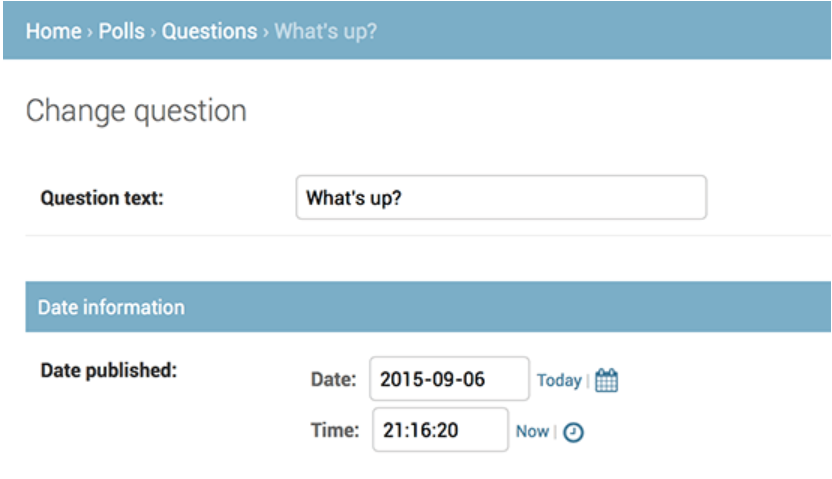
2.3调整admin后台管理的显示顺序跟风格
 from django.contrib import admin

 from .models import Question

 class QuestionAdmin(admin.ModelAdmin):

     fieldsets = [

         (None,               {'fields': ['question_text']}),

         ('Date information', {'fields': ['pub_date']}),

     ]

 admin.site.register(Question, QuestionAdmin)
3.django中的测试
3.1django中的单元测试,在app模块中的test.py中写代码,注意方法名要以test开头,运行测试脚本时候的命令
python manage.py test app_name
3.2如果在提交代码的时候自动化的进行测试,那也就是所谓的持续集成----continuous integration
4.静态文件的查找
4.1静态文件目录一般为app_name/static/appname/[type]/xxx.xxx,然后使用 django.contrib.staticfiles 即可让django自动的去查找对应的静态文件,方便管理,但是要在app模块中
4.2django让app有自己的模板有自己的静态文件,再次体现了django的app为单一的模块的思想。但是如果想让django自己去找,那要先把模块注入进来
5.进阶版后台管理界面
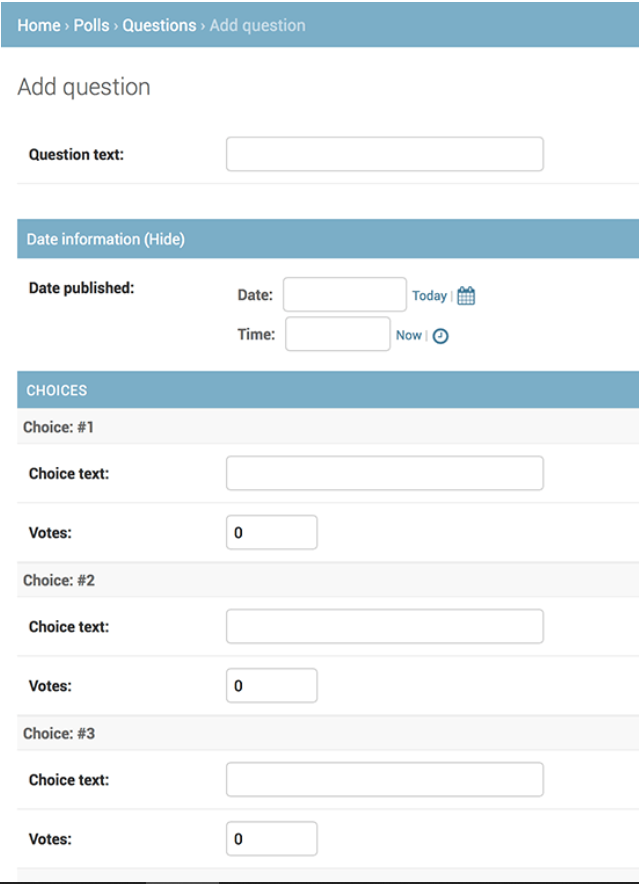
5.1可以设置显示数据表class的字段顺序,显示外键、分组显示、还可以自定义admin界面风格等等,这些都是在对应的admin.py中写代码
https://docs.djangoproject.com/zh-hans/2.1/intro/tutorial07/
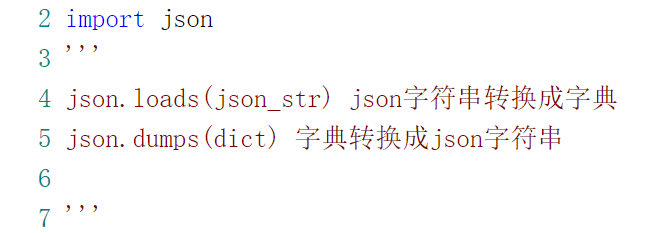
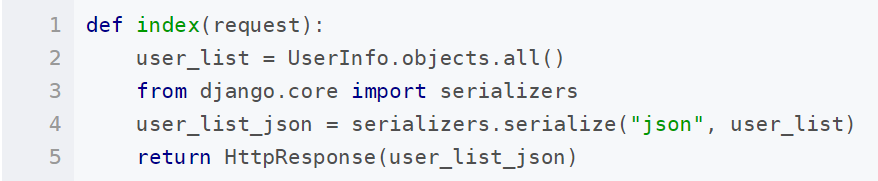
json、dict、对象之间的互相转化
django开发(二)的更多相关文章
- Django开发笔记二
Django开发笔记一 Django开发笔记二 Django开发笔记三 Django开发笔记四 Django开发笔记五 Django开发笔记六 1.xadmin添加主题.修改标题页脚和收起左侧菜单 # ...
- Linux——Django 开发环境部署(二)python版本控制器pyenv
python版本控制器pyenv 之前的 那篇是说明了django环境的site package完全独立出来了,但是使用的python解释器还是系统的,为了继续独立出来,甚至是达到ruby的rvm的自 ...
- Django开发目录
Django开发[第一章]:Django基础和基本使用 Django开发[第二章]:Django URLConf 进阶 Django开发[第三章]:Django View 进阶 Django开发[第四 ...
- Pycharm搭建Django开发环境
Pycharm搭建Django开发环境 作者:尹正杰 版权声明:原创作品,谢绝转载!否则将追究法律责任. 我们大家都知道Django是python都一个web框架,因此大家需要自行安装python环境 ...
- Django开发笔记六
Django开发笔记一 Django开发笔记二 Django开发笔记三 Django开发笔记四 Django开发笔记五 Django开发笔记六 1.登录功能完善 登录成功应该是重定向到首页,而不是转发 ...
- Django开发笔记五
Django开发笔记一 Django开发笔记二 Django开发笔记三 Django开发笔记四 Django开发笔记五 Django开发笔记六 1.页面继承 定义base.html: <!DOC ...
- Django开发笔记四
Django开发笔记一 Django开发笔记二 Django开发笔记三 Django开发笔记四 Django开发笔记五 Django开发笔记六 1.邮箱激活 users app下,models.py: ...
- Django开发笔记三
Django开发笔记一 Django开发笔记二 Django开发笔记三 Django开发笔记四 Django开发笔记五 Django开发笔记六 1.基于类的方式重写登录:views.py: from ...
- Django开发笔记一
Django开发笔记一 Django开发笔记二 Django开发笔记三 Django开发笔记四 Django开发笔记五 Django开发笔记六 1.运行 python manage.py runser ...
随机推荐
- 更改了react-redux 官方网站的todolist结构
最近在学习胡子大哈的react小书,内容讲的由浅入深,很值得react,react-redux小白一读. 废话不多说直接上地址:http://huziketang.mangojuice.top/boo ...
- Windows补丁更新Tips
1.Windows 2012 R2 MS14-066补丁安装失败 现象:下载对应版本的补丁,提示“此更新不适用于你的计算机” 解决:使用命令行可成功安装 @echo off expand –F:* d ...
- 如何用AJax提交name[]数组?
https://www.cnblogs.com/junzilan/p/5424120.html
- Qt编写自定义控件属性设计器
以前做.NET开发中,.NET直接就集成了属性设计器,VS不愧是宇宙第一IDE,你能够想到的都给你封装好了,用起来不要太爽!因为项目需要自从全面转Qt开发已经6年有余,在工业控制领域,有一些应用场景需 ...
- Qt编写自定义控件9-导航按钮控件
前言 导航按钮控件,主要用于各种漂亮精美的导航条,我们经常在web中看到导航条都非常精美,都是html+css+js实现的,还自带动画过度效果,Qt提供的qss其实也是无敌的,支持基本上所有的CSS2 ...
- mysql按位的索引判断位的值
DELIMITER $$ DROP FUNCTION IF EXISTS `value_of_bit_index`$$/*计算数字的某个位的值*/CREATE FUNCTION `value_of_b ...
- Ext Js 6+ 动态切换皮肤
在这里以ext js 6.2.1版本为例(注:需要安装Sencha Cmd,以及下载对应的sdk) 1.创建空白项目 在命令行中输入sencha -sdk D:\Code\ext-6.2.1 gene ...
- Linux下的搜索查找命令的详解(find)
4.find Linux下find命令在目录结构中搜索文件,并执行指定的操作.Linux下find命令提供了相当多的查找条件,功能很强大.由于find具有强大的功能,所以它的选项也很多,其中大部分选项 ...
- java的Io流学习
Java中io流的学习(一)File:https://blog.csdn.net/qq_41061437/article/details/81672859 Java中io流的学习(二)FileInpu ...
- freertos 建立任务超过几个后系统不能能运行
/* *** NOTE *********************************************************** If you find your application ...