
java command not found
INSTALLATION PROCEDURE ON RASPBERRY PI
The remaining steps should be performed directly on the console of the Raspberry Pi or using a SSH terminal connection with shell access. In the last step, we transfered the Oracle JDK file to the "pi" user's home directory. We should be logged in as the "pi" user and already in the user's home directory.
Lets create a new directory where we will install the JDK files to.
sudo mkdir -p -v /opt/java
Next, lets unpack the Oracle JDK .gz file using this command
tar xvzf ~/jdk-7u10-linux-arm-sfp.gz
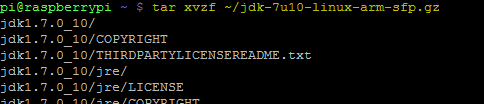 The unpacking process will take a few seconds to complete. It unpacks all the contents of the Oracle JDK tz file to a new directory named "jdk1.7.0_10" located in the user's home directory.
With the unpack complete its now time to move the new unpacked directory to the Java install location that we created earlier under "opt/java".
sudo mv -v ~/jdk1.7.0_10 /opt/java
We can also delete the original .tz file as it is no longer needed
rm ~/jdk-7u10-linux-arm-sfp.gz
To complete the JDK installation we need to let the system know there is a new JVM installed and where it is located. Use the following command to perform this task.
sudo update-alternatives --install "/usr/bin/java" "java" "/opt/java/jdk1.7.0_10/bin/java" 1
And finally we also need to tell the system that we want this JDK to be the default Java runtime for the system. The following command will perform this action.
sudo update-alternatives --set java /opt/java/jdk1.7.0_10/bin/java
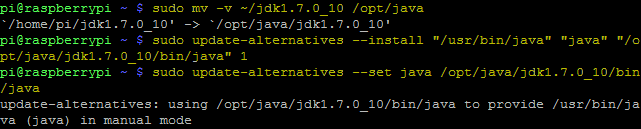
Now java is installed. To test and verify we can execute the java command using the version argument.
java -version
You should get the following response:

That's it the Oracle JDK is installed and ready for use.
ADD JAVA_HOME ENVIRONMENT VARIABLE
Some Java programs require a JAVA_HOME environment variable to be configured on the system. Add the following line to you "/etc/environment" using your favorite text editor.
JAVA_HOME="/opt/java/jdk1.7.0_10"
Also, edit your "~/.bashrc" file using this command
nano ~/.bashrc
and add the following two lines to the bottom of the file and save.
export JAVA_HOME="/opt/java/jdk1.7.0_10"
export PATH=$PATH:$JAVA_HOME/bin
Reboot or re-login to apply the export to your environment.
------------------------------------------------------------------------
att:
sudo update-alternatives --install "/usr/bin/java" "java" "/opt/javak1.7.0_10/bin/java" 1
--install <link> <name> <path> <priority>
java command not found的更多相关文章
- Drip is a launcher for the Java Virtual Machine that provides much faster startup times than the java command. The drip script is intended to be a drop-in replacement for the java command, only faster
小结: 1.初始化jvm: 2.第一次唤醒java命令不快,后续快: https://github.com/elastic/logstash Advanced: Drip Launcher Drip ...
- sudo: java: command not found
背景:搭建了jumpserver,给开发划分了所有权限,但是开发那边账户不能执行java命令 报错:sudo: java: command not found 解决方法: 在用户管理权限配置sudoe ...
- Jenkins远程执行shell出现java: command not found
之前在使用Jenkins执行远程shell脚本时,出现提示java: command not found:多方查找原因后发现是因为远程执行shell脚本时,不会自动加载环境变量,导致出现此错误,解决方 ...
- Wrapper: Error - Unable to execute Java command
在64位的系统下 将短信程序运行于服务中,出现以下错误: Error: [size=14px; line-height: 26px;]FATAL | wrapper | 2012/06/18 17 ...
- Ubuntu 提示sudo: java: command not found解决办法
ubuntu下运行sudo Java 时提示“sudo: java: command not found”.在网上找了,其中很多方法都提示要修改/etc/profile的配置,或是修改/etc/env ...
- kettle crontab java: command not found
contos6.5下,单独执行脚本无问题,添加到crontab 里保存 java: command not found ※(重点)接着,编写执行kettle任务的shell脚本创建test.sh,将以 ...
- bash: java: command not found
[root@izm5eab8t820b79js38tbxz ~]# java -version -bash: java: command not found 出现上面问题,解决方法: [root@iz ...
- java command line error opening registry key 'Software\JavaSoft\Java Runtime Environment' java.dll
C:\Users\huxxxxchan>javaError: opening registry key 'Software\JavaSoft\Java Runtime Environment'E ...
- java 利用ManagementFactory获取jvm,os的一些信息--转
原文地址:http://blog.csdn.net/dream_broken/article/details/49759043 想了解下某个Java项目的运行时jvm的情况,可以使用一些监控工具,比如 ...
随机推荐
- iOS技术栈-Swift版
在网上没找到基于Swift的技术栈介绍,或者技术已经不适用,所以自己画了一个,后面的博客中会重新整理基于Swfit的UI控件介绍和常用第三方库地图
- SpringBoot实战(四)获取接口请求中的参数(@PathVariable,@RequestParam,@RequestBody)
上一篇SpringBoot实战(二)Restful风格API接口中写了一个控制器,获取了前端请求的参数,现在我们就参数的获取与校验做一个介绍: 一:获取参数 SpringBoot提供的获取参数注解包括 ...
- [terry笔记]11gR2_DataGuard搭建_拷贝数据文件
11gR2搭建dataguard环境: 自己做的实验,后续按照rman模式搭建.主备切换.模式调整等实验会陆续发上来. primary: OS:oel 6.4 database:11.2.0.4.0 ...
- 笔记本win2008 r2的hyper-v安装centos
一.i5以上cpu支持虚拟化,不过默认是关闭的,先到bios设置里把虚拟功能打开: 二.“服务器管理器”->“角色”里安装hyper-v并重启: 三.设置无线网络桥接,有线就不需要了,具体如下: ...
- 关于bom ef+bb+bf的问题
今天在商品详细页头部出现了一行空白,各种尝试无果,最后怀疑是不是bom头的问题,经过断点跟踪调试逐步缩小范围,果然最后发现是一个语言包文件的开头有 ef bb bf样式的字节,用ultraedit另存 ...
- 2、Python列表和元组
2.Python序列 序列是一种数据存储方式,类似于C语言的数组.简单的说序列是一块用来存储多个值的连续内存空间,同一个序列的元素通常是相关的. Python中常用的序列结构有列表.元组.字典.字符串 ...
- DM8168 屏蔽 PCIe
DM8168新板在没有做PCI接口的情况下,能够把PCI模块凝视,直接尝试: make CROSS_COMPILE=arm-none-linux-gnueabi- ARCH=arm menuconfi ...
- zzulioj--1817--match number(水题)
1817: match number Time Limit: 1 Sec Memory Limit: 128 MB Submit: 98 Solved: 45 SubmitStatusWeb Bo ...
- python3.x学习笔记3(基础知识)
1.集合集合是一个无序的,不重复的数据组合,作用如下: >>去重,把一个列表变成集合,就自动去重 >>关系测试,测试两组数据之前的交集.差集.并集等关系 2.关系运算 交集: ...
- 虚拟机下安装mysql
虚拟机下CentOS6.8下安装MYSQL5.6 方法: 整理修改于 http://www.cnblogs.com/liuyi2614/p/6382183.html 开始时: 普通用户是$ root用 ...