
MVVM实现ViewModel获取View输入验证状态
由于Binding只把Convert成功的值送往Source,当目标中的值Convert失败时Source的值依然是旧值,所以ViewModel必须获取View的输入验证状态,以下是本人的实现。
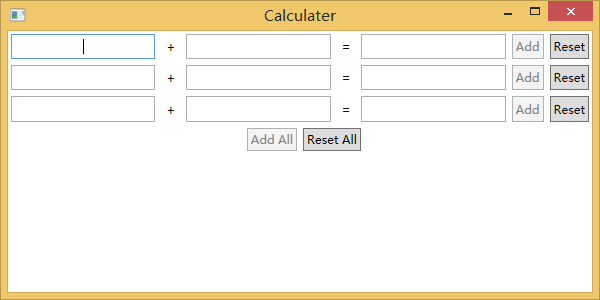
当“+”号两边输入正确时,“Add”可用,当所有“+”号两边输入正确时,“Add All”可用。
通过Behavior添加Validation.ErrorEvent路由事件的事件处理器,在该事件处理器中把HasError状态写入自定义的附加属性,附加属性可以绑定。
Behavior派生类引用System.Windows.Interactivity.dll,代码如下:
using System;

using System.Collections.Generic;

using System.Linq;

using System.Text;

using System.Windows;

using System.Windows.Controls;

using System.Windows.Interactivity;

namespace Calculater

{

    public class NotifyErrorBehavior : Behavior<UIElement>

    {

        protected override void OnAttached()

        {

            base.OnAttached();

            this.AssociatedObject.AddHandler(Validation.ErrorEvent, new RoutedEventHandler(HasErrorChanged));

        }

        protected override void OnDetaching()

        {

            base.OnDetaching();

            this.AssociatedObject.RemoveHandler(Validation.ErrorEvent, new RoutedEventHandler(HasErrorChanged));

        }

        private static void HasErrorChanged(object sender, RoutedEventArgs e)

        {

            DependencyObject d = e.OriginalSource as DependencyObject;

            HasErrorHelper.SetHasError(d, Validation.GetHasError(d));

        }

    }

}
附加属性代码:
using System;

using System.Collections.Generic;

using System.Linq;

using System.Text;

using System.Threading.Tasks;

using System.Windows;

using System.Windows.Controls;

namespace Calculater

{

    public class HasErrorHelper

    {

        public static bool GetHasError(DependencyObject obj)

        {

            return (bool)obj.GetValue(HasErrorProperty);

        }

        public static void SetHasError(DependencyObject obj, bool value)

        {

            obj.SetValue(HasErrorProperty, value);

        }

        public static readonly DependencyProperty HasErrorProperty =

            DependencyProperty.RegisterAttached("HasError", typeof(bool), typeof(HasErrorHelper), new PropertyMetadata(false));

    }

}
View代码:
<UserControl x:Class="Calculater.ChildCalculater"

             xmlns="http://schemas.microsoft.com/winfx/2006/xaml/presentation"

             xmlns:x="http://schemas.microsoft.com/winfx/2006/xaml"

             xmlns:mc="http://schemas.openxmlformats.org/markup-compatibility/2006"

             xmlns:d="http://schemas.microsoft.com/expression/blend/2008"

             xmlns:local="clr-namespace:Calculater"

             xmlns:i="http://schemas.microsoft.com/expression/2010/interactivity"

             mc:Ignorable="d"

             d:DesignHeight="" d:DesignWidth="">

    <i:Interaction.Behaviors>

        <local:NotifyErrorBehavior></local:NotifyErrorBehavior>

    </i:Interaction.Behaviors>

    <Grid>

        <Grid.ColumnDefinitions>

            <ColumnDefinition />

            <ColumnDefinition Width="Auto"/>

            <ColumnDefinition />

            <ColumnDefinition Width="Auto"/>

            <ColumnDefinition />

            <ColumnDefinition Width="Auto"/>

            <ColumnDefinition Width="Auto"/>

        </Grid.ColumnDefinitions>

        <TextBox Margin="" HorizontalContentAlignment="Center" VerticalContentAlignment="Center" local:HasErrorHelper.HasError="{Binding Path=HasErrorX,Mode=OneWayToSource}">

            <Binding Path="X" NotifyOnValidationError="True" UpdateSourceTrigger="PropertyChanged" TargetNullValue="" />

        </TextBox>

        <Label Margin="" VerticalContentAlignment="Center" HorizontalContentAlignment="Center" Grid.Column="">+</Label>

        <TextBox Margin="" HorizontalContentAlignment="Center" VerticalContentAlignment="Center" Grid.Column="" local:HasErrorHelper.HasError="{Binding Path=HasErrorY,Mode=OneWayToSource}">

            <Binding Path="Y" NotifyOnValidationError="True" UpdateSourceTrigger="PropertyChanged" TargetNullValue="" />

        </TextBox>

        <Label Margin="" VerticalContentAlignment="Center" HorizontalContentAlignment="Center" Grid.Column="">=</Label>

        <TextBox Margin="" HorizontalContentAlignment="Center" VerticalContentAlignment="Center" Grid.Column="" IsReadOnly="True">

            <Binding Path="Sum" TargetNullValue="" />

        </TextBox>

        <Button Margin="" Grid.Column="" Padding="" Command="{Binding CalculateCommand}">Add</Button>

        <Button Margin="" Grid.Column="" Padding="" Command="{Binding ResetCommand}">Reset</Button>

    </Grid>

</UserControl>
ViewModel引用Microsoft.Practices.Prism.dll,代码如下:
using Microsoft.Practices.Prism.Commands;

using Microsoft.Practices.Prism.ViewModel;

using System;

using System.Collections.Generic;

using System.Linq;

using System.Text;

namespace Calculater

{

    class ChildCalculaterViewModel : NotificationObject

    {

        public ChildCalculaterViewModel()

        {

            this._calculateCommand = new DelegateCommand(this.Calculate, this.CanCalculate);

            this._resetCommand = new DelegateCommand(this.Reset);

            CalculaterCommand.CalculateAllCommand.RegisterCommand(this.CalculateCommand);

            CalculaterCommand.ResetAllCommand.RegisterCommand(this.ResetCommand);

        }

        private double? _x;

        public double? X

        {

            get { return _x; }

            set

            {

                if (_x != value)

                {

                    _x = value;

                    this.RaisePropertyChanged("X");

                    this.Sum = null;

                    this.CalculateCommand.RaiseCanExecuteChanged();

                }

            }

        }

        private double? _y;

        public double? Y

        {

            get { return _y; }

            set

            {

                if (_y != value)

                {

                    _y = value;

                    this.RaisePropertyChanged("Y");

                    this.Sum = null;

                    this.CalculateCommand.RaiseCanExecuteChanged();

                }

            }

        }

        private double? _sum;

        public double? Sum

        {

            get { return _sum; }

            set

            {

                if (_sum != value)

                {

                    _sum = value;

                    this.RaisePropertyChanged("Sum");

                }

            }

        }

        private bool _hasErrorX;

        public bool HasErrorX

        {

            get { return _hasErrorX; }

            set

            {

                if (_hasErrorX != value)

                {

                    _hasErrorX = value;

                    this.Sum = null;

                    this.CalculateCommand.RaiseCanExecuteChanged();

                }

            }

        }

        private bool _hasErrorY;

        public bool HasErrorY

        {

            get { return _hasErrorY; }

            set

            {

                if (_hasErrorY != value)

                {

                    _hasErrorY = value;

                    this.Sum = null;

                    this.CalculateCommand.RaiseCanExecuteChanged();

                }

            }

        }

        private DelegateCommand _calculateCommand;

        public DelegateCommand CalculateCommand

        {

            get { return _calculateCommand; }

        }

        private bool CanCalculate()

        {

            if (this.HasErrorX || this.HasErrorY || !this.X.HasValue || !this.Y.HasValue)

            {

                return false;

            }

            return true;

        }

        private void Calculate()

        {

            try

            {

                double x = this.X.Value;

                double y = this.Y.Value;

                this.Sum = x + y;

            }

            catch

            {

                return;

            }

        }

        private DelegateCommand _resetCommand;

        public DelegateCommand ResetCommand

        {

            get { return _resetCommand; }

        }

        private void Reset()

        {

            this.X = null;

            this.Y = null;

            this.Sum = null;

        }

    }

}
主窗体代码:
<Window x:Class="Calculater.Shell"

        xmlns="http://schemas.microsoft.com/winfx/2006/xaml/presentation"

        xmlns:x="http://schemas.microsoft.com/winfx/2006/xaml"

        xmlns:local="clr-namespace:Calculater"

        xmlns:prism="http://www.codeplex.com/prism"

        Title="Calculater" Height="" Width="">

    <Grid>

        <Grid.RowDefinitions>

            <RowDefinition Height="Auto"/>

            <RowDefinition Height="Auto"/>

            <RowDefinition Height="Auto"/>

            <RowDefinition Height="Auto"/>

            <RowDefinition Height="Auto"/>

            <RowDefinition />

        </Grid.RowDefinitions>

        <local:ChildCalculater></local:ChildCalculater>

        <local:ChildCalculater Grid.Row=""></local:ChildCalculater>

        <local:ChildCalculater Grid.Row=""></local:ChildCalculater>

        <Grid Grid.Row="">

            <Grid.ColumnDefinitions>

                <ColumnDefinition />

                <ColumnDefinition />

            </Grid.ColumnDefinitions>

            <Button Margin="" HorizontalAlignment="Right" Padding="" Content="Add All" Command="{x:Static local:CalculaterCommand.CalculateAllCommand}"></Button>

            <Button Margin="" HorizontalAlignment="Left" Padding="" Grid.Column="" Content="Reset All" Command="{x:Static local:CalculaterCommand.ResetAllCommand}"></Button>

        </Grid>

    </Grid>

</Window>
using Microsoft.Practices.Prism.Commands;

using System;

using System.Collections.Generic;

using System.Linq;

using System.Text;

using System.Threading.Tasks;

namespace Calculater

{

    public static class CalculaterCommand

    {

        private static CompositeCommand _calculateAllCommand = new CompositeCommand();

        public static CompositeCommand CalculateAllCommand

        {

            get { return _calculateAllCommand; }

        }

        private static CompositeCommand _resetAllCommand = new CompositeCommand();

        public static CompositeCommand ResetAllCommand

        {

            get { return _resetAllCommand; }

        }

    }

}
MVVM实现ViewModel获取View输入验证状态的更多相关文章
- [WPF] 在 ViewModel 中让数据验证出错(Validation.HasError)的控件获得焦点
1. 需求 在 MVVM 中 ViewModel 和 View 之间的交互通常都是靠 Icommand 和 INotifyPropertyChanged,不过有时候还会需要从 MVVM 中控制 Vie ...
- MVVM模式下,ViewModel和View,Model有什么区别
摘自正美的5群 Model:很简单,就是业务逻辑相关的数据对象,通常从数据库映射而来,我们可以说是与数据库对应的model. View:也很简单,就是展现出来的用户界面. 基本上,绝大多数软件所做的工 ...
- js架构设计模式——MVVM模式下,ViewModel和View,Model有什么区别
MVVM模式下,ViewModel和View,Model有什么区别 Model:很简单,就是业务逻辑相关的数据对象,通常从数据库映射而来,我们可以说是与数据库对应的model. View:也很简单,就 ...
- MVVM模式中ViewModel和View、Model有什么区别
Model:很简单,就是业务逻辑相关的数据对象,通常从数据库映射而来,我们可以说是与数据库对应的model. View:也很简单,就是展现出来的用户界面. 基本上,绝大多数软件所做的工作无非就是从数据 ...
- WPF MVVM(Caliburn.Micro) 数据验证
书接前文 前文中仅是WPF验证中的一种,我们暂且称之为View端的验证(因为其验证规是写在Xaml文件中的). 还有一种我们称之为Model端验证,Model通过继承IDataErrorInfo接口来 ...
- 获取view宽高
在oncreate()中利用view.getWidth()或是view.getHeiht()来获取view的宽和高,看似没有问题,其实他们去得值是0,并不是你想要的结果? 这是为什么呢? 在调用onc ...
- [Swift通天遁地]二、表格表单-(8)快速实现表单的输入验证
★★★★★★★★★★★★★★★★★★★★★★★★★★★★★★★★★★★★★★★★➤微信公众号:山青咏芝(shanqingyongzhi)➤博客园地址:山青咏芝(https://www.cnblogs. ...
- silverlight wpf Command提交时输入验证
silverlight 或WPF在MVVM模式中使用INotifyDataErrorInfo接口对输入进行验证时 控件lostFocus时会触发验证,但在提交动作(例如button的Command)时 ...
- Struts2的输入验证
一.概述: ① Struts2的输入验证 –基于 XWorkValidation Framework的声明式验证:Struts2提供了一些基于 XWork Validation Framework的内 ...
随机推荐
- 2018年为什么要学习Linux?Linux运维的前景还好吗?
Linux一直是很多人入行IT的首选,无论是从入行难度还是职业寿命来说,Linux运维都比开发有着更大的优势.为了得到高薪工作,很多人在Linux学习过程中付出了非常大的努力,最终也得到了不错的收获. ...
- linux中快速查找文件
在使用linux时,经常需要进行文件查找.其中查找的命令主要有find和grep.两个命令是有区的. 区别:(1)find命令是根据文件的属性进行查找,如文件名,文件大小,所有者,所属组,是否为空,访 ...
- @Order
1.Spring 4.2 利用@Order控制配置类的加载顺序, 2.Spring在加载Bean的时候,有用到order注解. 3.通过@Order指定执行顺序,值越小,越先执行 4.@Order注解 ...
- LINUX C: 获取本地指定网卡的IP地址
#include <stdio.h> #include <stdlib.h> #include <string.h> #include <errno.h> ...
- c++ list双向链表管理对象
#cat list.cc #include <cstdlib> #include <iostream> #include <stdio.h> using names ...
- uva 1587(Box UVA - 1587)
题目大意是给定6个数对,每个数对代表一个面的长和宽,判断这6个面是否能构成一个长方体. 这种题一看很复杂,但是只要不想多了实际上这就是一个水题... 首先说明一下判断的思路: 1.长方体是有三个对面的 ...
- MySQL详细操作
一.用户管理 -- 创建用户 create user "用户名"@"IP地址" identified by "密码"; "; &q ...
- 17.使用原生cross-fiels技术解决搜索弊端
主要知识点: 原生cross-fiels的用法 原生cross-fiels解决三个弊端 一.原生cross-fiels的用法 GET /forum/article/_search { ...
- Silverlight之我见——DataGrid数据验证
<UserControl x:Class="DataValidationSample.MainPage" xmlns="http://schemas.microso ...
- 联赛前集训日记Day2
考试 倒数第二,我已经废了= = T1 那么水的点转区间都看不出来 T2 裸的线段树生打了个啥都不是的分块 T3 枚举想骗spj的部分分,结果啥都没有 GG 刷题 改题改的也是心累,现在蒙的要死 生活 ...