
SpringCloud系列——TX-LCN分布式事务管理
前言
SpringCloud分布式架构给我们带来开发上的便利,同时增加了我们对事务管理的难度,微服务的遍地开花,本地事务已经无法满足分布式的要求,由此分布式事务问题诞生。 分布式事务被称为世界性的难题。
更多分布式事务介绍请看这篇文章:再有人问你分布式事务,把这篇扔给他
本文记录整合TX-LCN分布式事务框架管理分布式事务,用的版本是5.0.2.RELEASE
TX-LCN
简单介绍
TX-LCN分布式事务框架,LCN并不生产事务,LCN只是本地事务的协调工,LCN是一个高性能的分布式事务框架,兼容dubbo、springcloud框架,支持RPC框架拓展,支持各种ORM框架、NoSQL、负载均衡、事务补偿
特性一览
1、一致性,通过TxManager协调控制与事务补偿机制确保数据一致性
2、易用性,仅需要在业务方法上添加@TxTransaction注解即可
3、高可用,项目模块不仅可高可用部署,事务协调器也可集群化部署
4、扩展性,支持各种RPC框架扩展,支持通讯协议与事务模式扩展
更多介绍跟文档说明请看官网:https://www.txlcn.org/zh-cn/index.html
撸代码
我们按照官方文档(https://www.txlcn.org/zh-cn/docs/preface.html)一步步操作:
Tx-Manager
创建数据库、表
创建MySQL数据库, 名称为:tx-manager(我们直接选择在我们自己的数据库下面创建表就行了,这里就不创建这个数据库)
创建数据表:t_tx_exception
CREATE TABLE `t_tx_exception`  (

  `id` bigint(20) NOT NULL AUTO_INCREMENT,

  `group_id` varchar(64) CHARACTER SET utf8mb4 COLLATE utf8mb4_general_ci NULL DEFAULT NULL,

  `unit_id` varchar(32) CHARACTER SET utf8mb4 COLLATE utf8mb4_general_ci NULL DEFAULT NULL,

  `mod_id` varchar(128) CHARACTER SET utf8mb4 COLLATE utf8mb4_general_ci NULL DEFAULT NULL,

  `transaction_state` tinyint(4) NULL DEFAULT NULL,

  `registrar` tinyint(4) NULL DEFAULT NULL,

  `remark` varchar(4096) NULL DEFAULT  NULL,

  `ex_state` tinyint(4) NULL DEFAULT NULL COMMENT '0 未解决 1已解决',

  `create_time` datetime NULL DEFAULT NULL,

  PRIMARY KEY (`id`) USING BTREE

) ENGINE = InnoDB AUTO_INCREMENT = 1 CHARACTER SET = utf8mb4 COLLATE = utf8mb4_general_ci ROW_FORMAT = Dynamic;
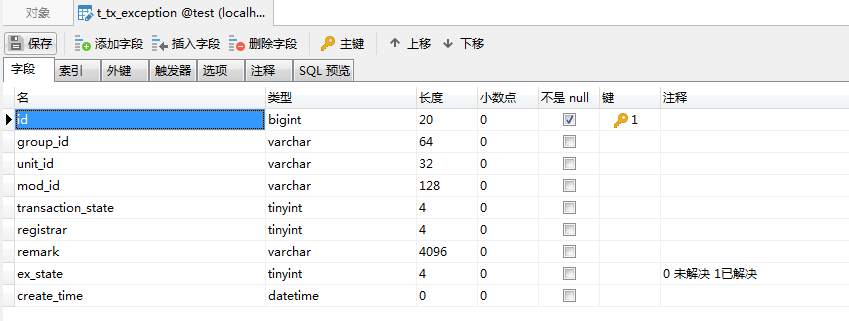
下载官网提供的最新版的TM项目,修改配置文件(PS:由于官网的下载地址打不开,我们去GitHub上面下载例子:https://github.com/codingapi/txlcn-demo),参考txlcn-demo-tm工程,在我们之前的项目下面创建一个springboot项目叫txlcn-tm
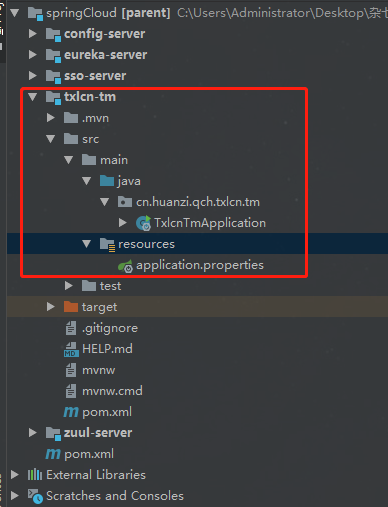
创建好springboot项目后,参照例子修改pom.xml文件
<?xml version="1.0" encoding="UTF-8"?>

<project xmlns="http://maven.apache.org/POM/4.0.0" xmlns:xsi="http://www.w3.org/2001/XMLSchema-instance"

         xsi:schemaLocation="http://maven.apache.org/POM/4.0.0 http://maven.apache.org/xsd/maven-4.0.0.xsd">

    <modelVersion>4.0.0</modelVersion>

    <groupId>cn.huanzi.qch.txlcn</groupId>

    <artifactId>txlcn-tm</artifactId>

    <version>0.0.1-SNAPSHOT</version>

    <name>txlcn-tm</name>

    <description>Tx-Manager(TM),TX-LCN分布式事务框架的独立服务</description>

    <!--继承信息-->

    <parent>

        <groupId>cn.huanzi.qch</groupId>

        <artifactId>parent</artifactId>

        <version>1.0.0</version>

    </parent>

    <dependencies>

        <!-- 参照例子引入需要的依赖jar -->

        <dependency>

            <groupId>com.codingapi.txlcn</groupId>

            <artifactId>txlcn-tm</artifactId>

            <version>5.0.2.RELEASE</version>

        </dependency>

        <!-- text报错,添加一下依赖-->

        <dependency>

            <groupId>org.springframework.boot</groupId>

            <artifactId>spring-boot-starter-test</artifactId>

            <scope>test</scope>

        </dependency>

    </dependencies>

    <!-- 构建工具 -->

    <build>

        <plugins>

            <plugin>

                <groupId>org.springframework.boot</groupId>

                <artifactId>spring-boot-maven-plugin</artifactId>

            </plugin>

        </plugins>

        <finalName>txlcn-tm</finalName>

    </build>

</project>
参照官网修改配置文件,详细的TM配置请戳:https://www.txlcn.org/zh-cn/docs/setting/manager.html,开发阶段最好开启日志,并设置为debug等级,这样方便追踪排查问题
spring.application.name=txlcn-tm

server.port=7970

spring.datasource.driver-class-name=com.mysql.jdbc.Driver

spring.datasource.url=jdbc:mysql://localhost:3306/test?characterEncoding=UTF-8&serverTimezone=Asia/Shanghai

spring.datasource.username=root

spring.datasource.password=123456

spring.jpa.database-platform=org.hibernate.dialect.MySQL5InnoDBDialect

spring.jpa.hibernate.ddl-auto=validate

# TM后台登陆密码

tx-lcn.manager.admin-key=123456

tx-lcn.manager.host=127.0.0.1

tx-lcn.manager.port=8070

# 开启日志,默认为false

tx-lcn.logger.enabled=true

tx-lcn.logger.driver-class-name=${spring.datasource.driver-class-name}

tx-lcn.logger.jdbc-url=${spring.datasource.url}

tx-lcn.logger.username=${spring.datasource.username}

tx-lcn.logger.password=${spring.datasource.password}
logging.level.com.codingapi.txlcn=DEBUG

#redis 主机

spring.redis.host=127.0.0.1

#redis 端口

spring.redis.port=6379

#redis 密码

spring.redis.password=
在启动类添加注解 @EnableTransactionManagerServer
package cn.huanzi.qch.txlcn.tm;

import com.codingapi.txlcn.tm.config.EnableTransactionManagerServer;

import org.springframework.boot.SpringApplication;

import org.springframework.boot.autoconfigure.SpringBootApplication;

@SpringBootApplication

@EnableTransactionManagerServer

public class TxlcnTmApplication {

    public static void main(String[] args) {

        SpringApplication.run(TxlcnTmApplication.class, args);

    }

}
把我们的Redis服务运行起来,然后启动txlcn-tm,启动成功后访问tm后台管理系统,使用默认密码登录(可以配置登录密码),访问 http://127.0.0.1:7970/admin/index.html进入管理后台,默认密码是codingapi,我们这里配置了123456
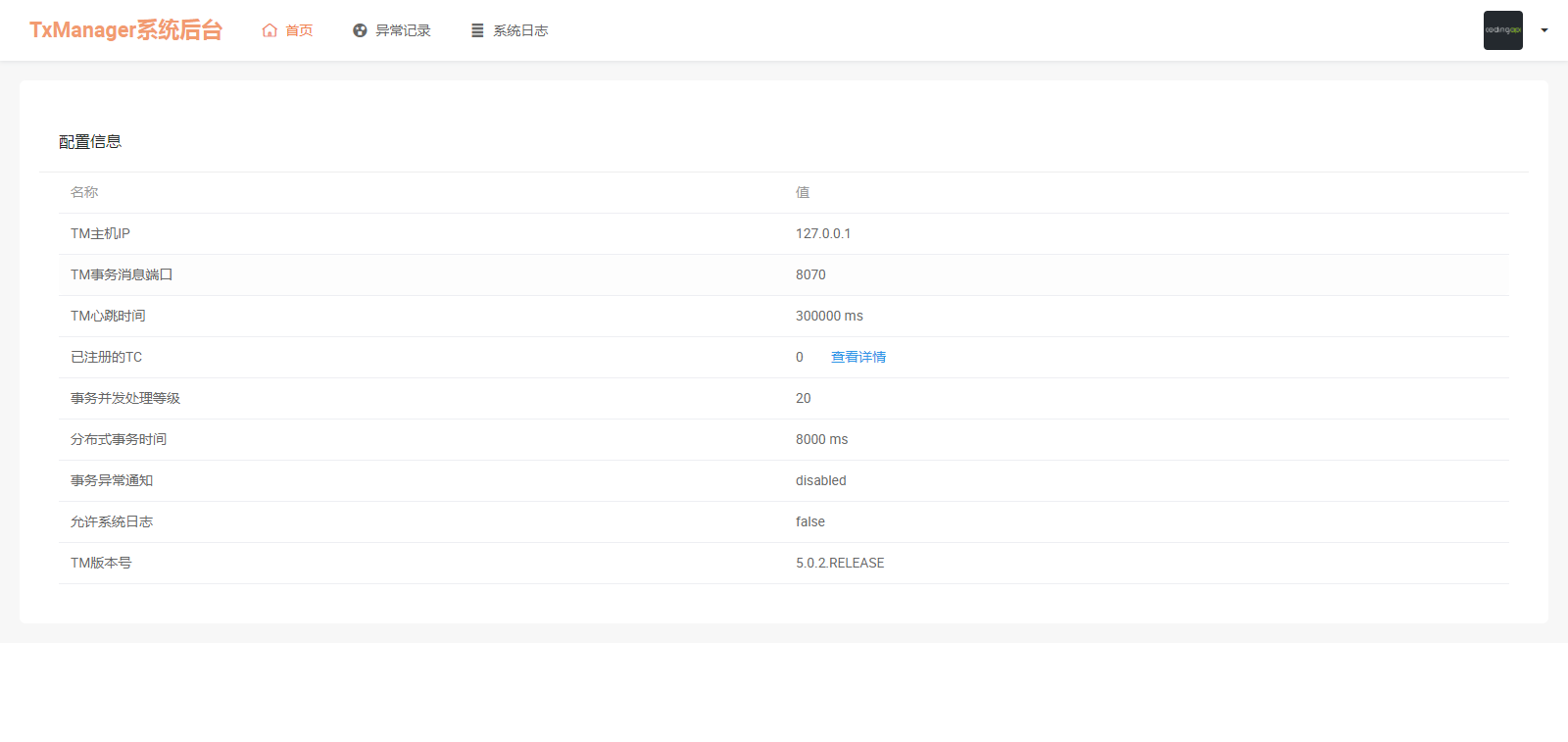
启动TM之前记得先启动我们的Redis服务,到这里,我们的tm搭建成功,更多TM介绍,请看官网TM管理手册:https://www.txlcn.org/zh-cn/docs/manageradmin.html
Tx-Client
TC端参照官网一步步操作:https://www.txlcn.org/zh-cn/docs/start.html
1、TC引入依赖
        <dependency>

            <groupId>com.codingapi.txlcn</groupId>

            <artifactId>txlcn-tc</artifactId>

            <version>5.0.2.RELEASE</version>

        </dependency>

        <dependency>

            <groupId>com.codingapi.txlcn</groupId>

            <artifactId>txlcn-txmsg-netty</artifactId>

            <version>5.0.2.RELEASE</version>

        </dependency>
PS:如果你没有添加jdbc驱动,启动的时候会报错
Parameter 0 of constructor in com.codingapi.txlcn.tc.core.transaction.txc.analy.TableStructAnalyser required a bean of type 'javax.sql.DataSource' that could not be found.
因此要添加jdbc依赖
        <dependency>

            <groupId>org.springframework.boot</groupId>

            <artifactId>spring-boot-starter-jdbc</artifactId>

        </dependency>
2、配置文件添加TM地址跟监听端口,如果TM是默认8070端口,且跟TC部署在同一台机器,可以忽略这个配置,并且开启日志,开发阶段最好开启日志,并设置为debug等级,这样方便追踪排查问题
# 是否启动LCN负载均衡策略(优化选项,开启与否,功能不受影响)

tx-lcn.ribbon.loadbalancer.dtx.enabled=true

# 默认之配置为TM的本机默认端口

tx-lcn.client.manager-address=127.0.0.1:8070

# 开启日志,默认为false

tx-lcn.logger.enabled=true

tx-lcn.logger.driver-class-name=${spring.datasource.driver-class-name}

tx-lcn.logger.jdbc-url=${spring.datasource.url}

tx-lcn.logger.username=${spring.datasource.username}

tx-lcn.logger.password=${spring.datasource.password}

logging.level.com.codingapi.txlcn=DEBUG
3、在启动类上使用 @EnableDistributedTransaction
//省略其他代码...

@EnableDistributedTransaction

public class MyspringbootApplication {

    public static void main(String[] args) {

        SpringApplication.run(MyspringbootApplication.class, args);

    }

}
4、在提交本地事务的地方添加@LcnTransaction,分布式事务注解,PS:@LcnTransaction的target是在方法上的,@Target({ElementType.METHOD})
测试代码
我们挑选之前的两个项目myspringboot、springdatejpa,按照步骤设置成TC,
并且在两个TC添加测试接口,
myspringboot
controller
    /**

     * 测试分布式事务

     */

    @GetMapping("feign/save")

    Result<UserVo> save(UserVo userVo){

        //模拟数据

        Description description = new Description();

        description.setUserId("111");

        description.setDescription("测试用户描述");

        Result<Description> save = descriptionService.save(description);

        System.out.println(save);

        return null;

    }
service
    @Override

    @LcnTransaction//分布式事务

    @Transactional //本地事务

    public Result<Description> save(Description description) {

        UserVo userVo = new UserVo();

        userVo.setUsername("huanzi");

        userVo.setPassword("123");

        //调用springdatejpa服务保存userVo

        Result<UserVo>  result = myspringbootFeign.save(userVo);

        System.out.println(result);

        //myspringboot本地服务保存description

        Description save = descriptionRepository.save(description);

        System.out.println(save);

        //模拟发生异常

        throw new RuntimeException("business code error");

    }
feign
@FeignClient(name = "springdatejpa", path = "/user/",fallback = MyspringbootFeignFallback.class,fallbackFactory = MyspringbootFeignFallbackFactory.class)

public interface MyspringbootFeign {

    @RequestMapping(value = "save")

    Result<UserVo> save(@RequestBody UserVo userVo);

}
springdatejpa
这个原先就已经有对应的save接口,其他的代码我们就不贴了,在UserServiceImpl类重写save方法,在save方法上添加@LcnTransaction注解
    @LcnTransaction//分布式事务

    @Transactional //本地事务

    @Override

    public Result<UserVo> save(UserVo entity) {

        User user = userRepository.save(FastCopy.copy(entity, User.class));

        return Result.of(FastCopy.copy(user, UserVo.class));

    }
演示效果
启动所有项目,TM跟Redis服务也要记得启动
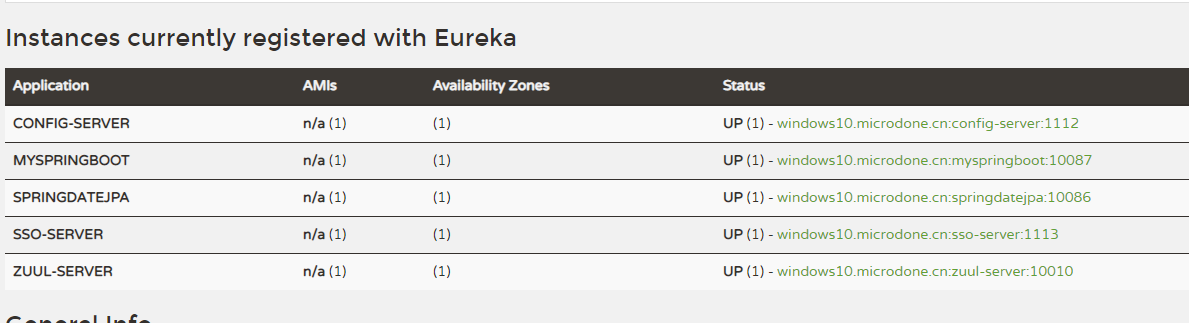
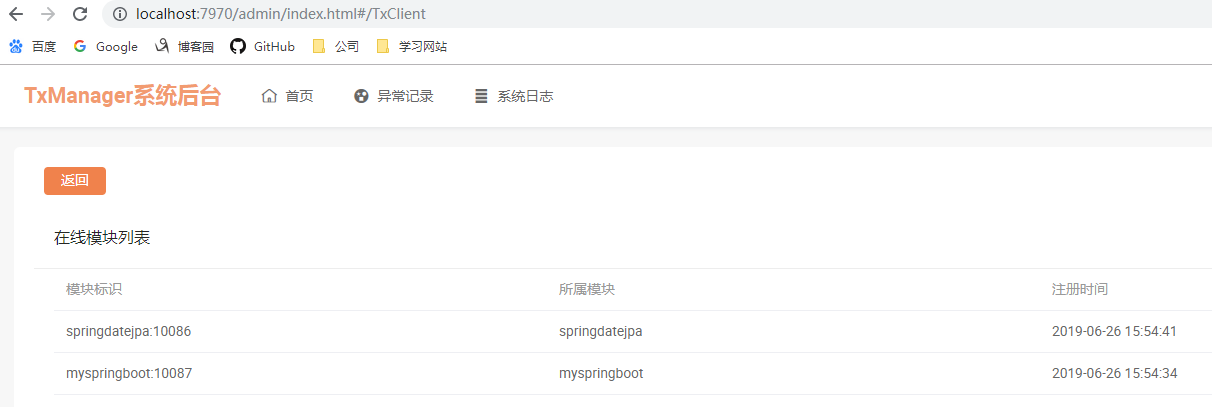
查看TM后台,可以看到成功注册了两个TC
访问http://localhost:10010/myspringboot/feign/save,被单点登录拦截,登录后跳转正常跳转该接口,这些就不再演示了,下面直接看后台debug日志
调用流程
myspringboot(A) ---> springdatejpa(B)
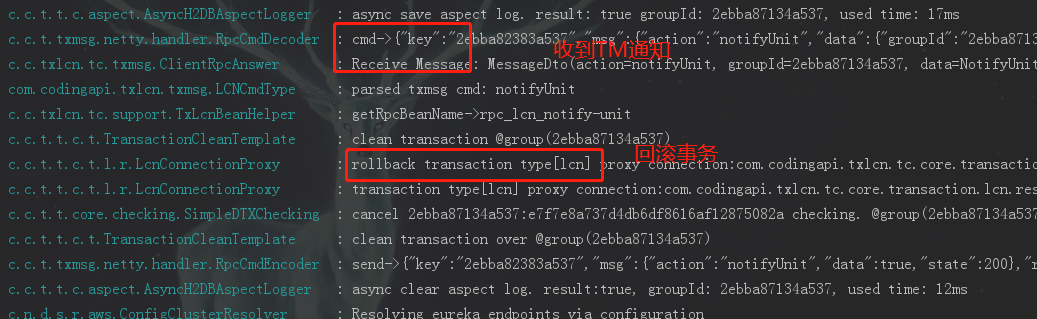
事务回滚
myspringboot(A)
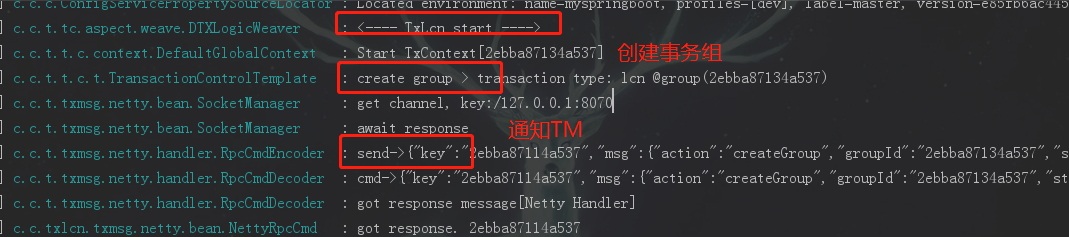
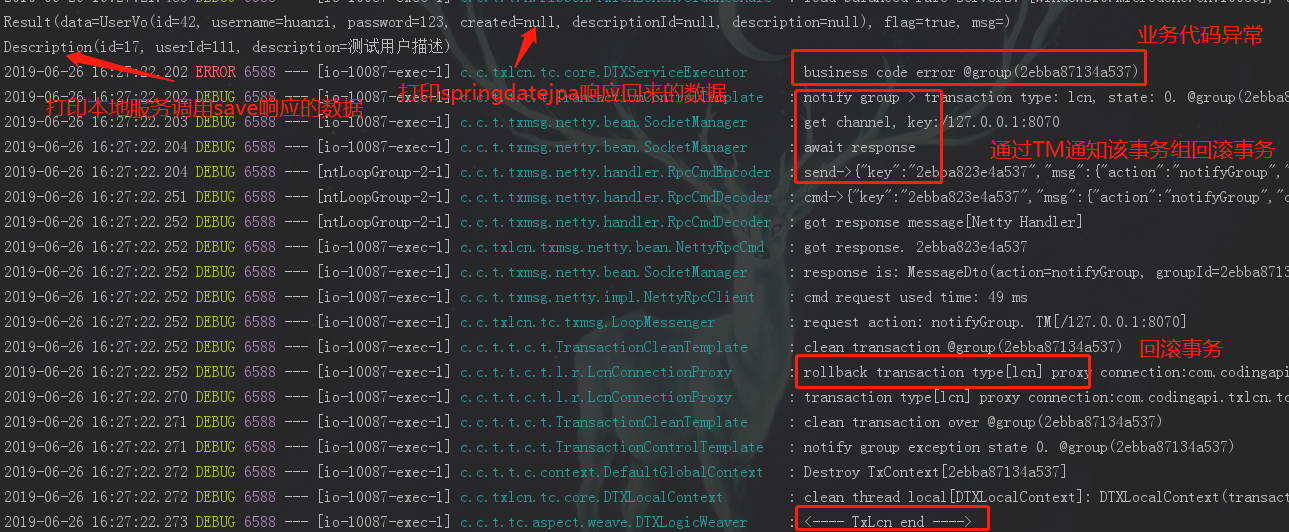
springdatejpa(B)
到这里springdatejpa(B)已经响应了user数据给myspringboot(A),而后收到回滚通知
事务提交
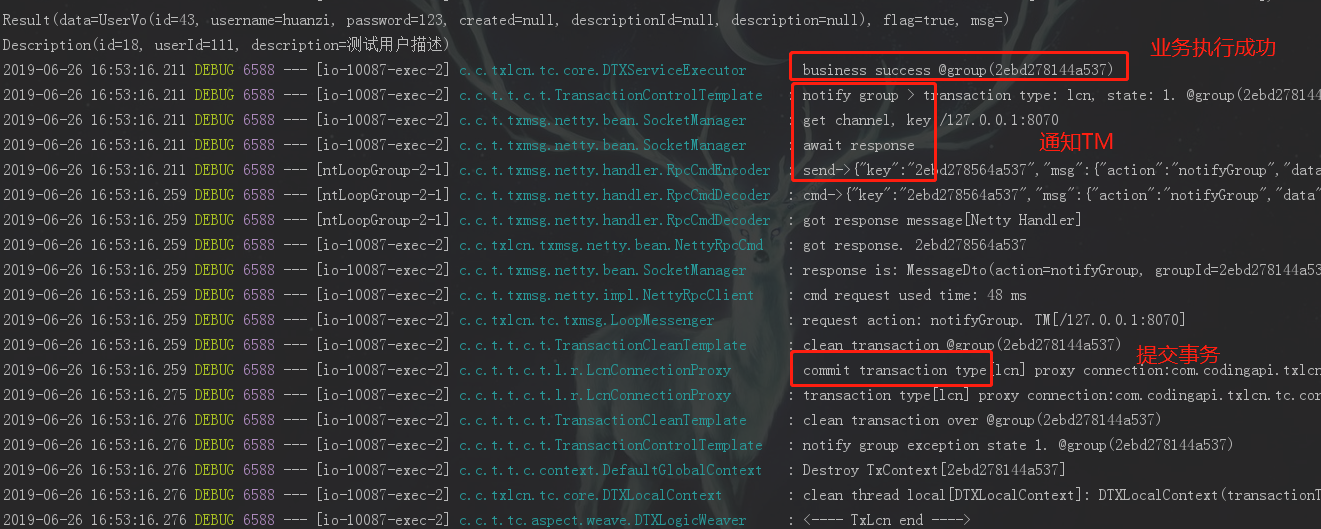
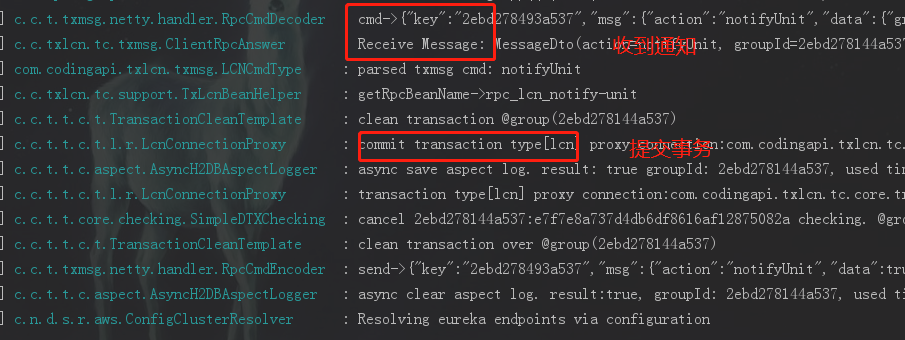
我们看一下事务正常提交是怎么样的,我们把模拟异常注释起来,并返回保存后的数据
        //模拟发生异常

        //throw new RuntimeException("business code error");

        return Result.of(save);
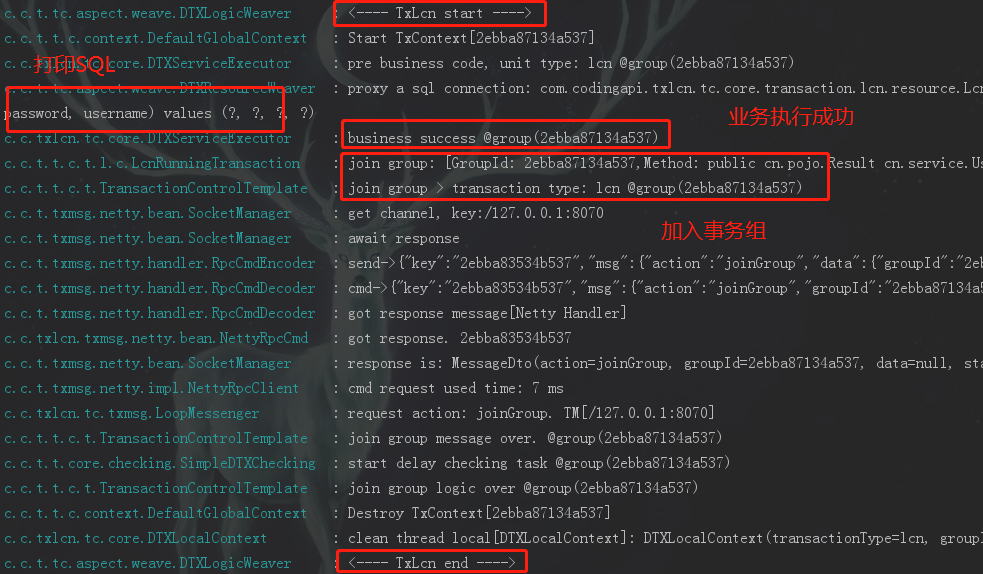
我们直接从springdatejpa(B)响应数据之后看
myspringboot(A)
springdatejpa(B)
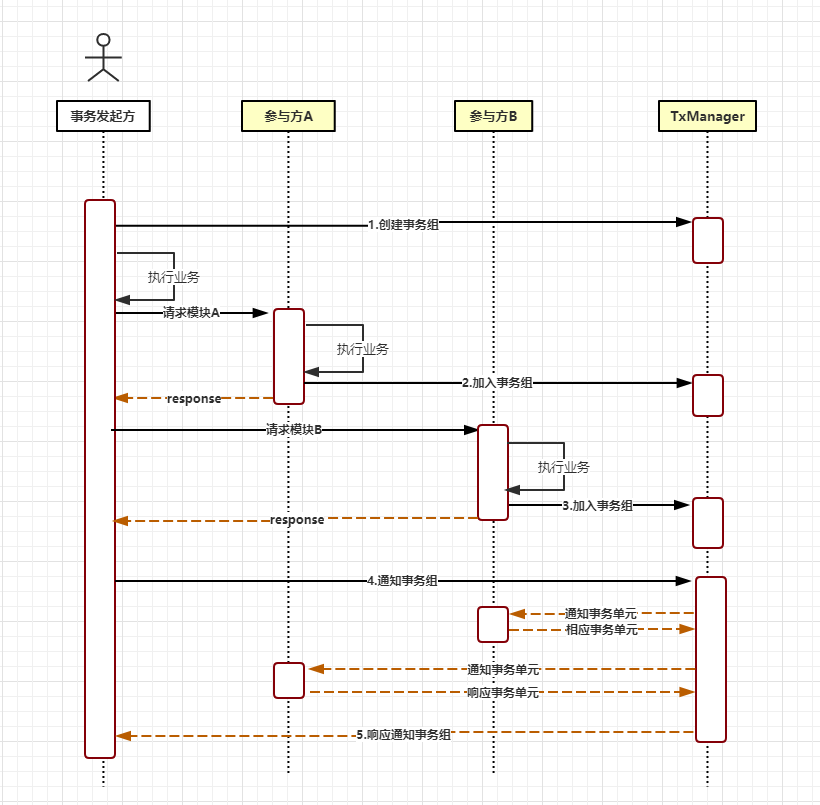
具体的流程已经事务控制原理可以查看官网:https://www.txlcn.org/zh-cn/docs/principle/control.html,这里简单的贴出官网提供的原理图:
后记
要注意我们的springboot版本跟txlcn的版本是不是兼容,按照官网的快速开始(https://www.txlcn.org/zh-cn/docs/start.html),以及参考官方例子(https://github.com/codingapi/txlcn-demo),一路下来碰到了一下小问题在这里总结一下:
1、A调B,A抛出异常,A事务回滚,B事务没有回滚
原因:这个是因为刚开始我是在A的controller层调用B,相当于B是一个单独是事务组,A又是一个单独的事务组
解决:在A开启事务后再调用B
代码开源
代码已经开源、托管到我的GitHub、码云:
GitHub:https://github.com/huanzi-qch/springCloud
码云:https://gitee.com/huanzi-qch/springCloud
SpringCloud系列——TX-LCN分布式事务管理的更多相关文章
- LCN分布式事务管理(一)
前言 好久没写东西了,9月份换了份工作,一上来就忙的要死.根本没时间学东西,好在新公司的新项目里面遇到了之前没遇到过的难题.那遇到难题就要想办法解决咯,一个请求,调用两个服务,同时操作更新两个数据库. ...
- SpringCloud系列之集成分布式事务Seata应用篇
目录 前言 项目版本 项目说明 Seata服务端部署 Seata客户端集成 cloud-web module-order module-cart module-goods module-wallet ...
- Spring Cloud 分布式事务管理
Spring Cloud 分布式事务管理 在微服务如火如荼的情况下,越来越多的项目开始尝试改造成微服务架构,微服务即带来了项目开发的方便性,又提高了运维难度以及网络不可靠的概率. Spring Clo ...
- 事务隔离级别与传播机制,spring+mybatis+atomikos实现分布式事务管理
1.事务的定义:事务是指多个操作单元组成的合集,多个单元操作是整体不可分割的,要么都操作不成功,要么都成功.其必须遵循四个原则(ACID). 原子性(Atomicity):即事务是不可分割的最小工作单 ...
- Spring事务隔离级别与传播机制详解,spring+mybatis+atomikos实现分布式事务管理
原创说明:本文为本人原创作品,绝非他处转载,转账请注明出处 1.事务的定义:事务是指多个操作单元组成的合集,多个单元操作是整体不可分割的,要么都操作不成功,要么都成功.其必须遵循四个原则(ACID). ...
- Spring+JTA+Atomikos+mybatis分布式事务管理
我们平时的工作中用到的Spring事务管理是管理一个数据源的.但是如果对多个数据源进行事务管理该怎么办呢?我们可以用JTA和Atomikos结合Spring来实现一个分布式事务管理的功能.了解JTA可 ...
- spring+springMVC+Mybatis架构下采用AbstractRoutingDataSource、atomikos、JTA实现多数据源灵活切换以及分布式事务管理
背景: 1.系统采用SSM架构.需要在10多个MYSQL数据库之间进行切换并对数据进行操作,上篇博文<springMVC+Mybatis(使用AbstractRoutingDataSource实 ...
- 已禁用对分布式事务管理器(MSDTC)的网络访问。请使用组件服务管理工具启用 DTC 以便在 MSDTC 安全配置中进行网络访问。
今天写ASP.NET程序,在网页后台的c#代码里写了个事务,事务内部对一张表进行批量插入,对另外一张表进行查询与批量插入. 结果第二张表查询后foreach迭代操作时报错:已禁用对分布式事务管理器(M ...
- ADO.NET中的TransactionScope何时需要启用MSTDC(分布式事务管理)
我们知道在ADO.NET中可以用TransactionScope来将多个SqlConnection(多个数据库连接)执行的Sql语句放入一个事物中提交或取消,但是使用TransactionScope的 ...
- 谈谈分布式事务之二:基于DTC的分布式事务管理模型[下篇]
[续上篇] 当基于LTM或者KTM的事务提升到基于DTC的分布式事务后,DTC成为了本机所有事务型资源管理器的管理者:此外,当一个事务型操作超出了本机的范 围,出现了跨机器的调用后,本机的DTC需要于 ...
随机推荐
- 轻松掌握XMLHttpRequest对象
XmlHttp是什么? 最通用的定义为:XmlHttp是一套可以在Javascript.VbScript.Jscript等脚本语言中通过http协议传送或从接收XML及其他数据的一套API.XmlHt ...
- Bridge 、 Adapter 和 Facade 的区别
Bridge和Adapter是没有关系的,而和Facade比较象,但在我的经验中更多的时候是会混淆Bridge和adapter而不是Facade,这里详细的列出三个模式的比较. 一. 定义: 1.Fa ...
- AlertDialog通过反射机制阻止Dialog关闭
在开发Android应用程序时,我们可能会用到需要用户输入的Dialog,如登录对话框等.这时候,如果用户没有输入登录信息而点击<确定>按钮时,我们并不希望登录Dialog消失,而是采用一 ...
- Android于popWindow写弹出菜单
1.什么是popWindow? popWindow这是对话的方式!文字解说android的方式来使用对话框,这就是所谓的popWindow. 2.popWindow特征 Android的对话框有两种: ...
- Cache memory power reduction techniques
Methods and apparatus to provide for power consumption reduction in memories (such as cache memories ...
- python 教程 第七章、 数据结构
Python中有三种内建的数据结构——列表.元组和字典. 1) Lists列表 [,] 列表是序列的一种 shoplist = ['apple', 'carrot', 'banana'] pri ...
- WPF 把图片分割成两份自动翻页 WpfFlipPageControl:CtrlBook 书控件
原文:WPF 把图片分割成两份自动翻页 WpfFlipPageControl:CtrlBook 书控件 版权声明:本文为博主原创文章,需要转载尽管转载. https://blog.csdn.net/z ...
- Vertica变化Local时间到GMT时间
在Vertica的数据库的使用过程中碰到这么一种场景.程序从不同一时候区的集群中收集数据写入同一张表,然后我们须要把这些数据依照GMT时间来显示. 此时我们能够通过Vertica提供TIME ZONE ...
- WPF 用代码增加路由事件的方法
using System;using System.Collections.Generic;using System.Linq;using System.Text;using System.Threa ...
- QT Linux Demo程序编译
我手上的qt源码包为:qt-everywhere-opensource-src-4.7.0.tar.gz 在Linux下编译比较容易,解压后直接 ./configure,一般会报缺少什么库这些.自己遇 ...