
thinkphp5项目--个人博客(三)
thinkphp5项目--个人博客(三)
项目地址
fry404006308/personalBlog: personalBlog
https://github.com/fry404006308/personalBlog
一、使用百度编辑器
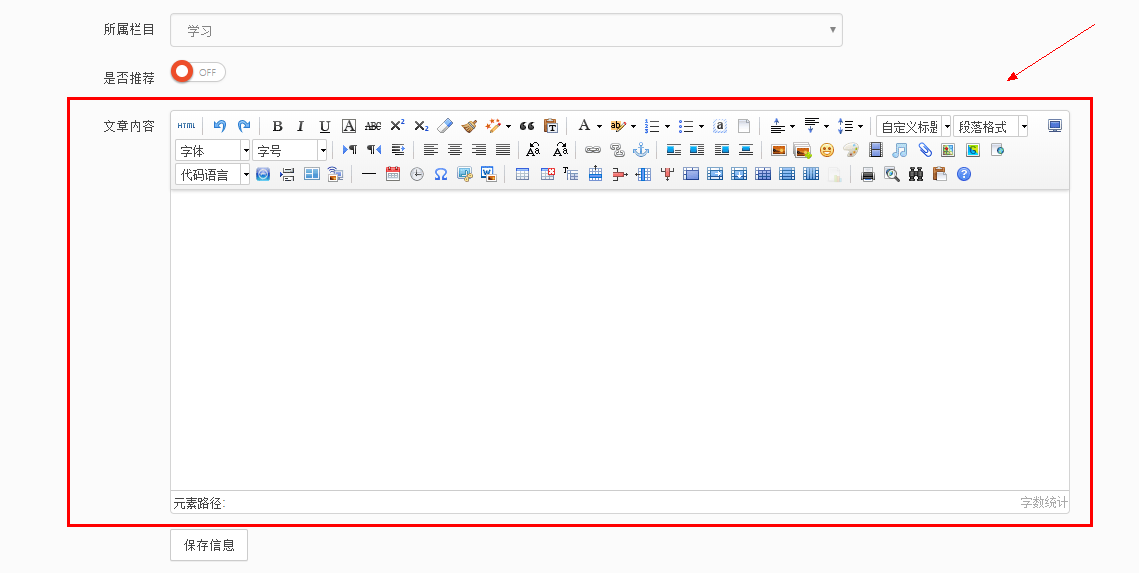
百度编辑器简介及使用链接:
百度编辑器简介及如何使用 - 复习,总结,实例 - 博客园
http://www.cnblogs.com/Renyi-Fan/p/8778291.html
代码
 <!DOCTYPE html>

 <html><head>

         <meta charset="utf-8">

     <title>童老师ThinkPHP交流群:484519446</title>

     <meta name="description" content="Dashboard">

     <meta name="viewport" content="width=device-width, initial-scale=1.0">

     <meta http-equiv="X-UA-Compatible" content="IE=edge">

     <meta http-equiv="Content-Type" content="text/html; charset=UTF-8">

     <!--Basic Styles-->

     <link href="__PUBLIC__/style/bootstrap.css" rel="stylesheet">

     <link href="__PUBLIC__/style/font-awesome.css" rel="stylesheet">

     <link href="__PUBLIC__/style/weather-icons.css" rel="stylesheet">

     <!--Beyond styles-->

     <link id="beyond-link" href="__PUBLIC__/style/beyond.css" rel="stylesheet" type="text/css">

     <link href="__PUBLIC__/style/demo.css" rel="stylesheet">

     <link href="__PUBLIC__/style/typicons.css" rel="stylesheet">

     <link href="__PUBLIC__/style/animate.css" rel="stylesheet">

     <script type="text/javascript" src="__PUBLIC__/ueditor/ueditor.config.js"></script>

     <script type="text/javascript" src="__PUBLIC__/ueditor/ueditor.all.min.js"></script>

     <script type="text/javascript" src="__PUBLIC__/ueditor/lang/zh-cn/zh-cn.js"></script>

 </head>

 <body>

     <!-- 头部 -->

     {include file="common/top"}

     <!-- /头部 -->

     <div class="main-container container-fluid">

         <div class="page-container">

             <!-- Page Sidebar -->

             {include file="common/left"}

             <!-- /Page Sidebar -->

             <!-- Page Content -->

             <div class="page-content">

                 <!-- Page Breadcrumb -->

                 <div class="page-breadcrumbs">

                     <ul class="breadcrumb">

                                         <li>

                         <a href="{:url('index/index')}">系统</a>

                     </li>

                                         <li>

                         <a href="{:url('links/lst')}">文章管理</a>

                     </li>

                                         <li class="active">添加文章</li>

                                         </ul>

                 </div>

                 <!-- /Page Breadcrumb -->

                 <!-- Page Body -->

                 <div class="page-body">

 <div class="row">

     <div class="col-lg-12 col-sm-12 col-xs-12">

         <div class="widget">

             <div class="widget-header bordered-bottom bordered-blue">

                 <span class="widget-caption">新增文章</span>

             </div>

             <div class="widget-body">

                 <div id="horizontal-form">

                     <form class="form-horizontal" role="form" action="" method="post">

                         <div class="form-group">

                             <label for="title" class="col-sm-2 control-label no-padding-right">文章标题</label>

                             <div class="col-sm-6">

                                 <input class="form-control" id="title" placeholder="" name="title" required="" type="text">

                                 <!-- required="" -->

                             </div>

                             <p class="help-block col-sm-4 red">* 必填</p>

                         </div>

                         <div class="form-group">

                             <label for="group_id" class="col-sm-2 control-label no-padding-right">文章作者</label>

                             <div class="col-sm-6">

                                 <input class="form-control" id="url" placeholder="" name="url" type="text">

                                 <!-- required="" -->

                             </div>

                         </div>

                         <div class="form-group">

                             <label for="group_id" class="col-sm-2 control-label no-padding-right">关键字</label>

                             <div class="col-sm-6">

                                 <input class="form-control" id="url" placeholder="" name="url"  type="text">

                                 <!-- required="" -->

                             </div>

                         </div>

                         <div class="form-group">

                             <label for="group_id" class="col-sm-2 control-label no-padding-right">文章描述</label>

                             <div class="col-sm-6">

                                 <textarea class="form-control" name="desc" id="" cols="30" rows="6"></textarea>

                             </div>

                         </div>

                         <div class="form-group">

                             <label for="group_id" class="col-sm-2 control-label no-padding-right">缩略图</label>

                             <div class="col-sm-6">

                                  <input class="form-control" id="url" placeholder="" name="url"  type="file">

                             </div>

                         </div>

                         <div class="form-group">

                             <label for="group_id" class="col-sm-2 control-label no-padding-right">所属栏目</label>

                             <div class="col-sm-6">

                                 <select class="form-control" name="" id="">

                                     <option value="">请选择栏目</option>

                                     {volist name="cateres" id="value"}

                                     <option value="{$value.catename}">{$value.catename}</option>

                                     {/volist}

                                 </select>

                             </div>

                         </div>

                         <div class="form-group">

                             <label for="group_id" class="col-sm-2 control-label no-padding-right">是否推荐</label>

                             <div class="col-sm-6">

                                 <label>

                                     <input class="checkbox-slider colored-darkorange"  type="checkbox">

                                     <!-- checked="checked" -->

                                     <span class="text"></span>

                                 </label>

                             </div>

                         </div>

                         <div class="form-group">

                             <label for="group_id" class="col-sm-2 control-label no-padding-right">文章内容</label>

                             <div class="col-sm-6">

                                 <textarea  name="desc" id="content" cols="30" rows="6"></textarea>

                             </div>

                         </div>

                         <div class="form-group">

                             <div class="col-sm-offset-2 col-sm-10">

                                 <button type="submit" class="btn btn-default">保存信息</button>

                             </div>

                         </div>

                     </form>

                 </div>

             </div>

         </div>

     </div>

 </div>

                 </div>

                 <!-- /Page Body -->

             </div>

             <!-- /Page Content -->

         </div>

     </div>

         <!--Basic Scripts-->

     <script src="__PUBLIC__/style/jquery_002.js"></script>

     <script src="__PUBLIC__/style/bootstrap.js"></script>

     <script src="__PUBLIC__/style/jquery.js"></script>

     <!--Beyond Scripts-->

     <script src="__PUBLIC__/style/beyond.js"></script>

     <script type="text/javascript">

         UE.getEditor('content',{initialFrameWidth:,initialFrameHeight:,});

     </script>

 </body></html>
二、列表内容显示
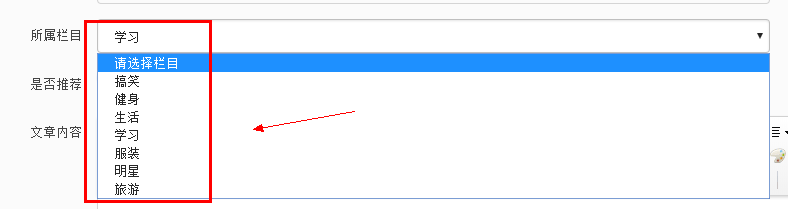
控制器
         $cateres=db('cate')->select();

         $this->assign('cateres',$cateres);

         return view();
视图
                         <div class="form-group">

                             <label for="group_id" class="col-sm-2 control-label no-padding-right">所属栏目</label>

                             <div class="col-sm-6">

                                 <select class="form-control" name="" id="">

                                     <option value="">请选择栏目</option>

                                     {volist name="cateres" id="value"}

                                     <option value="{$value.catename}">{$value.catename}</option>

                                     {/volist}

                                 </select>

                             </div>

                         </div>
三、图片上传
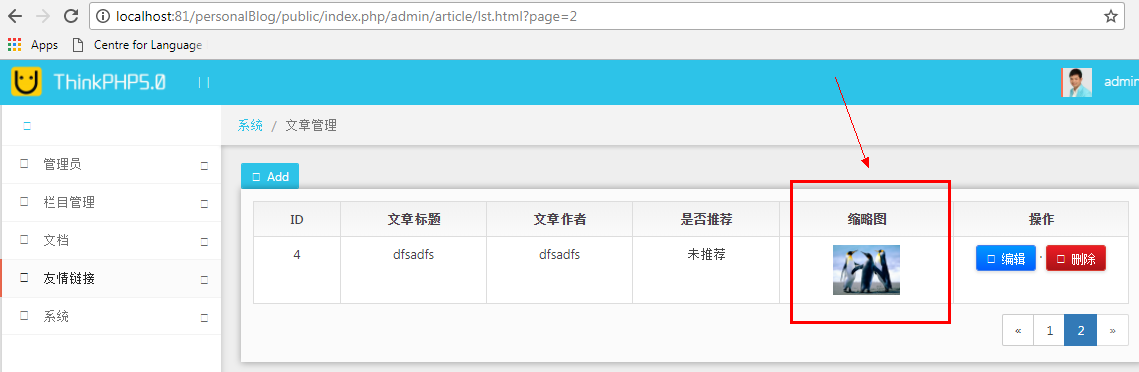
thinkphp5教程
 假设表单代码如下:

 <form action="/index/index/upload" enctype="multipart/form-data" method="post">

 <input type="file" name="image" /> <br>

 <input type="submit" value="上传" />

 </form>

 然后在控制器中添加如下的代码:

 public function upload(){

 // 获取表单上传文件 例如上传了001.jpg

 $file = request()->file('image');

 // 移动到框架应用根目录/public/uploads/ 目录下

 $info = $file->move(ROOT_PATH . 'public' . DS . 'uploads');

 if($info){

 // 成功上传后 获取上传信息

 // 输出 jpg

 echo $info->getExtension();

 // 输出 20160820/42a79759f284b767dfcb2a0197904287.jpg

 echo $info->getSaveName();

 // 输出 42a79759f284b767dfcb2a0197904287.jpg

 echo $info->getFilename();

 }else{

 // 上传失败获取错误信息

 echo $file->getError();

 }

 }

 move 方法成功的话返回的是一个SplFileInfo 对象,你可以对上传后的文件进行后续操作。
后续文件操作
上传成功后返回的是File 对象,除了可以使用SplFileObject 的属性和方法之外,还可以使用File类自
身提供的下列方法,便于进行后续的文件处理(例如对图像文件进行剪裁处理或者移动到远程服务器)。
方法描述
getSaveName 获取保存的文件名(包含动态生成的目录)
getInfo 获取上传文件信息
getMime 获取文件的MIME信息
md5 获取文件的md5散列值
sha1 获取文件的sha1散列值
控制器
             //如果有图片上传

             if($_FILES['pic']['tmp_name']){

                 // 获取表单上传文件 例如上传了001.jpg

                 $file = request()->file('pic');

                 // 移动到框架应用根目录/public/uploads/ 目录下

                 $info = $file->move(ROOT_PATH . 'public' . DS . 'static/uploads');

                 // 已经上传成功,我们要把文件的路径写进数据库

                 $data['pic']='uploads/'.$info->getSaveName();

                 // dump($data['pic']);die;

             }
配置文件
 <?php

 return [

     // +----------------------------------------------------------------------

     // | 模板设置

     // +----------------------------------------------------------------------

     'template'               => [

         // 模板后缀

         'view_suffix'  => 'htm',

     ],

     // 视图输出字符串内容替换

     'view_replace_str' => [

         '__PUBLIC__'=>SITE_URL.'/public/static/admin',

         '__IMG__'=>SITE_URL.'/public/static/',

     ],

     // 默认跳转页面对应的模板文件

     'dispatch_success_tmpl'  => THINK_PATH . 'tpl' . DS . 'dispatch_jump.tpl',

     'dispatch_error_tmpl'    => THINK_PATH . 'tpl' . DS . 'dispatch_jump.tpl',

 ];
视图
                                 <td align="center">

                                     {if condition="$value['pic'] neq '' "}

                                     <img src="__IMG__{$value.pic}"  height="50px" alt="">

                                     {else /}

                                     暂无缩略图

                                     {/if}

                                 </td>
四、数据表的链接查询
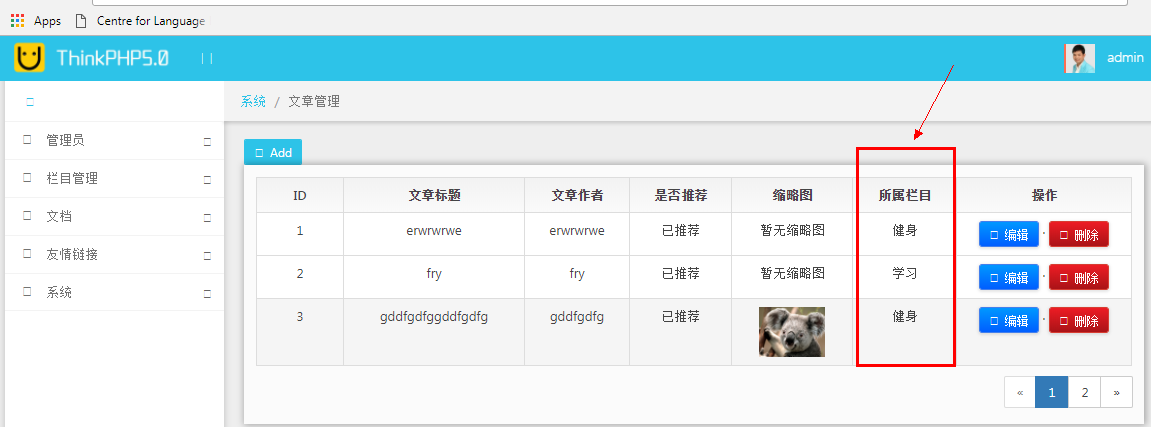
控制器
     public function lst()

     {

         // 分页输出列表 每页显示3条数据

         // $list = ArticleModel::paginate(3);

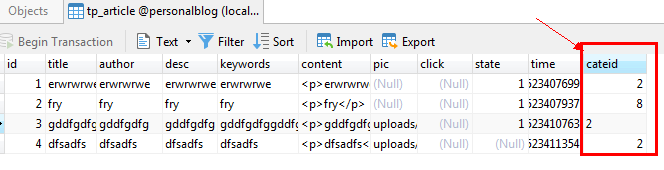
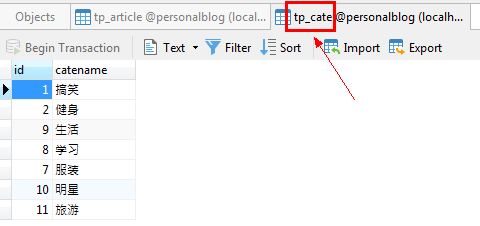
         $list=db('article')->alias('a')->join('cate c','c.id=a.cateid')->field('a.id,a.title,a.pic,a.author,a.state,c.catename')->paginate(3);

         $this->assign('list',$list);

         return view('list');

     }
视图
<td align="center">{$value.catename}</td>
五、关联模型
模型
 <?php

 namespace app\admin\model;

 use think\Model;

 class Article extends Model

 {

     public function cate()

     {

         //多篇文章属于一个栏目

         return $this->belongsTo('cate','cateid');

     }

 }
控制器
     public function lst()

     {

         // 分页输出列表 每页显示3条数据

         // $list = ArticleModel::paginate(3);

         // $list=db('article')->alias('a')->join('cate c','c.id=a.cateid')->field('a.id,a.title,a.pic,a.author,a.state,c.catename')->paginate(3);

         $list = ArticleModel::paginate(3);

         $this->assign('list',$list);

         return view('list');

     }
视图
<td align="center">{$value.cate.catename}</td>
对应参照的thinkphp手册
 我们就可以根据档案资料来获取用户模型的信息

 $profile = Profile::find(1);

 // 输出User关联模型的属性

 echo $profile->user->account;
 定义相对的关联

 要在 Comment 模型定义相对应的关联,可使用 belongsTo 方法:

 name app\index\model;

 use think\Model;

 class Comment extends Model

 {

 public function article()

 {

 return $this->belongsTo('article');

 }

 }
hasMany('关联模型名','外键名','主键名',['模型别名定义']);
thinkphp5项目--个人博客(三)的更多相关文章
- thinkphp5项目--个人博客(七)
thinkphp5项目--个人博客(七) 项目地址 fry404006308/personalBlog: personalBloghttps://github.com/fry404006308/per ...
- thinkphp5项目--个人博客(六)
thinkphp5项目--个人博客(六) 项目地址 fry404006308/personalBlog: personalBloghttps://github.com/fry404006308/per ...
- thinkphp5项目--个人博客(五)
thinkphp5项目--个人博客(五) 项目地址 fry404006308/personalBlog: personalBloghttps://github.com/fry404006308/per ...
- thinkphp5项目--个人博客(四)
thinkphp5项目--个人博客(四) 项目地址 fry404006308/personalBlog: personalBloghttps://github.com/fry404006308/per ...
- thinkphp5项目--个人博客(一)
thinkphp5项目--个人博客(一) 项目地址 fry404006308/personalBlog: personalBloghttps://github.com/fry404006308/per ...
- thinkphp5项目--个人博客(二)
thinkphp5项目--个人博客(二) 项目地址 fry404006308/personalBlog: personalBloghttps://github.com/fry404006308/per ...
- thinkphp5项目--个人博客(八)
thinkphp5项目--个人博客(八) 项目地址 fry404006308/personalBlog: personalBloghttps://github.com/fry404006308/per ...
- Do-Now—团队冲刺博客三
Do-Now-团队 冲刺博客三 作者:仇夏 前言 不知不觉我们的项目已经做了三个多礼拜了,团队冲刺博客也写到了这第三篇,看着一个基本成型的APP安装在自己的手机上,一种喜悦感油然而生.好了,现在来看看 ...
- 团队项目系列博客 —— 在路上(之wampserver 修改根目录以及配置多站点以及修改端口号)
团队项目系列博客 -- 在路上(之wampserver 修改根目录以及配置多站点以及修改端口号) 标签(空格分隔): wampserver php 参考:参考文献1.慕课网.知乎.github 一.w ...
随机推荐
- Hbase读取数据
get命令和HTable类的get()方法用于从HBase表中读取数据.使用 get 命令,可以同时获取一行数据.它的语法如下: get ’<table name>’,’row1’ 下面的 ...
- AssetBundle打包优化解决方式
第一阶段:AssetBundle出一套解决方式 1.解决如今同一个资源打2个bundle的冗余问题 2.測试验证节省资源的比率是多少 问题拆分 一.bundle反复 问 题 :同样资源拆分问题? ...
- 通过 KVM+virt-manager配置双屏虚拟机(两套键盘。鼠标)
感谢朋友支持本博客,欢迎共同探讨交流,因为能力和时间有限,错误之处在所难免,欢迎指正! 假设转载.请保留作者信息. 博客地址:http://blog.csdn.net/qq_21398167 原博文地 ...
- ZOJ Problem Set - 3820 Building Fire Stations 【树的直径 + 操作 】
题目:problemId=5374" target="_blank">ZOJ Problem Set - 3820 Building Fire Stations 题 ...
- ffmpeg在android上输出滑屏问题处理
ffmpeg部分机器上有花屏的问题 原代码例如以下: while(av_read_frame(formatCtx, &packet)>=0 && !_stop & ...
- Spring整合Shiro从源代码探究机制
首先从例如以下配置開始说起 ShiroDbFilterFactoryBean继承了ShiroFilterFactoryBean这个由jar提供的bean类, 而且它实现了InitializingBea ...
- 实战c++中的vector系列--再谈vector的insert()方法(都是make_move_iterator惹的祸)
之前说过了关于vector的insert()方法,把vector B的元素插入到vector A中.vector A中的结果我们可想而知,可是vector B中的元素还会怎样? 看看之前写过的程序: ...
- bzoj5106: [CodePlus2017]汀博尔(二分答案)
5106: [CodePlus2017]汀博尔 题目:传送门 题解: 百题纪念!!! 原谅一下第一百题刷了到水题... 直接二分月份然后判断(注意上界大小) 代码: #include<cstdi ...
- DGA ngram kmeans+TSNE用于绘图
# -*- coding:utf-8 -*- import sys import re import numpy as np from sklearn.externals import joblib ...
- nyoj--1239--引水工程(最小生成树)
引水工程 时间限制:2000 ms | 内存限制:65535 KB 难度: 描述 南水北调工程是优化水资源配置.促进区域协调发展的基础性工程,是新中国成立以来投资额最大.涉及面最广的战略性工程,事 ...