
IOS多选单选相册图片
之前做项目让实现多选相册的图片,自己写了一个demo一直保存在电脑上,今天下午发现电脑128G的容量已经快没有了,准备清理电脑,所以把之前做的一些demo放在博客上,以后方便用。
1.首先准备3个图片



2.定义单元格PhoCollectionViewCell

#import <UIKit/UIKit.h>

typedef void(^SelectBtnClickBlock) (BOOL isSelect);

@interface PhoCollectionViewCell : UICollectionViewCell

@property (weak ,nonatomic)  IBOutlet  UIImageView *  imageView;

@property (weak ,nonatomic)  IBOutlet  UIImageView *  selectImageView;

@property (nonatomic,copy) SelectBtnClickBlock selectBtnClickBlock;

- (IBAction)selectBtnClick:(id)sender;

@property (weak, nonatomic) IBOutlet UIButton *selectBtn;

@end
#import "PhoCollectionViewCell.h"

@implementation PhoCollectionViewCell

- (void)awakeFromNib {
    // Initialization code

}

- (IBAction)selectBtnClick:(id)sender {
    UIButton *btn=(UIButton *)sender;
     btn.selected=!btn.selected;
    NSLog(@"%@",@"aaaa");
      _selectBtnClickBlock(btn.selected);
}
@end
3.创建相片Model
#import <Foundation/Foundation.h>
#import <AssetsLibrary/ALAssetsLibrary.h>

@interface PhoModel : NSObject

@property(nonatomic,strong) ALAsset *asset;
@property (nonatomic,assign) BOOL isSelected;
@end
#import "PhoModel.h"

@implementation PhoModel

@end
4.获取相册图片显示图片
#import "ViewController.h"
#import <AssetsLibrary/AssetsLibrary.h>

#import "AppDelegate.h"
#import "PhoModel.h"
#import "PhoCollectionViewCell.h"

#define ApplicationDelegate ((AppDelegate *)[UIApplication sharedApplication].delegate)

;

@interface ViewController ()
{
    NSMutableArray *mutableAssets;
}
@property (weak, nonatomic) IBOutlet UICollectionView *collectionView;

@end

@implementation ViewController

- (void)viewDidLoad {
    [super viewDidLoad];

    //获取相册中的全部照片
    [self getAllPictures];
    [_collectionView registerNib: [UINib nibWithNibName:@"PhoCollectionViewCell" bundle:nil] forCellWithReuseIdentifier:@"CollectionViewCell"];
}

//获取相册中的全部照片
-(void)getAllPictures {
    mutableAssets = [[NSMutableArray alloc]init];

    NSMutableArray *assetURLDictionaries = [[NSMutableArray alloc] init];
    NSMutableArray *assetGroups = [[NSMutableArray alloc] init];

    __block NSMutableArray *tempMutableAssets = mutableAssets;
    __block ViewController *tempSelf = self;
    __block NSMutableArray *tempAssetGroups = assetGroups;

    [ApplicationDelegate.library enumerateGroupsWithTypes:ALAssetsGroupSavedPhotos usingBlock:^(ALAssetsGroup *group, BOOL *stop){
        if (group != nil) {
            count = [group numberOfAssets];
            __block ;
            [group enumerateAssetsUsingBlock:^(ALAsset *asset, NSUInteger index, BOOL *stop){
                if(asset != nil) {
                    ++ groupNum;
                    if([[asset valueForProperty:ALAssetPropertyType] isEqualToString:ALAssetTypePhoto]) {
                        [assetURLDictionaries addObject:[asset valueForProperty:ALAssetPropertyURLs]];
                        NSURL *url= (NSURL*) [[asset defaultRepresentation]url];
                        NSLog(@"%@,%@",[asset valueForProperty:ALAssetPropertyDate],url);

//                        [UIImage imageWithCGImage:[[result defaultRepresentation] fullScreenImage]];//图片
//                        [UIImage imageWithCGImage:[result thumbnail]];    //缩略图

                        PhoModel *phoModel=[[PhoModel alloc]init];
                        phoModel.asset=asset;
                        phoModel.isSelected=NO;
                        [tempMutableAssets addObject:phoModel];
                        if (tempMutableAssets.count == groupNum) {
                            [tempSelf allPhotosCollected:tempMutableAssets];
                        }
                    }
                }
            }];
            [tempAssetGroups addObject:group];
        }
    }failureBlock:^(NSError *error){
        NSLog(@"There is an error");
    }];
}

//所有asset
-(void)allPhotosCollected:(NSMutableArray *)mutableAsset{
    [self.collectionView reloadData];
}

#pragma mark -- UICollectionViewDataSource

- (CGSize)collectionView:(UICollectionView *)collectionView layout:(UICollectionViewLayout*)collectionViewLayout sizeForItemAtIndexPath:(NSIndexPath *)indexPath {
    CGSize itemSize = CGSizeMake(([UIScreen mainScreen].bounds.size.width-)/)/4.0);
    return itemSize;
}

//定义展示的UICollectionViewCell的个数
-(NSInteger)collectionView:(UICollectionView *)collectionView numberOfItemsInSection:(NSInteger)section
{
    ;
}
//每个UICollectionView展示的内容
-(UICollectionViewCell *)collectionView:(UICollectionView *)collectionView cellForItemAtIndexPath:(NSIndexPath *)indexPath
{
    static NSString * CellIdentifier = @"CollectionViewCell";
    PhoCollectionViewCell * cell = [collectionView dequeueReusableCellWithReuseIdentifier:CellIdentifier forIndexPath:indexPath];
    ) {
        cell.imageView.image = [UIImage imageNamed:@"0.png"];
        cell.selectImageView.hidden=YES;
        cell.selectBtnClickBlock=^(BOOL isSelect)
        {
            NSLog(@"cell1 block");
        };
        return cell;
    }

    PhoModel *phoModel = mutableAssets[indexPath.row-];

    cell.imageView.image = [UIImage imageWithCGImage:[phoModel.asset thumbnail]];

    if (phoModel.isSelected) {
        cell.selectImageView.image=[UIImage imageNamed:@"2.png"];
    }
    else
    {
        cell.selectImageView.image=[UIImage imageNamed:@"1.png"];
    }
    cell.selectImageView.hidden=NO;
    cell.selectBtn.selected=phoModel.isSelected;
    cell.selectBtnClickBlock=^(BOOL isSelect)
    {
        //单选多选标记 false 单选 true 多选
        BOOL issangal=false;
        if (issangal) {
            for (PhoModel *tmpPhotoModel in mutableAssets) {
                tmpPhotoModel.isSelected = NO;
            }
        }
        phoModel.isSelected=isSelect;
        [_collectionView reloadData];
    };

    return cell;
}
- (void)collectionView:(UICollectionView *)collectionView didSelectItemAtIndexPath:(NSIndexPath *)indexPath {
    NSLog(@"%ld",indexPath.row);
}

- (void)didReceiveMemoryWarning {
    [super didReceiveMemoryWarning];
    // Dispose of any resources that can be recreated.
}

@end
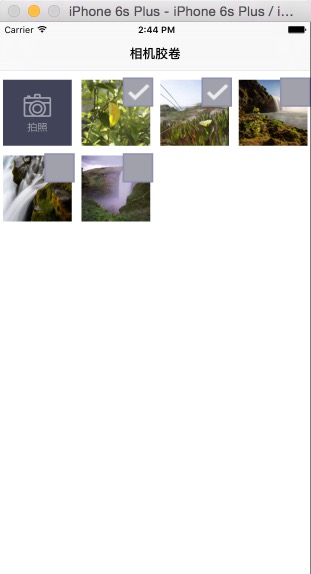
5.效果
IOS多选单选相册图片的更多相关文章
- ios获取摄像头与相册图片
iOS的一些设备上都安装了摄像头.现在绝大多数都有了. 在编程中,我们是用相应的东西来进行照相,录像等功能. 一.UIImagePickerController类 UIImagePickerCon ...
- iOS QRcode识别及相册图片二维码读取识别
https://www.jianshu.com/p/48e44fe67c1d 2016.03.30 10:32* 字数 892 阅读 16197评论 5喜欢 34赞赏 1 最近碰到一个用户 在使用我们 ...
- iOS Swift WisdomScanKit二维码扫码SDK,自定义全屏拍照SDK,系统相册图片浏览,编辑SDK
iOS Swift WisdomScanKit 是一款强大的集二维码扫码,自定义全屏拍照,系统相册图片编辑多选和系统相册图片浏览功能于一身的 Framework SDK [1]前言: 今天给大家 ...
- Android 仿微信朋友圈发动态功能(相册图片多选)
代码分享 代码名称: 仿微信朋友圈发动态功能(相册图片多选) 代码描述: 仿微信朋友圈发动态功能(相册图片多选) 代码托管地址: http://www.apkbus.com/android-15276 ...
- 修正iOS从照相机和相册中获取的图片 方向
修正iOS从照相机和相册中获取的图片 方向 修正iOS从照相机和相册中获取的图片 方向 使用系统相机拍照得到的图片的默认方向有时不是ImageOrientationDown,而是ImageOrie ...
- 使用JS调用手机本地摄像头或者相册图片识别二维码/条形码
接着昨天的需求,不过这次不依赖微信,使用纯js唤醒手机本地摄像头或者选择手机相册图片,识别其中的二维码或者是条形码.昨天,我使用微信扫一扫识别,效果超棒的.不过如果依赖微信的话,又怎么实现呢,这里介绍 ...
- ios 上传视频或图片
关于iOS如何实现视频和图片的上传, 我们先理清下思路 思路: #1. 如何获取图片? #2. 如何获取视频? #3. 如何把图片存到缓存路径中? #4. 如何把视频存到缓存路径中? #5. 如何上传 ...
- iOS关于UILabel 基本属性 背景图片 背景色
[代码] iOS关于UILabel 基本属性 背景图片 背景色 ? 1 2 3 4 5 6 7 8 9 10 11 12 13 14 15 16 17 18 19 20 21 22 23 24 25 ...
- android开发之——获取相册图片和路径
Android开发获取相册图片的方式网上有很多种,这里说一个Android4.4后的方法,因为版本越高,一些老的api就会被弃用,新的api和老的api不兼容,导致出现很多问题. 比如:managed ...
随机推荐
- 10-08常用的TIME和DATE函数以及各个函数对应的头文件
系统时间和日期函数: #include <time.h> char *asctime(const struct tm *tm);//将tm中存放的信息转换为标准格式 ...
- corss、inner、outer三种join方式
cross join(没有on)inner join(一般用于交集)outer join(你懂得)后面两个 on 1=1 效果同cross join
- 纸壳CMS列表Grid的配置
纸壳CMS(ZKEACMS)里的Grid是一个TagHelper,是对jQuery插件datatables的一个配置封装. Easy.Mvc.TagHelpers.GridTagHelper grid ...
- P4145 上帝造题的七分钟2
题目描述 "第一分钟,X说,要有数列,于是便给定了一个正整数数列. 第二分钟,L说,要能修改,于是便有了对一段数中每个数都开平方(下取整)的操作. 第三分钟,k说,要能查询,于是便有了求一段 ...
- html实现时间输入框
<!DOCTYPE html> <html lang="en"> <head> <meta charset="UTF-8&quo ...
- 使用wblockCloneObjects从后台读取dwg文件复制实体到当前数据库
AcDbDatabase *pNewDb=new AcDbDatabase(Adesk::kFalse); if (pNewDb == NULL) { return; } Acad::ErrorSta ...
- Using RDP to connect Windows remote desktop with Linux
安装rdesktop(一般情况下不需要这么做): sudo apt-get install rdesktop 执行连接: rdesktop xxx.xxx.xxx.xxx:3389 -u admini ...
- React 初识
React We built React to solve one problem: building large applications with data that changes over t ...
- linux C API连接并查询mysql5.7.9
开发环境: ubuntu16.04 mysql5.7.9 原生C API VIM 配置远程连接 配置mysql允许远程连接的方法默认情况下,mysql只允许本地登录,如果要开启远程连接,则需要修改/e ...
- 蓝牙4.0BLE抓包(一) - 搭建EN-Dongle工作环境 使用EN-Dongle抓包 nRF51822
版权声明:本文为博主原创文章,转载请注明作者和出处. 蓝牙4.0 BLE的开发过程中,使用抓包器进行抓包分析无疑会极大地提高我们的开发效率,同时能帮我们快速的定位问题.对于初学者 ...