
Restful风格wcf调用3——Stream
写在前面
上篇文章介绍了restful接口的增删改查,本篇文章将介绍,如何通过数据流进行文件的上传及下载操作。
系列文章
一个例子
添加一个wcf服务,并在global.asax中注册路由,并修改svc文件的标记,添加Factory属性。
   //注册路由

            System.Web.Routing.RouteTable.Routes.Add(new System.ServiceModel.Activation.ServiceRoute(

                "imageService", new System.ServiceModel.Activation.WebServiceHostFactory(), typeof(ImageService)));
<%@ ServiceHost Language="C#" Debug="true" Service="Wolfy.WCFRestfuleDemo.ImageService" CodeBehind="ImageService.svc.cs" Factory="System.ServiceModel.Activation.WebServiceHostFactory" %>
契约
namespace Wolfy.WCFRestfuleDemo

{

    // NOTE: You can use the "Rename" command on the "Refactor" menu to change the interface name "IImageService" in both code and config file together.

    [ServiceContract]

    public interface IImageService

    {

        /// <summary>

        /// 根据图片的相对路径获取文件流

        /// </summary>

        /// <param name="imgUrl"></param>

        /// <returns></returns>

        [OperationContract]

        [WebGet(UriTemplate = "api/{imagUrl}")]

        Stream GetImageStream(string imgUrl);

        /// <summary>

        /// 上传图片

        /// </summary>

        /// <param name="imgStream"></param>

        /// <param name="imageName"></param>

        [OperationContract]

        [WebInvoke(UriTemplate = "api/{imageName}", Method = "POST")]

        void UploadImage(Stream imgStream, string imageName);

        /// <summary>

        /// 获得所有图片的相对路径

        /// </summary>

        /// <returns></returns>

        [OperationContract]

        [WebGet(UriTemplate = "api/list", ResponseFormat = WebMessageFormat.Xml)]

        string[] GetImages();

    }

}
实现
using System;

using System.Collections.Generic;

using System.Drawing;

using System.IO;

using System.Linq;

using System.Runtime.Serialization;

using System.ServiceModel;

using System.ServiceModel.Web;

using System.Text;

namespace Wolfy.WCFRestfuleDemo

{

    // NOTE: You can use the "Rename" command on the "Refactor" menu to change the class name "ImageService" in code, svc and config file together.

    // NOTE: In order to launch WCF Test Client for testing this service, please select ImageService.svc or ImageService.svc.cs at the Solution Explorer and start debugging.

    public class ImageService : IImageService

    {

        /// <summary>

        /// 根据图片的相对路径获取文件流

        /// </summary>

        /// <param name="imgUrl"></param>

        /// <returns></returns>

        public System.IO.Stream GetImageStream(string imgUrl)

        {

            var contentType = Path.GetExtension(imgUrl).Trim('.');

            WebOperationContext woc = WebOperationContext.Current;

            //根据请求的图片类型,动态设置contenttype

            woc.OutgoingResponse.ContentType = "image/" + contentType;

            string savePath = System.Web.HttpContext.Current.Server.MapPath("/Images");

            string filePath = Path.Combine(savePath, imgUrl);

            return File.OpenRead(filePath);

        }

        /// <summary>

        /// 上传图片

        /// </summary>

        /// <param name="imgStream"></param>

        /// <param name="imageName"></param>

        public void UploadImage(System.IO.Stream imgStream, string imageName)

        {

            var dir = System.Web.HttpContext.Current.Server.MapPath("~/Images");

            var file = Path.Combine(dir, imageName);

            var bitmap = Bitmap.FromStream(imgStream);

            bitmap.Save(file);

        }

        /// <summary>

        /// 获得所有图片的相对路径

        /// </summary>

        /// <returns></returns>

        public string[] GetImages()

        {

            List<string> lstImages = new List<string>();

            var dir = System.Web.HttpContext.Current.Server.MapPath("~/Images");

            string[] paths = Directory.GetFiles(dir);

            for (int i = ; i < paths.Length; i++)

            {

                lstImages.Add(paths[i].Replace(dir, ""));

            }

            return lstImages.ToArray();

        }

    }

}
首先,进行上传文件1.jpg
            try

            {

                var httpClient = new HttpClient();

                var strPostUrl = "http://localhost:21074/imageService/api/{0}";

                string fileName = Path.GetFileName("1.jpg");

                FileStream fs = new FileStream("1.jpg", FileMode.Open, FileAccess.Read, FileShare.ReadWrite);

                HttpResponseMessage response = httpClient.Post(string.Format(strPostUrl, fileName), HttpContent.Create(fs));

                fs.Dispose();

                Console.WriteLine("上传成功");

            }

            catch (Exception)

            {

                throw;

            }
客户端提示
查看Images目录,1.jpg已经上传成功。
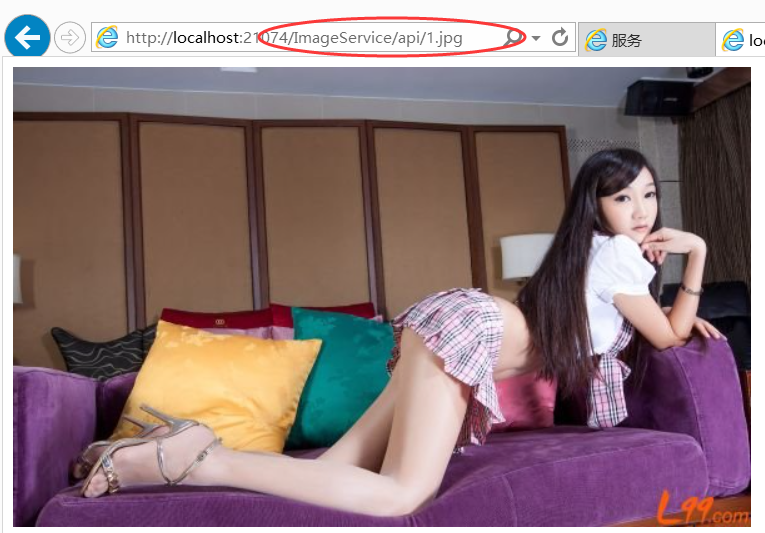
通过restful服务在浏览器中查看:在浏览器中发送get请求,将会调用GetImageStream方法,将stream响应给浏览器,浏览器进行渲染。
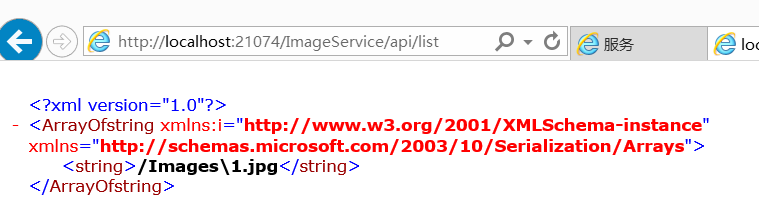
还剩最后一个接口测试,返回所有的图片。因为wcf寄宿的也是一个web站点,所以也可以通过在浏览器中直接调用,将会返回所有的图片的相对路径的xml信息并在页面上进行展示。
总结
本文介绍了restful接口如何处理post过来的stream,以及如何返回stream给客户端的方式,这里也是一种上传下载文件的一种方式。
参考资料
http://blog.csdn.net/fangxing80/article/details/6261431
Restful风格wcf调用3——Stream的更多相关文章
- Restful风格wcf调用4——权限认证
写在前面 在前面的三篇文章,已经介绍了restful风格wcf,如何实现增删改查以及文件的上传下载操作.本篇文章将介绍一下,调用restful的权限认证的内容.在调用的接口,为了安全,总会需要对请求进 ...
- Restful风格wcf调用
文章:Restful风格wcf调用 作者相当于把wcf服务改造成rest风格. Restful风格wcf调用2——增删改查 这篇文章在第一篇的基础上,进行了优化. Restful风格wcf调用3——S ...
- Restful风格wcf调用2——增删改查
写在前面 上篇文章介绍如何将wcf项目,修改成restful风格的接口,并在上面提供了查询的功能,上篇文章中也感谢园友在评论中的提的建议,自己也思考了下,确实是那个道理.在urltemplate中,定 ...
- 构建RESTful风格的WCF服务
构建RESTful风格的WCF服务 RESTful Wcf是一种基于Http协议的服务架构风格. 相较 WCF.WebService 使用 SOAP.WSDL.WS-* 而言,几乎所有的语言和网络平台 ...
- spring boot / cloud (十四) 微服务间远程服务调用的认证和鉴权的思考和设计,以及restFul风格的url匹配拦截方法
spring boot / cloud (十四) 微服务间远程服务调用的认证和鉴权的思考和设计,以及restFul风格的url匹配拦截方法 前言 本篇接着<spring boot / cloud ...
- PHP实现RESTful风格的API实例(二)
接前一篇PHP实现RESTful风格的API实例(一) Response.php :包含一个Request类,即输出类.根据接收到的Content-Type,将Request类返回的数组拼接成对应的格 ...
- PHP实现RESTful风格的API实例(一)
最近看了一些关于RESTful的资料,自己动手也写了一个RESTful实例,以下是源码 目录详情: restful/ Request.php 数据操作类 Response.php 输出类 index. ...
- 用cxf开发restful风格的WebService
我们都知道cxf还可以开发restful风格的webService,下面是利用maven+spring4+cxf搭建webService服务端和客户端Demo 1.pom.xml <projec ...
- Restful风格API接口开发springMVC篇
Restful风格的API是一种软件架构风格,设计风格而不是标准,只是提供了一组设计原则和约束条件.它主要用于客户端和服务器交互类的软件.基于这个风格设计的软件可以更简洁,更有层次,更易于实现缓存等机 ...
随机推荐
- hadoop之 安全模式及SafeModeException
问题: hadoop启动的时候报错 HTTP ERROR 500 Problem accessing /nn_browsedfscontent.jsp. Reason: Cannot issue de ...
- Java separatorChar 如何在Java里面添加 \
Java手册 separatorChar public static final char separatorChar 与系统有关的默认名称分隔符.此字段被初始化为包含系统属性 file.separa ...
- 【ZZ】浅谈大型web系统架构 | 菜鸟教程
浅谈大型web系统架构 http://www.runoob.com/w3cnote/large-scale-web-system-architecture.html
- Jenkins迁移
Jenkins:http://192.168.1.240:8080/jenkins 重启jenkins: sudo /etc/init.d/jenkins start sudo /etc/init.d ...
- 安装 sass 文档
为什么使用Sass 作为前端(html.javascript.css)的三大马车之一的css,一直以静态语言存在,HTML5火遍大江南北了.javascript由于NODE.JS而成为目前前后端统一开 ...
- python报头解决粘包简单实现
client------------- #!/usr/bin/env python # encoding: utf-8 # Date: 2018/6/5 import socketimport st ...
- python中tornado的第一个例子
1 先安装tornado pip install tornado 2 新建tor.py 记住不能建立 tornado.py 这样的名字 不然会报错 ImportError: No module n ...
- ES6系列_10之Symbol在对象中的作用
在ES5中 对象属性名都是字符串,这容易造成属性名的冲突,比如,你使用了一个他人提供的对象,但又想为这个对象添加新的方法(mixin 模式),新方法的名字就有可能与现有方法产生冲突,于是 ES6 引入 ...
- leetcode116
class Solution { public: void connect(TreeLinkNode *root) { if (root != NULL) { queue<TreeLinkNod ...
- 可视化库-Matplotlib-饼图与布局(第四天)
1. 画出一个基本的饼图,通过plt.pie() m = 51212 f = 40742 m_perc = m / (m+f) f_perc = f / (m+f) colors = ['navy', ...