
Linux_Chrome出现Adobe Flash Player is out of date解决方法
Chrome浏览器用的播放器插件是PepperFlashPlayer。而且是内置的。寻常的在命令行下安装的这个插件貌似起不到作用,但是我们可以找到当初安装Chrome时的安装配置目录,把新下载的.so库替换出来!
1. 下载最新版PepperFlashPlayer
官方下载网址:https://get.adobe.com/flashplayer/
进去之后,这个网站会自动识别你的操作系统和系统位数,你只需要选择.tar.gz(Ubuntu)或.rpm(Centos)的文件下载就好了。如图: 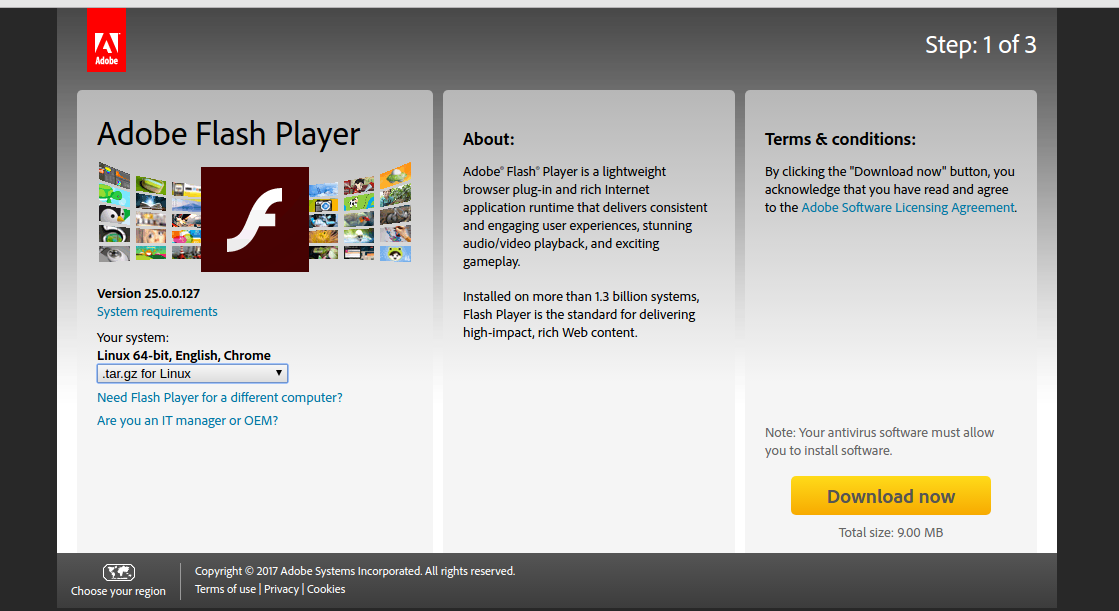
:
点图中的安装也是可以跳转到那个网站的!
下载好后解压,如图: 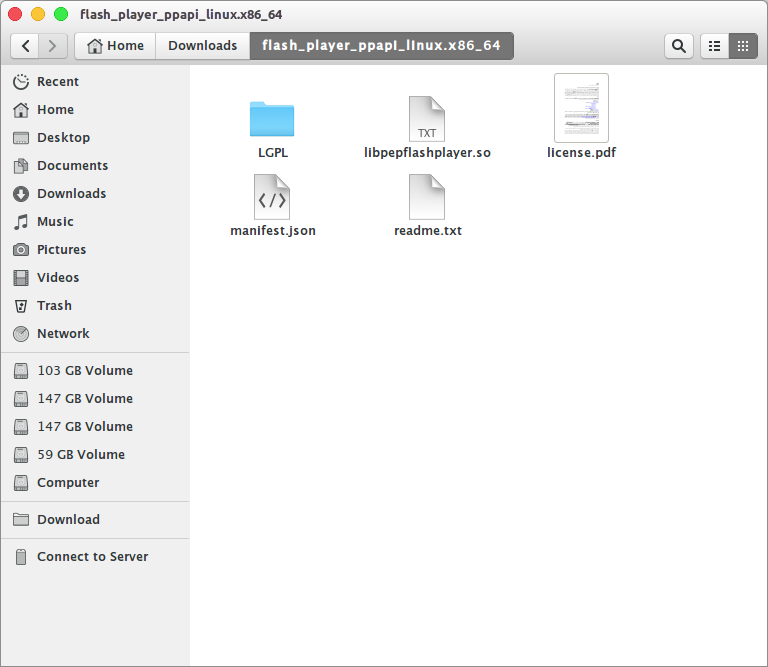
2. 找到Chrome的播放器插件位置
插件位置要么在用户的主目录中,要么在Chrome的安装目录中。
在我的电脑上,插件在安装目录中。
进入目录
cd /.config/google-chrome/PepperFlash
3. 替换原来的插件
将解压的libpepflashplayer.so 复制到当前目录
mv ~/Downloads/flash_player_ppapi_linux.x86_64/libpepflashplayer.so ./
将解压的manifest.json 复制到当前目录
mv ~/Downloads/flash_player_ppapi_linux.x86_64/manifest.json ./
参考:
http://blog.csdn.net/flushhip/article/details/53638061
Linux_Chrome出现Adobe Flash Player is out of date解决方法的更多相关文章
- Win8.1下Flash Builder 提示: 找不到所需的Adobe Flash Player调试器版本,解决办法
系统:Win8.1 x64 [解决]安装Flash DeBug最新版本补丁,注意下载对应系统的调试版本 下载地址:http://www.adobe.com/support/flashplayer/do ...
- 解决“chrome adobe flash player不是最新版本”的方法
chrome地址栏输入chrome://components 更新flash后,重启chrome即可,可能需要搭梯子才能更新.
- Chrome Adobe Flash Player 因过期而 阻止
百度搜索重装不管用 作者:胡中元链接:https://www.zhihu.com/question/32223811/answer/60456561来源:知乎著作权归作者所有.商业转载请联系作者获得授 ...
- Ubuntu下为Firefox安装Adobe Flash Player
使用环境: OS:Ubuntu 12.04 LTS Browser: Firefox 12.0 Adobe Flash Player: install_flash_play ...
- 安装Ubuntu双系统系列——为Firefox安装Adobe Flash Player
使用环境:OS:Ubuntu 12.04 LTSBrowser: Firefox 12.0Adobe Flash Player: install_flash_player_11_linux.x86_6 ...
- 安装Cnario Player 3.8.1.156或其他版本时提示"Warning 4154. Adobe Flash Player 13 ...not correctly installed"
错误提示 安装Cnario Player 3.8.1.156或其他版本时, 有时会出现如下提示: Warning 4154. Adobe Flash Player 13 ...not correctl ...
- 如何下载最新版的 Adobe Flash Player
如何下载最新版的 Adobe Flash Player 中国访客用代理访问下面的链接,否则会自动跳转到 https://www.flash.cn/ 当我们从 https://get.adobe.com ...
- 解决浏览器Adobe Flash Player不是最新版本问题
关键:选择谷歌浏览器的PPAPI版本的flash下载直接安装即可 搜索: Adobe Flash Player PPAPI 下载地址: http://www.wmzhe.com/soft-30259. ...
- chrome一直提示adobe flash player 因过期而遭阻止
链接:https://www.zhihu.com/question/32223811/answer/128088278 很多新用户在安装了Chrome浏览器或者更新过的的时候,经常提示 adobe f ...
随机推荐
- Emulator Error: Could not load OpenGLES emulation library: Could not load DLL!
Copy the file below from SDK\tools\lib to SDK\tools. libEGL_translator.dlllibGLES_CM_translator.dlll ...
- python2.0_day19_后台数据库设计思路
from django.db import models # Create your models here. from django.contrib.auth.models import User ...
- 15个常用GCC命令
GCC编译器非常强大 ,在各个发行的Linux系统中都非常流行,本文介绍的是一些常用的gcc编译选项 下面这段代码将回围绕整个文章: 编辑main.c如下. #include<stdio.h&g ...
- UITableView取消选中颜色、常用操作
UITableView取消选中颜色.常用操作 使用空白view取代cell - (UITableViewCell *)tableView:(UITableView *)tableView cell ...
- EL表达式格式化日期时间
1.首先引入标签库 <%@ taglib prefix="fmt" uri="http://java.sun.com/jsp/jstl/fmt" %> ...
- Runtime 运行时之一:类与对象
Objective-C语言是一门动态语言,它将很多静态语言在编译和链接时期做的事放到了运行时来处理.这种动态语言的优势在于:我们写代码时能够更具灵活性,如我们可以把消息转发给我们想要的对象,或者随意交 ...
- VIM 多行注释与取消
注释: 在使用vim的过程中, 注释是一个比较烦人的事情,要一行一行注释,或者用/* */来注释 下面这种方法可以快捷的进行多行注释. 1.进入vi/vim编辑器,按CTRL+V进入可视化模式(VIS ...
- LeetCode——Find Minimum in Rotated Sorted Array
Description: Suppose a sorted array is rotated at some pivot unknown to you beforehand. (i.e., 0 1 2 ...
- 关于layer.photos即照片显示的问题。
在layer组件中,照片显示是不常用,今天做了一些不伤了. 在这里写出来,以备后用. 其中注意几个问题, 1.格式问题. 2.路径问题. 不同的layer有不同的格式,查看layerAPI中发现的格式 ...
- poj1568 Find the Winning Move[极大极小搜索+alpha-beta剪枝]
Find the Winning Move Time Limit: 3000MS Memory Limit: 32768K Total Submissions: 1286 Accepted: ...