
python webdriver 测试框架-数据驱动json文件驱动的方式
数据驱动json文件的方式
test_data_list.json:
[
"邓肯||蒂姆",
"乔丹||迈克尔",
"库里||斯蒂芬",
"杜兰特||凯文",
"詹姆斯||勒布朗"
]
ReportTemplate.py:
#encoding=utf-8
def htmlTemplate(trData):
htmlStr = u'''<!DOCTYPE HTML>
<html>
<head>
<title>单元测试报告</title>
<style>
body {
width: 80%; /*整个body区域占浏览器的宽度百分比*/
margin: 40px auto; /*整个body区域相对浏览器窗口摆放位置(左右,上下)*/
font-weight: bold; /*整个body区域的字体加粗*/
font-family: 'trebuchet MS', 'Lucida sans', SimSun; /*表格中文字的字体类型*/
font-size: 18px; /*表格中文字字体大小*/
color: #000; /*整个body区域字体的颜色*/
}
table {
*border-collapse: collapse; /*合并表格边框*/
border-spacing: 0; /*表格的边框宽度*/
width: 100%; /*整个表格相对父元素的宽度*/
}
.tableStyle {
/*border: solid #ggg 1px;*/
border-style: outset; /*整个表格外边框样式*/
border-width: 2px; /*整个表格外边框宽度*/
/*border: 2px;*/
border-color: blue; /*整个表格外边框颜色*/
}
.tableStyle tr:hover {
background: rgb(173,216,230); /*鼠标滑过一行时,动态显示的颜色146,208,80*/
}
.tableStyle td,.tableStyle th {
border-left: solid 1px rgb(146,208,80); /*表格的竖线颜色*/
border-top: 1px solid rgb(146,208,80); /*表格的横线颜色 */
padding: 15px; /*表格内边框尺寸*/
text-align: center; /*表格内容显示位置*/
}
.tableStyle th {
padding: 15px; /*表格标题栏,字体的尺寸*/
background-color: rgb(146,208,80); /*表格标题栏背景颜色*/
/*表格标题栏设置渐变颜色*/
background-image: -webkit-gradient(linear, left top, left bottom, from(#92D050), to(#A2D668));
/*rgb(146,208,80)*/
}
</style>
</head>
<body>
<center><h1>测试报告</h1></center><br />
<table class="tableStyle">
<thead>
<tr>
<th>Search Words</th>
<th>Assert Words</th>
<th>Start Time</th>
<th>Waste Time(s)</th>
<th>Status</th>
</tr>
</thead>'''
endStr = u'''
</table>
</body>
</html>'''
# 拼接完整的测试报告HTML页面代码
html = htmlStr + trData + endStr
print html
# 生成.html文件
with open(u"d:\\test\\testTemplate.html", "w") as fp:
fp.write(html.encode("gbk"))
data_drivern_by_file.py:
# encoding=utf-8
from selenium import webdriver
import unittest, time
import logging, traceback
import ddt
from ReportTemplate import htmlTemplate
from selenium.common.exceptions import NoSuchElementException
#如果有no json的报错信息,请将json文件存储为utf-8,with Bom
# 初始化日志对象
logging.basicConfig(
# 日志级别
level = logging.INFO,
# 日志格式
# 时间、代码所在文件名、代码行号、日志级别名字、日志信息
format = '%(asctime)s %(filename)s[line:%(lineno)d] %(levelname)s %(message)s',
# 打印日志的时间
datefmt = '%a, %Y-%m-%d %H:%M:%S',
# 日志文件存放的目录(目录必须存在)及日志文件名
filename = 'd:/report.log',#’d:\\report.log’也可以
# 打开日志文件的方式
filemode = 'w'
)
@ddt.ddt
class TestDemo(unittest.TestCase):
@classmethod
def setUpClass(cls):
# 整个测试过程只被调用一次
TestDemo.trStr = ""
def setUp(self):
self.driver=webdriver.Firefox(executable_path="c:\\geckodriver")
status = None # 用于存放测试结果状态,失败'fail',成功'pass'
flag = 0 # 数据驱动测试结果的标志,失败置0,成功置1
@ddt.file_data("test_data_list.json")
def test_dataDrivenByFile(self, value):
# 决定测试报告中状态单元格中内容的颜色
flagDict = {0: 'red', 1: '#00AC4E'}
url = "http://www.baidu.com"
# 访问百度首页
self.driver.get(url)
# 将浏览器窗口最大化
self.driver.maximize_window()
print value
# 将从.json文件中读取出的数据用“||”进行分隔成测试数据
# 和期望数据
testdata, expectdata = tuple(value.strip().split("||"))
# 设置隐式等待时间为10秒
self.driver.implicitly_wait(10)
try:
# 获取当前的时间戳,用于后面计算查询耗时用
start = time.time()
# 获取当前时间的字符串,表示测试开始时间
startTime = time.strftime("%Y-%m-%d %H:%M:%S", time.localtime())
# 找到搜索输入框,并输入测试数据
self.driver.find_element_by_id("kw").send_keys(testdata)
# 找到搜索按钮,并点击
self.driver.find_element_by_id("su").click()
time.sleep(3)
# 断言期望结果是否出现在页面源代码中
self.assertTrue(expectdata in self.driver.page_source)
except NoSuchElementException, e:
logging.error(u"查找的页面元素不存在,异常堆栈信息:" \
+ str(traceback.format_exc()))
status = 'fail'
flag = 0
except AssertionError, e:
logging.info(u"搜索“%s”,期望“%s”,失败" %(testdata, expectdata))
status = 'fail'
flag = 0
except Exception, e:
logging.error(u"未知错误,错误信息:" + str(traceback.format_exc()))
status = 'fail'
flag = 0
else:
logging.info(u"搜索“%s”,期望“%s”通过" %(testdata, expectdata))
status = 'pass'
flag = 1
# 计算耗时,从将测试数据输入到输入框中到断言期望结果之间所耗时
wasteTime = time.time() - start - 3 # 减去强制等待的3秒
# 每一组数据测试结束后,都将其测试结果信息插入表格行
# 的HTML代码中,并将这些行HTML代码拼接到变量trStr变量中,
# 等所有测试数据都被测试结束后,传入htmlTemplate()函数中
# 生成完整测试报告的HTML代码
TestDemo.trStr += u'''
#这段儿会被多次拼接,每搜索一次就会把模板字符串后边的字符拼接上
<tr>
<td>%s</td>
<td>%s</td>
<td>%s</td>
<td>%.2f</td>
<td style="color:%s">%s</td>
</tr><br />''' % (testdata, expectdata,startTime, wasteTime, flagDict[flag], status)
def tearDown(self):
self.driver.quit()
@classmethod
def tearDownClass(cls):
# 写自定义的html测试报告
# 整个测试过程只被调用一次
htmlTemplate(TestDemo.trStr)
if __name__ == '__main__':
unittest.main()
结果:
D:\test>python test.py
邓肯||蒂姆
testdata,expectdata: 邓肯 蒂姆
.乔丹||迈克尔
testdata,expectdata: 乔丹 迈克尔
.库里||斯蒂芬
testdata,expectdata: 库里 斯蒂芬
.杜兰特||凯文
testdata,expectdata: 杜兰特 凯文
.詹姆斯||勒布朗
testdata,expectdata: 詹姆斯 勒布朗
.<!DOCTYPE HTML>
<html>
<head>
<title>单元测试报告</title>
<style>
body{
width:80%;/*整个body区域占浏览器的宽度百分比*/
margin:40px auto;/*整个body区域相对浏览器窗口摆放位置(左右,上下)*/
font-weight:bold;/*整个body区域的字体加粗*/
font-family:'trebuchet MS','Lucida sans',SimSun;/*表格中文字的字体类型*/
font-size:18px;/*表格中文字字体大小*/
color:#000;/*整个body区域字体的颜色*/
}
table{
*border-collapse:collapse;/*合并表格边框*/
border-spacing:0;/*表格的边框宽度*/
width:100%;
}
.tableStyle{
/*border:solid #ggg 1px;*/
border-style:outset;/*整个表格外边框样式*/
border-width:2px;/*整个表格外边框宽度*/
/*border:2px*/
border-color:blue;/*整个表格外边框颜色*/
}
.tableStyle tr:hover{
background:rgb(173,216,230);/*鼠标滑过一行时,动态显示的颜色*/
}
.tableStyle td,.tableStyle th{
border-left:solid 1px rgb(146,208,80);/*表格的竖线颜色*/
border-top:1px solid rgb(146,208,80);/*表格的横线颜色*/
padding:15px;/*表格内边框尺寸*/
text-align:center;/*表格内容显示位置*/
}
.tableStyle th{
padding:15px;/*表格标题栏,字体的尺寸*/
background-color:rgb(146,208,80);/*表格标题栏背景颜色*/
/*表格标题栏设置渐变颜色*/
background-image:-webkit-gradient(linear,left top,left bottom,from(#92D050) to(#A2D668));/*rgb(14,208,80)*/
}
</style>
</head>
<body>
<center><h1>测试报告</h1></center><br/>
<table class='tableStyle'>
<thead>
<tr>
<th>Search Words</th>
<th>Assert Words</th>
<th>Start Time</th>
<th>Waste Time(s)</th>
<th>Status</th>
</tr>
</thead>
<tr>
<td>邓肯</td>
<td>蒂姆</td>
<td>2018-06-27 21:38:14</td>
<td>0.58</td>
<td style="color:#00AC4E">pass</td>
</tr><br/>
<tr>
<td>乔丹</td>
<td>迈克尔</td>
<td>2018-06-27 21:38:29</td>
<td>0.53</td>
<td style="color:#00AC4E">pass</td>
</tr><br/>
<tr>
<td>库里</td>
<td>斯蒂芬</td>
<td>2018-06-27 21:38:43</td>
<td>0.53</td>
<td style="color:#00AC4E">pass</td>
</tr><br/>
<tr>
<td>杜兰特</td>
<td>凯文</td>
<td>2018-06-27 21:38:59</td>
<td>0.51</td>
<td style="color:#00AC4E">pass</td>
</tr><br/>
<tr>
<td>詹姆斯</td>
<td>勒布朗</td>
<td>2018-06-27 21:39:13</td>
<td>0.56</td>
<td style="color:#00AC4E">pass</td>
</tr><br/>
</table>
</body>
</html>
----------------------------------------------------------------------
Ran 5 tests in 74.468s
OK
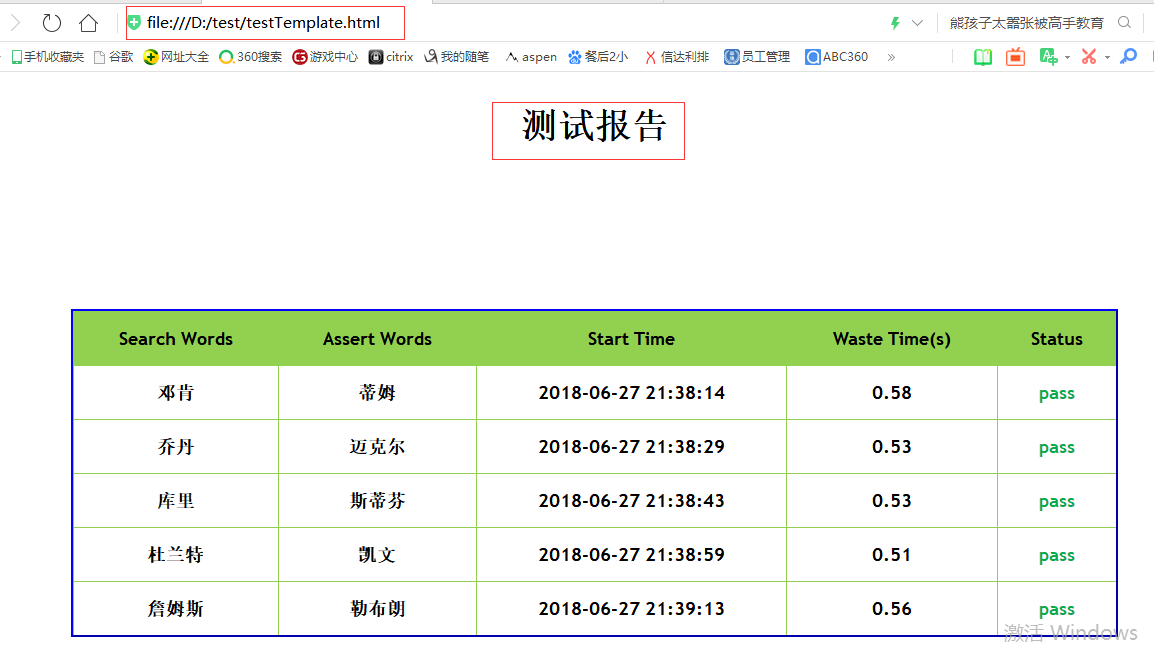
html报告:
report0627.log:
Wed,2018-06-27 21:38:18 test.py[line:110] INFO 搜索"邓肯",期望"蒂姆"通过
Wed,2018-06-27 21:38:33 test.py[line:110] INFO 搜索"乔丹",期望"迈克尔"通过
Wed,2018-06-27 21:38:47 test.py[line:110] INFO 搜索"库里",期望"斯蒂芬"通过
Wed,2018-06-27 21:39:03 test.py[line:110] INFO 搜索"杜兰特",期望"凯文"通过
Wed,2018-06-27 21:39:17 test.py[line:110] INFO 搜索"詹姆斯",期望"勒布朗"通过
python webdriver 测试框架-数据驱动json文件驱动的方式的更多相关文章
- python webdriver 测试框架-数据驱动txt文件驱动,带报告的例子
数据驱动txt文件驱动的方式,带报告 data.txt: gloryroad test||光荣之路 摔跤爸爸||阿米尔 超人||电影 data_driven_by_txt_file.py: #enco ...
- python webdriver 测试框架-数据驱动xml驱动方式
数据驱动xml驱动的方式 存数据的xml文件:TestData.xml: <?xml version="1.0" encoding="utf-8"?> ...
- python webdriver 测试框架-数据驱动excel驱动的方式
简介: 数据驱动excel驱动方式,就是数据配置在excel里面,主程序调用的时候每次用从excel里取出的数据作为参数,进行操作, 需要掌握的地方是对excel的操作,要灵活的找到目标数据 测试数据 ...
- python webdriver 测试框架-数据驱动exce驱动,不用ddt的方式
data.xlsx: 脚本: #encoding=utf-8from selenium import webdriverimport timeimport datetimefrom openpyxl ...
- python webdriver 测试框架-数据驱动DDT的例子
先在cmd环境 运行 pip install ddt 安装数据驱动ddt模块 脚本: #encoding=utf-8 from selenium import webdriver import un ...
- python webdriver 测试框架-行为驱动例子
安装行为驱动模块lettuce(卷心菜)模块 pip install lettuce Successfully installed argparse-1.4.0 colorama-0.3.9 extr ...
- python nose测试框架全面介绍七--日志相关
引: 之前使用nose框架时,一直使用--logging-config的log文件来生成日志,具体的log配置可见之前python nose测试框架全面介绍四. 但使用一段时间后,发出一个问题,生成的 ...
- python nose测试框架全面介绍十---用例的跳过
又来写nose了,这次主要介绍nose中的用例跳过应用,之前也有介绍,见python nose测试框架全面介绍四,但介绍的不详细.下面详细解析下 nose自带的SkipTest 先看看nose自带的S ...
- python nose测试框架全面介绍六--框架函数别名
之前python nose测试框架全面介绍二中介绍了nose框架的基本构成,但在实际应该中我们也会到setup_function等一系列的名字,查看管网后,我们罗列下nose框架中函数的别名 1.pa ...
随机推荐
- Oracle应用技术精华教程:管理还原段
管理还原段 在oracle 9i 之后提供了两种方法来管理还原数据 自动的还原数据管理:oracle 自动管理还原段的创建.分配和优化 手动的还原数据管理:oracle 手动管理还原段的创建.分配和优 ...
- Intel S5000VSA(SAS)主板设置RAID 步骤【转】
Intel S5000VSA(SAS)主板设置RAID 步骤 我近日亲自安 装了一台服务器,用的是intel S5000VSA 4DIMM主板,因为在安装过程中没有注意到一些细节,所以在安装时碰到了一 ...
- nginx mac 下启动 停止 重启,查看安装位置
Nginx的启动.停止与重启 启动 启动代码格式:nginx安装目录地址 -c nginx配置文件地址 例如: [root@LinuxServer sbin]# /usr/local/nginx/ ...
- stm32入门(从51过渡到32)
单片机对于我来说,就是一个超级大机器,上面有一排一排数不尽的开关,我需要做的,就是根据我的设计,拿着一张超级大的表(Datasheet),把需要的开关(reg)都开关(config)到对应功能的位置( ...
- cocos2d-x游戏引擎核心之九——跨平台
一.cocos2d-x跨平台 cocos2d-x到底是怎样实现跨平台的呢?这里以Win32和Android为例. 1. 跨平台项目目录结构 先看一下一个项目创建后的目录结构吧!这还是以HelloCpp ...
- Windows系统调用架构分析—也谈KiFastCallEntry函数地址的获取
为什么要写这篇文章 1. 因为最近在学习<软件调试>这本书,看到书中的某个调试历程中讲了Windows的系统调用的实现机制,其中讲到了从Ring3跳转到Ring0之后直接进入了K ...
- 解决instance中文命名导致nova list报错问题
当创建instance之后,如果使用英文命名,执行nova list的时候,无问题,但是,如果instance中出现中文,执行nova list的时候,会报以下错误: [root@controller ...
- 使用CDN的网络访问过程
CDN是指内容分发网络,在网络各处架设节点服务器,当用户访问时,CDN系统会根据网络流量.到用户的距离等因素将请求导向离用户最近的节点上. 访问过程是: 1.用户向浏览器提供要访问的域名. 2.浏览器 ...
- 图论之最短路径(2)——Bellman-Ford算法
继续最短路径!说说Bellman—Ford算法 思路:假设起点为s,图中有n个顶点和m个边,那么它到任一点(比如i)的最短路径 最多可以有n-1条(没有回路就是n-1条):因为最短路径中不可能包含回路 ...
- hihocoder [Offer收割]编程练习赛14 剑刃风暴
题目4 : 剑刃风暴 时间限制:20000ms 单点时限:2000ms 内存限制:256MB 描述 主宰尤涅若拥有一招非常厉害的招式——剑刃风暴,“无论是战士还是法师,都害怕尤涅若的武士刀剑技”. 现 ...