
Java——poi读取Excel文件
1.创建文件流,打开EXCEL文件
FileInputStream excelFile = new FileInputStream(excelPath);

XSSFWorkbook workbook = new XSSFWorkbook(excelFile);
2.切换到对应文件名
XSSFSheet excelSheet = workbook.getSheet(sheetName);
3.获取实际行数和列数
int rows = excelSheet.getPhysicalNumberOfRows(); //行数

int cols = excelSheet.getRow(0).getPhysicalNumberOfCells();//列数
4.读取数据
    public static String ReadData(XSSFSheet excelSheet, int row, int col){

        try{

            String CellData= "";

            XSSFCell cell = excelSheet.getRow(row).getCell(col);

            if(cell.getCellType() == HSSFCell.CELL_TYPE_NUMERIC){

                cell.setCellType(Cell.CELL_TYPE_STRING);

                CellData = cell.getStringCellValue();

            }

            else if(cell.getCellType() == HSSFCell.CELL_TYPE_STRING){

                CellData = cell.getStringCellValue();

            }

            else if(cell.getCellType() == HSSFCell.CELL_TYPE_FORMULA){

                CellData = cell.getCellFormula();

            }

            return CellData;

        }catch(Exception e){

            return "";

        }

    }
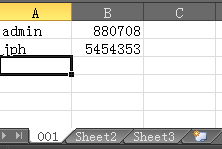
示例:
import java.io.FileInputStream;

import java.io.FileNotFoundException;

import java.io.IOException;

import org.apache.poi.ss.usermodel.Cell;

import org.apache.poi.xssf.usermodel.XSSFCell;

import org.apache.poi.xssf.usermodel.XSSFSheet;

import org.apache.poi.xssf.usermodel.XSSFWorkbook;

public class Excel {

    public static void main(String[] args) throws IOException {

        String excelPath = "F:\\login.xlsx";

        String sheetName = "001";

        try{

            FileInputStream excelFile = new FileInputStream(excelPath);

            XSSFWorkbook workbook = new XSSFWorkbook(excelFile);

            XSSFSheet excelSheet = workbook.getSheet(sheetName);

            int rows = excelSheet.getPhysicalNumberOfRows(); //行数

            int cols = excelSheet.getRow(0).getPhysicalNumberOfCells();//列数

            for(int row = 0;row< rows; ++row){

                for (int col =0; col < cols; ++col){

                    System.out.print(ReadData(excelSheet, row, col) + ' ');

                    if(col ==1)

                        System.out.println();

                }

            }

            workbook.close();

        }catch (FileNotFoundException e ){

            System.out.println("找不到该文件");

        }

    }

    public static String ReadData(XSSFSheet excelSheet, int row, int col){

        try{

            String CellData= "";

            XSSFCell cell = excelSheet.getRow(row).getCell(col);

            cell.setCellType(Cell.CELL_TYPE_STRING);

            CellData = cell.getStringCellValue();

            return CellData;

        }catch(Exception e){

            return "";

        }

    }

}
输出结果:

5.写入excel
同样我们一开始先来想下手工写入数据流程
1:打开EXCEL
2:指定Sheet
3: 指定行号
4:指定列号
5:写入数据
6:保存数据
了解了操作流程,我们就将思想转为成代码其实1,2,3,4
我们在读Excel时就已写过,但这里要注意下,我们在读Excel时是不是已有数据,那也就是说每个单元格中已有内容,我们用getRow(行号)不是空值对吗,如果我们要往一个没有值的单元格写值时一开始那个行号是空值,所以我们第三步应改为创建一个行号,第四步改为创一个列号创建行号
我们可以用CreateRow(行号)在创建行号时,我们要想一个问題,我们一开始创建了第一行,并写入一个值到单元格中,比如我想写入一个结果到第一行第二个单元格时也是先创建一行吗,如果再用创建方式生成第一行,那前一次写入的数据会不会不存在呢,实际上是会被删掉的,这个自已可以去试试
所以我们代码实现应是这样一开始用getrow(1)如果反回的值是空值,那就用CreateRow的方式,如果不是空值我就用GetRow(1)
public static void setData(int row, int col, String sheetName, String Data, String WriteExcelPath) throws IOException{

        try{

            FileInputStream excelFile = new FileInputStream(WriteExcelPath);

            XSSFWorkbook workbook = new XSSFWorkbook(excelFile);

            XSSFSheet excelSheet = workbook.getSheet(sheetName);

            XSSFRow Row = excelSheet.getRow(row);

            if(Row == null)

                Row = excelSheet.createRow(row);

            XSSFCell Cell = Row.getCell(col);

            if(Cell == null )

                Cell = Row.createCell(col);

            Cell.setCellValue(Data);

            FileOutputStream fileOut = new FileOutputStream(WriteExcelPath);

            workbook.write(fileOut);

            fileOut.close();

            workbook.close();

        }catch(Exception e){

            System.out.println("数据写入错误");

        }

    }
Java——poi读取Excel文件的更多相关文章
- JAVA使用POI读取EXCEL文件的简单model
一.JAVA使用POI读取EXCEL文件的简单model 1.所需要的jar commons-codec-1.10.jarcommons-logging-1.2.jarjunit-4.12.jarlo ...
- 项目一:第四天 1、快递员的条件分页查询-noSession,条件查询 2、快递员删除(逻辑删除) 3、基于Apache POI实现批量导入区域数据 a)Jquery OCUpload上传文件插件使用 b)Apache POI读取excel文件数据
1. 快递员的条件分页查询-noSession,条件查询 2. 快递员删除(逻辑删除) 3. 基于Apache POI实现批量导入区域数据 a) Jquery OCUpload上传文件插件使用 b) ...
- 使用POI 读取 Excel 文件,读取手机号码 变成 1.3471022771E10
使用POI 读取 Excel 文件,读取手机号码 变成 1.3471022771E10 [问题点数:40分,结帖人xieyongqiu] 不显示删除回复 ...
- Java实现POI读取Excel文件,兼容后缀名xls和xlsx
1.引入所需的jar包: maven管理项目的话直接添加以下坐标即可: <!-- https://mvnrepository.com/artifact/org.apache.poi/poi -- ...
- 使用jxl,poi读取excel文件
作用:在java后台添加一个方法,读取导入的excel内容,根据需要返回相应的sql语句,以完成对临时表的插入操作. 使用jxl读取excel文件 package com.sixthf.bi.sapp ...
- 使用POI读取excel文件内容
1.前言 项目中要求读取excel文件内容,并将其转化为xml格式.常见读取excel文档一般使用POI和JExcelAPI这两个工具.这里我们介绍使用POI实现读取excel文档. 2.代码实例: ...
- jspsmart(保存文件)+poi(读取excel文件)操作excel文件
写在前面: 项目环境:jdk1.4+weblogic 需求:能上传excel2003+2007 由于项目不仅需要上传excel2003,还要上传excel2007,故我们抛弃了jxl(只能上传exce ...
- 使用poi读取excel文件 Cannot get a text value from a numeric cell
我这样转换得到一个excel文本域的值 Cell cell = row.getCell(c); cell.setCellType(Cell.CELL_TYPE_STRING); String park ...
- spring boot 使用 POI 读取Excel文件
内容简介 本文主要介绍使用POI进行Excel文件的相关操作,涉及读取文件,获取sheet表格,对单元格内容进行读写操作,以及合并单元格的操作. Excel文件目录 Excel模板文件存了resour ...
随机推荐
- Android之扫描二维码和根据输入信息生成名片二维码
开发中常常遇到二维码扫码操作,前段时间做项目要实现该功能,于是网上查找资料实现了,现在把他做出来给各位分享一下,主要包含了二维码扫描和生成二维码名片. 先来看看效果图: 生成的二维码,打开微信扫一 ...
- linux下升级npm以及node
npm升级 废话不多说,直接讲步骤.先从容易的开始,升级npm. npm这款包管理工具虽然一直被人们诟病,很多人都推荐使用yarn,但其使用人数还是不见减少,况且npm都是随node同时安装好的,一时 ...
- UVA-12657 Boxes in a Line (双向链表)
题目大意:一个1~n的升序数字序列,有4种操作.操作1,将x放到y前面一个位置:操作2将x放到y后面的一个位置:操作3交换x和y的位置:操作4反转整个序列.求经过m次操作后的所有奇数项的和. 题目分析 ...
- 出错的sql
alter table m_account AUTO_INCREMENT=200029860;
- 在EORow或者VORow中对数据进行重复性校验
需求:在设置付款条件时不允许账期+付款方式重复. 由于本次需求仅需要对VO缓存中的数据进行重复性校验,所以仅需进行缓存遍历即可,不需要校验数据库. 方式1,在EORow的进行数据校验. public ...
- [转载]c语言指针segmentation fault 指针常常错误的小地方
http://www.cnblogs.com/qingjoin/archive/2012/03/20/2408944.html #include <stdio.h> ] = ] = ] = ...
- Python - learn note(1)
1. 下载安装Python 2.7(为了向下兼容以前的版本), Python 3.5(VS2015不支持配置3.6的环境) 教程 需要使用VS2015进行开发,必须勾选上后面两项: 2. VS2015 ...
- 面筋: 奇虎360 c++ 后台开发 实习生 面试
投的是360上海的商业化部门,岗位是C++服务端开发实习生,记录一下面试历程: 视频面试,但是是有代码框让你写代码的. 一面: Q:先说一下个人信息,做过的项目 A:.......... Q:先写个翻 ...
- hashcode()和equals()方法
(一)hashcode(): 当Set接收一个元素时根据该对象的内存地址算出hashCode,看它属于哪一个区间,再这个区间里调用equeals方法.这里需要注意的是:当俩个对象的hashCode值相 ...
- 判断一棵树是否为二叉搜索树(二叉排序树) python
输入一棵树,判断这棵树是否为二叉搜索树.首先要知道什么是排序二叉树,二叉排序树是这样定义的,二叉排序树或者是一棵空树,或者是具有下列性质的二叉树: (1)若左子树不空,则左子树上所有结点的值均小于它的 ...