
[Elixir005] 查看指定数据的详细信息 i helper
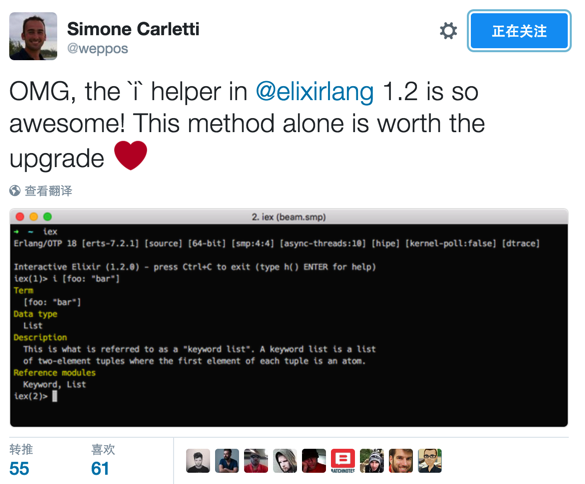
#查看变量描述

iex(1)> i {:test, "That sounds great"}

Term

  {:test, "That sounds great"}

Data type

  Tuple

Reference modules

  Tuple

#查看Module描述(有点类似于Erlang的lists:module_info)

iex(2)> i List

Term

  List

Data type

  Atom

Module bytecode

  usr/local/Cellar/elixir/1.2.0/bin/../lib/elixir/ebin/Elixir.List.beam

Source

  private/tmp/elixir20160101-48495-1fg1arr/elixir-1.2.0/lib/elixir/lib/list.ex

Version

  [322093417650371381585336045669056703278]

Compile time

  2016-1-1 11:57:45

Compile options

  [:debug_info]

Description

  Use h(List) to access its documentation.

  Call List.module_info() to access metadata.

Raw representation

  :"Elixir.List"

Reference modules

  Module, Atom
  @doc """

  Prints information about the given data type.

  """

  def i(term) do

    info = ["Term": inspect(term)] ++ IEx.Info.info(term)

    for {subject, info} <- info do

      info = info |> to_string() |> String.strip() |> String.replace("\n", "\n  ")

      IO.puts IEx.color(:eval_result, to_string(subject))

      IO.puts IEx.color(:eval_info, "  #{info}")

    end

    dont_display_result

  end
defprotocol IEx.Info do

  @fallback_to_any true

  @spec info(term) :: [{atom, String.t}]

  def info(term)

end

defimpl IEx.Info, for: Tuple do

  def info(_tuple) do

    ["Data type": "Tuple",

     "Reference modules": "Tuple"]

  end

end
它是一个protocol,在这个文件中把elixir的基本类型都实现了一次,它会返回一个keyword list, 所以我们才能看到,那么如果我们试试自己定义?
iex(3)> defmodule User do

…(3)> defstruct name: "John", age: 25

…(3)> @type t :: %User{name: String.t, age: non_neg_integer}

…(3)> end
因为在info.ex中已处理struct的类型, 如果我们现在直接i的结果它是
iex(4)> i %User{}

Term

  %User{age: 25, name: "John"}

Data type

  User

Description

  This is a struct. Structs are maps with a __struct__ key.

Reference modules

  User, Map
接下来, 我们来自定义看看
iex(5)> defimpl IEx.Info, for: User do

…(5)> def info(item) do

…(5)>   ["Data type":  User, "Description": "The customer is god, pleasure they", "Reference": "blablabla..."]

…(5)> end

…(5)> end

iex(6)> i %User{}

Term

  %User{age: 25, name: "John"}

Data type

  Elixir.User

Description

  The customer is god, pleasure they

Reference

  blablabla...
成功!
官方文档: http://elixir-lang.org/docs/stable/iex/IEx.Helpers.html#i/1
彩蛋:
有没有看到我们输入i得到的结果,只是把格式用有颜色的格式打印出来,但是确没有看到返回值被打印出来。。。
它的结果无论如何都打印不出来滴。因为它调用了
IEx.dont_display_result
在 evaluator.ex 里面:
unless result == IEx.dont_display_result, do: io_inspect(result)
if my fingers were erlang processes

[Elixir005] 查看指定数据的详细信息 i helper的更多相关文章
- asp.net/wingtip/显示数据和详细信息
前边我们的工作处于wingtip工程基础建设阶段,先是建立了“数据访问层”,然后设计建设了“UI和导航”的框架,接下来要充实工程的内容,显示“数据和详细信息”. 一. 添加数据控件(Data Cont ...
- 操作系统复习——如何查看一个进程的详细信息,如何追踪一个进程的执行过程 ,如何在 Linux 系统下查看 CPU、内存、磁盘、IO、网卡情况?epoll和select区别?
1. 如何查看一个进程的详细信息,如何追踪一个进程的执行过程 通过pstree命令(根据pid)进行查询进程内部当前运行了多少线程:# pstree -p 19135(进程号) 使用top命令查看(可 ...
- 使用tcpdump查看HTTP请求响应 详细信息 数据
安装tcpdump: sudo yum install tcpdump 查看get请求: tcpdump -s 0 -A 'tcp dst port 80 and tcp[((tcp[12:1] &a ...
- 【数据库】】MySQL之desc查看表结构的详细信息
在mysql中如果想要查看表的定义的话:有如下方式可供选择 1.show create table 语句: show create table table_name; 2.desc table_nam ...
- MySQL之desc查看表结构的详细信息
在mysql中如果想要查看表的定义的话:有如下方式可供选择 1.show create table 语句: show create table table_name; 2.desc table_nam ...
- Python查看模块函数,查看函数方法的详细信息
Python查看方法的详情 1.通用的帮助函数help() 使用help()函数来查看函数的帮助信息. 如: import requests help(requests) 会有类似如下输出: 2.查询 ...
- 查看mssql死锁的详细信息(存储过程)
CREATE procedure [dbo].[sp_who_lock]asbegindeclare @spid int,@bl int, @intTransactionCountOn ...
- docker查看容器元数据、详细信息,查看容器挂载的目录
通过 docker inspect 175f 查看容器元数据 我们启动docker的时候会挂载目录,但是挂载之后 后面就忘了 如何查看挂载的目录位置呢 可以通过 docker inspect a7a6 ...
- linux下如何查看某个容器的详细信息?
答: 使用docker inspect <CONTAINER ID>即可
随机推荐
- Bootstrap-Plugin:滚动监听(Scrollspy)插件
ylbtech-Bootstrap-Plugin:滚动监听(Scrollspy)插件 1.返回顶部 1. Bootstrap 滚动监听(Scrollspy)插件 滚动监听(Scrollspy)插件,即 ...
- [html][javascript] 正则匹配示例
var str="akdlfaklhello 1234klfd1441ksalfd9000kals8998j2345fd;lsa"; var reg = new RegExp(/( ...
- 【BZOJ】1801 [Ahoi2009]chess 中国象棋(dp)
题目 传送门:QWQ 分析 发现我们关心的不是棋子的位置,我们只关心棋子数量就ok. 首先每行每列最多两个棋子.这是显然的. 然后我觉得本题最难的部分就是对行进行讨论,蒟蒻我一直被限制在了对格点讨论. ...
- 给iOS开发新手送点福利,简述UIControl事件的用法
UIControl事件 1.UIControlEventTouchDown 单点触摸按下事件:用户点触屏幕,或者又有新手指落下的时候. 2.UIControlEventTouchDownRepeat ...
- django单表操作,增、删、改、查
一.实现:增.删.改.查 1.获取所有数据显示在页面上 model.Classes.object.all(),拿到数据后,渲染给前端;前端通过for循环的方式,取出数据. 目的:通过classes(班 ...
- ASPxGridView删除、添加、修改成功后,弹出提示对话框的方法
分为几步: 1.在aspx文件中添加 function EndCallBack(s, e) { if (s.cpAlertMsg != "" && s.cpA ...
- 33.使用默认的execAndWait拦截器
转自:https://wenku.baidu.com/view/84fa86ae360cba1aa911da02.html 当我们进行数据库查询等相关的操作时,如果服务器负荷过重可能不能及时把数据查询 ...
- ManagedProperty not injected in @FacesConverter
I'm trying to inject a ManagedBean in my FacesConverted the following way: @ManagedBean @RequestScop ...
- ThreadLocal<T> 类
using System; using System.Threading; using System.Threading.Tasks; class ThreadLocalDemo { // Demon ...
- 31. Next Permutation (Array; Math)
Implement next permutation, which rearranges numbers into the lexicographically next greater permuta ...