
iOS UITableView制作类似QQ好友列表视图
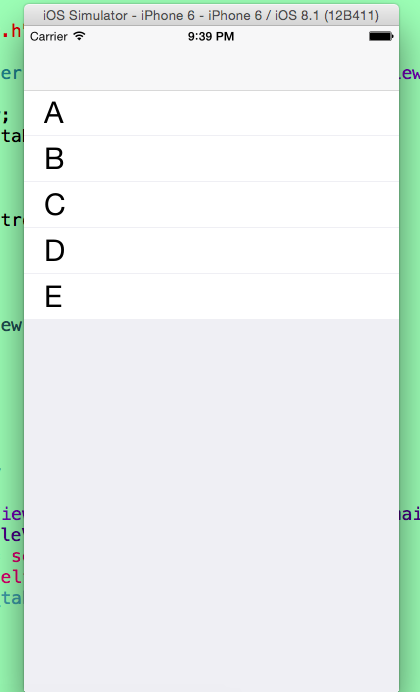
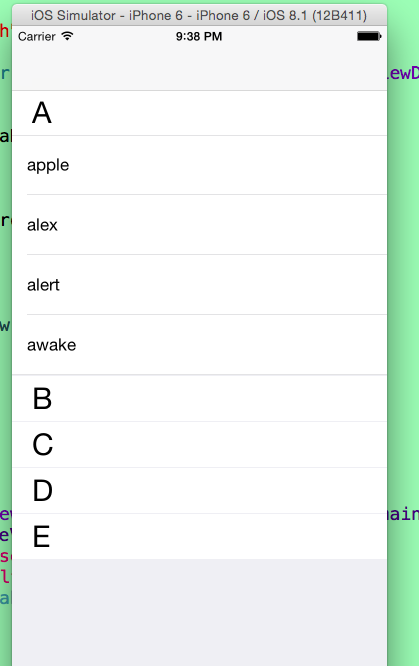
 #import <UIKit/UIKit.h>

 @interface AppDelegate : UIResponder <UIApplicationDelegate>

 @property (strong, nonatomic) UIWindow *window;

 @end
 #import "AppDelegate.h"

 #import "RootViewController.h"

 @interface AppDelegate ()

 @end

 @implementation AppDelegate

 - (BOOL)application:(UIApplication *)application didFinishLaunchingWithOptions:(NSDictionary *)launchOptions {

     self.window = [[UIWindow alloc] initWithFrame:[[UIScreen mainScreen] bounds]];

     // Override point for customization after application launch.

     self.window.backgroundColor = [UIColor whiteColor];

     UINavigationController *navi = [[UINavigationController alloc] initWithRootViewController:[[RootViewController alloc] init]];

     self.window.rootViewController = navi;

     [self.window makeKeyAndVisible];

     return YES;

 }

 @end
 #import <UIKit/UIKit.h>

 @interface RootViewController : UIViewController

 @end
 #import "RootViewController.h"

 @interface RootViewController ()<UITableViewDataSource,UITableViewDelegate>

 {

     UITableView *_tableView;

     NSMutableDictionary *dataDic;

 }

 @end

 @implementation RootViewController

 - (void)viewDidLoad {

     [super viewDidLoad];

     // 初始化_tableView

     [self initializeTableView];

     // 加载数据

     [self loadData];

 }

 /**

  *  初始化_tableView

  */

 - (void)initializeTableView

 {

     _tableView = [[UITableView alloc] initWithFrame:[[UIScreen mainScreen] bounds] style:UITableViewStyleGrouped];

     _tableView.dataSource = self;

     _tableView.delegate = self;

     [self.view addSubview:_tableView];

 }

 /**

  *  加载数据

  */

 - (void)loadData

 {

     // 数组的第一个对象为标志位(是否展开)

     NSMutableArray *arr1 = [NSMutableArray arrayWithObjects:@"",@"apple",@"alex",@"alert",@"awake", nil];

     NSMutableArray *arr2 = [NSMutableArray arrayWithObjects:@"",@"blance",@"bank",@"baby",@"bet",@"balance", nil];

     NSMutableArray *arr3 = [NSMutableArray arrayWithObjects:@"",@"cake",@"cat",@"caught",@"cell",@"clabe", @"cry",@"cave",nil];

     NSMutableArray *arr4 = [NSMutableArray arrayWithObjects:@"",@"dog",@"data",@"date",@"drive",@"down", @"deliver",@"dire",@"drawn",@"dety",@"depature",@"dom",nil];

     NSMutableArray *arr5 = [NSMutableArray arrayWithObjects:@"",@"elphance",@"eleven",@"every",nil];

     // 把对应的数据存入字典

     dataDic = [NSMutableDictionary dictionaryWithObjectsAndKeys:arr1,@"A",arr2,@"B",arr3,@"C",arr4,@"D",arr5,@"E", nil] ;

 }

 #pragma mark - UITableViewDataSource And UITableViewDelegate -

 // 返回的表头个数

 - (NSInteger)numberOfSectionsInTableView:(UITableView *)tableView

 {

     return [[dataDic allKeys] count];

 }

 // 每个表头返回对应的行数

 - (NSInteger)tableView:(UITableView *)tableView numberOfRowsInSection:(NSInteger)section

 {

     // 因为字典是无序的,通过比较来进行排序

     NSArray *keys = [[dataDic allKeys] sortedArrayUsingSelector:@selector(compare:)];

     NSString *key = keys[section];

     NSMutableArray *array = dataDic[key];

     NSString *IsExpand = array[];

     // 如果为“1”则返回相应的行数,否则返回0

     if ([IsExpand isEqualToString:@""]) {

         // 因为数组的第一位为标志位所以减1

         return ([array count] - );

     }

     return ;

 }

 - (CGFloat)tableView:(UITableView *)tableView heightForHeaderInSection:(NSInteger)section

 {

     return ;

 }

 - (CGFloat)tableView:(UITableView *)tableView heightForFooterInSection:(NSInteger)section

 {

     return ;

 }

 - (CGFloat)tableView:(UITableView *)tableView heightForRowAtIndexPath:(NSIndexPath *)indexPath

 {

     return ;

 }

 - (UIView *)tableView:(UITableView *)tableView viewForHeaderInSection:(NSInteger)section

 {

     UIView *view = [[UIView alloc] initWithFrame:CGRectMake(, , [UIScreen mainScreen].bounds.size.width, )];

     view.backgroundColor = [UIColor colorWithRed: green: blue: alpha:];

     UILabel *label = [[UILabel alloc] initWithFrame:CGRectMake(, , [UIScreen mainScreen].bounds.size.width - , )];

     label.font = [UIFont systemFontOfSize:];

     label.backgroundColor = [UIColor clearColor];

     label.textColor = [UIColor blackColor];

     NSArray *keys = [[dataDic allKeys] sortedArrayUsingSelector:@selector(compare:)];

     label.text = keys[section];

     [view addSubview:label];

     UIButton *button = [UIButton buttonWithType:UIButtonTypeCustom];

     button.frame = CGRectMake(, , [UIScreen mainScreen].bounds.size.width, );

     [button addTarget:self action:@selector(buttonAction:) forControlEvents:UIControlEventTouchUpInside];

     button.tag =  + section;

     [view addSubview:button];

     return view;

 }

 - (UITableViewCell *)tableView:(UITableView *)tableView cellForRowAtIndexPath:(NSIndexPath *)indexPath

 {

     static NSString *identifier = @"cell";

     UITableViewCell *cell = [tableView dequeueReusableCellWithIdentifier:identifier];

     if (cell == nil) {

         cell = [[UITableViewCell alloc] initWithStyle:UITableViewCellStyleDefault reuseIdentifier:identifier];

     }

     NSArray *keys = [[dataDic allKeys] sortedArrayUsingSelector:@selector(compare:)];

     NSString *key = keys[indexPath.section];

     NSMutableArray *array = dataDic[key];

     // 由于数组的第一位是标志位,且不用显示,所以加1

     NSString *textStr = array[indexPath.row + ];

     cell.textLabel.text = textStr;

     return cell;

 }

 #pragma mark -Target Action-

 /**

  *  点击表头,如果没有展开,则展开;如果已经展开,则关闭

  */

 - (void)buttonAction:(UIButton *)sender

 {

     long section = sender.tag - ;

     NSArray *keys = [[dataDic allKeys] sortedArrayUsingSelector:@selector(compare:)];

     NSString *key = keys[section];

     NSMutableArray *array = dataDic[key];

     NSString *IsExpand = array[];

     // 如果IsExpand等于“0”(关闭状态),则展开,且设置其值为“1”;相反,如果IsExpand等于“1”(展开状态),则关闭,且设置其值为“0”

     if ([IsExpand isEqualToString:@""]) {

         array[] = @"";

     }else{

         array[] = @"";

     }

     [_tableView reloadData];

 }

 @end
iOS UITableView制作类似QQ好友列表视图的更多相关文章
- android开发之ExpandableListView的使用,实现类似QQ好友列表
由于工作需要,今天简单研究了一下ExpandableListView,做了一个类似QQ列表的Demo,和大家分享一下. 效果图如下: 先来看看主布局文件: <RelativeLayout xml ...
- [iOS基础控件 - 6.9.3] QQ好友列表Demo TableView
A.需求 1.使用plist数据,展示类似QQ好友列表的分组.组内成员显示缩进功能 2.组名使用Header,展示箭头图标.组名.组内人数和上线人数 3.点击组名,伸展.缩回好友组 code so ...
- swift 实现QQ好友列表功能
最近项目中有类似QQ好友列表功能,整理了一下,话不多说,直接上代码 import UIKit class QQFriend: NSObject { var name: String? var intr ...
- ExpandableListView仿QQ好友列表
本例中,对ExpandableListView中的数据进行了封装,分为两个JavaBean,一个为Group类表示组信息,一个Child类表示该组下子列表信息: Group: public class ...
- iOS开发UI篇—使用UItableview完成一个简单的QQ好友列表(一)
iOS开发UI篇—使用UItableview完成一个简单的QQ好友列表(一) 一.项目结构和plist文件 二.实现代码 1.说明: 主控制器直接继承UITableViewController // ...
- (二十七)QQ好友列表的实现
QQ好友列表通过plist读取,plist的结构为一组字典,每个字典内有本组的信息和另外一组字典代表好友. 要读取plist,选择合适的数据结构,例如NSArray,然后调用initWithConte ...
- 仿QQ好友列表界面的实现
TableView有2种style:UITableViewStylePlain 和 UITableViewStyleGrouped. 但是QQ好友列表的tableView给人的感觉似乎是2个style ...
- android 实现QQ好友列表
在某些Android开发群里,看到有些新手问怎么实现QQ好友列表,其实网上一搜挺多的.接触Android,也才一年的时间,大部分时间花在工作上(解bug...),界面上开发很少参与.自己维护的系统应用 ...
- C#利用API制作类似QQ一样的右下角弹出窗体
C#利用API制作类似QQ一样的右下角弹出窗体 (2009-03-21 15:02:49) 转载▼ 标签: 杂谈 分类: .NET using System;using System.Collecti ...
随机推荐
- BW ON HANA 业务模型关系与数据取数
在接到业务需求之后,我认为重要的是理清楚自己该做什么.来实现业务.由于不了解业务,还是走了很多弯路.本可以不用这么做,还是这么做了.自然你最傻瓜的按照用户的方式去实现是没有问题的. 会使后面的人难以维 ...
- Javascript-- jQuery Ajax应用
使用ajax()方法加载服务器数据 使用ajax()方法是最底层.功能最强大的请求服务器数据的方法,它不仅可以获取服务器返回的数据,还能向服务器发送请求并传递数值,它的调用格式如下: jQuery.a ...
- KVM-环境安装
1.操作系统安装 本文采用Centos6.4X64操作系统,也可以采用RHEL/CentOS6.x. (1)查看系统版本.内核版本 ##查看系统版本 [root@KVM ~]# cat /etc/re ...
- python_安装python2.7.7和easy_install
[环境]: WIN7 + 32位 [要求]: 安装python2.7.7, easy_install 1. 下载并安装python2.7.7 首先访问http://www.python.org/dow ...
- poj2263 zoj1952 Heavy Cargo(floyd||spfa)
这道题数据范围小,方法比较多.我用floyd和spfa分别写了一下,spfa明显有时间优势. 一个小技巧在于:把城市名称对应到数字序号,处理是用数字. 方法一:spfa #include<ios ...
- Java进阶知识点2:看不懂的代码 - 协变与逆变
一.背景 要搞懂Java中的协办与逆变,不得不从继承说起,如果没有继承,协变与逆变也天然不存在了. 我们知道,在Java的世界中,存在继承机制.比如MochaCoffee类是Coffee类的派生类,那 ...
- ntp 配置 autokey 功能【摘录】
摘录于ntp官网:http://support.ntp.org/bin/view/Support/ConfiguringAutokey 6.7. Autokey Configuration for N ...
- 第11篇 PSR-0 规范
Mandatory A fully-qualified namespace and class must have the following structure \<Vendor Name&g ...
- Win10 Bash更改默认用户
Win10已经支持Ubuntu的Bash了. 在cmd中输入bash就可以进入bash界面.但此时是普通用户登录的. 如果希望更改默认的登录用户,可以在cmd中更改. 具体的命令是: lxrun /s ...
- Asp.NET Core+ABP框架+IdentityServer4+MySQL+Ext JS之验证码
验证码这东西,有人喜欢有人不喜欢.对于WebApi是否需要验证码,没去研究过,只是原来的SimpleCMS有,就加上吧. 在WeiApi上使用验证码,关键的地方在于WeiApi是没有状态的,也就是说, ...