
iOS UITableView制作类似QQ好友列表视图
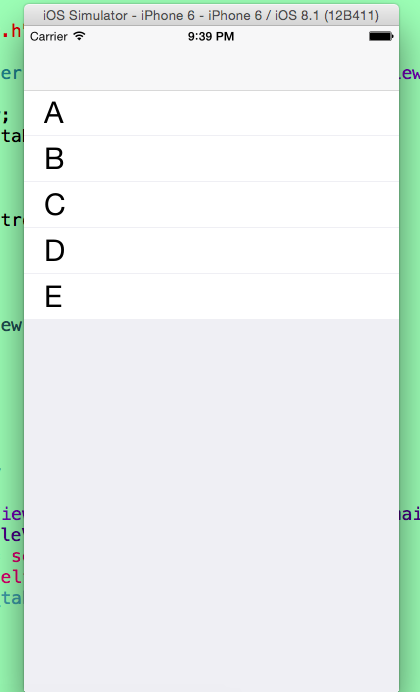
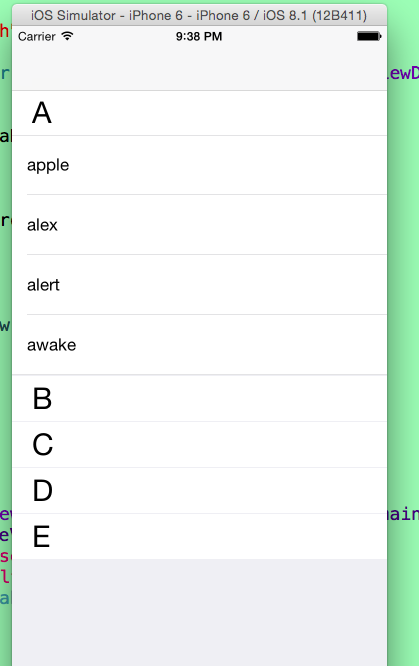
 #import <UIKit/UIKit.h>

 @interface AppDelegate : UIResponder <UIApplicationDelegate>

 @property (strong, nonatomic) UIWindow *window;

 @end
 #import "AppDelegate.h"

 #import "RootViewController.h"

 @interface AppDelegate ()

 @end

 @implementation AppDelegate

 - (BOOL)application:(UIApplication *)application didFinishLaunchingWithOptions:(NSDictionary *)launchOptions {

     self.window = [[UIWindow alloc] initWithFrame:[[UIScreen mainScreen] bounds]];

     // Override point for customization after application launch.

     self.window.backgroundColor = [UIColor whiteColor];

     UINavigationController *navi = [[UINavigationController alloc] initWithRootViewController:[[RootViewController alloc] init]];

     self.window.rootViewController = navi;

     [self.window makeKeyAndVisible];

     return YES;

 }

 @end
 #import <UIKit/UIKit.h>

 @interface RootViewController : UIViewController

 @end
 #import "RootViewController.h"

 @interface RootViewController ()<UITableViewDataSource,UITableViewDelegate>

 {

     UITableView *_tableView;

     NSMutableDictionary *dataDic;

 }

 @end

 @implementation RootViewController

 - (void)viewDidLoad {

     [super viewDidLoad];

     // 初始化_tableView

     [self initializeTableView];

     // 加载数据

     [self loadData];

 }

 /**

  *  初始化_tableView

  */

 - (void)initializeTableView

 {

     _tableView = [[UITableView alloc] initWithFrame:[[UIScreen mainScreen] bounds] style:UITableViewStyleGrouped];

     _tableView.dataSource = self;

     _tableView.delegate = self;

     [self.view addSubview:_tableView];

 }

 /**

  *  加载数据

  */

 - (void)loadData

 {

     // 数组的第一个对象为标志位(是否展开)

     NSMutableArray *arr1 = [NSMutableArray arrayWithObjects:@"",@"apple",@"alex",@"alert",@"awake", nil];

     NSMutableArray *arr2 = [NSMutableArray arrayWithObjects:@"",@"blance",@"bank",@"baby",@"bet",@"balance", nil];

     NSMutableArray *arr3 = [NSMutableArray arrayWithObjects:@"",@"cake",@"cat",@"caught",@"cell",@"clabe", @"cry",@"cave",nil];

     NSMutableArray *arr4 = [NSMutableArray arrayWithObjects:@"",@"dog",@"data",@"date",@"drive",@"down", @"deliver",@"dire",@"drawn",@"dety",@"depature",@"dom",nil];

     NSMutableArray *arr5 = [NSMutableArray arrayWithObjects:@"",@"elphance",@"eleven",@"every",nil];

     // 把对应的数据存入字典

     dataDic = [NSMutableDictionary dictionaryWithObjectsAndKeys:arr1,@"A",arr2,@"B",arr3,@"C",arr4,@"D",arr5,@"E", nil] ;

 }

 #pragma mark - UITableViewDataSource And UITableViewDelegate -

 // 返回的表头个数

 - (NSInteger)numberOfSectionsInTableView:(UITableView *)tableView

 {

     return [[dataDic allKeys] count];

 }

 // 每个表头返回对应的行数

 - (NSInteger)tableView:(UITableView *)tableView numberOfRowsInSection:(NSInteger)section

 {

     // 因为字典是无序的,通过比较来进行排序

     NSArray *keys = [[dataDic allKeys] sortedArrayUsingSelector:@selector(compare:)];

     NSString *key = keys[section];

     NSMutableArray *array = dataDic[key];

     NSString *IsExpand = array[];

     // 如果为“1”则返回相应的行数,否则返回0

     if ([IsExpand isEqualToString:@""]) {

         // 因为数组的第一位为标志位所以减1

         return ([array count] - );

     }

     return ;

 }

 - (CGFloat)tableView:(UITableView *)tableView heightForHeaderInSection:(NSInteger)section

 {

     return ;

 }

 - (CGFloat)tableView:(UITableView *)tableView heightForFooterInSection:(NSInteger)section

 {

     return ;

 }

 - (CGFloat)tableView:(UITableView *)tableView heightForRowAtIndexPath:(NSIndexPath *)indexPath

 {

     return ;

 }

 - (UIView *)tableView:(UITableView *)tableView viewForHeaderInSection:(NSInteger)section

 {

     UIView *view = [[UIView alloc] initWithFrame:CGRectMake(, , [UIScreen mainScreen].bounds.size.width, )];

     view.backgroundColor = [UIColor colorWithRed: green: blue: alpha:];

     UILabel *label = [[UILabel alloc] initWithFrame:CGRectMake(, , [UIScreen mainScreen].bounds.size.width - , )];

     label.font = [UIFont systemFontOfSize:];

     label.backgroundColor = [UIColor clearColor];

     label.textColor = [UIColor blackColor];

     NSArray *keys = [[dataDic allKeys] sortedArrayUsingSelector:@selector(compare:)];

     label.text = keys[section];

     [view addSubview:label];

     UIButton *button = [UIButton buttonWithType:UIButtonTypeCustom];

     button.frame = CGRectMake(, , [UIScreen mainScreen].bounds.size.width, );

     [button addTarget:self action:@selector(buttonAction:) forControlEvents:UIControlEventTouchUpInside];

     button.tag =  + section;

     [view addSubview:button];

     return view;

 }

 - (UITableViewCell *)tableView:(UITableView *)tableView cellForRowAtIndexPath:(NSIndexPath *)indexPath

 {

     static NSString *identifier = @"cell";

     UITableViewCell *cell = [tableView dequeueReusableCellWithIdentifier:identifier];

     if (cell == nil) {

         cell = [[UITableViewCell alloc] initWithStyle:UITableViewCellStyleDefault reuseIdentifier:identifier];

     }

     NSArray *keys = [[dataDic allKeys] sortedArrayUsingSelector:@selector(compare:)];

     NSString *key = keys[indexPath.section];

     NSMutableArray *array = dataDic[key];

     // 由于数组的第一位是标志位,且不用显示,所以加1

     NSString *textStr = array[indexPath.row + ];

     cell.textLabel.text = textStr;

     return cell;

 }

 #pragma mark -Target Action-

 /**

  *  点击表头,如果没有展开,则展开;如果已经展开,则关闭

  */

 - (void)buttonAction:(UIButton *)sender

 {

     long section = sender.tag - ;

     NSArray *keys = [[dataDic allKeys] sortedArrayUsingSelector:@selector(compare:)];

     NSString *key = keys[section];

     NSMutableArray *array = dataDic[key];

     NSString *IsExpand = array[];

     // 如果IsExpand等于“0”(关闭状态),则展开,且设置其值为“1”;相反,如果IsExpand等于“1”(展开状态),则关闭,且设置其值为“0”

     if ([IsExpand isEqualToString:@""]) {

         array[] = @"";

     }else{

         array[] = @"";

     }

     [_tableView reloadData];

 }

 @end
iOS UITableView制作类似QQ好友列表视图的更多相关文章
- android开发之ExpandableListView的使用,实现类似QQ好友列表
由于工作需要,今天简单研究了一下ExpandableListView,做了一个类似QQ列表的Demo,和大家分享一下. 效果图如下: 先来看看主布局文件: <RelativeLayout xml ...
- [iOS基础控件 - 6.9.3] QQ好友列表Demo TableView
A.需求 1.使用plist数据,展示类似QQ好友列表的分组.组内成员显示缩进功能 2.组名使用Header,展示箭头图标.组名.组内人数和上线人数 3.点击组名,伸展.缩回好友组 code so ...
- swift 实现QQ好友列表功能
最近项目中有类似QQ好友列表功能,整理了一下,话不多说,直接上代码 import UIKit class QQFriend: NSObject { var name: String? var intr ...
- ExpandableListView仿QQ好友列表
本例中,对ExpandableListView中的数据进行了封装,分为两个JavaBean,一个为Group类表示组信息,一个Child类表示该组下子列表信息: Group: public class ...
- iOS开发UI篇—使用UItableview完成一个简单的QQ好友列表(一)
iOS开发UI篇—使用UItableview完成一个简单的QQ好友列表(一) 一.项目结构和plist文件 二.实现代码 1.说明: 主控制器直接继承UITableViewController // ...
- (二十七)QQ好友列表的实现
QQ好友列表通过plist读取,plist的结构为一组字典,每个字典内有本组的信息和另外一组字典代表好友. 要读取plist,选择合适的数据结构,例如NSArray,然后调用initWithConte ...
- 仿QQ好友列表界面的实现
TableView有2种style:UITableViewStylePlain 和 UITableViewStyleGrouped. 但是QQ好友列表的tableView给人的感觉似乎是2个style ...
- android 实现QQ好友列表
在某些Android开发群里,看到有些新手问怎么实现QQ好友列表,其实网上一搜挺多的.接触Android,也才一年的时间,大部分时间花在工作上(解bug...),界面上开发很少参与.自己维护的系统应用 ...
- C#利用API制作类似QQ一样的右下角弹出窗体
C#利用API制作类似QQ一样的右下角弹出窗体 (2009-03-21 15:02:49) 转载▼ 标签: 杂谈 分类: .NET using System;using System.Collecti ...
随机推荐
- 利用wtl的CDialogResize自动调整atl ActiveX控件布局
前言 利用atl 开发activex控件时,如果使用atl复合控件时,acitvex控件上的界面元素不会自动改变大小,如果自己在OnSize中处理每个子控件的布局是一件非常麻烦的事,我们可以借助wtl ...
- hdoj-3791-二叉搜索树(二叉搜索树模板题)
#include <cstring> #include <cstdio> #include <iostream> using namespace std; type ...
- 真机环境spotlight光源丢失
maya做好的模型生成的fbx,导入到unity之后,pc运行正常,到了ios真机上发现光线丢失,场景内物体都是暗暗的,查出来原因是spot光源丢失了,选中spot光源,在其Render Mode里, ...
- 使用 MLCC 替代电解电容需要注意几点 (2018-07-23)
使用 MLCC 替代电解电容需要注意几点 容量,MLCC 在高压时容量会降到标称的 30~50% 以下 1. MLCC 的 ESR 很低,比较适合高频 DCDC 输出. MLCC 会有压电效应,可能会 ...
- 使用Json Template在Azure China创建ARM类型的虚拟机
前面几篇文章介绍过Azure的两种VM的模式,包括ASM和ARM.并且介绍了如何用Azure CLI和PowerShell创建虚拟机.本文将介绍如何采用Json的Template来创建基于ARM的VM ...
- acm 士兵杀敌(一)
士兵杀敌(一) 时间限制:1000 ms | 内存限制:65535 KB 难度:3 描述 南将军手下有N个士兵,分别编号1到N,这些士兵的杀敌数都是已知的. 小工是南将军手下的军师,南将军现在 ...
- hihoCoder1304:24点
时间限制:10000ms 单点时限:1000ms 内存限制:256MB 描述 周末,小Hi和小Ho都在家待着. 在收拾完房间时,小Ho偶然发现了一副扑克,于是两人考虑用这副扑克来打发时间. 小Ho:玩 ...
- java代码I/O类
总结:流类无法理解啊—————— package com.aini; import java.io.*; //流类 //使用FileInputStream读取文件信息 public class ffg ...
- Java-API:java.util.Random
ylbtech-Java-API:java.util.Random 1.返回顶部 2.返回顶部 3.返回顶部 4.返回顶部 5.返回顶部 1. https://docs.oracle. ...
- 单片机RS485通信接口、控制线、原理图及程序实例
RS232 标准是诞生于 RS485 之前的,但是 RS232 有几处不足的地方: 接口的信号电平值较高,达到十几 V,使用不当容易损坏接口芯片,电平标准也与TTL 电平不兼容. 传输速率有局限,不可 ...