
SpringBoot11 读取properties文件、发送邮件
1 读取properties文件
1.1 ResourceBundle
帮助我们事先国际化
1.1.1 前提
properties文件的命名方式必须体现除语言和国别
例如:test_zh_CN.propertis -> 表示名称为test,语言为中文,国别为中国的properties文件
1.2 Locale
根据语言和地区构造一个语言环境
例如:Locale locale = new Locale("zh", "CN"); -> 构造了一个语言为中文,地区为中国的语言环境
1.3 读取properties文件
1.3.1 在springboot项目的resource目录下创建properties文件
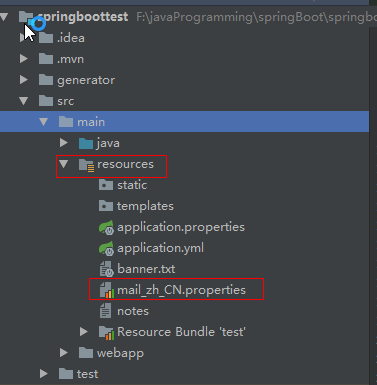
xiangxu.name=WYS

xiangxu.address=yuzu
test_zh_CN.properties
1.3.2 利用ResourceBundle读取配置文件中的内容
ResourceBundle resourceBundle = ResourceBundle.getBundle("test", new Locale("zh", "CN"));
代码解释:ResourceBundle对象就代表了需要读取的那个配置文件
技巧01:如果找不到test_zh_CN.properties就会去找test_zh_CN.properties,如果也找不到就会去找test.properties,如果还是找不到就会抛出异常
String name = resourceBundle.getString("xiangxu.address");
代码解释:利用ResourceBundle对象的getString方法去获取相应的值
/**

     * Gets a string for the given key from this resource bundle or one of its parents.

     * Calling this method is equivalent to calling

     * <blockquote>

     * <code>(String) {@link #getObject(java.lang.String) getObject}(key)</code>.

     * </blockquote>

     *

     * @param key the key for the desired string

     * @exception NullPointerException if <code>key</code> is <code>null</code>

     * @exception MissingResourceException if no object for the given key can be found

     * @exception ClassCastException if the object found for the given key is not a string

     * @return the string for the given key

     */

    public final String getString(String key) {

        return (String) getObject(key);

    }
getString源码
1.4 编写读取Properties文件的工具类
package cn.xiangxu.springboottest.utils;

import java.util.Enumeration;

import java.util.Locale;

import java.util.ResourceBundle;

/**

 * 读取properties文件工具类

 * 读取发送邮件所需信息的properties文件的工具类

 */

public class PropertiesUtil {

    private final ResourceBundle resource;

    private final String fileName;

    /**

     * 构造函数实例化部分对象,获取文件资源对象

     *

     * @param fileName

     */

    public PropertiesUtil(String fileName)

    {

        this.fileName = fileName;

        Locale locale = new Locale("zh", "CN");

        this.resource = ResourceBundle.getBundle(this.fileName, locale);

    }

    /**

     * 根据传入的key获取对象的值 2016年12月17日 上午10:19:55 getValue

     *

     * @param key properties文件对应的key

     * @return String 解析后的对应key的值

     */

    public String getValue(String key)

    {

        String message = this.resource.getString(key);

        return message;

    }

    /**

     * 获取properties文件内的所有key值<br>

     * 2016年12月17日 上午10:21:20 getKeys

     *

     * @return

     */

    public Enumeration<String> getKeys(){

        return resource.getKeys();

    }

}
2 利用javaMail实现邮件发送
2.1 导入相关依赖
<!--邮件相关-->

        <!-- https://mvnrepository.com/artifact/javax.mail/mail -->

        <dependency>

            <groupId>javax.mail</groupId>

            <artifactId>mail</artifactId>

            <version>1.4.7</version>

        </dependency>
<?xml version="1.0" encoding="UTF-8"?>

<project xmlns="http://maven.apache.org/POM/4.0.0" xmlns:xsi="http://www.w3.org/2001/XMLSchema-instance"

    xsi:schemaLocation="http://maven.apache.org/POM/4.0.0 http://maven.apache.org/xsd/maven-4.0.0.xsd">

    <modelVersion>4.0.0</modelVersion>

    <groupId>cn.xiangxu</groupId>

    <artifactId>springboottest</artifactId>

    <version>0.0.1-SNAPSHOT</version>

    <packaging>jar</packaging>

    <name>springboottest</name>

    <description>Demo project for Spring Boot</description>

    <parent>

        <groupId>org.springframework.boot</groupId>

        <artifactId>spring-boot-starter-parent</artifactId>

        <version>1.5.9.RELEASE</version>

        <relativePath/> <!-- lookup parent from repository -->

    </parent>

    <properties>

        <project.build.sourceEncoding>UTF-8</project.build.sourceEncoding>

        <project.reporting.outputEncoding>UTF-8</project.reporting.outputEncoding>

        <java.version>1.8</java.version>

    </properties>

    <dependencies>

        <dependency>

            <groupId>org.springframework.boot</groupId>

            <artifactId>spring-boot-starter-data-jpa</artifactId>

        </dependency>

        <dependency>

            <groupId>org.springframework.boot</groupId>

            <artifactId>spring-boot-starter-web</artifactId>

        </dependency>

        <dependency>

            <groupId>mysql</groupId>

            <artifactId>mysql-connector-java</artifactId>

            <scope>runtime</scope>

        </dependency>

        <dependency>

            <groupId>org.springframework.boot</groupId>

            <artifactId>spring-boot-starter-test</artifactId>

            <scope>test</scope>

        </dependency>

        <!--JSP相关-->

        <!-- https://mvnrepository.com/artifact/org.apache.tomcat.embed/tomcat-embed-jasper -->

        <dependency>

            <groupId>org.apache.tomcat.embed</groupId>

            <artifactId>tomcat-embed-jasper</artifactId>

        </dependency>

        <!--JSTL相关-->

        <!-- https://mvnrepository.com/artifact/javax.servlet/javax.servlet-api -->

        <dependency>

            <groupId>javax.servlet</groupId>

            <artifactId>javax.servlet-api</artifactId>

        </dependency>

        <!--邮件相关-->

        <!-- https://mvnrepository.com/artifact/javax.mail/mail -->

        <dependency>

            <groupId>javax.mail</groupId>

            <artifactId>mail</artifactId>

            <version>1.4.7</version>

        </dependency>

        <!--工具相关-->

        <!--代码生成工具-->

        <!-- https://mvnrepository.com/artifact/org.projectlombok/lombok -->

        <dependency>

            <groupId>org.projectlombok</groupId>

            <artifactId>lombok</artifactId>

        </dependency>

        <!--热部署工具-->

        <dependency>

            <groupId>org.springframework.boot</groupId>

            <artifactId>spring-boot-devtools</artifactId>

            <optional>true</optional>

        </dependency>

        <!--通用工具包-->

        <!-- https://mvnrepository.com/artifact/org.apache.commons/commons-lang3 -->

        <dependency>

            <groupId>org.apache.commons</groupId>

            <artifactId>commons-lang3</artifactId>

            <version>3.6</version>

        </dependency>

    </dependencies>

    <build>

        <plugins>

            <plugin>

                <groupId>org.springframework.boot</groupId>

                <artifactId>spring-boot-maven-plugin</artifactId>

                <configuration>

                    <fork>true</fork>

                </configuration>

            </plugin>

        </plugins>

    </build>

</project>
2.2 编写邮件实体
邮件实体就是将邮件利用Java对象的形式表示出来
package cn.xiangxu.springboottest.functionModule.mail;

import lombok.Data;

import java.io.Serializable;

import java.util.ArrayList;

import java.util.List;

/**

 * 邮件实体类:该类用于封装发送邮件时需要的参数字段

 */

@Data

public class MailEntity implements Serializable{

    //此处填写SMTP服务器

    private String smtpService;

    //设置端口号

    private String smtpPort;

    //设置发送邮箱

    private String fromMailAddress;

    // 设置发送邮箱的STMP口令

    private String fromMailStmpPwd;

    //设置邮件标题

    private String title;

    //设置邮件内容

    private String content;

    //内容格式(默认采用html)

    private String contentType;

    //接受邮件地址集合

    private List<String> list = new ArrayList<>();

}
2.3 编写邮件发送方的配置文件
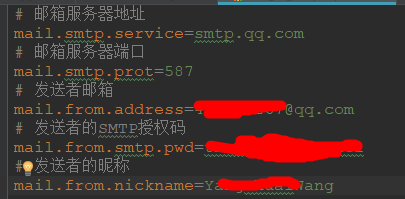
2.4 编写读取properties文件的工具类
package cn.xiangxu.springboottest.utils;

import java.util.Enumeration;

import java.util.Locale;

import java.util.ResourceBundle;

/**

 * 读取properties文件工具类

 * 读取发送邮件所需信息的properties文件的工具类

 */

public class PropertiesUtil {

    private final ResourceBundle resource;

    private final String fileName;

    /**

     * 构造函数实例化部分对象,获取文件资源对象

     *

     * @param fileName

     */

    public PropertiesUtil(String fileName)

    {

        this.fileName = fileName;

        Locale locale = new Locale("zh", "CN");

        this.resource = ResourceBundle.getBundle(this.fileName, locale);

    }

    /**

     * 根据传入的key获取对象的值 2016年12月17日 上午10:19:55 getValue

     *

     * @param key properties文件对应的key

     * @return String 解析后的对应key的值

     */

    public String getValue(String key)

    {

        String message = this.resource.getString(key);

        return message;

    }

    /**

     * 获取properties文件内的所有key值<br>

     * 2016年12月17日 上午10:21:20 getKeys

     *

     * @return

     */

    public Enumeration<String> getKeys(){

        return resource.getKeys();

    }

}
2.5 编写邮件内容类型的枚举
package cn.xiangxu.springboottest.functionModule.mail;

/**

 * 邮件模块所需要的枚举

 */

public enum MailContentTypeEnum {

    HTML("text/html;charset=UTF-8"), //html格式

    TEXT("text")

    ;

    private String value;

    MailContentTypeEnum(String value) {

        this.value = value;

    }

    public String getValue() {

        return value;

    }

}
2.6 编写邮件发送实体
邮件发送实体就是将邮件发送方信息、邮件接收方信息、以及邮件类型整合成了一个java对象
package cn.xiangxu.springboottest.functionModule.mail;

import cn.xiangxu.springboottest.utils.PropertiesUtil;

import javax.mail.*;

import javax.mail.internet.InternetAddress;

import javax.mail.internet.MimeMessage;

import javax.mail.internet.MimeUtility;

import java.util.List;

import java.util.Properties;

/**

 * 邮件发送方实体类

 */

public class MailSender {

    // 邮件实体

    private static MailEntity mail = new MailEntity();

    /**

     * 设置邮件标题

     * @param title 标题信息

     * @return

     */

    public MailSender title(String title){

        mail.setTitle(title);

        return this;

    }

    /**

     * 设置邮件内容

     * @param content

     * @return

     */

    public MailSender content(String content)

    {

        mail.setContent(content);

        return this;

    }

    /**

     * 设置邮件格式

     * @param typeEnum

     * @return

     */

    public MailSender contentType(MailContentTypeEnum typeEnum)

    {

        mail.setContentType(typeEnum.getValue());

        return this;

    }

    /**

     * 设置请求目标邮件地址

     * @param targets

     * @return

     */

    public MailSender targets(List<String> targets)

    {

        mail.setList(targets);

        return this;

    }

    /**

     * 执行发送邮件

     * @throws Exception 如果发送失败会抛出异常信息

     */

    public void send() throws Exception

    {

        // 01 基本信息验证

        // 0101 邮件内容格式验证,默认使用html内容发送

        if(mail.getContentType() == null)

            mail.setContentType(MailContentTypeEnum.HTML.getValue());

        // 0102 标题非空验证,如果为空就抛出异常

        if(mail.getTitle() == null || mail.getTitle().trim().length() == 0)

        {

            throw new Exception("邮件标题没有设置.调用title方法设置");

        }

        // 0103 内容为空验证,如果为空就抛出异常

        if(mail.getContent() == null || mail.getContent().trim().length() == 0)

        {

            throw new Exception("邮件内容没有设置.调用content方法设置");

        }

        // 0104 接收者邮箱地址验证,如果没有就抛出异常

        if(mail.getList().size() == 0)

        {

            throw new Exception("没有接受者邮箱地址.调用targets方法设置");

        }

        //读取/resource/mail_zh_CN.properties文件内容

        final PropertiesUtil properties = new PropertiesUtil("mail");

        // 创建Properties 类用于记录邮箱的一些属性

        final Properties props = new Properties();

        // 表示SMTP发送邮件,必须进行身份验证

        props.put("mail.smtp.auth", "true");

        //此处填写SMTP服务器

        props.put("mail.smtp.host", properties.getValue("mail.smtp.service"));

        //设置端口号,QQ邮箱给出了两个端口465/587

        props.put("mail.smtp.port", properties.getValue("mail.smtp.prot"));

        // 设置发送邮箱

        props.put("mail.user", properties.getValue("mail.from.address"));

        // 设置发送邮箱的16位STMP口令

        props.put("mail.password", properties.getValue("mail.from.smtp.pwd"));

        // 构建授权信息,用于进行SMTP进行身份验证

        Authenticator authenticator = new Authenticator() {

            protected PasswordAuthentication getPasswordAuthentication() {

                // 用户名、密码

                String userName = props.getProperty("mail.user");

                String password = props.getProperty("mail.password");

                return new PasswordAuthentication(userName, password);

            }

        };

        // 使用环境属性和授权信息,创建邮件会话

        Session mailSession = Session.getInstance(props, authenticator);

        // 创建邮件消息

        MimeMessage message = new MimeMessage(mailSession);

        // 设置发件人

        String nickName = MimeUtility.encodeText(properties.getValue("mail.from.nickname"));

        InternetAddress form = new InternetAddress(nickName + " <" + props.getProperty("mail.user") + ">");

        message.setFrom(form);

        // 设置邮件标题

        message.setSubject(mail.getTitle());

        //html发送邮件

        if(mail.getContentType().equals(MailContentTypeEnum.HTML.getValue())) {

            // 设置邮件的内容体

            message.setContent(mail.getContent(), mail.getContentType());

        }

        //文本发送邮件

        else if(mail.getContentType().equals(MailContentTypeEnum.TEXT.getValue())){

            message.setText(mail.getContent());

        }

        //发送邮箱地址

        List<String> targets = mail.getList();

        for(int i = 0;i < targets.size();i++){

            try {

                // 设置收件人的邮箱

                InternetAddress to = new InternetAddress(targets.get(i));

                message.setRecipient(Message.RecipientType.TO, to);

                // 最后当然就是发送邮件啦

                Transport.send(message);

            } catch (Exception e) {

                continue;

            }

        }

    }

}
2.7 编写测试类来发送邮件
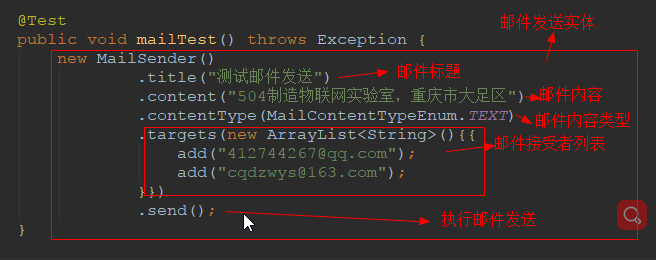
@Test

    public void mailTest() throws Exception {

        new MailSender()

                .title("测试邮件发送")

                .content("504制造物联网实验室,重庆市大足区")

                .contentType(MailContentTypeEnum.TEXT)

                .targets(new ArrayList<String>(){{

                    add("412744267@qq.com");

                    add("cqdzwys@163.com");

                }})

                .send();

    }
2.8 效果展示
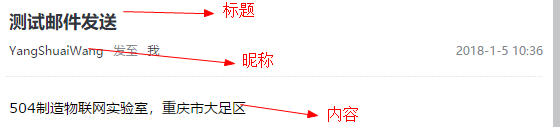
2.9 综合应用
在异常处理类中,对捕获到的异常通过邮件发送给开发者 -> 在异常处理类中进行
SpringBoot11 读取properties文件、发送邮件的更多相关文章
- 五种方式让你在java中读取properties文件内容不再是难题
一.背景 最近,在项目开发的过程中,遇到需要在properties文件中定义一些自定义的变量,以供java程序动态的读取,修改变量,不再需要修改代码的问题.就借此机会把Spring+SpringMVC ...
- java分享第十六天( java读取properties文件的几种方法&java配置文件持久化:static块的作用)
java读取properties文件的几种方法一.项目中经常会需要读取配置文件(properties文件),因此读取方法总结如下: 1.通过java.util.Properties读取Propert ...
- 用eclipse做项目中常遇到的问题-如何创建并读取properties文件
在用eclipse做项目开发的时候我们常常会将一些重要的内容写在配置文件里面, 特别是连接数据库的url,username,password等信息,我们常常会新建一个properties文件将所有信息 ...
- jsp读取properties文件
jsp读取properties文件 jsp中读取properties文件,并把值设到js变量中: mpi.properties文件内容: MerchantID=00000820 CustomerEMa ...
- java读取.properties文件
在web开发过程中,有些配置要保存到properties文件里,本章将给出一个工具类,用来方便读取properties文件. 案例: 1:config.properties文件 name=\u843D ...
- Java 读取Properties文件时应注意的路径问题
1. 使用Class的getResourceAsStream()方法读取Properties文件(资源文件)的路径问题: InputStream in = this.getClass().getRe ...
- Java的Properties类和读取.properties文件
一..properties文件的作用 Properties属性文件在JAVA应用程序中是经常可以看得见的,也是特别重要的一类文件.它用来配置应用程序的一些信息,不过这些信息一般都是比较少的数据,没有必 ...
- Java-马士兵设计模式学习笔记-观察者模式-读取properties文件改成单例模式
一.概述 1.目标:读取properties文件改成单例模式 二.代码 1.Test.java class WakenUpEvent{ private long time; private Strin ...
- Java读取Properties文件的六种方法
使用J2SE API读取Properties文件的六种方法 1.使用java.util.Properties类的load()方法示例: InputStream in = lnew BufferedIn ...
随机推荐
- mac上完整卸载删除:android studio方案
如果你是mac ,你删除as ,删不干净也正常,你会发现安装的时候,前面的东西也在.配置文件在,会导致你以前的错误不想要的东西都在. 废话不多说,复制粘贴!!~~~~~~~~ 第一步: 复制粘贴!! ...
- cassandra cqlsh 和 python客户端
Keyspaces A cluster is a container for keyspaces. A keyspace is the outermost container for data in ...
- CMMI 3级精简并行过程综述
“精简并行过程”(Simplified Parallel Process,SPP)是基于CMMI以及软件工程和项目管理知识而创作的一种“软件过程改进方法和规范”,它由众多的过程规范和文档模板组成.SP ...
- 关于stl advance函数移动步数超过容器大小(越界)的研究
今天使用advance遇到个问题,当advance移动步数超过容器大小时,表现的结果居然不一样. 再来看下stl源码 template<typename _BidirectionalIterat ...
- UVA - 1610 Party Games (字符串比较)
给你n(n为偶数)个字符串,让你找出一个长度最短且字典序尽量小的字符串,使得一半的字符串小于等于该串,一半的字符串大于该串. 紫薯上说这道题有坑,但其实思路对了就没什么坑. 很明显,只要取夹在中间两个 ...
- 常用Request对象获取请求信息
Request.ServerVariables(“REMOTE_ADDR”) ‘获取访问IPRequest.ServerVariables(“LOCAL_ADDR”) ‘同上Request.Serve ...
- Linux查看硬件信息(北桥芯片组、南桥、PCI接口、CPU等)
Linux查看硬件信息(北桥芯片组.南桥.PCI接口.CPU等) Linux查看硬件信息(北桥芯片组.南桥.PCI接口.CPU等) 查看MCH(北桥) 查看ICH(南桥) 查看CPU 查看pci接口设 ...
- 洛谷【P1616】疯狂的采药
浅谈\(DP\):https://www.cnblogs.com/AKMer/p/10437525.html 题目传送门:https://www.luogu.org/problemnew/show/P ...
- Visualforce入门第二篇_2017.3.1
代码实现类似Html的表单(Form) <apex:page sidebar="false" standardController="Account"&g ...
- jquery中stop停止动画笔记
jQuery stop() 方法用于停止动画或效果,在它们完成之前. stop() 方法适用于所有 jQuery 效果函数,包括滑动.淡入淡出和自定义动画. 语法: $(selector).stop( ...