
SWT的ListVierer的使用
package com.test;

import java.util.ArrayList;

import java.util.List;

import model.People;

import org.eclipse.jface.viewers.IStructuredContentProvider;

import org.eclipse.jface.viewers.LabelProvider;

import org.eclipse.jface.viewers.ListViewer;

import org.eclipse.jface.viewers.TableViewer;

import org.eclipse.jface.viewers.Viewer;

import org.eclipse.swt.SWT;

import org.eclipse.swt.events.SelectionAdapter;

import org.eclipse.swt.events.SelectionEvent;

import org.eclipse.swt.graphics.Color;

import org.eclipse.swt.graphics.Image;

import org.eclipse.swt.layout.FillLayout;

import org.eclipse.swt.widgets.Display;

import org.eclipse.swt.widgets.Shell;

import org.eclipse.swt.widgets.Table;

import org.eclipse.swt.widgets.TableColumn;

public class LBMShow {static class ListLabelProvider extends LabelProvider {

    public String getText(Object element) {

        Country country = (Country)element;

        return country.getName();

    }

    public Image getImage(Object element) {

        return null;

    }

}

static class ContentProvider implements IStructuredContentProvider {

    public Object[] getElements(Object inputElement) {

        if(inputElement instanceof List){

            List list = (List)inputElement;

            return list.toArray();

        }

        return new Object[];

    }

    public void dispose() {

    }

    @Override

    public void inputChanged(Viewer arg0, Object arg1, Object arg2) {

        // TODO Auto-generated method stub

    }

}

static class Country {

    private String name;

    public Country(){

    }

    public Country(String name){

        this.name = name;

    }

    public String getName() {

        return name;

    }

    public void setName(String name) {

        this.name = name;

    }

    public static List getCountryList(){

        List list = new ArrayList();

        list.add(new Country("中国"));

        list.add(new Country("美国"));

        list.add(new Country("日本"));

        return list;

    }

}

private static org.eclipse.swt.widgets.List list;

/**

 * Launch the application

 * @param args

 */

public static void main(String[] args) {

    final Display display = Display.getDefault();

    final Shell shell = new Shell();

    shell.setSize(, );

    shell.setText("SWT Application");

    //

    shell.open();

    final ListViewer listViewer = new ListViewer(shell, SWT.BORDER);

    list = listViewer.getList();

    list.setBounds(, , , );

    listViewer.setContentProvider(new ContentProvider());

    listViewer.setLabelProvider(new ListLabelProvider());

    listViewer.setInput(Country.getCountryList());

    //可以直接添加

   // listViewer.add(new Country("英国"));                //可以添加一条

    shell.setLayout(new FillLayout());

    shell.layout();

    while (!shell.isDisposed()) {

        if (!display.readAndDispatch())

            display.sleep();

    }

}}
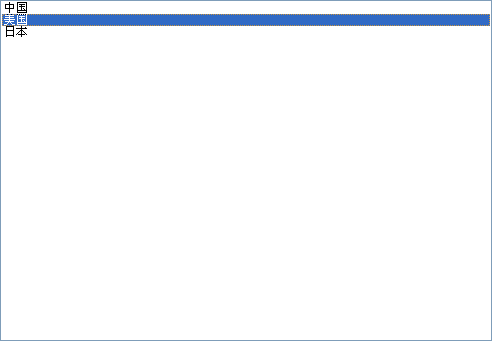
SWT的ListVierer的使用的更多相关文章
- eclipse里打开SWT项目找不到source/design的图形UI设计界面
因为前天重新装了个新版的eclipse, 结果今天打开一个SWT的项目,突然找不到source/design的图形UI设计的两个切换按钮 我把SWT组件重新装了还是找不到.结果后来发现是因为重装ecl ...
- eclipse Swt编程—窗口小部件widget
1.标签Label // 标签(Label类)组件是SWT中最简单的组件.Label类的构造方法和格式如下: // Label(Composite parent,
- Eclipse swt开发环境搭建
原料: eclipse swt.下载链接为: Eclipse 4.6.2 Release Build: 4.6.2 配置说明: Developing SWT applications using Ec ...
- 使SWT/JFace支持跨平台
由于SWT的实现机制,在不同平台下,必须引用不同swt*.jar. 由于这个瓶颈,我们要为不同的平台编译不同的版本.但是这是可以避免的.这将是本文要讨论的内容. 我一共google到了3种soluti ...
- 使Docker Container支持运行SWT程序
1, 下载安装JDK的docker container 我是从这个源下载已经做好的JDK8的container: https://registry.hub.docker.com/u/dockerfil ...
- org.eclipse.swt.custom.StyledText.getScrollbarsMode()I
错误: org.eclipse.swt.custom.StyledText.getScrollbarsMode()I 解决方法: 1 卸载,并手工清除myeclipse全部文件 2 重新安装myecl ...
- swt controls里的控件list
swt controls里的控件list,怎么显示滚动条,并且滚动条自动移动到最下边时,显示最新内容 package com.jokul; import org.eclipse.swt.widgets ...
- SWT布局管理器
一.充满式布局管理器(FillLayout类) FillLayout类是最简单的布局类,它把组件摆放成一行或者一列,并强制组件大小一致.一般,组件的高度与最高的组件一致,宽度与最宽的组件相同.,它里面 ...
- SWT组件添加事件的四种方式
在我们CS日常开发过程中会经常去为组件添加事件,我们常用的为AWT与SWT.SWT的事件模型是和标准的AWT基本一样的.下面将按照事件的四种写法来实现它. 一.匿名内部类的写法 new MouseAd ...
随机推荐
- ALV 数值列负号前置 (EDIT_MASK应用)
1.建立自定义函数 浮点数显示FUNCTION conversion_exit_zsign_output.*"---------------------------------------- ...
- webdynpro MESSGAE
1. 添加辅助类CL_WDR_DEMO_MESSAGES 环境,设计的控件有:输入控件,按钮,每个按钮对应一个事件.分别是下面,然后报消息 TEXT: SUCCESS: method ONACTIO ...
- ABAP常用字符串处理
1.SEARCH搜索指定字符串 REPORT Z_CHAR. ). MOVE 'Welcom to sap world!' to str. SEARCH str for 'sap'. 如果查找成功sy ...
- linux 解压操作命令
http://apps.hi.baidu.com/share/detail/37384818 download ADT link http://dl.google.com/android/ADT-0. ...
- 【ASP.NET Web API教程】1 ASP.NET Web API入门
原文 [ASP.NET Web API教程]1 ASP.NET Web API入门 Getting Started with ASP.NET Web API第1章 ASP.NET Web API入门 ...
- 【Demo 0003】Android 事件
本章学习要点: 1. 了解Android中资源用途: 2. 掌握资源使用通用规则: 3. 掌握具体资源使用方法;
- 如何在SAS中重新构建限价指令簿(Limit Order Book):使用HashTable
在之前的一篇日志里(http://blog.csdn.net/u010501526/article/details/8875446),我将重新构建LOB(Limit Order Book)分为了三步 ...
- C++,Python,Go对照学习-02
main函数 Go中有且只有一个main函数,而且main函数必须在package main当中.main函数无返回值也无参数,如果希望获取从命令行传递的参数有其他包解决这个问题. ...
- Nginx 訪问日志增长暴增出现尖刀的具体分析
前言: Nginx日志里面Mobileweb_access.log增长特别大.一天上百兆.将近100W的訪问记录.依照我们眼下的规模,热点用户才500个左右.就算人人用手机app訪问 ...
- git 提交ignore files
1,首先在命令行创建.gitignore文件 $ touch .gitignore 2,在文件.gitignore 加入要忽略的文件入 $ echo *.class > .gitignore 3 ...