
Qml 写的弹出层控件(13篇博客)
QML弹出窗口组件,灯箱效果、动画效果,可拖拽
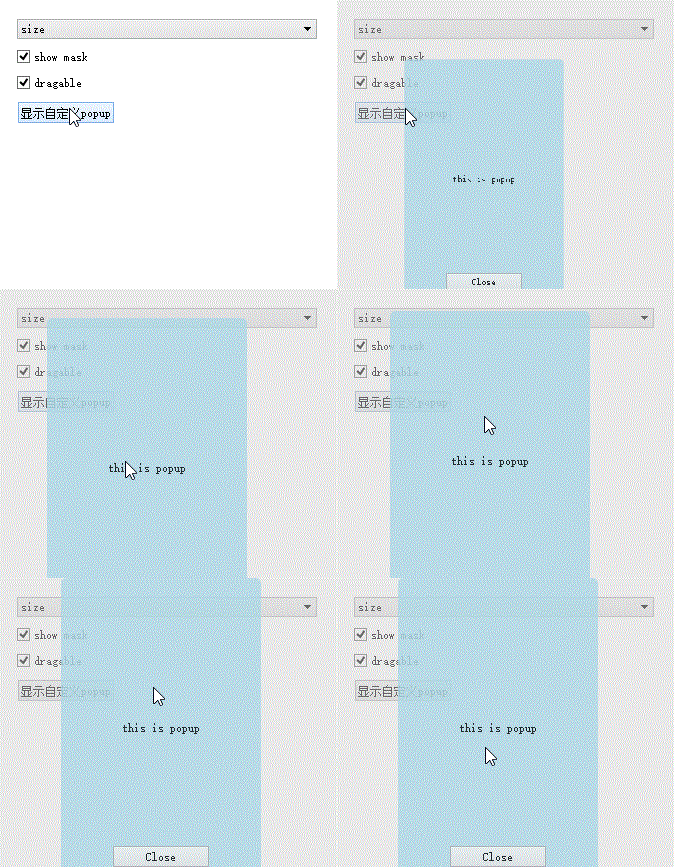
核心思路:一个mask层,一个最顶层,都用rectangle,禁止事件穿透
使用
Popup {
id: popup
width: 200; height: 300
x: 200; y:100
z: 101
opacity: 0.8
visible: false;
radius: 5
...
}
popup.showMask = chk.checked;
popup.animationType = 'size';
popup.show();
注意
使用位移动画不能用anchors定位方式
核心代码
|
1
2
3
4
5
6
7
8
9
10
11
12
13
14
15
16
17
18
19
20
21
22
23
24
25
26
27
28
29
30
31
32
33
34
35
36
37
38
39
40
41
42
43
44
45
46
47
48
49
50
51
52
53
54
55
56
57
58
59
60
61
62
63
64
65
66
67
68
69
70
71
72
73
74
75
76
77
78
79
80
81
82
83
84
85
86
87
88
89
90
91
92
93
94
95
96
97
98
99
100
101
102
103
104
105
106
107
108
109
110
111
112
113
114
115
116
117
118
119
120
121
122
123
124
125
126
127
128
129
130
131
132
133
134
135
136
137
138
139
140
141
142
143
144
145
146
147
148
149
150
151
152
153
154
155
156
157
158
159
160
161
162
163
164
165
|
Rectangle { id: root width: 100 height: 200 color: 'lightblue' z:100 transformOrigin: Item.Center // 无效 // 公有属性 property bool showMask : false; property string animationType : 'none'; property int duration : 500 property int easingType : Easing.OutBounce // 私有属性 property int innerX; property int innerY; property int innerWidth; property int innerHeight; property double innerOpacity; //------------------------------ // 事件 //------------------------------ // 属性备份一下,避免动画对属性进行变更 Component.onCompleted: { save(); } function show() { reset(); switch (animationType) { case "fade": animFadeIn.start(); break; case "focus": animFocusIn.start(); break; case "width": animWidthIncrease.start(); break; case "height": animHeightIncrease.start(); break; case "size": animBig.start(); break; case "flyDown": animInDown.start(); break; case "flyUp": animInUp.start(); break; case "flyLeft": animInLeft.start(); break; case "flyRight": animInRight.start(); break; default: this.visible = true; } } function hide() { switch (animationType) { case "fade": connector.target = animFadeOut; animFadeOut.start(); break; case "focus": connector.target = animFocusOut; animFocusOut.start(); break; case "width": connector.target = animWidthDecrease; animWidthDecrease.start(); break; case "height": connector.target = animHeightDecrease; animHeightDecrease.start(); break; case "size": connector.target = animSmall; animSmall.start(); break; case "flyDown": connector.target = animOutUp; animOutUp.start(); break; case "flyUp": connector.target = animOutDown; animOutDown.start(); break; case "flyLeft": connector.target = animOutRight; animOutRight.start();break; case "flyRight":connector.target = animOutLeft; animOutLeft.start(); break; default: close(); } } // 动画结束后调用的脚本 Connections{ id: connector target: animInDown onStopped: close() } //------------------------------ // 辅助方法 //------------------------------ function getRoot(item) { return (item.parent !== null) ? getRoot(item.parent) : item; } function save() { innerX = root.x; innerY = root.y; innerWidth = root.width; innerHeight = root.height; innerOpacity = root.opacity; console.log("x=" + innerX + " y="+innerY + " w=" + innerWidth + " h="+innerHeight); } function reset() { root.x = innerX; root.y = innerY; root.width = innerWidth root.height = innerHeight; root.opacity = innerOpacity; root.scale = 1; connector.target = null; mask.visible = showMask; root.visible = true; } // 立即关闭 function close() { mask.visible = false; root.visible = false; log(); } function log() { console.log("x=" + x + " y="+y + " w=" + width + " h="+height); } //------------------------------ // 遮罩 //------------------------------ // 禁止事件穿透 MouseArea{ anchors.fill: parent; onPressed:{ mouse.accepted = true } drag.target: root // root可拖动 } // 灯箱遮罩层 Mask{ id: mask visible: false } //------------------------------ // 动画 //------------------------------ // fadeIn/fadeOut PropertyAnimation { id:animFadeIn target: root duration: root.duration easing.type: root.easingType property: 'opacity'; from: 0; to: root.innerOpacity } PropertyAnimation { id: animFadeOut target: root duration: root.duration easing.type: root.easingType property: 'opacity'; from: root.innerOpacity; to: 0 } ...} |
下载:http://download.csdn.net/detail/surfsky/7985579
万能的qml,编起UI好开心。
再也不用管div、css、box原型、相对定位、绝对定位、浏览器适配、低性能的canvas...坑爹的html+js,无穷尽的js框架,这么多年了,怎么都摞不顺,永远扶不直的阿斗。
自从用了qml,整个人心情都舒畅了,腰也直了,背也不弯了,考试天天考100分
转载请注明出处:http://surfsky.cnblogs.com
Qml 写的弹出层控件(13篇博客)的更多相关文章
- Qml 写的弹出层控件
QML弹出窗口组件,灯箱效果.动画效果,可拖拽 核心思路:一个mask层,一个最顶层,都用rectangle,禁止事件穿透 使用 Popup { id: popup width: 200; heigh ...
- vue+element项目中使用el-dialog弹出Tree控件报错问题
1. 按正常的点击按钮,显示dialog弹出的Tree控件,然后把该条数据下的已经选中的checkbox , 用setCheckedNodes或者setCheckedKeys方法选择上 , 报下面这个 ...
- Anroid关于fragment控件设置长按事件无法弹出Popupwindows控件问题解决记录
一.问题描述 记录一下最近在安卓的gragment控件中设置长按事件遇见的一个坑!!! 在正常的activity中整个活动中设置长按事件我通常实例化根部局,例如LinearLayout ...
- 如何用写js弹出层 ----2017-03-29
<!DOCTYPE html> <html> <head> <meta charset="utf-8"> <title> ...
- React native 无法弹出调试控件的问题
React Native 在debug模式下,可以通过摇动手机,弹出调试选项.但是今天利用了cocoapods 把react native 文件整理后,调试界面就弹不出了,其他功能正常.查了好久,发现 ...
- EasyMvc入门教程-高级控件说明(18)弹出框控件
前面两节介绍了信息框与对话框,实际开发中如果我们遇到更复杂的要求,比如要求在弹出框里显示另外的网址,如下所示: 实现代码如下: @Html.Q().Popup().Text("我可以嵌套网页 ...
- 2015-11-04 报表(c#部分)(Datatable 查询,弹出日期控件,输入是否整数)
using System;using System.Collections;using System.Configuration;using System.Data;using System.Linq ...
- ActiveQt框架 禁止弹出ActiveX控件交互提示
重点重写QAxBindable的createAggregate() 参考Qt例子: qtactiveqt\activeqt\opengl\glbox.cpp
- LODOP内嵌挡住浏览器的div弹出层
首先,做一个简单的div弹出层用于测试,该弹出层的介绍可查看本博客另一篇博文:[JS新手教程]浏览器弹出div层 然后加入LODOP内嵌,LODOP可以内嵌,C-LODOP不能内嵌,可以在IE等浏览器 ...
随机推荐
- 临时节点不能有child 子节点
[zk: 127.0.0.1:2181(CONNECTED) 67] create '/zk01/0001/aaaa' dada Ephemerals cannot have children: /z ...
- VC命令行编译参数介绍
CL.exe是控制Microsoft C和C++编译器与链接器的32位工具.编译器产生通用对象文件格式(COFF)对象(.obj)文件.链接器产生可执行文件(.exe)或动态链接库文件(DLL). 注 ...
- KINGSO介绍
kingso_intro - Taocode KINGSO介绍 KINGSO是一种高效的垂直化的搜索引擎,其包含query解析.检索.过滤.统计.排序功能,不包含抓取部分.它对商品搜索做了针对性的优化 ...
- 《Java并发编程实战》第十四章 构建自己定义的同步工具 读书笔记
一.状态依赖性的管理 有界缓存实现的基类 @ ThreadSafe public abstract class BaseBoundedBuffer<E> { @GuardeBy( &quo ...
- SICP练习1.6-1.8
1.6 死循环 1.7 #lang racket (define (square x) (* x x)) (define (sqrt-iter guess x) (if (good-enough? g ...
- Ibatis调用存储过程实现增删改以及分页查询
1.Ibatis实现增删改操作很简单了,通常我是将某一模块的增删改功能写在一个存储过程里,通过一个标识符去区分执行增加还是修改抑或删除操作. statement: <!-- 存储过程:实现学生的 ...
- 【译】在Asp.Net中操作PDF - iTextSharp - 绘制矢量图
原文 [译]在Asp.Net中操作PDF - iTextSharp - 绘制矢量图 在上一篇iTextSharp文章中讲述了如何将现有的图片插入PDF中并对其进行操作.但有时,你需要在PDF中绘制不依 ...
- android 调用系统打电话和发短,懒得记
Intent intent = new Intent(); intent.setAction(Intent.ACTION_CALL); intent.setData( ...
- HTML——左右側边栏布局
<!DOCTYPE html PUBLIC "-//W3C//DTD HTML 4.01//EN" "http://www.w3.org/TR/html4/stri ...
- ListView 使用方法(Asp.Net)
您将须要用到的独有数据绑定控件. Fritz Onion 代码下载位置: ExtremeASPNET2008_03.exe (192 KB) Browse the Code Online 文件夹 L ...