
MRPT - Mobile Robot Programming Toolkit
1. https://www.mrpt.org/Building_and_Installing_Instructions#1_Prerequisites
P1. error C2371: “int32_t”: 重定义;不同的基类型 或“int8_t”
解决办法:因为两个.h文件所定义的int32_t和int8_t的类型不同。错误会提示哪两个.h文件冲突,打开pstdint.h文件,找到对应的定义,并修改为另一个.h文件的定义类型。
P2. Miscellaneous.h文件 error C2719: “p1”: 具有 __declspec(align('16')) 的形参将不被对齐 ,这个问题是编译时候包含了对PCL的支持
//Miscellaneous.h 修改为

 struct Segment

  {

    Segment(const PointT& p0, const PointT& p1)

    {

		P0 = p0;

		P1 = p1;

	};

    PointT P0, P1;

  };

  /*! Square of the distance between two segments */

  float PBMAP_IMPEXP dist3D_Segment_to_Segment2(const Segment& S1, const Segment& S2);

//对应的 Miscellaneous.cpp 修改为

float PBMAP_IMPEXP dist3D_Segment_to_Segment2(const Segment& S1, const Segment& S2)

{}

//同时注释掉 PbMapMaker.h

typedef pcl::PointXYZRGBA PointT;
2. Visula Studio 2013 测试
1、先将D:\Apps\MRPT\include\mrpt\mrpt-config\mrpt目录下的config.h和version.h复制到D:\Apps\MRPT\include\mrpt目录下。
2、打开VS2013,建立mrptTest项目:新建项目——C++——设置文件名mrptTest, WIN32控制台应用程序
3、打开工程属性——VC++目录——包含目录 :添加目录D:\Apps\MRPT\include和 D:\Apps\MRPT\libs\XXXX\include
第二个包含选项众多,我是将所有libs目录下所有的mrpt和otherlibs文件夹复制到D:\Apps\MRPT\include\,然后再添加该目录。需要用wxWidgets,则添加D:\Apps\wxWidgets-3.0.4\include
4、打开工程属性——VC++ 目录——库目录:在配置Debug中添加目录D:\Apps\MRPT\lib 并链接库 libmrpt-base130.lib
三、编写代码 这里采用MRPT的例子,参考 https://raw.githubusercontent.com/MRPT/mrpt/master/doc/mrpt_example1/test.cpp
#include "stdafx.h"

#include <mrpt/poses/CPoint3D.h>

#include <mrpt/poses/CPose2D.h>

#include <mrpt/poses/CPose3D.h>

#include <mrpt/utils/CTicTac.h>

using namespace mrpt::utils;

using namespace mrpt::poses;

using namespace std;

int _tmain(int argc, _TCHAR* argv[])

{

    try

    {

        // The landmark (global) position: 3D (x,y,z)

        CPoint3D L(0, 4, 2);

        // Robot pose: 2D (x,y,phi)

        CPose2D  R(2, 1, DEG2RAD(45.0f));

        // Camera pose relative to the robot: 6D (x,y,z,yaw,pitch,roll).

        CPose3D  C(0.5f, 0.5f, 1.5f, DEG2RAD(-90.0f), DEG2RAD(0), DEG2RAD(-90.0f));

        // TEST 1. Relative position L' of the landmark wrt the camera

        // --------------------------------------------------------------

        cout << "L: " << L << endl;

        cout << "R: " << R << endl;

        cout << "C: " << C << endl;

        cout << "R+C:" << (R + C) << endl;

        //cout << (R+C).getHomogeneousMatrix();

        CPoint3D L2;

        CTicTac tictac;

        tictac.Tic();

        size_t i, N = 10000;

        for (i = 0; i<N; i++)

            L2 = L - (R + C);

        cout << "Computation in: " << 1e6 * tictac.Tac() / ((double)N) << " us" << endl;

        cout << "L': " << L2 << endl;

        // TEST 2. Reconstruct the landmark position:

        // --------------------------------------------------------------

        CPoint3D L3 = R + C + L2;

        cout << "R(+)C(+)L' = " << L3 << endl;

        cout << "Should be equal to L = " << L << endl;

        // TEST 3. Distance from the camera to the landmark

        // --------------------------------------------------------------

        cout << "|(R(+)C)-L|= " << (R + C).distanceTo(L) << endl;

        cout << "|L-(R(+)C)|= " << (R + C).distanceTo(L) << endl;

        return 0;

    }

    catch (exception &e)

    {

        cerr << "EXCEPCTION: " << e.what() << endl;

        return -1;

    }

    catch (...)

    {

        cerr << "Untyped excepcion!!";

        return -1;

    }

}
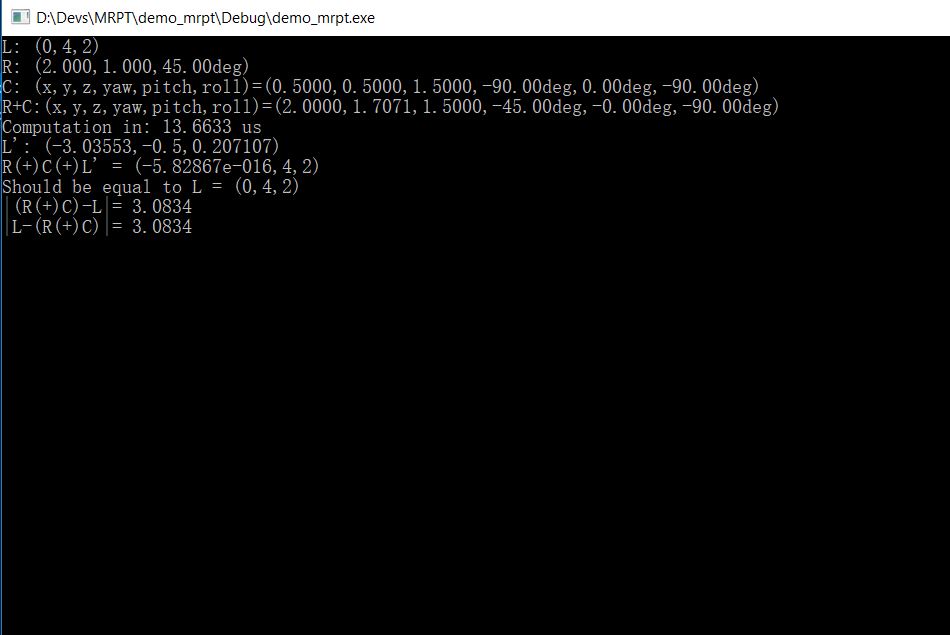
输出如下结果则表示安装正常
MRPT - Mobile Robot Programming Toolkit的更多相关文章
- UVA12569-Planning mobile robot on Tree (EASY Version)(BFS+状态压缩)
Problem UVA12569-Planning mobile robot on Tree (EASY Version) Accept:138 Submit:686 Time Limit: 300 ...
- Uva 12569 Planning mobile robot on Tree (EASY Version)
基本思路就是Bfs: 本题的一个关键就是如何判段状态重复. 1.如果将状态用一个int型数组表示,即假设为int state[17],state[0]代表机器人的位置,从1到M从小到大表示障碍物的位置 ...
- UVA-12569 Planning mobile robot on Tree (EASY Version) (BFS+状态压缩)
题目大意:一张无向连通图,有一个机器人,若干个石头,每次移动只能移向相连的节点,并且一个节点上只能有一样且一个东西(机器人或石头),找出一种使机器人从指定位置到另一个指定位置的最小步数方案,输出移动步 ...
- UVA Planning mobile robot on Tree树上的机器人(状态压缩+bfs)
用(x,s)表示一个状态,x表示机器人的位置,s表示其他位置有没有物体.用个fa数组和act数组记录和打印路径,转移的时候判断一下是不是机器人在动. #include<bits/stdc++.h ...
- Awesome C/C++
Awesome C/C++ A curated list of awesome C/C++ frameworks, libraries, resources, and shiny things. In ...
- awesome cpp
https://github.com/fffaraz/awesome-cpp Awesome C/C++ A curated list of awesome C/C++ frameworks, lib ...
- 【干货】国外程序员整理的 C++ 资源大全【转】
来自 https://github.com/fffaraz/awesome-cpp A curated list of awesome C/C++ frameworks, libraries, res ...
- SLAM学习--开源测试数据集合
Tum RGB-D SLAM Dataset and Benchmark https://vision.in.tum.de/data/datasets/rgbd-dataset Kitti http: ...
- [转]awsome c++
原文链接 Awesome C++ A curated list of awesome C++ (or C) frameworks, libraries, resources, and shiny th ...
随机推荐
- HihoCoder 1044 01-string 贪心
1144 : 01串 时间限制:7000ms 单点时限:1000ms 内存限制:256MB 描述 给定两个整数n和m,求是否存在恰好包含n个0和m个1的01串S,使得S中不存在子串"001& ...
- 【抽时间 试验】hibernate集合映射inverse和cascade详解
http://www.cnblogs.com/amboyna/archive/2008/02/18/1072260.html
- 【转】C# Socket编程(1)基本的术语和概念
[转自:http://www.cnblogs.com/IPrograming/archive/2012/10/10/2718371.html#Protocol] 计算机程序能够相互联网,相互通讯,这使 ...
- SqlServer 数据表数据移动
描述:将Test1表中的数据放到Test2表中 1.Test2表不存在 select A,B,C insert into Test2 from Test1 select * into Test2 fr ...
- loj #6138. 「2017 山东三轮集训 Day4」Right
题目: 题解: 暴力一波 \(SG\) 函数可以发现这么一个规律: \(p\) 为奇数的时候 : \(SG(n) = n \% 2\) \(p\) 为偶数的时候 : \(SG(n) = n \% (p ...
- manyToManyField理解和用法
转:http://www.cnblogs.com/linxiyue/p/3667418.html
- 一周学会HTML----Day02常用标签(上)
扩展 在开始第二天的课程之前,我们先来拓展两个概念. 第一个是前台和后台:前台是指用户看到的界面,而后台是指相关具有前线的人操作的界面 第二个是前端和后端:前端是值用户看到的界面和界布的操作(安卓.i ...
- 洛谷 1600 (NOIp2016) 天天爱跑步——树上差分
题目:https://www.luogu.org/problemnew/show/P1600 看TJ:https://blog.csdn.net/clove_unique/article/detail ...
- EditText动态转换只读/编辑状态
public class MyActivity extends Activity { private KeyListener listener; private EditText editText; ...
- 今天去python官网下载包安装的时候的问题记录
去官网下载了 tar压缩包 放到了site-packages下解压 然后使用 python setup.py install 安装 安装完后,所要引用的模块文件居然还在解压出来的压缩文件里面,导致无法 ...