
【转】appium常用方法整理
1、相对坐标解锁九宫格
应用场景
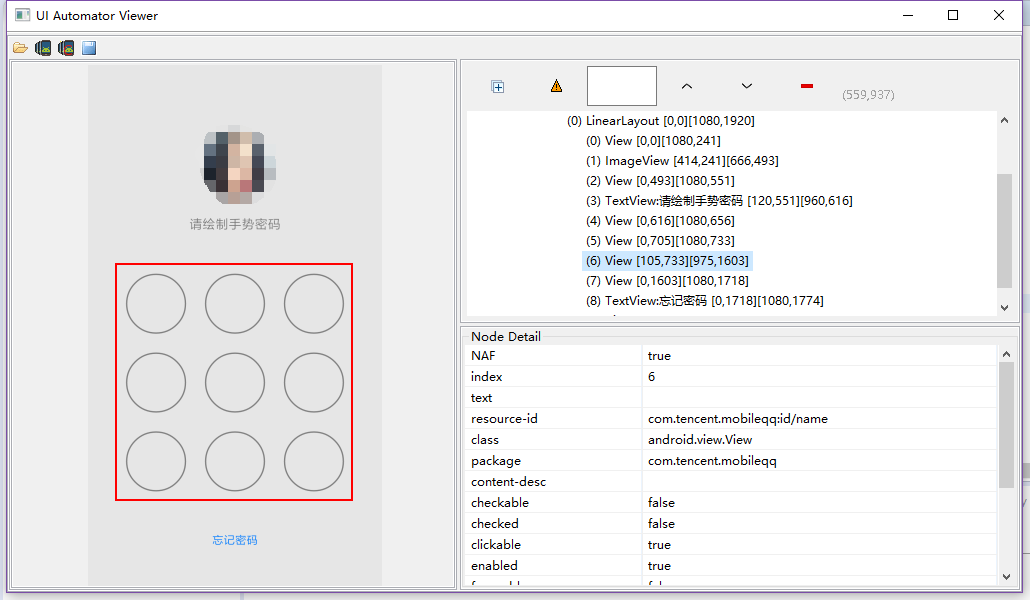
QQ解锁屏幕如上,可见九个按键在同一个View下面,要实现解锁,用press moveTo release perform方法
实现代码如下:

     WebElement jiugongge = pi.findByXpath("jiugongge");//获取九宫格所在的位置元素

        final TouchAction touchAction = new TouchAction(driver);

        // 元素的起始x和y坐标

        Point start = jiugongge.getLocation();

        int startX = start.x;

        int startY = start.y;

        System.out.println("startX : "+startX);

        System.out.println("startY : "+startY);

        // 元素的宽和高

        Dimension q = jiugongge.getSize();

        int width = q.getWidth();

        int hight = q.getHeight();

        System.out.println("width : "+width);

        System.out.println("hight : "+hight);

        //计算每个数字间隔的距离

        int jianjuX = width/3;

        int jianjuY = hight/3;

        System.out.println("jianjuX : "+jianjuX);

        System.out.println("jianjuY : "+jianjuY);

        // 计算出控件结束坐标

        int endX = width + startX;

        int endY = hight + startY;

        System.out.println("endX :"+endX);

        System.out.println("endY :"+endY);

        //1 的坐标

        int oneX = startX + jianjuX/2;

        int oneY = startY + jianjuY/2;

        System.out.println("oneX : "+oneX);

        System.out.println("oneY : "+oneY);
int twoX = oneX + jianjuX;
int twoY = oneY;
int threeX = twoX + jianjuX;
int threeY = oneY;
    //Z型  上下滑动时,x相对坐标为0,y的相对坐标为高度的jianju,相对坐标值为正数时向下you滑动,为负数时向上zuo滑动

        touchAction.press(oneX, oneY).waitAction(500).moveTo(jianjuX, 0).moveTo(jianjuX, 0).moveTo(-jianjuX, jianjuY).moveTo(-jianjuX, jianjuY).moveTo(jianjuX, 0).moveTo(jianjuX, 0).waitAction(500).release();

        touchAction.perform(); //运行会抛异常
//3-2-1-4-7-8-9 运行可以通过
touchAction.press(threeX, threeY).waitAction(500).moveTo(-jianjuX, 0).moveTo(-jianjuX, 0)
.moveTo(0, jianjuY).moveTo(0, jianjuY).moveTo(jianjuX, 0).moveTo(jianjuX, 0).waitAction(500).release();
touchAction.perform();
基本思路:
1、找到元素所在位置;
2、求出第一个点的坐标;
3、找出平均移动的间距;
4、利用TouchAction 的press() moveTo()等方法实现相对移动
解释:press(oneX, oneY)是按下时的坐标,moveTo()的坐标就是相对于按下的那个坐标而言
上下滑动时,x相对坐标为0,y的相对坐标为高度的jianju,相对坐标值为正数时向下右滑动,为负数时向上左滑动
moveTo方法的官方解释,移动是相对上一个点的坐标进行相对移动
/**

     * Move current touch to a new position relative to the current position on

     * the screen. If the current position of this TouchAction is (xOld, yOld),

     * then this method will move the TouchAction to (xOld + x, yOld + y).

     *

     * @param x change in x coordinate to move through.

     * @param y change in y coordinate to move through.

     * @return this TouchAction, for chaining.

     */

    public TouchAction moveTo(int x, int y) {

        ActionParameter action = new ActionParameter("moveTo");

        action.addParameter("x", x);

        action.addParameter("y", y);

        parameterBuilder.add(action);

        return this;

    }
备注:
这块解锁Z型的会有一个异常抛出,当然我还不知道怎么解决,但是大概知道了为什么会有这个异常,
我试了其他形状,只要不包括斜着移动就可以成功运行,有斜着移就会抛出异常
2、在控件上进行上下左右滑动
应用场景:
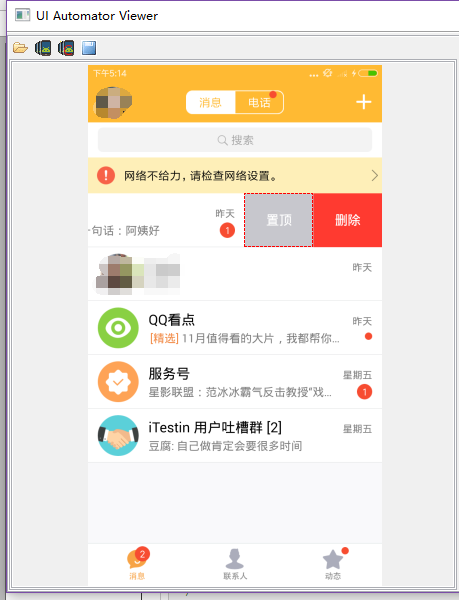
在第一个聊天的控件上进行左滑删除操作
实现代码如下:
/**

     * 根据控件定位

     * 在控件内上下左右滑动

     * @param element      控件定位方式

     * @param heading 滑动方向 UP  DOWN

     */

    public void swipeControl(WebElement element, Heading heading) {

        // 获取控件位置的坐标轴

        Point start = element.getLocation();

        int startX = start.x;

        int startY = start.y;

        // 获取控件坐标轴差

        Dimension q = element.getSize();

        int x = q.getWidth();

        int y = q.getHeight();

        // 计算出控件结束坐标

        int endX = x + startX;

        int endY = y + startY;

        // 计算中间点坐标

        int centreX = (endX + startX) / 2;

        int centreY = (endY + startY) / 2;

        switch (heading) {

            // 向you滑动

            case RIGHT:

                driver.swipe(endX - 10, endY, centreX, endY, 500);

                break;

            // 向zuo滑动

            case LEFT:

                driver.swipe(endX- 10,endY , centreX , endY -5, 1000);

                break;

            //向上滑动

            case UP:

                driver.swipe(endX,endY + 5,centreX,centreY,1000);

                break;

            //向下滑动

            case DOWN:

                driver.swipe(endX,endY - 5,centreX,centreY,1000);

                break;

        }

    }
/**

     * 控制滑动方向

     */

    public enum Heading {

        RIGHT, LEFT,

        UP, DOWN

    }
基本思路:
1、找到要滑动的元素;
2、得到元素的起始位置;
3、利用swipe(startx,starty,endx,endy,time)函数进行滑动,time为滑动的时间,毫秒为单位
解释:在滑动的坐标可以根据自己需要的进行控制
3、清楚控件的值
应用场景:密码框获取不到值,直接用appium自带的clear函数不能清除干净
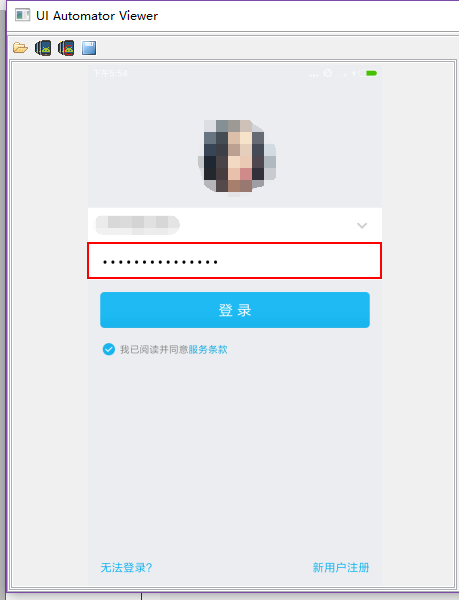
亲测,QQ的密码框的值用clear函数有时候不能清除干净
实现代码如下:
/**

     * 一个一个删除edittext控件里的值

     * @author lu

     * @param driver

     * @param text

     */

    public void clearText(String text ,int second) {

        driver.pressKeyCode(123);//123:光标移动到输入框最右边

        if(text.length()!=0)

            driver.pressKeyCode(67);//67删除

        CommonUtils.sleep(second);

    }
4、截图操作
public static void snapshot(AndroidDriver driver, String filename) {

//        CommonUtils.sleep(2);

        boolean ret = ViewUtils.waitForWebViewInit(driver,"WEBVIEW_com.eshare.Purse");

        if (ret) {

            driver.context("NATIVE_APP");

        }

        String currentPath = System.getProperty("user.dir"); // get current work

            // folder

        File scrFile = ((TakesScreenshot) driver).getScreenshotAs(OutputType.FILE);

        try {

            System.out.println("save snapshot path is:" + currentPath + "/screen/" + filename);

            FileUtils.copyFile(scrFile, new File(currentPath + "\\screen\\" + filename));

        } catch (IOException e) {

            System.out.println("Can't save screenshot");

            e.printStackTrace();

        } finally {

            ret = false;

            if (!ret) {

                driver.context("WEBVIEW");

            }

            System.out.println("screen shot finished, it's in " + currentPath + " folder");

            CommonUtils.sleep(2);

        }
代码如上
对于混合型APP(NATIVE_APP,WEBVIEW混合)
由代码可见,我在截图之前,先判断了当前是原生页面还是webview页面,操作之后又将其还原为WEBVIEW模式
这是因为,截图这个操作在webview模式下会提示一个异常错误
所以在截图前,先将其转换为NATIVE_APP模式。
5、判断页面是否存在某个元素
public boolean isElementExist(String xpath ){

        try{

            driver.findElement(By.xpath(xpath));

            return  true;

        }catch(org.openqa.selenium.NoSuchElementException ex){

            return false;

        }

    }
我之前有用过isDisplay()函数,但是这个函数只是判断元素是否显示,它使用的前提是元素存在
对于不存在元素,要判断其是否存在,见如上代码。
【转】appium常用方法整理的更多相关文章
- appium常用方法整理
1.相对坐标解锁九宫格 应用场景 QQ解锁屏幕如上,可见九个按键在同一个View下面,要实现解锁,用press moveTo release perform方法 实现代码如下: WebElem ...
- Python 部分系统类的常用方法整理
下面是常用的几个系统类的常用方法整理: list: 列表[1, 2,...] set: 集合,无重复元素{1, 2,...} str: 字符串 dict: 字典{a:'a', b:'b',...} T ...
- appium问题整理
在刚进入appium的世界时,遇到无数的坑,趟过无数的浑水,现在整理一些常用的报错讯息,供大家参考 1.org.openqa.selenium.remote.UnreachableBrowserExc ...
- APPIUM API整理(python)---元素查找
最近在学习自动化框架appium,网上找一些API相关资料整理了一下 1.find_element_by_id find_element_by_id(self, id_): Finds element ...
- 八 Appium常用方法介绍
由于appium是扩展了Webdriver协议,所以可以使用webdriver提供的方法,比如在处理webview页面,完全可以使用webdriver中的方法.当然在原生应用中,也可以使用. 1.元素 ...
- PHP常用方法整理
最近开始写PHP项目,各种常用的方法简单整理一下,以备后用. 1. Xml转Json json_decode(json_encode(simplexml_load_string($xml, 'Sim ...
- underscore.js常用方法整理(慢慢完善)
整理自Underscore.js (1.8.3) 中文文档,http://www.css88.com/doc/underscore/ 1. extend _.extend() 复制对象中的所有属性到目 ...
- appium===常用方法介绍,元素定位
https://testerhome.com/topics/3711 元素定位方法: find_element_by_android_uiautomator ,使用uiautomator定位,后面参数 ...
- Appium 常用方法
锁定 锁定屏幕 # python driver.lock(5) 将 app 置于后台 把当前应用放到后台去 # python driver.background_app(5) 收起键盘 收起键盘 # ...
随机推荐
- [剑指Offer] 25.复杂链表的复制
/* struct RandomListNode { int label; struct RandomListNode *next, *random; RandomListNode(int x) : ...
- Bootstrap中轮播图
Bootstrap中轮播图插件叫作Carousel,为了清晰的表明每个标签在这里是什么意思,我把解释写在了下面的代码中. <!-- 以下容器就是整个轮播图组件的整体, 注意该盒子必须加上 cla ...
- Linux 常用命令记录(学习笔记)
不同机器间文件传输(转自:http://www.zhimengzhe.com/mac/323324.html) scp是什么? scp是secure copy的简写,用于在Linux下进行远程拷贝文件 ...
- [Leetcode] Reverse linked list ii 反转链表
Reverse a linked list from position m to n. Do it in-place and in one-pass. For example:Given1->2 ...
- BZOJ1305 [CQOI2009]dance跳舞 【网络流】
1305: [CQOI2009]dance跳舞 Time Limit: 5 Sec Memory Limit: 162 MB Submit: 3714 Solved: 1572 [Submit][ ...
- 【BZOJ 4832】 [Lydsy2017年4月月赛] 抵制克苏恩 期望概率dp
打记录的题打多了,忘了用开维记录信息了......我们用f[i][j][l][k]表示已经完成了i次攻击,随从3血剩j个,2血剩l个,1血剩k个,这样我们求出每个状态的概率,从而求出他们对答案的贡献并 ...
- taotao购物车2 解决购物车本地cookie和服务器redis不同步的问题
下面的思路逻辑一定要理清楚,比较绕 思路; 前面已经实现了在cookie本地维护购物车的功能, 这次加入和服务器同步功能, 因为 购物车 操作比较频繁,所以,后台服务器 用redis存储用户的购物车信 ...
- POJ1984:Navigation Nightmare(带权并查集)
Navigation Nightmare Time Limit: 2000MS Memory Limit: 30000K Total Submissions: 7871 Accepted: 2 ...
- Boke光纤交换机的snmp配置
今天我配置了一下Boke光纤交换机e-300的snmp trap的配置 敲击help命令你会发现配置snmp的命令共有四个 snmpconfig Config ...
- hive向表格中插入数据并分析语句
1,---导入mds_imei_month_info ; //最大的动态分区表 set hive.support.concurrency=false; //是否支持并发 ; //each mapper ...