
使用 GitHub API 进行数据分析 (Node.js)
使用 GitHub API 进行数据分析 (Node.js)
Node.js 的访问 GitHub 的 API 库,通过 npm 或者 yarn 安装:
yarn add github-api
官方示例
获取 rate limit,有修改:
 var GitHub = require('github-api');

 var gh = new GitHub( {token: "Your Token Here" } );

 /**

  * Search API has its own rate limit other than other apis

  */

 function rateLimit() {

     // check our rate-limit status

     // since we're unauthenticated the limit is 60 requests per hour

     gh.getRateLimit().getRateLimit()

     .then( function(resp) {

         console.log('Limit remaining: ' + resp.data.rate.remaining);

         // date constructor takes epoch milliseconds and we get epoch seconds

         console.log('Reset date: ' + new Date(resp.data.rate.reset * 1000));

     }).catch( function(error) {

         console.log('Error fetching rate limit', error.message);

     });

 }

 rateLimit();
在构建 GitHub 对象时,输入用户名及密码,或者你在 GitHub 上申请的 Token。
申请 Token 步骤比较简单,进入 https://github.com/settings/developers 中,选择 Personal Access Tokens,点击 Generate New Token,该 Token 在关闭页面后便无法再次查看,需要将它记录下来。
注意这里打印的 rate limit 次数是 5000/h,但它与 Search api 是有区别的。参考: https://github.com/github-tools/github/issues/487
搜索
官方示例中只有一个获取 rate limit 的示例,如果想要使用 GitHub 提供的 Search api 对整个 GitHub 进行搜索,其实也比较简单:
 keyword = 'test';

 gh.search( {q: keyword, type: "code" } ).forCode()  // *

 .then( ( result ) => {

     console.log( 'Processing data...' );

     const data = result.data;

     if( saveFile ) {

         console.log( 'Saving into file...' );

         writeJsonIntoFile( "./repos.data", data );

     }

     for( let i = 0; i < data.length; i++ ) {

         console.log( `Searching Page ${i+1}` );

         process( data[i] );

     }

 }).catch( ( error ) => {

     console.log( `Status ${error.response.statusText }` )

     console.log( `Wait ${error.response.headers.retry-after} seconds before try again.`)

     writeJsonIntoFile( "./test.log", error );

 });
上面 * 号位置有几个不同的接口:forCode()、forRepositories() 等等,对应着下图中的红色方框的位置进行的筛选:
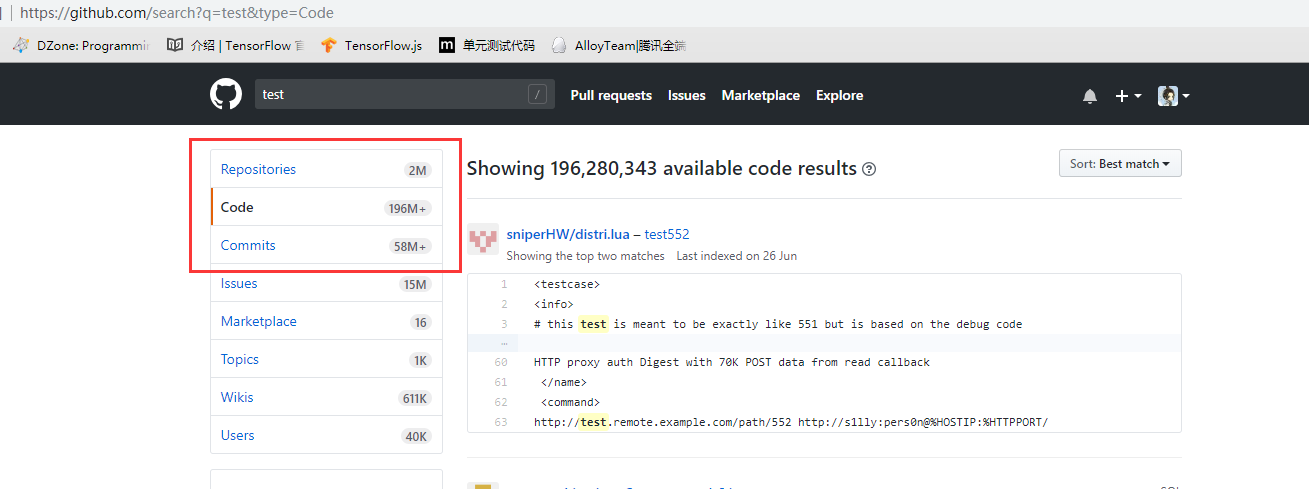
之前提到过,这个 Search API 是有限制的,如果你过度使用的话,forCode() 中会捕获到错误 error,将 error.data 打印出来:

如果出现了 abuse detection 的话,就需要等待一定时间后才能进行查询操作,等待的时间在响应的头部信息中:error.response.headers.retry-after。
顺便一提,使用这个搜索 api 很耗时,应该是网络的原因。
如果在对 JSON 对象做 JSON.stringify 处理时出现 converting circular structure to json 的错误,需要解决掉循环引用,可参考下方中提到的做法:
我将 JSON 对象的日志输出封装成了 writeJsonToFile 方法中。
小结
这里简单的提到了 GitHub api 的用法和使用过程中的一些注意事项,但仅仅通过 api 获取到了相应的数据还没有对其进行处理。
数据的处理需要先对 Search.forCode() 方法的返回值 data 进行分析,以后再说。
参考
2. https://github.com/github-tools/github/issues/487
使用 GitHub API 进行数据分析 (Node.js)的更多相关文章
- 从Github远程库安装Node.JS
3)从Github远程库安装Node.JS在这个方法中我们需要一些步骤来把Node.js的从Github上的远程的仓库克隆到本地仓库目录 在开始克隆(克隆)包到本地并且配制之前,我们要先安装以下依赖包 ...
- [MEAN Stack] First API -- 1. with Node.js, Express and MongoDB
Learn how to import data into your MongoDB and then use Express to serve a simple Node.js API. Impor ...
- GitHub 如何基於 Node.js 和 Chromium 開發 Atom?
看到回答里, 多数都没有回答到点子上, 还有些给了非常主观的意见而没有给出实际结论和分析过程. 题主的问题有四个: 1. Github 如何基于 Node.js 和 Chromium 开发 Atom? ...
- [MEAN+ Webstrom] First API -- 2.Debug Node.js RESTful application
Using WebStrom can easily debug the Node applcation. For example, we have an Node+Express applicatio ...
- Code Your First API With Node.js and Express: Set Up the Server
How to Set Up an Express API Server in Node.js In the previous tutorial, we learned what the REST ar ...
- 使用 Node.js 搭建一个 API 网关
原文地址:Building an API Gateway using Node.js 外部客户端访问微服务架构中的服务时,服务端会对认证和传输有一些常见的要求.API 网关提供共享层来处理服务协议之间 ...
- node.js学习资料
Node.js 入门 <汇智网 Node.js 课程> <快速搭建 Node.js 开发环境以及加速 npm> http://fengmk2.com/blog/2014/03/ ...
- Node.js(2)-protobuf zeromq gzip
1.Node.Js环境准备 在win8 + vs.net 2012 环境下调试了很长时间没搞定安装编译问题,重装系统测试了2套环境,解决了编译问题: 1)Win8.1 + vs.net 2013 2) ...
- node.js中文资料导航
以下资料来自gitHUb上面:https://github.com/youyudehexie/node123 Node.js HomePage Node官网七牛镜像 Infoq深入浅出Node.js系 ...
随机推荐
- angular 服务之间依赖注入
import { Injectable } from '@angular/core'; @Injectable() export class LoggerServiceService { constr ...
- Asp.net负载均衡之Session
在WEB场中,动态网页往往会因为几台主机做了负载而产生SESSION丢失的问题,网上也有很多的介绍,我这里只将我经历的过程给大家分享一下: 系统要运行在负载平衡的 Web 场环境中,而系统配置文件we ...
- sqlServer基础知识
sqlServer 基础知识 大纲 创建数据库 1 创建表 2 备份表 3 删除表 4 修改表 5 查询出重复的数据 6 增删改查 7 添加约束 8 分页存储过程 9 排序 10 类型转换 11 ...
- kali linux之端口扫描
端口对应网络服务及应用端程序,服务端程序的漏洞通过端口攻入 发现开放的端口,有更具体的攻击面 nmap hping3 scapy都可以 nmap隐蔽扫描 扫描抓包 nmap僵尸扫描 先发现僵尸机,僵尸 ...
- I/O(输入/输出)---序列化与反序列化
概念: 序列化就是将对象的状态存储到特定的介质中的过程,也就是将对象状态转换为可保持或传输格式的过程. 反序列化则是从特定存储介质中将数据重新构建对象的过程.可以将存储在文件上的对象信息读取,然后重新 ...
- 如何查看Centos版本
使用命令 cat /etc/centos-release 查看效果如下图 当然,你也可以查看红帽的版本 cat /etc/redhat-release 郴州软件开发培训 郴州软件培训 郴州java培训 ...
- 25.Remove Nth Node From End of List(删除链表的倒数第n个节点)
Level: Medium 题目描述: Given a linked list, remove the n-th node from the end of list and return its ...
- excel文件的groovy脚本在SoapUI中进行数据驱动测试
SoapUI Pro具有从外部文件读取数据的功能,例如:excel,csv等.但SoapUI不提供从excel文件读取数据的功能.因此,为了从SoapUI中的excel文件中读取数据,我们需要在gro ...
- asp.net 同时执行js事件和代码事件 导出 excel
onclick="return bnQuery_onclick()" onserverclick="bnQuery_ServerClick" public ...
- Asp.Net 远程连接Oracle数据库
Asp.Net 远程连接Oracle数据库 首先从微软停止.Net FrameWork支持Oracle数据库的研发,转为第三方提供说起,微软是很有实力的公司,他在桌面领域令其他对手望其项背,产品战线也 ...