
JavaScript basics: 2 ways to get child elements with JavaScript
原文: https://blog.mrfrontend.org/2017/10/2-ways-get-child-elements-javascript/
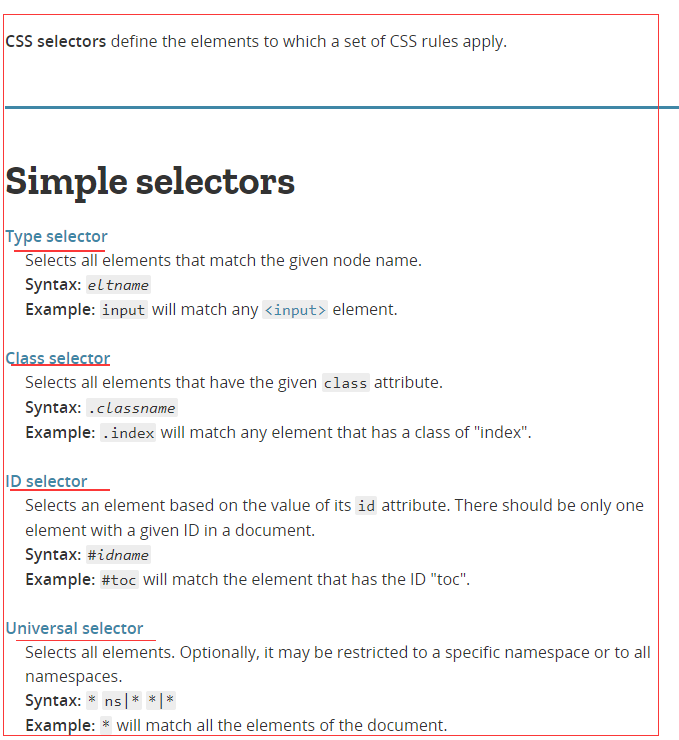
Along the lines of other frameworks such as jQuery or Prototype, shortening the "querySelector" name can be convenient:
function $ (selector, el) {

     if (!el) {el = document;}

     return el.querySelector(selector);

}

function $$ (selector, el) {

     if (!el) {el = document;}

     return el.querySelectorAll(selector);

     // Note: the returned object is a NodeList.

     // If you'd like to convert it to a Array for convenience, use this instead:

     // return Array.prototype.slice.call(el.querySelectorAll(selector));

}

alert($('#myID').id);
--------------------------------------------------------------------------------
In jQuery, it is super easy to get the child elements of a parent HTML element. But do you know how it works with Vanilla JavaScript?
Today I want to show you 2 ways how you can use Vanilla JavaScript to get the child elements, even when you don’t know what’s in the parent element.
If you like reading instead of watching a video? Please scroll down to continue reading.
Looking for the video resources? Scroll to the bottom!
Let’s start with a simple webshop page.
HTML
<header class="product__list-header">

    <h2>Webshop</h2>

</header>

<section class="product__list">

  <div class="product__item">

    <img src="http://lorempixel.com/400/200/food" class="product__image" alt="Food">

    <span class="product__price">500</span>

  </div>

  <div class="product__item fun__class">

    <img src="https://lorempixel.com/400/200/food" class="product__image" alt="Food">

    <span class="product__price">500</span>

  </div>

  <div class="product__item">

    <img src="https://lorempixel.com/400/200/food" class="product__image" alt="Food">

    <span class="product__price">500</span>

  </div>

  <div class="product__item">

    <img src="https://lorempixel.com/400/200/food" class="product__image" alt="Food">

    <span class="product__price">500</span>

  </div>

  <div class="product__item">

    <img src="https://lorempixel.com/400/200/food" class="product__image" alt="Food">

    <span class="product__price">500</span>

  </div>

</section>
As you noticed, I used BEM as naming convention for my webshop example page.
#1 element.children
The first way to get the child elements is with the element.children. If you want to check out what kind of properties the DOM Element Object has for you, check it on W3schools. That is btw one of my favorite websites to check JavaScript example’s & documentation.
JavaScript
var productList = document.querySelector('.product__list').children;

console.log('productList: ', productList);
In the console log, you will find a.HTMLCollection Check the property__proto__, you will find out that he is not an Array.
Loop over the children
The children property will return a.HTMLCollection So you can loop over it with the plain-old For-loop.
for (i = 0; i < productList.length; i++) {

  console.log('productList[i]: ', productList[i]);

}
Check my element.children jsbin example.
#2 document.querySelectorAll
If you know which elements are in a parent element, you can adjust the selector to:..product__list .product__item With this selector, you target al the product items inside the product list.
If you don’t know which elements are in the parent element, I would recommend the element.children way. Because then you will definitely get all the children back.
Maybe you remind the querySelectorAll from my previous blog post, but I don’t mind to show it again .
JavaScript
var productList = document.querySelectorAll('.product__list .product__item');

console.log('productList: ', productList);
In the console log, you will find a NodeList. If you check the __proto__ you will find out that he is not an Array.
Just like the HTMLCollection, you can use the For-loop to loop over each element in the NodeList.
for (i = 0; i < productList.length; i++) {

  console.log('product: ', productList[i]);

}
Check my querySelectorAll jsbin example.
Conclusion: element.children VS querySelectorAll
But now is the question, which one do you use?
You know the child elements
In the case you know what child elements there are in the parent element, it is good to use the document.querySelectorAll method.
This a much faster way to target them with the CSS selector. And because of the, querySelectorAll it doesn’t matter how much elements there are.
You don’t know the child elements
In the case you don’t know what child elements you can expect, you need the. element.children All the elements inside the parent element will come back with the DOM Element Object.
JavaScript basics: 2 ways to get child elements with JavaScript的更多相关文章
- 3 Ways to Preload Images with CSS, JavaScript, or Ajax---reference
Preloading images is a great way to improve the user experience. When images are preloaded in the br ...
- 深入理解JavaScript系列(1):编写高质量JavaScript代码的基本要点
深入理解JavaScript系列(1):编写高质量JavaScript代码的基本要点 2011-12-28 23:00 by 汤姆大叔, 139489 阅读, 119 评论, 收藏, 编辑 才华横溢的 ...
- JavaScript高级程序设计(二):在HTML中使用JavaScript
一.使用<script>元素 1.<script>元素定义了6个属性: async:可选.表示应该立即下载脚本,但不应该妨碍页面中的其他操作,比如下载其他资源或等待加载其他脚本 ...
- JavaScript学习总结(四)——this、原型链、javascript面向对象
一.this 在JavaScript中this表示:谁调用当前函数this就指向谁,不知道调用者时this指向window. JavaScript是由对象组成的,一切皆为对象,万物皆为对象.this是 ...
- JS事件 什么是事件?JavaScript 创建动态页面。事件是可以被 JavaScript 侦测到的行为。 网页中的每个元素都可以产生某些可以触发 JavaScript 函数或程序的事件。
什么是事件 JavaScript 创建动态页面.事件是可以被 JavaScript 侦测到的行为. 网页中的每个元素都可以产生某些可以触发 JavaScript 函数或程序的事件. 比如说,当用户单击 ...
- 《JavaScript高级程序设计》——第二章在HTML使用JavaScript
这章讲的是JavaScript在HTML中的使用,也就是<script>元素的属性.书中详细讲了async.defer.src和type四个<script>的属性. 下面是对第 ...
- 7 JavaScript Basics Many Developers Aren't Using (Properly)【转】
JavaScript, at its base, is a simple language that we continue to evolve with intelligent, flexible ...
- [HTML5] Add an SVG Image to a Webpage and Get a Reference to the Internal Elements in JavaScript
We want to show an SVG avatar of the patio11bot, so we'll do that in three ways: Using an img tag - ...
- Deleting array elements in JavaScript - delete vs splice
javascript 数组中删除元素用 array.splice(start, deleteCount);这个方法. ----------------------------------------- ...
随机推荐
- java字节流和字符流编码格式(转自姚刚)
/** * 字节流和字符流的区别, * (1)字符流带有缓冲,必须flush或close后数据才会从缓存中写入磁盘文件. * 字节流直接写文件. * (2)字符流在创建流的时候,指定编码,字节流在文件 ...
- 【反演复习计划】【bzoj2154】Crash的数字表格
膜拜cdc……他的推导详细到我这种蒟蒻都能看得懂! 膜拜的传送门 所以我附一下代码就好了. #include<bits/stdc++.h> #define N 10000005 #defi ...
- xshell连接虚拟机CentOS出现eth0 device not found的解决方法
昨天用xshell连接虚拟机上的centOS老是连接不上,ifconfig eth0 命令显示 device not found.不知道是什么原因... 折腾了好久 网上是各种搜啊 终于找到解决方法了 ...
- Python shell 控制台,有个快捷键可以向dos那样通过上下键来选择之前输入的内容?
Alt + p 往前: Alt+n 从头开始历史输入
- iptables 执行清除命令 iptables -F 要非常小心
使用 /sbin/iptables -F 要小心,搞不好,你就马上同服务器断开连接了 以下是来自 http://wiki.ubuntu.org.cn/IptablesHowTo 上的说明 可以通过/s ...
- deepin使用root身份运行
https://blog.csdn.net/guanripeng/article/details/79630619
- [BZOJ2005][Noi2010]能量采集 容斥+数论
2005: [Noi2010]能量采集 Time Limit: 10 Sec Memory Limit: 552 MBSubmit: 4394 Solved: 2624[Submit][Statu ...
- 【转】如何只用CSS做到完全居中
英文原版链接:http://codepen.io/shshaw/full/gEiDt 我们都知道 margin:0 auto; 的样式能让元素水平居中,而 margin: auto; 却不能做到垂直居 ...
- POJ 3087 Shuffle'm Up【模拟/map/string】
Shuffle'm Up Time Limit: 1000MS Memory Limit: 65536K Total Submissions: 14471 Accepted: 6633 Descrip ...
- HDU 1251 统计难题 (字典树)(查询是否为前缀)
统计难题 Time Limit: 4000/2000 MS (Java/Others) Memory Limit: 131070/65535 K (Java/Others)Total Submi ...